lock KIA NIRO HYBRID EV 2021 Repair Manual
[x] Cancel search | Manufacturer: KIA, Model Year: 2021, Model line: NIRO HYBRID EV, Model: KIA NIRO HYBRID EV 2021Pages: 667, PDF Size: 9.17 MB
Page 182 of 667

Features of your vehicle
42 4
If your vehicle is equipped with a
sunroof, you can slide or tilt your
sunroof with the sunroof control lever
located on the overhead console.
The sunroof can only be opened,
closed, or tilted when the ignition
switch is in the ON position.
The sunroof can be operated for
approximately 30 seconds after the
ignition key is removed or turned to
the ACC or LOCK (or OFF) position.
However, if the front door is opened,
the sunroof cannot be operated even
within the 30 seconds period.In cold and wet climates, the sunroof
may not work properly due to freez-
ing conditions.
After the vehicle is washed or in a
rainstorm, be sure to wipe off any
water that is on the sunroof before
operating it.
The sunroof cannot slide when it is in
the tilt position nor can it be tilted
while in an open or slide position.
SUNROOF (IF EQUIPPED)
ODEEV048035NCAUTION- Sunroof
control lever
Do not continue to press the sun-
roof control lever after the sun-
roof is fully opened, closed, or
tilted. Damage to the motor or
system components could occur.
CAUTION
Make sure the sunroof is fully
closed when leaving your vehi-
cle. If the sunroof is open, rain
or snow may leak through the
sunroof and wet the interior.
WARNING
Never adjust the sunroof or
sunshade while driving. This
could result in loss of control
and an accident that may cause
death, serious injury, or proper-
ty damage.
Page 188 of 667

Features of your vehicle
48 4
(Continued)
• When the charging system warning
light comes on due to low voltage
(when the alternator or battery
does not operate normally or mal-
function), the steering wheel may
require increased steering effort.Tilt and telescopic steering
Tilt and telescopic steering allows
you to adjust the steering wheel
before you drive. You can also raise it
to give your legs more space when
you get on or off the vehicle.
The steering wheel should be posi-
tioned so that it is comfortable for
you to drive, while permitting you to
see the instrument panel warning
lights and gauges.
To change the steering wheel angle,
pull down the lock-release lever (1),
adjust the steering wheel to the
desired angle (2) and height (3) then
pull up the lock-release lever to lock
(4) the steering wheel in place. Be
sure to adjust the steering wheel to
the desired position before driving.
✽ ✽
NOTICE
After adjustment, sometimes the
lock release lever may not lock the
steering wheel. It is not a malfunc-
tion. This occurs when two gears are
not engaged correctly. In this case,
adjust the steering wheel again and
then lock the steering wheel.
WARNING- Steering
wheel adjustment
Never adjust the angle and
height of the steering wheel
while driving. You may lose
steering control.
ODE046022
Page 195 of 667
455
Features of your vehicle
Automatic-dimming function
Your mirror will automatically dim
upon detecting glare from the vehi-
cles traveling behind you.
✽ ✽
NOTICE
The mirror defaults to the ON posi-
tion each time the vehicle is started.
Integrated HomeLink®Wireless
Control System
The HomeLink
®Wireless Control
System provides a convenient way to
replace up to three hand-held radio-
frequency (RF) transmitters with a
single built-in device. This innovative
feature will learn the radio frequency
codes of most current transmitters to
operate devices such as gate opera-
tors, garage door openers, entry
door locks, security systems, even
home lighting. Both standard and
rolling code-equipped transmitters
can be programmed by following the
outlined procedures. Additional
HomeLink
®information can be found
at: www.homelink.com or by calling
1-800-355-3515.
❈HomeLink
®is a registered trade-
mark of Gentex Corporation.Retain the original transmitter of the
RF device you are programming for
use in other vehicles as well as for
future HomeLink
®programming. It is
also suggested that upon the sale of
the vehicle, the programmed
HomeLink
®buttons be erased for
security purposes.
Page 204 of 667
Features of your vehicle
64 4
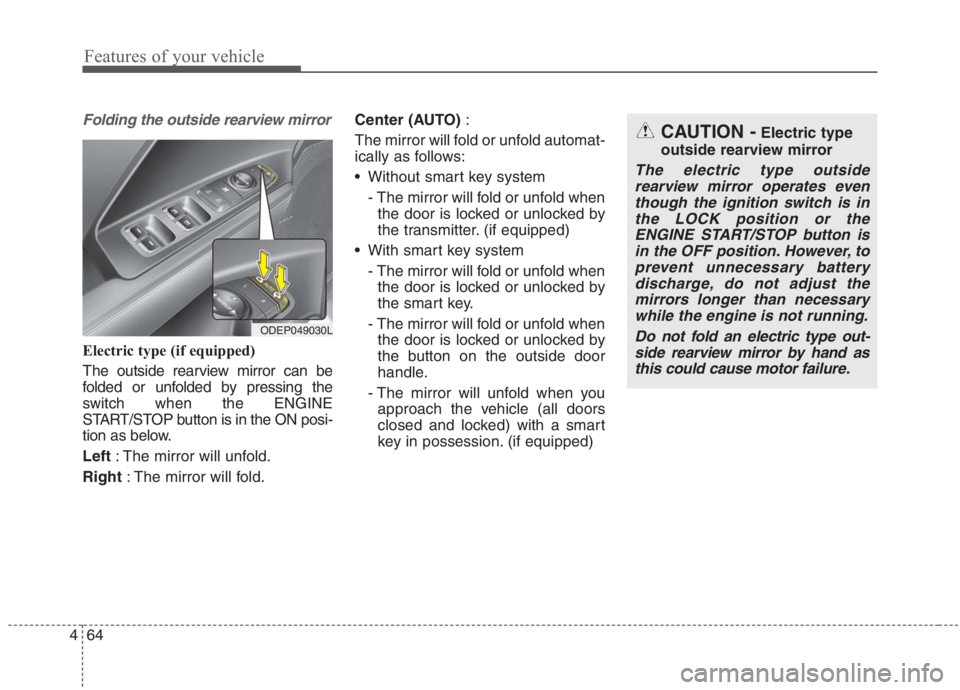
Folding the outside rearview mirror
Electric type (if equipped)
The outside rearview mirror can be
folded or unfolded by pressing the
switch when the ENGINE
START/STOP button is in the ON posi-
tion as below.
Left : The mirror will unfold.
Right : The mirror will fold.Center (AUTO):
The mirror will fold or unfold automat-
ically as follows:
Without smart key system
- The mirror will fold or unfold when
the door is locked or unlocked by
the transmitter. (if equipped)
With smart key system
- The mirror will fold or unfold when
the door is locked or unlocked by
the smart key.
- The mirror will fold or unfold when
the door is locked or unlocked by
the button on the outside door
handle.
- The mirror will unfold when you
approach the vehicle (all doors
closed and locked) with a smart
key in possession. (if equipped)
ODEP049030L
CAUTION -Electric type
outside rearview mirror
The electric type outside
rearview mirror operates even
though the ignition switch is in
the LOCK position or the
ENGINE START/STOP button is
in the OFF position. However, to
prevent unnecessary battery
discharge, do not adjust the
mirrors longer than necessary
while the engine is not running.
Do not fold an electric type out-
side rearview mirror by hand as
this could cause motor failure.
Page 219 of 667
479
Features of your vehicle
Tire Pressure
❈For more details, refer to “Tire
Pressure Monitoring System
(TPMS)” in chapter 6.Master warning mode
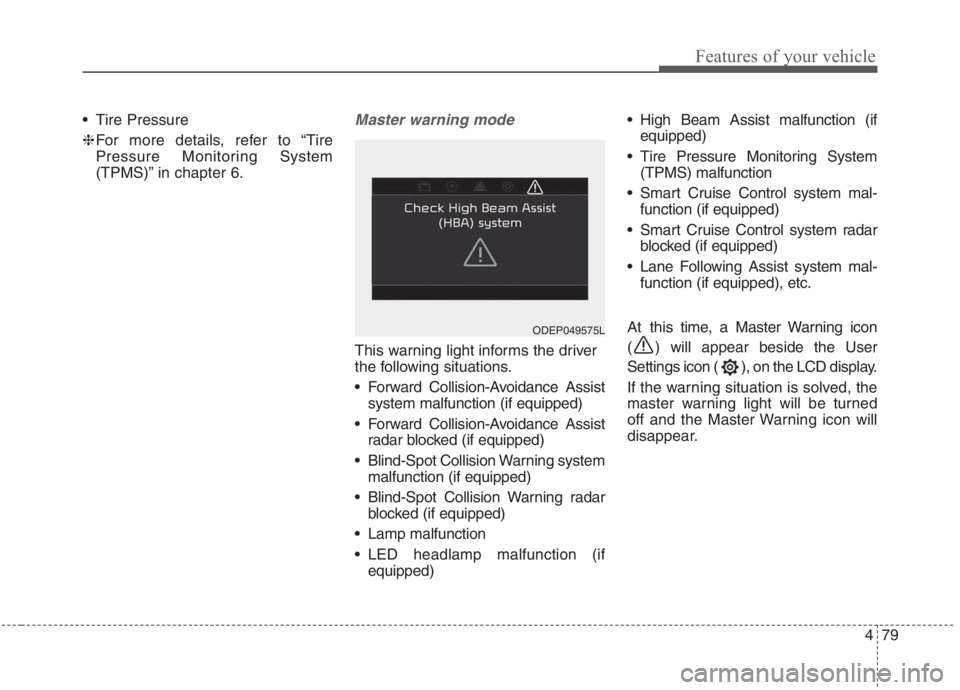
This warning light informs the driver
the following situations.
Forward Collision-Avoidance Assist
system malfunction (if equipped)
Forward Collision-Avoidance Assist
radar blocked (if equipped)
Blind-Spot Collision Warning system
malfunction (if equipped)
Blind-Spot Collision Warning radar
blocked (if equipped)
Lamp malfunction
LED headlamp malfunction (if
equipped) High Beam Assist malfunction (if
equipped)
Tire Pressure Monitoring System
(TPMS) malfunction
Smart Cruise Control system mal-
function (if equipped)
Smart Cruise Control system radar
blocked (if equipped)
Lane Following Assist system mal-
function (if equipped), etc.
At this time, a Master Warning icon
( ) will appear beside the User
Settings icon ( ), on the LCD display.
If the warning situation is solved, the
master warning light will be turned
off and the Master Warning icon will
disappear.
ODEP049575L
Page 223 of 667
483
Features of your vehicle
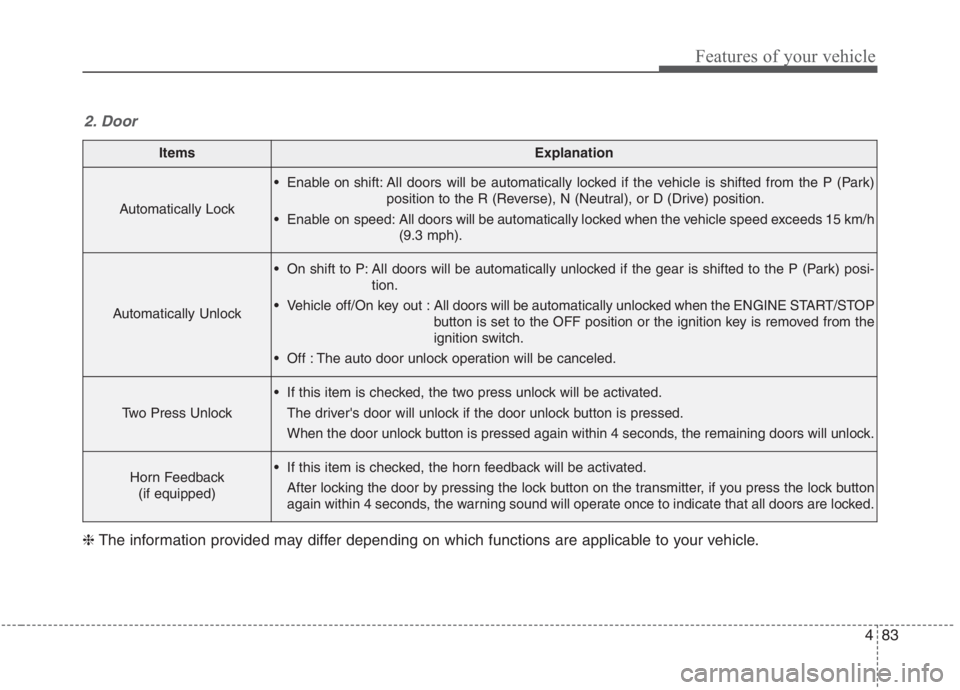
ItemsExplanation
Automatically Lock
Enable on shift: All doors will be automatically locked if the vehicle is shifted from the P (Park)
position to the R (Reverse), N (Neutral), or D (Drive) position.
Enable on speed: All doors will be automatically locked when the vehicle speed exceeds 15 km/h
(9.3 mph).
Automatically Unlock
On shift to P: All doors will be automatically unlocked if the gear is shifted to the P (Park) posi-
tion.
Vehicle off/On key out : All doors will be automatically unlocked when the ENGINE START/STOP
button is set to the OFF position or the ignition key is removed from the
ignition switch.
Off : The auto door unlock operation will be canceled.
Two Press Unlock
If this item is checked, the two press unlock will be activated.
The driver's door will unlock if the door unlock button is pressed.
When the door unlock button is pressed again within 4 seconds, the remaining doors will unlock.
Horn Feedback
(if equipped) If this item is checked, the horn feedback will be activated.
After locking the door by pressing the lock button on the transmitter, if you press the lock button
again within 4 seconds, the warning sound will operate once to indicate that all doors are locked.
2. Door
❈The information provided may differ depending on which functions are applicable to your vehicle.
Page 237 of 667
497
Features of your vehicle
Press START button while turning
wheel (for smart key system)
This warning message illuminates
if the steering wheel does not
unlock normally when the ENGINE
START/STOP button is pressed.
It means that you should press the
ENGINE START/STOP button
while turning the steering wheel
right and left.
Steering wheel not locked
(for smart key system)
This warning message illuminates
if the steering wheel does not lock
when the ENGINE START/STOP
button changes to the OFF posi-
tion.
Check Steering Wheel Lock
System (for smart key system)
This warning message illuminates
if the steering wheel does not lock
normally when the ENGINE
START/STOP button changes to
the OFF position.
Press brake pedal to start engine
(for smart key system)
This warning message illuminates
if the ENGINE START/STOP button
changes to the ACC position twice
by pressing the button repeatedly
without depressing the brake pedal.
It means that you should depress
the brake pedal to start the engine.
Key not in vehicle (for smart key
system)
This warning message illuminates
if the smart key is not in the vehicle
when you press the ENGINE
START/STOP button.
It means that you should always
have the smart key with you.
Key not detected (for smart key
system)
This warning message illuminates
if the smart key is not detected
when you press the ENGINE
START/STOP button.
Page 247 of 667
4107
Features of your vehicle
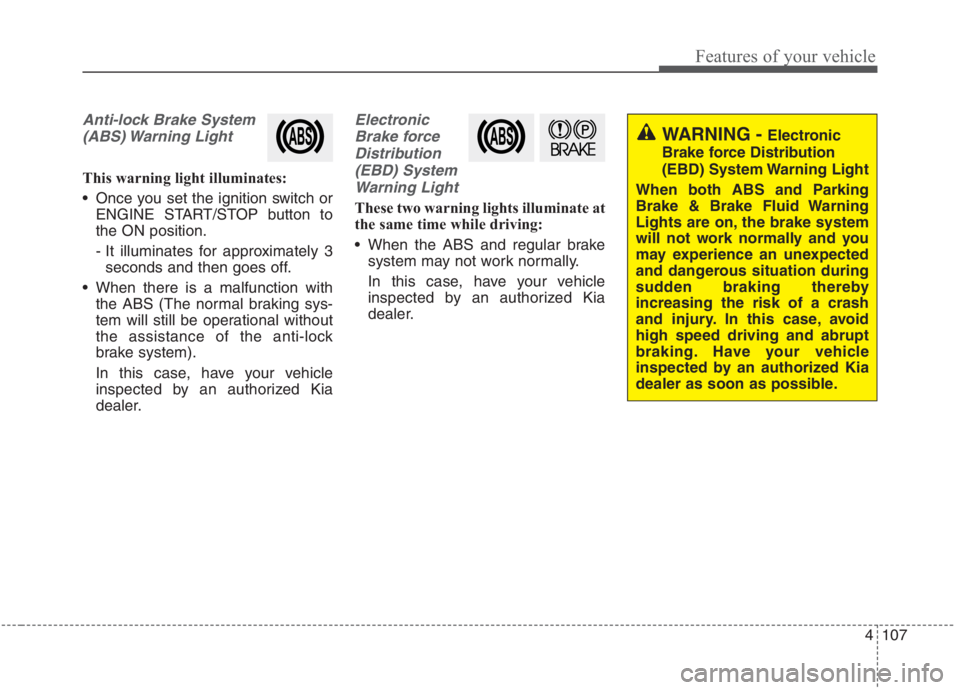
Anti-lock Brake System
(ABS) Warning Light
This warning light illuminates:
Once you set the ignition switch or
ENGINE START/STOP button to
the ON position.
- It illuminates for approximately 3
seconds and then goes off.
When there is a malfunction with
the ABS (The normal braking sys-
tem will still be operational without
the assistance of the anti-lock
brake system).
In this case, have your vehicle
inspected by an authorized Kia
dealer.
Electronic
Brake force
Distribution
(EBD) System
Warning Light
These two warning lights illuminate at
the same time while driving:
When the ABS and regular brake
system may not work normally.
In this case, have your vehicle
inspected by an authorized Kia
dealer.
WARNING - Electronic
Brake force Distribution
(EBD) System Warning Light
When both ABS and Parking
Brake & Brake Fluid Warning
Lights are on, the brake system
will not work normally and you
may experience an unexpected
and dangerous situation during
sudden braking thereby
increasing the risk of a crash
and injury. In this case, avoid
high speed driving and abrupt
braking. Have your vehicle
inspected by an authorized Kia
dealer as soon as possible.
Page 252 of 667
Features of your vehicle
112 4
Master Warning light
(if equipped)
This warning light informs the driv-
er the following situations.
- Forward Collision-Avoidance Assist
system malfunction (if equipped)
- Forward Collision-Avoidance Assist
radar blocked (if equipped)
- Blind-Spot Collision Warning system
malfunction (if equipped)
- Blind-Spot Collision Warning radar
blocked (if equipped)
- Lamp malfunction
- LED headlamp malfunction (if
equipped)
- High Beam Assist malfunction (if
equipped)
- Tire Pressure Monitoring System
(TPMS) malfunction
- Smart Cruise Control system mal-
function (if equipped)
- Smart Cruise Control system radar
blocked (if equipped)
- Lane Following Assist system mal-
function (if equipped), etc.The Master Warning Light illuminates
when one or more of the above warn-
ing situations occur. If the warning situ-
ation is resolved, the master warning
light will turn off.
Engine Coolant
Temperature Warning
Light
This warning light illuminates:
When the engine coolant tempera-
ture is above 120°C (248°F). This
means that the engine is overheat-
ed and may be damaged.
If your vehicle is overheated, refer
to “If the engine overheats” in
chapter 6.
CAUTION - Engine
Overheating
Do not continue driving with the
engine overheated. Otherwise
the engine may be damaged.
Page 262 of 667
Features of your vehicle
122 4
This system will activate when
backing up with the ignition switch
or ENGINE START/STOP button to
the ON position.
If the vehicle is moving at a speed
over 5 km/h (3 mph), the system
may not be activated correctly.
The sensing distance while the
back-up warning system is in oper-
ation is approximately 120 cm (48
in) at the rear bumper center area,
60 cm (24 in) at the rear bumper
both side area.
When more than two objects are
sensed at the same time, the clos-
est one will be recognized first.
Types of warning sound
When an object is 60 cm to 120 cm
(24 in to 48 in) from the rear
bumper: Buzzer beeps intermit-
tently.
When an object is 30 cm to 60 cm
(12 in to 24 in) from the rear
bumper: Buzzer beeps more fre-
quently.
When an object is within 30 cm (12
in) of the rear bumper:
Buzzer sounds continuously.
Non-operational conditions of
Reverse Parking Distance
Warning system
Reverse Parking Distance
Warning system may not operate
properly when:
1. Moisture is frozen to the sensor. (It
will operate normally once the
moisture clears.
2. The sensor is covered with foreign
matter, such as snow or water, or
the sensor cover is blocked. (It will
operate normally when the materi-
al is removed or the sensor is no
longer blocked.)
3. Driving on uneven road surfaces
(unpaved roads, gravel, bumps,
gradient).
4. Objects generating excessive
noise (vehicle horns, loud motor-
cycle engines, or truck air brakes)
are within range of the sensor.
5. Heavy rain or water spray exists.
6. Wireless transmitters or mobile
phones are within range of the
sensor.
7. The sensor is covered with snow.
8. Trailer towingThe detecting range may decrease
when:
1. The sensor is covered with foreign
matter such as snow or water.
(The sensing range will return to
normal when removed.)
2. Outside air temperature is
extremely hot or cold.
The following objects may not be
recognized by the sensor:
1. Sharp or slim objects such as
ropes, chains or small poles.
2. Objects which tend to absorb the
sensor frequency such as clothes,
sound absorbent material or snow.
3. Undetectable objects smaller than
100 cm (4 in) in height and nar-
rower than 14 cm (6 in) in diame-
ter.