reset KIA NIRO HYBRID EV 2022 User Guide
[x] Cancel search | Manufacturer: KIA, Model Year: 2022, Model line: NIRO HYBRID EV, Model: KIA NIRO HYBRID EV 2022Pages: 684, PDF Size: 9.67 MB
Page 227 of 684
489
Features of your vehicle
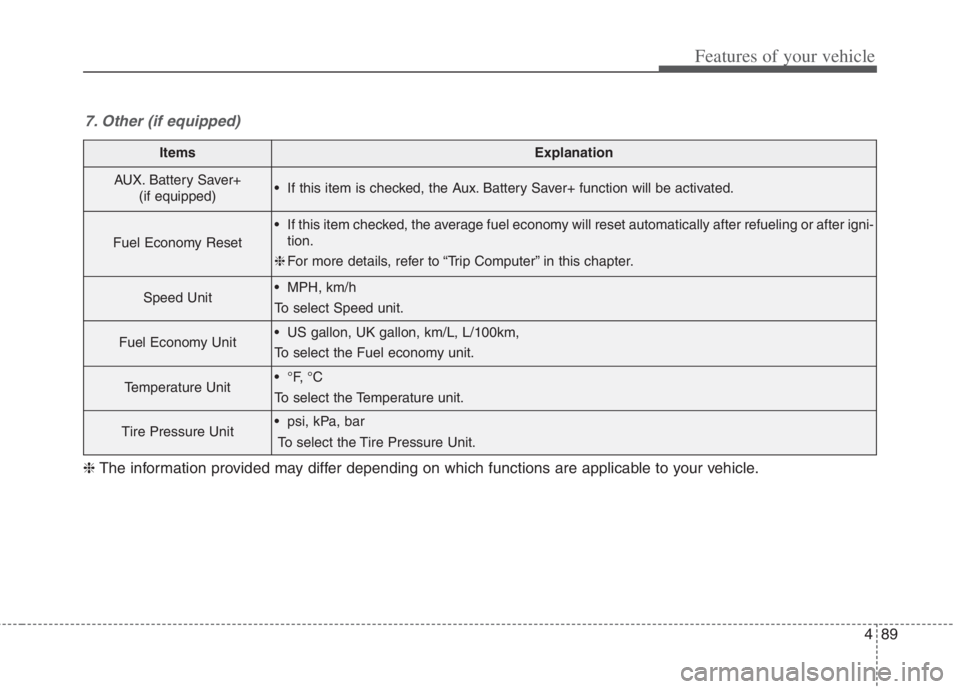
ItemsExplanation
AUX. Battery Saver+
(if equipped) If this item is checked, the Aux. Battery Saver+ function will be activated.
Fuel Economy Reset
If this item checked, the average fuel economy will reset automatically after refueling or after igni-
tion.
❈For more details, refer to “Trip Computer” in this chapter.
Speed Unit MPH, km/h
To select Speed unit.
Fuel Economy Unit US gallon, UK gallon, km/L, L/100km,
To select the Fuel economy unit.
Temperature Unit
To select the Temperature unit.
Tire Pressure Unit psi, kPa, bar
To select the Tire Pressure Unit.
7. Other (if equipped)
❈The information provided may differ depending on which functions are applicable to your vehicle.
Page 228 of 684
Features of your vehicle
90 4
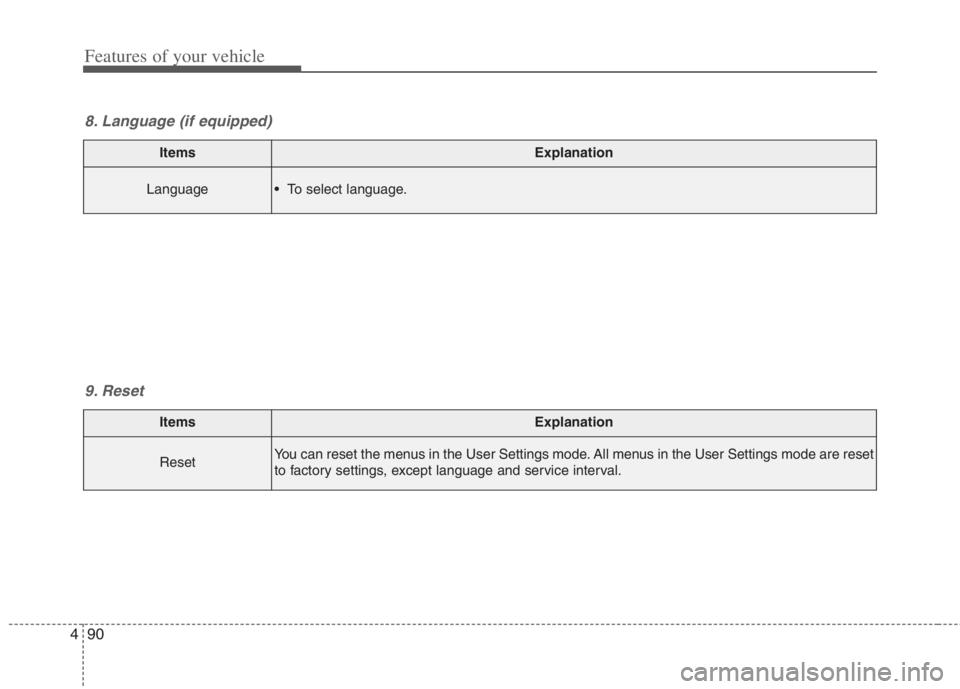
ItemsExplanation
ResetYou can reset the menus in the User Settings mode. All menus in the User Settings mode are reset
to factory settings, except language and service interval.
9. Reset
ItemsExplanation
Language To select language.
8. Language (if equipped)
Page 229 of 684
491
Features of your vehicle
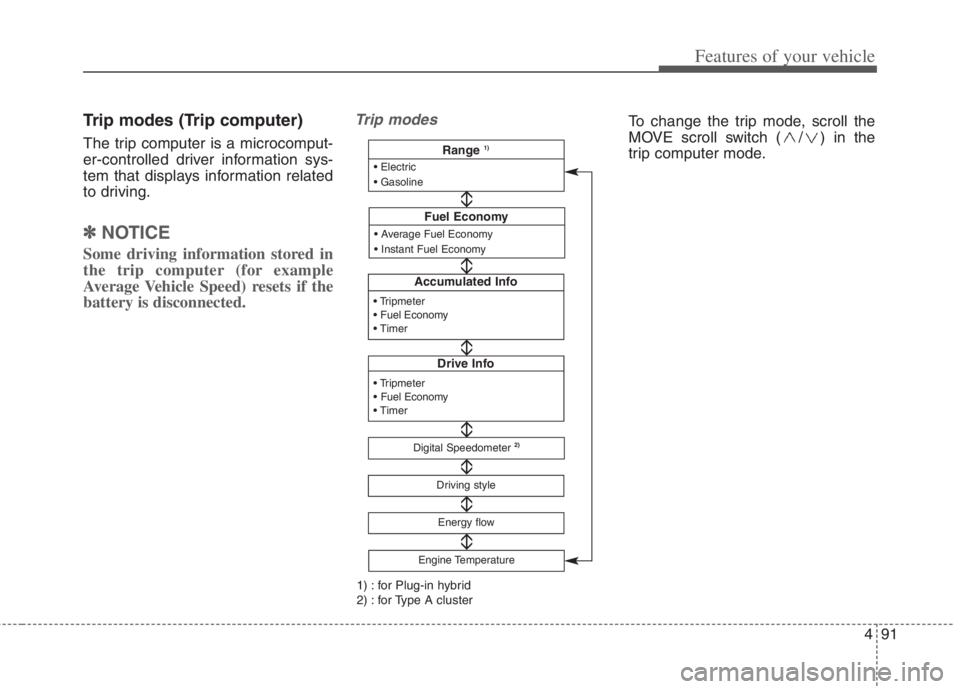
Trip modes (Trip computer)
The trip computer is a microcomput-
er-controlled driver information sys-
tem that displays information related
to driving.
✽ ✽
NOTICE
Some driving information stored in
the trip computer (for example
Average Vehicle Speed) resets if the
battery is disconnected.
Trip modes
Accumulated Info
Drive Info
Digital Speedometer2)
Driving style
Fuel Economy
Energy flow
Engine Temperature
Range 1)
1) : for Plug-in hybrid
2) : for Type A cluster
To change the trip mode, scroll the
MOVE scroll switch ( / ) in the
trip computer mode.
Page 230 of 684
Features of your vehicle
92 4
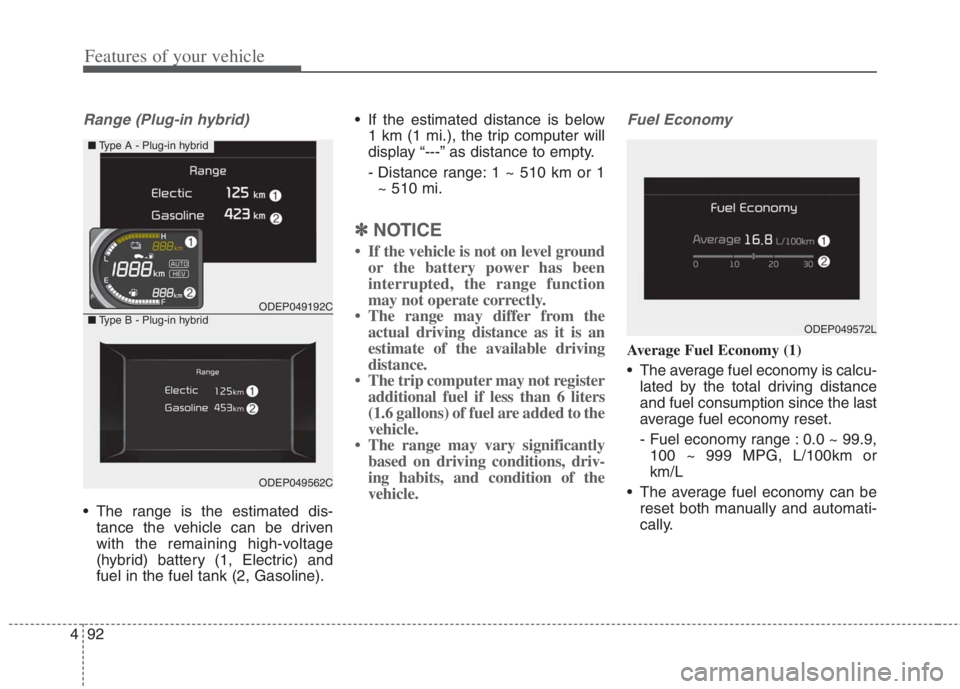
Range (Plug-in hybrid)
The range is the estimated dis-
tance the vehicle can be driven
with the remaining high-voltage
(hybrid) battery (1, Electric) and
fuel in the fuel tank (2, Gasoline). If the estimated distance is below
1 km (1 mi.), the trip computer will
display “---” as distance to empty.
- Distance range: 1 ~ 510 km or 1
~ 510 mi.
✽ ✽
NOTICE
• If the vehicle is not on level ground
or the battery power has been
interrupted, the range function
may not operate correctly.
• The range may differ from the
actual driving distance as it is an
estimate of the available driving
distance.
• The trip computer may not register
additional fuel if less than 6 liters
(1.6 gallons) of fuel are added to the
vehicle.
• The range may vary significantly
based on driving conditions, driv-
ing habits, and condition of the
vehicle.
Fuel Economy
Average Fuel Economy (1)
The average fuel economy is calcu-
lated by the total driving distance
and fuel consumption since the last
average fuel economy reset.
- Fuel economy range : 0.0 ~ 99.9,
100 ~ 999 MPG, L/100km or
km/L
The average fuel economy can be
reset both manually and automati-
cally.
ODEP049192C
ODEP049562C
■Type A - Plug-in hybrid
■Type B - Plug-in hybridODEP049572L
Page 231 of 684
493
Features of your vehicle
Manual reset
To clear the average fuel economy
manually, press the OK button
(reset) on the steering wheel for
more than 1 second when the aver-
age fuel economy is displayed.Automatic reset
To make the average fuel economy
be reset automatically whenever
refueling, select the “Fuel Economy
Reset” mode in User Setting menu of
the LCD display (Refer to “LCD dis-
play”).
OFF - You may set to default man-
ually by using the trip switch reset
button.
After ignition - The vehicle will
automatically set to default once 4
hours pass after the ignition switch
or ENGINE START/STOP button is
turned to the OFF position.
After refueling - After refueling
more than 6 liters (1.6 gallons) and
driving over 1 km/h (1 mph), the
vehicle will reset to default auto-
matically.
✽ ✽
NOTICE
The average vehicle speed is not dis-
played, when the vehicle drives
shorter than 300 meters (0.2 miles)
or less than 10 seconds after turning
ON the ignition switch or ENGINE
START/STOP button.
Instant Fuel Economy (2)
This mode displays the instant fuel
economy while driving.
- Fuel economy range : 0.0 ~ 30
L/100km, km/L or 0.0 ~ 75 MPG
Page 232 of 684
Features of your vehicle
94 4
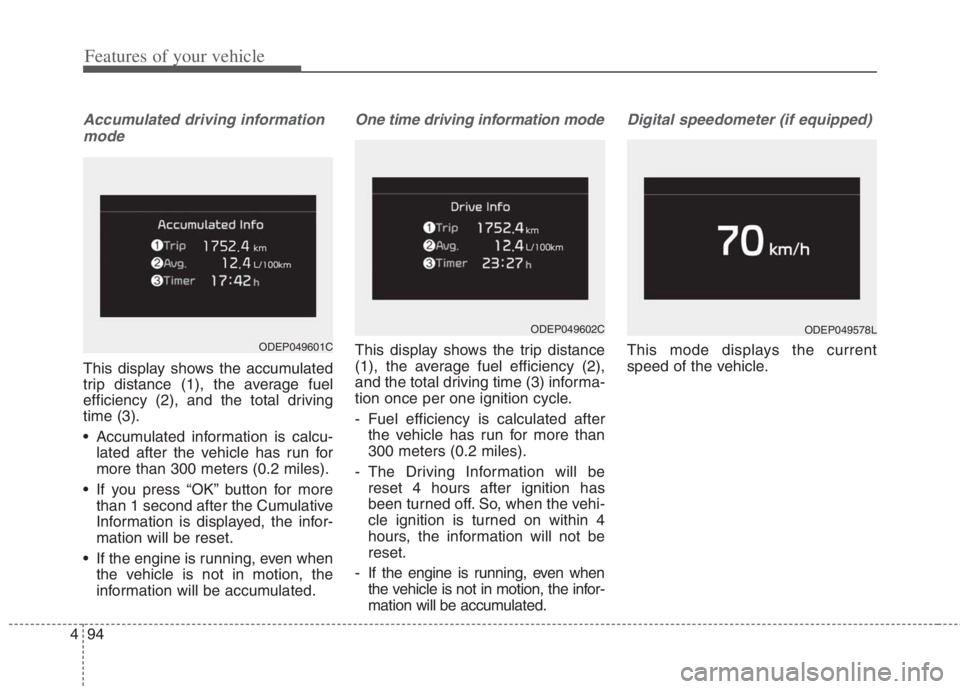
Accumulated driving information
mode
This display shows the accumulated
trip distance (1), the average fuel
efficiency (2), and the total driving
time (3).
Accumulated information is calcu-
lated after the vehicle has run for
more than 300 meters (0.2 miles).
If you press “OK” button for more
than 1 second after the Cumulative
Information is displayed, the infor-
mation will be reset.
If the engine is running, even when
the vehicle is not in motion, the
information will be accumulated.
One time driving information mode
This display shows the trip distance
(1), the average fuel efficiency (2),
and the total driving time (3) informa-
tion once per one ignition cycle.
- Fuel efficiency is calculated after
the vehicle has run for more than
300 meters (0.2 miles).
- The Driving Information will be
reset 4 hours after ignition has
been turned off. So, when the vehi-
cle ignition is turned on within 4
hours, the information will not be
reset.
- If the engine is running, even when
the vehicle is not in motion, the infor-
mation will be accumulated.
Digital speedometer (if equipped)
This mode displays the current
speed of the vehicle.
ODEP049602C
ODEP049601C
ODEP049578L
Page 292 of 684
Features of your vehicle
154 4
✽
✽
NOTICE
When starting the vehicle in cold
weather using manual temperature
control, operate the system in the fol-
lowing method to improve heating.
- Turn off or lower the blower, right
after starting the engine.
- Allow the engine to warm up dur-
ing this time since the air flow
from the heater is still cold.
- After a few minutes of engine
warm up, turn on or set the fan to
a higher level and adjust the tem-
perature setting to hot.
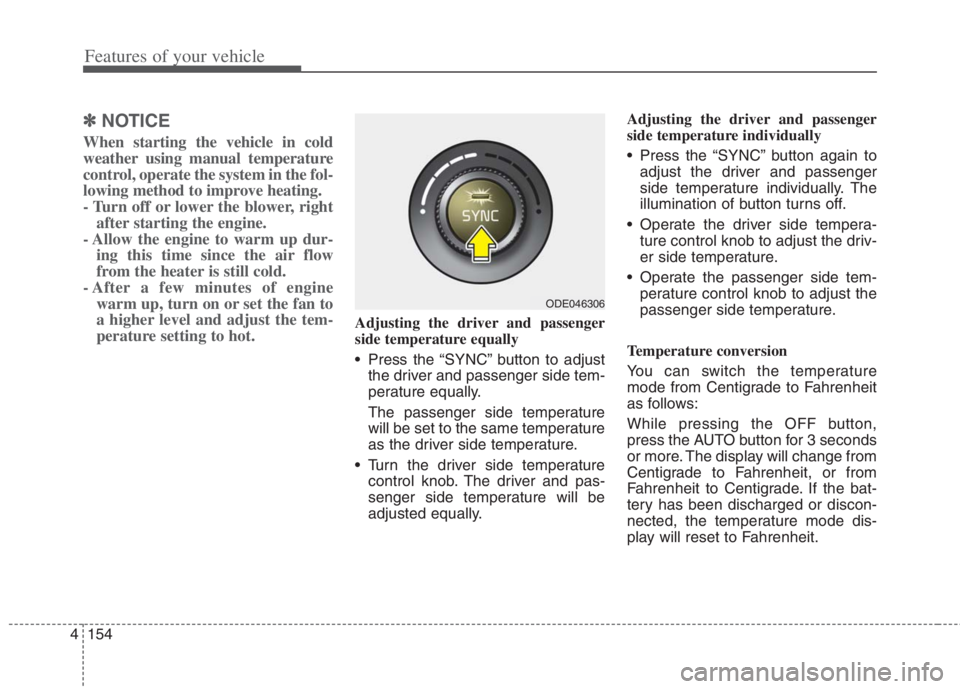
Adjusting the driver and passenger
side temperature equally
Press the “SYNC” button to adjust
the driver and passenger side tem-
perature equally.
The passenger side temperature
will be set to the same temperature
as the driver side temperature.
Turn the driver side temperature
control knob. The driver and pas-
senger side temperature will be
adjusted equally.Adjusting the driver and passenger
side temperature individually
Press the “SYNC” button again to
adjust the driver and passenger
side temperature individually. The
illumination of button turns off.
Operate the driver side tempera-
ture control knob to adjust the driv-
er side temperature.
Operate the passenger side tem-
perature control knob to adjust the
passenger side temperature.
Temperature conversion
You can switch the temperature
mode from Centigrade to Fahrenheit
as follows:
While pressing the OFF button,
press the AUTO button for 3 seconds
or more. The display will change from
Centigrade to Fahrenheit, or from
Fahrenheit to Centigrade. If the bat-
tery has been discharged or discon-
nected, the temperature mode dis-
play will reset to Fahrenheit.
ODE046306
Page 298 of 684

Features of your vehicle
160 4
To cancel or reset the Automatic
Ventilation
When the air conditioning system is
on, select Face Level ( ) mode
and while pressing the A/C button,
press the air intake control button 5
times within 3 seconds.
When the automatic ventilation func-
tion is canceled, the indicator light
blinks 3 times at an interval of 0.5
seconds.
The air intake will be automatically
controlled to the fresh air position,
and the flow and air conditioning will
be automatically controlled.
When the automatic ventilation func-
tion is selected, the indicator light
blinks 6 times at an interval of 0.25
seconds.
The air intake will be automatically
controlled to the fresh air position,
and the flow and air conditioning will
be automatically controlled.
After the battery has been dis-
charged or separated, the automatic
ventilation function will be reset, so
please selected, according to you
preference.Sunroof inside air recircula-
tion (if equipped)
The outside (fresh) air position is
automatically selected when the sun-
roof is opened.
When you select the recirculated air
position, the system maintains the
recirculated air position for 3 minutes
and then automatically converts to
the outside (fresh) air position.
When the sunroof is closed, the air
intake position will return to the orig-
inal position that was selected.
Recirculated air at washer
fluid spray
To prevent the odor from entering to
inside the vehicle, the ventilation sys-
tem changes to Recirculated Air
Mode for a while when the wind-
shield washer fluid sprayed.
However, at low outside temperature,
to prevent from windshield fogging,
the system continues to outside air
mode.
System setting
1. ENGINE START/STOP button is
On or ignition switch ON.
2. Select Floor-Level ( ) air flow
direction by pressing
Mode Selection button.
3. With pressing Air Conditioning but-
ton, press the Recirculated Air but-
ton more than 4 times within 2
seconds.
4. If the system is set up, the indica-
tor on Recirculated Air button will
blinks 6 times.
Page 303 of 684
4165
Features of your vehicle
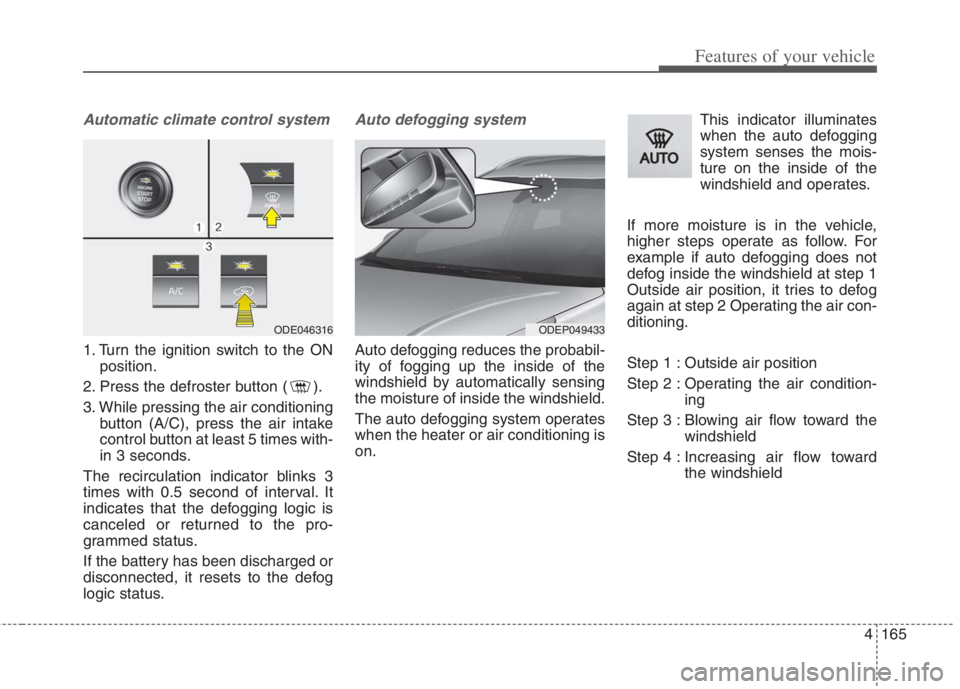
Automatic climate control system
1. Turn the ignition switch to the ON
position.
2. Press the defroster button ( ).
3. While pressing the air conditioning
button (A/C), press the air intake
control button at least 5 times with-
in 3 seconds.
The recirculation indicator blinks 3
times with 0.5 second of interval. It
indicates that the defogging logic is
canceled or returned to the pro-
grammed status.
If the battery has been discharged or
disconnected, it resets to the defog
logic status.
Auto defogging system
Auto defogging reduces the probabil-
ity of fogging up the inside of the
windshield by automatically sensing
the moisture of inside the windshield.
The auto defogging system operates
when the heater or air conditioning is
on.This indicator illuminates
when the auto defogging
system senses the mois-
ture on the inside of the
windshield and operates.
If more moisture is in the vehicle,
higher steps operate as follow. For
example if auto defogging does not
defog inside the windshield at step 1
Outside air position, it tries to defog
again at step 2 Operating the air con-
ditioning.
Step 1 : Outside air position
Step 2 : Operating the air condition-
ing
Step 3 : Blowing air flow toward the
windshield
Step 4 : Increasing air flow toward
the windshield
ODEP049433 ODE046316
Page 304 of 684
Features of your vehicle
166 4
To cancel or reset the Auto Defogging
System
Press the front windshield defroster
button for 3 seconds when the igni-
tion switch is in the ON position.
When the ADS system is canceled,
the indicator light on the button will
blink 3 times per 0.5 sec.
When the ADS system is reset, the
indicator light on the button will blink
6 times per 0.25 sec.CAUTION
Do not remove the sensor cover
located on the upper end of the
passenger side windshield
glass. Damage to the system
parts could occur and may not
be covered by your vehicle war-
ranty.