driver KIA NIRO PHEV 2018 Owners Manual
[x] Cancel search | Manufacturer: KIA, Model Year: 2018, Model line: NIRO PHEV, Model: KIA NIRO PHEV 2018Pages: 616, PDF Size: 18.3 MB
Page 416 of 616
Driving your vehicle
82
6
The Driver Attention Alert (DAA) sys-
tem displays the condition of the dri-
ver's fatigue level and inattention.System setting and activation
System setting
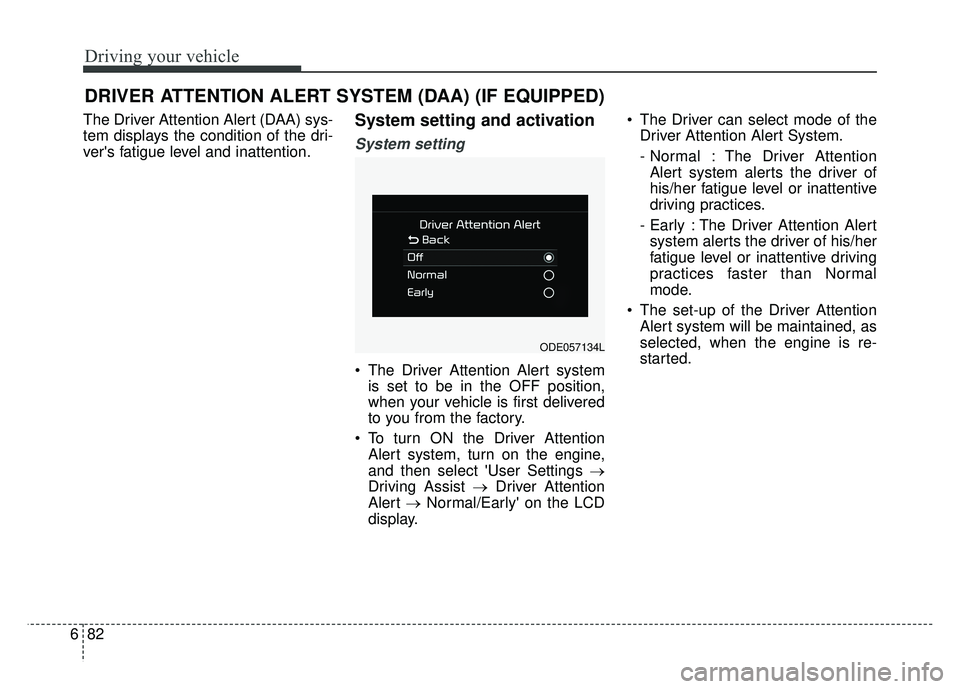
The Driver Attention Alert system
is set to be in the OFF position,
when your vehicle is first delivered
to you from the factory.
To turn ON the Driver Attention Alert system, turn on the engine,
and then select 'User Settings →
Driving Assist → Driver Attention
Alert →Normal/Early' on the LCD
display. The Driver can select mode of the
Driver Attention Alert System.
- Normal : The Driver AttentionAlert system alerts the driver of
his/her fatigue level or inattentive
driving practices.
- Early : The Driver Attention Alert system alerts the driver of his/her
fatigue level or inattentive driving
practices faster than Normal
mode.
The set-up of the Driver Attention Alert system will be maintained, as
selected, when the engine is re-
started.
DRIVER ATTENTION ALERT SYSTEM (DAA) (IF EQUIPPED)
ODE057134L
Page 417 of 616
683
Driving your vehicle
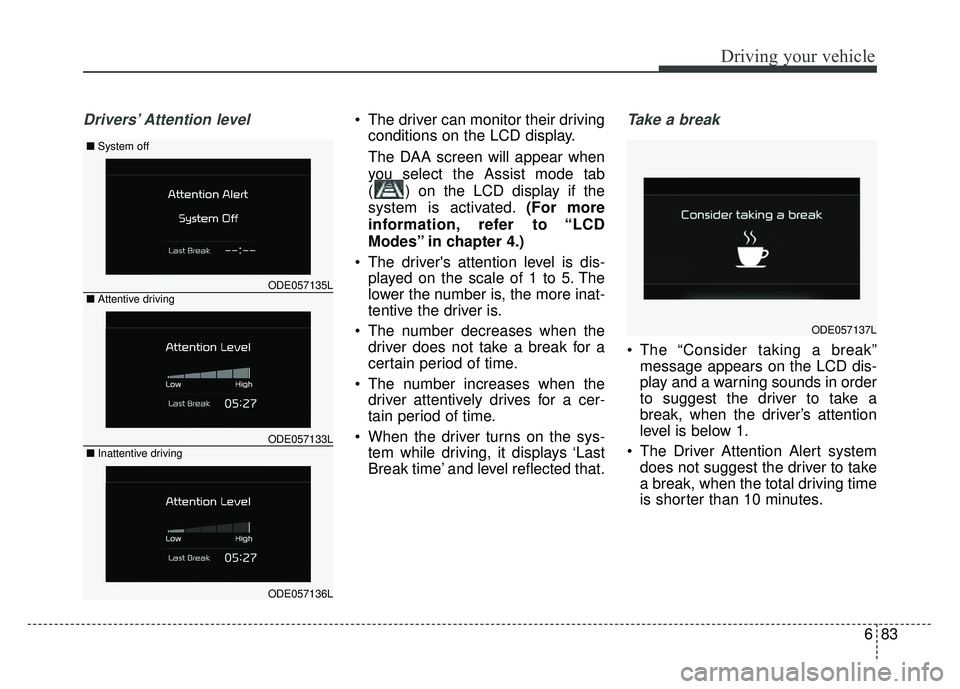
Drivers’ Attention level The driver can monitor their drivingconditions on the LCD display.
The DAA screen will appear when
you select the Assist mode tab
( ) on the LCD display if the
system is activated. (For more
information, refer to “LCD
Modes” in chapter 4.)
The driver's attention level is dis- played on the scale of 1 to 5. The
lower the number is, the more inat-
tentive the driver is.
The number decreases when the driver does not take a break for a
certain period of time.
The number increases when the driver attentively drives for a cer-
tain period of time.
When the driver turns on the sys- tem while driving, it displays ‘Last
Break time’ and level reflected that.Take a break
The “Consider taking a break”message appears on the LCD dis-
play and a warning sounds in order
to suggest the driver to take a
break, when the driver’s attention
level is below 1.
The Driver Attention Alert system does not suggest the driver to take
a break, when the total driving time
is shorter than 10 minutes.
ODE057135L
■ System off
ODE057133L
■Attentive driving
ODE057136L
■Inattentive driving
ODE057137L
Page 418 of 616

Driving your vehicle
84
6
Resetting the system
The last break time is set to 00:00
and the driver's attention level is
set to 5 (very attentive) when the
driver resets the Driver Attention
Alert system.
The Driver Attention Alert system resets in the following situations.
- The engine is turned OFF.
- The driver unfastens the seat beltand then opens the driver’s door.
- Stop lasting more than 10 min- utes.
The Driver Attention Alert system operates again, when the driver
restarts driving.
System disabled
The Driver Attention Alert system
enters the ready status and displays
the 'Disabled' screen in the following
situations.
- The camera sensor keeps failing todetect the lanes.
- Driving speed remains under 40 mph (64 km/h) or over 110 mph
(177 km/h).
System malfunction
When the “Check Driver Attention
Alert” warning message appears, the
system is not working properly. In this
case, have the vehicle inspected by
an authorized Kia dealer.
ODE057138LODE057139L
Page 419 of 616

685
Driving your vehicle
WARNING
The Driver Attention Alertsystem is not a substitute for
safe driving practices, but a
convenience function only. It
is the responsibility of the
driver to always drive cau-
tiously to prevent unexpected
and sudden situations from
occurring. Pay attention to the
road conditions at all times.
The system may suggest a break according to the dri-
ver’s driving pattern or habits
even if the driver doesn’t feel
fatigue.
The driver, who feels fatigued, should take a break, even
though there is no break sug-
gestion by the Driver
Attention Alert system.
CAUTION
The Driver Attention Alert sys-tem utilizes the camera sensoron the front windshield for itsoperation.
To prevent potential damage tothe camera and keep the camerasensor operating under optimalconditions, observe the follow-ings:
Do not disassemble camera temporarily for tinted windowor attaching any types of coat-ings and accessories. If youdisassemble a camera andassemble it again, take yourvehicle to an authorized Kiadealer and have the systemchecked to need a calibration.
Do not locate any reflective objects (i.e. white paper, mir-ror) over the dashboard. Anylight reflection may cause amal-function of the DriverAttention Alert (DAA) system.
(Continued)
(Continued) Pay extreme caution to keep the camera sensor out ofwater.
Do not arbitrarily disassemble the camera assembly, norapply any impact on the cam-era assembly.
Playing the vehicle audio sys- tem at high volume may offsetthe Driver Attention Alert sys-tem warning sounds.
Page 420 of 616
Driving your vehicle
86
6
✽
✽
NOTICE
The Driver Attention Alert system
may not properly operate with limit-
ed alerting in the following situa-
tions:
• Not properly recognize lane (For
more information, refer to “Lane
Keeping Assist System (LKAS)” in
this chapter.)
• Rough or intentionally evasive driving
• Large tire pressure deviation, uneven wear, poor wheel align-
ment, etc.
• Severe winding road
• Uneven road surface condition
• Windy road
• The vehicle drives through a windy area.
• The vehicle is controlled by the following driving assist systems:
- Lane Keeping Assist System(LKAS)
- Blind Spot Detection System
- Autonomous Emergency Braking (AEB) System
- Smart Cruise Control (SCC) System
Page 423 of 616
689
Driving your vehicle
Hazardous driving conditions
When hazardous driving conditions
are encountered such as water,
snow, ice, mud, sand, or similar haz-
ards, follow these suggestions:
Drive cautiously and allow extradistance for braking.
Avoid sudden braking or steering.
When braking with non-ABS brakes pump the brake pedal with
a light up-and-down motion until
the vehicle is stopped.
Do not pump the brake pedal on a
vehicle equipped with ABS. If stalled in snow, mud, or sand,
use the second gear. Accelerate
slowly to avoid spinning the drive
wheels.
Use sand, rock salt, or other non- slip material under the drive
wheels to provide traction when
stalled in ice, snow, or mud.
Reducing the risk of a rollover
This multi-purpose passenger vehi-
cle is defined as a Sports Utility
Vehicle (SUV). Utility vehicles have a
significantly higher rollover rate than
other types of vehicles. SUV's have
higher ground clearance and a nar-
rower track to make them capable of
performing in a wide variety of off-
road applications. Specific design
characteristics give them a higher
center of gravity than ordinary vehi-
cles. An advantage of the higher
ground clearance is a better view of
the road, which allows you to antici-
pate problems. They are not
designed for cornering at the same
speeds as conventional passenger
vehicles, any more than low-slung
sports vehicles are designed to per-
form satisfactorily in off-road condi-
tions. Due to this risk, driver and pas-
sengers are strongly recommended
to buckle their seat belts. In a rollover
crash, an unbelted person is signifi-
cantly more likely to die than a per-
son wearing a seat belt. There are
steps that a driver can make to
reduce the risk of a rollover.
SPECIAL DRIVING CONDITIONS
WARNING- Downshifting
Do not downshift with a dual
clutch transmission while driv-
ing on slippery surfaces. The
sudden change in tire speed
could cause the tires to skid
and result in an accident.
Page 426 of 616
Driving your vehicle
92
6
Driving at night
Because night driving presents more
hazards than driving in the daylight,
here are some important tips to
remember:
Slow down and keep more dis-
tance between you and other vehi-
cles, as it may be more difficult to
see at night, especially in areas
where there may not be any street
lights.
Adjust your mirrors to reduce the glare from other driver's head-
lights.
Keep your headlights clean and properly aimed. (On vehicles not
equipped with the automatic head-
light aiming feature.) Dirty or
improperly aimed headlights will
make it much more difficult to see
at night.
Avoid staring directly at the head- lights of oncoming vehicles. You
could be temporarily blinded, and it
will take several seconds for your
eyes to readjust to the darkness.
Driving in the rain
Rain and wet roads can make driving
dangerous, especially if you’re not
prepared for the slick pavement.
Here are a few things to consider
when driving in the rain: A heavy rainfall will make it harder
to see and will increase the dis-
tance needed to stop your vehicle,
so slow down.
Keep your windshield wiping equipment in good shape. Replace
your windshield wiper blades when
they show signs of streaking or
missing areas on the windshield.
If your tires are not in good condi- tion, making a quick stop on wet
pavement can cause a skid and
possibly lead to an accident. Be
sure your tires are in good shape.
Turn on your headlights to make it easier for others to see you.
Driving too fast through large pud- dles can affect your brakes. If you
must go through puddles, try to
drive through them slowly.
If you believe you may have gotten your brakes wet, apply them lightly
while driving until normal braking
operation returns.
Page 432 of 616
Driving your vehicle
98
6
Vehicle capacity weight:
849 lbs. (385 kg)
Vehicle capacity weight is the maxi-
mum combined weight of occupants
and cargo. If your vehicle is equipped
with a trailer, the combined weight
includes the tongue load.
Seating capacity:
Total : 5 persons (Front seat : 2 persons, Rear seat : 3 persons)
Seating capacity is the maximum
number of occupants including a
driver, your vehicle may carry.
However, the seating capacity may
be reduced based upon the weight of
all of the occupants, and the weight
of the cargo being carried or towed.
Do not overload the vehicle as there
is a limit to the total weight, or load
limit including occupants and cargo,
the vehicle can carry.
VEHICLE LOAD LIMIT
ODE067042N/ODE067043N/ODE067055N/ODE067056N
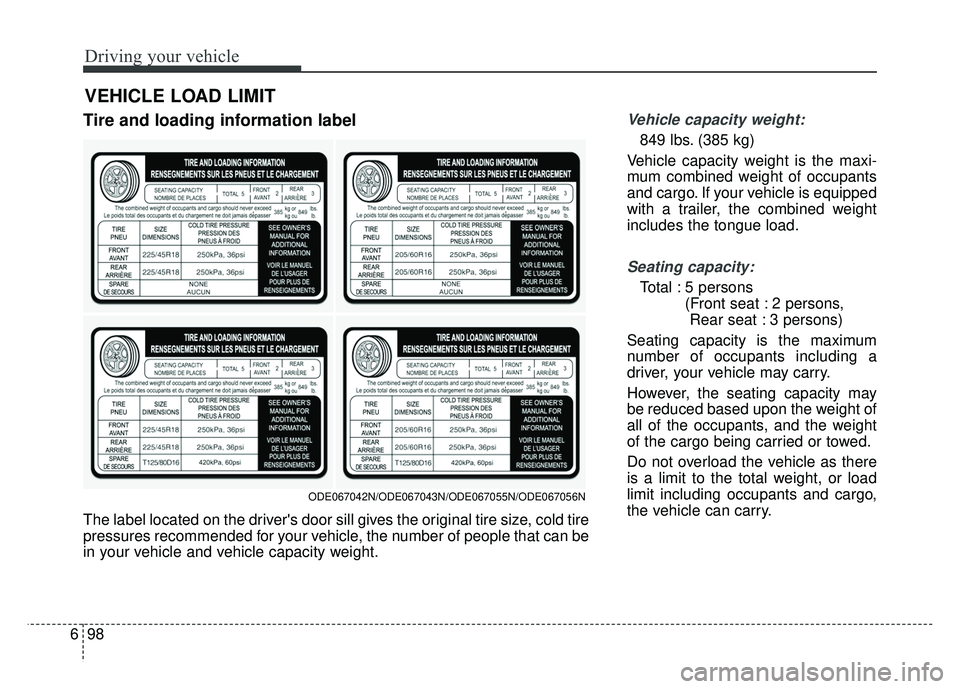
The label located on the driver's door sill gives the original tire size, cold tire
pressures recommended for your vehicle, the number of people that can be
in your vehicle and vehicle capacity weight.
Tire and loading information label
Page 433 of 616
699
Driving your vehicle
Towing capacity:
We do not recommend using this
vehicle for trailer towing.
Cargo capacity:
The cargo capacity of your vehicle
will increase or decrease depending
on the weight and the number of
occupants.
Steps For Determining CorrectLoad Limit -
1. Locate the statement "The com- bined weight of occupants and
cargo should never exceed XXX
kg or XXX lbs.'' on your vehicle's
placard.
2. Determine the combined weight of the driver and passengers that will
be riding in your vehicle.
3. Subtract the combined weight of the driver and passengers from
XXX kg or XXX lbs.
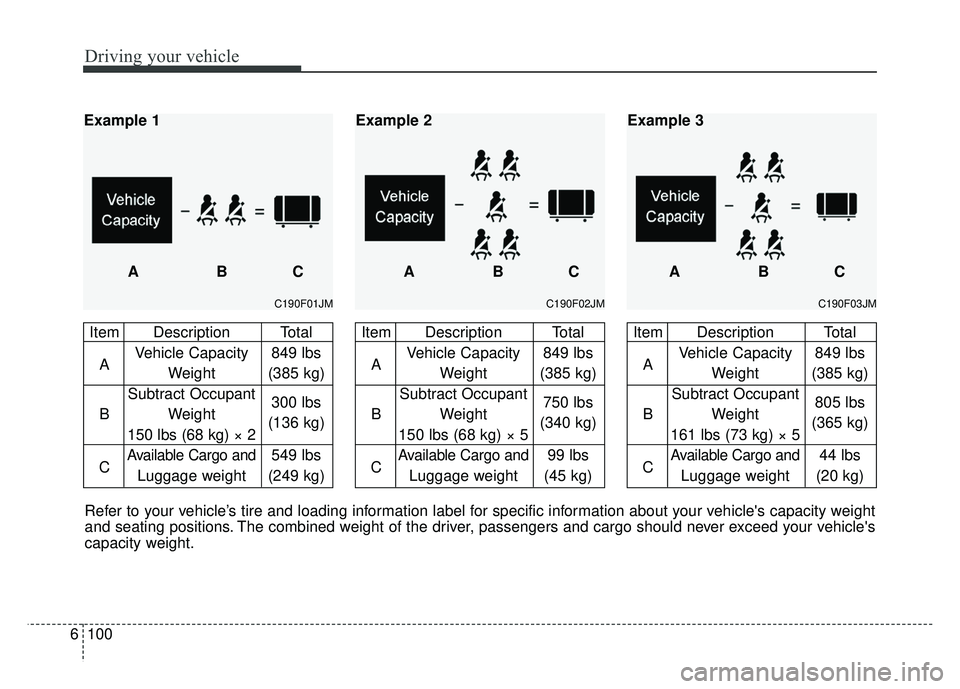
4. The resulting figure equals the available amount of cargo and lug-
gage load capacity. For example, if
the "XXX" amount equals 1400
lbs. and there will be five 150 lbs.
passengers in your vehicle, the
amount of available cargo and lug-
gage load capacity is 650 lbs.
(1400-750 (5 x 150) = 650 lbs.) 5. Determine the combined weight of
luggage and cargo being loaded
on the vehicle. That weight may
not safely exceed the available
cargo and luggage load capacity
calculated in Step 4.
6. If your vehicle will be towing a trail- er, load from your trailer will be
transferred to your vehicle. Consult
this manual to determine how this
reduces the available cargo and
luggage load capacity of your
vehicle.
WARNING - Loose cargo
Do not travel with unsecured
blunt objects in the passenger
compartment of your vehicle
(e.g. suit cases or unsecured
child seats). These items may
strike occupant during a sud-
den stop or crash.
Page 434 of 616
Driving your vehicle
100
6
C190F03JM
Item Description Total
A Vehicle Capacity 849 lbs
Weight (385 kg)
Subtract Occupant
B Weight 805 lbs
161 lbs (73 kg) × 5 (365 kg)
C
Available Cargo and44 lbs
Luggage weight (20 kg)
ABC
Example 3
C190F02JM
Item Description Total
A Vehicle Capacity 849 lbs
Weight (385 kg)
Subtract Occupant
B Weight 750 lbs
150 lbs (68 kg) × 5 (340 kg)
C
Available Cargo and99 lbs
Luggage weight (45 kg)
ABC
Example 2
C190F01JM
Item Description Total
A Vehicle Capacity 849 lbs
Weight (385 kg)
Subtract Occupant
B Weight 300 lbs
150 lbs (68 kg) × 2 (136 kg)
C
Available Cargo and549 lbs
Luggage weight (249 kg)
Example 1
ABC
Refer to your vehicle’s tire and loading information label for specific information about your vehicle's capacity weight
and seating positions. The combined weight of the driver, passengers and cargo should never exceed your vehicle's
capacity weight.