eco KIA NIRO PHEV 2020 Owners Manual
[x] Cancel search | Manufacturer: KIA, Model Year: 2020, Model line: NIRO PHEV, Model: KIA NIRO PHEV 2020Pages: 687, PDF Size: 11.43 MB
Page 5 of 687
H3
PHEV (PLUG-IN ELECTRIC VEHICLE) SYSTEM
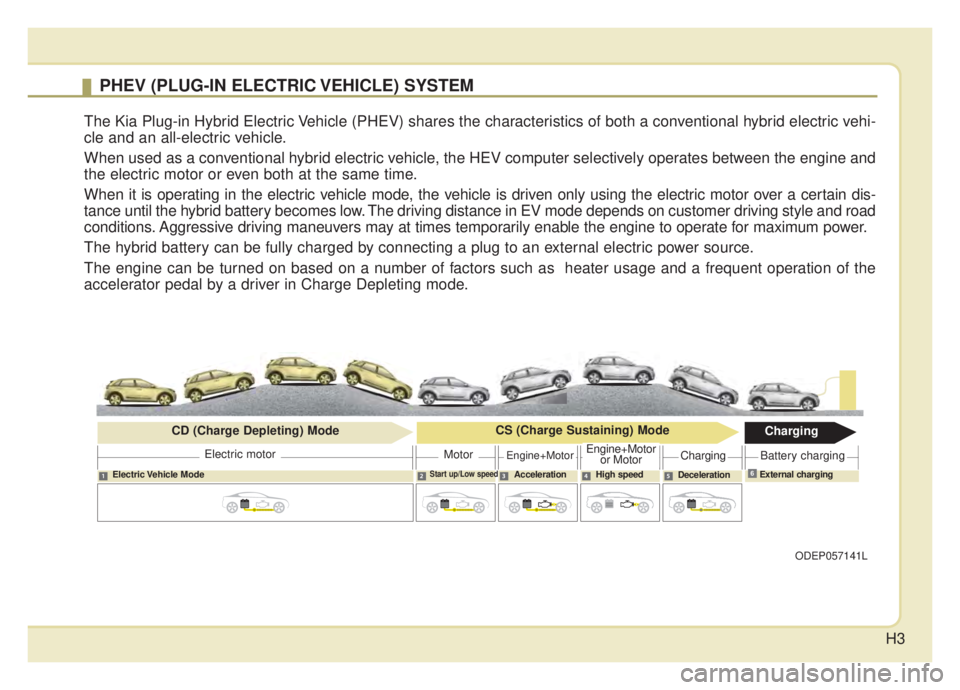
The Kia Plug-in Hybrid Electric Vehicle (PHEV) shares the characteristics of both a conventional hybrid electric vehi-
cle and an all-electric vehicle.
When used as a conventional hybrid electric vehicle, the HEV computer selectively operates between the engine and
the electric motor or even both at the same time.
When it is operating in the electric vehicle mode, the vehicle is driven only using the electric motor over a certain dis-
tance until the hybrid battery becomes low. The driving distance in EV mode depends on customer driving style and road
conditions. Aggressive driving maneuvers may at times temporarily enable the engine to operate for maximum power.
The hybrid battery can be fully charged by connecting a plug to an external electric power source.
The engine can be turned on based on a number of factors such as heater usage and a frequent operation of the
accelerator pedal by a driver in Charge Depleting mode.
ODEP057141L
Electric Vehicle ModeStart up/Low speedAcceleration High speedDecelerationExternal charging
Electric motor
CD (Charge Depleting) Mode
CS (Charge Sustaining) Mode
Charging
MotorEngine+MotorEngine+Motor
or MotorChargingBattery charging
6
Page 10 of 687
H8
Scheduled Charging
(if equipped)
You can set reserved chargingusing the Infotainment System.
Refer to the Infotainment System
for detailed information about set-
ting reserved charging.
Scheduled charging can only be done when using a AC Charger or
the portable charging cable (ICCB:
In-Cable Control Box).
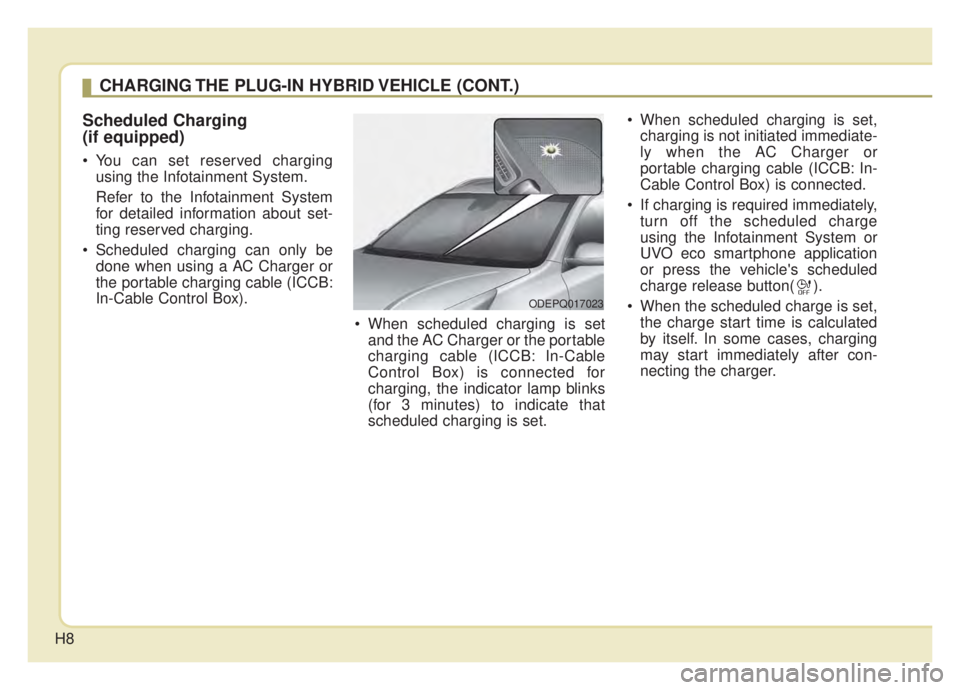
When scheduled charging is setand the AC Charger or the portable
charging cable (ICCB: In-Cable
Control Box) is connected for
charging, the indicator lamp blinks
(for 3 minutes) to indicate that
scheduled charging is set. When scheduled charging is set,
charging is not initiated immediate-
ly when the AC Charger or
portable charging cable (ICCB: In-
Cable Control Box) is connected.
If charging is required immediately, turn off the scheduled charge
using the Infotainment System or
UVO eco smartphone application
or press the vehicle's scheduled
charge release button( ).
When the scheduled charge is set, the charge start time is calculated
by itself. In some cases, charging
may start immediately after con-
necting the charger.
CHARGING THE PLUG-IN HYBRID VEHICLE (CONT.)
ODEPQ017023
Page 15 of 687

H13
7. Check if the charging cable con-nection indicator of the high volt-
age battery in the instrument clus-
ter is turned ON.
Charging does not occur when the
indicator is OFF. When the charg-
ing connector is not connected
properly, reconnect the charging
cable to charge.
✽ ✽ NOTICE
• Charging is in progress only when
the shift lever is in P (Park).
Charging the battery with the
Engine Start/Stop button in the
ACC position is possible. However,
it may discharge the 12-V battery.
Thus, if possible, charge the bat-
tery with the Engine Start/Stop
button in the OFF position.
• The charging process is interrupt- ed temporarily when the shift lever
is moved from P (Park) to Not P(R
(Reverse)/N (Neutral)/D (Drive))
during charging. To resume(restart)
charging, move the shift lever to the
P (park) position. Then, the charging
process is resumed(restarted).
8. After charging has started, the
estimated charging time is dis-
played on the instrument cluster
for about 1 minute. It is also dis-
played, when the driver’s door is
opened with charging in progress.
When scheduled charging is set,
the estimated charging time is dis-
played as “--” .
ODEPQ017028L
ODEPQ019027
ODEPQ019125
\bType A
\bType B
Page 21 of 687

H19
10. Check if the charging cable con-nection indicator of the high volt-
age battery in the instrument
cluster is turned ON. Charging does not occur when the
indicator is OFF. When the charg-
ing connector is not connected
properly, reconnect the charging
cable to charge.
✽ ✽
NOTICE
• The charging is in progress only
with the shift lever is in P (Park).
Charging the battery with the
Engine Start/Stop button in the
ACC position is possible. However,
it may discharge the 12-V battery.
Thus, if possible, charge the bat-
tery with the Engine Start/Stop
button in the OFF position.
• Moving the shift lever from P (Park) to R (Reverse)/N(Neutral)/D
(Drive) stops the charging process.
To restart the charging process,
move the shift lever to P (Park),
press the Engine Start/Stop button
to the OFF position, and discon-
nect the charging cable. Then,
connect the charging cable and
restart the vehicle again.
11. After charging has started, the
estimated charging time is dis-
played on the instrument cluster
for about 1 minute. It is also dis-
played, when the driver’s door is
opened with charging in progress.
When scheduled charging is set,
the estimated charging time is dis-
played as "--".
ODEPQ019027
ODEPQ019125
\bType A
\bType BODEPQ017028L
Page 23 of 687
H21
Charge cable storage
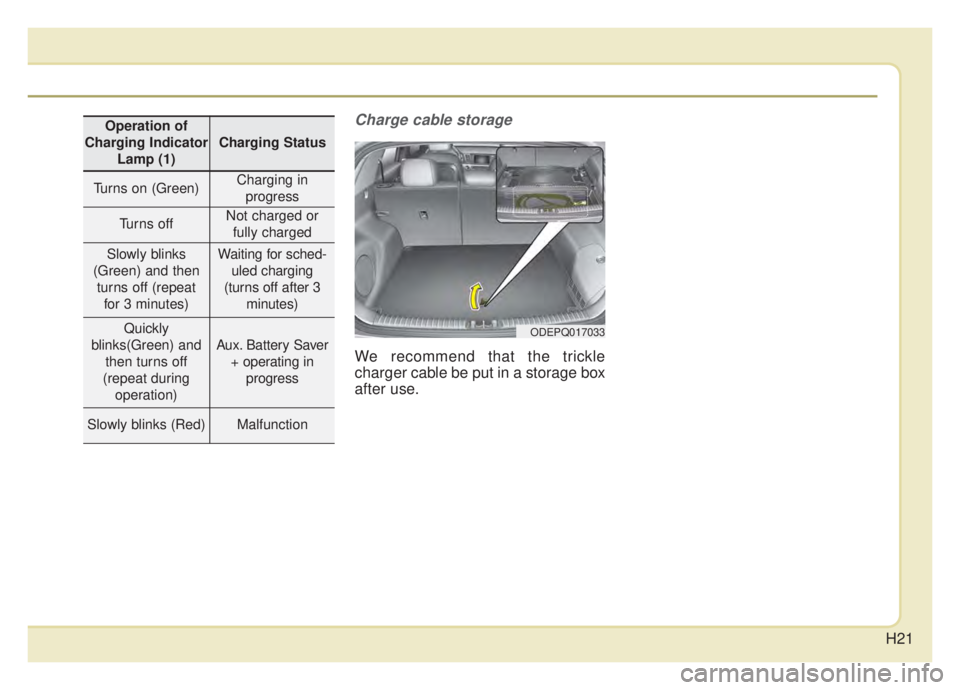
We recommend that the trickle
charger cable be put in a storage box
after use.
ODEPQ017033
Operation of
Charging Indicator Lamp (1)
Charging Status
Turns on (Green)Charging inprogress
Turns offNot charged or fully charged
Slowly blinks
(Green) and then turns off (repeat for 3 minutes)Waiting for sched- uled charging
(turns off after 3 minutes)
Quickly
blinks(Green) and then turns off
(repeat during operation)
Aux. Battery Saver + operating in progress
Slowly blinks (Red)Malfunction
Page 27 of 687

H25
How to Disconnect the PortableCharging Cable (ICCB: In-CableControl Box)
1. Before disconnecting the charging connector, make sure the doors are
unlocked. When the door is locked,
the charging connector lock system
will not allow disconnection. To pre-
vent charging cable theft, the
charging connector cannot be dis-
connected from the inlet when the
doors are locked. Unlock all doors
to disconnect the charging connec-
tor from the inlet. However, if the
vehicle is in the charging connector
AUTO mode, the charging connec-
tor automatically unlocks from the
inlet when charging is completed.
For more details, refer to “Charging
Connector AUTO/LOCK Mode” in
this chapter. 2. While holding the charging con-
nector, pressing the locking
release button(1) and then pull it
out.
3. Make sure to securely close the charging door. 4. Disconnect the plug from the
household electric outlet. Do not
pull the cable when disconnecting
the plug.
5. Close the protective cover for the charging connector so that foreign
material cannot get into the terminal.
6. Put the charging cable inside the storage bag to protect it.
ODEPQ017031OJFHPQ016015N
CAUTION
In order to disconnect thecharging connector, unlock thedoors to release the chargingconnector lock system. If not,the charging connector and thevehicle's charging inlet may bedamaged.
Page 29 of 687
H27
Action to be taken when
charging stops abruptly
When the high voltage battery does
not charge, check the followings:
1. Check the charging setting for thevehicle.
(e.g. When scheduled charging is
set, charging is not initiated imme-
diately when the AC charger or
portable charger (ICCB: In-Cable
Control Box) is connected.)
2. Check the operation status of AC charger, portable charger.
(Charging Status Indicator Lamp
for Portable Charger, refer to
“Checking Charging Status” for
trickle charge in this chapter.)
❈ Actual method for indicating the
charging status may vary in accor-
dance with the charger manufac-
turer.
3. When the vehicle does not charge and a warning message appears
on the cluster, check the corre-
sponding message. Refer to “LCD
Display Messages”, in this chap-
ter. 4. If the vehicle is properly charged
when charged with another nor-
mally working charger, contact the
charger manufacturer.
5. If the vehicle does not charge when charged with another nor-
mally working charger, we recom-
mend that you contact an author-
ized Kia dealer.
Page 31 of 687
H29
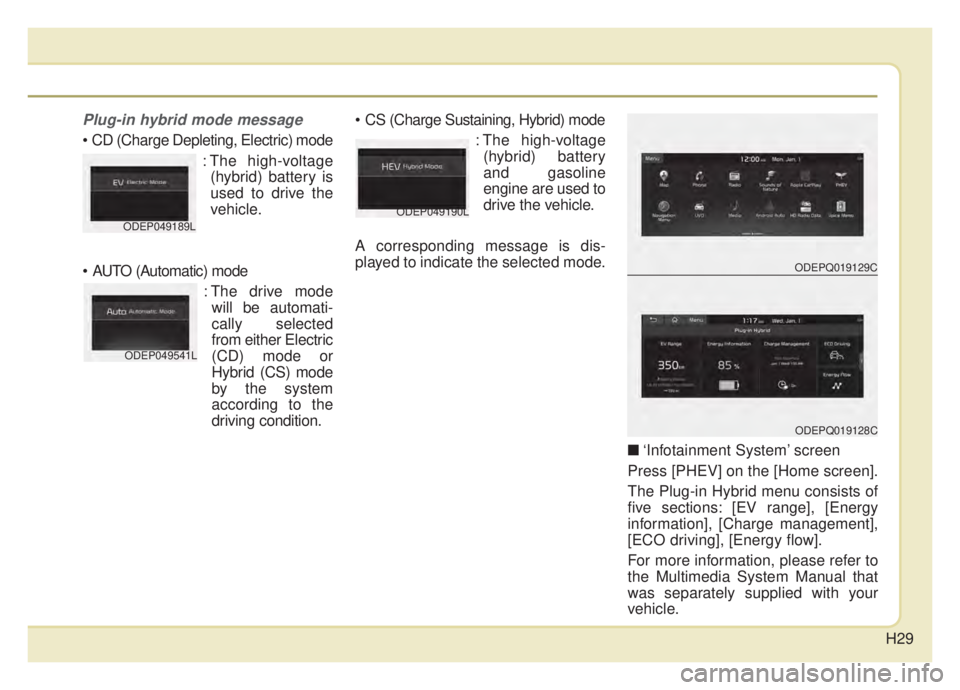
Plug-in hybrid mode message
: The high-voltage(hybrid) battery is
used to drive the
vehicle.
: The drive modewill be automati-
cally selected
from either Electric
(CD) mode or
Hybrid (CS) mode
by the system
according to the
driving condition.
: The high-voltage(hybrid) battery
and gasoline
engine are used to
drive the vehicle.
A corresponding message is dis-
played to indicate the selected mode.
\b‘Infotainment System’ screen
Press [PHEV] on the [Home screen].
The Plug-in Hybrid menu consists of
five sections: [EV range], [Energy
information], [Charge management],
[ECO driving], [Energy flow].
For more information, please refer to
the Multimedia System Manual that
was separately supplied with your
vehicle.
ODEP049189LODEP049190L
ODEP049541L
ODEPQ019129C
ODEPQ019128C
Page 32 of 687
H30
Warning and indicator lights
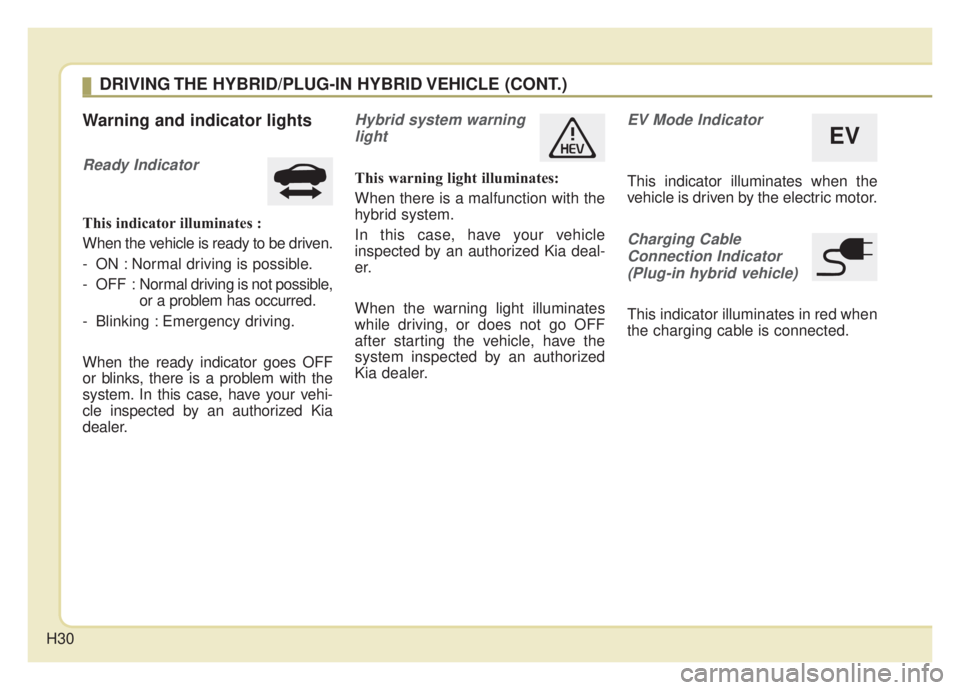
Ready Indicator
This indicator illuminates :
When the vehicle is ready to be driven.
- ON : Normal driving is possible.
- OFF : Normal driving is not possible,
or a problem has occurred.
- Blinking : Emergency driving.
When the ready indicator goes OFF
or blinks, there is a problem with the
system. In this case, have your vehi-
cle inspected by an authorized Kia
dealer.
Hybrid system warning light
This warning light illuminates:
When there is a malfunction with the
hybrid system.
In this case, have your vehicle
inspected by an authorized Kia deal-
er.
When the warning light illuminates
while driving, or does not go OFF
after starting the vehicle, have the
system inspected by an authorized
Kia dealer.
EV Mode Indicator
This indicator illuminates when the
vehicle is driven by the electric motor.
Charging CableConnection Indicator(Plug-in hybrid vehicle)
This indicator illuminates in red when
the charging cable is connected.
EV
DRIVING THE HYBRID/PLUG-IN HYBRID VEHICLE (CONT.)
Page 34 of 687

H32
LCD Display Messages
Check Hybrid system
This message is displayed when
there is a problem with the hybrid
control system.
Refrain from driving when the warn-
ing message is displayed.
In this case, have your vehicle inspect-
ed by an authorized Kia dealer.
Check Hybrid system.Turn off engine
This message is displayed when
there is a problem with the hybrid
system. The " " indicator will blink
and a warning chime will sound until
the problem is solved.
In this case, have your vehicle inspect-
ed by an authorized Kia dealer.
Check Hybrid system.Do not start engine.
This message is displayed when the
hybrid battery power (SOC) level is
low. A warning chime will sound until
the problem is solved.
In this case, park the vehicle in a safe
location and have your vehicle
inspected by an authorized Kia dealer.
Stop vehicle and check powerSupply
This message is displayed when a
failure occurs in the power supply
system.
In this case, park the vehicle in a safe
location and have your vehicle
inspected by an authorized Kia dealer.
Refill inverter coolant
This message is displayed when the
inverter coolant is nearly empty.
You should refill the inverter coolant.
In this case, have your vehicle inspect-
ed by an authorized Kia dealer.
Stop vehicle and check brakes
This message is displayed when a
failure occurs in the brake system.
In this case, park the vehicle in a safe
location and have your vehicle
inspected by an authorized Kia dealer.
Check brakes
This message is displayed when the
brake performance is low or the
regenerative brake does not work
properly due to a failure in the brake
system.
In this case, it may take longer for the
brake pedal to operate and the brak-
ing distance may become longer.
DRIVING THE HYBRID/PLUG-IN HYBRID VEHICLE (CONT.)