brake KIA NIRO PHEV 2020 Owners Manual
[x] Cancel search | Manufacturer: KIA, Model Year: 2020, Model line: NIRO PHEV, Model: KIA NIRO PHEV 2020Pages: 687, PDF Size: 11.43 MB
Page 438 of 687
Driving your vehicle
128
5
Set SCC Reaction
The sensitivity of vehicle speed
when following the front vehicle to
maintain the set distance can be
adjusted.
The acceleration speed (reaction) for
following the front vehicle is set in
conjunction with the DRIVE MODE
button.
SCC Reaction
Fast:
Vehicle speed following the front
vehicle to maintain the set distance
is faster than normal speed.
Normal: Vehicle speed following the front
vehicle to maintain the set distance
is normal
Slow: Vehicle speed following the front
vehicle to maintain the set distance
is slower than normal speed.
Vehicle to vehicle distance
setting
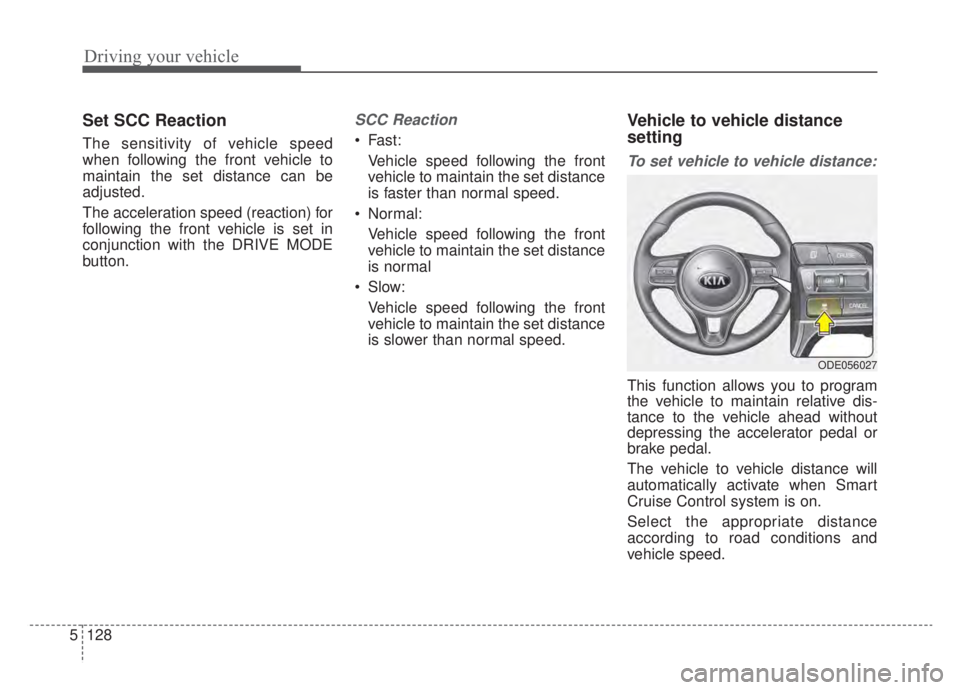
To set vehicle to vehicle distance:
This function allows you to program
the vehicle to maintain relative dis-
tance to the vehicle ahead without
depressing the accelerator pedal or
brake pedal.
The vehicle to vehicle distance will
automatically activate when Smart
Cruise Control system is on.
Select the appropriate distance
according to road conditions and
vehicle speed.
ODE056027
Page 441 of 687
5131
Driving your vehicle
Collision Warning
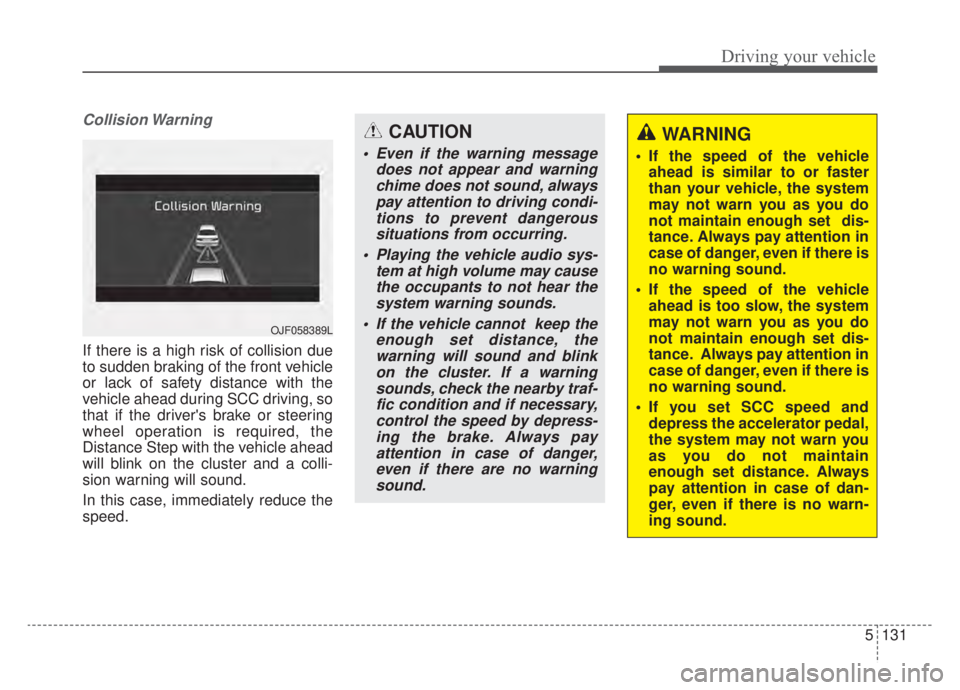
If there is a high risk of collision due
to sudden braking of the front vehicle
or lack of safety distance with the
vehicle ahead during SCC driving, so
that if the driver's brake or steering
wheel operation is required, the
Distance Step with the vehicle ahead
will blink on the cluster and a colli-
sion warning will sound.
In this case, immediately reduce the
speed.
OJF058389L
CAUTION
Even if the warning messagedoes not appear and warningchime does not sound, alwayspay attention to driving condi-tions to prevent dangeroussituations from occurring.
Playing the vehicle audio sys- tem at high volume may causethe occupants to not hear thesystem warning sounds.
If the vehicle cannot keep the enough set distance, thewarning will sound and blinkon the cluster. If a warningsounds, check the nearby traf-fic condition and if necessary,control the speed by depress-ing the brake. Always payattention in case of danger,even if there are no warningsound.
WARNING
If the speed of the vehicle ahead is similar to or faster
than your vehicle, the system
may not warn you as you do
not maintain enough set dis-
tance. Always pay attention in
case of danger, even if there is
no warning sound.
If the speed of the vehicle ahead is too slow, the system
may not warn you as you do
not maintain enough set dis-
tance. Always pay attention in
case of danger, even if there is
no warning sound.
If you set SCC speed and depress the accelerator pedal,
the system may not warn you
as you do not maintain
enough set distance. Always
pay attention in case of dan-
ger, even if there is no warn-
ing sound.
Page 442 of 687

Driving your vehicle
132
5
In traffic situation
Use switch or pedal to accelerate
In traffic, your vehicle will stop if the
vehicle ahead of you stops. Also, if
the vehicle ahead of you starts
moving, your vehicle will start as
well. However, if the vehicle stops
you must depress the accelerator
pedal or push up the switch
(RES+) to start driving. If you push the smart cruise control
switch (RES+ or SET-) while Auto
Hold and smart cruise control is
operating the Auto Hold will be
released regardless of accelerator
pedal operation and the vehicle will
start to move. The AUTO HOLD
indicator changes from green to
white. (if equipped with EPB
(Electronic Parking Brake))
CAUTION
If the vehicle ahead (vehiclespeed: less than 20 mph (30km/h) disappears to the nextlane, the warning chime willsound and a message willappear. Adjust your vehiclespeed for vehicles or objectsthat can suddenly appear infront of you by depressing thebrake pedal according to theroad condition ahead and driv-ing condition.
ODEP059084L OJF058402L
Page 446 of 687
Driving your vehicle
136
5
1. Turn Smart Cruise Control system
on (the cruise indicator light will be
on but the system will not be acti-
vated).
2. Push the distance to distance switch for more than 2 seconds.
3. Choose between "Smart Cruise Control" and "Cruise Control".
When the system is canceled using
the CRUISE button or the CRUISE
button is used after the engine is
turned on, the Smart Cruise Control
mode will turn on.Limitations of the system
Smart Cruise Control system may
have limits to its ability to detect dis-
tance to the vehicle ahead due to
road and traffic conditions.
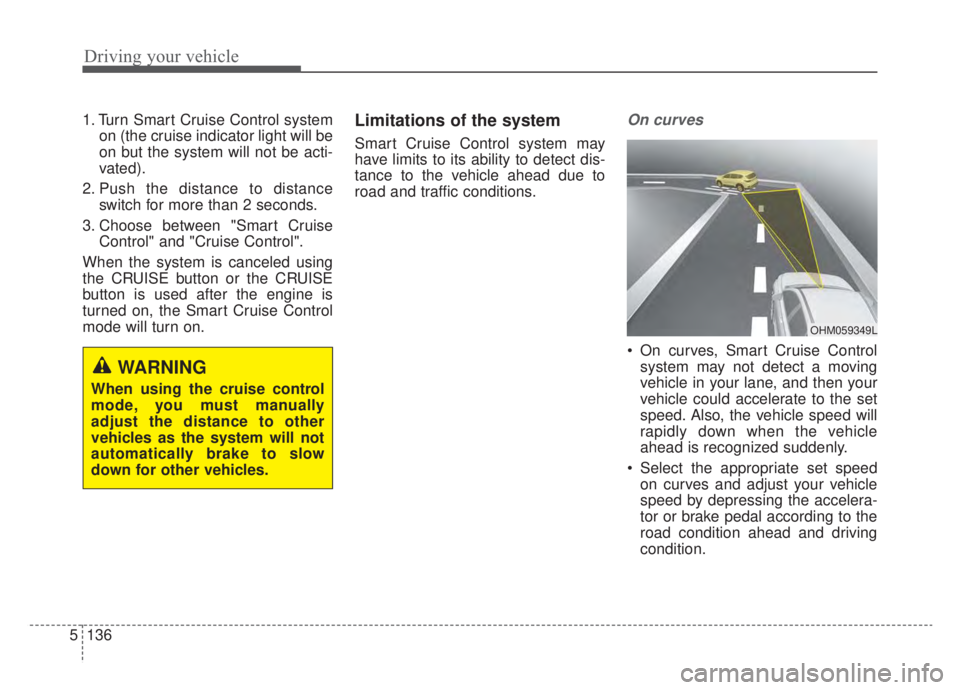
On curves
On curves, Smart Cruise Control system may not detect a moving
vehicle in your lane, and then your
vehicle could accelerate to the set
speed. Also, the vehicle speed will
rapidly down when the vehicle
ahead is recognized suddenly.
Select the appropriate set speed on curves and adjust your vehicle
speed by depressing the accelera-
tor or brake pedal according to the
road condition ahead and driving
condition.
WARNING
When using the cruise control
mode, you must manually
adjust the distance to other
vehicles as the system will not
automatically brake to slow
down for other vehicles.
OHM059349L
Page 447 of 687

5137
Driving your vehicle
Your vehicle speed can be reduceddue to a vehicle in the adjacent
lane. Adjust your vehicle speed by
depressing the brake pedal
according to the road condition
ahead and driving condition. Apply
the accelerator pedal and select
the appropriate set speed. Check
to be sure that the road conditions
permit safe operation of the smart
cruise control.
On inclines
During uphill or downhill driving,Smart Cruise Control system may
not detect a moving vehicle in your
lane, and cause your vehicle to
accelerate to the set speed. Also,
the vehicle speed will rapidly down
when the vehicle ahead is recog-
nized suddenly.
Select the appropriate set speed on inclines and adjust your vehicle
speed by depressing the accelera-
tor or brake pedal according to the
road condition ahead and driving
condition.
Lane changing
A vehicle which moves into yourlane from an adjacent lane cannot
be recognized by the sensor until it
is in the sensor's detection range.
The sensor may not detect imme- diately when a vehicle cuts in sud-
denly. Always pay attention to the
traffic, road and driving conditions.
If a vehicle which moves into your lane is slower than your vehicle,
your speed may decrease to main-
tain the distance to the vehicle
ahead.
OHM059355LOJF055028
OHM059352L
Page 449 of 687

5139
Driving your vehicle
A vehicle ahead cannot be recog-
nized correctly by the sensor if any of
following occurs:
- When the vehicle is pointingupwards due to overloading in the
liftgate (tailgate)
- While making turns by steering
- When driving to one side of the lane
- When driving on narrow lanes or on curves
Adjust your vehicle speed by
depressing the brake pedal accord-
ing to the road condition ahead and
driving condition. When vehicles are at a standstill
and the vehicle in front of you
changes to the next lane, be care-
ful when your vehicle starts to
move because it may not recognize
the stopped vehicle in front of you.
In this case, you must maintain a
safe braking distance, and if nec-
essary, depress the brake pedal to
reduce your driving speed in order
to maintain a safe distance. Always look out for pedestrians
when your vehicle is maintaining a
distance with the vehicle ahead.
OJF055029OJF055050
Page 450 of 687
Driving your vehicle
140
5
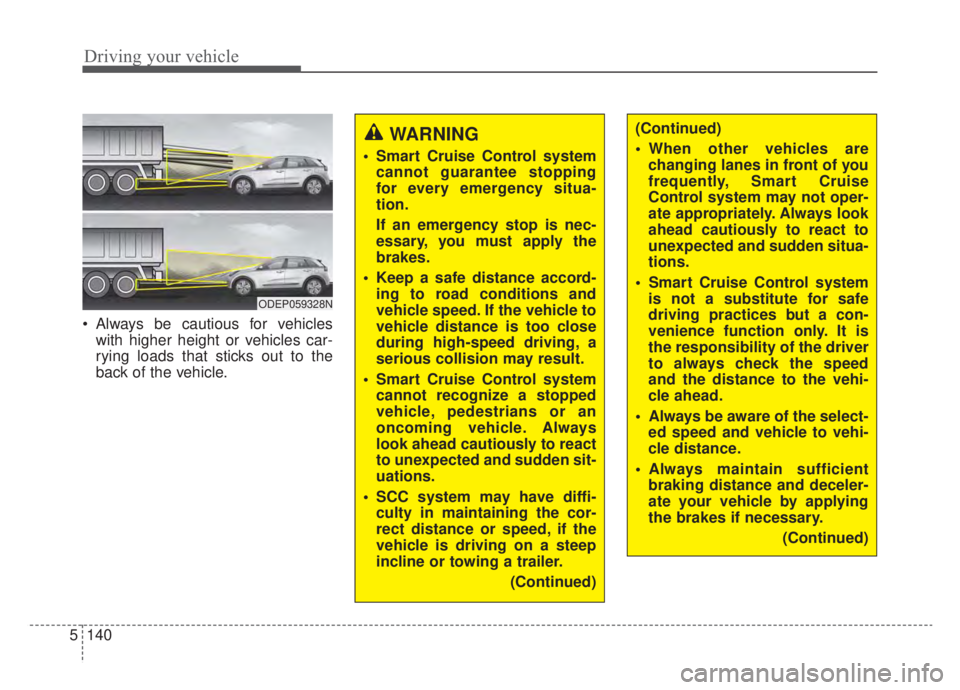
Always be cautious for vehicles
with higher height or vehicles car-
rying loads that sticks out to the
back of the vehicle.
WARNING
Smart Cruise Control systemcannot guarantee stopping
for every emergency situa-
tion.
If an emergency stop is nec-
essary, you must apply the
brakes.
Keep a safe distance accord- ing to road conditions and
vehicle speed. If the vehicle to
vehicle distance is too close
during high-speed driving, a
serious collision may result.
Smart Cruise Control system cannot recognize a stopped
vehicle, pedestrians or an
oncoming vehicle. Always
look ahead cautiously to react
to unexpected and sudden sit-
uations.
SCC system may have diffi- culty in maintaining the cor-
rect distance or speed, if the
vehicle is driving on a steep
incline or towing a trailer.
(Continued)
ODEP059328N
(Continued)
When other vehicles arechanging lanes in front of you
frequently, Smart Cruise
Control system may not oper-
ate appropriately. Always look
ahead cautiously to react to
unexpected and sudden situa-
tions.
Smart Cruise Control system is not a substitute for safe
driving practices but a con-
venience function only. It is
the responsibility of the driver
to always check the speed
and the distance to the vehi-
cle ahead.
Always be aware of the select- ed speed and vehicle to vehi-
cle distance.
Always maintain sufficient braking distance and deceler-
ate your vehicle by applying
the brakes if necessary.
(Continued)
Page 463 of 687

5153
Driving your vehicle
The vehicle brakes suddenly.
Only one lane marker is detected.
The lane is very wide or narrow.
There are more than two lanemarkers on the road (e.g. construc-
tion area).
Radius of a curve is too small.
The vehicle is driven on a steep incline.
The steering wheel is turned sud- denly.Automatic speed setting
If HDA system operating conditions
are all met and setting speed match-
es with the legal highway speed limit,
HDA system will enter the automatic
speed setting mode. (The set speed
and the "AUTO" symbol will be dis-
played in green with an indicative
sound) In the automatic speed set-
ting mode, the set speed is automat-
ically adjusted to the changing speed
limits of highway sections. If the driver directly changes the
speed, it enters the manual speed
setting mode and the set speed is
displayed in white and the “AUTO”
symbol will disappear.
ODEP059291N
ODEP059292N
Page 465 of 687
5155
Driving your vehicle
* Refer to “Smart Cruise Control(SCC)” in this chapter. for cautions
and warnings about vehicle to
vehicle distance control and front
radar.
* Refer to “Lane Following Assist (LFA) “ in this chapter. for cautions
and warnings about steering con-
trol and front camera.CAUTION
Highway Driving Assist systemmay not function properly in thefollowing situations:
The navigation is not working properly.
The navigation is not updated. The real-time GPS or map information provided haserrors.
The navigation is overloaded by performing functions suchas route search, video play-back, voice recognition, etc.are performing simultaneously.
The navigation is recalculat- ing the route while driving.
GPS signals are blocked in areas such as a tunnel.
The driver goes off course or the route to the destination ischanged or canceled by reset-ting the navigation.
The vehicle enters a service station or rest area
(Continued)
(Continued) The speed limit of selected highway section is changeddue to road conditions.
Android Auto or Car Play is operating.
The navigation cannot detect the current vehicle position(ex: elevated roads includingoverpass adjacent to generalroads or nearby roads exist ina parallel way).
The navigation is being updat- ed while driving.
The navigation is being reset while driving.
The road is slippery due to bad weather such as rain orsnow.
If your vehicle tows a trailer or another vehicle, you shouldrelease Highway DrivingAssist system. Operating thebrake system or steering sys-tem while towing mayadversely affect the safety.
Page 469 of 687

5159
Driving your vehicle
Warning message and system
control
Rear Cross-Traffic CollisionWarning system
If the vehicle detected by the sensors
approaches from the rear left/right
side of your vehicle, the warning
chime will sound, the warning light
on the outside rearview mirror will
blink and a message will appear on
the LCD display. If the rear view mon-
itor system is in activation, a mes-
sage will also appear on the
‘Infortainment System’.
The warning will stop when:
- The vehicle moving at the rear left/right side of your vehicle is not
in the detection range.
- The vehicle is right behind your vehicle.
- The vehicle is not driving towards your vehicle.
- The vehicle’s approaching speed is decreased.CAUTION
When the operation condition of RCCW is met, the warningwill occur every time a vehicleapproaches the side or rear ofyour stopped (0 mph (0 km/h)vehicle speed) vehicle.
The system's warning or brake may not operate properly if theleft or right of your vehicle'srear bumper is blocked by avehicle or obstacle.
The driver should always use extreme caution while operat-ing the vehicle, whether or notthe warning light on the outerside view mirror illuminates orthere is a warning alarm.
Playing the vehicle audio sys- tem at high volume may pre-vent occupants from hearingthe system's warning sounds.
If any other warning sound such as seat belt warningchime is already generated,the RCCW warning may notsound.
OSK3058093L
OSK3058094L
■ Left
■ Right