eco KIA NIRO PHEV 2020 Owners Manual
[x] Cancel search | Manufacturer: KIA, Model Year: 2020, Model line: NIRO PHEV, Model: KIA NIRO PHEV 2020Pages: 687, PDF Size: 11.43 MB
Page 363 of 687

553
Driving your vehicle
FCA system is designed to detect
the vehicle ahead or pedestrians
ahead in the roadway through front
view camera recognition to warn the
driver that a collision is imminent,
and if necessary, apply emergency
braking.
❈FCA stands for Forward Collision-
Avoidance AssistSystem setting and activation
Forward safety
The driver can activate FCA system
by placing the ignition switch or
ENGINE START/STOP button to the
ON position and by selecting:
“User Settings → Driver Assistance
→ Forward Safety”
- If you select “Active Assist”, FCA system activates. FCA produces
warning messages and warning
alarms in accordance with the col-
lision risk levels. Also, it controls
the brakes in accordance with the
collision risk levels.
- If you select “Warning Only”, FCA system activates and produces
only warning alarms in accordance
with the collision risk levels. You
should control the brake directly
because FCA system do not con-
trol the brake.
- If you select “Off ”, FCA system deactivates,
FORWARD COLLISION-AVOIDANCE ASSIST (FCA) (FRONT VIEW CAMERA ONLY)
(IF EQUIPPED)
WARNING
Take the following precautions
when using Forward Collision-
Avoidance Assist system:
This system is only a supple-mental system and it is not
intended to, nor does it replace
the need for extreme care and
attention of the driver. The
sensing range and objects
detectable by the sensors are
limited. Pay attention to the
road conditions at all times.
NEVER drive too fast in accor- dance with the road condi-
tions or while cornering.
Always drive cautiously to prevent unexpected and sud-
den situations from occur-
ring. FCA system does not
stop the vehicle completely
and is only intended to help
mitigate an imminent colli-
sion.
Page 370 of 687

Driving your vehicle
60
5
System malfunction
When FCA system is not working
properly, the FCA warning light
( ) will illuminate and the warn-
ing message will appear for a few
seconds. After the message disap-
pears, the master warning light
( ) will illuminate. In this case,
have your vehicle inspected by an
authorized Kia dealer.
The FCA warning message may appear along with the illumination
of the ESC warning light.
WARNING
FCA system may not activate
without any warning messeges
according to driving condition,
traffic on the road, weather,
road condition, etc.
OJF058394L
WARNING
FCA system is only a supple-mental system for the driver’s
convenience. The driver should
hold the responsibility to con-
trol the vehicle operation. Do
not solely depend on FCA sys-
tem. Rather, maintain a safe
braking distance, and, if neces-
sary, depress the brake pedal
to lower the driving speed.
In certain instances and under certain driving condi-
tions, FCA system may acti-
vate unintentionally. This ini-
tial warning message appears
on the LCD display with a
warning chime.
Also, in certain instances the
front radar sensor or camera
recognition system may not
detect the vehicle or pedestri-
an ahead. FCA system may
not activate and the warning
message will not be dis-
played.
(Continued)
Page 372 of 687

Driving your vehicle
62
5
Limitation of the system
Forward Collision-Avoidance Assist
system is designed to monitor the
vehicle ahead in the roadway
through camera recognition to warn
the driver that a collision is imminent,
and if necessary, apply emergency
braking. In certain situations, the
camera may not be able to detect the
vehicle ahead or pedestrian ahead.
In these cases, FCA system may not
operate normally. The driver must
pay careful attention in the following
situations where FCA operation may
be limited.
Recognizing vehicles
The sensor may be limited when:
The system may not work around
15 seconds after starting the vehi-
cle or the initialization or rebooting
of the front view camera.
The camera is blocked with a for- eign object or debris
The camera lens is contaminated due to tinted, filmed or coated
windshield, damaged glass, or
stuck of foreign matter (sticker,
bug, etc.) on the glass
Inclement weather such as heavy rain or snow obscures the field of
view of the camera
There is interference by electro- magnetic waves
The camera recognition is limited
The vehicle in front is too small to be detected (for example a motor
cycle or bicycle etc.)
The vehicle in front is an oversize vehicle or trailer that is too big to
be detected by the camera recog-
nition system (for example a tractor
trailer, etc.) The driver's field of view is not well
illuminated (either too dark or too
much reflection or too much back-
light that obscures the field of view)
The vehicle in front does not have their rear lights properly turned
ON.
The outside brightness changes suddenly, for example when enter-
ing or exiting a tunnel
The vehicle in front is driving errat- ically
The vehicle is on unpaved or uneven rough surfaces, or road
with sudden gradient changes.
The vehicle is under ground level or inside a building.
The vehicle is driven near areas containing metal substances as a
construction zone, railroad, etc.
The sensor recognition changes suddenly when passing over a
speed bump
The vehicle shakes heavily.
You are on a roundabout and the vehicle in front circles
Page 373 of 687

563
Driving your vehicle
The front view or camera is broken.
The headlamps are not on at nightor in a tunnel, or light level is low.
The light of street, sun, oncoming vehicle and so on reflects from the
water on the road.
When light shines brightly in the reverse direction you drive.
The shadow is on the lane marker by a median strip, trees, etc.
The windshield glass is fogged up; a clear view of the road is obstruct-
ed
The front view camera sensor recognition is limited
When only a part of vehicle image does not cover the entire vehicle.
When the front view camera is blocked by continuous washer
spray and wiper operation.
The vehicle in front is a special purpose vehicle, a trailer, or a truck
loading with unusual shape of lug-
gage.
The ambient light is too high or low.
The vehicle is passing a tunnel, a tollgate, or partially paved road. The windshield glass is fogged up;
It is hard to see the rear side of the
vehicle in front.
When it is hard to see the rear side of the front vehicle. (The front vehi-
cle is turning or is overturned.)
When the rear part of the front vehicle is small or low.
When a trailer or other vehicle is towing the front vehicle.
When the ground clearance of the front vehicle is high.
When a front vehicle makes sud- den lane changes unexpectedly.Detecting pedestrians
The sensor may be limited when:
The pedestrian is not fully detectedby the camera recognition system,
for example, if the pedestrian is
leaning over or is not fully walking
upright.
The pedestrian is moving very quickly or appears abruptly in the
camera detection area.
The pedestrian is wearing clothing that easily blends into the back-
ground, making it difficult to be
detected by the camera recogni-
tion system.
The outside lighting is too bright (e.g. when driving in bright sunlight
or in sun glare) or too dark (e.g.
when driving on a dark rural road
at night).
It is difficult to detect and distin- guish the pedestrian from other
objects in the surroundings, for
example, when there is a group of
pedestrians or a large crowd.
There is an item similar to a per- son's body structure.
The pedestrian is small.
Page 374 of 687
Driving your vehicle
64
5
The pedestrian has impaired
mobility.
When the pedestrian suddenly interrupts in front of the vehicle.
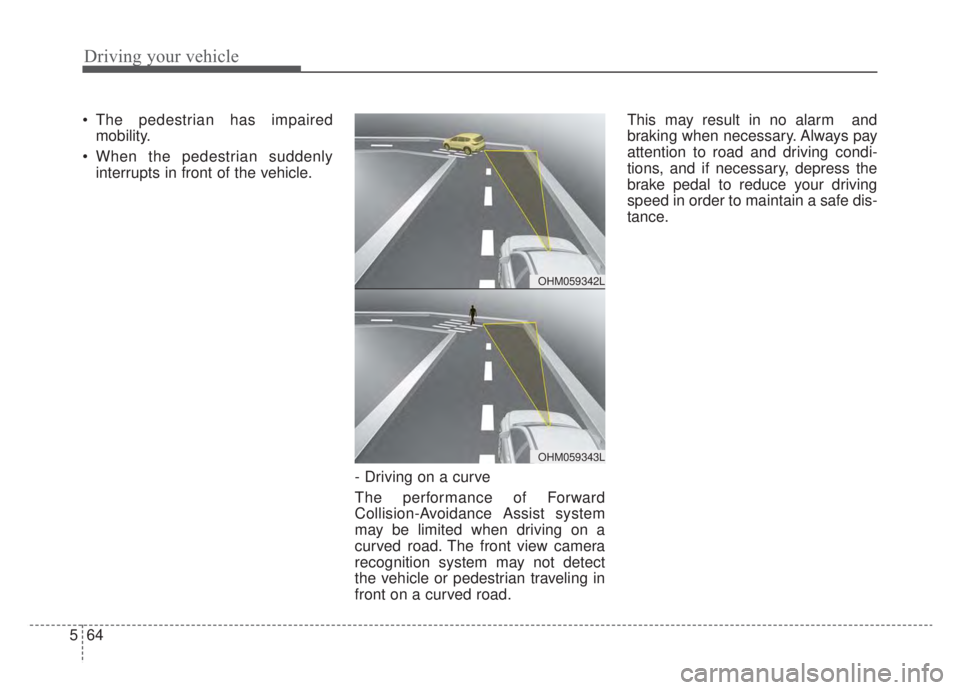
- Driving on a curve
The performance of Forward
Collision-Avoidance Assist system
may be limited when driving on a
curved road. The front view camera
recognition system may not detect
the vehicle or pedestrian traveling in
front on a curved road. This may result in no alarm and
braking when necessary. Always pay
attention to road and driving condi-
tions, and if necessary, depress the
brake pedal to reduce your driving
speed in order to maintain a safe dis-
tance.
OHM059342L
OHM059343L
Page 375 of 687
565
Driving your vehicle
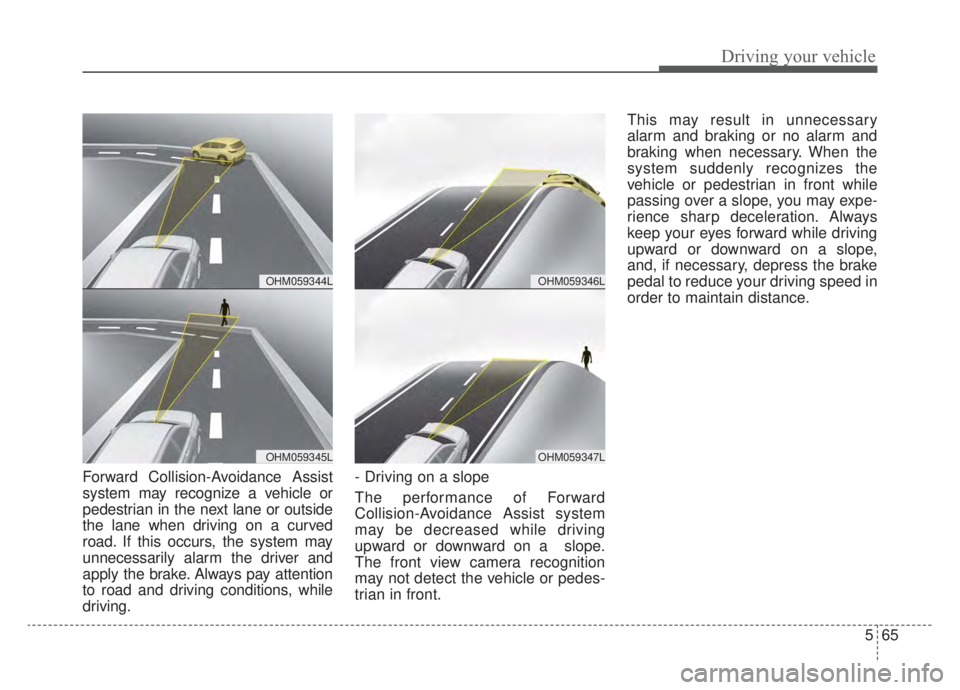
Forward Collision-Avoidance Assist
system may recognize a vehicle or
pedestrian in the next lane or outside
the lane when driving on a curved
road. If this occurs, the system may
unnecessarily alarm the driver and
apply the brake. Always pay attention
to road and driving conditions, while
driving.- Driving on a slope
The performance of Forward
Collision-Avoidance Assist system
may be decreased while driving
upward or downward on a slope.
The front view camera recognition
may not detect the vehicle or pedes-
trian in front.This may result in unnecessary
alarm and braking or no alarm and
braking when necessary. When the
system suddenly recognizes the
vehicle or pedestrian in front while
passing over a slope, you may expe-
rience sharp deceleration. Always
keep your eyes forward while driving
upward or downward on a slope,
and, if necessary, depress the brake
pedal to reduce your driving speed in
order to maintain distance.
OHM059346L
OHM059347L
OHM059344L
OHM059345L
Page 376 of 687
Driving your vehicle
66
5
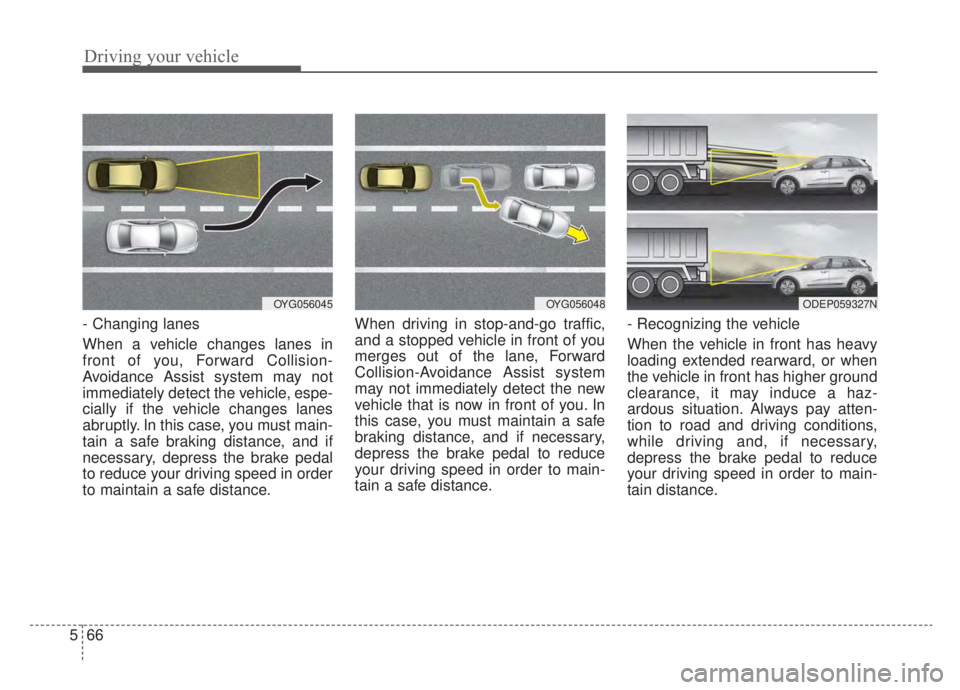
- Changing lanes
When a vehicle changes lanes in
front of you, Forward Collision-
Avoidance Assist system may not
immediately detect the vehicle, espe-
cially if the vehicle changes lanes
abruptly. In this case, you must main-
tain a safe braking distance, and if
necessary, depress the brake pedal
to reduce your driving speed in order
to maintain a safe distance. When driving in stop-and-go traffic,
and a stopped vehicle in front of you
merges out of the lane, Forward
Collision-Avoidance Assist system
may not immediately detect the new
vehicle that is now in front of you. In
this case, you must maintain a safe
braking distance, and if necessary,
depress the brake pedal to reduce
your driving speed in order to main-
tain a safe distance.
- Recognizing the vehicle
When the vehicle in front has heavy
loading extended rearward, or when
the vehicle in front has higher ground
clearance, it may induce a haz-
ardous situation. Always pay atten-
tion to road and driving conditions,
while driving and, if necessary,
depress the brake pedal to reduce
your driving speed in order to main-
tain distance.
OYG056048OYG056045ODEP059327N
Page 377 of 687

567
Driving your vehicle
Detecting pedestrians
The sensor may be limited when:
The pedestrian is not fully detectedby the front view camera recogni-
tion system, for example, if the
pedestrian is leaning over or is not
fully walking upright.
The pedestrian is moving very quickly or appears abruptly in the
camera detection area.
The pedestrian is wearing clothing that easily blends into the back-
ground, making it difficult to be
detected by the camera recogni-
tion system.
The outside lighting is too bright (e.g. when driving in bright sunlight
or in sun glare) or too dark (e.g.
when driving on a dark rural road
at night).
It is difficult to detect and distin- guish the pedestrian from other
objects in the surroundings, for
example, when there is a group of
pedestrians, or a large crowd. There is an item similar to a per-
son's body structure.
The pedestrian is small.
The pedestrian has impaired mobility.
In case of camera sensor recogni- tion is in a marginal state.
When the pedestrian suddenly interrupts in front of the vehicle.
When there is any other electro- magnetic interference.
When the construction area, rail or other metal object is near the
pedestrian.
In case of a large number of pedestrians are gathered.
When it is difficult to distinguish between surroundings and pedes-
trians.
When it is at night or in dark sur- roundings.WARNING
Do not use Forward Collision-Avoidance Assist system
when towing a vehicle.
Application of FCA system
while towing may adversely
affect the safety of your vehi-
cle or the towing vehicle.
Use extreme caution when the vehicle in front of you has
cargo that extends rearward
from the cab, or when the
vehicle in front of you has
higher ground clearance.
FCA system is designed to detect and monitor the vehicle
ahead in the roadway through
camera recognition. It is not
designed to detect bicycles,
motorcycles, or smaller
wheeled objects such as lug-
gage bags, shopping carts, or
strollers.
(Continued)
Page 379 of 687

569
Driving your vehicle
FCA system is to reduce or to avoid
accident risk. It recognizes the dis-
tance from the vehicle ahead, the
pedestrian or the cyclist through the
sensors (i.e. front view camera and
front radar), and, if necessary, warns
the driver of accident risk with the
warning message or the warning
alarms and apply emergency brak-
ing.
❈FCA stands for Forward Collision-
Avoidance Assist.
❈ Sensor fusion (front view camera
+ front radar) FCA system oper-
ates for the vehicle ahead, the
pedestrian or the cyclist in front.System setting and activation
Forward safety
The driver can activate FCA system
by placing the ignition switch or
ENGINE START/STOP button to the
ON position and by selecting:
“User Settings → Driver Assistance
→ Forward Safety”
- If you select “Active Assist”, FCA system activates. FCA produces
warning messages and warning
alarms in accordance with the col-
lision risk levels. Also, it controls
the brakes in accordance with the
collision risk levels.
- If you select “Warning Only”, FCA system activates and produces
only warning alarms in accordance
with the collision risk levels. You
should control the brake directly
because FCA system do not con-
trol the brake.
- If you select “Off ”, FCA system deactivates,
FORWARD COLLISION-AVOIDANCE ASSIST (FCA) (SENSOR FUSION) (IF EQUIPPED)
WARNING
Take the following precautions
when using Forward Collision-
Avoidance Assist system:
This system is only a supple-mental system and it is not
intended to, nor does it replace
the need for the extreme care
and attention of the driver. The
sensing range and objects
detectable by the sensors are
limited. Pay attention to the
road conditions at all times.
NEVER drive too fast in accor- dance with the road condi-
tions or while cornering.
Always drive cautiously to prevent unexpected and sud-
den situations from occur-
ring. FCA system does not
stop the vehicle completely
and is only intended to help
mitigate an imminent colli-
sion.
Page 381 of 687
571
Driving your vehicle
✽ ✽NOTICE
If you change the warning timing,
the warning timing of other systems
may change. Always be aware of
warning timing before changing the
warning timing.
Prerequisite for activation
FCA system gets ready to be activat-
ed, when the “Active assist” or
“Warning only” under the Forward
Safety is selected on the LCD dis-
play, and when the following prereq-
uisites are satisfied.
- The ESC is activated.
- The driving speed is over 5 mph (8
km/h). (However, FCA is activated
within certain driving speed.)
- When recognizing the vehicle or the pedestrian or the cyclist in
front. (However, FCA does not acti-
vate according to conditions in
front and vehicle systems, but it
notices only certain warnings.)
- FCA does not operate properly or it only produces a warning alarms in
accordance with the driving or
vehicle condition.
- If the warning only under the Forward Safety is selected, FCA
produces only warning alarms in
accordance with the collision risk
levels.
✽ ✽ NOTICE
FCA may not operate properly
according to the frontal situation,
the direction of pedestrian or cyclist
and speed.