set time KIA NIRO PHEV 2020 Owner's Manual
[x] Cancel search | Manufacturer: KIA, Model Year: 2020, Model line: NIRO PHEV, Model: KIA NIRO PHEV 2020Pages: 687, PDF Size: 11.43 MB
Page 287 of 687

Features of your vehicle
150
4
To cancel or reset the Auto Defogging
System
Press the front windshield defroster
button for 3 seconds when the igni-
tion switch is in the ON position.
When the ADS system is canceled,
ADS OFF symbol will blink 3 times
per 0.5 sec and ADS OFF will be dis-
played on the climate control infor-
mation screen.
When the ADS system is reset, ADS
OFF symbol will blink 6 times per
0.25 sec and ADS OFF will be disap-
pear on the climate control informa-
tion screen.CAUTION
Do not remove the sensor cover
located on the upper end of thepassenger side windshieldglass. Damage to the systemparts could occur and may notbe covered by your vehicle war-ranty.
Page 292 of 687

4155
Features of your vehicle
Temperature control (Manual)
Each time you press the switch, the temperature setting of the seat
will change as follows :
■ Front seat
The seat warmer defaults to the OFF position whenever the ignition
switch is turned on. Temperature control(Automatic)
The seat warmer starts to automati-
cally control the seat temperature in
order to prevent low-temperature
burns after being manually turned
ON.
■ Front seat
You may manually press the button
to increase the seat temperature.
However, it soon returns to the auto-
matic mode again when pressing the
switch for more than 1.5 seconds
with the seat warmer operating, the
seat warmer will turn OFF. The seat
warmer defaults to the OFF position
whenever the Engine Start/Stop but-
ton is in the ON position.✽ ✽ NOTICE
With the seat warmer switch in the
ON position, the heating system in
the seat turns off or on automatical-
ly depending on the seat tempera-
ture.▼ ▼
OFF→ HIGH( )→ MIDDLE( )→LOW( )
→OFF→HIGH( )→ MIDDLE( )→LOW( )
→→30min
60min
Page 293 of 687

Features of your vehicle
156
4
Air ventilation seat (if equipped)
The temperature setting of the seat
changes according to the switch
position.
If you want to ventilate your seat
cushion, press the switch (blue
color).
Each time you press the button, the airflow will change as follows: The seat warmer (with air ventila-
tion) defaults to the OFF position
whenever the ignition switch is
turned on.
OFF→ HIGH( )→ MIDDLE( )→LOW( )
→
CAUTION - Seat damage
When cleaning the seats, do
not use an organic solventsuch as paint thinner, ben-zene, alcohol and gasoline.Doing so may damage the airventilation seat.
Do not place heavy or sharp objects on the seat. Thosethings may damage the airventilation seat.
Be careful not to spill liquid such as water or beverages onthe seat. If you spill some liq-uid, wipe the seat with a drytowel. Before using the airventilation seat, dry the seatcompletely.
ODEP049423
WARNING- Seat warmer
burns
The seat warmer may cause
burns, even at low tempera-
tures, if used over a long period
of time. Never allow passengers
who may not be able to take
care of themselves to be
exposed to the risk of seat
heater burns. These include:
1. Infants, children, elderly or disabled persons, or hospital
outpatients
2. Persons with sensitive skin or those that burn easily
3. Fatigued individuals
4. Intoxicated individuals
5. Individuals taking medication that can cause drowsiness or
sleepiness (sleeping pills,
cold tablets, etc.)
Page 314 of 687

Driving your vehicle
45
Be sure the exhaust system does
not leak.
The exhaust system should be
checked whenever the vehicle is
raised to change the oil or for any
other purpose. If you hear a change in
the sound of the exhaust or if you drive
over something that strikes the under-
neath side of the vehicle, have the
exhaust system checked as soon as
possible by an authorized Kia dealer.
WARNING- Engineexhaust
Do not inhale exhaust fumes or
leave your engine running in a
enclosed area for a prolonged
time. Exhaust fumes contain
carbon monoxide, a colorless,
odorless gas that can cause
unconsciousness and death by
asphyxiation.WARNING- Open liftgate
Do not drive with the liftgate
open. Poisonous exhaust gases
can enter the passenger com-
partment. If you must drive with
the liftgate open proceed as fol-
lows:
1. Close all windows.
2. Open side vents.
3. Set the air intake control at “Fresh”, the air flow control
at “Floor” or “Face” and the
fan at the highest speed.
Page 363 of 687

553
Driving your vehicle
FCA system is designed to detect
the vehicle ahead or pedestrians
ahead in the roadway through front
view camera recognition to warn the
driver that a collision is imminent,
and if necessary, apply emergency
braking.
❈FCA stands for Forward Collision-
Avoidance AssistSystem setting and activation
Forward safety
The driver can activate FCA system
by placing the ignition switch or
ENGINE START/STOP button to the
ON position and by selecting:
“User Settings → Driver Assistance
→ Forward Safety”
- If you select “Active Assist”, FCA system activates. FCA produces
warning messages and warning
alarms in accordance with the col-
lision risk levels. Also, it controls
the brakes in accordance with the
collision risk levels.
- If you select “Warning Only”, FCA system activates and produces
only warning alarms in accordance
with the collision risk levels. You
should control the brake directly
because FCA system do not con-
trol the brake.
- If you select “Off ”, FCA system deactivates,
FORWARD COLLISION-AVOIDANCE ASSIST (FCA) (FRONT VIEW CAMERA ONLY)
(IF EQUIPPED)
WARNING
Take the following precautions
when using Forward Collision-
Avoidance Assist system:
This system is only a supple-mental system and it is not
intended to, nor does it replace
the need for extreme care and
attention of the driver. The
sensing range and objects
detectable by the sensors are
limited. Pay attention to the
road conditions at all times.
NEVER drive too fast in accor- dance with the road condi-
tions or while cornering.
Always drive cautiously to prevent unexpected and sud-
den situations from occur-
ring. FCA system does not
stop the vehicle completely
and is only intended to help
mitigate an imminent colli-
sion.
Page 364 of 687
Driving your vehicle
54
5
The warning light illumi-
nates on the LCD display,
when you cancel FCA
system.
The driver can monitor the FCA
ON/OFF status on the LCD display.
Also, the warning light illuminates
when the ESC (Electronic Stability
Control) is turned off. When the warn-
ing light remains ON with FCA acti-
vated, have your vehicle inspected by
an authorized Kia dealer.Warning Timing
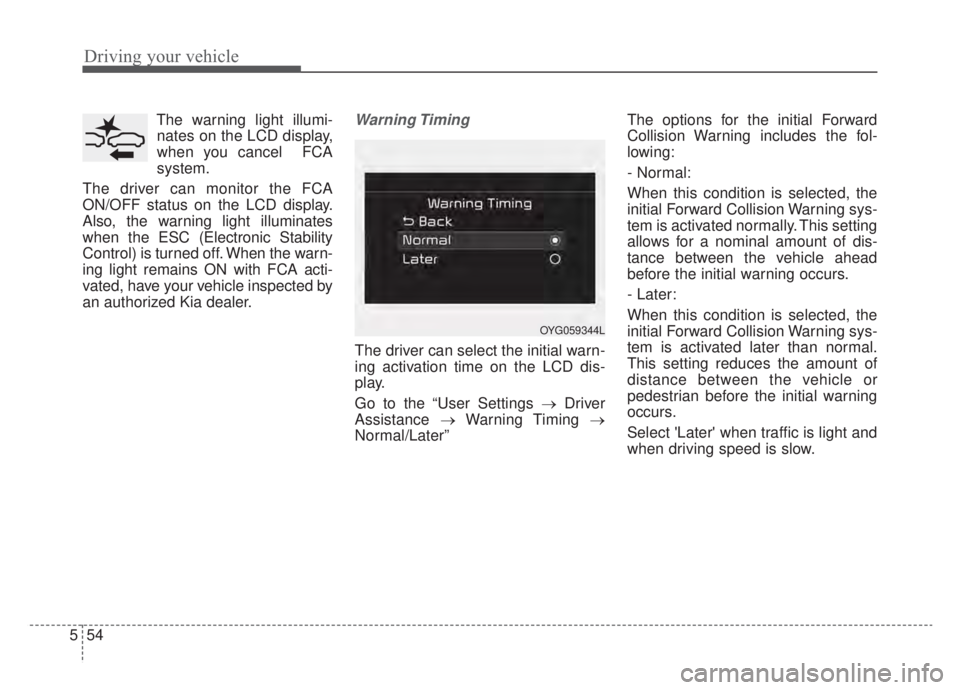
The driver can select the initial warn-
ing activation time on the LCD dis-
play.
Go to the “User Settings → Driver
Assistance →Warning Timing →
Normal/Later” The options for the initial Forward
Collision Warning includes the fol-
lowing:
- Normal:
When this condition is selected, the
initial Forward Collision Warning sys-
tem is activated normally. This setting
allows for a nominal amount of dis-
tance between the vehicle ahead
before the initial warning occurs.
- Later:
When this condition is selected, the
initial Forward Collision Warning sys-
tem is activated later than normal.
This setting reduces the amount of
distance between the vehicle or
pedestrian before the initial warning
occurs.
Select 'Later' when traffic is light and
when driving speed is slow.
OYG059344L
Page 366 of 687

Driving your vehicle
56
5
FCA warning message and
system control
FCA produces warning messages
and warning alarms in accordance
with the collision risk levels, such as
abrupt stopping of the vehicle in
front, insufficient braking distance,
pedestrian detection. Also, it controls
the brakes in accordance with the
collision risk levels.
The driver can select the initial warn-
ing activation time in the ‘Settings’ on
the LCD display or Infotainment
System screen. The options for the
initial Forward Collision Warning
include Normal or Late initial warning
time.
Collision Warning (1st warning)
The warning message appears on
the LCD display with the warning
alarms.
The Vehicle may slow down slightly - It will operate if the vehicle speedis greater than 5 mph (8 km/h)
and less than or equal to 40 mph
(60 km/h) on a forward vehicle.
(Depending on the condition of
the vehicle ahead and the envi-
ronment surrounding it, the possi-
ble maximum operating speed
may be reduced.) - For pedestrians, the vehicle
speed is greater than or equal to
5 mph (8 km/h) and less than 40
mph (60 km/h). (Depending on
the condition of pedestrians and
the surrounding environment the
possible maximum operating
speed may be reduced.)
FCA system controls the brakes within certain limit to release shock
from the collision.
- If you select “Warning Only”, FCAsystem activates and produces
only warning alarms in accor-
dance with the collision risk lev-
els. You should control the brake
directly because FCA system do
not control the brake.
OJF058389L
Page 379 of 687

569
Driving your vehicle
FCA system is to reduce or to avoid
accident risk. It recognizes the dis-
tance from the vehicle ahead, the
pedestrian or the cyclist through the
sensors (i.e. front view camera and
front radar), and, if necessary, warns
the driver of accident risk with the
warning message or the warning
alarms and apply emergency brak-
ing.
❈FCA stands for Forward Collision-
Avoidance Assist.
❈ Sensor fusion (front view camera
+ front radar) FCA system oper-
ates for the vehicle ahead, the
pedestrian or the cyclist in front.System setting and activation
Forward safety
The driver can activate FCA system
by placing the ignition switch or
ENGINE START/STOP button to the
ON position and by selecting:
“User Settings → Driver Assistance
→ Forward Safety”
- If you select “Active Assist”, FCA system activates. FCA produces
warning messages and warning
alarms in accordance with the col-
lision risk levels. Also, it controls
the brakes in accordance with the
collision risk levels.
- If you select “Warning Only”, FCA system activates and produces
only warning alarms in accordance
with the collision risk levels. You
should control the brake directly
because FCA system do not con-
trol the brake.
- If you select “Off ”, FCA system deactivates,
FORWARD COLLISION-AVOIDANCE ASSIST (FCA) (SENSOR FUSION) (IF EQUIPPED)
WARNING
Take the following precautions
when using Forward Collision-
Avoidance Assist system:
This system is only a supple-mental system and it is not
intended to, nor does it replace
the need for the extreme care
and attention of the driver. The
sensing range and objects
detectable by the sensors are
limited. Pay attention to the
road conditions at all times.
NEVER drive too fast in accor- dance with the road condi-
tions or while cornering.
Always drive cautiously to prevent unexpected and sud-
den situations from occur-
ring. FCA system does not
stop the vehicle completely
and is only intended to help
mitigate an imminent colli-
sion.
Page 380 of 687
Driving your vehicle
70
5
The warning light illumi-
nates on the LCD display,
when you cancel FCA sys-
tem. The driver can moni-
tor the FCA ON/OFF status on the
LCD display. Also, the warning light
illuminates when the ESC (Electronic
Stability Control) is turned off. When
the warning light remains ON with
FCA activated, have your vehicle
inspected by an authorized Kia deal-
er.Warning Timing
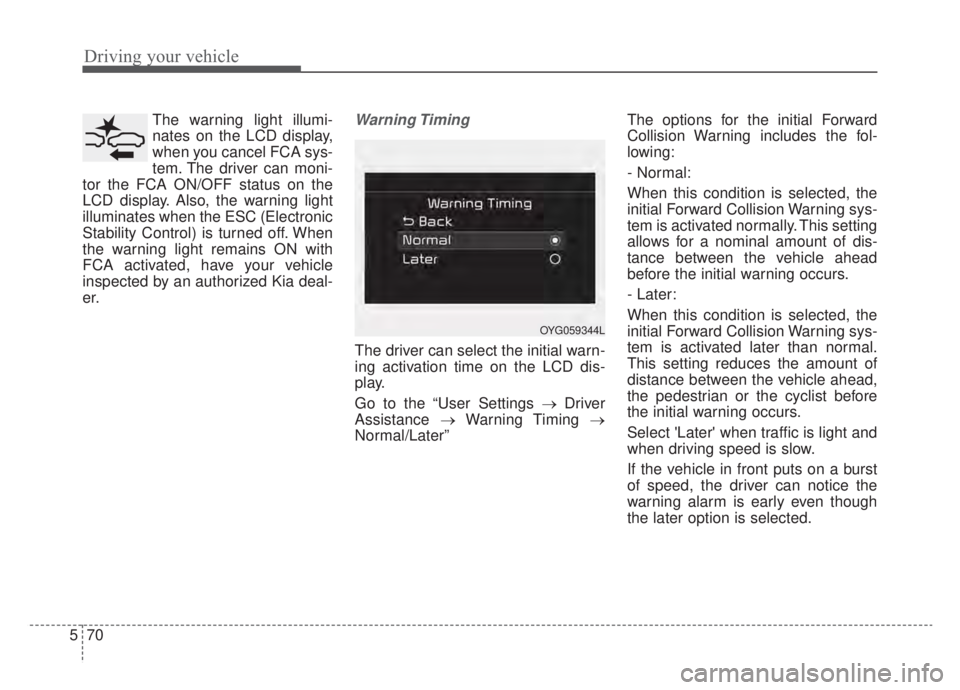
The driver can select the initial warn-
ing activation time on the LCD dis-
play.
Go to the “User Settings → Driver
Assistance →Warning Timing →
Normal/Later” The options for the initial Forward
Collision Warning includes the fol-
lowing:
- Normal:
When this condition is selected, the
initial Forward Collision Warning sys-
tem is activated normally. This setting
allows for a nominal amount of dis-
tance between the vehicle ahead
before the initial warning occurs.
- Later:
When this condition is selected, the
initial Forward Collision Warning sys-
tem is activated later than normal.
This setting reduces the amount of
distance between the vehicle ahead,
the pedestrian or the cyclist before
the initial warning occurs.
Select 'Later' when traffic is light and
when driving speed is slow.
If the vehicle in front puts on a burst
of speed, the driver can notice the
warning alarm is early even though
the later option is selected.
OYG059344L
Page 382 of 687

Driving your vehicle
72
5
FCA warning message and
system control
FCA system produces warning mes-
sages and warning alarms in accor-
dance with the collision risk levels of
followings like vehicle’s sudden brak-
ing in front or lack of vehicle to vehi-
cle distance or collision to pedestri-
ans or cyclist. Also, it controls the
brakes in accordance with the colli-
sion risk levels.
The driver can select the initial warn-
ing activation time in the User set-
tings in the LCD display. The
options for the initial Forward
Collision Warning include Normal or
Late initial warning time.
Collision Warning (1st warning)
The warning message appears on the LCD display with the warning
alarms.
The Vehicle may slow down slightly - It will operate if the vehicle speedis greater than 5 mph (8 km/h)
and less than or equal to 110
mph (180 km/h) on a forward
vehicle. (Depending on the condi-
tion of the vehicle ahead and the
environment surrounding it, the
possible maximum operating
speed may be reduced.)
WARNING
Completely stop the vehicle in a safe location before operat-
ing the switch on the steering
wheel to activate/deactivate
FCA system.
FCA system automatically activates upon placing the
ignition switch to the ON posi-
tion. The driver can deactivate
FCA system by canceling the
system setting on the LCD
display or Infotainment
System screen.
FCA system automatically deactivates upon canceling
the ESC. When the ESC is
canceled, FCA system cannot
be activated on the LCD dis-
play or Infotainment System
screen.
FCA system warning light will
illuminate, which is normal.
OJF058389L