battery KIA NIRO PHEV 2020 Quick Start Guide Base Audio
[x] Cancel search | Manufacturer: KIA, Model Year: 2020, Model line: NIRO PHEV, Model: KIA NIRO PHEV 2020Pages: 134, PDF Size: 4.4 MB
Page 49 of 134
2-17
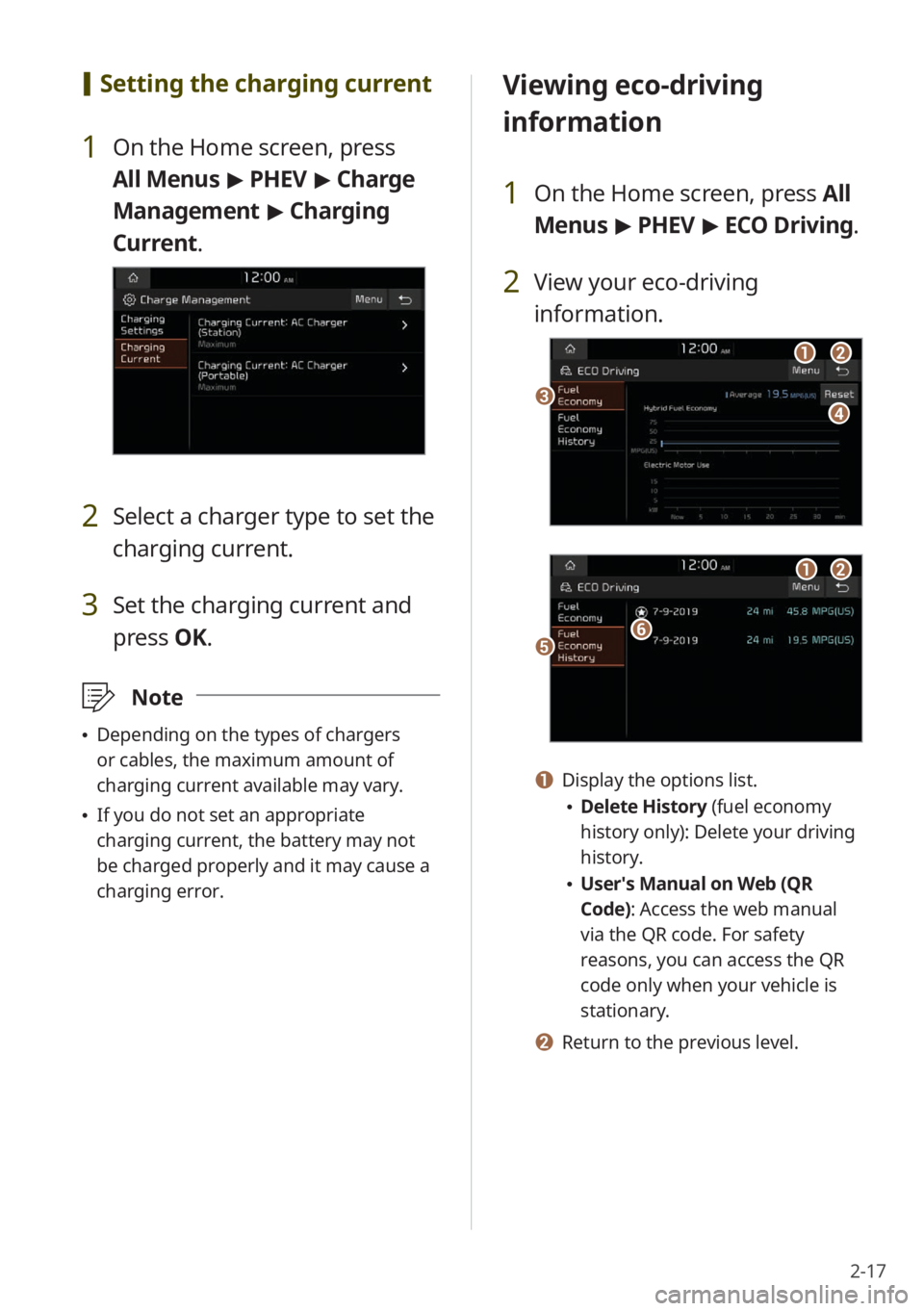
[Setting the charging current
1 On the Home screen, press
All Menus > PHEV > Charge
Management > Charging
Current .
2 Select a charger type to set the
charging current.
3 Set the charging current and
press OK.
\333Note
Depending on the types of chargers
or cables, the maximum amount of
charging current available may vary.
If you do not set an appropriate
charging current, the battery may not
be charged properly and it may cause a
charging error.
Viewing eco-driving
information
1 On the Home screen, press All
Menus > PHEV > ECO Driving.
2 View your eco-driving
information.
cd
ab
ef
ab
a Display the options list.
Delete History (fuel economy
history only): Delete your driving
history.
User′s Manual on Web (QR
Code): Access the web manual
via the QR code. For safety
reasons, you can access the QR
code only when your vehicle is
stationary.
b Return to the previous level.
Page 50 of 134
2-18
Viewing the energy flow
You can view the energy flow between the
engine, the electric motor, and the battery
according to your vehicle′s driving status.
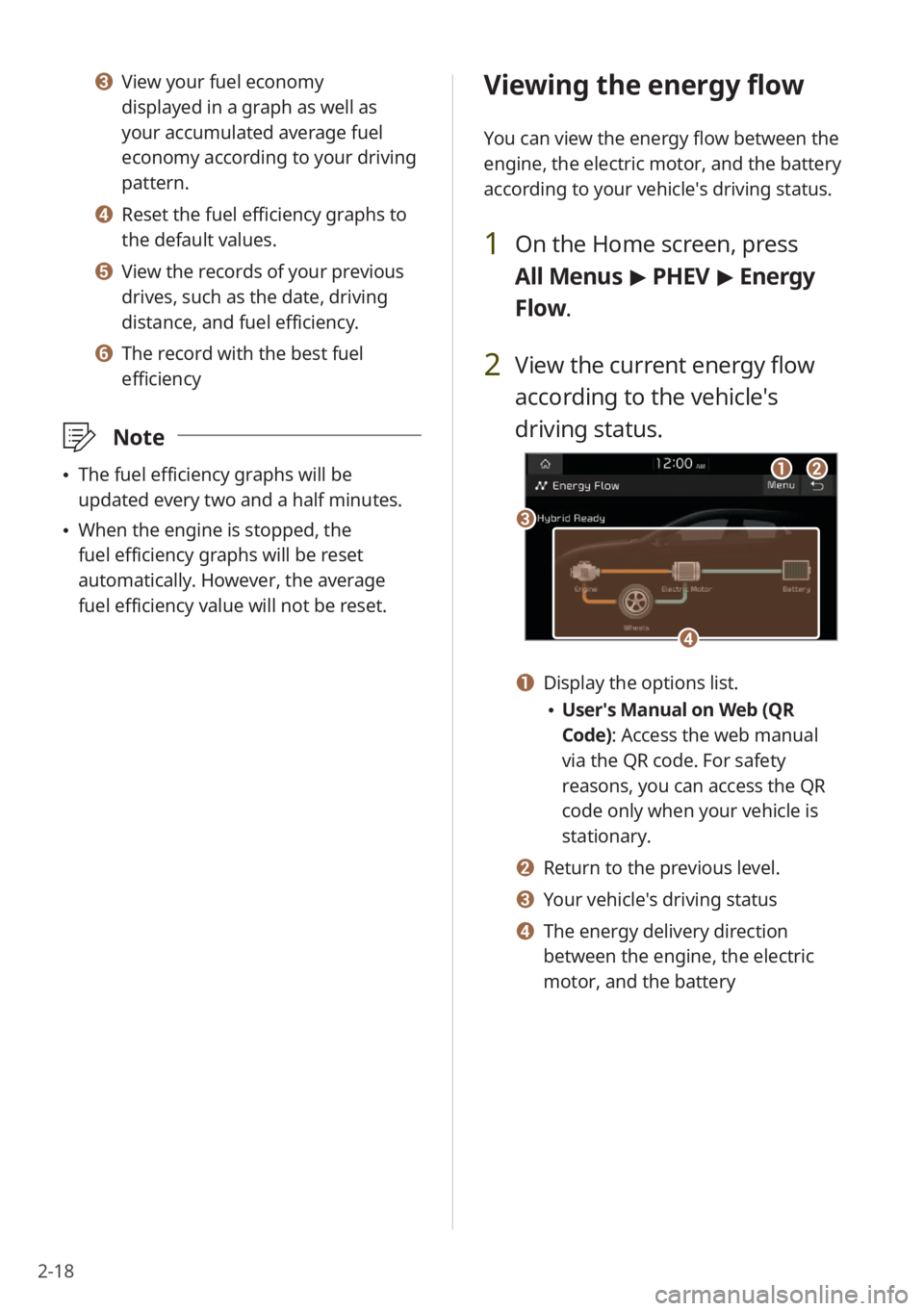
1 On the Home screen, press
All Menus > PHEV > Energy
Flow.
2 View the current energy flow
according to the vehicle′s
driving status.
c
ab
d
a Display the options list.
User′s Manual on Web (QR
Code): Access the web manual
via the QR code. For safety
reasons, you can access the QR
code only when your vehicle is
stationary.
b Return to the previous level.
c Your vehicle′s driving status
d The energy delivery direction
between the engine, the electric
motor, and the battery
c View your fuel economy
displayed in a graph as well as
your accumulated average fuel
economy according to your driving
pattern.
d Reset the fuel efficiency graphs to
the default values.
e View the records of your previous
drives, such as the date, driving
distance, and fuel efficiency.
f The record with the best fuel
efficiency
\333 Note
The fuel efficiency graphs will be
updated every two and a half minutes.
When the engine is stopped, the
fuel efficiency graphs will be reset
automatically. However, the average
fuel efficiency value will not be reset.
Page 51 of 134

2-19
Starting the vehicle
Starting the vehicle with the motor′s
power
Driving
Driving the vehicle with the engine′s
power and the motor′s power
Driving the vehicle with the engine′s
power
Driving the vehicle with the motor′s
power
Charging the battery and driving the
vehicle with the engine′s power
Charging the battery with the engine′s
power and driving the vehicle with the
motor′s power
Decelerating
Charging the battery with the
deceleration energy from braking and
the engine′s power
Charging the battery with the
deceleration energy from braking
Page 52 of 134

2-20
Reducing the engine′s power for
slowing down the vehicle and charging
the battery with the deceleration
energy from the engine′s power
Reducing the engine′s power for
slowing down the vehicle
Idle mode
Idle mode without delivering any
power
Charging the battery with the engine′s
power while the vehicle is in idle mode
Page 116 of 134
9-4
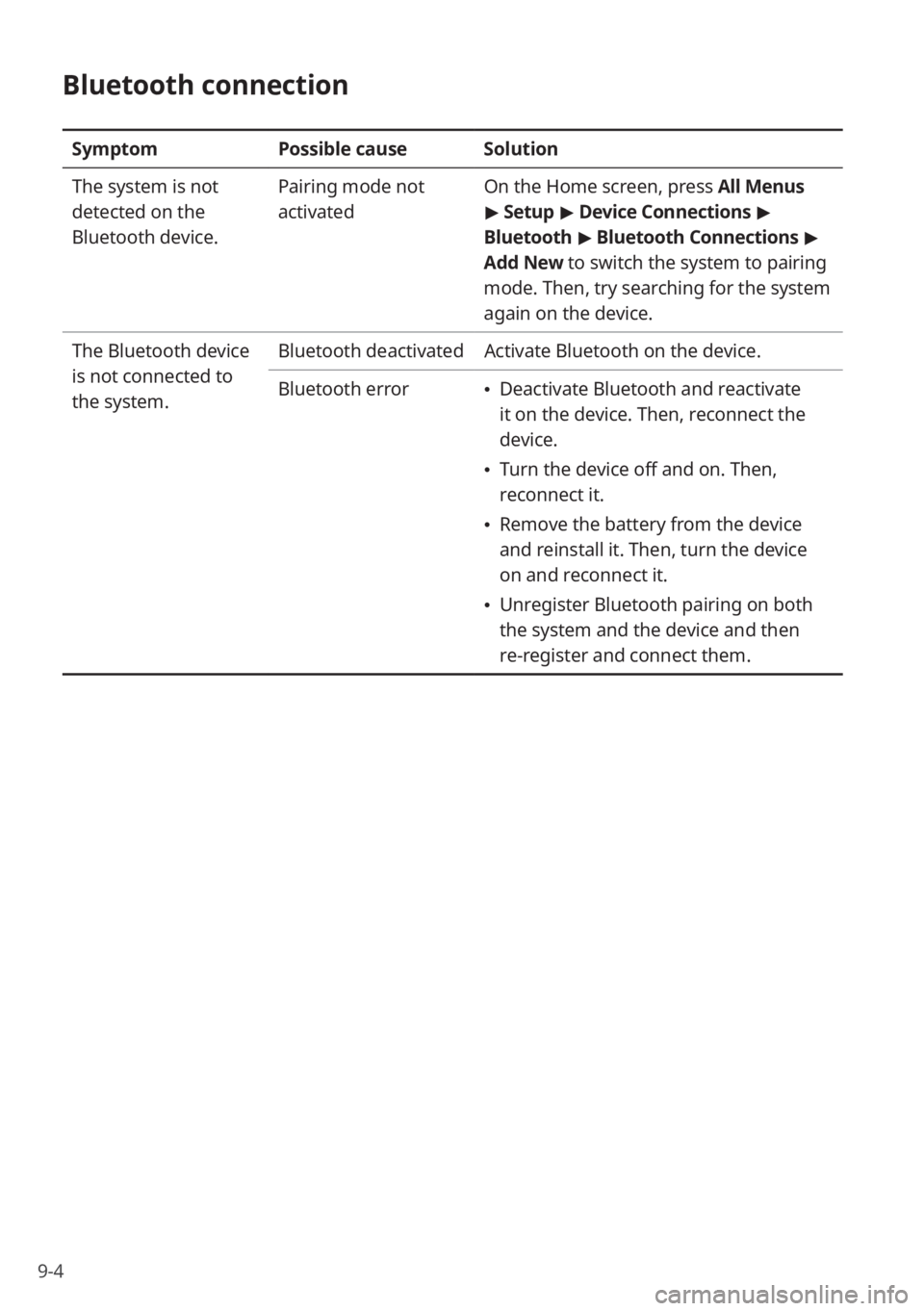
Bluetooth connection
SymptomPossible causeSolution
The system is not
detected on the
Bluetooth device. Pairing mode not
activated
On the Home screen, press All Menus
>
Setup > Device Connections >
Bluetooth > Bluetooth Connections >
Add New to switch the system to pairing
mode. Then, try searching for the system
again on the device.
The Bluetooth device
is not connected to
the system. Bluetooth deactivated
Activate Bluetooth on the device.
Bluetooth error
Deactivate Bluetooth and reactivate
it on the device. Then, reconnect the
device.
Turn the device off and on. Then,
reconnect it.
Remove the battery from the device
and reinstall it. Then, turn the device
on and reconnect it.
Unregister Bluetooth pairing on both
the system and the device and then
re-register and connect them.
Page 117 of 134
9-5
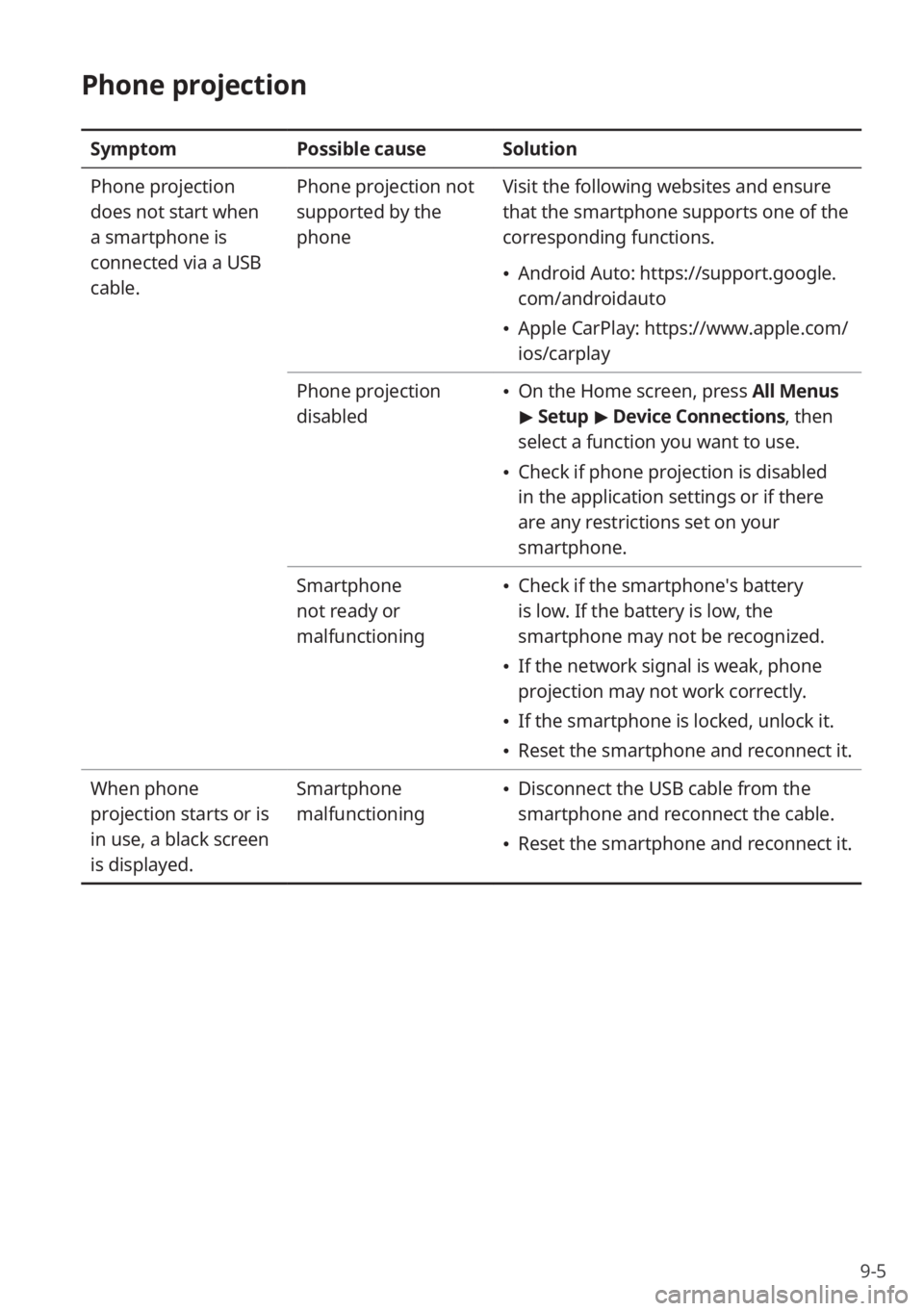
Phone projection
SymptomPossible causeSolution
Phone projection
does not start when
a smartphone is
connected via a USB
cable. Phone projection not
supported by the
phone
Visit the following websites and ensure
that the smartphone supports one of the
corresponding functions.
Android Auto: https://support.google.
com/androidauto
Apple CarPlay: https://www.apple.com/
ios/carplay
Phone projection
disabled
On the Home screen, press All Menus
> Setup > Device Connections , then
select a function you want to use.
Check if phone projection is disabled
in the application settings or if there
are any restrictions set on your
smartphone.
Smartphone
not ready or
malfunctioning
Check if the smartphone′s battery
is low. If the battery is low, the
smartphone may not be recognized.
If the network signal is weak, phone
projection may not work correctly.
If the smartphone is locked, unlock it.
Reset the smartphone and reconnect it.
When phone
projection starts or is
in use, a black screen
is displayed. Smartphone
malfunctioning
Disconnect the USB cable from the
smartphone and reconnect the cable.
Reset the smartphone and reconnect it.
Page 129 of 134
9-17
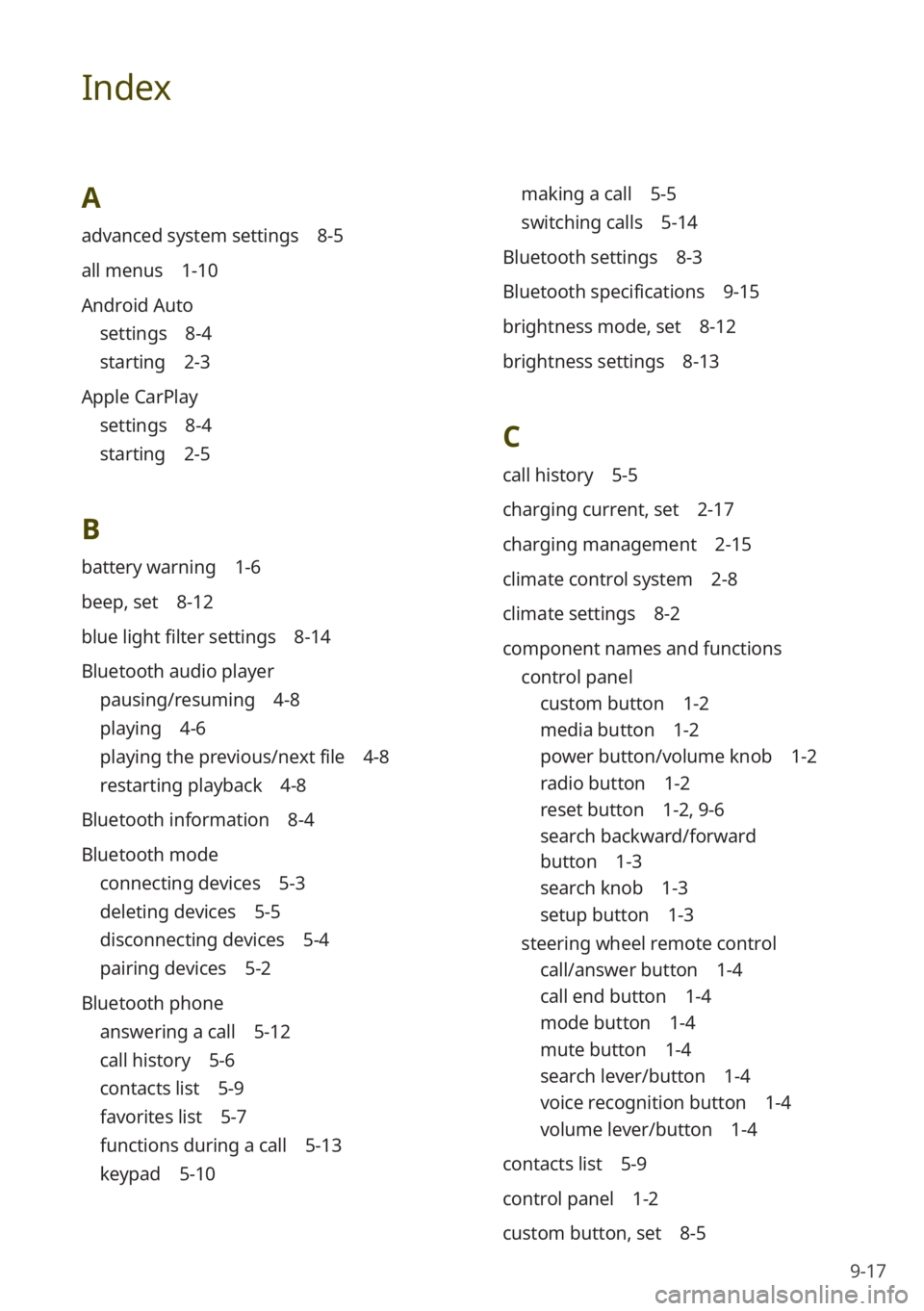
Index
A
advanced system settings 8-5
all menus 1-10
Android Auto
settings 8-4
starting 2-3
Apple CarPlay
settings 8-4
starting 2-5
B
battery warning 1-6
beep, set 8-12
blue light filter settings 8-14
Bluetooth audio player
pausing/resuming 4-8
playing 4-6
playing the previous/next file 4-8
restarting playback 4-8
Bluetooth information 8-4
Bluetooth mode
connecting devices 5-3
deleting devices 5-5
disconnecting devices 5-4
pairing devices 5-2
Bluetooth phone
answering a call 5-12
call history 5-6
contacts list 5-9
favorites list 5-7
functions during a call 5-13
keypad 5-10
making a call 5-5
switching calls 5-14
Bluetooth settings 8-3
Bluetooth specifications 9-15
brightness mode, set 8-12
brightness settings 8-13
C
call history 5-5
charging current, set 2-17
charging management 2-15
climate control system 2-8
climate settings 8-2
component names and functions control panel
custom button 1-2
media button 1-2
power button/volume knob 1-2
radio button 1-2
reset button 1-2 , 9-6
search backward/forward
button 1-3
search knob 1-3
setup button 1-3
steering wheel remote control
call/answer button 1-4
call end button 1-4
mode button 1-4
mute button 1-4
search lever/button 1-4
voice recognition button 1-4
volume lever/button 1-4
contacts list 5-9
control panel 1-2
custom button, set 8-5