phone KIA NIRO PHEV 2020 Quick Start Guide Base Audio
[x] Cancel search | Manufacturer: KIA, Model Year: 2020, Model line: NIRO PHEV, Model: KIA NIRO PHEV 2020Pages: 134, PDF Size: 4.4 MB
Page 33 of 134
Useful functions
Using phone projection
Getting to know the driving assistance screen
Using the climate control system (if equipped) Viewing driving information (if equipped) Viewing UVO notices (if equipped)
Using the Hybrid menu (hybrid electric vehicles only)
Using the Plug-in Hybrid menu (plug-in hybrid electric vehicles only)
2
Page 34 of 134
2-2
Using phone
projection
Phone projection enables you to connect
your Android smartphone or iPhone to
your system and use their functions via
the system. You can perform and control
your smartphone applications by using
the larger screen and enhance your use of
the system.
\334Warning
Driving while distracted can result
in a loss of vehicle control that may
lead to an accident, severe bodily
injury, or death. The driver′s primary
responsibility is the safe and legal
operation of the vehicle, and the use
of any vehicle systems, including
the touch screen and steering wheel
controls, which take the driver′s eyes,
attention, and focus away from the safe
operation of the vehicle, or which are
not permissible by law, should never be
used during the operation of the vehicle.
Do not adjust or set up any phone
settings while driving. You may lose
your steering control which could cause
an accident and severe bodily injuries.
\335 Caution
Using an approved USB cable provided
by your smartphone manufacturer is
recommended. Using unapproved USB
cables may cause a phone projection
error or a system malfunction.
Use only applications that are
compatible with phone projection.
Using incompatible applications may
cause problems for your system or
smartphone.
Only compatible applications will be
displayed on the phone projection
screen. You can also check compatible
applications by visiting the following
websites:
- Apple CarPlay: https://www.apple.
com/ios/carplay
-Android Auto: https://www.android.
com/auto
Page 35 of 134
2-3
Connecting your Android
smartphone via Android
Auto
You can connect your Android
smartphone and system via Android Auto
and control your smartphone applications
on the system′s screen.
Before using Android Auto, be sure to
check the following:
Android Auto support on your
smartphone
Visit the Android homepage (https://
www.android.com/auto) and check the
regions, device types, and models that
support Android Auto.
Android Auto installed on your
smartphone
Download and install the Android Auto
application from Google Play. If you
are in a region where Android Auto is
not supported, you cannot install the
application. Start Android Auto by following the steps
below:
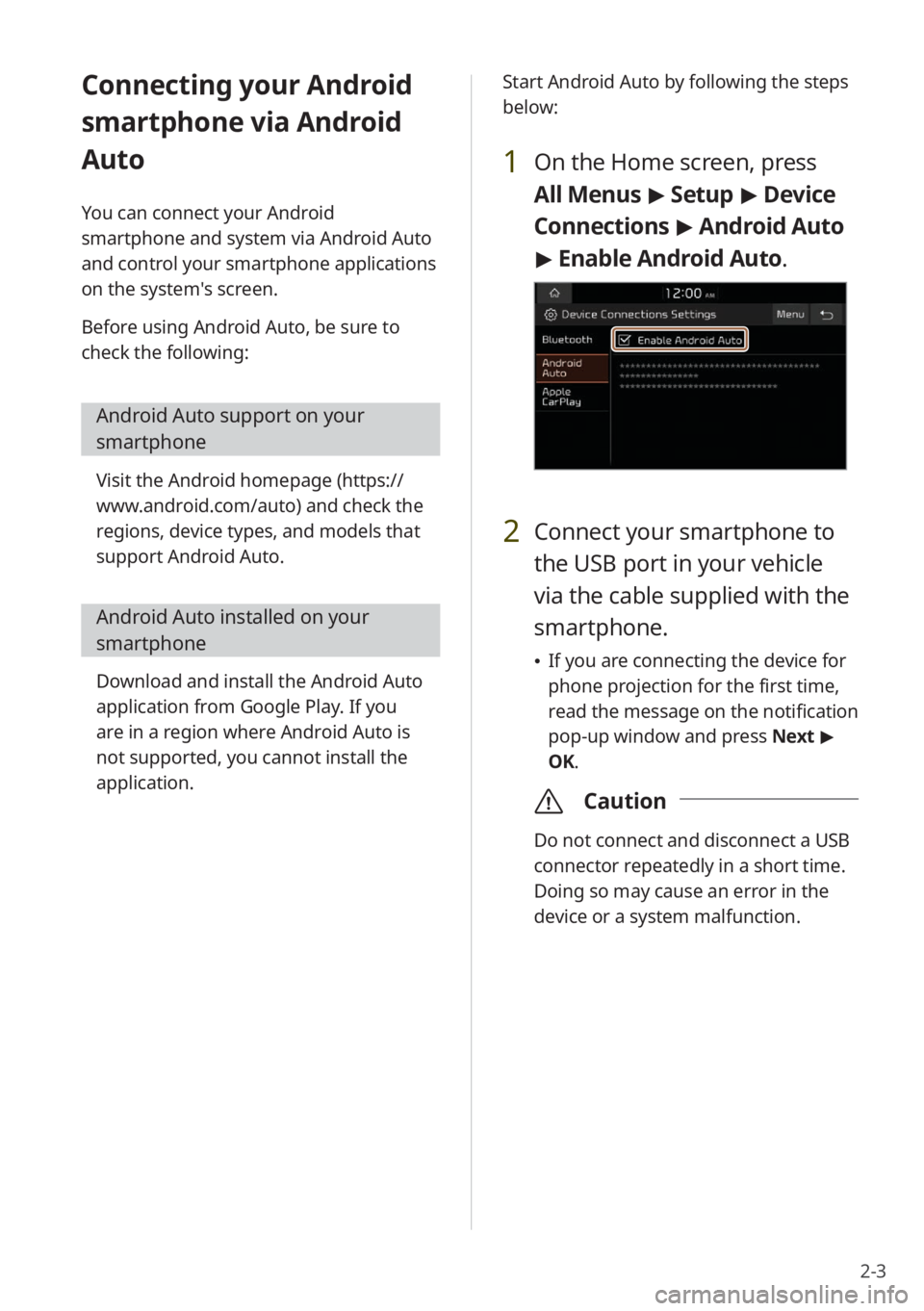
1 On the Home screen, press
All Menus
> Setup > Device
Connections > Android Auto
> Enable Android Auto.
2 Connect your smartphone to
the USB port in your vehicle
via the cable supplied with the
smartphone.
If you are connecting the device for
phone projection for the first time,
read the message on the notification
pop-up window and press Next >
OK.
\335 Caution
Do not connect and disconnect a USB
connector repeatedly in a short time.
Doing so may cause an error in the
device or a system malfunction.
Page 36 of 134
2-4
3 If your smartphone is locked,
unlock it and agree to use
phone projection.
When the smartphone is recognized
successfully, the Android Auto menu
is activated on the All Menus screen.
4 On the Home screen, press All
Menus > Android Auto.
5 Use your smartphone's
functions, such as calling and
messaging, on your system.
Press an icon on the screen to run an
application or perform a function.
Press the Voice recognition button
on the steering wheel to start
Google voice recognition.
Press the Call/Answer button on
the steering wheel to start using
Bluetooth call functions.
6 To end Android Auto, remove
the USB cable from your
system.
\333 Note
When phone projection is active, you
cannot change the phone projection
settings. To change the settings, remove
the USB cable from your system.
Depending on Google's policies, the
icons on the main screen of Android
Auto may change.
Depending on Google's policies,
applications or functions that are
compatible with Android Auto
may change. To check compatible
applications, visit the Android
homepage (https://www.android.com/
auto).
To use phone projection in optimized
environments, update your
smartphone's operating system to the
latest version.
Depending on the connected device's
hardware, firmware, and operating
system versions, the recognition time
may vary.
Using phone projection may result in
mobile communication charges.
Depending on the network signal status,
some functions may not work correctly.
Avoid controlling your smartphone
while phone projection is in use.
While you are using Android Auto, the
following functions are unavailable:
- USB mode
-Searches using the Search knob
(TUNE FILE)
- Apple CarPlay
Page 37 of 134
2-5
Connecting your iPhone
via Apple CarPlay
You can connect your iPhone and system
via Apple CarPlay and control your
smartphone applications on the system′s
screen.
Before using Apple CarPlay, be sure to
check the following:
Apple CarPlay support on your
iPhone
Visit the Apple homepage (https://
www.apple.com/ios/carplay) and check
the iPhone models that support Apple
CarPlay.
Apple CarPlay and Siri activated or
updated on your iPhone
On your iPhone, ensure that Apple
CarPlay and Siri are activated. If your
iPhone does not have the functions,
update the iPhone's operating system to
the latest version. Start Apple CarPlay by following the steps
below:
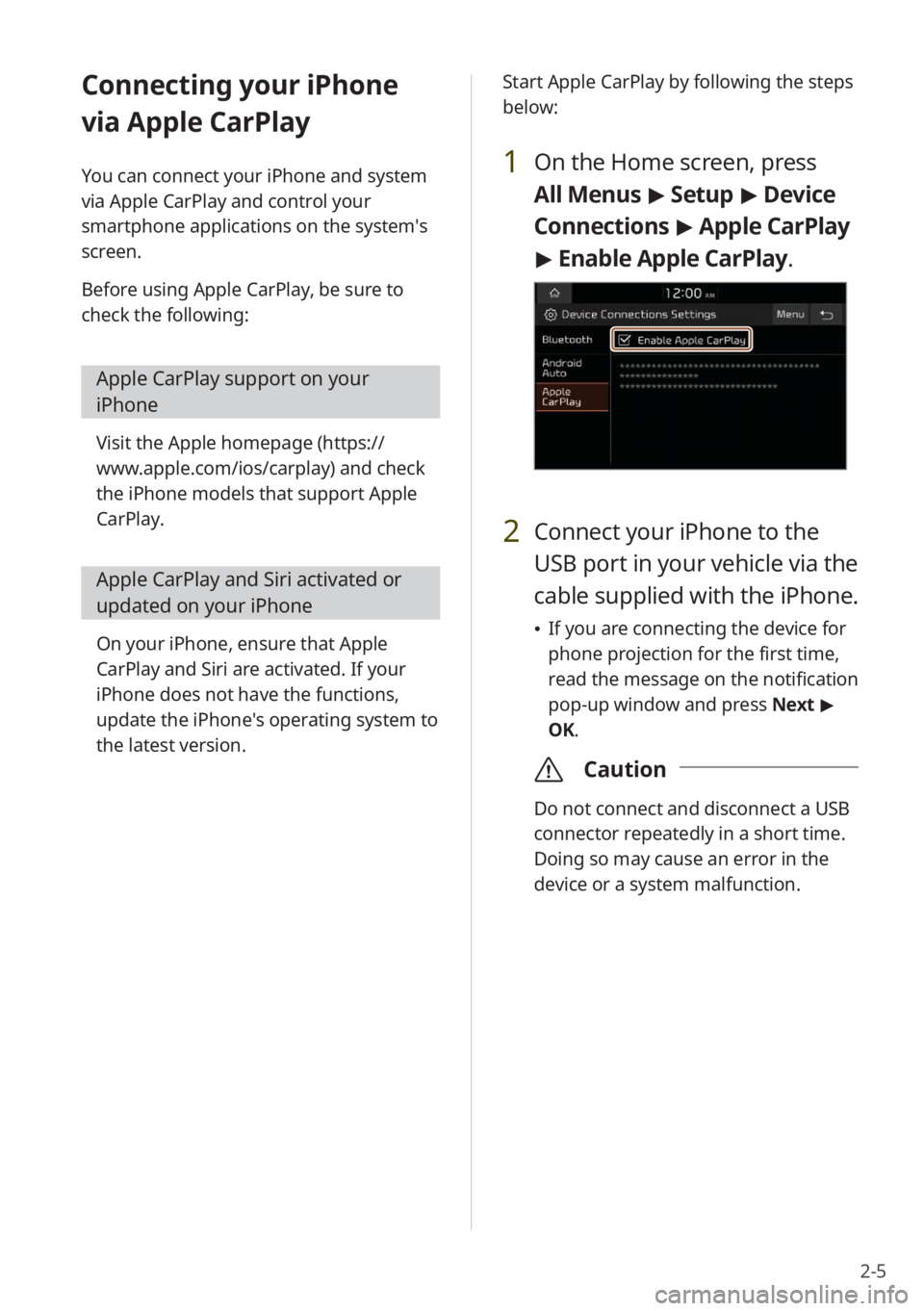
1 On the Home screen, press
All Menus
> Setup > Device
Connections > Apple CarPlay
> Enable Apple CarPlay .
2 Connect your iPhone to the
USB port in your vehicle via the
cable supplied with the iPhone.
If you are connecting the device for
phone projection for the first time,
read the message on the notification
pop-up window and press Next >
OK.
\335 Caution
Do not connect and disconnect a USB
connector repeatedly in a short time.
Doing so may cause an error in the
device or a system malfunction.
Page 38 of 134
2-6
3 If your iPhone is locked, unlock
it and agree to use phone
projection.
When the iPhone is recognized
successfully, the Apple CarPlay
menu is activated on the All Menus
screen.
4 On the Home screen, press All
Menus > Apple CarPlay.
5 Use your iPhone's functions,
such as calling and messaging,
on your system.
Press an icon on the screen to run
an application or perform a function.
Press the KIA icon (
) to move to
the Home screen of your system.
Press the Voice recognition button
on the steering wheel to start Siri.
Press the Call/Answer button on
the steering wheel to answer an
incoming call.
6 To end Apple CarPlay, remove
the USB cable from your
system.
\333 Note
When phone projection is active, you
cannot change the phone projection
settings. To change the settings, remove
the USB cable from your system.
Depending on Apple's policies,
applications or functions that are
compatible with Apple CarPlay
may change. To check compatible
applications, visit the Apple homepage
(https://www.apple.com/ios/carplay).
To use phone projection in optimized
environments, update your
smartphone's operating system to the
latest version.
Depending on the connected device's
hardware, firmware, and operating
system versions, the recognition time
may vary.
Using phone projection may result in
mobile communication charges.
Depending on the network signal status,
some functions may not work correctly.
Avoid controlling your smartphone
while phone projection is in use.
While you are using Apple CarPlay, the
following functions are unavailable:
- Bluetooth
-USB mode
-Searches using the Search knob
(TUNE FILE)
- Android Auto
Page 68 of 134
4-6
[Searching for music files on
a files list
Access a files list to search for and select
a song.
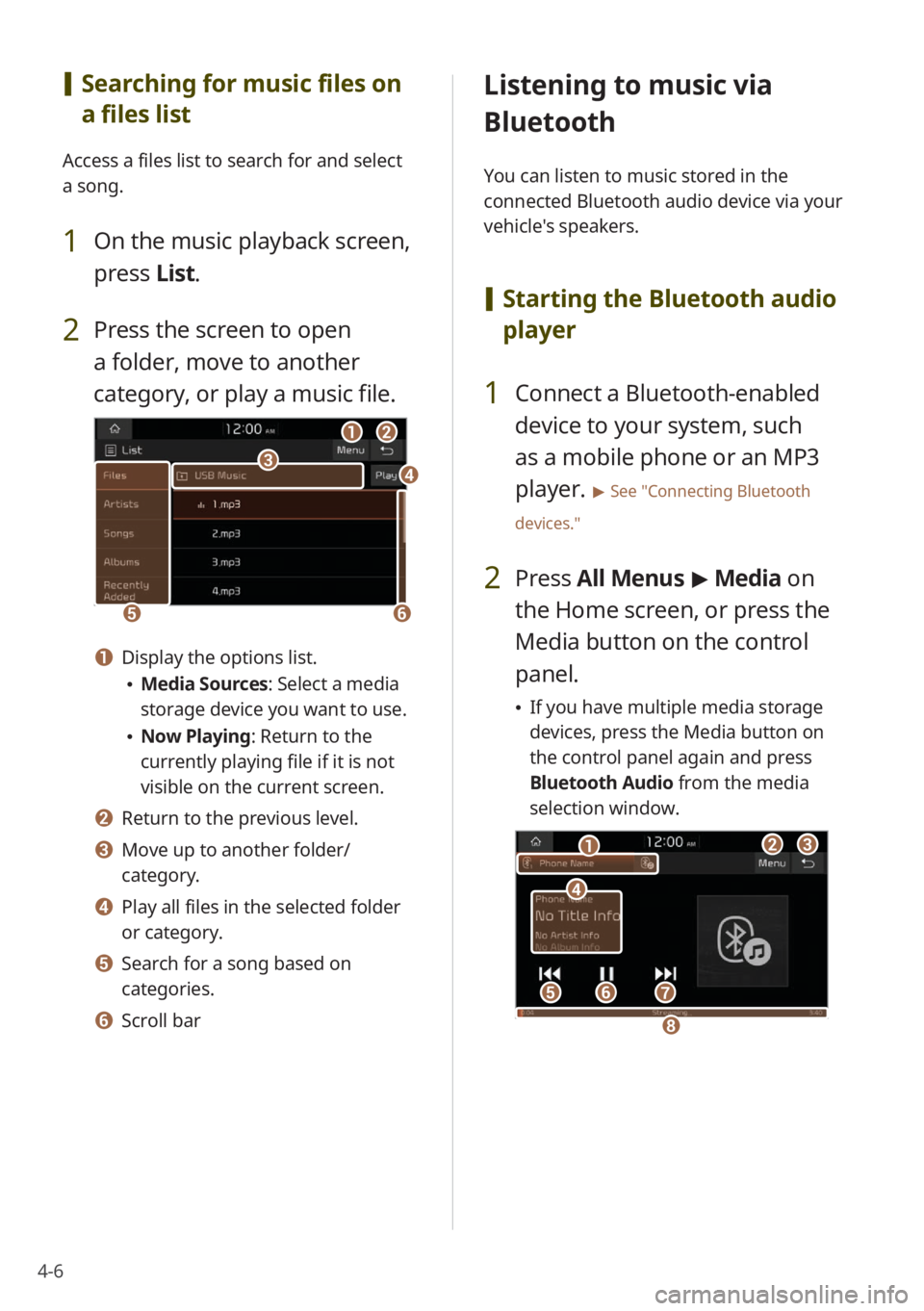
1 On the music playback screen,
press List.
2 Press the screen to open
a folder, move to another
category, or play a music file.
ba
ef
cd
a Display the options list.
Media Sources: Select a media
storage device you want to use.
Now Playing: Return to the
currently playing file if it is not
visible on the current screen.
b Return to the previous level.
c Move up to another folder/
category.
d Play all files in the selected folder
or category.
e Search for a song based on
categories.
f Scroll bar
Listening to music via
Bluetooth
You can listen to music stored in the
connected Bluetooth audio device via your
vehicle's speakers.
[ Starting the Bluetooth audio
player
1 Connect a Bluetooth-enabled
device to your system, such
as a mobile phone or an MP3
player.
> See ″Connecting Bluetooth
devices.″
2 Press All Menus > Media on
the Home screen, or press the
Media button on the control
panel.
If you have multiple media storage
devices, press the Media button on
the control panel again and press
Bluetooth Audio from the media
selection window.
bc
efg
d
a
h
Page 69 of 134
4-7
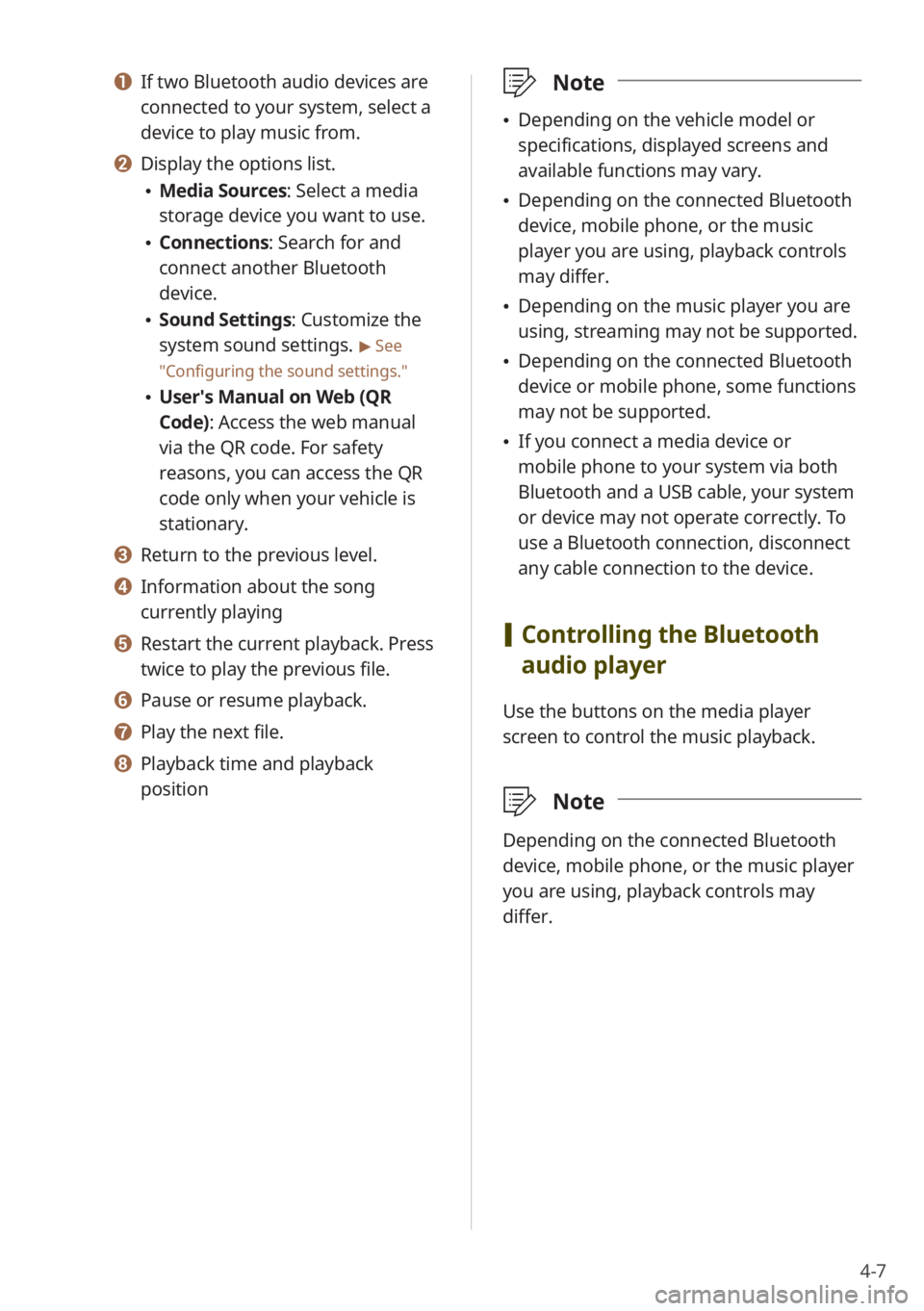
a If two Bluetooth audio devices are
connected to your system, select a
device to play music from.
b Display the options list.
Media Sources: Select a media
storage device you want to use.
Connections : Search for and
connect another Bluetooth
device.
Sound Settings: Customize the
system sound settings.
> See
″ Configuring the sound settings.″
User′s Manual on Web (QR
Code): Access the web manual
via the QR code. For safety
reasons, you can access the QR
code only when your vehicle is
stationary.
c Return to the previous level.
d Information about the song
currently playing
e Restart the current playback. Press
twice to play the previous file.
f Pause or resume playback.
g Play the next file.
h Playback time and playback
position
\333 Note
Depending on the vehicle model or
specifications, displayed screens and
available functions may vary.
Depending on the connected Bluetooth
device, mobile phone, or the music
player you are using, playback controls
may differ.
Depending on the music player you are
using, streaming may not be supported.
Depending on the connected Bluetooth
device or mobile phone, some functions
may not be supported.
If you connect a media device or
mobile phone to your system via both
Bluetooth and a USB cable, your system
or device may not operate correctly. To
use a Bluetooth connection, disconnect
any cable connection to the device.
[Controlling the Bluetooth
audio player
Use the buttons on the media player
screen to control the music playback.
\333 Note
Depending on the connected Bluetooth
device, mobile phone, or the music player
you are using, playback controls may
differ.
Page 71 of 134
Connecting Bluetooth devicesMaking a call via Bluetooth
Answering a call via Bluetooth
Phone
5
Page 72 of 134
5-2
Connecting Bluetooth
devices
Bluetooth is a short-range wireless
networking technology. Via Bluetooth,
you can connect nearby mobile devices
wirelessly to send and receive data
between connected devices. This enables
you to use your devices effectively.
On your system, you can use only the
Bluetooth Handsfree and Audio features.
Connect a mobile device that supports the
Bluetooth Handsfree or Audio feature.
\334Warning
Park your vehicle in a safe location before
connecting Bluetooth devices. Distracted
driving can cause a traffic accident and
lead to personal injury or death.
\333Note
For more information on Bluetooth-
enabled devices and their functional
compatibility, visit the KIA Motors America
website (https://www.kia.com).
Pairing devices with your
system
For Bluetooth connections, first pair your
device with your system to add it to the
Bluetooth devices list. You can register up
to six devices.
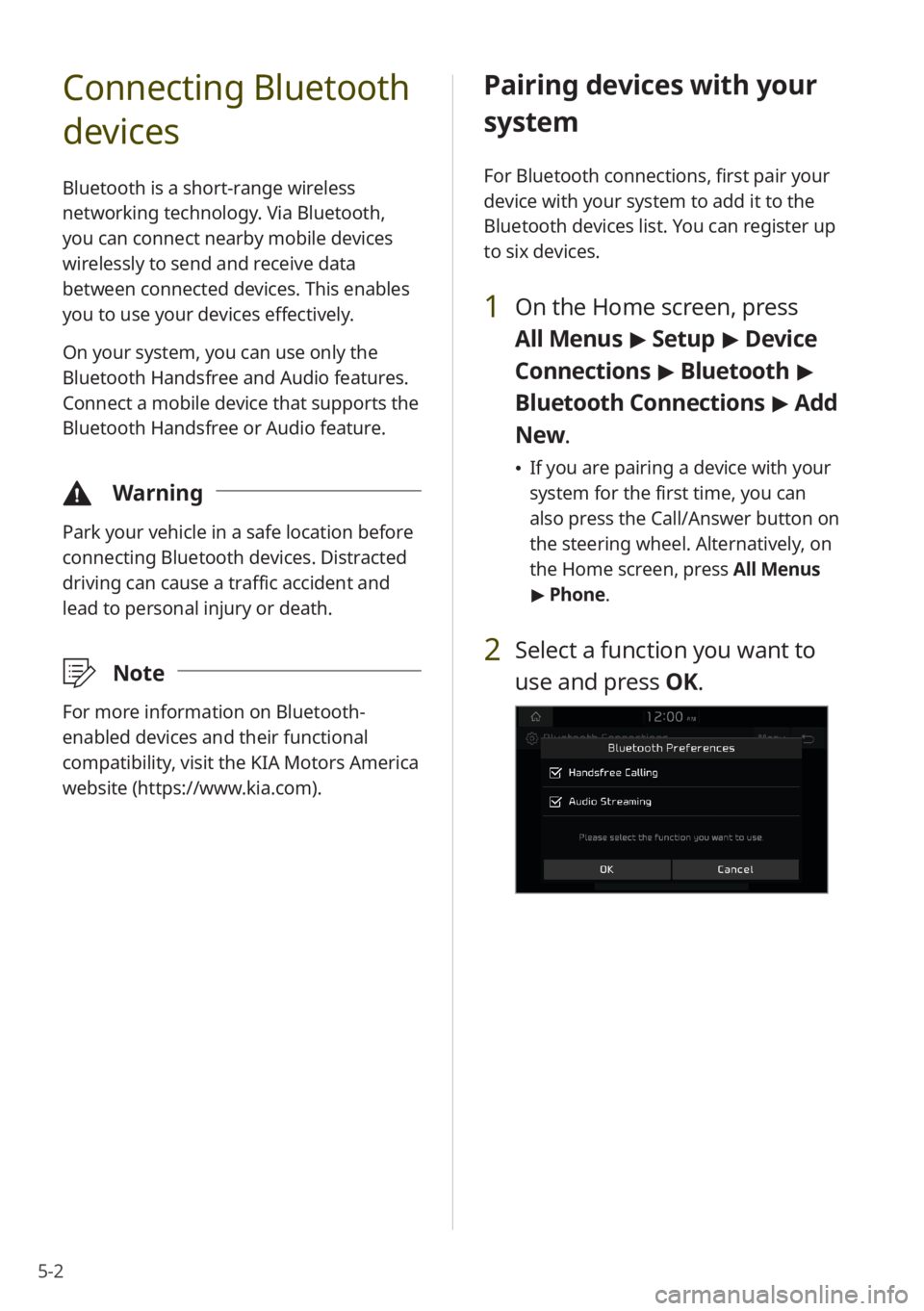
1 On the Home screen, press
All Menus > Setup > Device
Connections > Bluetooth >
Bluetooth Connections > Add
New .
If you are pairing a device with your
system for the first time, you can
also press the Call/Answer button on
the steering wheel. Alternatively, on
the Home screen, press All Menus
> Phone.
2 Select a function you want to
use and press OK.