phone KIA NIRO PHEV 2020 Quick Start Guide Base Audio
[x] Cancel search | Manufacturer: KIA, Model Year: 2020, Model line: NIRO PHEV, Model: KIA NIRO PHEV 2020Pages: 134, PDF Size: 4.4 MB
Page 84 of 134
5-14
Switching between calls
If your mobile phone supports call
waiting, you can accept a second call. The
first call is put on hold.
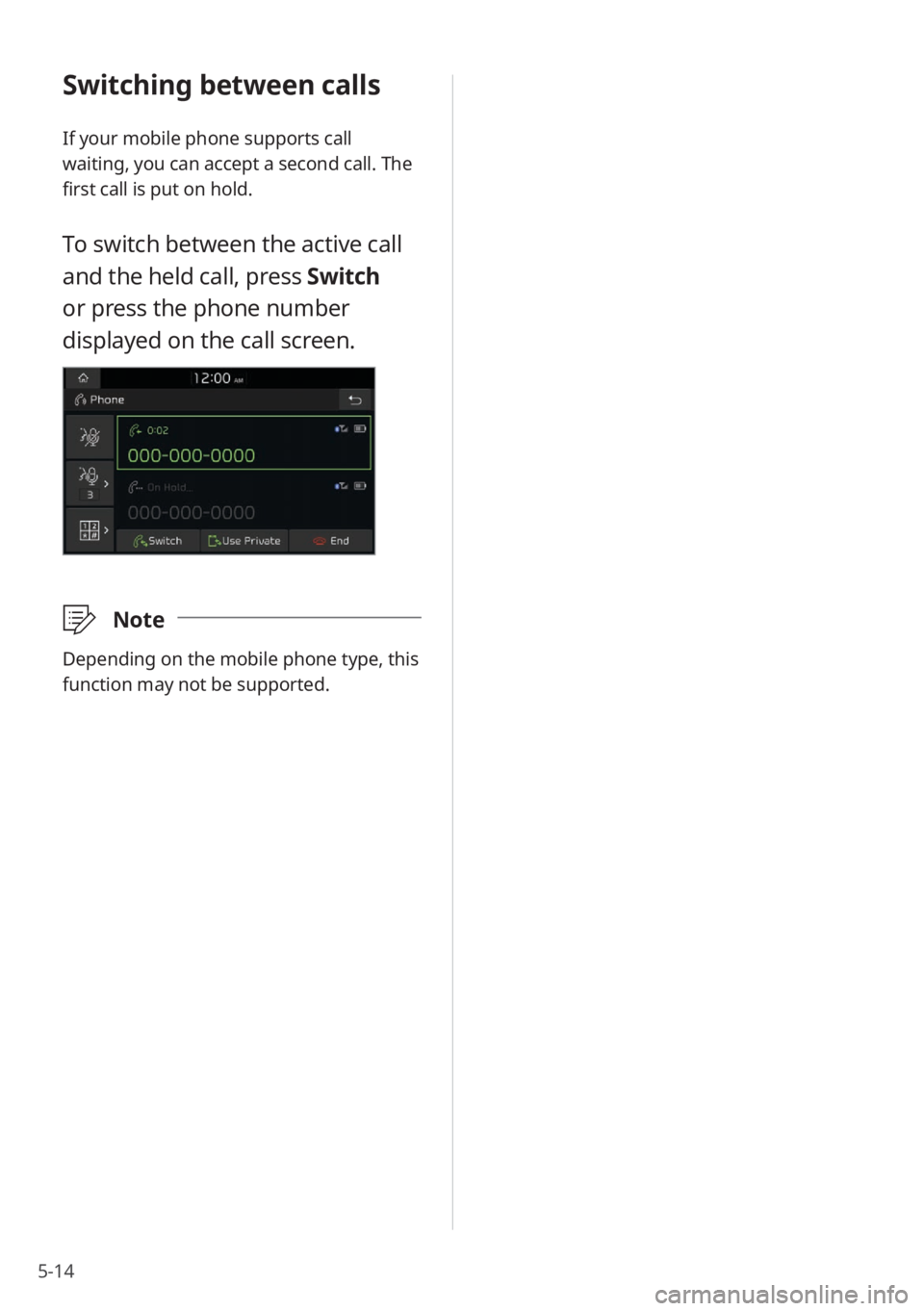
To switch between the active call
and the held call, press Switch
or press the phone number
displayed on the call screen.
\333Note
Depending on the mobile phone type, this
function may not be supported.
Page 86 of 134
6-2
Using Voice Memo
You can record voice memos using the
microphone installed in your vehicle and
play voice memos on your system.
\334Warning
Driving while distracted can result in a
loss of vehicle control that may lead to an
accident, severe bodily injury, or death.
The driver′s primary responsibility is the
safe and legal operation of the vehicle,
and the use of any vehicle systems,
including the touch screen and steering
wheel controls, which take the driver′s
eyes, attention, and focus away from the
safe operation of the vehicle, or which are
not permissible by law, should never be
used during the operation of the vehicle.
Starting Voice Memo
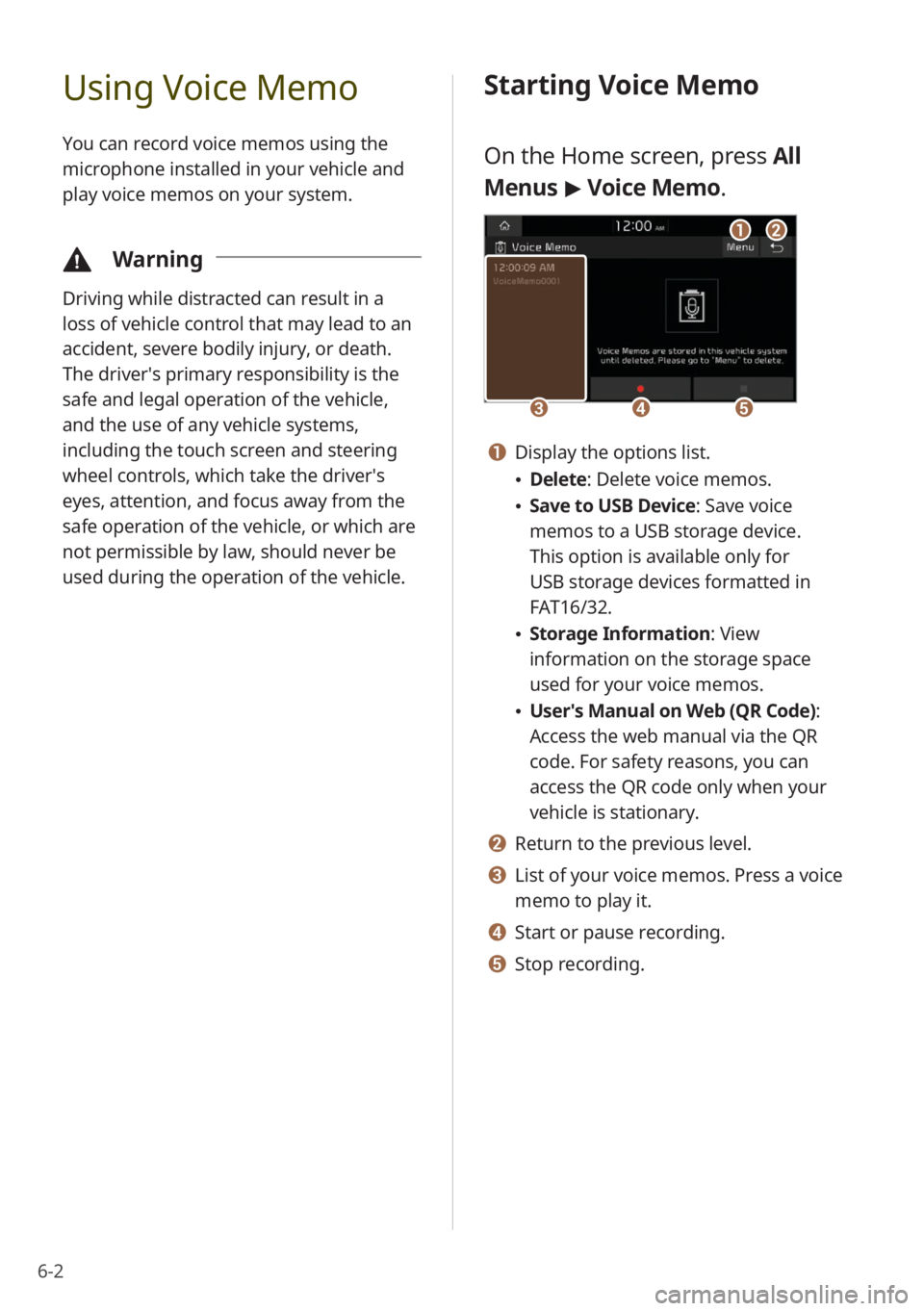
On the Home screen, press All
Menus > Voice Memo.
cde
ab
a Display the options list.
Delete: Delete voice memos.
Save to USB Device : Save voice
memos to a USB storage device.
This option is available only for
USB storage devices formatted in
FAT16/32.
Storage Information : View
information on the storage space
used for your voice memos.
User′s Manual on Web (QR Code) :
Access the web manual via the QR
code. For safety reasons, you can
access the QR code only when your
vehicle is stationary.
b Return to the previous level.
c List of your voice memos. Press a voice
memo to play it.
d Start or pause recording.
e Stop recording.
Page 91 of 134

7-3
Activating UVO services
You must activate UVO services to use
them. An account with MyUVO.com is
required for activation. If you do not
already have an account, enter your
information to create one. If you already
have an account, enter the verification
code you received from MyUVO.com.
1 Park your vehicle in a safe
location.
You cannot enter information for
service activation while your vehicle
is moving.
2 On the Home screen, press All
Menus > UVO > UVO Settings
> Activate UVO.
3 Enter your phone number
or email address and press
Submit.
Once your account has been
successfully registered, a verification
code will be sent to you by phone or
email.
If you have a registered account
and your verification code, press I
already have a code .
4 Enter the verification code you
received from MyUVO.com and
press Submit.
Activation will begin. While the
activation is in progress, the system
buttons will be locked.
\335 Caution
Do not turn off the engine while activation
is in progress. Doing so may cause the
system to malfunction.
\333Note
To call the UVO Center to request help
for service activation, press All Menus
> UVO > UVO Call Center on the Home
screen or the [
] button in your
vehicle.
If the activation fails, contact the UVO
Center at (844) UVO-9411.
If your UVO service has expired, you can
reactivate by renewing your subscription
at MyUVO.com and entering your
verification code again in the Activate
UVO menu.
Page 99 of 134
8-3
[Defog/Defrost Options (if
equipped)
You can change the defog/defrost
settings.
Defog/Defrost : Set to activate air
ventilation or operate the air conditioner
automatically to defog or defrost the
windshield.
Auto Defog: Set to operate the climate
control system automatically to
prevent fog from forming on the front
windshield.
[Climate Features (if equipped)
You can change the settings for the
climate control features.
Lock Rear Climate Controls : Set to
prevent operation of the climate control
system from the rear seats.
Rear Climate Controls : Set to check the
current status and control the rear seat
climate control system via the system
screen.
Configuring the device
connection settings
You can manage Bluetooth devices or
customize your Bluetooth settings. You
can also enable phone projection to
control your smartphone applications via
the system screen.
Depending on the vehicle model or
specifications, displayed screens and
available options may vary.
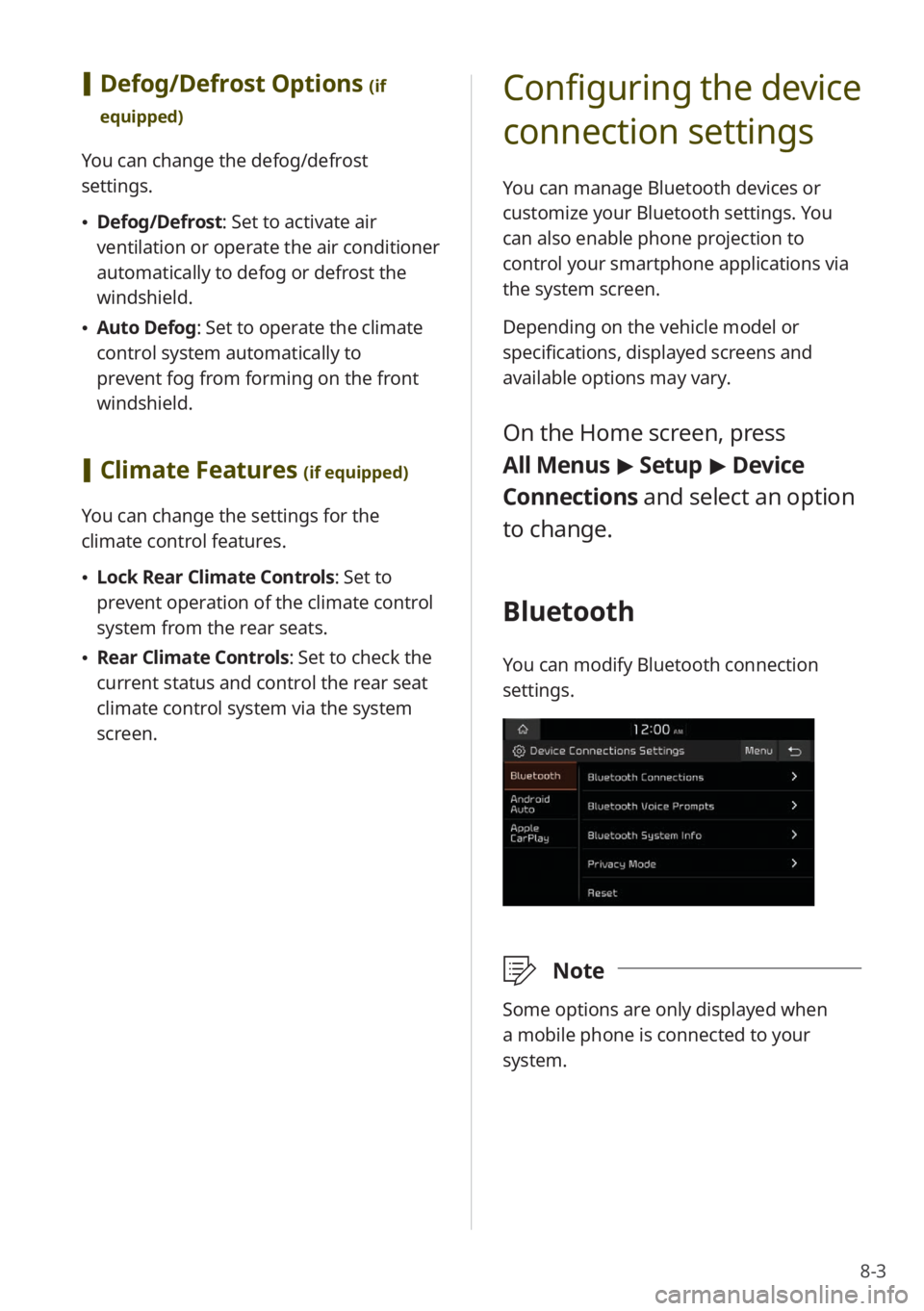
On the Home screen, press
All Menus > Setup > Device
Connections and select an option
to change.
Bluetooth
You can modify Bluetooth connection
settings.
\333 Note
Some options are only displayed when
a mobile phone is connected to your
system.
Page 100 of 134
8-4
[Bluetooth Connections
You can pair new Bluetooth devices to
your system, or connect or disconnect a
paired device. You can also delete paired
devices.
[Bluetooth Voice Prompts
You can set to enable or disable voice
prompts for Bluetooth connections.
[Bluetooth System Info
You can view or edit your system's
Bluetooth information.
[Privacy Mode
You can activate privacy mode to protect
your personal information. In the privacy
mode, personal data will not be displayed.
[Reset
You can delete all paired Bluetooth
devices and reset your Bluetooth settings
to default values. All data related to
Bluetooth devices will also be deleted.
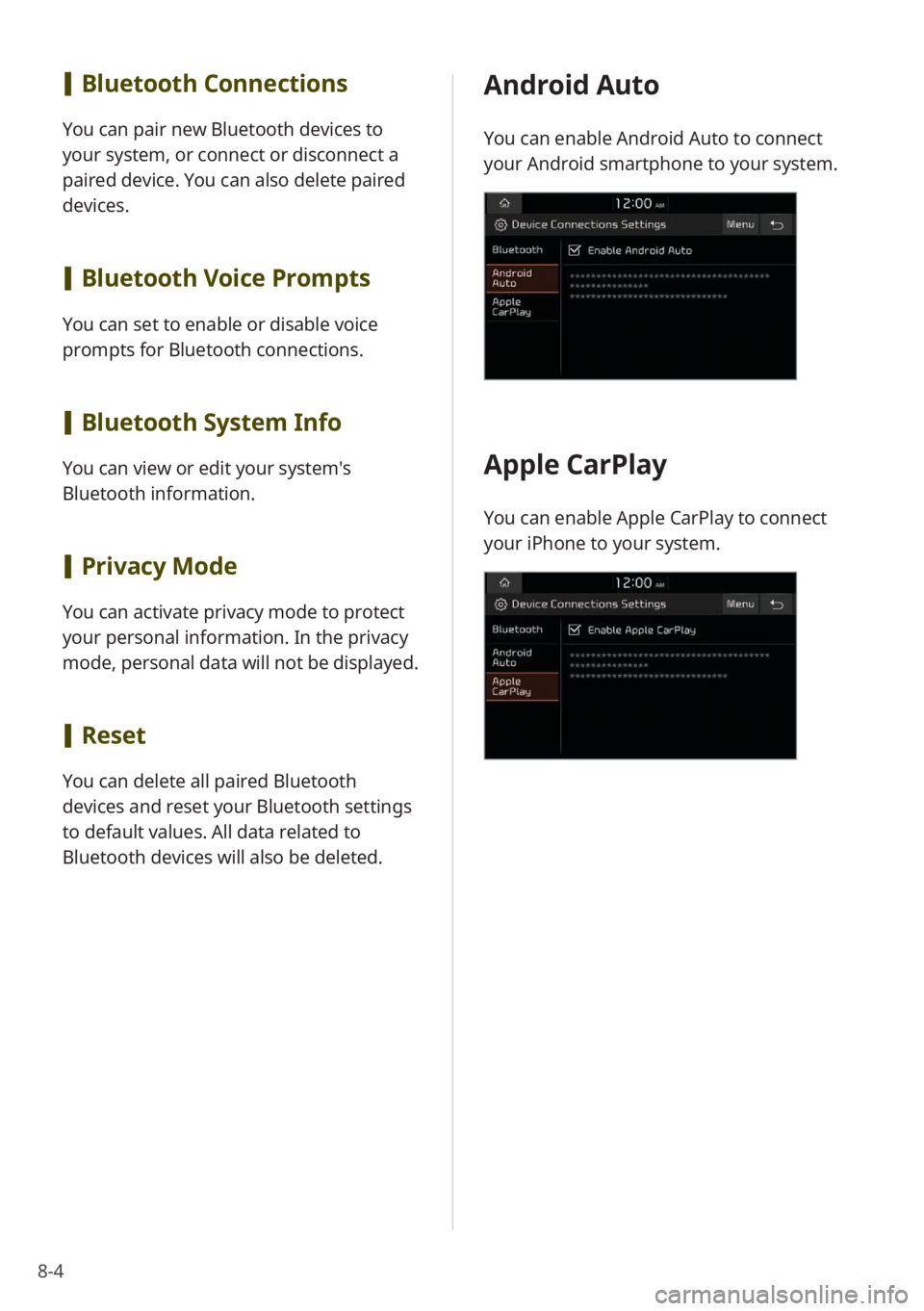
Android Auto
You can enable Android Auto to connect
your Android smartphone to your system.
Apple CarPlay
You can enable Apple CarPlay to connect
your iPhone to your system.
Page 105 of 134
8-9
[User′s Manual on Web (QR
Code)
You can access the web manual of the
system by scanning the QR code with your
smartphone.
\334 Warning
Park your vehicle in a safe location before
scanning the QR code. For safety reasons,
you are not able to access QR codes from
the system′s screen while the vehicle is
moving.
[Reset
You can reset your system settings to
default values. All user data stored in the
system will also be deleted.
Configuring the sound
settings
You can adjust/modify sound settings
such as speaker volume or sound effects.
Depending on the vehicle model or
specifications, displayed screens and
available options may vary.
On the Home screen, press All
Menus > Setup > Sound and
select an option to change.
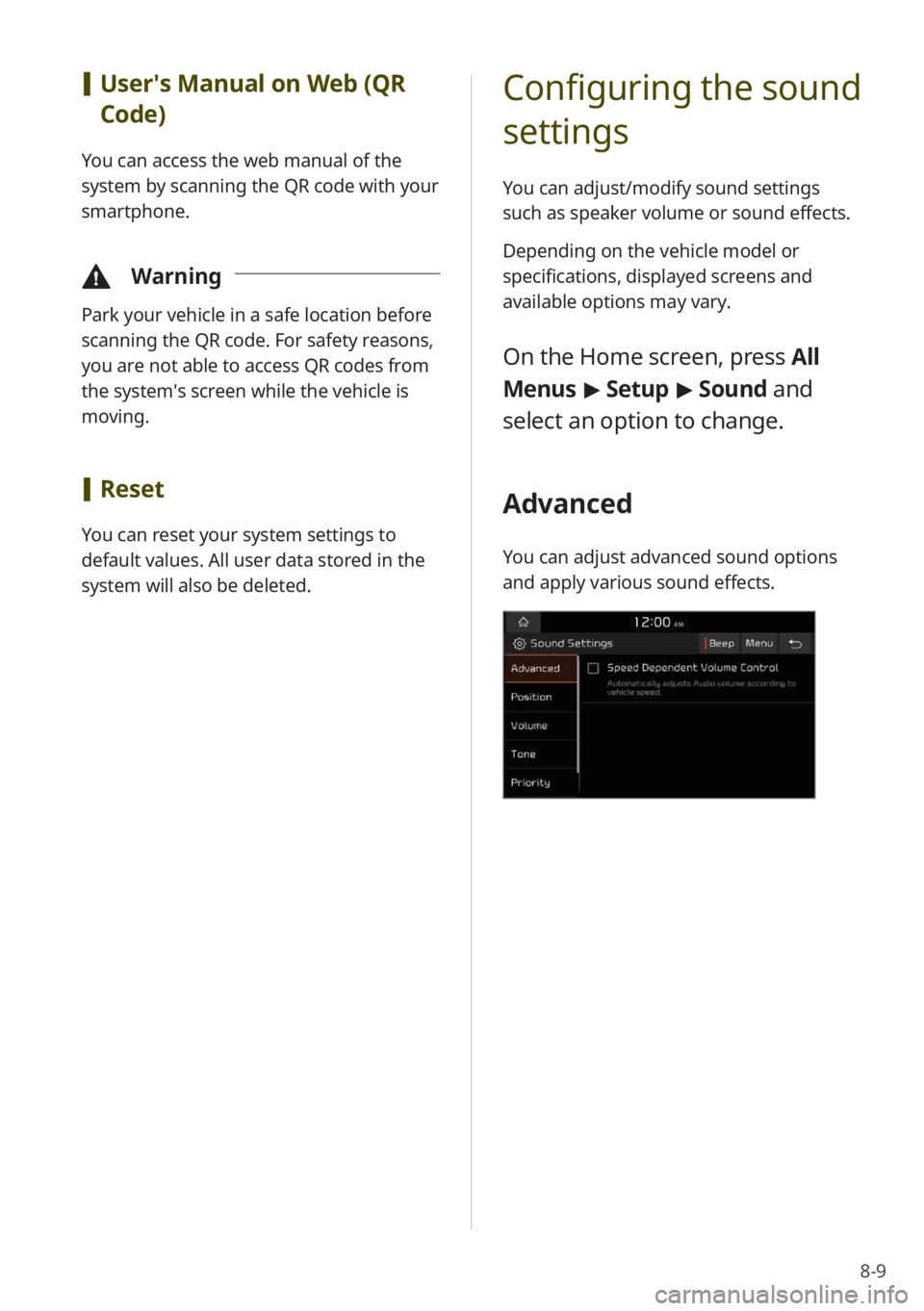
Advanced
You can adjust advanced sound options
and apply various sound effects.
Page 107 of 134
8-11
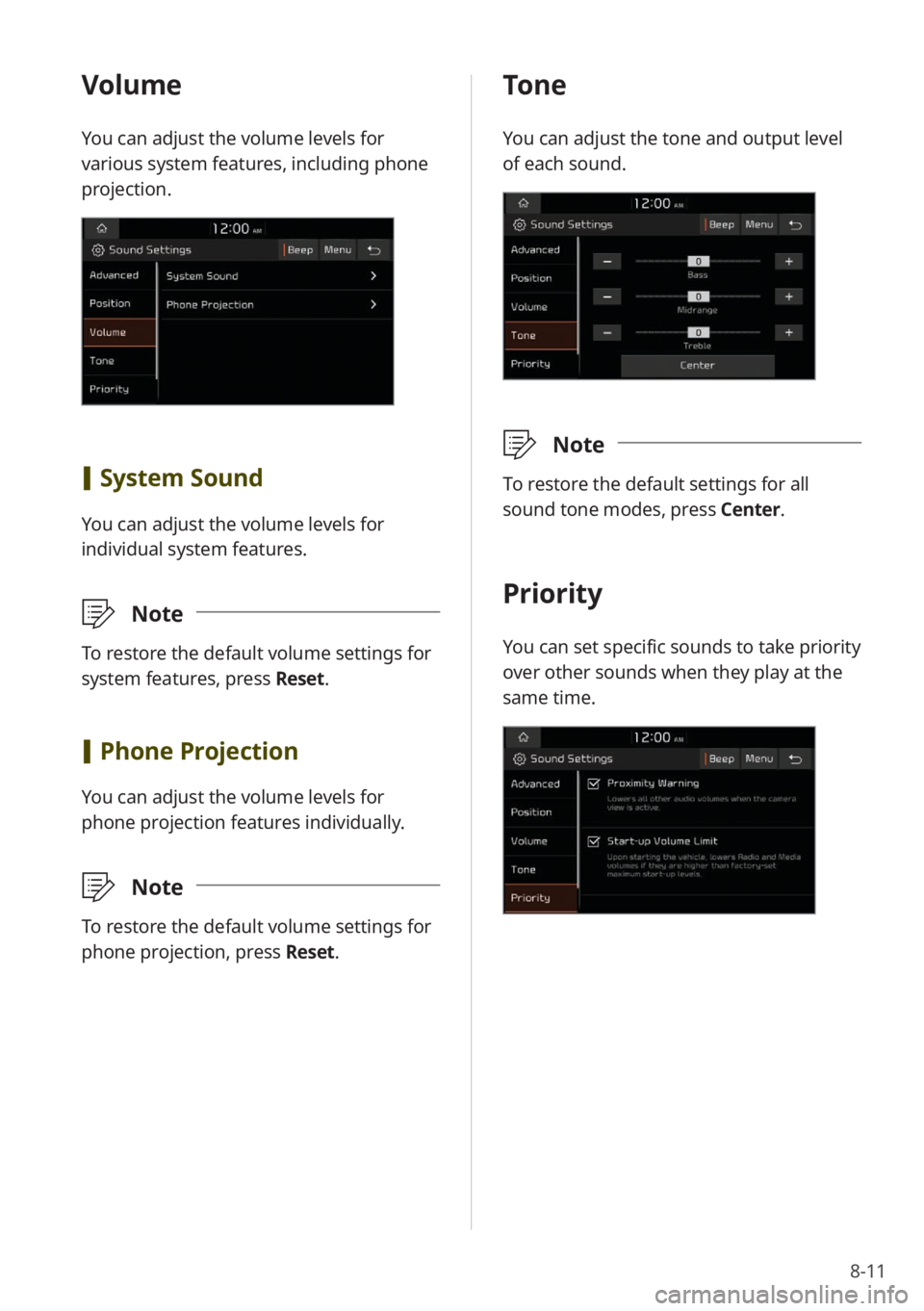
Volume
You can adjust the volume levels for
various system features, including phone
projection.
[System Sound
You can adjust the volume levels for
individual system features.
\333 Note
To restore the default volume settings for
system features, press Reset.
[Phone Projection
You can adjust the volume levels for
phone projection features individually.
\333 Note
To restore the default volume settings for
phone projection, press Reset.
Tone
You can adjust the tone and output level
of each sound.
\333Note
To restore the default settings for all
sound tone modes, press Center.
Priority
You can set specific sounds to take priority
over other sounds when they play at the
same time.
Page 117 of 134
9-5
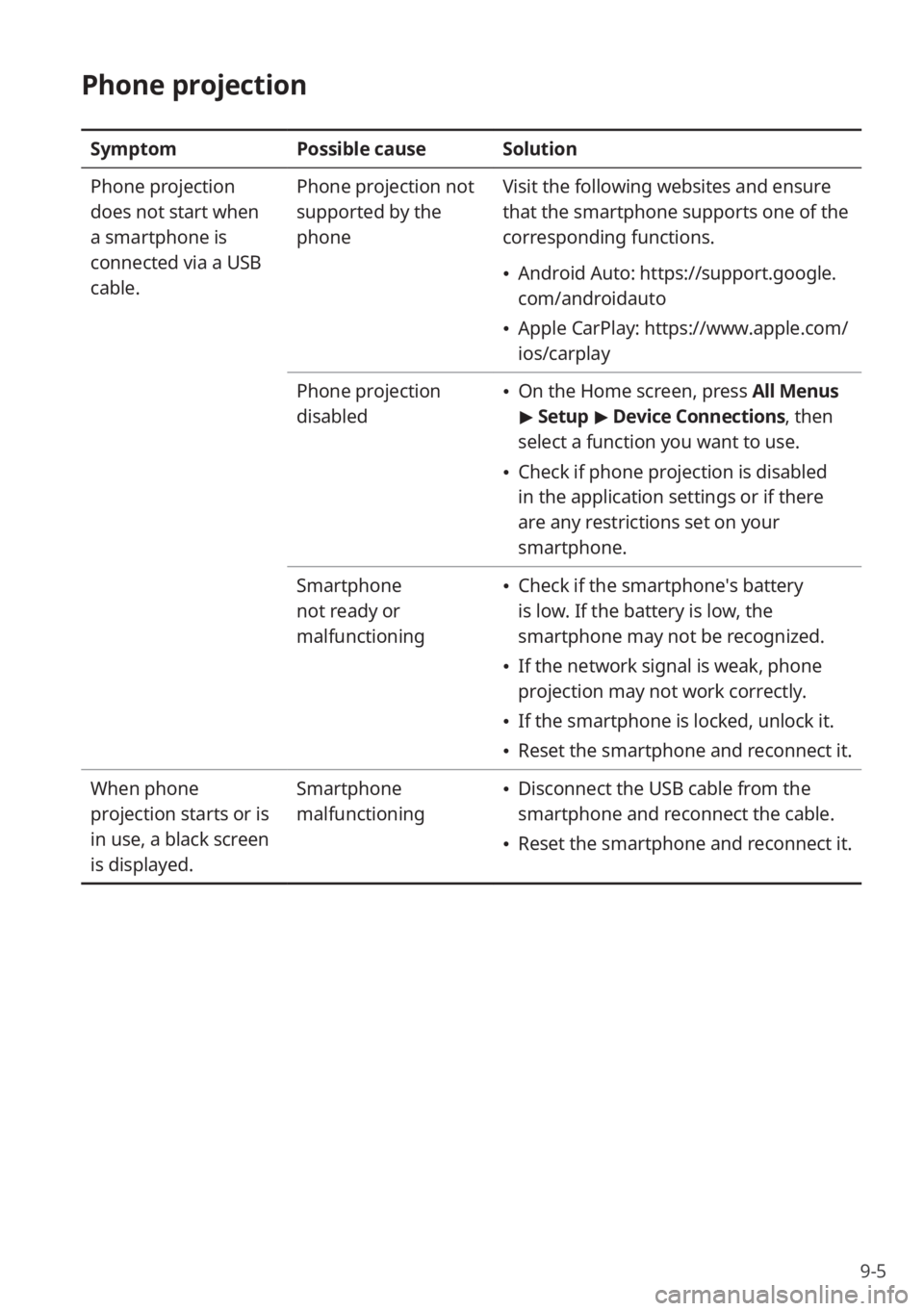
Phone projection
SymptomPossible causeSolution
Phone projection
does not start when
a smartphone is
connected via a USB
cable. Phone projection not
supported by the
phone
Visit the following websites and ensure
that the smartphone supports one of the
corresponding functions.
Android Auto: https://support.google.
com/androidauto
Apple CarPlay: https://www.apple.com/
ios/carplay
Phone projection
disabled
On the Home screen, press All Menus
> Setup > Device Connections , then
select a function you want to use.
Check if phone projection is disabled
in the application settings or if there
are any restrictions set on your
smartphone.
Smartphone
not ready or
malfunctioning
Check if the smartphone′s battery
is low. If the battery is low, the
smartphone may not be recognized.
If the network signal is weak, phone
projection may not work correctly.
If the smartphone is locked, unlock it.
Reset the smartphone and reconnect it.
When phone
projection starts or is
in use, a black screen
is displayed. Smartphone
malfunctioning
Disconnect the USB cable from the
smartphone and reconnect the cable.
Reset the smartphone and reconnect it.
Page 119 of 134
9-7
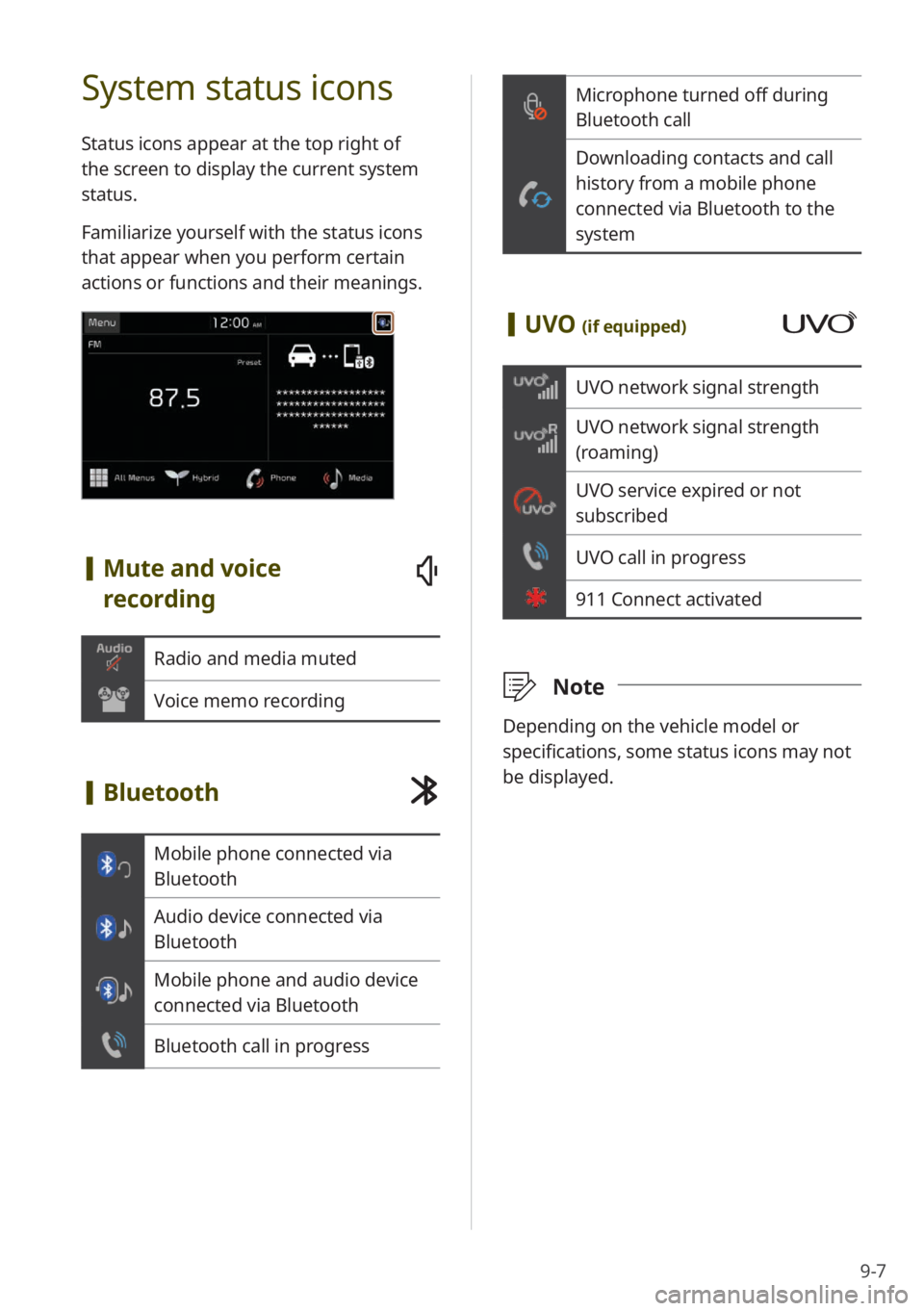
Microphone turned off during
Bluetooth call
Downloading contacts and call
history from a mobile phone
connected via Bluetooth to the
system
[UVO (if equipped)
UVO network signal strength
UVO network signal strength
(roaming)
UVO service expired or not
subscribed
UVO call in progress
911 Connect activated
\333 Note
Depending on the vehicle model or
specifications, some status icons may not
be displayed.
System status icons
Status icons appear at the top right of
the screen to display the current system
status.
Familiarize yourself with the status icons
that appear when you perform certain
actions or functions and their meanings.
[Mute and voice
recording
Radio and media muted
Voice memo recording
[Bluetooth
Mobile phone connected via
Bluetooth
Audio device connected via
Bluetooth
Mobile phone and audio device
connected via Bluetooth
Bluetooth call in progress
Page 120 of 134
9-8
QHow do I pair a Bluetooth device
with the system?
AOn the Home screen, press
All Menus > Setup > Device
Connections > Bluetooth >
Bluetooth Connections > Add
New . From the Bluetooth device
you want to connect, search for
and pair with your system. When
you enter or confirm a Bluetooth
passkey displayed on the system
screen, the device is registered
to the system's Bluetooth devices
list and connected to the system
automatically.
> See ″Connecting
Bluetooth devices .″
QWhat is a passkey?
AA passkey is the password used
to authenticate the connection
between the system and the mobile
device. The passkey needs to be
entered only once when you pair a
mobile phone for the first time.
The initial passkey is ″0000.″
You can change it by pressing
All Menus > Setup > Device
Connections > Bluetooth >
Bluetooth System Info > Passkey.
FAQ
Bluetooth
QWhat kinds of functions can I use
with Bluetooth?
AYou can connect your mobile phone
to make or answer calls hands
free. You can also connect audio
devices, such as MP3 players and
mobile phones, to listen to music
in your vehicle.
> See "Making a call
via Bluetooth " or
"Listening to music via
Bluetooth."
QWhat is the difference between
pairing a device and connecting a
device?
APairing occurs through
authenticating the system and
a mobile device. Devices paired
with the system can be connected
and disconnected until they are
deleted from the system. Bluetooth
Handsfree features, such as making
or answering calls or accessing
contacts, are supported only in
mobile phones connected with the
system.