warning light KIA NIRO PHEV 2021 Workshop Manual
[x] Cancel search | Manufacturer: KIA, Model Year: 2021, Model line: NIRO PHEV, Model: KIA NIRO PHEV 2021Pages: 710, PDF Size: 14.77 MB
Page 253 of 710
4113
Features of your vehicle
Master Warning light
(if equipped)
This warning light informs the driv-
er the following situations.
- Forward Collision-Avoidance Assist
malfunction (if equipped)
- Forward Collision-Avoidance Assist
radar blocked (if equipped)
- Blind-Spot Collision Warning mal-
function (if equipped)
- Blind-Spot Collision Warning radar
blocked (if equipped)
- Lamp malfunction
- LED headlamp malfunction (if
equipped)
- High Beam Assist malfunction (if
equipped)
- Tire Pressure Monitoring System
(TPMS) malfunction
- Smart Cruise Control malfunction (if
equipped)
- Smart Cruise Control radar blocked
(if equipped)- Lane Following Assist malfunction (if
equipped), etc.
- Highway Driving Assist malfunction
(if equipped)
The Master Warning Light illuminates
when one or more of the above warn-
ing situations occur. If the warning situ-
ation is resolved, the master warning
light will turn off.
Engine Coolant
Temperature Warning
Light
This warning light illuminates:
When the engine coolant tempera-
ture is above 248°F (120°C). This
means that the engine is overheat-
ed and may be damaged.
If your vehicle is overheated, refer
to “If the engine overheats” in
chapter 6.
CAUTION - Engine
Overheating
Do not continue driving with the
engine overheated. Otherwise
the engine may be damaged.
Page 254 of 710
Features of your vehicle
114 4
Electronic Parking Brake
(EPB) Warning Light
(if equipped)
This warning light illuminates:
Once you set the ignition switch or
ENGINE START/STOP button to
the ON position.
- It illuminates for approximately 3
seconds and then goes off.
When there is a malfunction with
the EPB.
In this case, have your vehicle
inspected by an authorized Kia
dealer.
✽ ✽
NOTICE- Electronic Parking
Brake (EPB) Warning Light
The Electronic Parking Brake
(EPB) Warning Light may illumi-
nate when the Electronic Stability
control (ESC) Indicator Light comes
on to indicate that the ESC is not
working properly (This does not
indicate malfunction of the EPB).
LED Headlamp Warning
Light (if equipped)
This warning light illuminates:
Once you set the ignition switch or
ENGINE START/STOP button to
the ON position.
- It illuminates for approximately 3
seconds and then goes off.
When there is a malfunction with
the LED headlamp.
In this case, have your vehicle inspect-
ed by an authorized Kia dealer.
Forward Collision-
Avoidance Assist
Warning Light
(if equipped)
This warning light illuminates:
Once you set the ignition switch or
ENGINE START/STOP button to
the ON position.
- The FCA warning light illuminates
for approximately 3 seconds and
then turns off.
When there is a malfunction with
FCA.
If this occurs, have your vehicle
inspected by an authorized Kia
dealer.
❈For more details, refer to “Forward
Collision-Avoidance Assist (FCA)”
in chapter 5.
CAUTION - LED
Headlamp Warning Light
Continuous driving with the
LED Headlamp Warning Light
on can reduce LED headlamp
(low beam) life.
EPB
Page 255 of 710
4115
Features of your vehicle
Icy Road Warning Light
This warning light is to warn the
driver the road may be icy.
When the temperature on the out-
side temperature gauge is approx-
imately below 39°F (4°C), the Icy
Road Warning Light and Outside
Temperature Gauge blinks and
then illuminates. Also, the warning
chime sounds 1 time.
✽ ✽
NOTICE
If the icy road warning light appears
while driving, you should drive
more attentively and safely, refrain-
ing from over-speeding, rapid accel-
eration, sudden braking or sharp
turning, etc.
Indicator Lights
Charging Cable
Connection Indicator
(Plug-in hybrid)
This indicator illuminates in red when
the charging cable is connected.
Electronic Stability Control (ESC)
Indicator Light
This indicator light illumi-
nates:
Once you set the ignition switch or
ENGINE START/STOP button to
the ON position.
- It illuminates for approximately 3
seconds and then goes off.
When there is a malfunction with
the ESC system.
In this case, have your vehicle
inspected by an authorized Kia
dealer.
This indicator light blinks:
While the ESC is operating.
❈For more details, refer to
“Electronic Stability Control (ESC)”
in chapter 5.
Page 258 of 710
Features of your vehicle
118 4
Low Beam Indicator
Light (if equipped)
This indicator light illuminates:
When the headlights are on.
Light ON Indicator Light
This indicator light illuminates:
When the tail lights or headlights
are on.
High Beam Assist
indicator (if equipped)
This warning light illuminates :
When the High-Beam is on with
the light switch in the AUTO light
position.
If your vehicle detects oncoming or
preceding vehicles, High Beam
Assist will switch the high beam to
low beam automatically.
❈For more details, refer to “High
Beam Assist (HBA)” in chapter 4.
EV Mode Indicator
This indicator illuminates when the
vehicle is driven by the electric
motor.
EV
Page 262 of 710
Features of your vehicle
122 4
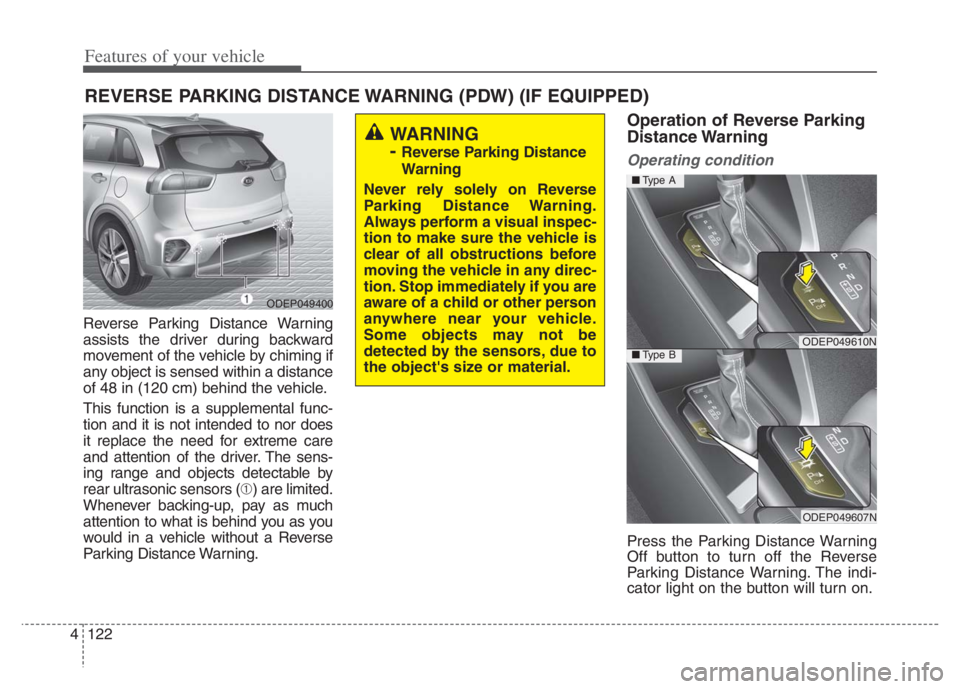
Reverse Parking Distance Warning
assists the driver during backward
movement of the vehicle by chiming if
any object is sensed within a distance
of 48 in (120 cm) behind the vehicle.
This function is a supplemental func-
tion and it is not intended to nor does
it replace the need for extreme care
and attention of the driver. The sens-
ing range and objects detectable by
rear ultrasonic sensors (➀) are limited.
Whenever backing-up, pay as much
attention to what is behind you as you
would in a vehicle without a Reverse
Parking Distance Warning.
Operation of Reverse Parking
Distance Warning
Operating condition
Press the Parking Distance Warning
Off button to turn off the Reverse
Parking Distance Warning. The indi-
cator light on the button will turn on.
REVERSE PARKING DISTANCE WARNING (PDW) (IF EQUIPPED)
WARNING
-
Reverse Parking Distance
Warning
Never rely solely on Reverse
Parking Distance Warning.
Always perform a visual inspec-
tion to make sure the vehicle is
clear of all obstructions before
moving the vehicle in any direc-
tion. Stop immediately if you are
aware of a child or other person
anywhere near your vehicle.
Some objects may not be
detected by the sensors, due to
the object's size or material.
ODEP049400
ODEP049610N
ODEP049607N
■Type A
■Type B
Page 268 of 710
Features of your vehicle
128 4
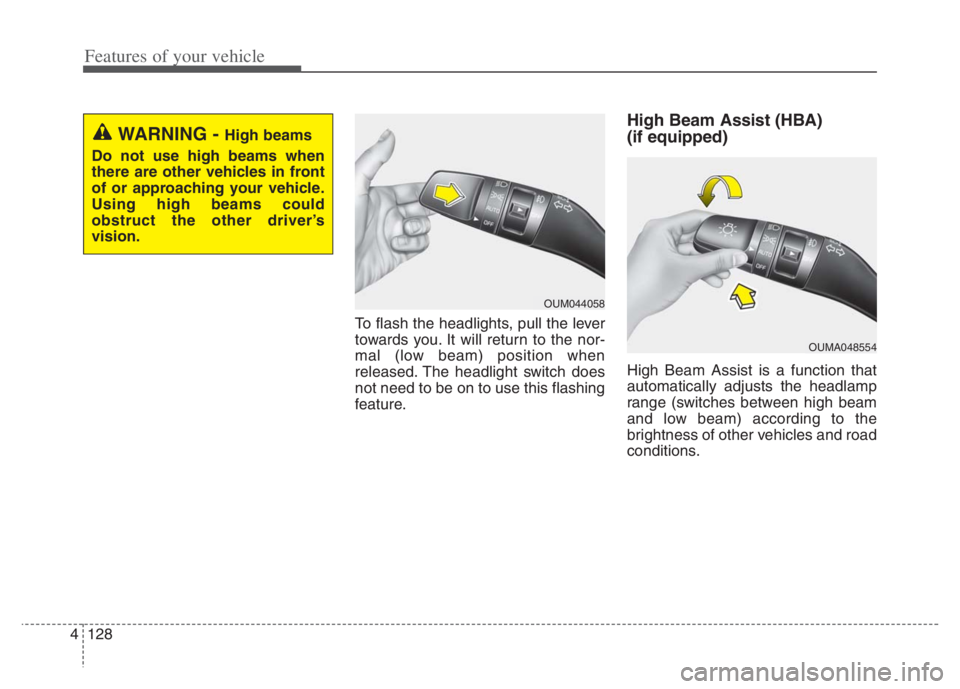
To flash the headlights, pull the lever
towards you. It will return to the nor-
mal (low beam) position when
released. The headlight switch does
not need to be on to use this flashing
feature.
High Beam Assist (HBA)
(if equipped)
High Beam Assist is a function that
automatically adjusts the headlamp
range (switches between high beam
and low beam) according to the
brightness of other vehicles and road
conditions.
OUM044058
WARNING - High beams
Do not use high beams when
there are other vehicles in front
of or approaching your vehicle.
Using high beams could
obstruct the other driver’s
vision.
OUMA048554
Page 271 of 710
4131
Features of your vehicle
If an indicator stays on and does not
flash or if it flashes abnormally, one of
the turn signal bulbs may be burned
out and will require replacement.
✽ ✽
NOTICE
If an indicator flash is abnormally
quick or slow, a bulb may be burned
out or have a poor electrical connec-
tion in the circuit.
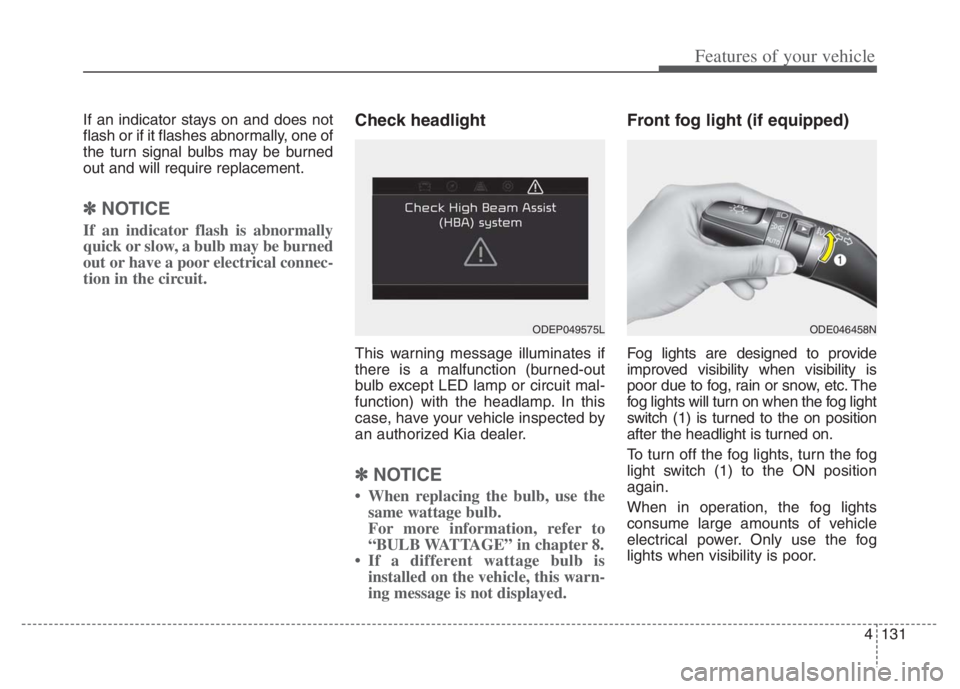
Check headlight
This warning message illuminates if
there is a malfunction (burned-out
bulb except LED lamp or circuit mal-
function) with the headlamp. In this
case, have your vehicle inspected by
an authorized Kia dealer.
✽ ✽
NOTICE
• When replacing the bulb, use the
same wattage bulb.
For more information, refer to
“BULB WATTAGE” in chapter 8.
• If a different wattage bulb is
installed on the vehicle, this warn-
ing message is not displayed.
Front fog light (if equipped)
Fog lights are designed to provide
improved visibility when visibility is
poor due to fog, rain or snow, etc. The
fog lights will turn on when the fog light
switch (1) is turned to the on position
after the headlight is turned on.
To turn off the fog lights, turn the fog
light switch (1) to the ON position
again.
When in operation, the fog lights
consume large amounts of vehicle
electrical power. Only use the fog
lights when visibility is poor.
ODE046458NODEP049575L
Page 276 of 710
Features of your vehicle
136 4
Do not use the interior lights for
extended periods when the engine is
not running.
It may cause battery discharge.Automatic turn off function
The interior lights automatically turn
off approximately 20 minutes after
the ignition switch is turned off, if the
lights are in the ON position.
If your vehicle is equipped with the
theft alarm system, the interior lights
automatically turn off approximately
5 seconds after the system is armed.
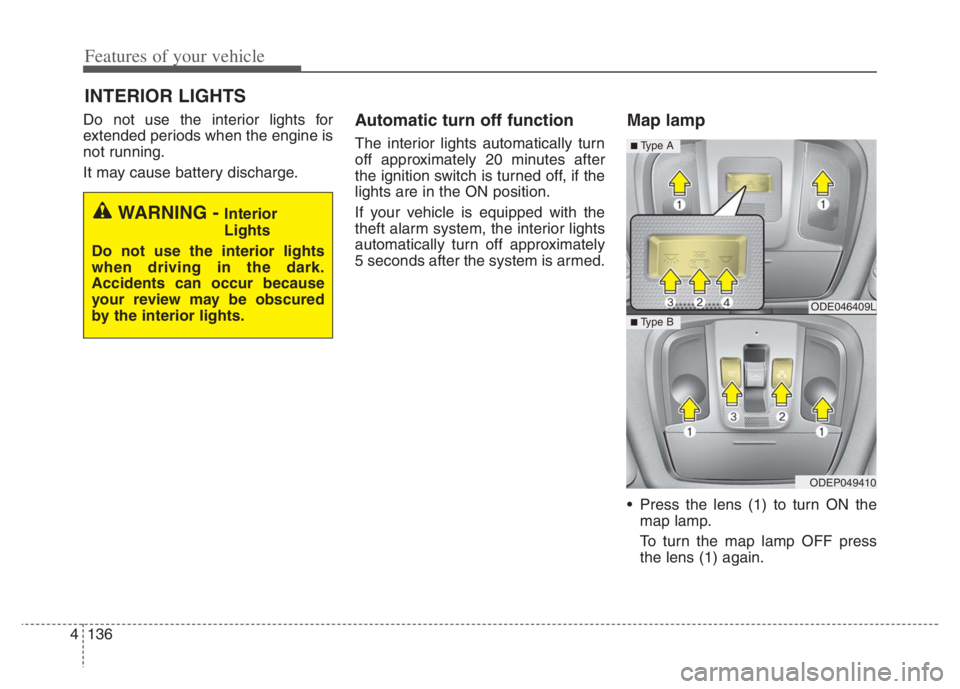
Map lamp
Press the lens (1) to turn ON the
map lamp.
To turn the map lamp OFF press
the lens (1) again.
INTERIOR LIGHTS
WARNING - Interior
Lights
Do not use the interior lights
when driving in the dark.
Accidents can occur because
your review may be obscured
by the interior lights.
ODE046409L
ODEP049410
■ Type B
■ Type A
Page 289 of 710
4149
Features of your vehicle
Air conditioning
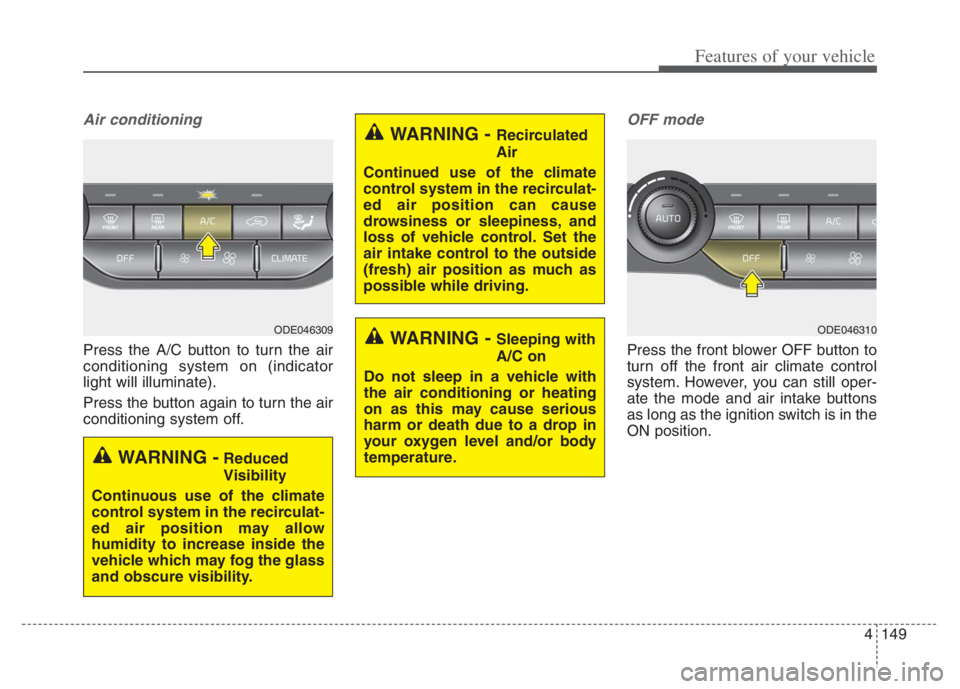
Press the A/C button to turn the air
conditioning system on (indicator
light will illuminate).
Press the button again to turn the air
conditioning system off.
OFF mode
Press the front blower OFF button to
turn off the front air climate control
system. However, you can still oper-
ate the mode and air intake buttons
as long as the ignition switch is in the
ON position.
WARNING - Recirculated
Air
Continued use of the climate
control system in the recirculat-
ed air position can cause
drowsiness or sleepiness, and
loss of vehicle control. Set the
air intake control to the outside
(fresh) air position as much as
possible while driving.
WARNING - Sleeping with
A/C on
Do not sleep in a vehicle with
the air conditioning or heating
on as this may cause serious
harm or death due to a drop in
your oxygen level and/or body
temperature.
WARNING -Reduced
Visibility
Continuous use of the climate
control system in the recirculat-
ed air position may allow
humidity to increase inside the
vehicle which may fog the glass
and obscure visibility.
ODE046309ODE046310
Page 310 of 710
Features of your vehicle
170 4
Wireless smart phone charging
1. Remove any object on the smart
phone charging pad including the
smart key. If there is any foreign
object on the pad other than a
smart phone, the wireless charging
function may not operate properly.
2. Place the smart phone on the cen-
ter of the wireless charging pad.
3. The indicator light will change to
orange once the wireless charging
begins. After the charging is com-
plete, the orange light will change
to green.
4. You can choose to turn the wireless
charging function to either ON or
OFF by selecting the USM on the
instrument cluster. (Please refer to
“Instrument Cluster” for details).
If the wireless charging does not
work, gently move your smart phone
around the pad until the charging
indicator light turns orange.
Depending on the smart phone, the
charging indicator light may not turn
green even after the charging is com-
plete.If the wireless charging is not func-
tioning properly, the orange light will
blink and flash for ten seconds then
turn off. In such cases, remove the
smart phone from the pad and
replace it on the pad again, or double
check the charging status.
If you leave the smart phone on the
charging pad when the vehicle igni-
tion is in OFF, the vehicle will alert
you through warning messages and
sound (applicable for vehicles with
voice guidance function) after the
‘Good bye’ function on the instru-
ment cluster ends.WARNING - Distracted
driving
Driving while distracted can
result in a loss of vehicle con-
trol that may lead to an acci-
dent, severe personal injury,
and death. The driver’s primary
responsibility is in the safe and
legal operation of a vehicle, and
any handheld devices, other
equipment, or vehicle systems
which take the driver’s eyes,
attention and focus away from
the safe operation of a vehicle
or which are not permissible by
law should never be used dur-
ing operation of the vehicle.