warning KIA NIRO PHEV 2022 Owners Manual
[x] Cancel search | Manufacturer: KIA, Model Year: 2022, Model line: NIRO PHEV, Model: KIA NIRO PHEV 2022Pages: 710, PDF Size: 10.35 MB
Page 189 of 710
449
Features of your vehicle
Electric Power Steering
(EPS)
The power steering uses a motor to
assist you in steering the vehicle. If
the engine is off or if the power steer-
ing system becomes inoperative, the
vehicle may still be steered, but it will
require increased steering effort.
The EPS is controlled by a power
steering control unit which senses
the steering wheel torque and vehi-
cle speed to command the motor.
The steering becomes heavier as the
vehicle’s speed increases and
becomes lighter as the vehicle’s
speed decreases for optimum steer-
ing control.
Should you notice any change in the
effort required to steer during normal
vehicle operation, have the power
steering checked by an authorized
Kia dealer. When you operate the steering
wheel in low temperature, noise
may occur. If temperature rises, the
noise will likely disappear. This is a
normal condition.
When the vehicle is stationary, and the steering wheel is turned all the
way to the left or right continuous-
ly, the steering wheel becomes
harder to turn. The power assist is
limited to protect the motor from
overheating.
As time passes, the steering wheel
will return to its normal condition.
✽ ✽ NOTICE
The following symptoms may occur
during normal vehicle operation:
• The EPS warning light does not
illuminate.
• The steering gets heavy immedi- ately after turning the ENGINE
START/STOP button is ON posi-
tion. This happens as the system
performs the EPS system diagnos-
tics. When the diagnostics are
completed, the steering wheel will
return to its normal condition.
• A click noise may be heard from the EPS relay after turning the
ENGINE START/STOP button is
ON or OFF position.
• A motor noise may be heard when the vehicle is at a stop or at a low
driving speed.
• If the Electric Power Steering System does not operate normally,
the warning light will illuminate on
the instrument cluster. The steer-
ing wheel may become difficult to
control or operate abnormally.
Take your vehicle to an authorized
Kia dealer and have the vehicle
checked as soon as possible. (Continued)
STEERING WHEEL
Page 190 of 710

Features of your vehicle
50
4
(Continued)
• When abnormality is detected in
the electric power steering system,
to prevent a deadly accident, the
steering assist function will stop.
At this time, the warning light
turns on or blinks on the cluster.
The steering wheel may become
difficult to control or operate.
Have your vehicle checked imme-
diately, after moving the vehicle to
a safe zone.
• When the charging system warning light comes on due to low voltage
(when the alternator or battery
does not operate normally or mal-
function), the steering wheel may
require increased steering effort.
• If the vehicle needs to be jump started due to battery discharge,
the steering wheel may not function
normally. This is a temporary situ-
ation caused by low battery volt-
age. It will be solved once the bat-
tery is charged. Check for normal
steering function by turning the
steering wheel slowly before driv-
ing the vehicle.Tilt and telescopic steering
Tilt and telescopic steering allows
you to adjust the steering wheel
before you drive. You can also raise it
to give your legs more space when
you get on or off the vehicle.
The steering wheel should be posi-
tioned so that it is comfortable for
you to drive, while permitting you to
see the instrument panel warning
lights and gauges. To change the steering wheel angle,
pull down the lock-release lever (1),
adjust the steering wheel to the
desired angle (2) and height (3) then
pull up the lock-release lever to lock
(4) the steering wheel in place. Be
sure to adjust the steering wheel to
the desired position before driving.
✽ ✽NOTICE
After adjustment, sometimes the
lock release lever may not lock the
steering wheel. It is not a malfunc-
tion. This occurs when two gears are
not engaged correctly. In this case,
adjust the steering wheel again and
then lock the steering wheel.
WARNING- Steering
wheel adjustment
Never adjust the angle and
height of the steering wheel
while driving. You may lose
steering control.
ODEP041545L
Page 191 of 710

451
Features of your vehicle
Heated steering wheel
(if equipped)
With the ignition switch or ENGINE
START/STOP button is ON position,
pressing the heated steering wheel
button warms the steering wheel.
The indicator on the button will illumi-
nate.
To turn the heated steering wheel off,
press the button once again. The
indicator on the button will turn off.
✽ ✽NOTICE
The heated steering wheel will turn
off automatically approximately 30
minutes after the heated steering
wheel is turned on.
CAUTION
Do not install any type of grip
cover for the steering wheel, itmay impair the function of theheated steering wheel system.
When cleaning the heated steering wheel, do not use anorganic solvent such as paintthinner, benzene, alcohol andgasoline. Doing so may dam-age the surface of the steeringwheel.
If the surface of steering wheel is damaged by sharpobject, damage to the heatedsteering wheel componentscould occur.
ODEP049023
WARNING
If the steering wheel becomes
too warm, turn the system off.
The heated steering wheel may
cause burns even at low tem-
peratures, especially if used for
long periods of time.
Page 193 of 710

453
Features of your vehicle
MIRRORS
Inside rearview mirror
Adjust the rearview mirror so that the
center view through the rear window
is seen. Make this adjustment before
you start driving.
Do not place objects in the rear seat
or cargo area which would interfere
with your vision through the rear win-
dow.
Day/night rearview mirror (if equipped)
Make this adjustment before you
start driving and while the day/night
lever (3) is in the day position.
Pull the day/night lever (3) toward
you to reduce the glare from the
headlights of the vehicles behind you
during night driving.
Remember that you lose somerearview clarity in the night position.
❈ (1) : Day, (2) : Night
WARNING- Mirror adjust-
ment
Do not adjust the rearview mir-
ror while the vehicle is moving.
This could result in loss of con-
trol.
WARNING
Do not modify the inside mirror
and don’t install a wide mirror. It
could result in injury during an
accident or deployment of the
air bag.
ODE046025L
Page 203 of 710

463
Features of your vehicle
✽ ✽NOTICE
Two way communication range dis-
tance between “vehicle” and “garage
door opener” is 3,937 in (100 m).
The range may be reduced or
increased due to obstacle conditions
around the garage door opener, such
as houses or trees.
Outside rearview mirror
Be sure to adjust the mirror angles
before driving.
Your vehicle is equipped with both
left-hand and right-hand outside
rearview mirrors. The mirrors can be
adjusted remotely with the remote
switch. The mirror heads can be fold-
ed back to prevent damage during an
automatic vehicle wash or when
passing through a narrow street.
The right outside rearview mirror is
convex. Objects seen in the mirror
are closer than they appear.
Use your interior rearview mirror or
direct observation to determine the
actual distance of following vehicles
when changing lanes. If the mirror is jammed with ice, do
not adjust the mirror by force. Use an
approved spray de-icer (not radiator
antifreeze) to release the frozen
mechanism or move the vehicle to a
warm place and allow the ice to melt.
WARNING- Mirror
adjustment
Do not adjust or fold the outside
rearview mirrors while the vehi-
cle is moving. This could result
in loss of control.
CAUTION - Rearview
mirror
Do not scrape ice off the mirror face; this may damage the sur-face of the glass. If ice shouldrestrict the movement of the mir-ror, do not force the mirror foradjustment. To remove ice, use adeicer spray, a sponge or softcloth with very warm water.
Page 207 of 710

467
Features of your vehicle
INSTRUMENT CLUSTER
1. Hybrid system gauge
2. Fuel gauge
3. Speedometer
4. Warning and indicator lights
5. LCD display
6. Battery SOC (State of Charge) gauge
7. Distance To Empty
ODEP049100N/ODEP049538N
■ ■Type A for Hybrid
❈For more details, refer to the “Gauges” in
this chapter.
■ ■
Type B for Hybrid
❈ The actual cluster and contents of the LCD display in the vehicle may differ from the illustration.
Page 208 of 710

Features of your vehicle
68
4
1. Hybrid system gauge
2. Fuel gauge
3. Speedometer
4. Warning and indicator lights
5. LCD display
6. Battery SOC (State of Charge) gauge
7. Distance To Empty
ODEP049182N/ODEP049183N
■ ■
Type A for Plug-in Hybrid
❈For more details, refer to the “Gauges” in
this chapter.
■ ■
Type B for Plug-in Hybrid
❈ The actual cluster and contents of the LCD display in the vehicle may differ from the illustration.
Page 213 of 710

473
Features of your vehicle
✽ ✽NOTICE
• The fuel tank capacity is given in
chapter 8.
• The fuel gauge is supplemented by a low fuel warning light which will
illuminate when the fuel tank is
nearly empty.
• On inclines or curves, the fuel gauge pointer may fluctuate or the
low fuel warning light may come
on earlier than usual due to the
movement of fuel in the tank.
✽ ✽ NOTICE - Fuel gauge
Running out of fuel can expose vehi-
cle occupants to danger. You must
obtain additional fuel as soon as pos-
sible after the warning light comes
on or when the gauge indicator
comes close to the “E (Empty)”
level.
✽ ✽NOTICE
Fuel display may not be accurate if
vehicle is being fueled while in an
incline.
Distance to empty
The distance to empty is the esti-
mated distance the vehicle can be
driven with the remaining fuel.
- Distance range : 1 ~ 9,999 mi. or
1 ~ 9,999 km
CAUTION- Low fuel
Avoid driving with an extremelylow fuel level. Running out offuel could cause the engine tomisfire, damaging the catalyticconverter.ODEP049142N
ODEP049561N
■ Type B
■ Type A
Page 218 of 710
Features of your vehicle
78
4
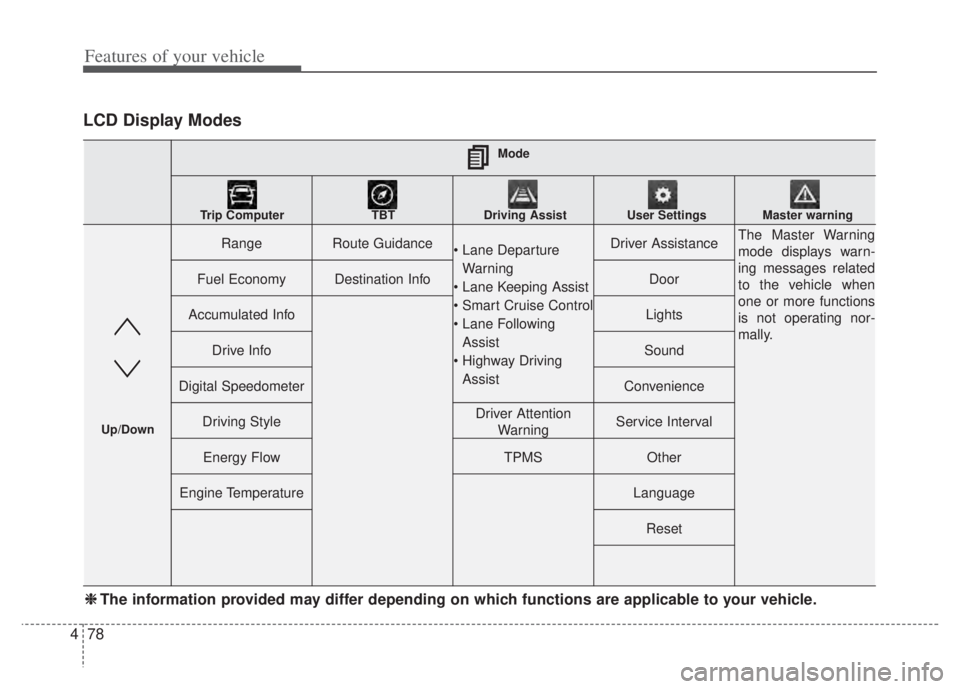
LCD Display Modes
RangeRoute Guidance
Warning
Assist
AssistDriver AssistanceThe Master Warning
mode displays warn-
ing messages related
to the vehicle when
one or more functions
is not operating nor-
mally.
Fuel EconomyDestination InfoDoor
Accumulated InfoLights
Drive InfoSound
Digital SpeedometerConvenience
Driving StyleDriver Attention WarningService Interval
Energy FlowTPMSOther
Engine TemperatureLanguage
Reset
Mode
Trip Computer TBT Driving Assist User Settings Master warning
Up/Down
❈ ❈ The information provided may differ depending on which functions are applicable to your vehicle.
Page 219 of 710

479
Features of your vehicle
Trip computer mode
The trip computer mode displays
information related to vehicle driving
parameters including fuel economy,
tripmeter information and vehicle
speed.
❈ For more details, refer to “Trip
Computer” in this chapter.
Turn By Turn (TBT) mode
(if equipped)
This mode displays the state of the
navigation.
Driving Assist mode(if equipped)
This mode displays the state of :
- Lane Departure Warning
- Lane Keeping Assist
- Smart Cruise Control
- Lane Following Assist
- Highway Driving Assist
Driver Attention Warning
❈ For more details, refer to each
function information in chapter 5.
ODEP049599N
ODEP049574LODEP049573N