light KIA NIRO PHEV 2022 Owners Manual
[x] Cancel search | Manufacturer: KIA, Model Year: 2022, Model line: NIRO PHEV, Model: KIA NIRO PHEV 2022Pages: 710, PDF Size: 10.35 MB
Page 429 of 710
![KIA NIRO PHEV 2022 Owners Manual Driving your vehicle
106
5
[A] : noise barrier, [B] : guardrail
Driving where there is a structure
beside the road
Blind-Spot Collision Warning may not
operate properly when driving where
there is st](/img/2/54743/w960_54743-428.png "KIA NIRO PHEV 2022 Owners Manual Driving your vehicle
106
5
[A] : noise barrier, [B] : guardrail
Driving where there is a structure
beside the road
Blind-Spot Collision Warning may not
operate properly when driving where
there is st")
Driving your vehicle
106
5
[A] : noise barrier, [B] : guardrail
Driving where there is a structure
beside the road
Blind-Spot Collision Warning may not
operate properly when driving where
there is structure beside the road.
In certain instances, the function
may wrongly recognize the struc-
tures (noise barriers, guardrail, dou-
ble guardrail, median strip, bollard,
street light, road sign, tunnel wall,
etc.) beside the road.
Always pay attention to road and
driving conditions, while driving. This device complies with Part 15
of the FCC rules.
Operation is subject to the following
two conditions:
1. This device may not cause harmful
interference, and
2. This device must accept any inter- ference received, including inter-
ference that may cause undesired
operation.
ODEP051161L
Page 434 of 710
5111
Driving your vehicle
✽ ✽NOTICE
Driver Attention Warning utilizes
the front view camera sensor on the
front windshield for its operation.
To keep the front view camera
sensor in the best condition, you
should observe the followings:
- Do not disassemble camera tem-
porarily for tinted window or
attaching any types of coatings and
accessories. If you disassemble a
camera and assemble it again, take
your vehicle to an authorized Kia
dealer and have the function
checked.
- Do not locate any reflective objects (i.e. white paper, mirror)
over the dashboard. Any light
reflection may cause a mal-func-
tion of Driver Attention Warning. (Continued)(Continued)
- Pay extreme caution to keep the
front view camera out of water.
- Do not arbitrarily disassemble the camera assembly, nor apply any
impact on the camera assembly.
• Playing the vehicle audio system at high volume may offset Driver
Attention Warning warning
sounds.
For more information of front
view camera, refer to “Lane
Keeping Assist (LKA)”.CAUTION
Driver Attention Warning may
not properly operate with limit-ed alerting in the following situ-ations:
Driver Attention Warning will not operate for about 15 sec-onds when restarting theengine or initializing the frontview camera such as reboot-ing, etc.
The lane detection perform- ance is limited. (For moreinformation, refer to "LaneKeeping Assist (LKA)" in thischapter.)
The vehicle is violently driven or is abruptly turned for obsta-cle avoidance (e.g. construc-tion area, other vehicles, fallenobjects, bumpy road).
Intentionally frequent lane cut-in
(Continued)
Page 437 of 710

Driving your vehicle
114
5
1. Cruise indicator (CRUISE)
2. Cruise set indicator
Cruise Control allows you to program
the vehicle to maintain a constant
speed without pressing the accelera-
tor pedal.
This function is designed to function
above approximately 20 mph (30
km/h ).
CRUISE CONTROL (CC)
WARNING
• If Cruise Control is left on,
(cruise indicator light is illu-
minated), Cruise Control can
be switched on accidentally.
Keep Cruise Control off when
Cruise Control is not in use, to
avoid inadvertently setting a
speed.
Use Cruise Control only when traveling on open highways in
good weather.
(Continued)
(Continued)
Do not use Cruise Controlwhen it may not be safe to
keep the vehicle at a constant
speed, for instance, driving in
heavy or varying traffic, or on
slippery (rainy, icy or snow-
covered) or winding roads or
over 6% up-hill or down-hill
roads.
Pay particular attention to the driving conditions whenever
using Cruise Control.
Be careful when driving downhill using Cruise
Control, which may increase
the vehicle speed.
ODEP051018
Page 438 of 710
5115
Driving your vehicle
✽ ✽NOTICE
• During normal Cruise Control
operation, when the SET- switch is
activated or reactivated after apply-
ing the brakes, Cruise Control will
energize after approximately 3 sec-
onds. This delay is normal.
• To activate Cruise Control, depress the brake pedal at least once after
placing the ignition switch or
ENGINE START/STOP button to
the ON position or starting the
engine. This is to check if the brake
switch which is important part to
cancel Cruise Control is in normal
condition.
Driving Assist button
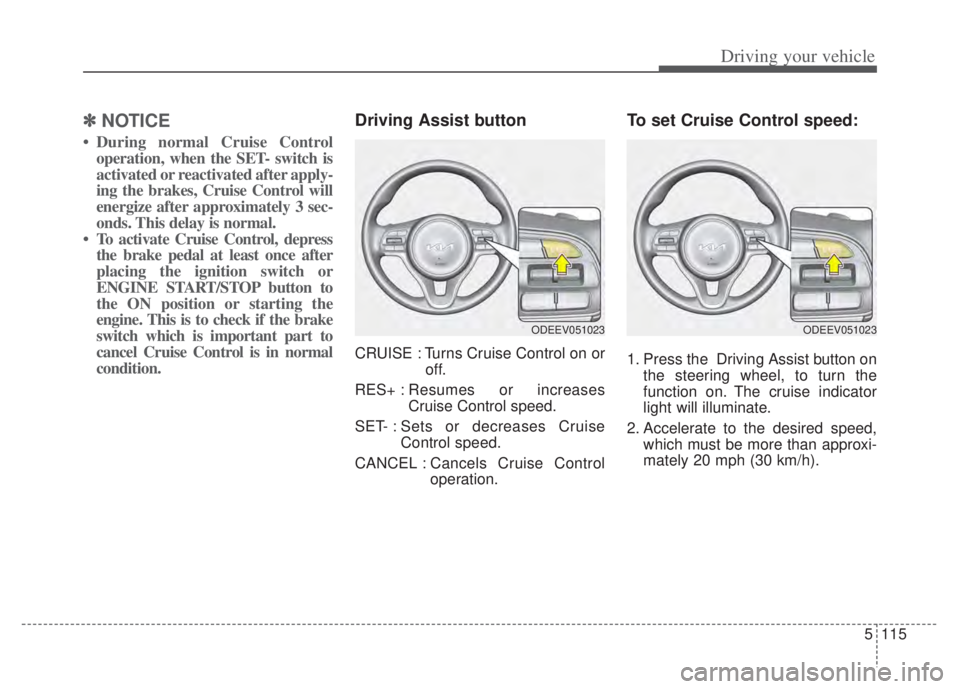
CRUISE : Turns Cruise Control on or
off.
RES+ : Resumes or increases
Cruise Control speed.
SET- : Sets or decreases Cruise Control speed.
CANCEL : Cancels Cruise Control
operation.
To set Cruise Control speed:
1. Press the Driving Assist button on
the steering wheel, to turn the
function on. The cruise indicator
light will illuminate.
2. Accelerate to the desired speed, which must be more than approxi-
mately 20 mph (30 km/h).
ODEEV051023ODEEV051023
Page 439 of 710

Driving your vehicle
116
5
3. Push the switch down (to SET-),
and release it at the desired
speed. The cruise set indicator
light will illuminate. Release the
accelerator pedal at the same
time. The desired speed will auto-
matically be maintained.
On a steep grade, the vehicle mayslow down or speed up slightly whilegoing downhill.
To increase Cruise Control set
speed:
Follow either of these procedures:
Push the switch up (to RES+) and hold it. Your vehicle will accelerate.
Release the switch at the speed
you want.
Push the switch up (to RES+) and release it immediately. The cruising
speed will increase by 1 mph (or 1
km/h ) each time you move the
switch up (to RES+) in this manner.
To decrease Cruise Control
set speed:
Follow either of these procedures:
Push the switch down (to SET-)and hold it. Your vehicle will gradu-
ally slow down. Release the switch
at the speed you want to maintain.
Push the switch down (to SET-) and release it immediately. The
cruising speed will decrease by 1
mph (or 1 km/h) each time you
move the switch down (to SET-) in
this manner.
ODEEV051024
ODEEV051025ODEEV051024
Page 440 of 710

5117
Driving your vehicle
To temporarily accelerate with
Cruise Control on:
If you want to speed up temporarily
when Cruise Control is on, depress
the accelerator pedal. Increased
speed will not interfere with Cruise
Control operation or change the set
speed.
To return to the set speed, take your
foot off the accelerator pedal.
To cancel Cruise Control, do
one of the following:
• Depress the brake pedal.
Shift into N (Neutral) if equippedwith an Dual clutch transmission.
Press the CANCEL button located on the steering wheel.
Decrease the vehicle speed lower than the memory speed by approx-
imately 12 mph (20 km/h).
Decrease the vehicle speed to less than approximately 15 mph (25 km/h).
Each of these actions will cancelCruise Control operation (the
cruise
set
indicator light will go off), but it
will not turn the function off. If you wish to resume Cruise Control oper-ation, move up the switch (to RES+)located on your steering wheel. Youwill return to your previously presetspeed.
ODEP051417
Page 441 of 710

Driving your vehicle
118
5
To resume cruising speed at
more than approximately 20
mph (30 km/h).
If any method other than the Driving
Assist button was used to cancel
cruising speed and the function is
still activated, the most recent set
speed will automatically resume
when the RES+ switch is pushed.
It will not resume, however, if the
vehicle speed has dropped below
approximately 20 mph (30 km/h).
To turn Cruise Control off, do
one of the following:
Press the Driving Assist button (the
cruise indicator light will be turn off).
Press the Driving Assist button twice. (The cruise indicator light will
be turn on.)
Turn the ignition off.
Both of these actions cancel Cruise Control operation. If you want toresume Cruise Control operation,repeat the steps provided in “To setCruise Control speed” on the previ-ous page.
ODEEV051025
Page 443 of 710

Driving your vehicle
120
5
Smart Cruise Control speed To
set Smart Cruise Control Speed :
1. Press the Driving Assist button, to turn the function on. The Cruise
indicator ( CRUISE) in the
instrument cluster will illuminate.
2. Accelerate to the desired speed. Smart Cruise Control speed can
be set as follows: km/h) : when there is no vehicle
in front
km/h) : when there is a vehicle in
front 3. Push the switch down (to SET-),
and release it at the desired
speed. The set speed and vehicle
distance on the LCD screen will
illuminate.
4. Release the accelerator pedal. The desired speed will automati-
cally be maintained.
If there is a vehicle in front of you, the
speed may decrease to maintain the
distance to the vehicle ahead.
On a steep grade, the vehicle may
slow down or speed up slightly while
going uphill or downhill. Vehicle speed may decrease on an
upward slope and increase on a
downward slope.
The speed will be set to 0 ~ 20 mph
(0 ~30 km/h) when there is a vehicle
ahead and your vehicle speed is 0 ~
20 mph (0 ~30 km/h).
ODEEV051023
ODEEV051024
Page 457 of 710

Driving your vehicle
134
5
To convert to Cruise Control
mode:
The driver may choose to only use
the cruise control mode (speed con-
trol function) by doing as follows:
(Continued)
Do not damage the sensor or sensor area by a strongimpact. If the sensor movesslightly off position, SmartCruise Control will not operatecorrectly without any warningor indicator from the cluster.
If this occurs, have your vehi-cle checked by an authorizedKia dealer as soon as possi-ble.
Use only a genuine Kia sensor cover for your vehicle. Do notpaint anything on the sensorcover.
If the front bumper becomes damaged in the area aroundthe radar sensor, Smart CruiseControl may not operate prop-erly.
(Continued)(Continued) To prevent sensor cover dam- age from occurring, wash thecar with a soft cloth.
Do not tint the window or install stickers, accessoriesaround the inside mirrorwhere the camera is installed.
Make sure the frontal camera installation point does not getwet.
Do not place reflective objects(white paper or mirroretc.) on the crash pad.Forward Collision-AvoidanceAssist may activate unneces-sarily due to reflect of the sun-light.
Do not impact or arbitrarily remove any front view cameracomponents.
OJF058400L
OJF058399L
Page 458 of 710
5135
Driving your vehicle
1. Turn Smart Cruise Control on (thecruise indicator light will be on but
the function will not be activated).
2. Push the distance to distance switch for more than 2 seconds.
3. Choose between "Smart Cruise Control" and "Cruise Control".
When the function is canceled using
the Driving Assist button or the
Driving Assist button is used after the
engine is turned on, Smart Cruise
Control mode will turn on.Limitations of Smart Cruise
Control
Smart Cruise Control may have lim-
its to its ability to detect distance to
the vehicle ahead due to road and
traffic conditions.
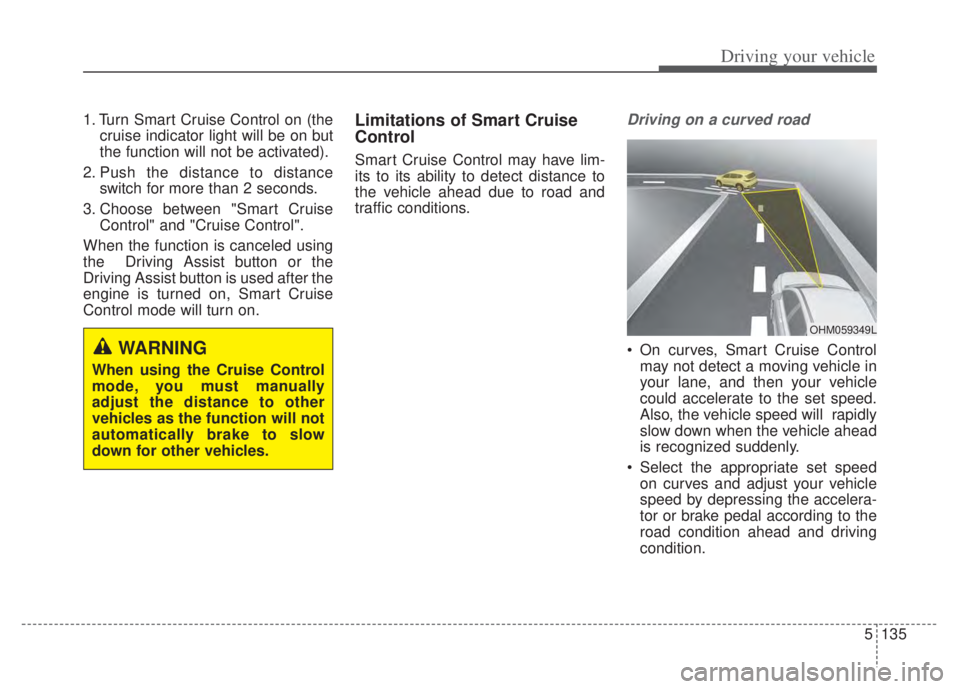
Driving on a curved road
On curves, Smart Cruise Control may not detect a moving vehicle in
your lane, and then your vehicle
could accelerate to the set speed.
Also, the vehicle speed will rapidly
slow down when the vehicle ahead
is recognized suddenly.
Select the appropriate set speed on curves and adjust your vehicle
speed by depressing the accelera-
tor or brake pedal according to the
road condition ahead and driving
condition.WARNING
When using the Cruise Control
mode, you must manually
adjust the distance to other
vehicles as the function will not
automatically brake to slow
down for other vehicles.
OHM059349L