light KIA NIRO PHEV 2022 Owners Manual
[x] Cancel search | Manufacturer: KIA, Model Year: 2022, Model line: NIRO PHEV, Model: KIA NIRO PHEV 2022Pages: 710, PDF Size: 10.35 MB
Page 391 of 710

Driving your vehicle
68
5
Detecting pedestrian
The sensor may be limited when:
The pedestrian is not fully detected
by the front view camera recogni-
tion function, for example, if the
pedestrian is leaning over or is not
fully walking upright.
The pedestrian is moving very quickly or appears abruptly in the
front view camera detection area.
The pedestrian is wearing clothing that easily blends into the back-
ground, making it difficult to be
detected by the front view camera
recognition function.
The outside lighting is too bright (e.g. when driving in bright sunlight
or in sun glare) or too dark (e.g.
when driving on a dark rural road
at night).
It is difficult to detect and distin- guish the pedestrian from other
objects in the surroundings, for
example, when there is a group of
pedestrian, or a large crowd. There is an item similar to a per-
son's body structure.
The pedestrian is small.
The pedestrian has impaired mobility.
In case of front view camera sen- sor recognition is in a marginal
state.
When the pedestrian suddenly interrupts in front of the vehicle.
When there is any other electro- magnetic interference.
When the construction area, rail or other metal object is near the
pedestrian.
In case of a large number of pedestrian are gathered.
When it is difficult to distinguish between surroundings and pedes-
trian.
When it is at night or in dark sur- roundings.WARNING
Do not use Forward Collision-Avoidance Assist when tow-
ing a vehicle. Application of
Forward Collision-Avoidance
Assist while towing may
adversely affect the safety of
your vehicle or the towing
vehicle.
Use extreme caution when the vehicle in front of you has
cargo that extends rearward
from the cab, or when the
vehicle in front of you has
higher ground clearance.
Forward Collision-Avoidance Assist is designed to detect
and monitor the vehicle ahead
in the roadway through front
view camera recognition. It is
not designed to detect bicy-
cles, motorcycles, or smaller
wheeled objects such as lug-
gage bags, shopping carts, or
strollers.
(Continued)
Page 394 of 710

571
Driving your vehicle
The warning light illumi-
nates on the LCD display,
when you cancel Forward
Collision-Avoidance
Assist. The driver can monitor the
Forward Collision-Avoidance Assist
ON/OFF status on the LCD display.
Also, the warning light illuminates
when the ESC (Electronic Stability
Control) is turned off. When the
warning light remains ON with
Forward Collision-Avoidance Assist
activated, have your vehicle inspect-
ed by an authorized Kia dealer.Warning Timing
The driver can select the initial warn-
ing activation time on the LCD dis-
play.
Go to the “User Settings Driver
Assistance Warning Timing
Normal/Later” The options for the initial Forward
Collision Warning includes the fol-
lowing:
- Normal:
When this condition is selected, the
initial Forward Collision Warning is
activated normally. This setting
allows for a nominal amount of dis-
tance between the vehicle ahead
before the initial warning occurs.
- Later:
When this condition is selected, the
initial Forward Collision Warning is
activated later than normal. This set-
ting reduces the amount of distance
between the vehicle ahead, the
pedestrian or the cyclist before the
initial warning occurs.
Select 'Later' when traffic is light and
when driving speed is slow.
If the vehicle in front puts on a burst
of speed, the driver can notice the
warning alarm is early even though
the later option is selected.
OYG059344L
Page 396 of 710
573
Driving your vehicle
Forward Collision-Avoidance
Assist warning message and
function control
Forward Collision-Avoidance Assist
produces warning messages and
warning alarms in accordance with
the collision risk levels of followings
like vehicle’s sudden braking in front
or lack of vehicle distance or collision
to pedestrian or cyclist. Also, it con-
trols the brakes in accordance with
the collision risk levels.The driver can select the initial warn-
ing activation time in the User set-
tings in the LCD display. The
options for the initial Forward
Collision Warning include Normal or
Late initial warning time.
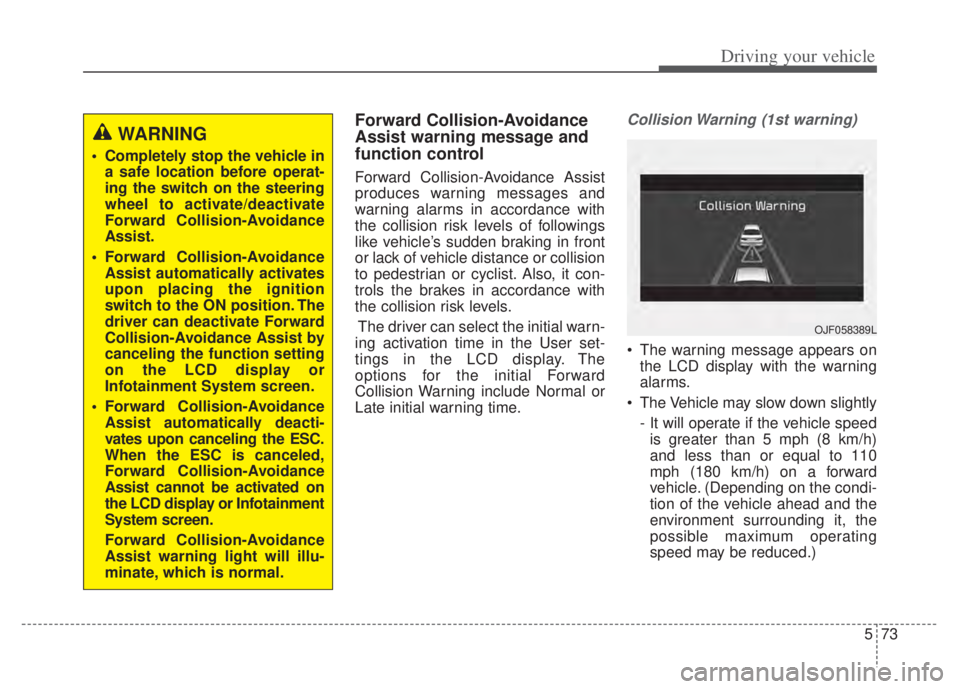
Collision Warning (1st warning)
The warning message appears on the LCD display with the warning
alarms.
The Vehicle may slow down slightly - It will operate if the vehicle speedis greater than 5 mph (8 km/h)
and less than or equal to 110
mph (180 km/h) on a forward
vehicle. (Depending on the condi-
tion of the vehicle ahead and the
environment surrounding it, the
possible maximum operating
speed may be reduced.)
WARNING
Completely stop the vehicle in a safe location before operat-
ing the switch on the steering
wheel to activate/deactivate
Forward Collision-Avoidance
Assist.
Forward Collision-Avoidance Assist automatically activates
upon placing the ignition
switch to the ON position. The
driver can deactivate Forward
Collision-Avoidance Assist by
canceling the function setting
on the LCD display or
Infotainment System screen.
Forward Collision-Avoidance Assist automatically deacti-
vates upon canceling the ESC.
When the ESC is canceled,
Forward Collision-Avoidance
Assist cannot be activated on
the LCD display or Infotainment
System screen.
Forward Collision-Avoidance
Assist warning light will illu-
minate, which is normal.
OJF058389L
Page 399 of 710
Driving your vehicle
76
5
In bad weather conditions such as
heavy rain, heavy snow, and fog, or
when sensor is covered by foreign
material, dust, etc., the sensors will
be degraded and the function will be
temporarily disabled.
Always keep the sensor clean.✽ ✽
NOTICE
• Do not install any accessories,
such as license plate molding or
sticker, on the sensor area. Nor
arbitrarily replace the bumper.
Those may adversely affect the
sensing performance.
• Always keep the sensor/bumper area clean.
• Use only soft cloths to wash the vehicle. Also, do not spray highly-
pressurized water on the sensor
installed on the bumper.
• Be careful not to apply unneces- sary force on the frontal sensor
area. When the sensor moves out
of the correct position due to
external force, the function may
not normally operate even without
the warning light or message. In
this case, have your vehicle
inspected by an authorized Kia
dealer.
• Use only the genuine Kia sensor cover. Do not arbitrarily apply
paint on the sensor cover. (Continued)(Continued)
• Do not tint the window or install
stickers, accessories around the
inside mirror where the camera is
installed.
• Make sure the front view camera installation point does not get wet.
• Do not impact or arbitrarily remove any front radar compo-
nents.
• Do not place reflective objects(white paper or mirror etc.)
on the crash pad.
The function may activate unnec-
essarily due to reflect of the sun-
light.
• Excessive audio volume may dis- turb the sound of the function
warning alarm.
• For more cautions for the front view camera sensor, refer to the
“Lane Keeping Assist (LKA)” in
this chapter.
Page 400 of 710

577
Driving your vehicle
Warning message and warninglight
If the sensor or sensor cover is cov-
ered by bad weather or foreign objects,
dust, etc., v operation may temporarily
stop. In this case, the warning mes-
sage appears to warn the driver.
This is not a malfunction with Forward
Collision-Avoidance Assist. To operate
Forward Collision-Avoidance Assist
again, remove the foreign substances.
Forward Collision-Avoidance Assist
may not properly operate when the
front radar is contaminated or an
object such as an open area is not
existed after engine start.
Forward Collision-Avoidance
Assist malfunction
• When Forward Collision-Avoidance Assist is not working properly,
Forward Safety warning light ( )
will illuminate and the warning mes-
sage will appear for a few seconds.
After the message disappears, the
master warning light ( ) will illu-
minate. In this case, have your vehi-
cle inspected by an authorized Kia
dealer.
Forward Collision-Avoidance Assist warning message may
appear along with the illumination
of the ESC warning light.
WARNING
Forward Collision-Avoidance
Assist may not activate without
any warning messages accord-
ing to driving condition, traffic
on the road, weather, road con-
dition, etc.
OJF058394LOJF058392L
Page 403 of 710

Driving your vehicle
80
5
Recognizing vehicles
The sensor may be limited when:
The front view camera or front
radar sensor is blocked with a for-
eign object or debris
The front view camera lens is con- taminated due to tinted, filmed or
coated windshield, damaged
glass, or stuck of foreign matter
(sticker, bug, etc.) on the glass
Inclement weather such as heavy rain or snow obscures the field of
view of the front radar sensor or
front view camera
There is interference by electro- magnetic waves
There is severe irregular reflection from the front view camera sensor
The front view camera/front radar sensor recognition is limited
The vehicle in front is too small to be detected (for example a motor-
cycle etc.)
The vehicle in front is an oversize vehicle or trailer that is too big to
be detected by the front view cam-
era recognition function (for exam-
ple a tractor trailer, etc.) The front view camera’s field of
view is not well illuminated (either
too dark or too much reflection or
too much backlight that obscures
the field of view)
The vehicle in front does not have their rear lights or their rear lights
does not turned ON or their rear
lights are located unusually.
The outside brightness changes suddenly, for example when enter-
ing or exiting a tunnel
When light coming from a street light or an oncoming vehicle is
reflected on a wet road surface
such as a puddle in the road
The field of view in front is obstructed by sun glare
The vehicle in front is driving errat- ically
The vehicle is on unpaved or uneven rough surfaces, or road
with sudden gradient changes.
The vehicle is driven near areas containing metal substances as a
construction zone, railroad, etc. The vehicle drives inside a build-
ing, such as a basement parking
lot
The front view camera does not recognize the entire vehicle in
front.
The front view camera is damaged.
The brightness outside is too low such as when the headlamps are
not on at night or the vehicle is
going through a tunnel.
The shadow is on the road by a median strip, trees, etc.
The vehicle drives through a toll- gate.
The windshield glass is fogged up; a clear view of the road is obstructed.
The rear part of the vehicle in front is not normally visible. (the vehicle
turns in other direction or the vehi-
cle is overturned.)
The adverse road conditions cause excessive vehicle vibrations while
driving
Page 404 of 710

581
Driving your vehicle
The sensor recognition changessuddenly when passing over a
speed bump
The vehicle in front is moving lon- gitudinally to the driving direction
The vehicle in front is stopped lon- gitudinally
The vehicle in front is driving towards your vehicle or reversing
You are on a roundabout and the vehicle in front circles
It is difficult to secure the field of view of the front view camera such
as backlight, reflected light, and
darkness.
When the front view camera is blocked by continuous washer
spray and wiper operation.
The vehicle in front is a special purpose vehicle, a trailer, or a truck
loading with unusual shape of lug-
gage.
The ambient light is too high or low.
The front view camera is contami- nated by front glass tinting, attach-
ing film, water proof coating, dam-
aged, foreign material such as a
sticker, worm, etc. When the front view camera
(including lens) or front radar is
damaged.
If not using headlamp or using weak light in the night or in a tun-
nel.
Backlight is shining in the driving direction of the vehicle. (Including
oncoming vehicle headlights.)
When the rear part of the front vehicle is small or low.
When a trailer or other vehicle is towing the front vehicle.
When the ground clearance of the front vehicle is high.
When a front vehicle makes sud- den lane changes unexpectedly.
OHM059350L
OHM059349L
OHM059351L
Page 407 of 710

Driving your vehicle
84
5
When driving in stop-and-go traffic,
and a stopped vehicle in front of you
merges out of the lane, Forward
Collision-Avoidance Assist may not
immediately detect the new vehicle
that is now in front of you. In this
case, you must maintain a safe brak-
ing distance, and if necessary,
depress the brake pedal to reduce
your driving speed in order to main-
tain a safe distance. - Recognizing the vehicle
When the vehicle in front has heavy
loading extended rearward, or when
the vehicle in front has higher ground
clearance, it may induce a haz-
ardous situation. Always pay atten-
tion to road and driving conditions,
while driving and, if necessary,
depress the brake pedal to reduce
your driving speed in order to main-
tain distance.
Recognizing pedestrian or cyclist
The sensor may be limited when:
The pedestrian or cyclist is not fully
detected by the front view camera
recognition function, for example, if
the pedestrian is leaning over or is
not fully walking upright
The pedestrian or cyclist is moving very quickly or appears abruptly in
the front view camera detection
area
The pedestrian or cyclist is wear- ing clothing that easily blends into
the background, making it difficult
to be detected by the front view
camera recognition function
The outside lighting is too bright (e.g. when driving in bright sunlight
or in sun glare) or too dark (e.g.
when driving on a dark rural road
at night)
ODEP051328NOJF055029
Page 408 of 710

585
Driving your vehicle
It is difficult to detect and distin-guish the pedestrian or cyclist from
other objects in the surroundings,
for example, when there is a group
of pedestrian, cyclists or a large
crowd
There is an item similar in shape or appearance to a person
The pedestrian or cyclist is below the sensor's viewing range
The sensor can not identify the pedestrian's outline because of
other items changing their profile,
such as mobility assistance devices
The front view camera or front radar is obstructed by a foreign
object or debris
Inclement weather such as heavy rain or snow obscures the field of
view of the front radar sensor or
front view camera
When light coming from a street light or an oncoming vehicle is
reflected on a wet road surface
such as a puddle in the road The field of view in front is
obstructed by sun glare
The windshield glass is fogged up; a clear view of the road is obstruct-
ed
The adverse road conditions cause excessive vehicle vibrations while
driving
When the pedestrian or cyclist suddenly enters the path of travel
of the vehicle
When the cyclist in front is riding perpendicular to the direction of
travel
When there is any electromagnetic interference
When the cyclist is near areas con- taining metal objects such as a
construction zone, railroad, etc.
If the bicycle material is not reflect- ed well on the front radar
When a pedestrian or cyclist’s height is small.
When a pedestrian or cyclist’s behavior is unstable. When a pedestrian or cyclist sud-
denly interrupts in front of the vehi-
cle.
When there are many pedestrian or cyclist.
When there is an object that reflects front radar well. (such as a
guardrail or a nearby vehicle)
Page 410 of 710
587
Driving your vehicle
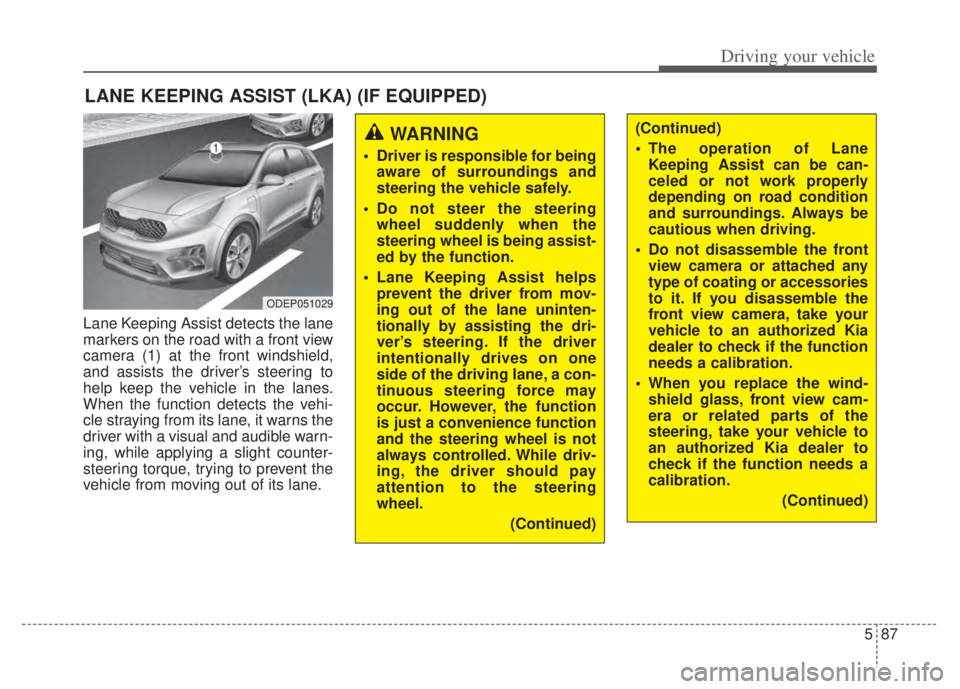
Lane Keeping Assist detects the lane
markers on the road with a front view
camera (1) at the front windshield,
and assists the driver’s steering to
help keep the vehicle in the lanes.
When the function detects the vehi-
cle straying from its lane, it warns the
driver with a visual and audible warn-
ing, while applying a slight counter-
steering torque, trying to prevent the
vehicle from moving out of its lane.
LANE KEEPING ASSIST (LKA) (IF EQUIPPED)
WARNING
Driver is responsible for beingaware of surroundings and
steering the vehicle safely.
Do not steer the steering wheel suddenly when the
steering wheel is being assist-
ed by the function.
Lane Keeping Assist helps prevent the driver from mov-
ing out of the lane uninten-
tionally by assisting the dri-
ver’s steering. If the driver
intentionally drives on one
side of the driving lane, a con-
tinuous steering force may
occur. However, the function
is just a convenience function
and the steering wheel is not
always controlled. While driv-
ing, the driver should pay
attention to the steering
wheel.
(Continued)
(Continued)
The operation of LaneKeeping Assist can be can-
celed or not work properly
depending on road condition
and surroundings. Always be
cautious when driving.
Do not disassemble the front view camera or attached any
type of coating or accessories
to it. If you disassemble the
front view camera, take your
vehicle to an authorized Kia
dealer to check if the function
needs a calibration.
When you replace the wind- shield glass, front view cam-
era or related parts of the
steering, take your vehicle to
an authorized Kia dealer to
check if the function needs a
calibration.
(Continued)
ODEP051029