Eps KIA NIRO PHEV 2022 User Guide
[x] Cancel search | Manufacturer: KIA, Model Year: 2022, Model line: NIRO PHEV, Model: KIA NIRO PHEV 2022Pages: 710, PDF Size: 10.35 MB
Page 299 of 710

4159
Features of your vehicle
Automatic climate control system
1. Turn the ignition switch to the ONposition.
2. Press the defroster button ( ).
3. While pressing the air conditioning button (A/C), press the air intake
control button at least 5 times with-
in 3 seconds.
The recirculation indicator blinks 3
times with 0.5 second of interval. It
indicates that the defogging logic is
canceled or returned to the pro-
grammed status.
If the battery has been discharged or
disconnected, it resets to the defog
logic status.
Auto defogging system
Auto defogging reduces the probabil-
ity of fogging up the inside of the
windshield by automatically sensing
the moisture of inside the windshield.
The auto defogging system operates
when the heater or air conditioning is
on. This indicator illuminates
when the auto defogging
system senses the mois-
ture on the inside of the
windshield and operates.
If more moisture is in the vehicle,
higher steps operate as follow. For
example if auto defogging does not
defog inside the windshield at step 1
Outside air position, it tries to defog
again at step 2 Operating the air con-
ditioning.
Step 1 : Outside air position
Step 2 : Operating the air condition- ing
Step 3 : Blowing air flow toward the windshield
Step 4 : Increasing air flow toward the windshield
ODEP049433 ODE046316
Page 313 of 710

4173
Features of your vehicle
Floor mat anchor(s)
(if equipped)
When using a floor mat on the front
floor carpet, make sure it attaches to
the floor mat anchor(s) in your vehi-
cle. This keeps the floor mat from
sliding forward.The following must be observed
when installing ANY floor mat to the
vehicle.
Ensure that the floor mats are
securely attached to the vehicle's
floor mat anchor(s) before driving
the vehicle.
Do not use ANY floor mat that can- not be firmly attached to the vehi-
cle's floor mat anchors.
Do not stack floor mats on top of one another (e.g. all-weather rub-
ber mat on top of a carpeted floor
mat). Only a single floor mat should
be installed in each position.
✽ ✽ NOTICE
Your vehicle was manufactured with
driver's side floor mat anchors that
are designed to securely hold the
floor mat in place. To avoid any
interference with pedal operation,
Kia recommends that only the Kia
floor mat designed for use in your
vehicle be installed.
OXM043309
■Type A■Type B
WARNING - After market
floor mat
Do not install aftermarket floor
mats that are not capable of
being securely attached to the
vehicle's floor mat anchors.
Unsecured floor mats can inter-
fere with pedal operation.
WARNING
Do not hang other objects such
as hangers or hard objects from
the clothes hanger. Also, do not
put heavy, sharp or breakable
objects in the clothing’s pock-
ets. In an accident or when the
curtain air bag is inflated, it may
cause vehicle damage or per-
sonal injury.
OPS046500
Page 344 of 710

521
Driving your vehicle
R (Reverse)
Use this position to drive the vehicle
backward.N (Neutral)
The wheels and transmission are not
engaged.
- Parking in N (Neutral) gear
Follow below steps when parking
and you want the vehicle to move
when pushed.
1.After parking your vehicle, step on
the brake pedal and move the shift
lever to [P] with the ignition switch or
ENGINE START/STOP button in
[ON] or while the engine is running.
2.If the parking brake is applied unlock the parking brake.
- For EPB (Electronic ParkingBrake) equipped vehicles, push
the brake pedal with the ignition
switch or ENGINE START/STOP
button in [ON] or while the engine
is running to disengage the park-
ing brake. If [AUTO HOLD] func-
tion is used while driving (If
[AUTO HOLD] indicator is on in
the cluster), press [AUTO HOLD]
switch and [AUTO HOLD] func-
tion should be turn off.
CAUTION
Always come to a complete stopbefore shifting into or out of R(Reverse); you may damage thetransmission if you shift into R(Reverse) while the vehicle is inmotion.
WARNING
Do not shift into gear unless
your foot is firmly on the brake
pedal. Shifting into gear when
the engine is running at high
speed can cause the vehicle to
move very rapidly. You could
lose control of the vehicle and
hit people or objects.
WARNING
Do not drive with the shift lever
in N (Neutral).
The engine brake may not work
and lead to an accident.
Page 374 of 710
551
Driving your vehicle
Vehicle Stability Management
(VSM)
This system provides further
enhancements to vehicle stability
and steering responses when a vehi-
cle is driving on a slippery road or a
vehicle detects changes in coeffi-
cient of friction between right wheels
and left wheels when braking.
VSM operation
When the VSM is in operation, ESC
indicator light ( ) blinks.
When the vehicle stability manage-
ment is operating properly, you can
feel a slight pulsation in the vehicle
and/or abnormal steering responses
(EPS- Electronic Power Steering).
This is only the effect of brake and
EPS control and indicates nothing
unusual.
The VSM does not operate when:
Driving on a sloping road such as agradient or incline
Driving in reverse
ESC OFF indicator light ( ) remains on the instrument cluster
EPS indicator light remains on the instrument cluster
VSM operation off
If you press the ESC OFF button to
turn off the ESC, the VSM will also
cancel and the ESC OFF indicator
light ( ) illuminates.
To turn on the VSM, press the button
again. The ESC OFF indicator light
goes out.
WARNING- Tire/
Wheel size
When replacing tires and wheels,
make sure they are the same size
as the original tires and wheels
installed. Driving with varying
tire or wheel sizes may diminish
any supplemental safety benefits
of the VSM system.
WARNING
- Vehicle stability manage- ment
Drive carefully even though your
vehicle has vehicle stability
management. It can only assist
you in maintaining control of the
vehicle under certain circum-
stances.
Page 375 of 710
Driving your vehicle
52
5
Malfunction indicator
The VSM can be deactivated even if
you don’t cancel the VSM operation
by pressing the ESC OFF button. It
indicates that a malfunction has
been detected somewhere in the
Electric Power Steering system or
VSM system. If the ESC indicator
light ( ) or EPS warning light
remains on, take your vehicle to an
authorized Kia dealer and have the
system checked. The Vehicle Stability Management
system is not a substitute for safe
driving practices but a supplemen-
tary function only. It is the responsi-
bility of the driver to always check
the speed and the distance to the
vehicle ahead. Always hold the
steering wheel firmly while driving.
Your vehicle is designed to activate according to the driver’s intention,
even with installed VSM. Always fol-
low all the normal precautions for
driving at safe speeds for the condi-
tions – including driving in inclement
weather and on a slippery road.
Hill-start Assist Control (HAC)
A vehicle has the tendency to roll
back on a steep hill when it starts to
go after stopping. The Hill-start
Assist Control (HAC) prevents the
vehicle from rolling back by applying
the brakes automatically for about 2
seconds. The brakes are released
when the accelerator pedal is
depressed or after about 2 seconds.
The HAC is activated only for about 2
seconds, so when the vehicle is
starting off always depress the accel-
erator pedal.
WARNING
For maximum protection,
always wear your seat belt. No
system, no matter how
advanced, can compensate for
all driver error and/or driving
conditions. Always drive
responsibly.
WARNING- Maintaining
Brake Pressure on Incline
HAC does not replace the need
to apply brakes while stopped on
an incline. While stopped, make
sure you maintain brake pres-
sure sufficient to prevent your
vehicle from rolling backward
and causing an accident. Don’t
release the brake pedal until you
are ready to accelerate forward.
Page 411 of 710
Driving your vehicle
88
5
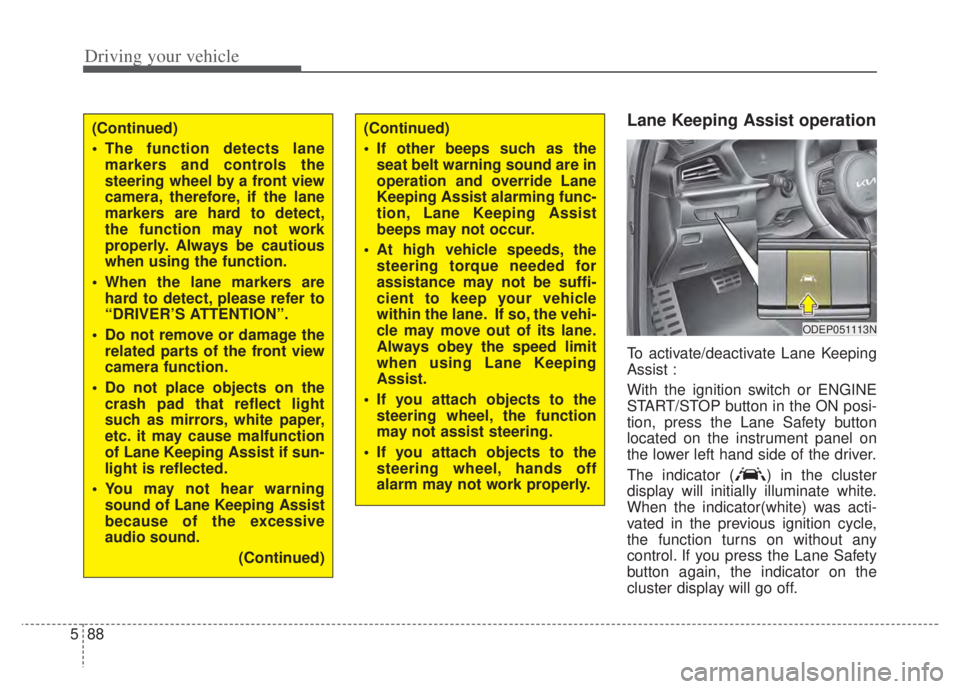
Lane Keeping Assist operation
To activate/deactivate Lane Keeping
Assist :
With the ignition switch or ENGINE
START/STOP button in the ON posi-
tion, press the Lane Safety button
located on the instrument panel on
the lower left hand side of the driver.
The indicator ( ) in the cluster
display will initially illuminate white.
When the indicator(white) was acti-
vated in the previous ignition cycle,
the function turns on without any
control. If you press the Lane Safety
button again, the indicator on the
cluster display will go off.
(Continued)
The function detects lane
markers and controls the
steering wheel by a front view
camera, therefore, if the lane
markers are hard to detect,
the function may not work
properly. Always be cautious
when using the function.
When the lane markers are hard to detect, please refer to
“DRIVER’S ATTENTION”.
Do not remove or damage the related parts of the front view
camera function.
Do not place objects on the crash pad that reflect light
such as mirrors, white paper,
etc. it may cause malfunction
of Lane Keeping Assist if sun-
light is reflected.
You may not hear warning sound of Lane Keeping Assist
because of the excessive
audio sound.
(Continued)(Continued)
If other beeps such as theseat belt warning sound are in
operation and override Lane
Keeping Assist alarming func-
tion, Lane Keeping Assist
beeps may not occur.
At high vehicle speeds, the steering torque needed for
assistance may not be suffi-
cient to keep your vehicle
within the lane. If so, the vehi-
cle may move out of its lane.
Always obey the speed limit
when using Lane Keeping
Assist.
If you attach objects to the steering wheel, the function
may not assist steering.
If you attach objects to the steering wheel, hands off
alarm may not work properly.
ODEP051113N
Page 441 of 710

Driving your vehicle
118
5
To resume cruising speed at
more than approximately 20
mph (30 km/h).
If any method other than the Driving
Assist button was used to cancel
cruising speed and the function is
still activated, the most recent set
speed will automatically resume
when the RES+ switch is pushed.
It will not resume, however, if the
vehicle speed has dropped below
approximately 20 mph (30 km/h).
To turn Cruise Control off, do
one of the following:
Press the Driving Assist button (the
cruise indicator light will be turn off).
Press the Driving Assist button twice. (The cruise indicator light will
be turn on.)
Turn the ignition off.
Both of these actions cancel Cruise Control operation. If you want toresume Cruise Control operation,repeat the steps provided in “To setCruise Control speed” on the previ-ous page.
ODEEV051025
Page 472 of 710

5149
Driving your vehicle
Lane Following Assist opera-
tion
To use Lane Following Assist two
steps are necessary:
(1) Lane Following Assist has to beenabled, and
(2) Smart Cruise Control has to be activated
Select or release the setting from “User setting Driver Assistance
Driving Assist Lane Following
Assist”. Select Lane Following
Assist in the user setting of the
instrument panel.
Press the Lane Driving Assist but- ton ( ) located on the steering
wheel to turn on Lane Following
Assist.
(Continued)
- Depending on your surround- ings and road conditions,Lane Following Assist couldfail to recognize the lane andstop working. In turn, extracaution is required while driv-ing with Lane FollowingAssist on.
- Be sure to check the non- operating conditions and cau-tions for the driver beforeusing Lane Following Assist.
- Do not place reflective materi- als such as white paper ormirror on the crash pad.Sunlight reflections can causea malfunction in LaneFollowing Assist.
- Too big sound from the sound function can interrupt thealarming sound from LaneFollowing Assist.
(Continued)(Continued)- Keeping your hands off the wheel while driving will triggerthe hands-off warning anddeactivate the steering-assistfunction. Put your hands backon the wheel, then the steer-ing-assist system will be re-activated.
- When driving at a high speed, the steering assist force canbecome weak and the vehiclecan drive out of its lane. Extracaution is required, and com-ply with the speed limit.
- Attaching an object to the steering wheel could detersteering assistance.
- Attaching an object to the steering wheel could deter thehands-off alarming system.
Page 474 of 710

5151
Driving your vehicle
Warning
If you keep your hands off the wheel
while driving with Lane Following
Assist assisting the steering, the
hands-off warning will be triggered.
If the driver keeps hands off the
wheel even with the hands-off warn-
ing on, the steering assist is tem-
porarily released automatically.
If you put your hands back on the
wheel with Lane Following Assist
released, the steering assist will re-
start.
ODEP051397N
WARNING
Lane Following Assist ensures
the vehicle stays in its lane.
Lane Following Assist does not
guarantee 100% safety. Make
sure you always check road
conditions and drive safely at
all times.
Never completely rely on your
Lane Following Assist.
CAUTION
Hands-off warnings may bedelayed depending on roadconditions. Always keep yourhands on the steering wheelwhile driving.
Hold the steering wheel tight. Otherwise, Lane FollowingAssist could misjudge that thedriver hands off the wheel,and a hands-off warning mayoccur.
Page 475 of 710

Driving your vehicle
152
5
Lane Following Assist mal-
function
The warning message popped up
(turned off after a certain period of
time)means a problem with Lane
Following Assist. If this occurs, we
recommend that the function be
checked by an authorized Kia dealer.
Limitation of Lane Following
Assist
If the driver turns on the turn signal
light or the emergency warning
light to change the lane
- Operate the turn signal lightswitch before changing the lane
- If you change the lane without operating the turn signal lights,
steering reaction force of the
wheel may occur.
Once Lane Following Assist is turned on or the lane is changed,
the vehicle should be in the center
of the road to switch to the steering
assist mode. If the driver keeps
driving along the lane, Lane
Following Assist will not assist the
steering.
When the ESC or VSM is activat- ed, the function does not assist
steering.
When driving on a curved road at a high speed, steering assist mode
may not work.
When driving at a speed faster than 110 mph (180 km/h), steering
assist mode may not work.
CAUTION
It is the driver’s responsibility to operate the steering wheelwhile driving.
With Lane Following Assist on, the driver can steer thevehicle by operating the wheelon his own.
We recommend that the driver turns off Lane FollowingAssist and operates the steer-ing wheel by himself in the fol-lowing cases
- bad weather- bad road conditions- when frequent operation of the steering wheel is required
- when towing other vehicle or trailers
The steering wheel can feel heavy or light if LaneFollowing Assist is assistingthe steering.
ODEP059265L