wheel KIA NIRO PHEV 2022 Service Manual
[x] Cancel search | Manufacturer: KIA, Model Year: 2022, Model line: NIRO PHEV, Model: KIA NIRO PHEV 2022Pages: 710, PDF Size: 10.35 MB
Page 391 of 710

Driving your vehicle
68
5
Detecting pedestrian
The sensor may be limited when:
The pedestrian is not fully detected
by the front view camera recogni-
tion function, for example, if the
pedestrian is leaning over or is not
fully walking upright.
The pedestrian is moving very quickly or appears abruptly in the
front view camera detection area.
The pedestrian is wearing clothing that easily blends into the back-
ground, making it difficult to be
detected by the front view camera
recognition function.
The outside lighting is too bright (e.g. when driving in bright sunlight
or in sun glare) or too dark (e.g.
when driving on a dark rural road
at night).
It is difficult to detect and distin- guish the pedestrian from other
objects in the surroundings, for
example, when there is a group of
pedestrian, or a large crowd. There is an item similar to a per-
son's body structure.
The pedestrian is small.
The pedestrian has impaired mobility.
In case of front view camera sen- sor recognition is in a marginal
state.
When the pedestrian suddenly interrupts in front of the vehicle.
When there is any other electro- magnetic interference.
When the construction area, rail or other metal object is near the
pedestrian.
In case of a large number of pedestrian are gathered.
When it is difficult to distinguish between surroundings and pedes-
trian.
When it is at night or in dark sur- roundings.WARNING
Do not use Forward Collision-Avoidance Assist when tow-
ing a vehicle. Application of
Forward Collision-Avoidance
Assist while towing may
adversely affect the safety of
your vehicle or the towing
vehicle.
Use extreme caution when the vehicle in front of you has
cargo that extends rearward
from the cab, or when the
vehicle in front of you has
higher ground clearance.
Forward Collision-Avoidance Assist is designed to detect
and monitor the vehicle ahead
in the roadway through front
view camera recognition. It is
not designed to detect bicy-
cles, motorcycles, or smaller
wheeled objects such as lug-
gage bags, shopping carts, or
strollers.
(Continued)
Page 396 of 710
573
Driving your vehicle
Forward Collision-Avoidance
Assist warning message and
function control
Forward Collision-Avoidance Assist
produces warning messages and
warning alarms in accordance with
the collision risk levels of followings
like vehicle’s sudden braking in front
or lack of vehicle distance or collision
to pedestrian or cyclist. Also, it con-
trols the brakes in accordance with
the collision risk levels.The driver can select the initial warn-
ing activation time in the User set-
tings in the LCD display. The
options for the initial Forward
Collision Warning include Normal or
Late initial warning time.
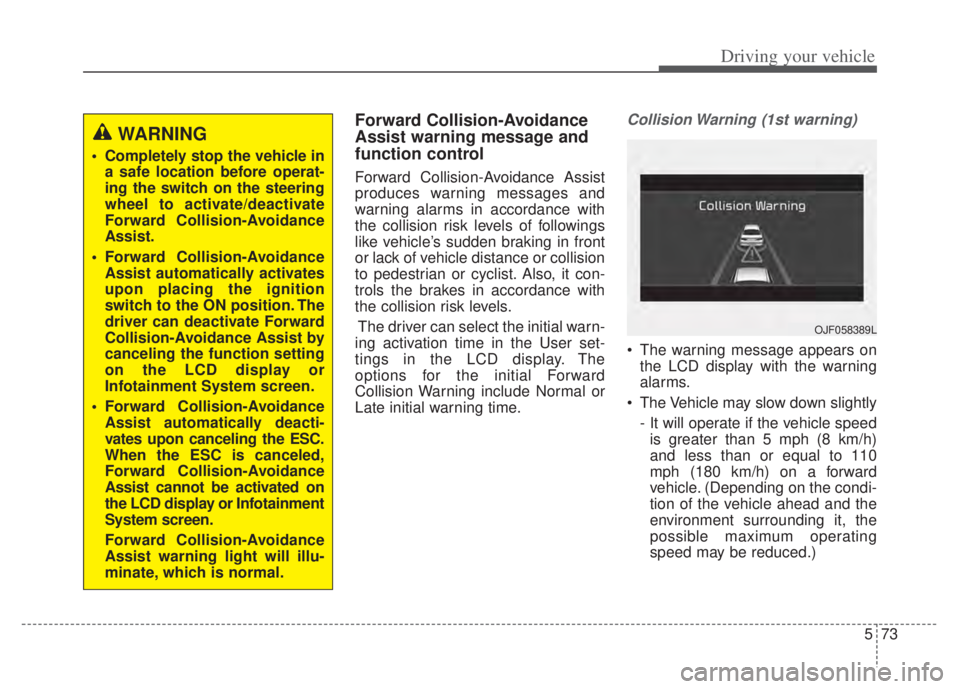
Collision Warning (1st warning)
The warning message appears on the LCD display with the warning
alarms.
The Vehicle may slow down slightly - It will operate if the vehicle speedis greater than 5 mph (8 km/h)
and less than or equal to 110
mph (180 km/h) on a forward
vehicle. (Depending on the condi-
tion of the vehicle ahead and the
environment surrounding it, the
possible maximum operating
speed may be reduced.)
WARNING
Completely stop the vehicle in a safe location before operat-
ing the switch on the steering
wheel to activate/deactivate
Forward Collision-Avoidance
Assist.
Forward Collision-Avoidance Assist automatically activates
upon placing the ignition
switch to the ON position. The
driver can deactivate Forward
Collision-Avoidance Assist by
canceling the function setting
on the LCD display or
Infotainment System screen.
Forward Collision-Avoidance Assist automatically deacti-
vates upon canceling the ESC.
When the ESC is canceled,
Forward Collision-Avoidance
Assist cannot be activated on
the LCD display or Infotainment
System screen.
Forward Collision-Avoidance
Assist warning light will illu-
minate, which is normal.
OJF058389L
Page 398 of 710

575
Driving your vehicle
Brake operation
In an urgent situation, the brakingsystem enters into the ready status
for prompt reaction to assist the driv-
er in depressing the brake pedal.
Forward Collision-Avoidance Assist provides additional braking
power for optimum braking per-
formance, when the driver
depresses the brake pedal.
The braking control is automatical- ly deactivated, when the driver
sharply depresses the accelerator
pedal, or when the driver abruptly
operates the steering wheel.
The braking control is automatical- ly canceled, when risk factors dis-
appear.
Detecting sensors (Front view
camera/Front radar)
[1] : Front view camera
[2] : Front radar
The sensors are that detecting the
distance to vehicles ahead, pedestri-
an or cyclist.
CAUTION
The driver should always paygreat caution to vehicle opera-tion, even though there is nowarning message or warningalarm.
WARNING
Forward Collision-Avoidance
Assist cannot avoid all colli-
sions. Forward Collision-
Avoidance Assist might not
completely stop the vehicle
before a collision, due to ambi-
ent, weather and road condi-
tions. The driver has the
responsibility to drive safely
and control the vehicle.
WARNING
Forward Collision-Avoidance
Assist operates in accordance
with certain risk factors, such as
the distance from the
vehicle/passer-by in front, the
speed of the vehicle/passer-by in
front, and the driver's vehicle
operation.
ODEP051029
ODEP051417N
Page 409 of 710

Driving your vehicle
86
5
✽ ✽
NOTICE
In some instances, Forward
Collision-Avoidance Assist may be
cancelled when subjected to electro-
magnetic interference.
This device complies with Part 15
of the FCC rules.
Operation is subject to the following
three conditions:
1. This device may not cause harmful
interference, and
2. This device must accept any inter- ference received, including inter-
ference that may cause undesired
operation.
3. Changes or modifications not expressly approved by the party
responsible for compliance could
void the user's authority to operate
the device.
Radio frequency radiation exposure
information:
This equipment complies with FCC
radiation exposure limits set forth for
uncontrolled environment.
This equipment should be installed
and operated with minimum distance
of 8 in. (20 cm) between the radiator
(antenna) and your body.
This transmitter must not be co-
located or operating in conjunction
with any other antenna or transmit-
ter.(Continued)
Never try to test the operation of Forward Collision-Avoidance
Assist. Doing so may cause
severe injury or death.
If the front bumper, front glass, front view camera or front
radar have been replaced or
repaired, have your vehicle
inspected by an authorized Kia
dealer.
If the function detects an object that has a similar
shape or characteristics of a
vehicle or a pedestrian,
Forward Collision-Avoidance
Assist may operate.WARNING
Do not use Forward Collisionavoidance Assist when towing a
vehicle. Application of Forward
Collision-Avoidance Assist
while towing may adversely
affect the safety of your vehicle
or the towing vehicle.
Use extreme caution when the vehicle in front of you has
cargo that extends rearward
from the cab, or when the
vehicle in front of you has
higher ground clearance.
Forward Collision-Avoidance Assist is designed to detect
and monitor the vehicle ahead
or detect a pedestrian or
cyclist in the roadway through
front view camera recognition
and front radar signals. It may
not always detect bicycles,
motorcycles, or smaller
wheeled objects such as lug-
gage bags, shopping carts, or
strollers.
(Continued)
Page 410 of 710
587
Driving your vehicle
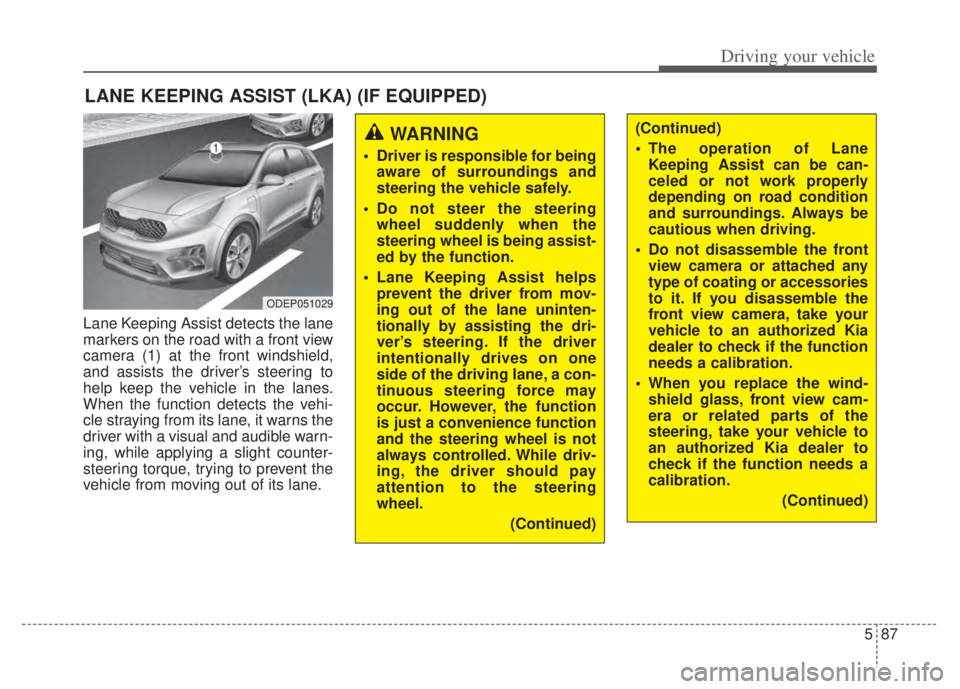
Lane Keeping Assist detects the lane
markers on the road with a front view
camera (1) at the front windshield,
and assists the driver’s steering to
help keep the vehicle in the lanes.
When the function detects the vehi-
cle straying from its lane, it warns the
driver with a visual and audible warn-
ing, while applying a slight counter-
steering torque, trying to prevent the
vehicle from moving out of its lane.
LANE KEEPING ASSIST (LKA) (IF EQUIPPED)
WARNING
Driver is responsible for beingaware of surroundings and
steering the vehicle safely.
Do not steer the steering wheel suddenly when the
steering wheel is being assist-
ed by the function.
Lane Keeping Assist helps prevent the driver from mov-
ing out of the lane uninten-
tionally by assisting the dri-
ver’s steering. If the driver
intentionally drives on one
side of the driving lane, a con-
tinuous steering force may
occur. However, the function
is just a convenience function
and the steering wheel is not
always controlled. While driv-
ing, the driver should pay
attention to the steering
wheel.
(Continued)
(Continued)
The operation of LaneKeeping Assist can be can-
celed or not work properly
depending on road condition
and surroundings. Always be
cautious when driving.
Do not disassemble the front view camera or attached any
type of coating or accessories
to it. If you disassemble the
front view camera, take your
vehicle to an authorized Kia
dealer to check if the function
needs a calibration.
When you replace the wind- shield glass, front view cam-
era or related parts of the
steering, take your vehicle to
an authorized Kia dealer to
check if the function needs a
calibration.
(Continued)
ODEP051029
Page 411 of 710
Driving your vehicle
88
5
Lane Keeping Assist operation
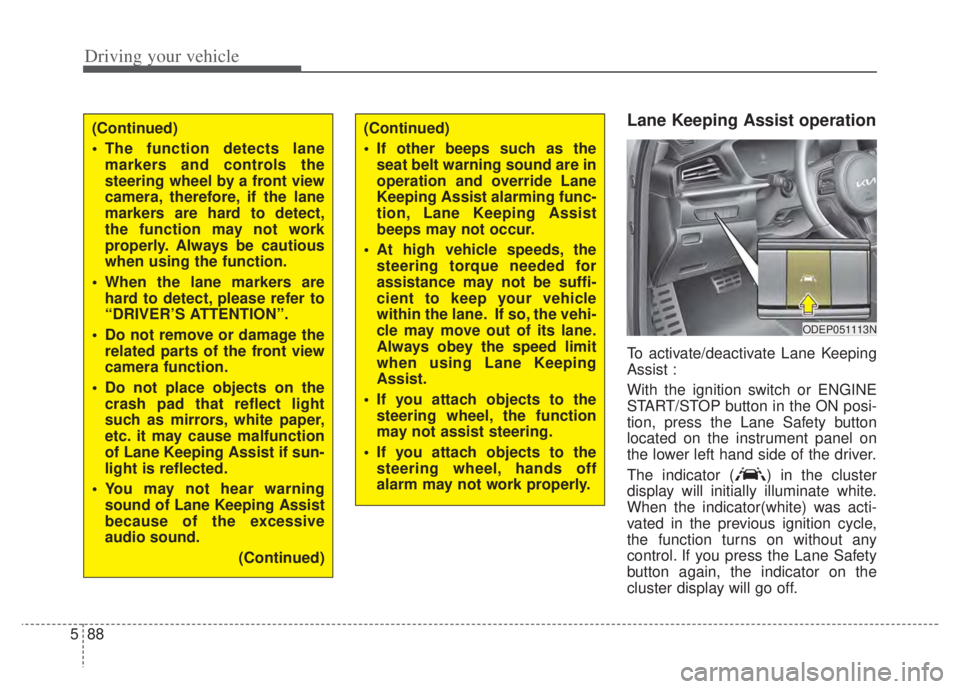
To activate/deactivate Lane Keeping
Assist :
With the ignition switch or ENGINE
START/STOP button in the ON posi-
tion, press the Lane Safety button
located on the instrument panel on
the lower left hand side of the driver.
The indicator ( ) in the cluster
display will initially illuminate white.
When the indicator(white) was acti-
vated in the previous ignition cycle,
the function turns on without any
control. If you press the Lane Safety
button again, the indicator on the
cluster display will go off.
(Continued)
The function detects lane
markers and controls the
steering wheel by a front view
camera, therefore, if the lane
markers are hard to detect,
the function may not work
properly. Always be cautious
when using the function.
When the lane markers are hard to detect, please refer to
“DRIVER’S ATTENTION”.
Do not remove or damage the related parts of the front view
camera function.
Do not place objects on the crash pad that reflect light
such as mirrors, white paper,
etc. it may cause malfunction
of Lane Keeping Assist if sun-
light is reflected.
You may not hear warning sound of Lane Keeping Assist
because of the excessive
audio sound.
(Continued)(Continued)
If other beeps such as theseat belt warning sound are in
operation and override Lane
Keeping Assist alarming func-
tion, Lane Keeping Assist
beeps may not occur.
At high vehicle speeds, the steering torque needed for
assistance may not be suffi-
cient to keep your vehicle
within the lane. If so, the vehi-
cle may move out of its lane.
Always obey the speed limit
when using Lane Keeping
Assist.
If you attach objects to the steering wheel, the function
may not assist steering.
If you attach objects to the steering wheel, hands off
alarm may not work properly.
ODEP051113N
Page 412 of 710

589
Driving your vehicle
To activate/deactivate Lane Keeping
Assist:
With the ignition switch or ENGINE
START/STOP button in the ON posi-
tion, press and hold the Lane Driving
Assist button ( ) located on the
steering wheel to turn off Lane
Keeping Assist. Press and hold the
button again to turn on the function.
The indicator ( ) in the cluster
display will initially illuminate white. If
you pressing and holding the Lane
Driving Assist button located on the
steering wheel, Lane Keeping Assist
will be turned off and the indicator on
the cluster display will go off.❈
The color of indicator will change
depend on the condition of Lane
Keeping Assist.
- White : Sensor does not detect the lane marker or vehi-
cle speed is less than 40
mph (60 km/h).
- Green : Sensor detects the lane marker and function is
able to control the steer-
ing.
Lane Keeping Assist setting
The driver can change Lane Keeping
Assist to Lane Depar ture Warning or
change the Lane Keeping Assist
mode from the LCD display.
“User Settings Driver Assistance
Lane Safety Lane Keeping
Assist/Lane Departure Warning/Off ”
Lane Keeping Assist
Lane Keeping Assist mode guides
the driver to keep the vehicle within
the lanes. It rarely controls the steer-
ing wheel, when the vehicle drives
well inside the lanes. However, it
starts to control the steering wheel,
when the vehicle is about to deviate
from the lanes.ODEEV051027
Page 413 of 710

Driving your vehicle
90
5
Lane Departure Warning
Lane Departure Warning warns the
driver with a visual and acoustic
warning when the function detects
the vehicle leaving the lane. In this
mode, the steering wheel will not be
controlled. When the vehicle’s front
wheel contacts the inside edge of
lane line, the contacted line will be
displayed on the LCD display.
Off
If you select ‘Off’, it is the same with
pressing Lane Safety ( ) button
to release.
Lane Keeping Assist activa-
tion
To see Lane Keeping Assist screen
on the LCD display in the cluster,
Tab to the Driving Assist mode
().
After Lane Keeping Assist is acti- vated, if both lane markers are
detected, vehicle speed is over 40
mph (60 km/h) and all the activa-
tion conditions are satisfied, a
green steering wheel indicator will
illuminate and the steering wheel
will be controlled.
ODEP050112N
WARNING
Lane Keeping Assist is a func-
tion to help prevent the driver
from leaving the lane. However,
the driver should not solely rely
on the function and should
always check road conditions
wen driving.
Page 414 of 710
591
Driving your vehicle
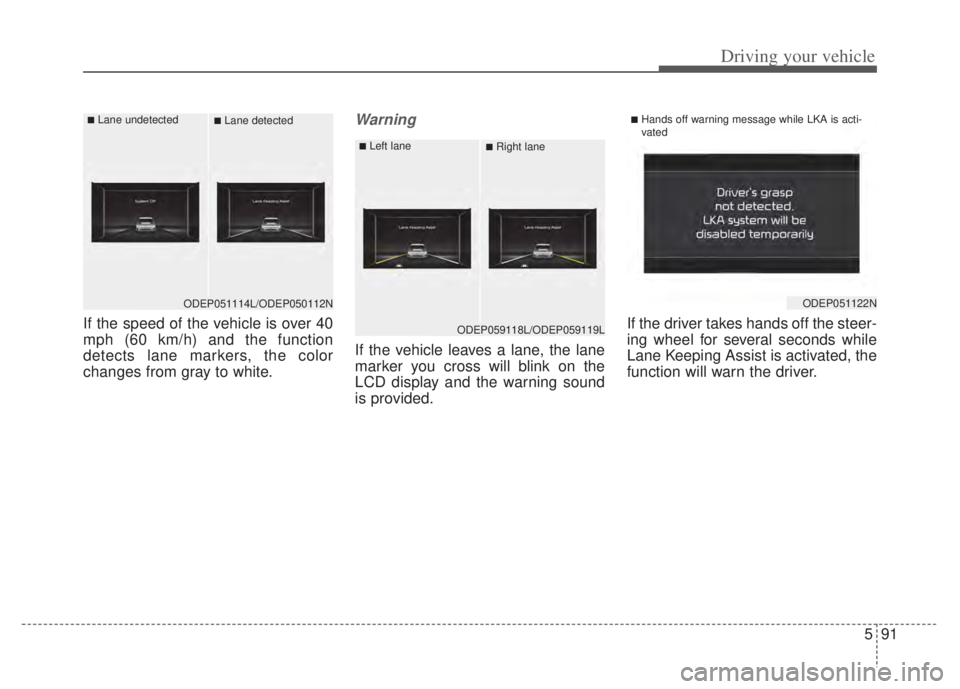
If the speed of the vehicle is over 40
mph (60 km/h) and the function
detects lane markers, the color
changes from gray to white.
Warning
If the vehicle leaves a lane, the lane
marker you cross will blink on the
LCD display and the warning sound
is provided.If the driver takes hands off the steer-
ing wheel for several seconds while
Lane Keeping Assist is activated, the
function will warn the driver.
ODEP059118L/ODEP059119L
■Left lane■Right lane
ODEP051122N
■Hands off warning message while LKA is acti-
vated
ODEP051114L/ODEP050112N
■Lane undetected■Lane detected
Page 415 of 710

Driving your vehicle
92
5
✽ ✽
NOTICE
• Even though the steering is assist-
ed by the function, the driver may
control the steering.
• The steering wheel may feel heav- ier when the steering wheel is
assisted by the function than when
it is not. WARNING
The driver is responsible for
accurate steering.
Even though the steering is assisted by the function, the
driver may control the steer-
ing wheel.
Turn off the function and drive the vehicle in the below situa-
tions:
- In bad weather
- In bad road conditions
- When the steering wheelneeds to be controlled by the
driver frequently.
- When towing a vehicle or trailer.
The steering wheel may feel heavier when the steering
wheel is assisted by the func-
tion than when it is not.
WARNING
The hands-off warning mes-sage may be delayed accord-
ing to road conditions.
Therefore, always have your
hands on the steering wheel
while driving.
If you hold the steering wheel lightly, the function may dis-
play the hands off warning
because Lane Keeping Assist
may believe you are not grab-
bing the wheel.