CD player KIA Optima 2008 2.G User Guide
[x] Cancel search | Manufacturer: KIA, Model Year: 2008, Model line: Optima, Model: KIA Optima 2008 2.GPages: 289, PDF Size: 4.78 MB
Page 125 of 289
Knowing your vehicle116 33. FF/REW Button If you want to fast forward or reverse
through the compact disc track, push and
hold the FF or REW button.
When you release the button, the compact
disc player will resume playing.4. REPEAT (RPT) Button To repeat the track you are currently
listening to, press the RPT button. To
cancel, press it again.
To repeat the music within selected
folder, press the RPT button for more
than 0.8 seconds. To cancel, press it
again. (MP3 CD only)
If you do not release RPT operation
when the track ends, it will automati-
cally be replayed.
This process will be continued until you
push the button again or turn the power
OFF then ON.
5. RANDOM (RDM) ButtonWith random, you can listen to the tracks
in random, rather than sequential order.
To use random, do the following:
Press the RDM button to listen to
recorded tracks in random sequence.
Press RDM again to cancel or turn the
power OFF then ON. The unit defaults
to playing tracks in sequential order.
To listen to the music within the select-
ed folder in random order, press the
RDM button within a second. To can-
cel, press it again or turn the power
OFF then ON . (MP3 CD only)6. BOOKMARK (MARK) ButtonWhen the CD player unit is operating, the
desired track on the disc can be book-
marked by using the MARK button.(MP3
CD only)
Press the MARK button for more than
0.8 seconds to bookmark the desired
track.
“M” will be displayed on the LCD and
“MEMORY(1~50)” will display for
approximately five seconds with beep
sound.
To play a bookmarked track, press the
MARK button within 0.8 seconds and
select the bookmarked track to play. To erase a bookmarked track, press
the MARK button for more than 0.8
seconds. The unit will beep once when
the bookmark is erased.
✽ ✽
NOTICETracks stored using the Bookmark func-
tion will be automatically erased after
you eject CDs that contain those tracks. 7. SCROLL ButtonPress the button, and you can check the
file names with more than 16 characters
on MP3 CD(max 34 characters.).
The button doesn’t work on file names
with less than 16 characters.8. EQ ButtonPress the EQ button to select the CLAS-
SIC, POPS, ROCK, JAZZ and OFF
MODE for the desired tone quality. Each
press of the button changes the display
as follows;CLASSIC➟POPS➟ROCK➟JAZZ➟OFF
Page 127 of 289
Knowing your vehicle118 3✽
✽
NOTICE• To assure proper operation of the unit,
keep the vehicle interior temperature
within a normal range by using the
vehicle's air conditioning or heating
system.
• When replacing the fuse, replace it
with a fuse having the correct capaci-
ty.
• All stored bookmarks are all erased
when the car battery is disconnected
or power to the vehicle is lost. If this
occurs, the bookmarks will have to be
reset.
• This equipment is designed to be used
only in a 12 volt DC battery system
with negative ground.
• This unit is made of precision parts.
Do not attempt to disassemble or
adjust any parts.
• When driving your vehicle, be sure to
keep the volume of the unit set low
enough to allow you to hear sounds
coming from the outside.
• Do not expose this equipment (includ-
ing the speakers and tape) to water or
excessive moisture.
✽ ✽
NOTICE• Do not insert warped or poor quality
discs into the CD player as damage to
the unit may occur.
• Do not insert anything like coins into
the player slot as damage to the unit
may occur.
• Do not place beverages close to the
audio system. The playback mecha-
nism may be damaged if you spill
them.
• Do not strike or allow anything to
impact the audio system, damage to
the system mechanisms could occur.
• Off-road or rough surface driving
may cause the compact disc to skip.
Do not use the compact disc when
driving in such conditions as damage
to the compact disc face could occur.
• Do not attempt to grab or pull the
compact disc out while the disc is
being pulled into the audio unit by the
self-loading mechanism. Damage to
the audio unit and compact disc could
occur.
• Avoid using recorded compact discs in
your audio unit. Original compact
discs are recommended.
Page 131 of 289
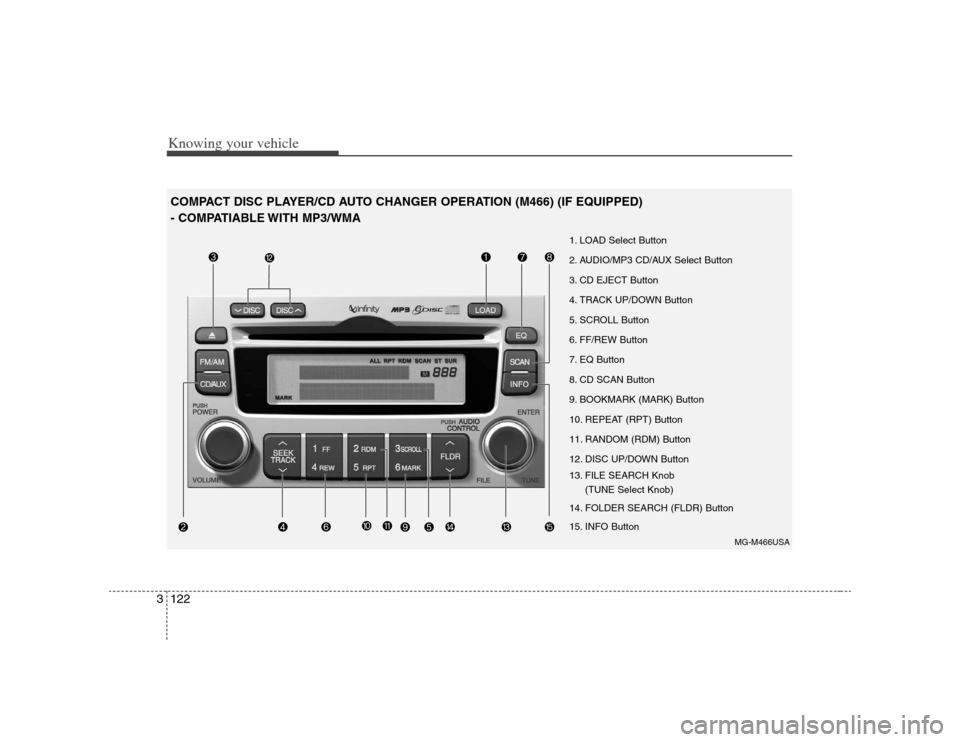
Knowing your vehicle122 3COMPACT DISC PLAYER/CD AUTO CHANGER OPERATION (M466) (IF EQUIPPED)
- COMPATIABLE WITH MP3/WMA
MG-M466USA
1. LOAD Select Button
2. AUDIO/MP3 CD/AUX Select Button
3. CD EJECT Button
4. TRACK UP/DOWN Button
5. SCROLL Button
6. FF/REW Button
7. EQ Button
8. CD SCAN Button
9. BOOKMARK (MARK) Button
10. REPEAT (RPT) Button
11. RANDOM (RDM) Button
12. DISC UP/DOWN Button
13. FILE SEARCH Knob
(TUNE Select Knob)
14. FOLDER SEARCH (FLDR) Button
15. INFO Button
Page 132 of 289
3123
Knowing your vehicle
1. LOAD Select ButtonThis compact disc player will accommo-
date up to six compact discs.
To insert multiple discs into the player,
perform the following:
1. Press and release the LOAD Button.
2. Green light on the slot will be illuminat-
ed and the lowest number of empty
slot will blink on the display.
After “WAIT” is displayed on the LCD,
the slot will open with “INSERT” dis-
played on the LCD.
3. Insert a disc partway into the slot, label
side up. The player will pull the disc in.
When the disc is inserted, the disc will
begin to play automatically.✽ ✽
NOTICE• The disc can be only inserted while the
green light is blinking on the slot.
• This CD player is suitable only for 12
cm discs, do not use irregular shaped
CDs.
To insert multiple discs:
1. Press and hold the LOAD button for
one second or more.
You will then hear a beep sound and
the green light on the slot will be illumi-
nated, and the numbers of empty disc
will blink on the display.
2. After “WAIT” is displayed on the LCD
with the lowest number of empty slot
blinking, the slot will open with “INSERT”
displayed on the LCD.
3. Insert a disc partway into the slot, label
side up. The player will pull the disc in.
Once the disc is loaded, the numbers
of the empty disc will blink on the dis-
play continuously.
If the next “DISC NO.” is displayed when
the slot is illuminated, you can then load
another disc.
4. Load the remaining disc by following
procedures 1 and 2. When you finished
loading 6 discs, the CD player will
begin to play the last CD loaded.
5. To load more than one disc but less
than six, complete Steps 1 and 2.When you have finished loading discs,
press LOAD button to cancel the loading
function or wait for 10 seconds. The CD
player will begin to play the last CD
loaded. As each CD starts to play, the
DISC number will appear on the display.
✽ ✽
NOTICEThe disc player takes up to six discs. Do
not try to load more than six.2. AUDIO/MP3 CD/AUX Select
ButtonAUDIO/MP3 CD Select Insert the CD with the label facing
upward.
Insert the CD to start CD playback,
during radio operation.
If you press the CD/AUX button while a
disc is in the CD deck, the CD player
will begin playing even if the radio or
cassette player is being used.
The CD/AUX player can be used when
the ignition switch is in either the “ON”
or “ACC” position.
Push the CD/AUX button to turn on
that function without pushing the
Power ON-OFF control knob.
Page 133 of 289
Knowing your vehicle124 3✽
✽
NOTICEPlayback of MP3 and WMA file formats
are supported. Load to play time for
these formats may be longer due to the
compressed nature of these discs.✽ ✽
NOTICE• Do not stick paper or tape etc., on the
label side or the recording side of any
discs, as it may cause a malfunction.
• The unit can play a multi-session CD-
R (recordable CD) and CD-RW
(rewritable CD) that consists of more
than two sessions.
Please refer to the manual of CD-
R/CD-RW recorder or CD-R/CD-RW
software for more information on
finalization process.
• Depending on the recording status,
some CD-Rs/CD-RWs may not play
on this unit.
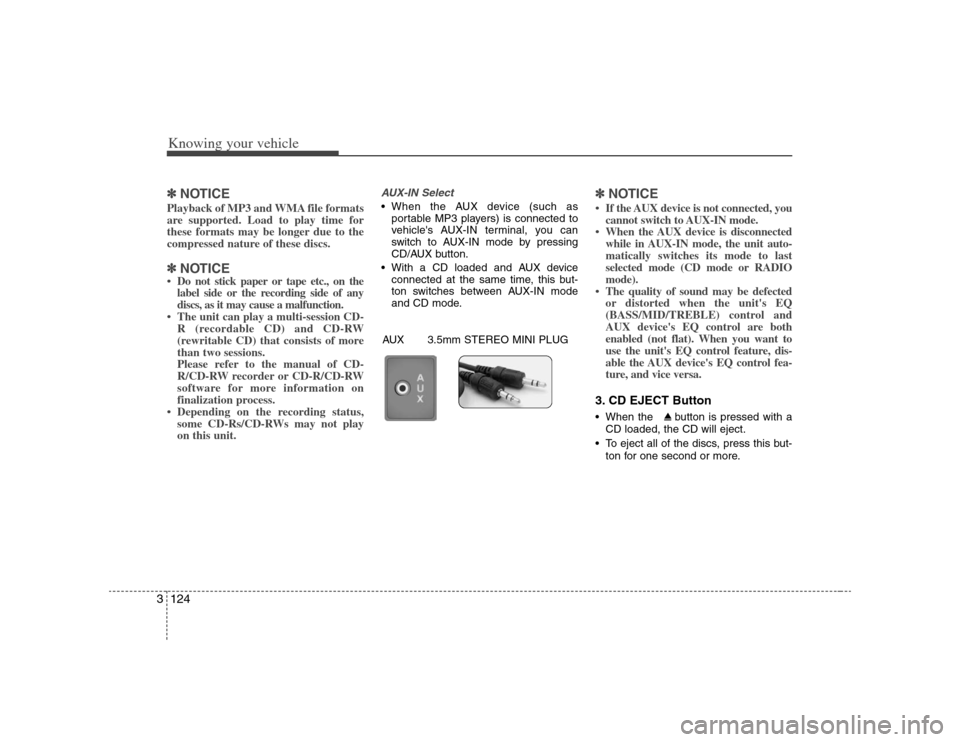
AUX-IN Select When the AUX device (such as
portable MP3 players) is connected to
vehicle's AUX-IN terminal, you can
switch to AUX-IN mode by pressing
CD/AUX button.
With a CD loaded and AUX device
connected at the same time, this but-
ton switches between AUX-IN mode
and CD mode.
✽ ✽
NOTICE• If the AUX device is not connected, you
cannot switch to AUX-IN mode.
• When the AUX device is disconnected
while in AUX-IN mode, the unit auto-
matically switches its mode to last
selected mode (CD mode or RADIO
mode).
• The quality of sound may be defected
or distorted when the unit's EQ
(BASS/MID/TREBLE) control and
AUX device's EQ control are both
enabled (not flat). When you want to
use the unit's EQ control feature, dis-
able the AUX device's EQ control fea-
ture, and vice versa.3. CD EJECT Button When the button is pressed with a
CD loaded, the CD will eject.
To eject all of the discs, press this but-
ton for one second or more.
AUX 3.5mm STEREO MINI PLUG
Page 134 of 289
3125
Knowing your vehicle
4. TRACK UP/DOWN Button The desired track on the disc currently
being played can be selected using the
track number.
Press once to skip forward to the
beginning of the next track.
Press once to skip back to the
beginning of the track.
Press before playback begins to
quickly move backward through a CD.5. SCROLL ButtonPress the button, and you can check the file
names with more than 16 characters on
MP3 CD(max 34 characters).
The button doesn’t work on file names
less than 16 characters.6. FF/REW ButtonIf you want to fast forward or reverse
through the compact disc track, push and
hold the FF or REW button.
When you release the button, the compact
disc player will resume playing.
7. EQ ButtonPress the EQ button to select the CLAS-
SIC, POPS, ROCK, JAZZ and OFF
MODE for the desired tone quality. Each
press of the button changes the display
as follows;8. CD SCAN Button To playback the first 10 seconds of
each track, press the CD SCAN button
more than 0.8 seconds.
To playback the first 10 seconds of
each track in the selected folder, press
the CD SCAN button within 0.8 sec-
onds. (MP3 CD only)
Press the CD SCAN button again with-
in 10 sec. when you have reached the
desired track.
9. BOOKMARK (MARK) ButtonWhen the CD player unit is operating, the
desired track on the disc can be book-
marked by using the MARK button.
Press the MARK button for more than
0.8 seconds to bookmark the desired
track.
“M” will be displayed on the LCD and
“MEMORY(1~50)” will display for
approximately five seconds with beep
sound.
To play the bookmarked tracks, press
the MARK button within 0.8 seconds
and select the bookmarked track to
play.
To erase a bookmarked track, press the
MARK button for more than 0.8 sec-
onds. The unit will beep once when the
bookmark is erased.
If you want to delete all tracks stored using
the Bookmark function, press FILE
SEARCH Knob in the Mark Play mode for
more than 0.8 seconds. You will hear a beep
sound and all tracks will be deleted from
Mark Memory with “MARK DELETE ALL”
displayed on the LCD.
CLASSIC➟POPS➟ROCK➟JAZZ➟OFF
Page 136 of 289
3127
Knowing your vehicle
15. INFO ButtonWhile playing CD(MP3), If this button is
pressed repeatedly, the played file infor-
mation will be displayed in the following
order.
FILE NAME
➟
SONG TITLE
➟
ARTIST
NAME
➟
ALBUM TITLE
➟
FOLDER
NAME
➟
TOTAL FILE
➟
MARK
ADDRESS
➟ FILE NAME
“NO DATA” wil be displayed in case that
there is no information on the selected
item.
✽ ✽
NOTICE• To assure proper operation of the unit,
keep the vehicle interior temperature
within a normal range by using the
vehicle's air conditioning or heating
system.
• When replacing the fuse, replace it
with a fuse having the correct capaci-
ty.
• Stored bookmarks are all erased when
the car battery is disconnected or
power to the vehicle is lost. If this
occurs, the bookmarks will have to be
reset.
• This equipment is designed to be used
only in a 12 volt DC battery system
with negative ground.
• This unit is made of precision parts.
Do not attempt to disassemble or
adjust any parts.
• When driving your vehicle, be sure to
keep the volume of the unit set low
enough to allow you to hear sounds
coming from the outside.
• Do not expose this equipment (includ-
ing the speakers and tape) to water or
excessive moisture.
✽ ✽
NOTICE• Do not insert warped or poor quality
discs into the CD player as damage to
the unit may occur.
• Do not insert anything like coins into
the player slot as damage to the unit
may occur.
• Do not place beverages close to the
audio system. The playback mecha-
nism may be damaged if you spill
them.
• Do not strike or allow anything to
impact the audio system, damage to
the system mechanisms could occur.
• Off-road or rough surface driving
may cause the compact disc to skip.
Do not use the compact disc when
driving in such conditions as damage
to the compact disc face could occur.
• Do not attempt to grab or pull the
compact disc out while the disc is
being pulled into the audio unit by the
self-loading mechanism. Damage to
the audio unit and compact disc could
occur.
• Avoid using recorded compact discs in
your audio unit. Original compact
discs are recommended.