lock KIA Optima 2008 2.G Owner's Guide
[x] Cancel search | Manufacturer: KIA, Model Year: 2008, Model line: Optima, Model: KIA Optima 2008 2.GPages: 289, PDF Size: 4.78 MB
Page 53 of 289
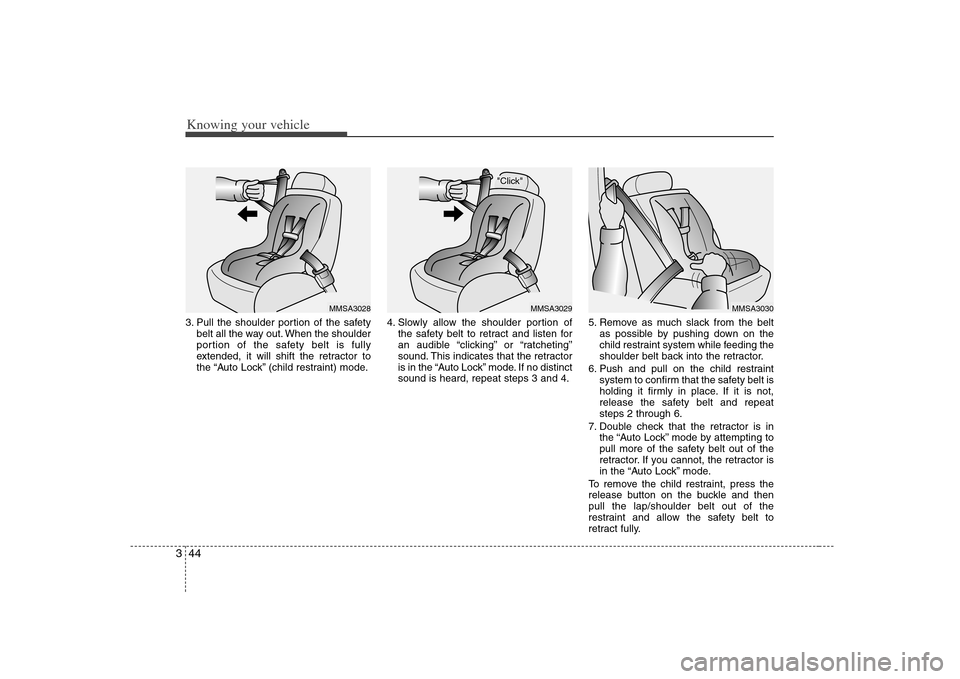
Knowing your vehicle44 33. Pull the shoulder portion of the safety
belt all the way out. When the shoulder
portion of the safety belt is fully
extended, it will shift the retractor to
the “Auto Lock” (child restraint) mode.4. Slowly allow the shoulder portion of
the safety belt to retract and listen for
an audible “clicking” or “ratcheting”
sound. This indicates that the retractor
is in the “Auto Lock” mode. If no distinct
sound is heard, repeat steps 3 and 4.5. Remove as much slack from the belt
as possible by pushing down on the
child restraint system while feeding the
shoulder belt back into the retractor.
6. Push and pull on the child restraint
system to confirm that the safety belt is
holding it firmly in place. If it is not,
release the safety belt and repeat
steps 2 through 6.
7. Double check that the retractor is in
the “Auto Lock” mode by attempting to
pull more of the safety belt out of the
retractor. If you cannot, the retractor is
in the “Auto Lock” mode.
To remove the child restraint, press the
release button on the buckle and then
pull the lap/shoulder belt out of the
restraint and allow the safety belt to
retract fully.
"Click"
MMSA3029
MMSA3028
MMSA3030
Page 54 of 289
345
Knowing your vehicle
When the safety belt is allowed to
retract to its fully stowed position, the
retractor will automatically switch
from the “Auto Lock” mode to the
emergency lock mode for normal
adult usage.
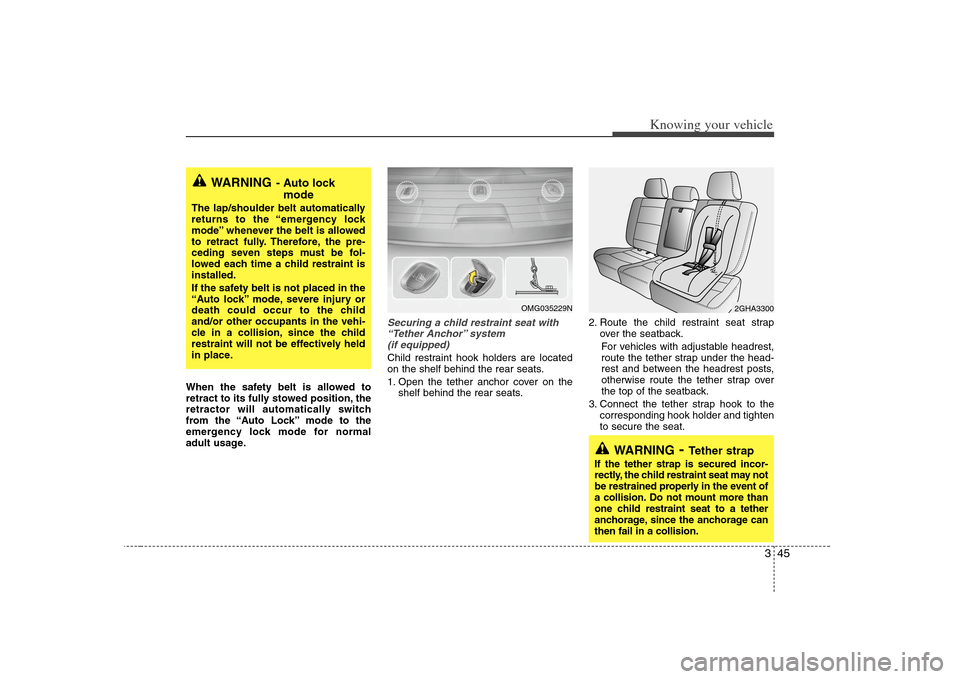
Securing a child restraint seat with
“Tether Anchor” system
(if equipped) Child restraint hook holders are located
on the shelf behind the rear seats.
1. Open the tether anchor cover on the
shelf behind the rear seats.2. Route the child restraint seat strap
over the seatback.
For vehicles with adjustable headrest,
route the tether strap under the head-
rest and between the headrest posts,
otherwise route the tether strap over
the top of the seatback.
3. Connect the tether strap hook to the
corresponding hook holder and tighten
to secure the seat.
WARNING
- Auto lock
mode
The lap/shoulder belt automatically
returns to the “emergency lock
mode” whenever the belt is allowed
to retract fully. Therefore, the pre-
ceding seven steps must be fol-
lowed each time a child restraint is
installed.
If the safety belt is not placed in the
“Auto lock” mode, severe injury or
death could occur to the child
and/or other occupants in the vehi-
cle in a collision, since the child
restraint will not be effectively held
in place.
2GHA3300
WARNING
- Tether strap
If the tether strap is secured incor-
rectly, the child restraint seat may not
be restrained properly in the event of
a collision. Do not mount more than
one child restraint seat to a tether
anchorage, since the anchorage can
then fail in a collision.
OMG035229N
Page 68 of 289
359
Knowing your vehicle
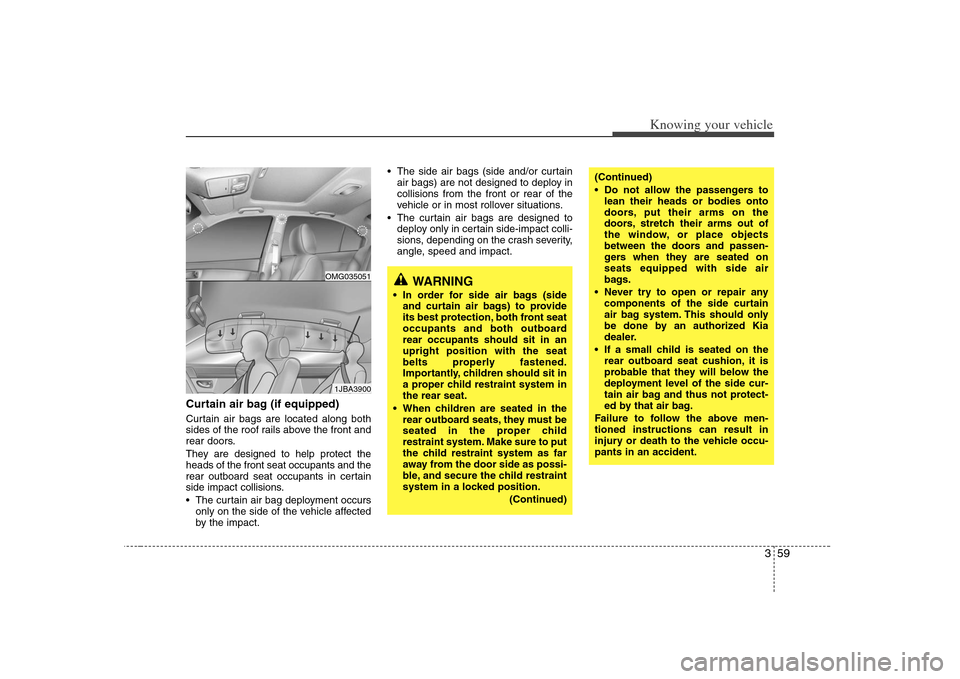
Curtain air bag (if equipped)Curtain air bags are located along both
sides of the roof rails above the front and
rear doors.
They are designed to help protect the
heads of the front seat occupants and the
rear outboard seat occupants in certain
side impact collisions.
The curtain air bag deployment occurs
only on the side of the vehicle affected
by the impact. The side air bags (side and/or curtain
air bags) are not designed to deploy in
collisions from the front or rear of the
vehicle or in most rollover situations.
The curtain air bags are designed to
deploy only in certain side-impact colli-
sions, depending on the crash severity,
angle, speed and impact.
WARNING
In order for side air bags (side
and curtain air bags) to provide
its best protection, both front seat
occupants and both outboard
rear occupants should sit in an
upright position with the seat
belts properly fastened.
Importantly, children should sit in
a proper child restraint system in
the rear seat.
When children are seated in the
rear outboard seats, they must be
seated in the proper child
restraint system. Make sure to put
the child restraint system as far
away from the door side as possi-
ble, and secure the child restraint
system in a locked position.
(Continued)
(Continued)
Do not allow the passengers to
lean their heads or bodies onto
doors, put their arms on the
doors, stretch their arms out of
the window, or place objects
between the doors and passen-
gers when they are seated on
seats equipped with side air
bags.
Never try to open or repair any
components of the side curtain
air bag system. This should only
be done by an authorized Kia
dealer.
If a small child is seated on the
rear outboard seat cushion, it is
probable that they will below the
deployment level of the side cur-
tain air bag and thus not protect-
ed by that air bag.
Failure to follow the above men-
tioned instructions can result in
injury or death to the vehicle occu-
pants in an accident.
1JBA3900OMG035051
Page 76 of 289
367
Knowing your vehicle
Air bag warning lightThe purpose of air bag warning light in
your instrument panel is to alert you of a
potential problem with your air bag -
Supplemental Restraint System (SRS).
When the ignition switch is turned ON,
the indicator light should blink or illumi-
nate for approximately 6 seconds, then
go off.
Have the system checked if:
The light does not turn on briefly when
you turn the ignition ON.
The light stays on after the engine
starts.
The light comes on while the vehicle is
in motion.
Air bag (Supplemental Restraint
System) service Your Supplemental Restraint System is
virtually maintenance-free. There are no
parts which you can service.
You must have the system serviced
under the following circumstances:
If an air bag ever inflates, the air bag
must be replaced. Do not try to remove
or discard the air bag by yourself. This
must be done by an authorized Kia
dealer.
If the air bag warning indicator light
alerts you to a problem, have the air
bag system checked as soon as possi-
ble. Otherwise, your air bag system
may be ineffective.
WARNING
- Children
Never put a child in the front pas-
senger seat, even if they are in a
child restraint. If the front passen-
ger air bag inflates, it may cause
severe or fatal injuries.
When children are seated in the
rear outboard seats in which cur-
tain air bags are equipped, be
sure to put the child restraint sys-
tem as far away from the door
side as possible, and secure the
child restraint system to be
locked in position.
AIR
BAG
CAUTION
- No modification
Do not modify any part of the air
bag system. Modification could
make the air bag system ineffective
or could cause unnecessary
deployment.
Page 78 of 289
369
Knowing your vehicle
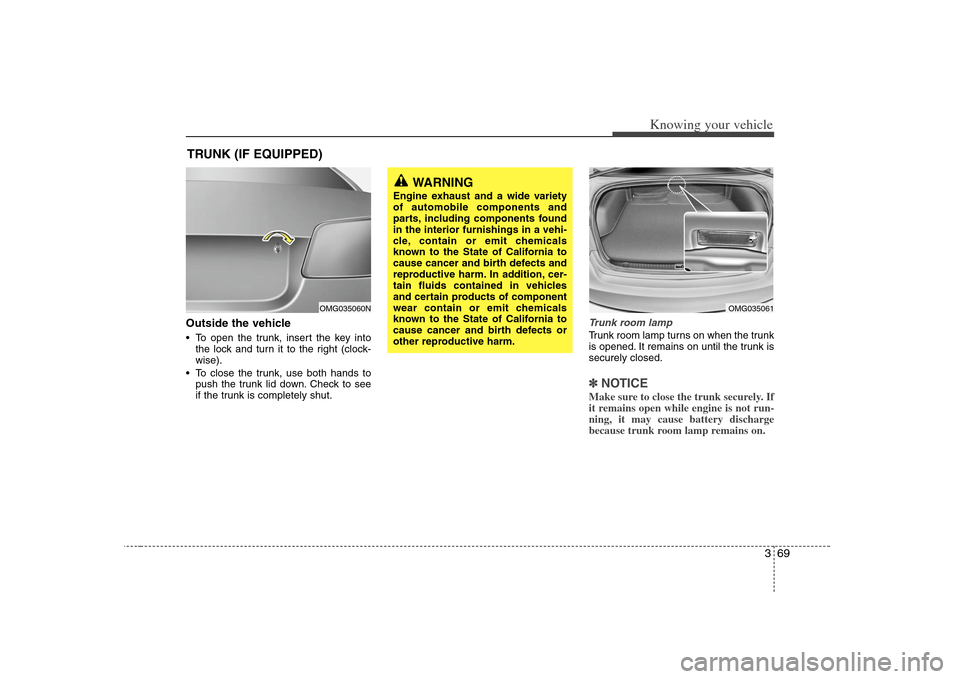
Outside the vehicle To open the trunk, insert the key into
the lock and turn it to the right (clock-
wise).
To close the trunk, use both hands to
push the trunk lid down. Check to see
if the trunk is completely shut.
Trunk room lampTrunk room lamp turns on when the trunk
is opened. It remains on until the trunk is
securely closed.✽ ✽
NOTICEMake sure to close the trunk securely. If
it remains open while engine is not run-
ning, it may cause battery discharge
because trunk room lamp remains on.
TRUNK (IF EQUIPPED)
WARNING
Engine exhaust and a wide variety
of automobile components and
parts, including components found
in the interior furnishings in a vehi-
cle, contain or emit chemicals
known to the State of California to
cause cancer and birth defects and
reproductive harm. In addition, cer-
tain fluids contained in vehicles
and certain products of component
wear contain or emit chemicals
known to the State of California to
cause cancer and birth defects or
other reproductive harm.
OMG035061
OMG035060N
Page 79 of 289
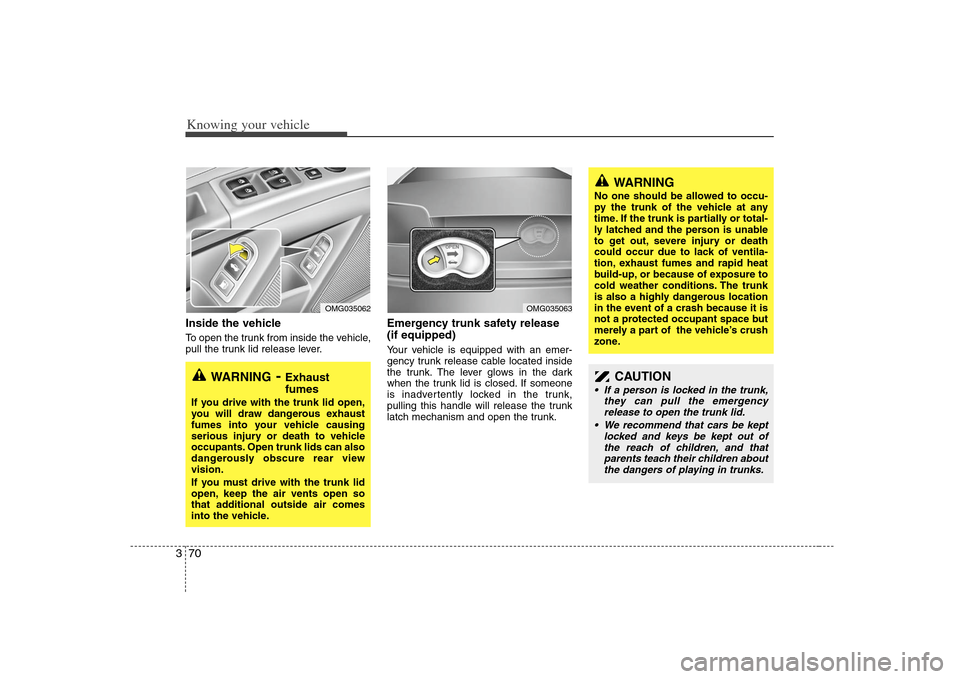
Knowing your vehicle70 3Inside the vehicleTo open the trunk from inside the vehicle,
pull the trunk lid release lever.
Emergency trunk safety release
(if equipped)Your vehicle is equipped with an emer-
gency trunk release cable located inside
the trunk. The lever glows in the dark
when the trunk lid is closed. If someone
is inadvertently locked in the trunk,
pulling this handle will release the trunk
latch mechanism and open the trunk.
WARNING
- Exhaust
fumes
If you drive with the trunk lid open,
you will draw dangerous exhaust
fumes into your vehicle causing
serious injury or death to vehicle
occupants. Open trunk lids can also
dangerously obscure rear view
vision.
If you must drive with the trunk lid
open, keep the air vents open so
that additional outside air comes
into the vehicle.
WARNING
No one should be allowed to occu-
py the trunk of the vehicle at any
time. If the trunk is partially or total-
ly latched and the person is unable
to get out, severe injury or death
could occur due to lack of ventila-
tion, exhaust fumes and rapid heat
build-up, or because of exposure to
cold weather conditions. The trunk
is also a highly dangerous location
in the event of a crash because it is
not a protected occupant space but
merely a part of the vehicle’s crush
zone.
CAUTION
If a person is locked in the trunk,
they can pull the emergency
release to open the trunk lid.
We recommend that cars be kept
locked and keys be kept out of
the reach of children, and that
parents teach their children about
the dangers of playing in trunks.
OMG035062
OMG035063
Page 80 of 289
371
Knowing your vehicle
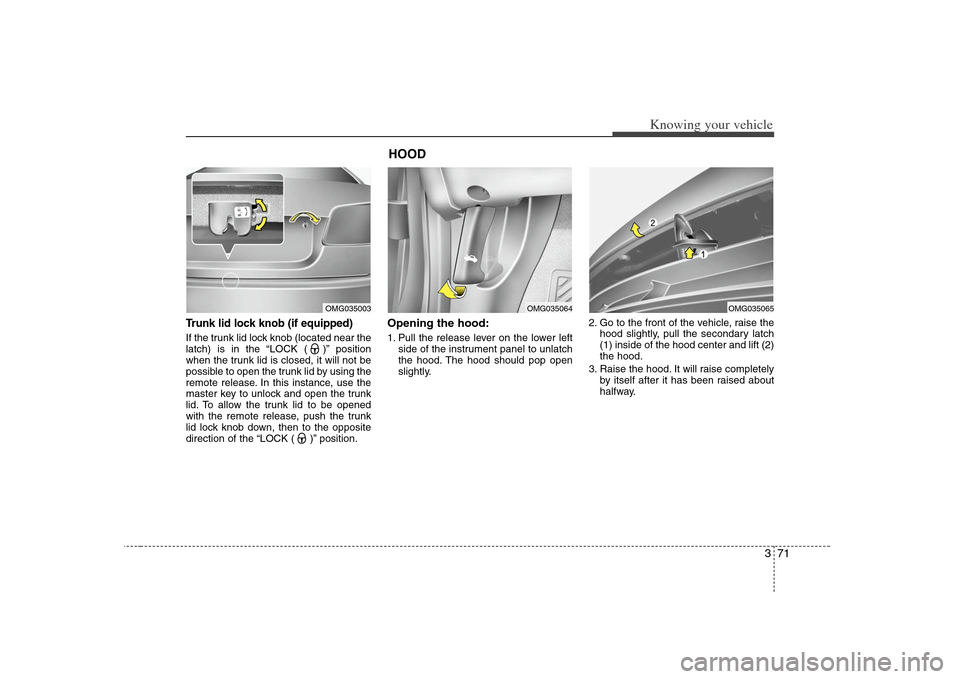
Trunk lid lock knob (if equipped)If the trunk lid lock knob (located near the
latch) is in the “LOCK ( )” position
when the trunk lid is closed, it will not be
possible to open the trunk lid by using the
remote release. In this instance, use the
master key to unlock and open the trunk
lid. To allow the trunk lid to be opened
with the remote release, push the trunk
lid lock knob down, then to the opposite
direction of the “LOCK ( )” position.
Opening the hood:1. Pull the release lever on the lower left
side of the instrument panel to unlatch
the hood. The hood should pop open
slightly.2. Go to the front of the vehicle, raise the
hood slightly, pull the secondary latch
(1) inside of the hood center and lift (2)
the hood.
3. Raise the hood. It will raise completely
by itself after it has been raised about
halfway.
OMG035003
HOOD
OMG035064
OMG035065
Page 81 of 289
Knowing your vehicle72 3Closing the hood1. Before closing the hood, check the fol-
lowing:
must be correctly installed.
bustible material must be removed
from the engine compartment.
2. Lower the hood halfway and push
down to securely lock in place.
Make sure the hood is properly locked
before driving.
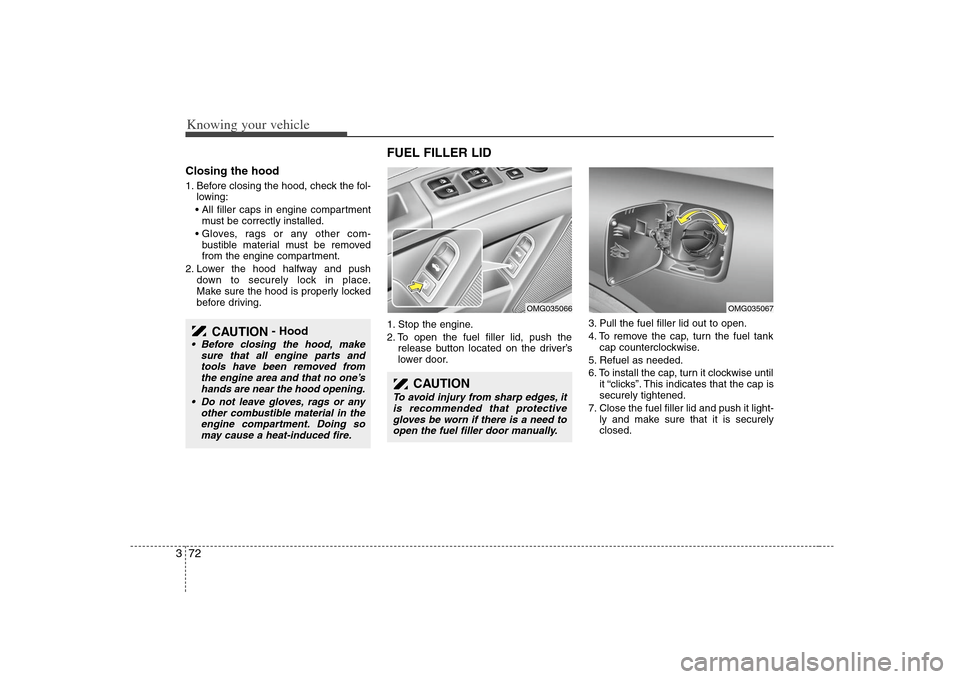
FUEL FILLER LID 1. Stop the engine.
2. To open the fuel filler lid, push the
release button located on the driver’s
lower door.3. Pull the fuel filler lid out to open.
4. To remove the cap, turn the fuel tank
cap counterclockwise.
5. Refuel as needed.
6. To install the cap, turn it clockwise until
it “clicks”. This indicates that the cap is
securely tightened.
7. Close the fuel filler lid and push it light-
ly and make sure that it is securely
closed.
CAUTION
- Hood
Before closing the hood, make
sure that all engine parts and
tools have been removed from
the engine area and that no one’s
hands are near the hood opening.
Do not leave gloves, rags or any
other combustible material in the
engine compartment. Doing so
may cause a heat-induced fire.
CAUTION
To avoid injury from sharp edges, it
is recommended that protective
gloves be worn if there is a need to
open the fuel filler door manually.
OMG035067
OMG035066
Page 88 of 289
379
Knowing your vehicle
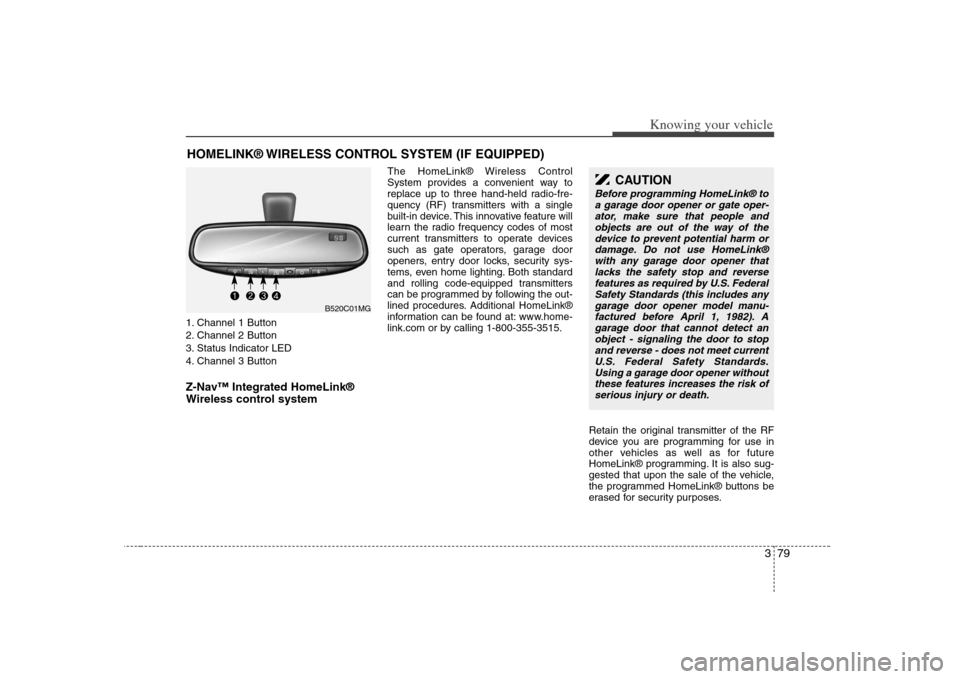
1. Channel 1 Button
2. Channel 2 Button
3. Status Indicator LED
4. Channel 3 ButtonZ-Nav™ Integrated HomeLink®
Wireless control system
The HomeLink® Wireless Control
System provides a convenient way to
replace up to three hand-held radio-fre-
quency (RF) transmitters with a single
built-in device. This innovative feature will
learn the radio frequency codes of most
current transmitters to operate devices
such as gate operators, garage door
openers, entry door locks, security sys-
tems, even home lighting. Both standard
and rolling code-equipped transmitters
can be programmed by following the out-
lined procedures. Additional HomeLink®
information can be found at: www.home-
link.com or by calling 1-800-355-3515.
Retain the original transmitter of the RF
device you are programming for use in
other vehicles as well as for future
HomeLink® programming. It is also sug-
gested that upon the sale of the vehicle,
the programmed HomeLink® buttons be
erased for security purposes.
HOMELINK® WIRELESS CONTROL SYSTEM (IF EQUIPPED)
CAUTION
Before programming HomeLink® to
a garage door opener or gate oper-
ator, make sure that people and
objects are out of the way of the
device to prevent potential harm or
damage. Do not use HomeLink®
with any garage door opener that
lacks the safety stop and reverse
features as required by U.S. Federal
Safety Standards (this includes any
garage door opener model manu-
factured before April 1, 1982). A
garage door that cannot detect an
object - signaling the door to stop
and reverse - does not meet current
U.S. Federal Safety Standards.
Using a garage door opener without
these features increases the risk of
serious injury or death.
B520C01MG
Page 90 of 289
381
Knowing your vehicle
Rolling code programmingRolling code devices which are "code-
protected" and manufactured after 1996
may be determined by the following:
Reference the device owner's manual
for verification.
The handheld transmitter appears to
program the HomeLink Universal
Transceiver but does not activate the
device.
Press and hold the trained HomeLink
button. The device has the rolling code
feature if the indicator light flashes rap-
idly and then turns solid after 2 sec-
onds.
To train rolling code devices, follow these
instructions:
1. At the garage door opener receiver
(motor-head unit) in the garage, locate
the "learn" or "smart" button. This can
usually be found where the hanging
antenna wire is attached to the motor-
head unit. Exact location and color of
the button may vary by garage door
opener brand. If there is difficulty locat-
ing the training button, reference the
device owner's manual or please visit
our Web site at www.homelink.com.2. Firmly press and release the "learn" or
"smart" button (which activates the
"training light").
There are 30 seconds in which to initi-
ate step 3.
3. Return to the vehicle and firmly press,
hold for two seconds and then release
the desired HomeLink® button.
Repeat the "press/hold/release"
sequence a second time to complete
the programming. (Some devices may
require you to repeat this sequence a
third time to complete the program-
ming.)
4. Press and hold the just-trained
HomeLink® button and observe the
red Status Indicator LED. If the indica-
tor light stays on constantly, program-
ming is complete and your device
should activate.
5. To program the remaining two
HomeLink® buttons, follow either
steps 1 through 4 above for other
Rolling Code devices or steps 2
through 5 in Standard Programming
for standard devices.
Gate operator & canadian program-
mingDuring programming, your handheld
transmitter may automatically stop trans-
mitting. Continue to press the Integrated
HomeLink® Wireless Control System
button (note steps 2 through 4 in the
Standard Programming portion of this
document) while you press and re-press
("cycle") your handheld transmitter every
two seconds until the frequency signal
has been learned. The indicator light will
flash slowly and then rapidly after sever-
al seconds upon successful training.Operating HomeLink®To operate, simply press and release the
programmed HomeLink® button.
Activation will now occur for the trained
device (i.e. garage door opener, gate
operator, security system, entry door
lock, home/office lighting, etc.). For con-
venience, the hand-held transmitter of
the device may also be used at any time.