tow KIA Optima 2014 3.G User Guide
[x] Cancel search | Manufacturer: KIA, Model Year: 2014, Model line: Optima, Model: KIA Optima 2014 3.GPages: 479, PDF Size: 13.21 MB
Page 162 of 479
Features of your vehicle
92
4
Non-operational conditions of
back-up warning system
The back-up warning system may
not operate properly when:
1. Moisture is frozen to the sensor. (It
will operate normally when the
moisture has been cleared.)
2. The sensor is covered with foreign matter, such as snow or water, or
the sensor cover is blocked. (It will
operate normally when the materi-
al is removed or the sensor is no
longer blocked.)
3. Driving on uneven road surfaces. (unpaved roads, gravel, bumps,
gradient.)
4. Objects generating excessive noise (vehicle horns, loud motor-
cycle engines, or truck air brakes)
are within range of the sensor.
5. Heavy rain or water spray exists.
6. Wireless transmitters or mobile phones are within range of the
sensor.
7. The sensor is covered with snow.
8. Trailer towing. The detecting range may decrease
when:
1. The sensor is stained with foreign
matter such as snow or water.
(The sensing range will return to
normal when removed.)
2. Outside air temperature is extremely hot or cold.
The following objects may not be
recognized by the sensor:
1. Sharp or slim objects such as ropes, chains or small poles.
2. Objects which tend to absorb the sensor frequency such as clothes,
spongy material or snow.
3. Undetectable objects smaller than 1 m (40 in.) in height and narrower
than 14 cm (6 in.) in diameter.
back-up warning system pre-
cautions
The back-up warning system maynot sound sequentially depending
on the speed and shapes of the
objects detected.
The back-up warning system may malfunction if the vehicle bumper
height or sensor installation has
been modified or damaged. Any
non-factory installed equipment or
accessories may also interfere with
the sensor performance.
The sensor may not recognize objects less than 30 cm (11 in.)
from the sensor, or it may sense an
incorrect distance. Use caution.
When the sensor is frozen or stained with snow, dirt, or water, the sensor
may be inoperative until the stains
are removed using a soft cloth.
Do not push, scratch or strike the sensor. Sensor damage could occur.
Page 169 of 479
499
Features of your vehicle
High beam operation
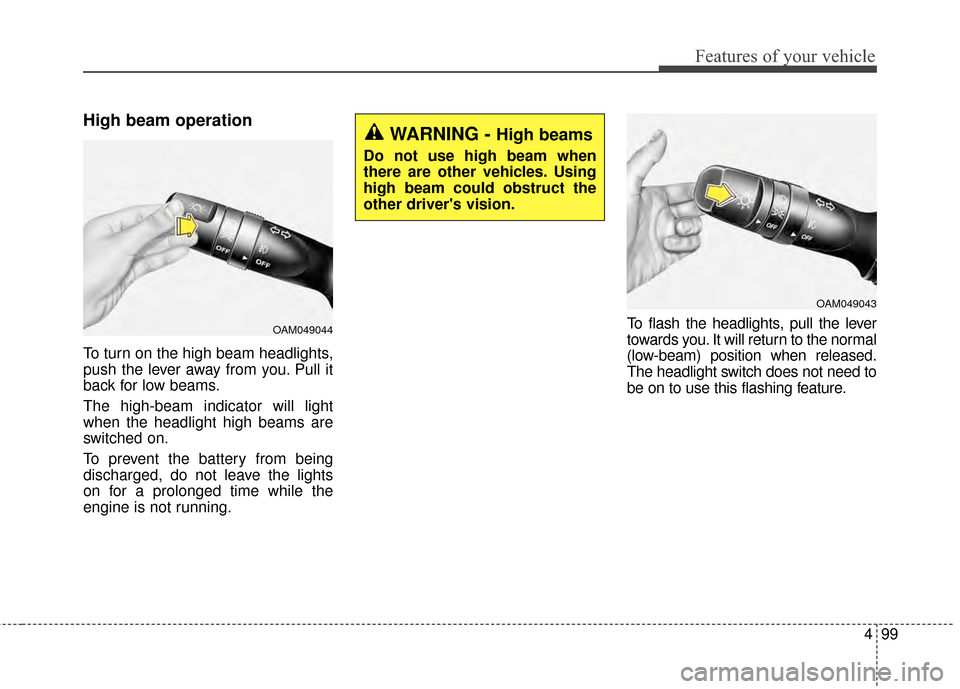
To turn on the high beam headlights,
push the lever away from you. Pull it
back for low beams.
The high-beam indicator will light
when the headlight high beams are
switched on.
To prevent the battery from being
discharged, do not leave the lights
on for a prolonged time while the
engine is not running.To flash the headlights, pull the lever
towards you. It will return to the normal
(low-beam) position when released.
The headlight switch does not need to
be on to use this flashing feature.
OAM049044
WARNING - High beams
Do not use high beam when
there are other vehicles. Using
high beam could obstruct the
other driver's vision.
OAM049043
Page 173 of 479
4103
Features of your vehicle
To vary the speed setting, turn the
speed control knob (1).
If the wiper switch is set in AUTO
mode when the ignition switch is ON,
the wiper will operate once to per-
form a self-check of the system. Set
the wiper to OFF position when the
wiper is not in use.
Always remove all snow and ice and
defrost the windshield properly prior
to operating the windshield wipers.
✽ ✽NOTICE - Sensor cover
Do not remove the sensor cover
located on the upper end of the pas-
senger side windshield glass as this
may damage the sensor system.
✽ ✽NOTICE - Winter driving
Always set the auto wiper switch to
the off position in the winter to avoid
auto activation during icy conditions
which may damage the windshield
wipers.
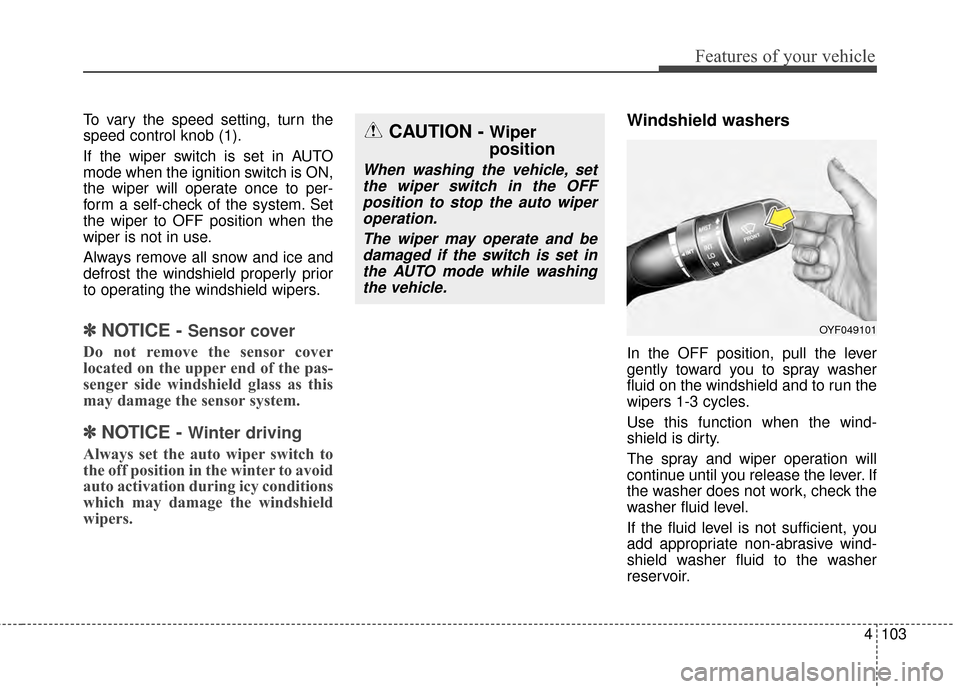
Windshield washers
In the OFF position, pull the lever
gently toward you to spray washer
fluid on the windshield and to run the
wipers 1-3 cycles.
Use this function when the wind-
shield is dirty.
The spray and wiper operation will
continue until you release the lever. If
the washer does not work, check the
washer fluid level.
If the fluid level is not sufficient, you
add appropriate non-abrasive wind-
shield washer fluid to the washer
reservoir.
CAUTION - Wiper
position
When washing the vehicle, set
the wiper switch in the OFFposition to stop the auto wiperoperation.
The wiper may operate and bedamaged if the switch is set inthe AUTO mode while washingthe vehicle.
OYF049101
Page 182 of 479
Features of your vehicle
112
4
Mode selection
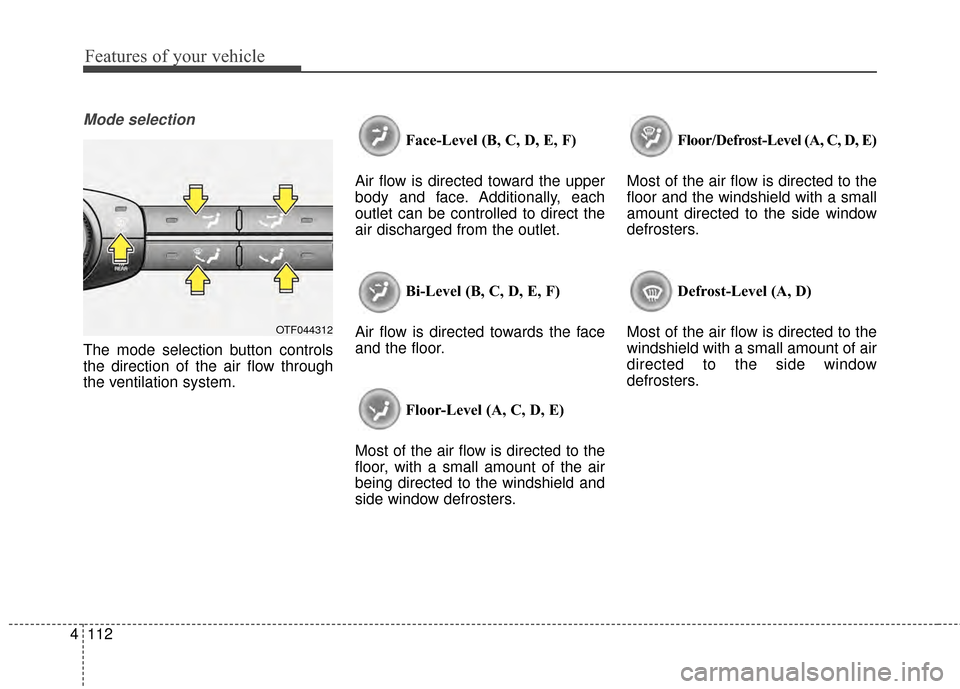
The mode selection button controls
the direction of the air flow through
the ventilation system. Face-Level (B, C, D, E, F)
Air flow is directed toward the upper
body and face. Additionally, each
outlet can be controlled to direct the
air discharged from the outlet.
Bi-Level (B, C, D, E, F)
Air flow is directed towards the face
and the floor.
Floor-Level (A, C, D, E)
Most of the air flow is directed to the
floor, with a small amount of the air
being directed to the windshield and
side window defrosters. Floor/Defrost-Level (A, C, D, E)
Most of the air flow is directed to the
floor and the windshield with a small
amount directed to the side window
defrosters.
Defrost-Level (A, D)
Most of the air flow is directed to the
windshield with a small amount of air
directed to the side window
defrosters.
OTF044312
Page 192 of 479
Features of your vehicle
122
4
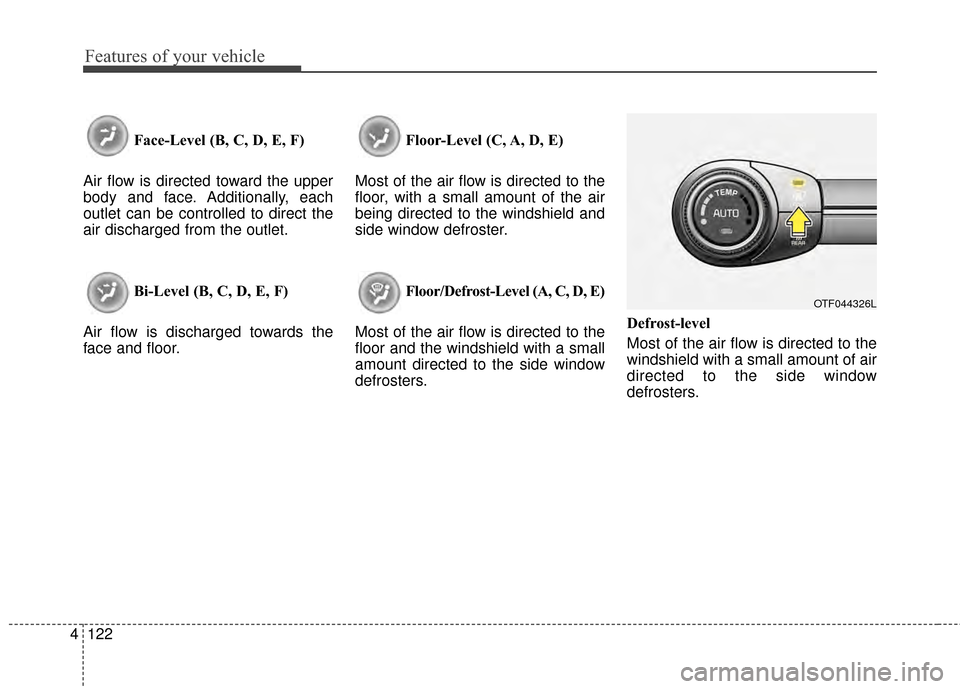
Face-Level (B, C, D, E, F)
Air flow is directed toward the upper
body and face. Additionally, each
outlet can be controlled to direct the
air discharged from the outlet.
Bi-Level (B, C, D, E, F)
Air flow is discharged towards the
face and floor. Floor-Level (C, A, D, E)
Most of the air flow is directed to the
floor, with a small amount of the air
being directed to the windshield and
side window defroster.
Floor/Defrost-Level (A, C, D, E)
Most of the air flow is directed to the
floor and the windshield with a small
amount directed to the side window
defrosters. Defrost-level
Most of the air flow is directed to the
windshield with a small amount of air
directed to the side window
defrosters.
OTF044326L
Page 204 of 479
Features of your vehicle
134
4
3. While pressing the air conditioning
button (A/C), press the air intake
control button ( ) at least 5
times within 3 seconds.
The indicator light in the air intake
control button will blink 3 times with
0.5 second of interval. It indicates that
the defogging logic is canceled or
returned to the programmed status.
If the battery has been discharged or
disconnected, it resets to the defog
logic status.Auto defogging system (Only for automatic climate control system,if equipped)
Auto defogging reduces the probabil-
ity of fogging up the inside of the
windshield by automatically sensing
the moisture inside the windshield.
The auto defogging system operates
when the heater or air conditioning is
on. This indicator illuminates
when the auto defogging
system senses the mois-
ture inside the windshield
and operates.
If more moisture is in the vehicle,
higher steps operate as follows. For
example, if auto defogging does not
defog inside the
windshield at step 1 Outside air posi-
tion, it tries to defog again at step 2
Blowing air toward the windshield.
Step 1 : Operating the air conditioning
Step 2 : Outside air position
Step 3 :Blowing air toward the wind-
shield
Step 4 : Increasing air flow toward the windshield
OTF044178N
Page 218 of 479
Features of your vehicle
148
4
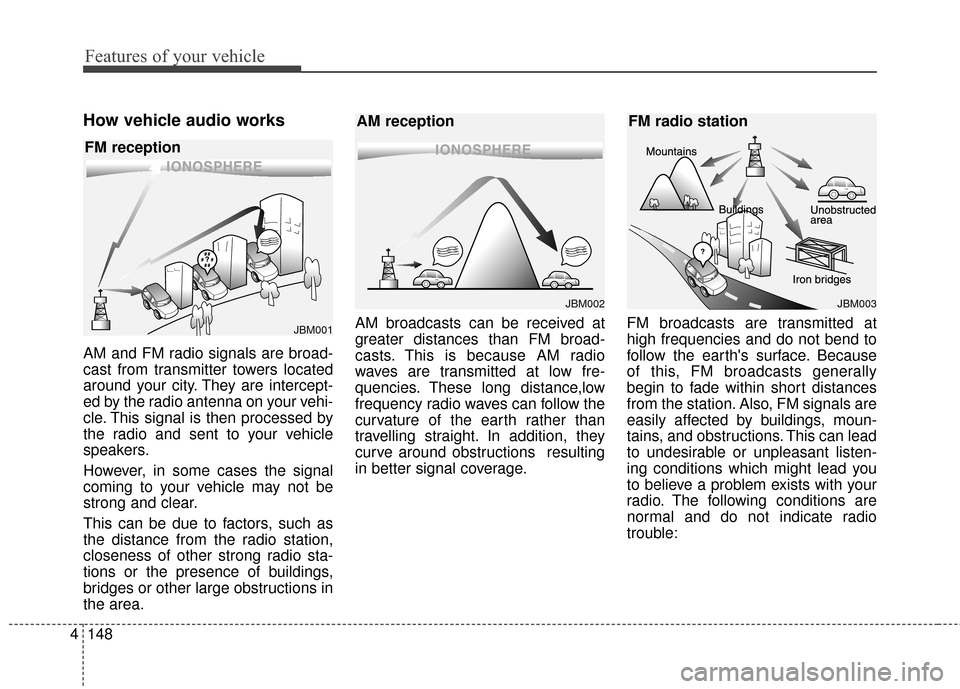
How vehicle audio works
AM and FM radio signals are broad-
cast from transmitter towers located
around your city. They are intercept-
ed by the radio antenna on your vehi-
cle. This signal is then processed by
the radio and sent to your vehicle
speakers.
However, in some cases the signal
coming to your vehicle may not be
strong and clear.
This can be due to factors, such as
the distance from the radio station,
closeness of other strong radio sta-
tions or the presence of buildings,
bridges or other large obstructions in
the area. AM broadcasts can be received at
greater distances than FM broad-
casts. This is because AM radio
waves are transmitted at low fre-
quencies. These long distance,low
frequency radio waves can follow the
curvature of the earth rather than
travelling straight. In addition, they
curve around obstructions resulting
in better signal coverage.
FM broadcasts are transmitted at
high frequencies and do not bend to
follow the earth's surface. Because
of this, FM broadcasts generally
begin to fade within short distances
from the station. Also, FM signals are
easily affected by buildings, moun-
tains, and obstructions. This can lead
to undesirable or unpleasant listen-
ing conditions which might lead you
to believe a problem exists with your
radio. The following conditions are
normal and do not indicate radio
trouble:
¢¢¢¢¢¢
JBM002
AM reception
¢¢¢
JBM001
FM reception
JBM003
FM radio station
Page 278 of 479
Driving your vehicle
65
Illuminated ignition switch
(if equipped)
Whenever a front door is opened, the
ignition switch will illuminate for your
convenience, provided the ignition
switch is not in the ON position. The
light will go off immediately when the
ignition switch is turned on. It will
also go off after about 30 seconds
after the door is closed.
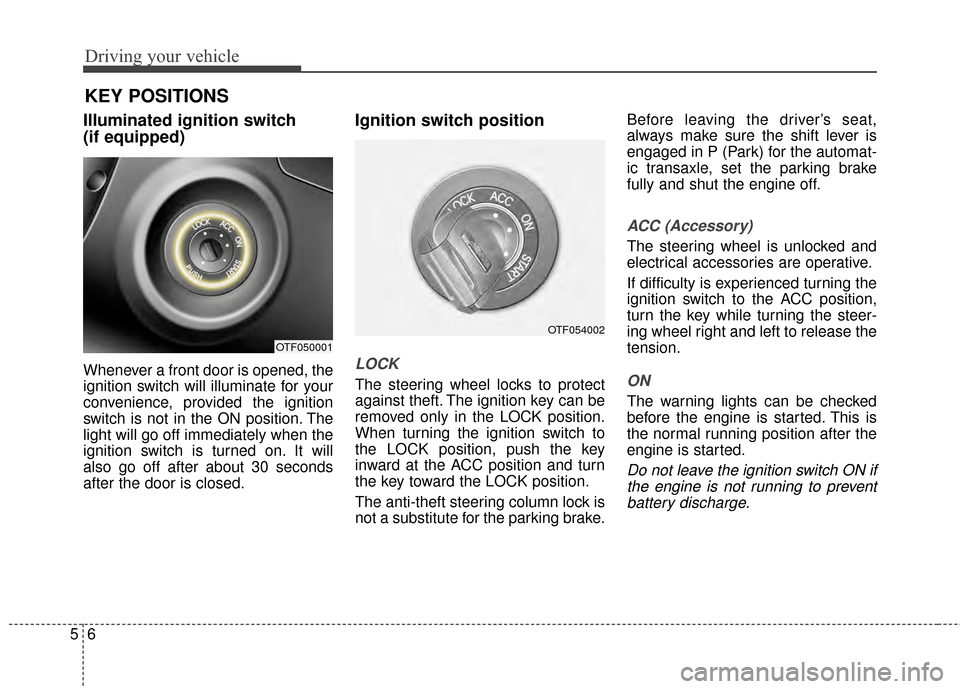
Ignition switch position
LOCK
The steering wheel locks to protect
against theft. The ignition key can be
removed only in the LOCK position.
When turning the ignition switch to
the LOCK position, push the key
inward at the ACC position and turn
the key toward the LOCK position.
The anti-theft steering column lock is
not a substitute for the parking brake.Before leaving the driver’s seat,
always make sure the shift lever is
engaged in P (Park) for the automat-
ic transaxle, set the parking brake
fully and shut the engine off.
ACC (Accessory)
The steering wheel is unlocked and
electrical accessories are operative.
If difficulty is experienced turning the
ignition switch to the ACC position,
turn the key while turning the steer-
ing wheel right and left to release the
tension.
ON
The warning lights can be checked
before the engine is started. This is
the normal running position after the
engine is started.
Do not leave the ignition switch ON if
the engine is not running to preventbattery discharge.
OTF050001
KEY POSITIONS
OTF054002
Page 322 of 479
Driving your vehicle
50
5
Hazardous driving conditions
When hazardous driving conditions
are encountered such as water,
snow, ice, mud, sand, or similar haz-
ards, follow these suggestions:
Drive cautiously and allow extra
distance for braking.
Avoid sudden braking or steering.
When braking with non-ABS brakes pump the brake pedal with
a light up-and-down motion until
the vehicle is stopped. Do not pump the brake pedal on a
vehicle equipped with ABS.
If stalled in snow, mud, or sand,
use second gear. Accelerate slow-
ly to avoid spinning the drive
wheels.
Use sand, rock salt, or other non- slip material under the drive
wheels to provide traction when
stalled in ice, snow, or mud.
Rocking the vehicle
If it is necessary to rock the vehicle
to free it from snow, sand, or mud,
first turn the steering wheel right and
left to clear the area around your
front wheels. Then, shift back and
forth between R (Reverse) and any
forward gear in vehicles equipped
with an automatic transaxle. Do not
race the engine, and spin the wheels
as little as possible. If you are still
stuck after a few tries, have the vehi-
cle pulled out by a tow vehicle to
avoid engine overheating and possi-
ble damage to the transaxle.
The ESC system should be turned
OFF prior to rocking the vehicle.
SPECIAL DRIVING CONDITIONS
WARNING - Downshifting
Do not downshift with an auto-
matic transaxle while driving on
slippery surfaces. The sudden
change in tire speed could
cause the tires to skid and
result in an accident.
CAUTION - Vehicle rocking
Prolonged rocking may causeengine overheating, transaxledamage or failure, and tire dam-age.
Page 328 of 479
Driving your vehicle
56
5
Don't let your parking brake
freeze
Under some conditions your parking
brake can freeze in the engaged
position. This is most likely to hap-
pen when there is an accumulation
of snow or ice around or near the
rear brakes or if the brakes are wet.
If there is a risk the parking brake
may freeze, apply it only temporarily
while you put the shift lever in P
(automatic transaxle) and block the
rear wheels so the vehicle cannot
roll. Then release the parking brake.
Don't let ice and snow accu-
mulate underneath
Under some conditions, snow and
ice can build up under the fenders
and interfere with the steering. When
driving in severe winter conditions
where this may happen, you should
periodically check underneath the
car to be sure the movement of the
front wheels and the steering com-
ponents is not obstructed.
Carry emergency equipment
Depending on the severity of the
weather you should carry appropri-
ate emergency equipment. Some of
the items you may want to carry
include tow straps or chains, flash-
light, emergency flares, sand, a
shovel, jumper cables, a window
scraper, gloves, ground cloth, cover-
alls, a blanket, etc.
TRAILER TOWING
We do not recommend using this
vehicle for trailer towing.