heater KIA Optima 2014 3.G Owner's Manual
[x] Cancel search | Manufacturer: KIA, Model Year: 2014, Model line: Optima, Model: KIA Optima 2014 3.GPages: 479, PDF Size: 13.21 MB
Page 12 of 479
Your vehicle at a glance
42
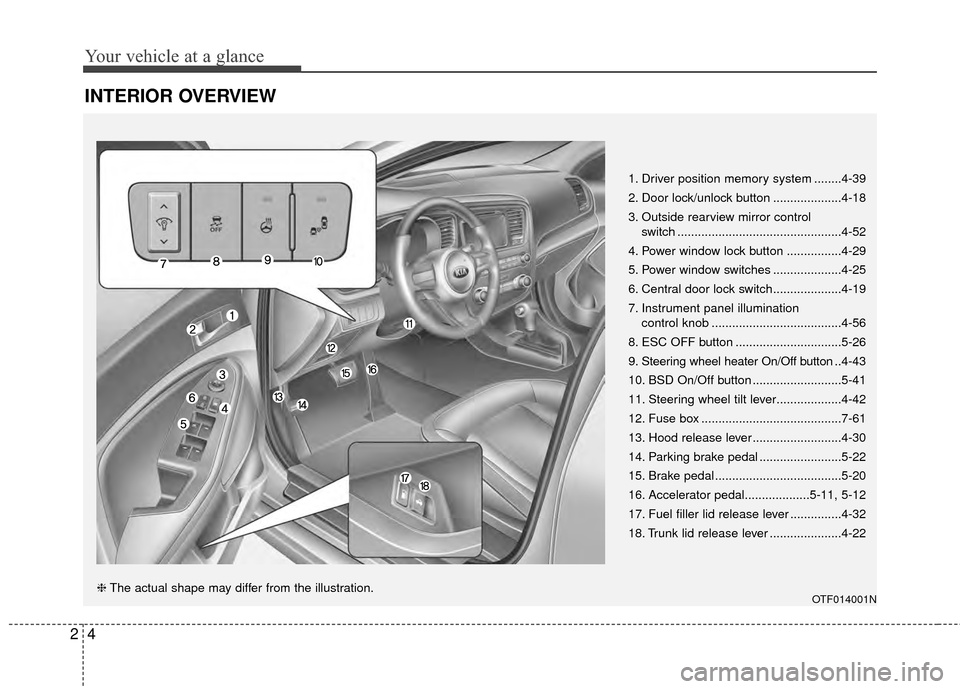
INTERIOR OVERVIEW
1. Driver position memory system ........4-39
2. Door lock/unlock button ....................4-18
3. Outside rearview mirror control switch ................................................4-52
4. Power window lock button ................4-29
5. Power window switches ....................4-25
6. Central door lock switch....................4-19
7. Instrument panel illumination control knob ......................................4-56
8. ESC OFF button ...............................5-26
9. Steering wheel heater On/Off button .. 4-43
10. BSD On/Off button ..........................5-41
11. Steering wheel tilt lever...................4-42
12. Fuse box .........................................7-61
13. Hood release lever ..........................4-30
14. Parking brake pedal ........................5-22
15. Brake pedal .....................................5-20
16. Accelerator pedal...................5-11, 5-12
17. Fuel filler lid release lever ...............4-32
18. Trunk lid release lever .....................4-22
OTF014001N❈ The actual shape may differ from the illustration.
Page 25 of 479
311
Safety features of your vehicle
During mild weather or under condi-
tions where the operation of the seat
warmer is not needed, keep the
switches in the OFF position.
With the seat warmer switch in the
ON position, the heating system in
the seat turns off or on automatically
depending on the seat temperature.
Each time you push the button, thetemperature setting of the seat is
changed as follows :
When pressing the switch for more than 1.5 seconds with the seat
warmer operating, the seat warmer
will turn OFF.
The seat warmer defaults to the OFF position whenever the engine
start/stop button (the ignition
switch) is turned on.CAUTION - Seat damage
When cleaning the seats, do not use an organic solventsuch as paint thinner, ben-zene, alcohol and gasoline.Doing so may damage the sur-face of the heater or seats.
To prevent overheating the seat warmer, do not place any-thing on the seats that insu-lates against heat, such asblankets, cushions or seatcovers while the seat warmeris in operation.
Do not place heavy or sharp objects on seats equippedwith seat warmers. Damage tothe seat warming componentscould occur.
WARNING- Seat warmer
burns
Passengers should use extreme
caution when using seat warm-
ers due to the possibility of
excess heating or burns. The
seat warmer may cause burns
even at low temperatures, espe-
cially if used for long periods of
time. The occupants must be
able to feel if the seat is becom-
ing too warm and to turn the
seat warmer off.
In particular, the driver must
exercise extreme care for the
following types of passengers:
1. Infants, children, elderly or disabled persons, or hospital
outpatients
2. Persons with sensitive skin or those that burn easily
3. Fatigued individuals
4. Intoxicated individuals
5. Individuals taking medication that can cause drowsiness or
sleepiness (sleeping pills,
cold tablets, etc.)
OFF → HIGH ( ) → LOW ( )
→
Page 60 of 479
Safety features of your vehicle
46
3
Any child age 12 and under should
ride in the rear seat. Children too
large for child restraints should use
the available lap/shoulder belts. No
matter what type of crash, children of
all ages are safer when restrained in
the rear seat.
✽ ✽
NOTICE
Do not modify or replace the front
passenger seat. Don't place anything
on or attach anything such as a blan-
ket, front seat covers or after market
seat heater to the front passenger
seat. This can adversely affect the
occupant detection system.
If the occupant detection system is
not working properly, the SRS air
bag warning light on the instru-
ment panel will illuminate because
the passenger's front air bag is con-
nected with the occupant detection
system. If there is a malfunction of
the occupant detection system, the
PASSENGER AIR BAG “OFF” indi-
cator will not illuminate and the pas-
senger's front air bag will inflate in
frontal impact crashes even if there is
no occupant in the front passenger's
seat.Driver's and passenger's front
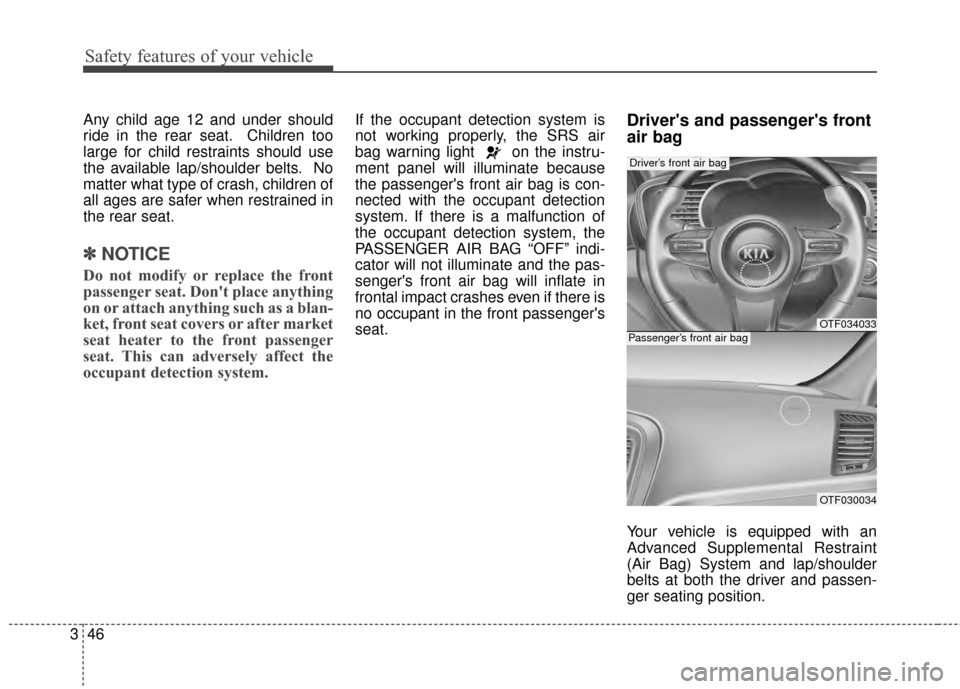
air bag
Your vehicle is equipped with an
Advanced Supplemental Restraint
(Air Bag) System and lap/shoulder
belts at both the driver and passen-
ger seating position.
OTF034033
OTF030034
Driver’s front air bag
Passenger’s front air bag
Page 113 of 479
443
Features of your vehicle
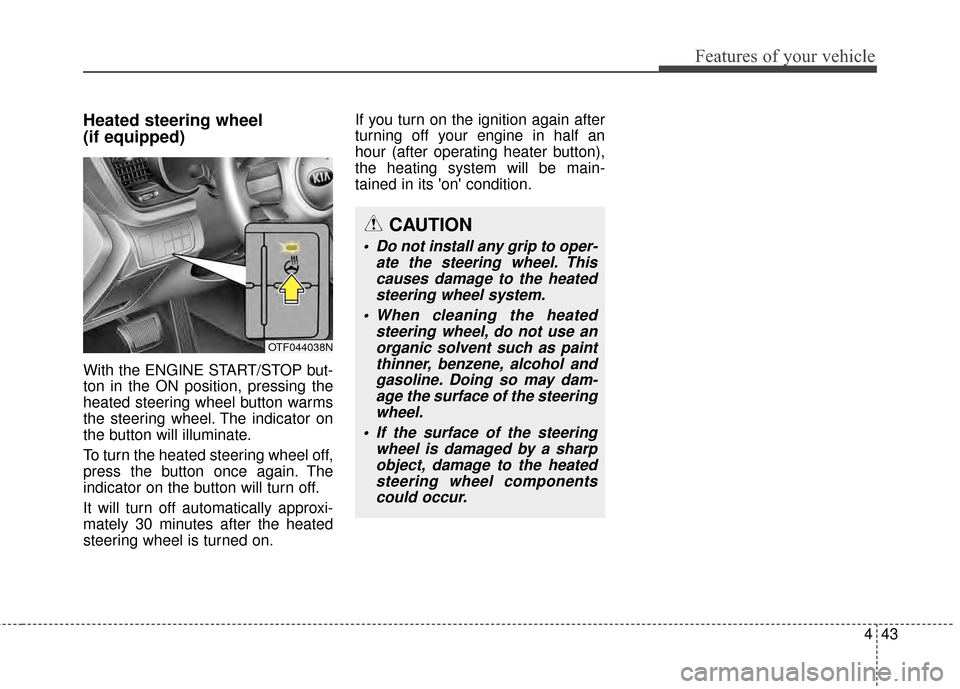
Heated steering wheel
(if equipped)
With the ENGINE START/STOP but-
ton in the ON position, pressing the
heated steering wheel button warms
the steering wheel. The indicator on
the button will illuminate.
To turn the heated steering wheel off,
press the button once again. The
indicator on the button will turn off.
It will turn off automatically approxi-
mately 30 minutes after the heated
steering wheel is turned on.If you turn on the ignition again after
turning off your engine in half an
hour (after operating heater button),
the heating system will be main-
tained in its 'on' condition.
CAUTION
Do not install any grip to oper-
ate the steering wheel. Thiscauses damage to the heatedsteering wheel system.
When cleaning the heated steering wheel, do not use anorganic solvent such as paintthinner, benzene, alcohol andgasoline. Doing so may dam-age the surface of the steeringwheel.
If the surface of the steering wheel is damaged by a sharpobject, damage to the heatedsteering wheel componentscould occur.
OTF044038N
Page 184 of 479
Features of your vehicle
114
4
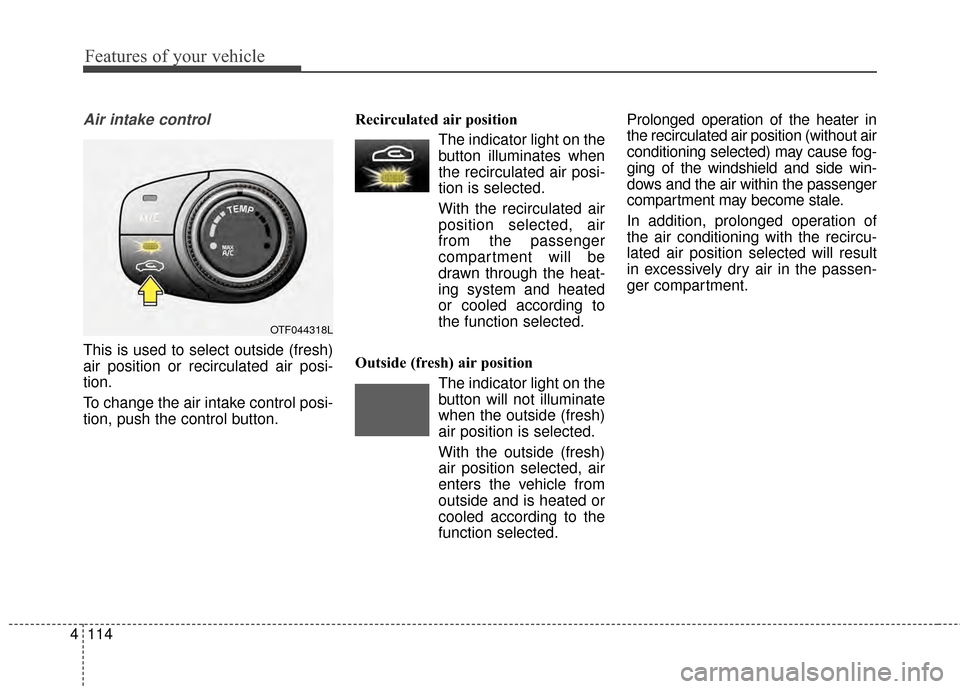
Air intake control
This is used to select outside (fresh)
air position or recirculated air posi-
tion.
To change the air intake control posi-
tion, push the control button. Recirculated air position
The indicator light on the
button illuminates when
the recirculated air posi-
tion is selected.
With the recirculated air position selected, air
from the passenger
compartment will be
drawn through the heat-
ing system and heated
or cooled according to
the function selected.
Outside (fresh) air position The indicator light on the
button will not illuminate
when the outside (fresh)
air position is selected.
With the outside (fresh) air position selected, air
enters the vehicle from
outside and is heated or
cooled according to the
function selected. Prolonged operation of the heater in
the recirculated air position (without air
conditioning selected) may cause fog-
ging of the windshield and side win-
dows and the air within the passenger
compartment may become stale.
In addition, prolonged operation of
the air conditioning with the recircu-
lated air position selected will result
in excessively dry air in the passen-
ger compartment.
OTF044318L
Page 188 of 479
Features of your vehicle
118
4
Climate control air filter
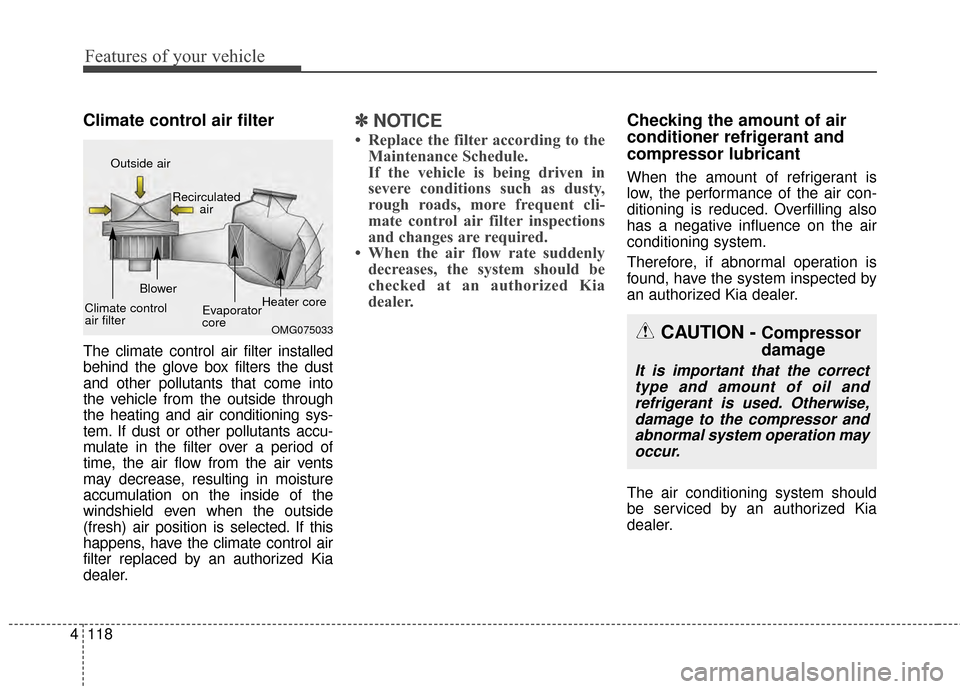
The climate control air filter installed
behind the glove box filters the dust
and other pollutants that come into
the vehicle from the outside through
the heating and air conditioning sys-
tem. If dust or other pollutants accu-
mulate in the filter over a period of
time, the air flow from the air vents
may decrease, resulting in moisture
accumulation on the inside of the
windshield even when the outside
(fresh) air position is selected. If this
happens, have the climate control air
filter replaced by an authorized Kia
dealer.
✽ ✽
NOTICE
• Replace the filter according to the
Maintenance Schedule.
If the vehicle is being driven in
severe conditions such as dusty,
rough roads, more frequent cli-
mate control air filter inspections
and changes are required.
• When the air flow rate suddenly decreases, the system should be
checked at an authorized Kia
dealer.
Checking the amount of air
conditioner refrigerant and
compressor lubricant
When the amount of refrigerant is
low, the performance of the air con-
ditioning is reduced. Overfilling also
has a negative influence on the air
conditioning system.
Therefore, if abnormal operation is
found, have the system inspected by
an authorized Kia dealer.
The air conditioning system should
be serviced by an authorized Kia
dealer.
CAUTION - Compressor
damage
It is important that the correct
type and amount of oil andrefrigerant is used. Otherwise,damage to the compressor andabnormal system operation mayoccur.
OMG075033
Outside air
Recirculatedair
Climate control
air filter Blower
Evaporator
coreHeater core
Page 200 of 479
Features of your vehicle
130
4
WINDSHIELD DEFROSTING AND DEFOGGING
For maximum defrosting, set the
temperature control to the extreme
right/hot position and the fan speed
control to the highest speed.
If warm air to the floor is desired while defrosting or defogging, set the
mode to the floor-defrost position.
Before driving, clear all snow and ice from the windshield, rear win-
dow, outside rear view mirrors, and
all side windows.
Clear all snow and ice from the hood and air inlet in the cowl grill to
improve heater and defroster effi-
ciency and to reduce the probabili-
ty of fogging up the inside of the
windshield.Manual climate control system
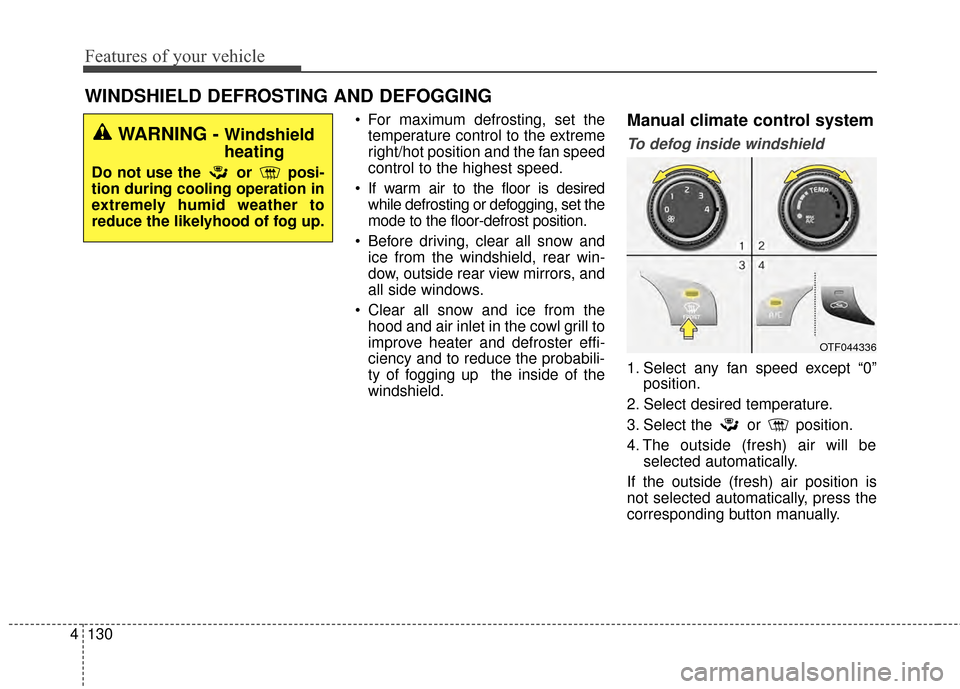
To defog inside windshield
1. Select any fan speed except “0” position.
2. Select desired temperature.
3. Select the or position.
4. The outside (fresh) air will be selected automatically.
If the outside (fresh) air position is
not selected automatically, press the
corresponding button manually.
OTF044336
WARNING - Windshield
heating
Do not use the or posi-
tion during cooling operation in
extremely humid weather to
reduce the likelyhood of fog up.
Page 204 of 479
Features of your vehicle
134
4
3. While pressing the air conditioning
button (A/C), press the air intake
control button ( ) at least 5
times within 3 seconds.
The indicator light in the air intake
control button will blink 3 times with
0.5 second of interval. It indicates that
the defogging logic is canceled or
returned to the programmed status.
If the battery has been discharged or
disconnected, it resets to the defog
logic status.Auto defogging system (Only for automatic climate control system,if equipped)
Auto defogging reduces the probabil-
ity of fogging up the inside of the
windshield by automatically sensing
the moisture inside the windshield.
The auto defogging system operates
when the heater or air conditioning is
on. This indicator illuminates
when the auto defogging
system senses the mois-
ture inside the windshield
and operates.
If more moisture is in the vehicle,
higher steps operate as follows. For
example, if auto defogging does not
defog inside the
windshield at step 1 Outside air posi-
tion, it tries to defog again at step 2
Blowing air toward the windshield.
Step 1 : Operating the air conditioning
Step 2 : Outside air position
Step 3 :Blowing air toward the wind-
shield
Step 4 : Increasing air flow toward the windshield
OTF044178N
Page 211 of 479
4141
Features of your vehicle
Only use 12V electric accessories
which are less than 10A in electric
capacity.
Adjust the air-conditioner or heater to
the lowest operating level when
using the power outlet.
Close the cover when not in use.
Some electronic devices can cause
electronic interference when plugged
into a vehicle’s power outlet. These
devices may cause excessive audio
static and malfunctions in other elec-
tronic systems or devices used in
your vehicle.Digital clock
Whenever the battery terminals or
related fuses are disconnected, you
must reset the time.
When the ignition switch is in the
ACC or ON position, the clock but-
tons operate as follows:
WARNING - Electric
shock
Do not put a finger or a foreign
element (pin, etc.) into a power
outlet and do not touch with a
wet hand. You may get an elec-
tric shock.
WARNING
Do not adjust the clock while
driving. You may lose your steer-
ing control and cause severe
personal injury or accidents.
OTF044368
OTF044356
■Type A
■Type B
Page 223 of 479
4153
Features of your vehicle
USING THE USB DEVICE
To use an external USB device,make sure the device is not con-
nected when starting up the
vehicle. Connect the device after
starting up.
If you start the engine when the USB device is connected, it may
damage the USB device. (USB
flashdrives are very sensitive to
electric shock.)
If the engine is started up or turned off while the external USB
device is connected, the external
USB device may not work.
The System may not play unau- thenticated MP3 or WMA files.
1) It can only play MP3 files with the compression rate
between 8Kbps ~ 320Kbps.
2) It can only play WMA music files with the compression
rate between 8Kbps ~
320Kbps.
Take precautions for static elec- tricity when connecting or discon-
necting the external USB device.
(Continued)(Continued)
An encrypted MP3 PLAYER is
not recognizable.
Depending on the condition of the external USB device, the
connected external USB device
can be unrecognizable.
When the formatted byte/sector setting of External USB device is
not either 512BYTE or
2048BYTE, then the device will
not be recognized.
Use only a USB device format- ted to FAT 12/16/32.
USB devices without USB I/F authentication may not be recog-
nizable.
Make sure the USB connection terminal does not come in con-
tact with the human body or
other objects.
If you repeatedly connect or dis- connect the USB device in a
short period of time, it may break
the device.
(Continued)(Continued)
You may hear a strange noise
when connecting or disconnect-
ing a USB device.
If you disconnect the external USB device during playback in
USB mode, the external USB
device can be damaged or may
malfunction. Therefore, discon-
nect the external USB device
when the audio is turned off or in
another mode. (e.g, Radio, CD)
Depending on the type and capacity of the external USB
device or the type of the files
stored in the device, there is a
difference in the time for recogni-
tion the device.
Do not use the USB device for purposes other than playing
music files.
Playing videos through the USB is not supported.
Use of USB accessories such as rechargers or heaters using USB
I/F may lower performance or
cause trouble.
(Continued)