USB KIA Optima 2015 4.G User Guide
[x] Cancel search | Manufacturer: KIA, Model Year: 2015, Model line: Optima, Model: KIA Optima 2015 4.GPages: 487, PDF Size: 13.4 MB
Page 247 of 487
Features of your vehicle
174
4
BASIC METHOD OF USE :
Audio CD / MP3 CD / USB /
iPod
®/ My Music
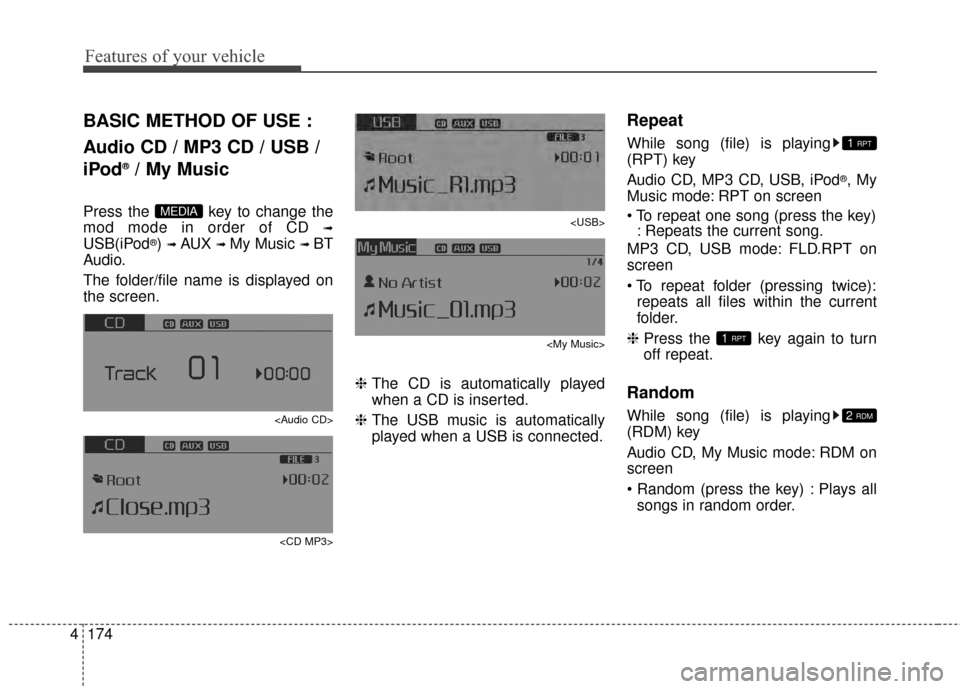
Press the key to change the
mod mode in order of CD
➟
USB(iPod®) ➟ AUX ➟ My Music ➟ BT
Audio.
The folder/file name is displayed on
the screen.
Page 248 of 487
4175
Features of your vehicle
MP3 CD, USB mode: FLD.RDM on
screen
Plays all files within the current fold-
er in random order.
iPod
®mode: ALL RDM on screen
Plays all files in random order.
MP3 CD, USB : ALL RDM on screen
Plays all files in random order.
❈ Press the key again to turn
off random.
Changing Song/File
While song (file) is playing
key
Plays the current song from the beginning.
❈ If the key is pressed
again within 2 second, the previ-
ous song is played.
0.8 seconds): Rewinds the song. While song (file) is playing
key
Plays the next song.
0.8 seconds): Fast forwards the
song.
Scan
While song (file) is playing
key
Scans all
songs from the next song for 10
seconds each.
❈ Press the key again to turn
off.
❈ The SCAN function is not support-
ed in iPod
®mode.
Folder Search : MP3 CD, USB
Mode
While file is playing
(Folder Up) key
While file is playing
(Folder Down) key
❈ If a folder is selected by pressing
the TUNE knob, the first file
within the selected folder will be
played.
❈ In iPod
®mode, moves to the
Parent Folder.
Searching Songs (File)
TUNE knob : Searches for songs (files)
TUNE knob : Plays selected song (file).
CAT
FOLDER
CAT
FOLDER
SCAN
SCAN
SEEK
TRACK
SEEK
TRACK
SEEK
TRACK
2RDM
Page 249 of 487
![KIA Optima 2015 4.G User Guide Features of your vehicle
176
4
MENU : Audio CD
Press the CD MP3 mode key
to set the Repeat, Random,
Information features.
Repeat
Press the key Set [ RPT]
through the TUNE knob or
key to repeat the](/img/2/2963/w960_2963-248.png "KIA Optima 2015 4.G User Guide Features of your vehicle
176
4
MENU : Audio CD
Press the CD MP3 mode key
to set the Repeat, Random,
Information features.
Repeat
Press the key Set [ RPT]
through the TUNE knob or
key to repeat the")
Features of your vehicle
176
4
MENU : Audio CD
Press the CD MP3 mode key
to set the Repeat, Random,
Information features.
Repeat
Press the key Set [ RPT]
through the TUNE knob or
key to repeat the current song.
❈ Press RPT again to turn off.
Random
Press the key Set [ RDM]
through the
TUNEknob or
key to randomly play songs within
the current folder.
❈ Press RDM again to turn off.
Information
Press the key Set [ Info]
through the
TUNEknob or
key to display information of the cur-
rent song.
❈ Press the key to turn off
info display
.
MENU : MP3 CD / USB
Press the CD MP3 mode key
to set the Repeat, Folder Random,
Folder Repeat, All Random,
Information, and Copy features.
Repeat
Press the key Set [ RPT]
through the
TUNEknob or
key to repeat the current song.
❈ Press RPT again to turn off.1 RPTMENU
MENU
MENU
3
MENU
2 RDMMENU
1 RPT
MENU
MENU
Page 250 of 487
![KIA Optima 2015 4.G User Guide 4177
Features of your vehicle
Folder Random
Press the key Set [ F.RDM]
through the
TUNEknob or
key to randomly play songs within the
current folder.
❈ Press F.RDM again to turn off.
Folder Repea](/img/2/2963/w960_2963-249.png "KIA Optima 2015 4.G User Guide 4177
Features of your vehicle
Folder Random
Press the key Set [ F.RDM]
through the
TUNEknob or
key to randomly play songs within the
current folder.
❈ Press F.RDM again to turn off.
Folder Repea")
4177
Features of your vehicle
Folder Random
Press the key Set [ F.RDM]
through the
TUNEknob or
key to randomly play songs within the
current folder.
❈ Press F.RDM again to turn off.
Folder Repeat
Press the key Set [ F.RPT]
through the
TUNEknob or
key to repeat songs within the cur-
rent folder.
❈ Press F.RPT again to turn off.
All Random
Press the key Set [ A.RDM]
through the
TUNEknob or key
to randomly play all songs within the
CD.
❈ Press A.RDM again to turn off.
Information
Press the key Set [ Info]
through the
TUNEknob or
key to display information of the cur-
rent song.
❈ Press the key to turn off
info display.
Copy
Press the key Set [ Copy]
through the
TUNEknob or
key.
This is used to copy the currentsong into My Music. You can play
the copied Music in My Music
mode.
❈ If another key is pressed while
copying is in progress, a pop up
asking you whether to cancel
copying is displayed.
❈ If another media is connected or
inserted (USB, CD, iPod
®, AUX)
while copying is in progress, copy-
ing is canceled.
❈ Music will not be played while
copying is in progress.
6
MENU
MENU
5
MENU
4
MENU
3
MENU
2 RDM
MENU
Page 255 of 487
Features of your vehicle
182
4
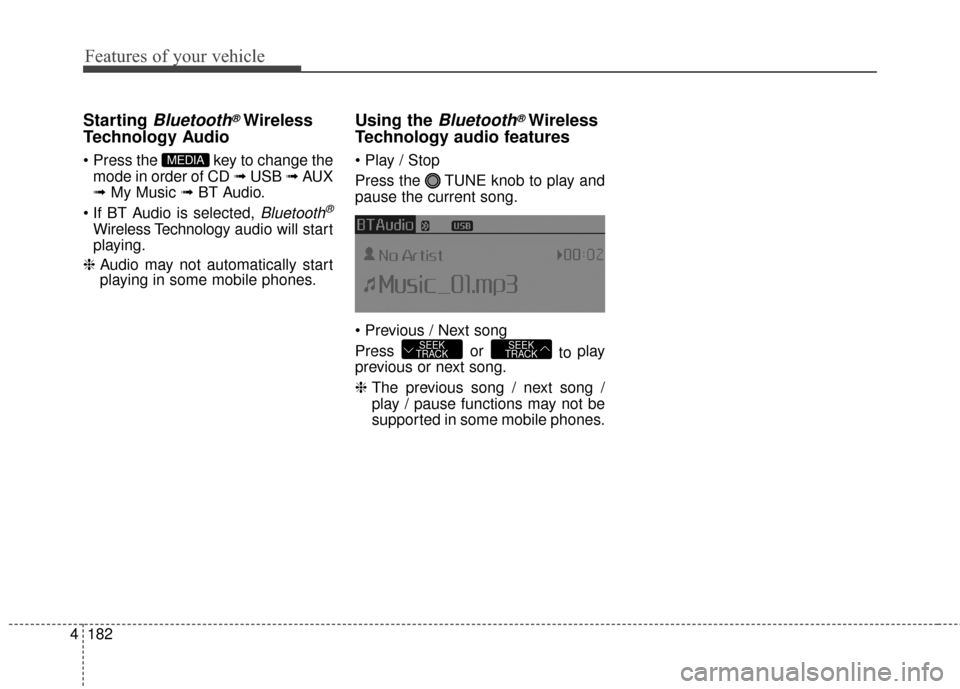
Starting Bluetooth®Wireless
Technology Audio
key to change the
mode in order of CD ➟ USB ➟ AUX
➟ My Music ➟ BT Audio.
Bluetooth®
Wireless Technology audio will start
playing.
❈ Audio may not automatically start
playing in some mobile phones.
Using the Bluetooth®Wireless
Technology audio features
Press the TUNE knob to play and
pause the current song.
Press or to play
previous or next song.
❈ The previous song / next song /
play / pause functions may not be
supported in some mobile phones.
SEEK
TRACKSEEK
TRACK
MEDIA
Page 272 of 487
4199
Features of your vehicle
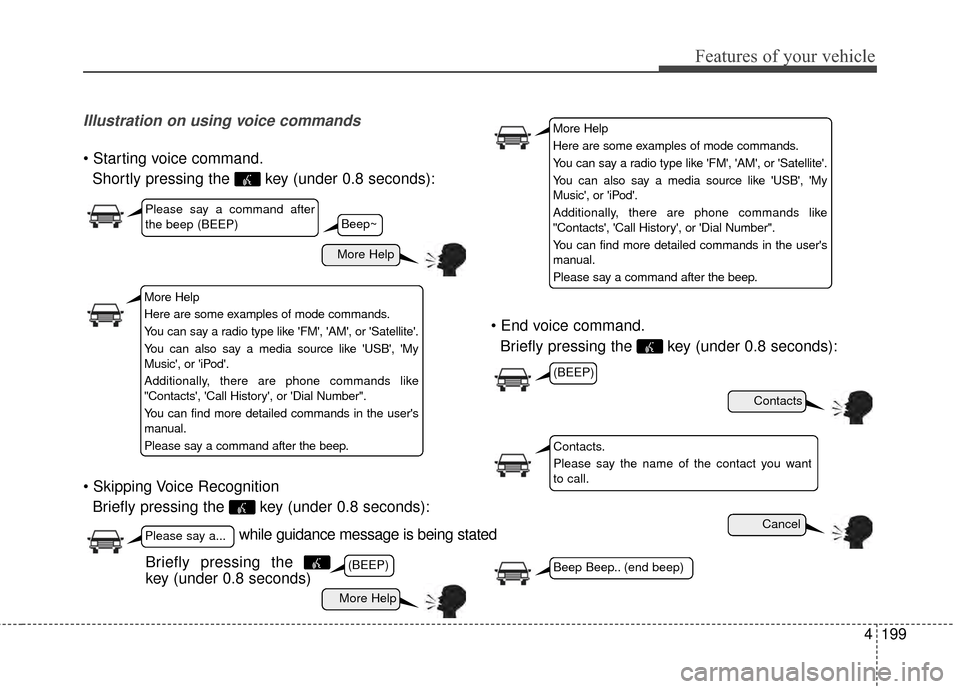
Illustration on using voice commands
Shortly pressing the key (under 0.8 seconds):
Briefly pressing the key (under 0.8 seconds):
Briefly pressing the key (under 0.8 seconds):
while guidance message is being stated
More Help
Contacts
Cancel
More Help
Please say a command after
the beep (BEEP)
Please say a...
Contacts.
Please say the name of the contact you want
to call.
(BEEP)
(BEEP)
Beep Beep.. (end beep)Briefly pressing the
key (under 0.8 seconds)
Beep~
More Help
Here are some examples of mode commands.
You can say a radio type like 'FM', 'AM', or 'Satellite'.
You can also say a media source like 'USB', 'My
Music', or 'iPod'.
Additionally, there are phone commands like
"Contacts', 'Call History', or 'Dial Number".
You can find more detailed commands in the user's
manual.
Please say a command after the beep.
More Help
Here are some examples of mode commands.
You can say a radio type like 'FM', 'AM', or 'Satellite'.
You can also say a media source like 'USB', 'My
Music', or 'iPod'.
Additionally, there are phone commands like
"Contacts', 'Call History', or 'Dial Number".
You can find more detailed commands in the user's
manual.
Please say a command after the beep.
Page 274 of 487
4201
Features of your vehicle
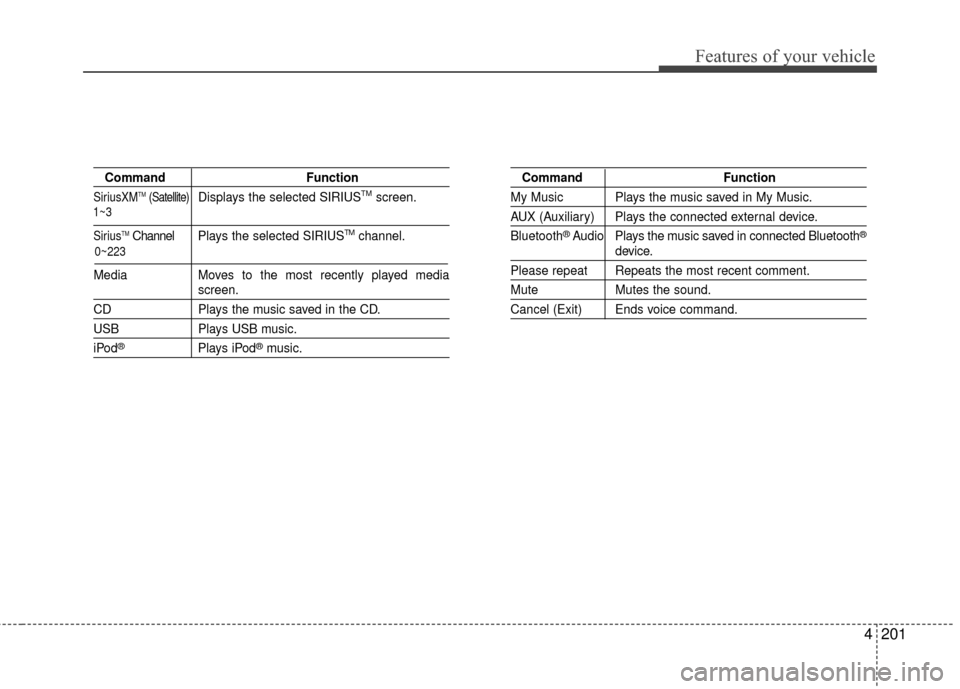
CommandFunction
SiriusXMTM(Satellite)Displays the selected SIRIUSTMscreen.
SiriusTMChannel P l ay s the selected SIRIUSTMchannel.
Media Moves to the most recently played media
screen.
CD Plays the music saved in the CD.
USBPlays USB music.
iPod®Plays iPod®music.
Command Function
My Music Plays the music saved in My Music.
AUX (Auxiliary) Plays the connected external device.
Bluetooth
®Audio Plays the music saved in connected Bluetooth®
device.
Please repeat Repeats the most recent comment.
Mute Mutes the sound.
Cancel (Exit) Ends voice command.
0~223
1~3
Page 276 of 487
4203
Features of your vehicle
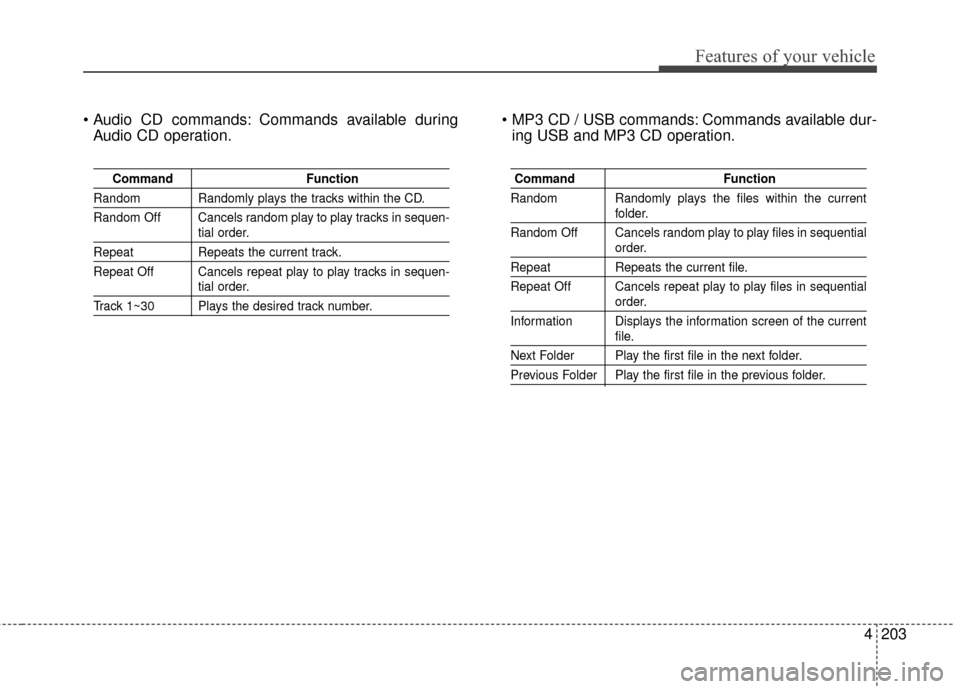
Commands available duringAudio CD operation. Commands available dur-
ing USB and MP3 CD operation.
Command Function
Random Randomly plays the tracks within the CD.
Random Off Cancels random play to play tracks in sequen-
tial order.
RepeatRepeats the current track.
Repeat Off Cancels repeat play to play tracks in sequen-
tial order.
Track 1~30 Plays the desired track number.
Command Function
Random Randomly plays the files within the current
folder.
Random Off Cancels random play to play files in sequential
order.
Repeat Repeats the current file.
Repeat Off Cancels repeat play to play files in sequential
order.
Information Displays the information screen of the current
file.
Next Folder Play the first file in the next folder.
Previous Folder Play the first file in the previous folder.
Page 480 of 487
Index
2I
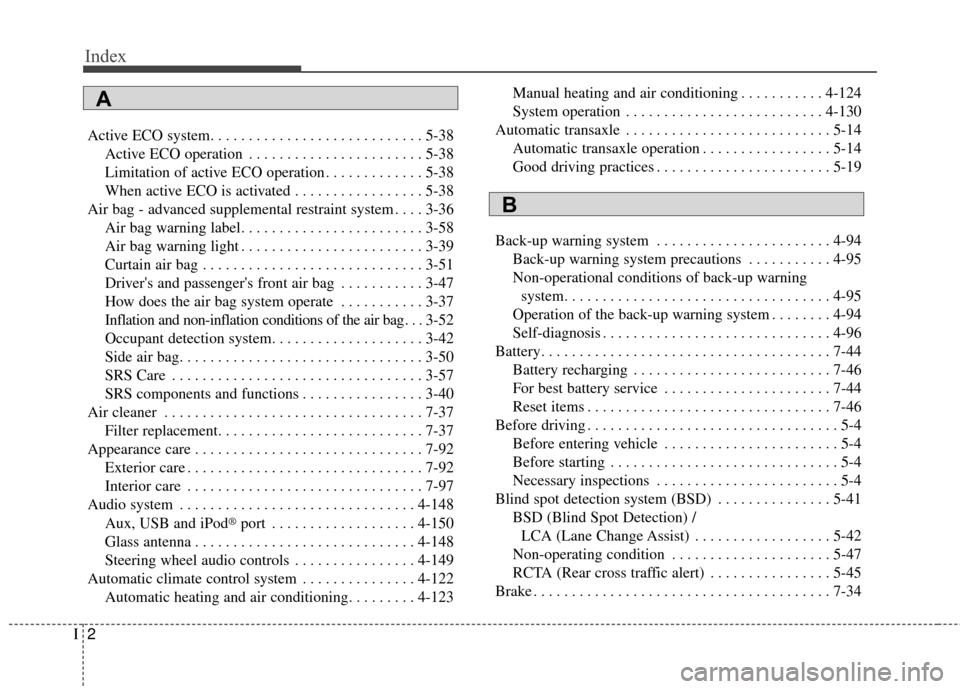
Active ECO system. . . . . . . . . . . . . . . . . . . . . . . . . . . . 5-38Active ECO operation . . . . . . . . . . . . . . . . . . . . . . . 5-38
Limitation of active ECO operation . . . . . . . . . . . . . 5-38
When active ECO is activated . . . . . . . . . . . . . . . . . 5-38
Air bag - advanced supplemental restraint system . . . . 3-36 Air bag warning label. . . . . . . . . . . . . . . . . . . . . . . . 3-58
Air bag warning light . . . . . . . . . . . . . . . . . . . . . . . . 3-39
Curtain air bag . . . . . . . . . . . . . . . . . . . . . . . . . . . . . 3-51
Driver's and passenger's front air bag . . . . . . . . . . . 3-47
How does the air bag system operate . . . . . . . . . . . 3-37
Inflation and non-inflation conditions of the air bag . . . 3-52
Occupant detection system. . . . . . . . . . . . . . . . . . . . 3-42
Side air bag. . . . . . . . . . . . . . . . . . . . . . . . . . . . . . . . 3-50
SRS Care . . . . . . . . . . . . . . . . . . . . . . . . . . . . . . . . . 3-57
SRS components and functions . . . . . . . . . . . . . . . . 3-40
Air cleaner . . . . . . . . . . . . . . . . . . . . . . . . . . . . . . . . . . 7-37\
Filter replacement. . . . . . . . . . . . . . . . . . . . . . . . . . . 7-37
Appearance care . . . . . . . . . . . . . . . . . . . . . . . . . . . . . . 7-92 Exterior care . . . . . . . . . . . . . . . . . . . . . . . . . . . . . . . 7-92
Interior care . . . . . . . . . . . . . . . . . . . . . . . . . . . . . . . 7-97
Audio system . . . . . . . . . . . . . . . . . . . . . . . . . . . . . . . 4-148
Aux, USB and iPod
®port . . . . . . . . . . . . . . . . . . . 4-150
Glass antenna . . . . . . . . . . . . . . . . . . . . . . . . . . . . . 4-148
Steering wheel audio controls . . . . . . . . . . . . . . . . 4-149
Automatic climate control system . . . . . . . . . . . . . . . 4-122 Automatic heating and air conditioning. . . . . . . . . 4-123 Manual heating and air conditioning . . . . . . . . . . . 4-124
System operation . . . . . . . . . . . . . . . . . . . . . . . . . . 4-130
Automatic transaxle . . . . . . . . . . . . . . . . . . . . . . . . . . . 5-14 Automatic transaxle operation . . . . . . . . . . . . . . . . . 5-14
Good driving practices . . . . . . . . . . . . . . . . . . . . . . . 5-19
Back-up warning system . . . . . . . . . . . . . . . . . . . . . . . 4-94 Back-up warning system precautions . . . . . . . . . . . 4-95
Non-operational conditions of back-up warningsystem. . . . . . . . . . . . . . . . . . . . . . . . . . . . . . . . . . . 4-\
95
Operation of the back-up warning system . . . . . . . . 4-94
Self-diagnosis . . . . . . . . . . . . . . . . . . . . . . . . . . . . . . 4-96
Battery. . . . . . . . . . . . . . . . . . . . . . . . . . . . . . . . . . . . \
. . 7-44 Battery recharging . . . . . . . . . . . . . . . . . . . . . . . . . . 7-46
For best battery service . . . . . . . . . . . . . . . . . . . . . . 7-44
Reset items . . . . . . . . . . . . . . . . . . . . . . . . . . . . . . . . 7-46
Before driving . . . . . . . . . . . . . . . . . . . . . . . . . . . . . . . . . 5-4 Before entering vehicle . . . . . . . . . . . . . . . . . . . . . . . 5-4
Before starting . . . . . . . . . . . . . . . . . . . . . . . . . . . . . . 5-4
Necessary inspections . . . . . . . . . . . . . . . . . . . . . . . . 5-4
Blind spot detection system (BSD) . . . . . . . . . . . . . . . 5-41 BSD (Blind Spot Detection) /LCA (Lane Change Assist) . . . . . . . . . . . . . . . . . . 5-42
Non-operating condition . . . . . . . . . . . . . . . . . . . . . 5-47
RCTA (Rear cross traffic alert) . . . . . . . . . . . . . . . . 5-45
Brake . . . . . . . . . . . . . . . . . . . . . . . . . . . . . . . . . . . . \
. . . 7-34
A
B