fuel KIA Optima 2015 4.G User Guide
[x] Cancel search | Manufacturer: KIA, Model Year: 2015, Model line: Optima, Model: KIA Optima 2015 4.GPages: 487, PDF Size: 13.4 MB
Page 107 of 487
Features of your vehicle
34
4
Make sure to refuel your vehicle
according to the "Fuel requirements"
suggested in chapter 1.
If the fuel filler cap requires replace-
ment, use only a genuine Kia cap or
the equivalent specified for your vehi-
cle. An incorrect fuel filler cap can
result in a serious malfunction of the
fuel system or emission control sys-
tem.Emergency fuel filler lid release
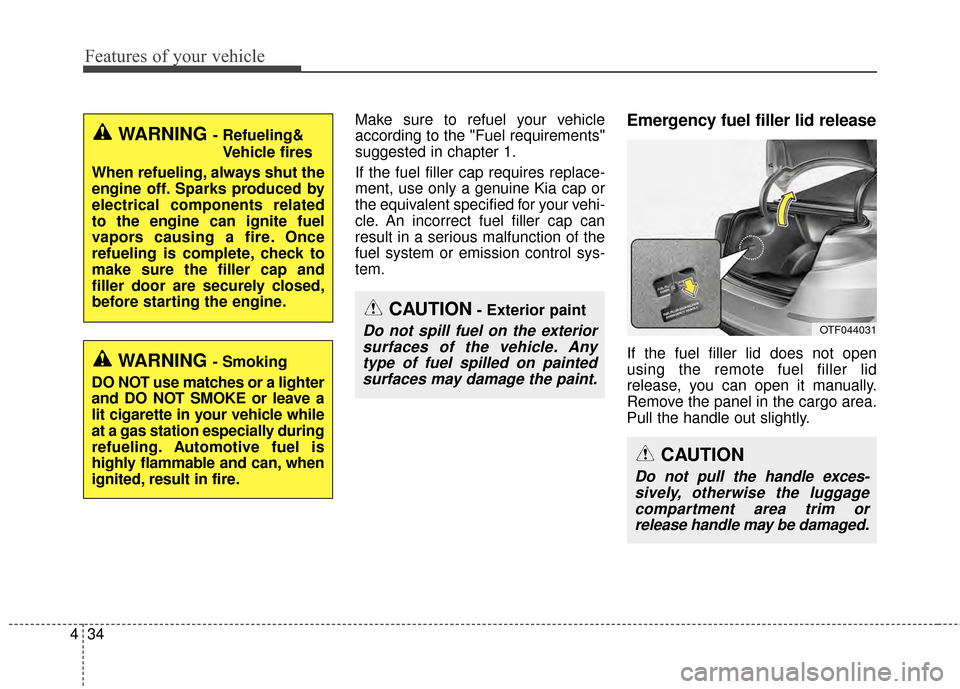
If the fuel filler lid does not open
using the remote fuel filler lid
release, you can open it manually.
Remove the panel in the cargo area.
Pull the handle out slightly.
CAUTION- Exterior paint
Do not spill fuel on the exterior
surfaces of the vehicle. Anytype of fuel spilled on paintedsurfaces may damage the paint.
WARNING - Refueling&
Vehicle fires
When refueling, always shut the
engine off. Sparks produced by
electrical components related
to the engine can ignite fuel
vapors causing a fire. Once
refueling is complete, check to
make sure the filler cap and
filler door are securely closed,
before starting the engine.
WARNING - Smoking
DO NOT use matches or a lighter
and DO NOT SMOKE or leave a
lit cigarette in your vehicle while
at a gas station especially during
refueling. Automotive fuel is
highly flammable and can, when
ignited, result in fire.
CAUTION
Do not pull the handle exces- sively, otherwise the luggagecompartment area trim orrelease handle may be damaged.
OTF044031
Page 131 of 487
Features of your vehicle
58
4
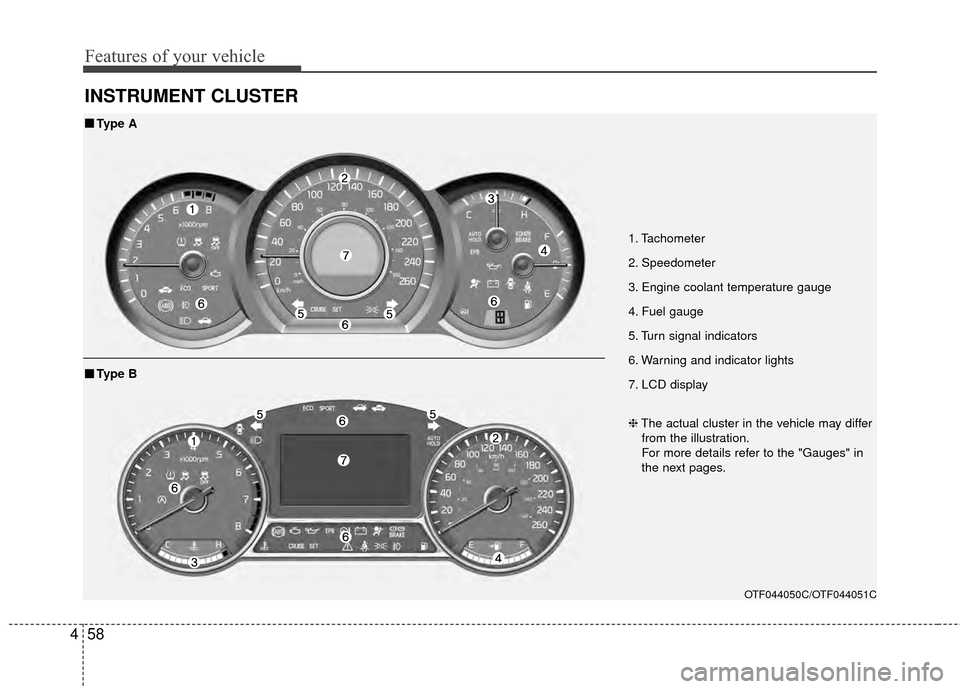
INSTRUMENT CLUSTER
1. Tachometer
2. Speedometer
3. Engine coolant temperature gauge
4. Fuel gauge
5. Turn signal indicators
6. Warning and indicator lights
7. LCD display
OTF044050C/OTF044051C
■
■
Type A
❈The actual cluster in the vehicle may differ
from the illustration.
For more details refer to the "Gauges" in
the next pages.
■ ■ Type B
Page 134 of 487
461
Features of your vehicle
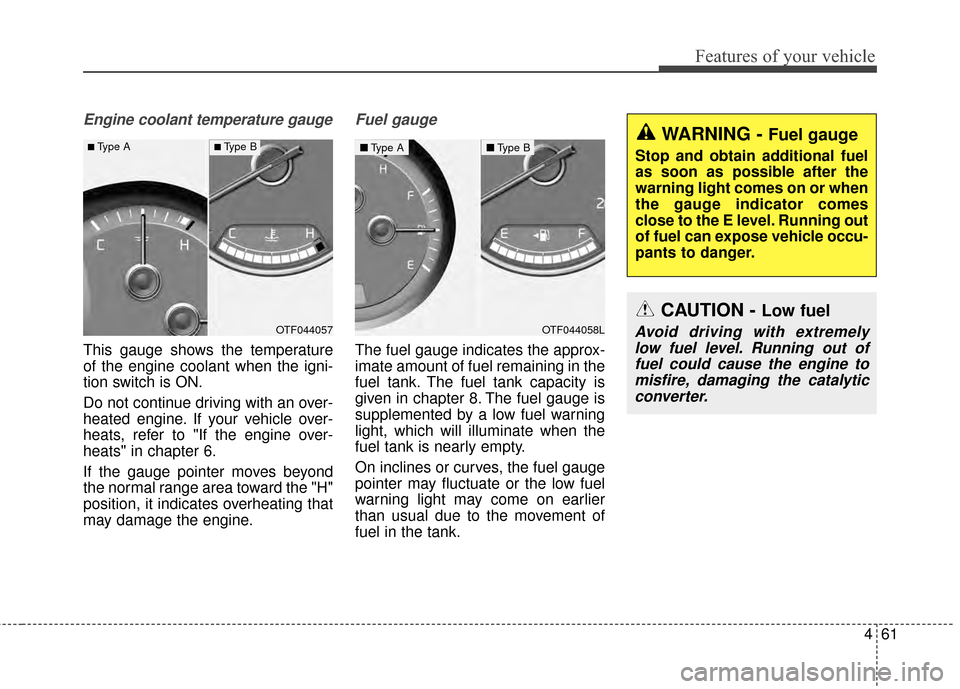
Engine coolant temperature gauge
This gauge shows the temperature
of the engine coolant when the igni-
tion switch is ON.
Do not continue driving with an over-
heated engine. If your vehicle over-
heats, refer to "If the engine over-
heats" in chapter 6.
If the gauge pointer moves beyond
the normal range area toward the "H"
position, it indicates overheating that
may damage the engine.
Fuel gauge
The fuel gauge indicates the approx-
imate amount of fuel remaining in the
fuel tank. The fuel tank capacity is
given in chapter 8. The fuel gauge is
supplemented by a low fuel warning
light, which will illuminate when the
fuel tank is nearly empty.
On inclines or curves, the fuel gauge
pointer may fluctuate or the low fuel
warning light may come on earlier
than usual due to the movement of
fuel in the tank.
WARNING - Fuel gauge
Stop and obtain additional fuel
as soon as possible after the
warning light comes on or when
the gauge indicator comes
close to the E level. Running out
of fuel can expose vehicle occu-
pants to danger.
CAUTION - Low fuel
Avoid driving with extremelylow fuel level. Running out offuel could cause the engine tomisfire, damaging the catalyticconverter.OTF044057
■Type A■ Type B
OTF044058L
■ Type A■Type B
Page 137 of 487
Features of your vehicle
64
4
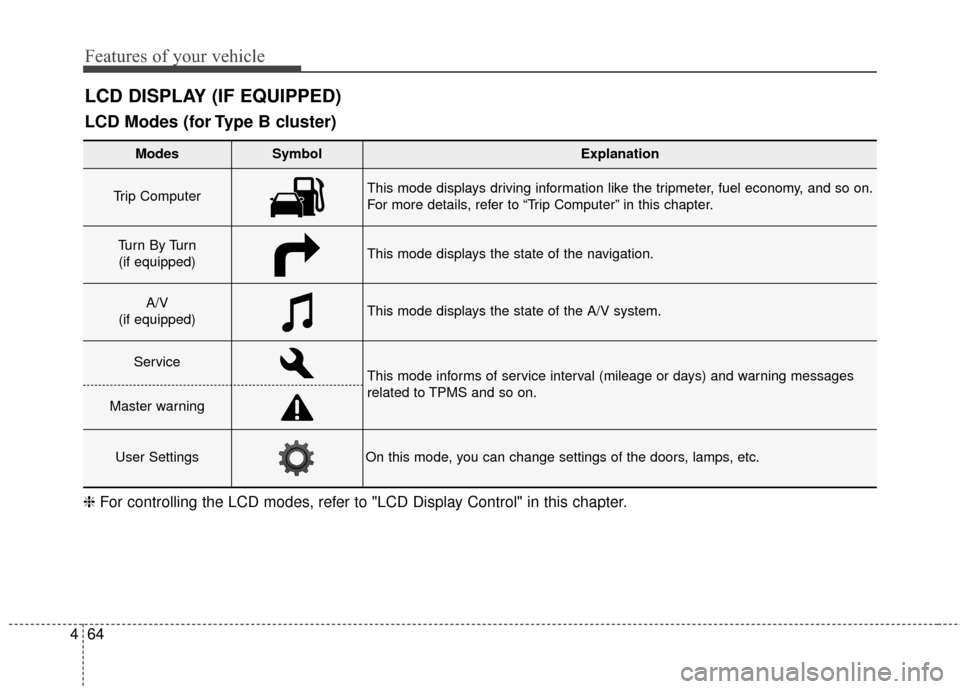
LCD DISPLAY (IF EQUIPPED)
❈ For controlling the LCD modes, refer to "LCD Display Control" in this chapter.
LCD Modes (for Type B cluster)
Modes SymbolExplanation
Trip Computer This mode displays driving information like the tripmeter, fuel economy, and so on.
For more details, refer to “Trip Computer” in this chapter.
Tu r n B y Tu r n
(if equipped)This mode displays the state of the navigation.
A/V
(if equipped)This mode displays the state of the A/V system.
ServiceThis mode informs of service interval (mileage or days) and warning messages
related to TPMS and so on.
Master warning
User SettingsOn this mode, you can change settings of the doors, lamps, etc.
Page 142 of 487
469
Features of your vehicle
Convenience
Language
Choose the language you prefer
within the LCD.
Temperature Unit
Convert the temperature unit from °C
to °F or from °F to °C.
AVG Fuel Eco Reset
Auto Reset:The average fuel economy will
reset automatically when refueling.
Manual Reset: The average fuel economy will not
reset automatically whenever refu-
eling.
For more details, refer to "Trip
Computer" in this chapter. Seat Easy Access (if equipped)
If this item is checked, the driver’s
seat will automatically move forward
or rearward for the driver to enter or
exit the vehicle comfortably.
Welcome Sound
If this item is checked, the welcome
sound function will be activated.
Steering Position (if equipped)
If this item is checked, the warning
function regarding the steering wheel
alignment will be activated.
For more details, refer to "Warning
Messages" in this chapter.
Driving Assist (if equipped)
RCTA
If this item is checked RCTA (Rear
Cross Traffic Alert) function in BSD
(Blind Spot Detection) system will be
activated.
For more details, refer to Blind spot
detection system in chapter 5.
Page 152 of 487
479
Features of your vehicle
Overview
Description
The trip computer is a microcomput-
er-controlled driver information sys-
tem that displays information related
to driving.
✽ ✽NOTICE
Some driving information stored in
the trip computer (for example
Average Vehicle Speed) resets if the
battery is disconnected.
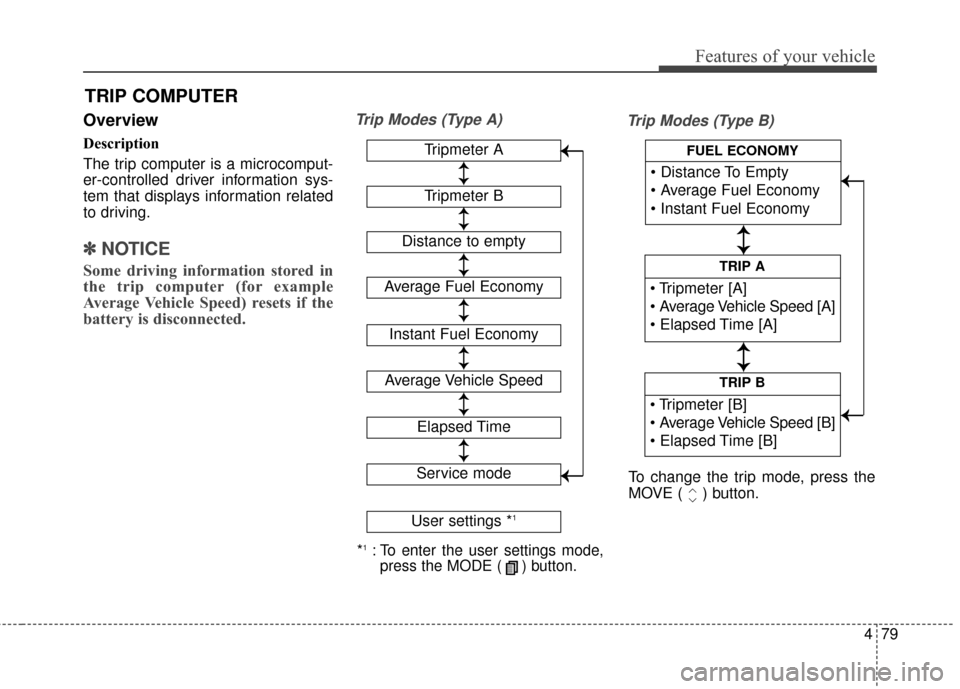
Trip Modes (Type A)
Trip Modes (Type B)
TRIP COMPUTER
*1:To enter the user settings mode,
press the MODE ( ) button.
Tripmeter A
Average Fuel Economy
Instant Fuel Economy
Average Vehicle Speed
Elapsed Time
Service mode
User settings *1
↕
↕
→
→
→
→
Tripmeter B
Distance to empty
↕
↕
↕ ↕
↕ ↕
↕ ↕
↕ ↕
↕ ↕
TRIP B
TRIP A
FUEL ECONOMY
To change the trip mode, press the
MOVE ( ) button.
↕
↕
↕ ↕
→
→ → →
Page 153 of 487
Features of your vehicle
80
4
Fuel Economy
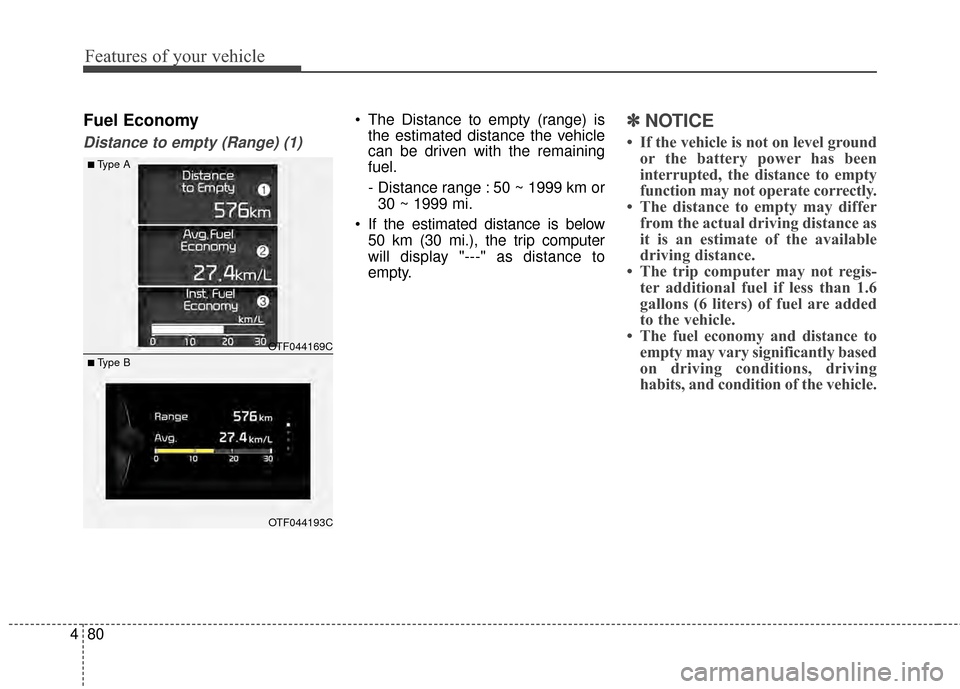
Distance to empty (Range) (1)
The Distance to empty (range) is
the estimated distance the vehicle
can be driven with the remaining
fuel.
- Distance range : 50 ~ 1999 km or
30 ~ 1999 mi.
If the estimated distance is below 50 km (30 mi.), the trip computer
will display "---" as distance to
empty.✽ ✽ NOTICE
• If the vehicle is not on level ground
or the battery power has been
interrupted, the distance to empty
function may not operate correctly.
• The distance to empty may differ from the actual driving distance as
it is an estimate of the available
driving distance.
• The trip computer may not regis- ter additional fuel if less than 1.6
gallons (6 liters) of fuel are added
to the vehicle.
• The fuel economy and distance to empty may vary significantly based
on driving conditions, driving
habits, and condition of the vehicle.
OTF044169C
OTF044193C
■Type A
■ Type B
Page 154 of 487
481
Features of your vehicle
Average Fuel Economy (2)
The average fuel economy is calcu-lated by the total driving distance
and fuel consumption since the last
average fuel economy reset.
- Fuel economy range: 0.0 ~ 99.9MPG or L/100km
The average fuel economy can be reset both manually and automati-
cally. Manual reset
To clear the average fuel economy
manually, press the SELECT/RESET
button OK on the steering wheel for
more than 1 second when the aver-
age fuel economy is displayed.
Automatic reset
To make the average fuel economy
be reset automatically whenever refu-
eling, select the "Auto Reset" mode in
User Setting menu of the LCD display
(Refer to "LCD Display").
Under "Auto Reset" mode, the aver-
age fuel economy will be cleared to
zero (---) when the vehicle speed
exceeds 1 km/h after refueling more
than 6 liters (1.6 gallons).
✽ ✽
NOTICE
The average fuel economy is not dis-
played for more accurate calculation
if the vehicle does not drive more than
10 seconds or 50 meters (0.03 miles)
since the ignition switch or Engine
Start/Stop button is turned to ON.
Instant Fuel Economy (3)
This mode displays the instant fuel
economy during the last few sec-
onds when the vehicle speed is
more than 10 km/h (6.2 MPH).
- Fuel economy range: 0 ~ 50 MPGor 0 ~ 30 L/100km
Page 156 of 487
483
Features of your vehicle
Elapsed Time (3)
The elapsed time is the total driv-ing time since the last elapsed time
reset.
- Time range (hh:mm): 00:00 ~ 99:59
To reset the elapsed time, press the SELECT/RESET button OK on
the steering wheel for more than 1
second when the elapsed time is
displayed.
✽ ✽ NOTICE
Even if the vehicle is not in motion,
the elapsed time keeps going while
the engine is running.
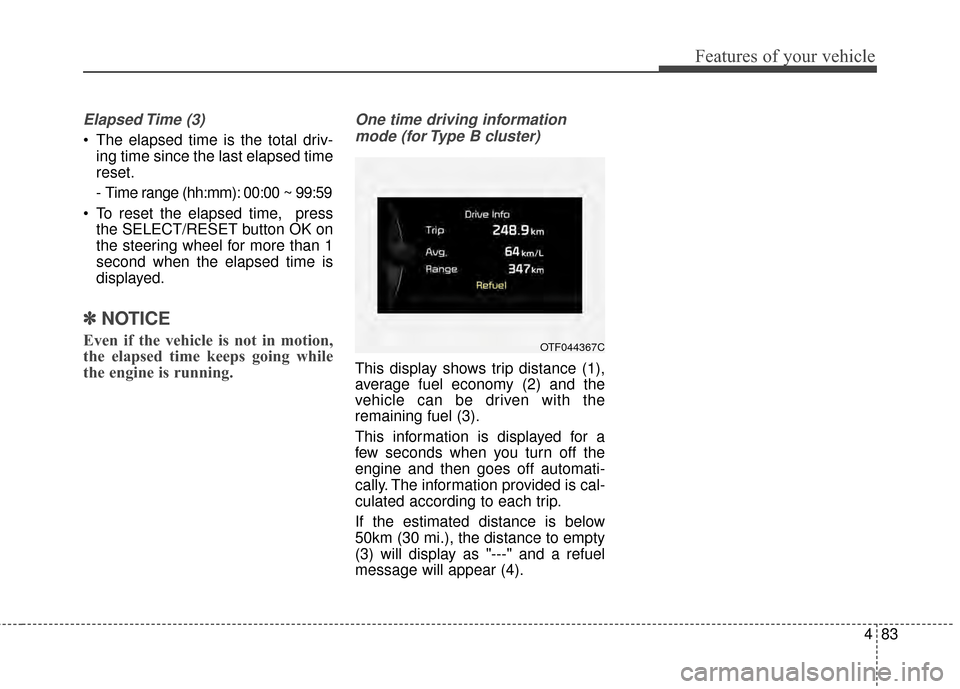
One time driving information
mode (for Type B cluster)
This display shows trip distance (1),
average fuel economy (2) and the
vehicle can be driven with the
remaining fuel (3).
This information is displayed for a
few seconds when you turn off the
engine and then goes off automati-
cally. The information provided is cal-
culated according to each trip.
If the estimated distance is below
50km (30 mi.), the distance to empty
(3) will display as "---" and a refuel
message will appear (4).
OTF044367C
Page 160 of 487
487
Features of your vehicle
Electronic PowerSteering (EPS) WarningLight (if equipped)
This warning light illuminates:
Once you set the ignition switch or Engine Start/Stop Button to the ON
position.
- It remains on until the engine isstarted.
When there is a malfunction with the EPS.
In this case, have your vehicle
inspected by an authorized Kia
dealer.
Malfunction Indicator
Lamp (MIL)
This warning light illuminates:
Once you set the ignition switch or Engine Start/Stop Button to the ON
position.
- It remains on until the engine isstarted.
When there is a malfunction with the emission control system.
In this case, have your vehicle
inspected by an authorized Kia
dealer.
CAUTION - Malfunction
Indicator
Lamp (MIL)
Driving with the MalfunctionIndicator Lamp (MIL) on maycause damage to the emissioncontrol systems which couldeffect drivability and/or fueleconomy.
CAUTION - Gasoline
Engine
If the Malfunction IndicatorLamp (MIL) illuminates, poten-tial catalytic converter damageis possible which could result inloss of engine power.
In this case, have your vehicleinspected by an authorized Kiadealer as soon as possible.