Navi KIA OPTIMA 2016 Navigation System Quick Reference Guide
[x] Cancel search | Manufacturer: KIA, Model Year: 2016, Model line: OPTIMA, Model: KIA OPTIMA 2016Pages: 84, PDF Size: 2.45 MB
Page 57 of 84
54
00360048004400550046004B
Address
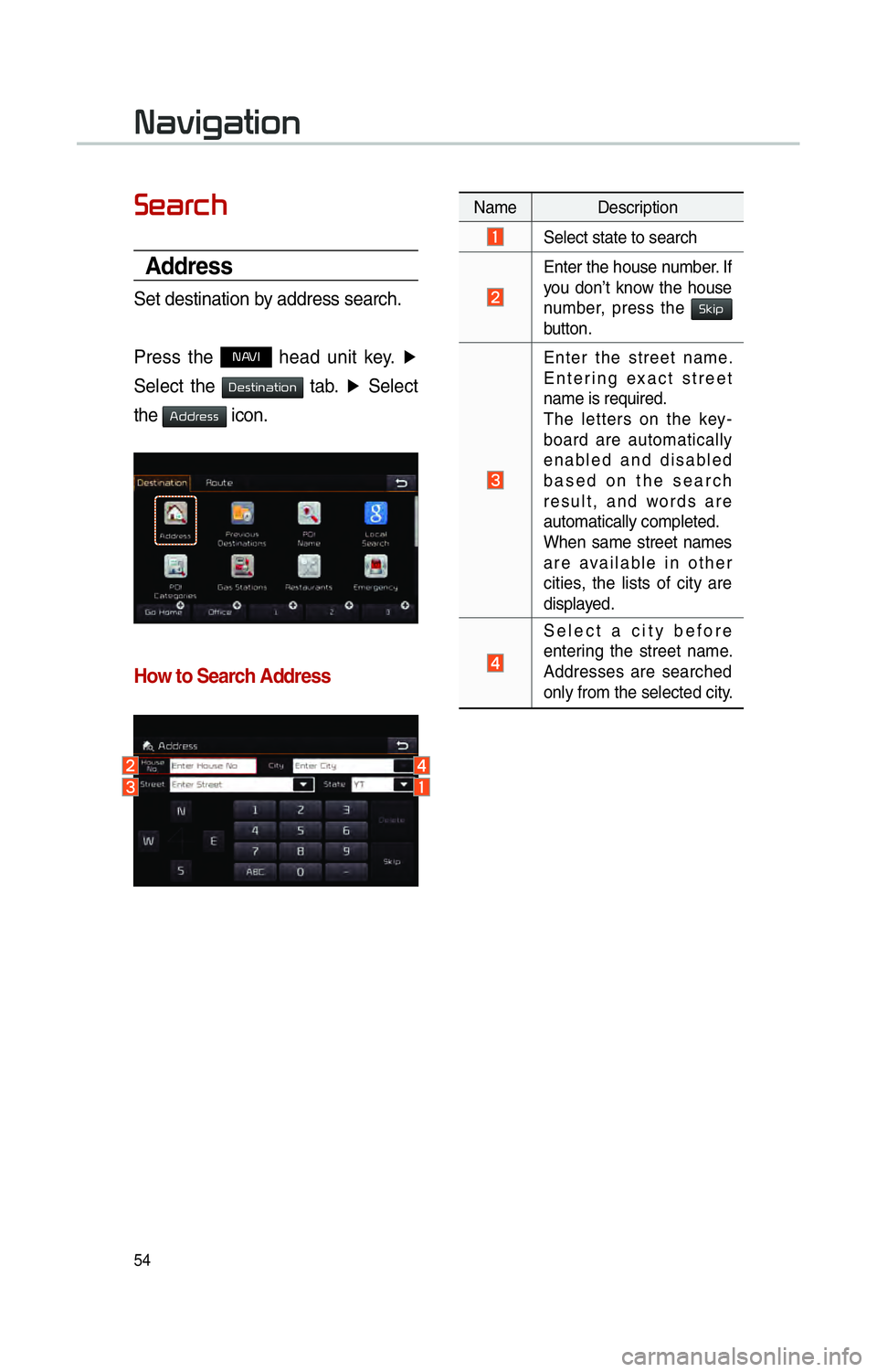
Set destination by address search.
Press the
NAVI head unit key. ▶
Select the
0027004800560057004C005100440057004C00520051 tab. ▶
Select
the
0024004700470055004800560056 icon.
How to Search Address
Name Description
Select state to search
Enter the house number. If
you don’t know the house
number, press the 0036004E004C0053
button.
Enter the street name.
Entering exact street
name is required.
The letters on the key-
board are automatically
enabled and disabled
based on the search
result, and words are
automatically completed.
When same street names
are available in other
cities, the lists of city are
displayed.
Select a city before
entering the street name.
Addresses are searched
only from the selected city.
003100440059004C004A00440057004C00520051
Page 58 of 84
55
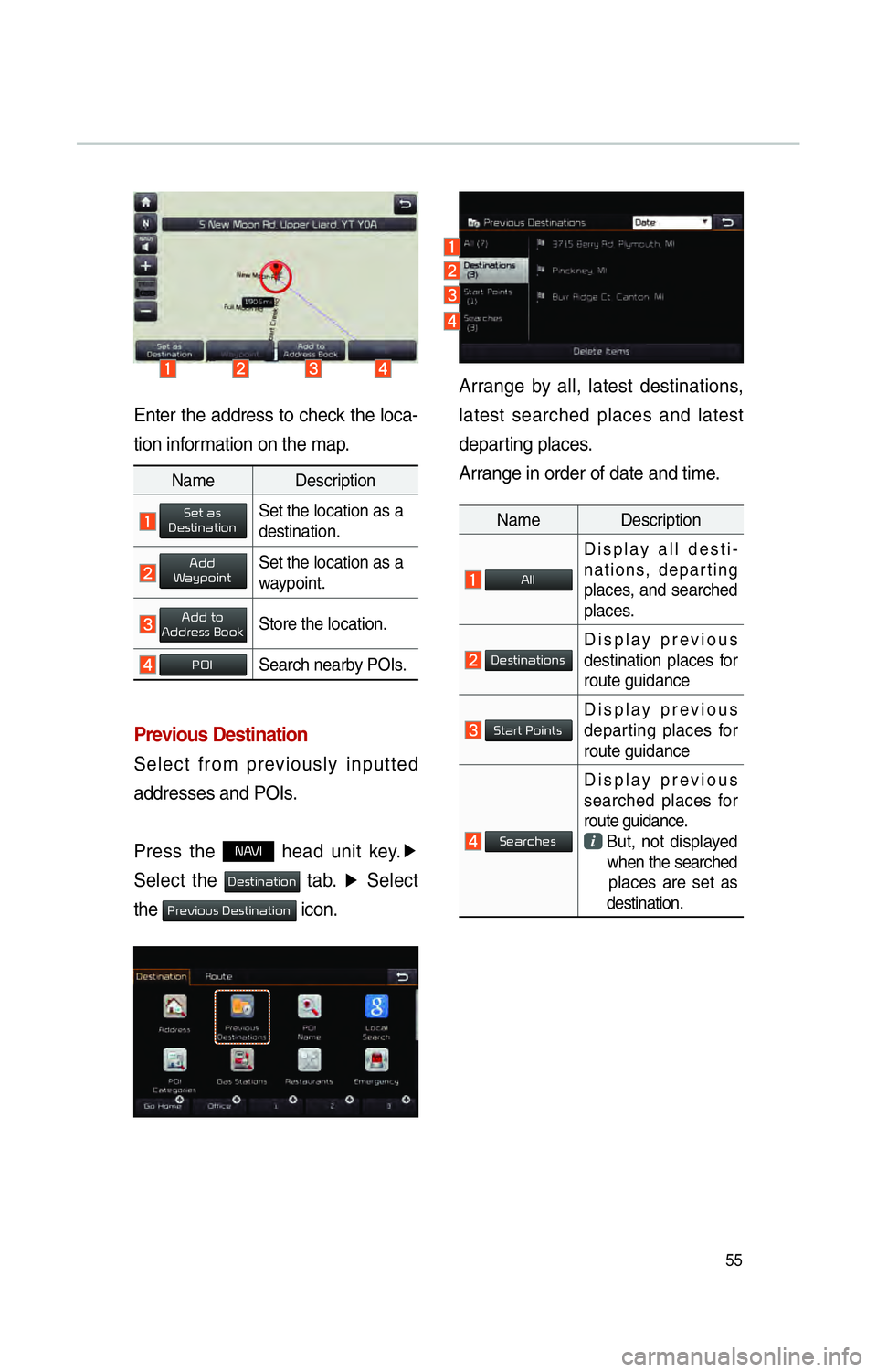
Enter the address to check the loca-
tion information on the map.
Previous Destination
Select from previously inputted
addresses and POIs.
Press the
NAVI head unit key.▶
Select the
0027004800560057004C005100440057004C00520051 tab. ▶
Select
the
0033005500480059004C00520058005600030027004800560057004C005100440057004C00520051 icon.
Arrange by all, latest destinations,
latest searched places and latest
departing places.
Arrange in order of date and time.
Name Description
All
Display all desti-
nations, departing
places, and searched
places.
DestinationsDisplay previous
destination places for
route guidance
Start PointsDisplay previous
departing places for
route guidance
Searches
Display previous
searched places for
route guidance.
But, not displayed
when the searched
places are set as
destination.
Name Description
Set as DestinationSet the location as a
destination.
Add WaypointSet the location as a
waypoint.
Add toAddress BookStore the location.
POISearch nearby POIs.
Page 59 of 84
56
POI Name
Press the NAVI head unit key.▶
Select the
0027004800560057004C005100440057004C00520051 tab. ▶
Select
the
00330032002C00030031004400500048 icon.
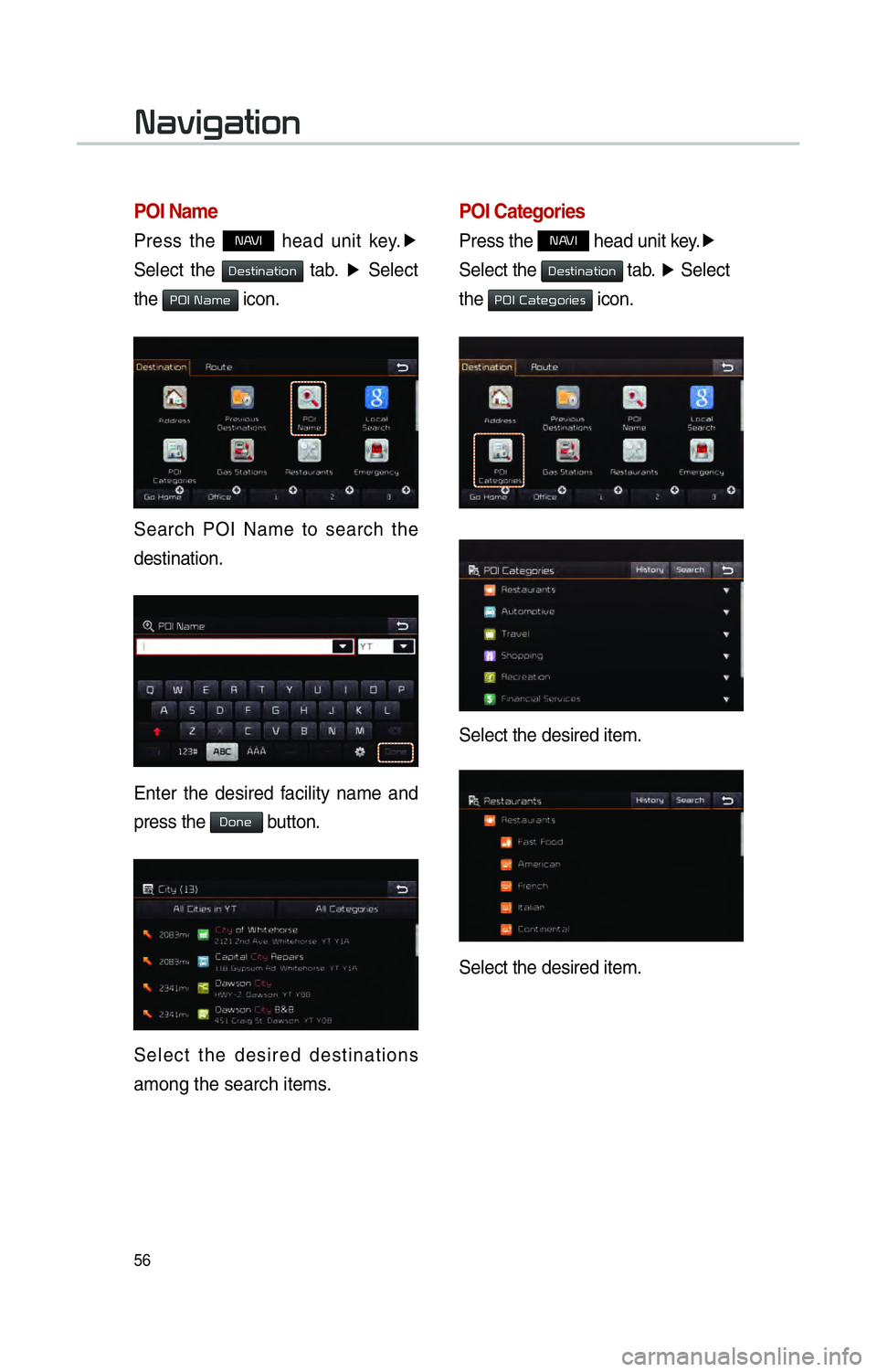
Search POI Name to search the
destination.
Enter the desired facility name and
press the
Done button.
Select the desired destinations
among the search items.
POI Categories
Press the NAVI head unit key. ▶
Select the
0027004800560057004C005100440057004C00520051 tab. ▶
Select
the
00330032002C00030026004400570048004A00520055004C00480056 icon.
Select the desired item.
Select the desired item.
003100440059004C004A00440057004C00520051
Page 60 of 84
57
Gas Station
Search a gas station.
Press the
NAVI head unit key. ▶
Select the
0027004800560057004C005100440057004C00520051 tab. ▶
Select
the
002A0044005600030036005700440057004C005200510056 icon.
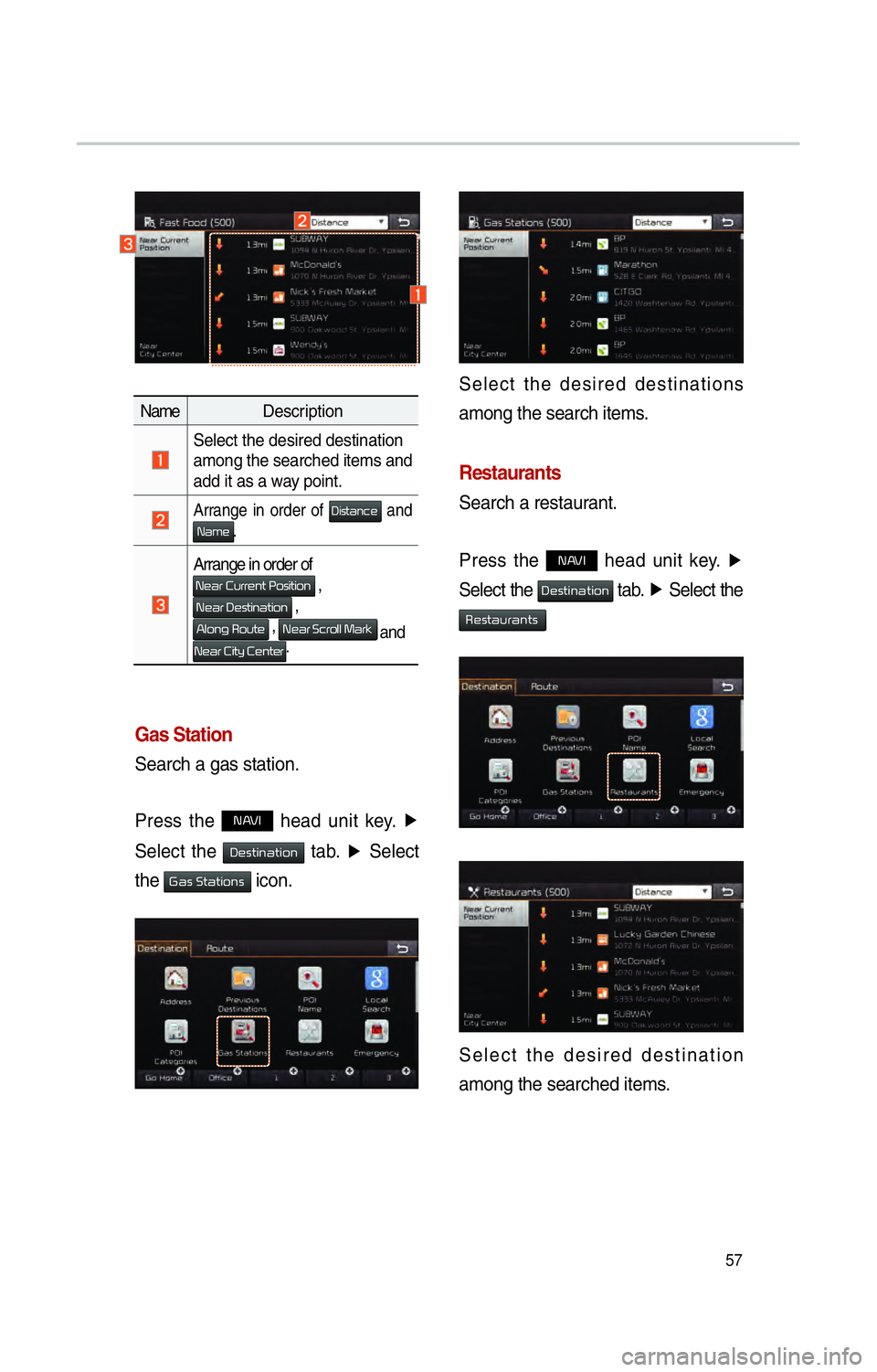
Name Description
Select the desired destination
among the searched items and
add it as a way point.
Arrange in order of 0027004C005600570044005100460048 and 0031004400500048.
Arrange in order of
0031004800440055000300260058005500550048005100570003003300520056004C0057004C00520051 ,
003100480044005500030027004800560057004C005100440057004C00520051 ,
0024004F00520051004A000300350052005800570048 , 003100480044005500030036004600550052004F004F0003003000440055004E
and
003100480044005500030026004C0057005C0003002600480051005700480055.
Select the desired destinations
among the search items.
Restaurants
Search a restaurant.
Press the
NAVI head unit key.
▶
Select the
0027004800560057004C005100440057004C00520051 tab. ▶
Select the
00350048005600570044005800550044005100570056
Select the desired destination
among the searched items.
Page 61 of 84

58
Emergency
Search an emergency facility.
Press the
NAVI head unit key. ▶
Select the
0027004800560057004C005100440057004C00520051 tab. ▶
Select the
0028005000480055004A004800510046005C
Check the current location informa-
tion and select the desired item in
the sub menu (ex. Police Station)
Select the desired destination
among the searched items.
Address Book
Search the destination with the
address book.
Press the
NAVI head unit key. ▶
Select the
0027004800560057004C005100440057004C00520051 tab. ▶
Select
the
00240047004700550048005600560003004500520052004E
Select the desired group.
Save in the Favorite Places, then
route can be set easily by using
3 buttons such as
002A00520003002B005200500048 and
003200490049004C00460048 on the button of the menu.
003100440059004C004A00440057004C00520051
Page 62 of 84

59
Favorite Places
Set the route with the specially reg-
istered places.
Press the
NAVI head unit key. ▶
Select the
0027004800560057004C005100440057004C00520051 tab. ▶
Select
from our favorite places
On the button where locations are
not registered, the
icon is dis-
played. When a location is regis-
tered, the
button disappears and
the buttons 1 to 3 are displayed as
the registered place names.
Name Description
Select the desired destination
from the searched items.
Edit the destination.
Register a new destination.
Delete the desired item.
Press the Go Home button and then
popup appears. Press the
Yes but-
ton for setting.
Register Go Home in various
searching methods. By using the
same methods, possible to register
Office, Special 1, Special 2, and
Special 3.
Route guidance starts by pressing
one of favorite place buttons.
Page 63 of 84

60
Route Setting
After searching the destination, pos-
sible to set a route.
While the destination is set, the
buttons
0026004B00440051004A004800030027004800560057004C005100440057004C00520051 and
0024004700470003003A0057 appear. Press each
button to change a destination or
add a waypoint.
Destination Setting(Change)
After searching the destination,
press the
00360048005700030044005600030027004800560057004C005100440057004C00520051 button to
set the location as a destination and
search a route.
All Routes
When the alternative routes option
is enabled in navigation setting, two
routing options are displayed based
on faster time and shorter distance.
!Ÿ
Faster Time : Select time optimized
route, being the fastest roads.
!Ÿ
Shorter Distance : Select short
distance, irrespective of how fast or
slow progress will be
Name Description
Faster Time
Display total dis-
tance, travel time,
and toll fees. Select
the desired route.
Start GuidanceStart the guidance
with the route.
Route OptionsChange the route
option.
Route PreviewPreview turn-by-
turn list.
Edit RouteEdit the route.
Total Display total distance
of the route
Freeway Display length of
freeway on the
route
Toll Road Display length of toll
road on the route
FerryDisplay length of
Ferry route on the
route
003100440059004C004A00440057004C00520051
Page 65 of 84
62
00350052005800570048
Canceling Route
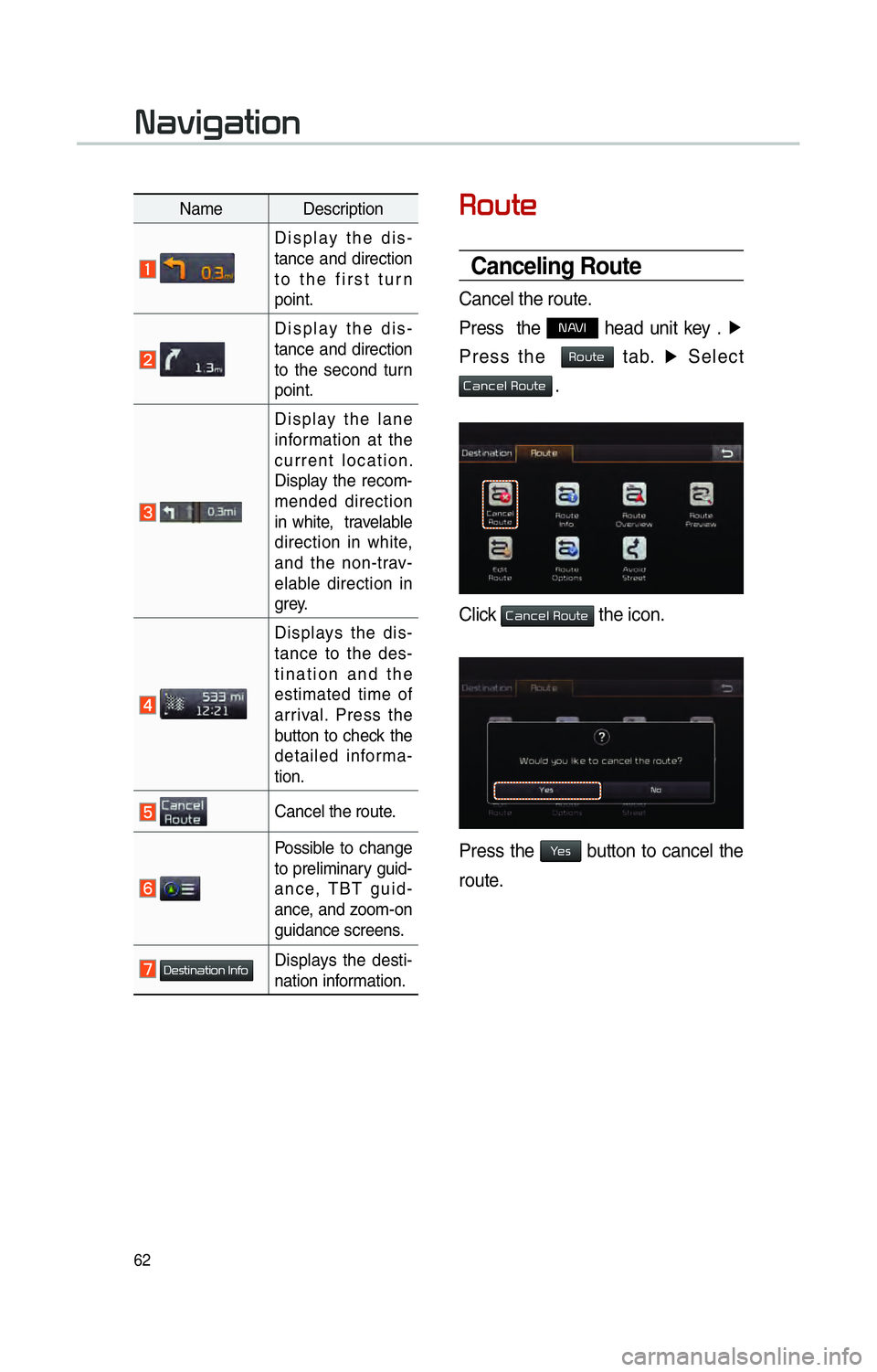
Cancel the route.
Press the
NAVI head unit key . ▶
Press the
Route tab. ▶
Select
Cancel Route .
Click Cancel Route the icon.
Press the Yes button to cancel the
route.
Name Description
Display the dis-
tance and direction
to the first turn
point.
Display the dis-
tance and direction
to the second turn
point.
Display the lane
information at the
current location.
Display the recom-
mended direction
in white, travelable
direction in white,
and the non-trav-
elable direction in
grey.
Displays the dis-
tance to the des-
tination and the
estimated time of
arrival. Press the
button to check the
detailed informa-
tion.
Cancel the route.
Possible to change
to preliminary guid-
ance, TBT guid-
ance, and zoom-on
guidance screens.
Destination InfoDisplays the desti-
nation information.
003100440059004C004A00440057004C00520051
Page 66 of 84
63
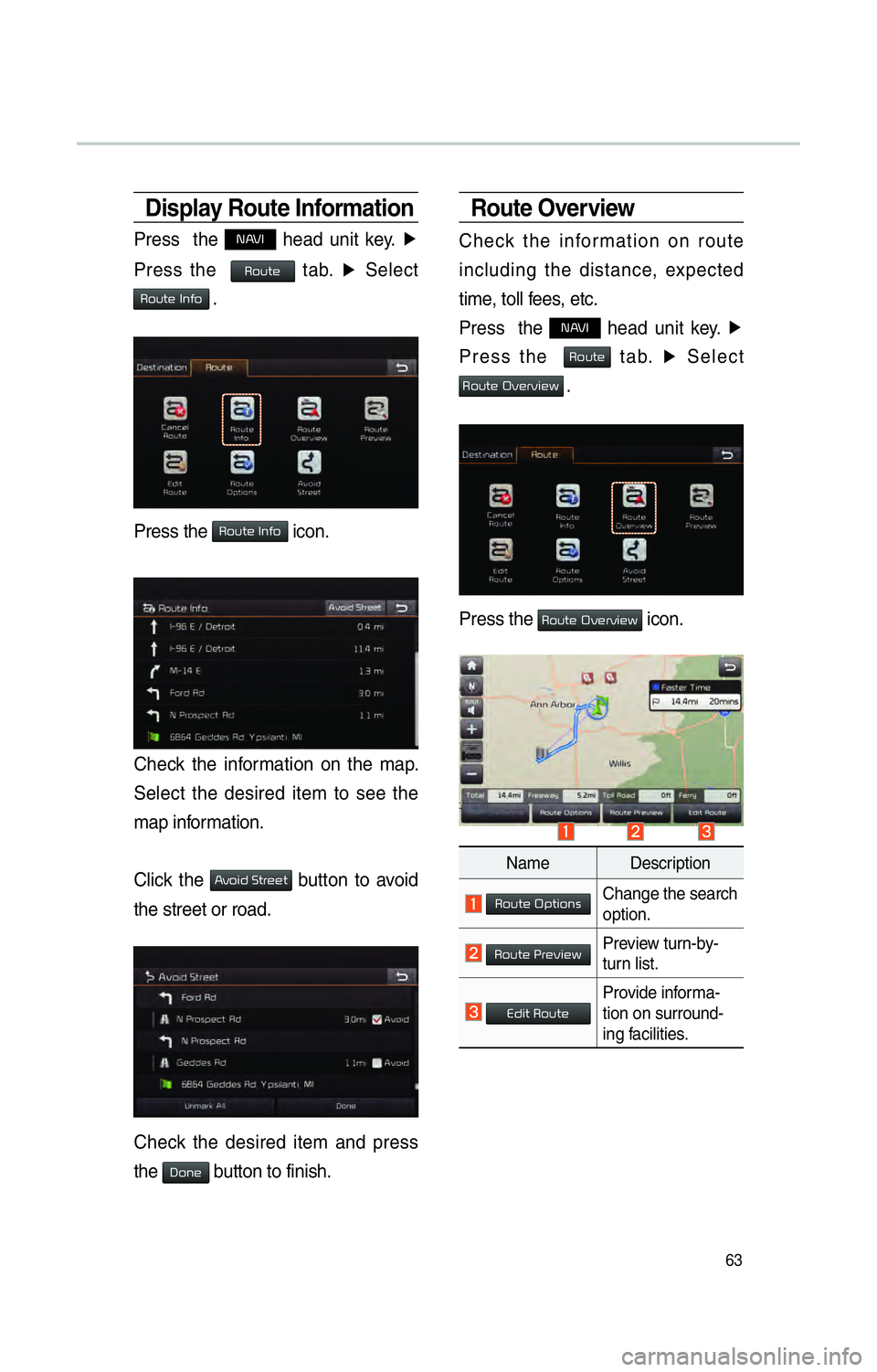
Display Route Information
Press the NAVI head unit key. ▶
Press the
Route tab. ▶
Select
Route Info .
Press the Route Info icon.
Check the information on the map.
Select the desired item to see the
map information.
Click the
Avoid Street button to avoid
the street or road.
Check the desired item and press
the
Done button to finish.
Route Overview
Check the information on route
including the distance, expected
time, toll fees, etc.
Press the
NAVI head unit key. ▶
Press the
Route tab. ▶
Select
Route Overview .
Press the Route Overview icon.
Name Description
Route OptionsChange the search
option.
Route PreviewPreview turn-by-
turn list.
Edit RouteProvide informa-
tion on surround-
ing facilities.
Page 68 of 84
65
Editing Route
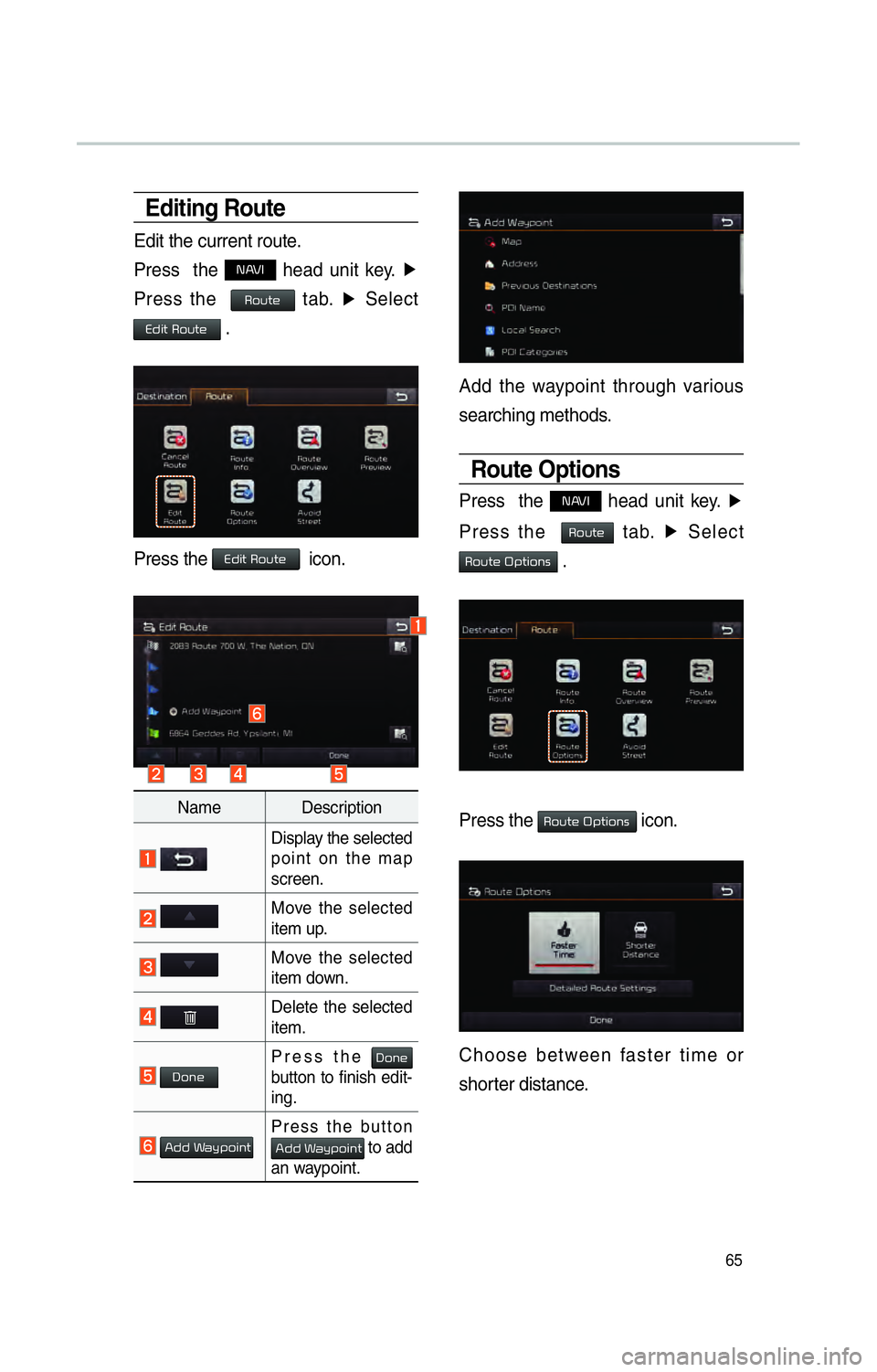
Edit the current route.
Press the
NAVI head unit key. ▶
Press the
Route tab. ▶
Select
Edit Route .
Press the Edit Route icon.
Name Description
Display the selected
point on the map
screen.
Move the selected
item up.
Move the selected
item down.
Delete the selected
item.
DonePress the Done
button to finish edit-
ing.
Add WaypointPress the button Add Waypoint to add
an waypoint.
Add the waypoint through various
searching methods.
Route Options
Press the NAVI head unit key. ▶
Press the
Route tab. ▶
Select
Route Options .
Press the Route Options icon.
Choose between faster time or
shorter distance.