Tire KIA OPTIMA 2017 User Guide
[x] Cancel search | Manufacturer: KIA, Model Year: 2017, Model line: OPTIMA, Model: KIA OPTIMA 2017Pages: 629, PDF Size: 15.24 MB
Page 158 of 629

471
Features of your vehicle
ItemsExplanation
Fuel Economy Auto ResetIf this item is checked, the average fuel economy will reset automatically when refueling or after
ignition.
Fuel Economy UnitChoose the fuel economy unit. (Km/L, L/100 km)
Temperature UnitChoose the temperature unit. (°C,°F)
Tire Pressure Unit(if equipped)Choose the tire pressure unit. (psi, kPa, Bar)
Other features
JF CAN (ENG) 4.qxp 2016-09-21 11:15 Page 71
Page 177 of 629
Features of your vehicle
90
4
If the warning light stays on while the
engine is running, it indicates that
there may be serious engine dam-
age or malfunction. In this case,
1. Stop the vehicle as soon as it is
safe to do so.
2. Turn off the engine and check the oil level. If the oil level is low, fill the
engine oil to the proper level.
3. Start the engine again. If the warn- ing light stays on after the engine
is started, turn the engine off
immediately. In this case, have
your vehicle inspected by an
authorized Kia dealer.
Low Tire Pressure
Warning Light (if equipped)
This warning light illuminates:
Once you set the ignition switch or Engine Start/Stop Button to the ON
position.
- It illuminates for approximately 3seconds and then goes off.
When one or more of your tires are significantly underinflated.
For more details, refer to “Tire
Pressure Monitoring System
(TPMS)” in chapter 7.
This warning light remains on after
blinking for approximately 60 seconds
or repeats blinking and off at the
intervals of approximately 3 seconds:
When there is a malfunction with the TPMS.
In this case, have your vehicle
inspected by an authorized Kia
dealer as soon as possible.
For more details, refer to “Tire
Pressure Monitoring System
(TPMS)” in chapter 7. The TPMS cannot alert you to
severe and sudden tire damage
caused by external factors.
If you notice any vehicle instability, immediately take your foot off the
accelerator pedal, apply the brakes
gradually with light force, and slow-
ly move to a safe position off the
road.
CAUTION - Engine
damage
If the engine is not stoppedimmediately after the engine oilpressure warning light is illumi-nated and stays on while theengine is running, seriousengine damage may result.
WARNING - Low tire
pressure
Significantly low tire pressure makes the vehicle unstable
and can contribute to loss of
vehicle control and increased
braking distances.
Continued driving or low pres- sure tires will cause the tires to
overheat and fail.
JF CAN (ENG) 4.qxp 2016-09-21 11:16 Page 90
Page 178 of 629
491
Features of your vehicle
Electronic Parking Brake(EPB) Warning Light(if equipped)
This warning light illuminates:
Once you set the ignition switch or Engine Start/Stop Button to the ON
position.
- It illuminates for approximately 3seconds and then goes off.
When there is a malfunction with the EPB.
In this case, have your vehicle
inspected by an authorized Kia
dealer.
✽ ✽ NOTICE- Electronic Parking
Brake (EPB) Warning Light
The Electronic Parking Brake
(EPB) Warning Light may illumi-
nate when the Electronic Stability
control (ESC) Indicator Light comes
on to indicate that the ESC is not
working properly (This does not
indicate malfunction of the EPB).
Master Warning light (if equipped)
This warning light informs the driver of the following situations
- Blind Spot Detection (BSD) mal-function (if equipped)
- Advanced Smart Cruise Control (ASCC) malfunction (if equipped)
- Tire Pressure Monitoring System (TPMS) malfunction (if equipped)
- Autonomous Emergency Braking (AEB) malfunction (if equipped)
- High Beam Assist(HBA) malfunc- tion (if equipped)
- Lamp malfunction and so on.
The Master Warning Light illumi-
nates when more than one of the
above warning situations occur. At
this time, the LCD Modes Icon will
change from ( ) to ( ).
If the warning situation is solved, the
master warning light will be turned off
and the LCD Modes Icon will be
changed back to its previous icon ( ).
Autonomous Emergency Braking (AEB) Warninglight (if equipped)
This indicator light illuminates:
When there is a malfunction with the AEB.
In this case, have the vehicle
inspected by an authorized Kia deal-
er.
EPB
JF CAN (ENG) 4.qxp 2016-09-21 11:16 Page 91
Page 194 of 629
4107
Features of your vehicle
When it is hard to see because offog, heavy rain or snow.
When the headlamp is not repaired or replaced at an authorized deal-
er.
When headlamp aiming is not properly adjusted.
When driving on a narrow curved road or rough road.
When driving downhill or uphill.
When only part of the vehicle in front is visible on a crossroad or
curved road.
When there is a traffic light, reflect- ing sign, flashing sign or mirror.
When the road conditions are bad such as being wet or covered with
snow.
When the front vehicle’s head- lamps are off but the fog lamps on.
When a vehicle suddenly appears from a curve.
When the vehicle is tilted from a flat tire or being towed.
When the LDWS (lane departure warning system) warning light illu-
minates. (if equipped)✽ ✽ NOTICE
• Do not place any accessories,
stickers or tint the windshield.
• Have the windshield glass replaced from an authorized dealer.
• Do not remove or damage related parts of the High Beam Assist sys-
tem.
• Be careful that water doesn’t get into the High Beam Assist unit.
• Do not place objects on the dash- board that reflect light such as
mirrors, white paper, etc. The sys-
tem may malfunction if sunlight is
reflected.
• At times, the High Beam Assist system may not work properly,
always check the road conditions
for your safety. When the system
does not operate normally, manu-
ally change between the high
beam and low beam.
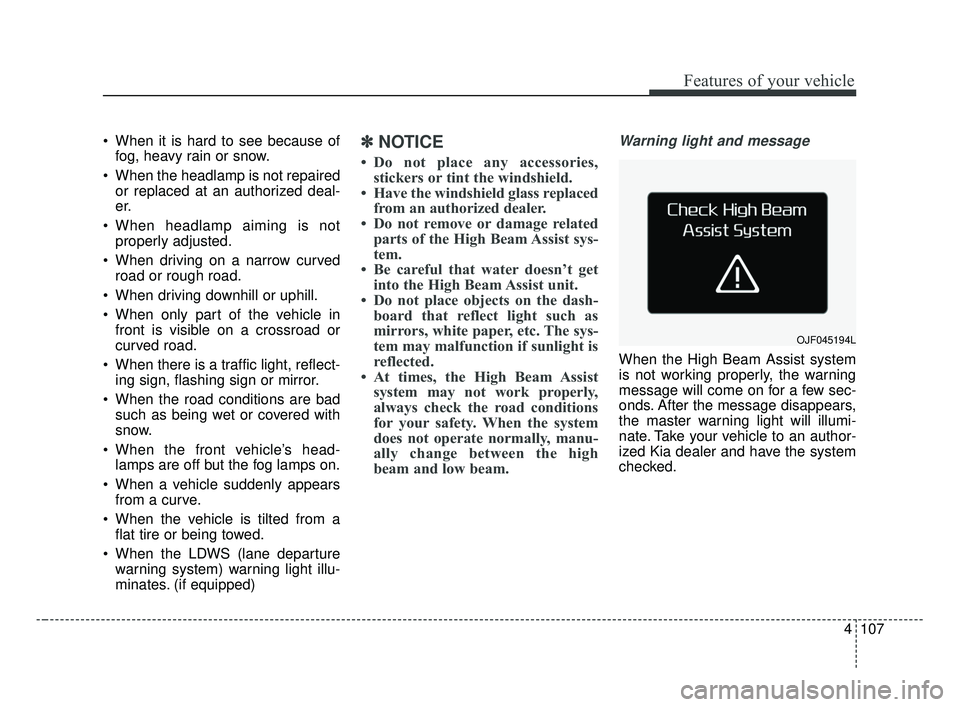
Warning light and message
When the High Beam Assist system
is not working properly, the warning
message will come on for a few sec-
onds. After the message disappears,
the master warning light will illumi-
nate. Take your vehicle to an author-
ized Kia dealer and have the system
checked.
OJF045194L
JF CAN (ENG) 4.qxp 2016-09-21 11:17 Page 107
Page 359 of 629
Advanced smart cruise control system (ASCC) . . 6-66
• Speed setting (ASCC) . . . . . . . . . . . . . . . . . . . . . . . . . 6-67
• Vehicle to vehicle distance setting (ASCC) . . . . . . . . 6-72
• To adjust the sensitivity of
Advanced Smart Cruise Control . . . . . . . . . . . . . . 6-76
• To convert to cruise control mode: . . . . . . . . . . . . . . 6-77
• Limitations of the system . . . . . . . . . . . . . . . . . . . . . . 6-77
Drive mode integrated control system . . . . . . . . . 6-83
• DRIVE mode . . . . . . . . . . . . . . . . . . . . . . . . . . . . . . . . 6-83
Blind spot detection system (BSD) . . . . . . . . . . . . 6-86
• BSD (Blind Spot Detection) / LCA (Lane Change Assist) . . . . . . . . . . . . . . . . . . . . 6-87
• RCTA (Rear Cross Traffic Alert). . . . . . . . . . . . . . . . 6-90
• Limitations condition . . . . . . . . . . . . . . . . . . . . . . . . . 6-92
Lane departure warning system (LDWS) . . . . . . 6-94
• Warning indicator . . . . . . . . . . . . . . . . . . . . . . . . . . . . 6-96
• Conditions that cause the LDWS not to operate . . . 6-96
• Conditions that cause missed warnings and false warnings . . . . . . . . . . . . . . . . . . . . . . . . . . . . . . . . . . . 6-\
97
Economical operation . . . . . . . . . . . . . . . . . . . . . . 6-98
Special driving conditions . . . . . . . . . . . . . . . . . . 6-100
• Hazardous driving conditions . . . . . . . . . . . . . . . . . 6-100
• Rocking the vehicle . . . . . . . . . . . . . . . . . . . . . . . . . . 6-100
• Smooth cornering . . . . . . . . . . . . . . . . . . . . . . . . . . . 6-101
• Driving at night . . . . . . . . . . . . . . . . . . . . . . . . . . . . . 6-101 • Driving in the rain . . . . . . . . . . . . . . . . . . . . . . . . . . . 6-102
• Driving in flooded areas . . . . . . . . . . . . . . . . . . . . . . 6-103
• Driving off-road . . . . . . . . . . . . . . . . . . . . . . . . . . . . . 6-103
• Highway driving . . . . . . . . . . . . . . . . . . . . . . . . . . . . 6-103
Winter driving . . . . . . . . . . . . . . . . . . . . . . . . . . . 6-104
• Snowy or icy conditions . . . . . . . . . . . . . . . . . . . . . . 6-104
• Use high quality ethylene glycol coolant . . . . . . . . . 6-105
• Check battery and cables . . . . . . . . . . . . . . . . . . . . . 6-105
• Change to "winter weight" oil if necessary . . . . . . 6-105
• Check spark plugs and ignition system. . . . . . . . . . 6-105
• To keep locks from freezing . . . . . . . . . . . . . . . . . . . 6-105
• Use approved window washer anti-freeze in
system . . . . . . . . . . . . . . . . . . . . . . . . . . . . . . . . . . . . \
6-105
• Don’t let your parking brake freeze . . . . . . . . . . . . 6-106
• Don't let ice and snow accumulate underneath . . . 6-106
• Carry emergency equipment . . . . . . . . . . . . . . . . . . 6-106
• Trailer towing. . . . . . . . . . . . . . . . . . . . . . . . . . . . . . . 6-10\
6
Vehicle load limit . . . . . . . . . . . . . . . . . . . . . . . . . 6-107
• Tire and loading information label . . . . . . . . . . . . . 6-107
• Certification label . . . . . . . . . . . . . . . . . . . . . . . . . . . 6-111
Vehicle weight . . . . . . . . . . . . . . . . . . . . . . . . . . . . 6-112
6
JF CAN (ENG) 6.qxp 2016-09-21 11:24 Page 2
Page 361 of 629
Driving your vehicle
46
Before entering vehicle
• Be sure that all windows, outsidemirror(s), and outside lights are
clean.
Check the condition of the tires.
Check under the vehicle for any sign of leaks.
Be sure there are no obstacles behind you if you intend to back up.
Necessary inspections
Fluid levels, such as engine oil,
engine coolant, brake fluid, and
washer fluid should be checked on a
regular basis, at the exact interval
depending on the fluid. Further
details are provided in chapter 8,
“Maintenance”.
Before starting
Close and lock all doors.
Position the seat so that all con-trols are easily reached.
Buckle your seat belt.
Adjust the inside and outside rearview mirrors.
Be sure that all lights work.
Check all gauges.
Check the operation of warning lights when the ignition switch is
turned to the ON position.
Release the parking brake and make sure the brake warning light
goes out.
For safe operation, be sure you are
familiar with your vehicle and its
equipment.
BEFORE DRIVING
WARNING - Distracted driving
Focus on the road while driving.
The driver's primary responsi-
bility is in the safe and legal
operation of the vehicle. Use of
any handled devices, other
equipment or vehicle systems
that distract the drive should
not be used during vehicle
operation.
JF CAN (ENG) 6.qxp 2016-09-21 11:24 Page 4
Page 405 of 629
Driving your vehicle
48
6
Vehicle stability management
(VSM)
This system provides further
enhancements to vehicle stability
and steering responses when a vehi-
cle is driving on a slippery road or a
vehicle detects changes in coeffi-
cient of friction between right wheels
and left wheels when braking.
VSM operation
When the VSM is in operation, ESC
indicator light ( ) blinks.
When the vehicle stability manage-
ment is operating properly, you can
feel a slight pulsation in the vehicle
and/or abnormal steering responses
(EPS- Electronic Power Steering).
This is only the effect of brake and
EPS control and indicates nothing
unusual.
The VSM does not operate when:
Driving on a sloping road such as a
gradient or incline
Driving in reverse
ESC OFF indicator light ( ) remains on the instrument cluster
EPS indicator light remains on the instrument cluster
VSM operation off
If you press the ESC OFF button to
turn off the ESC, the VSM will also
cancel and the ESC OFF indicator
light ( ) illuminates.
To turn on the VSM, press the button
again. The ESC OFF indicator light
goes out.
WARNING- Tire/
Wheel size
When replacing tires and wheels,
make sure they are the same size
as the original tires and wheels
installed. Driving with varying
tire or wheel sizes may diminish
any supplemental safety benefits
of the VSM system.
JF CAN (ENG) 6.qxp 2016-09-21 11:25 Page 48
Page 407 of 629
Driving your vehicle
50
6
Good braking practices
Check to be sure the parking brake
is not engaged and the parking
brake indicator light is out before
driving away.
Driving through water may get the brakes wet. They can also get wet
when the vehicle is washed. Wet
brakes can be dangerous! Your
vehicle will not stop as quickly if the
brakes are wet. Wet brakes may
cause the vehicle to pull to one side.
To dry the brakes, apply the brakes
lightly until the braking action
returns to normal, taking care to
keep the vehicle under control at all
times. If the braking action does not
return to normal, stop as soon as it
is safe to do so and call an author-
ized Kia dealer for assistance.
Don't coast down hills with the vehicle out of gear. This is extreme-
ly hazardous. Keep the vehicle in
gear at all times, use the brakes to
slow down, then shift to a lower
gear so that engine braking will
help you maintain a safe speed. Don't "ride" the brake pedal.
Resting your foot on the brake
pedal while driving can be danger-
ous because the brakes might
overheat and lose their effective-
ness. It also increases the wear of
the brake components.
If a tire goes flat while you are driv- ing, apply the brakes gently and
keep the vehicle pointed straight
ahead while you slow down. When
you are moving slowly enough for it
to be safe to do so, pull off the road
and stop in a safe place.
If your vehicle is equipped with an Automatic Transaxle / Dual clutch
transmission, don't let your vehicle
creep forward. To avoid creeping
forward, keep your foot firmly on
the brake pedal when the vehicle is
stopped.
Be cautious when parking on a hill. Firmly engage the parking brake
and place the shift lever in P (auto-
matic transaxle). If your vehicle is
facing downhill, turn the front
wheels into the curb to help keep
the vehicle from rolling. If your vehicle is facing uphill, turn
the front wheels away from the
curb to help keep the vehicle from
rolling. If there is no curb or if it is
required by other conditions to
keep the vehicle from rolling, block
the wheels.
Under some conditions your park- ing brake can freeze in the
engaged position. This is most like-
ly to happen when there is an
accumulation of snow or ice
around or near the rear brakes or if
the brakes are wet. If there is a risk
that the parking brake may freeze,
apply it only temporarily while you
put the shift lever in P (automatic
transaxle) and block the rear
wheels so the vehicle cannot roll.
Then release the parking brake.
Do not hold the vehicle on an incline with the accelerator pedal.
This can cause the transaxle to
overheat. Always use the brake
pedal or parking brake.
JF CAN (ENG) 6.qxp 2016-09-21 11:25 Page 50
Page 439 of 629
Driving your vehicle
82
6
- After an engine start, please stop
for several seconds. If system ini-
tialization is not completed, the
ASCC does not normally operate.
- After an engine start, if any objects are not detected or the sensor
cover is obscured with foreign sub-
stances, there is a possibility that
the ASCC system may not work.
- The following conditions may cause a malfunction: over-loading
the trunk, suspension modification,
tire replacement with unauthorized
tires or tires with different tread
wear and pressure levels. This device complies with
Industry Canada licence-exempt
RSS standard(s).
Operation is subject to the following
three conditions:
(1) This device may not cause inter-
ference, and
(2) This device must accept any interference, including interfer-
ence that may cause undesired
operation of the device.
(3) Changes or modifications not expressly approved by the party
responsible for compliance could
void the user’s authority to oper-
ate the device.
WARNING - Inclines &
Towing
Do not use ASCC on steep
inclines or when towing another
vehicle or trailer since such
extreme loading can interfere
with your vehicle's ability to
maintain the selected speed.WARNING
The advanced smart cruise con-
trol system may not detect a
vehicle which stops farther than
180 m ahead from your vehicle.
Therefore, never solely rely on
the system and pay attention
when driving to avoid a collision.
JF CAN (ENG) 6.qxp 2016-09-21 11:27 Page 82
Page 449 of 629
Driving your vehicle
92
6
✽ ✽
NOTICE
• The system may not work proper-
ly if the bumper has been replaced
or if repair work has been done
near the sensor.
• The detection area differs according to the roads road's width. If the road
is narrow the system may detect
other vehicles in the next lane.
• If the road is very wide the system may not detect other vehicles.
• The system may turn off due to strong electromagnetic interfer-
ence.
Limitations condition
Driver's Attention
The driver must be cautious in the
below situations for the system may
not assist the driver and may not
work properly.
- Curved roads, tollgates, etc.
- The surrounding of the sensor cover
is dirty with rain, snow, mud, etc.
- The rear bumper near the sensor is covered or obstructed with foreign
matter such as a sticker, bumper
guard, bicycle racks etc.
- The rear bumper is damaged or the sensor is out of place.
- The height of the vehicle has signif- icantly changed such as when the
trunk is loaded with heavy objects,
abnormal tire pressure etc.
- Due to bad weather such as heavy rain or snow. - A fixed object is near such as a
guardrail, etc.
- A substantial amount of metallic objects such as a construction
area.
- A large vehicle is nearby such as a bus or truck.
- A motorcycle or bicycle is near.
- A flat trailer is near.
- If two vehicles near each other accelerate together.
- When another vehicle passes by at a high rate of speed.
- When changing lanes.
- When going down or up a steep road where the height of the lane is
different.
- When another vehicle drives very close the back bumper/trunk.
- When a trailer or carrier is installed.
- When going down or up a steep, uneven road.
WARNING
The Blind Spot Detection
System with Lane Change
Assist and Rear Cross Traffic
Alert is not a substitute for
proper and safe lane changing
procedures. Always drive safely
and use caution when changing
lanes. The Blind Spot Detection
System may not detect every
object alongside the vehicle.
JF CAN (ENG) 6.qxp 2016-09-21 11:28 Page 92