instrument cluster KIA OPTIMA 2017 User Guide
[x] Cancel search | Manufacturer: KIA, Model Year: 2017, Model line: OPTIMA, Model: KIA OPTIMA 2017Pages: 629, PDF Size: 15.24 MB
Page 422 of 629
665
Driving your vehicle
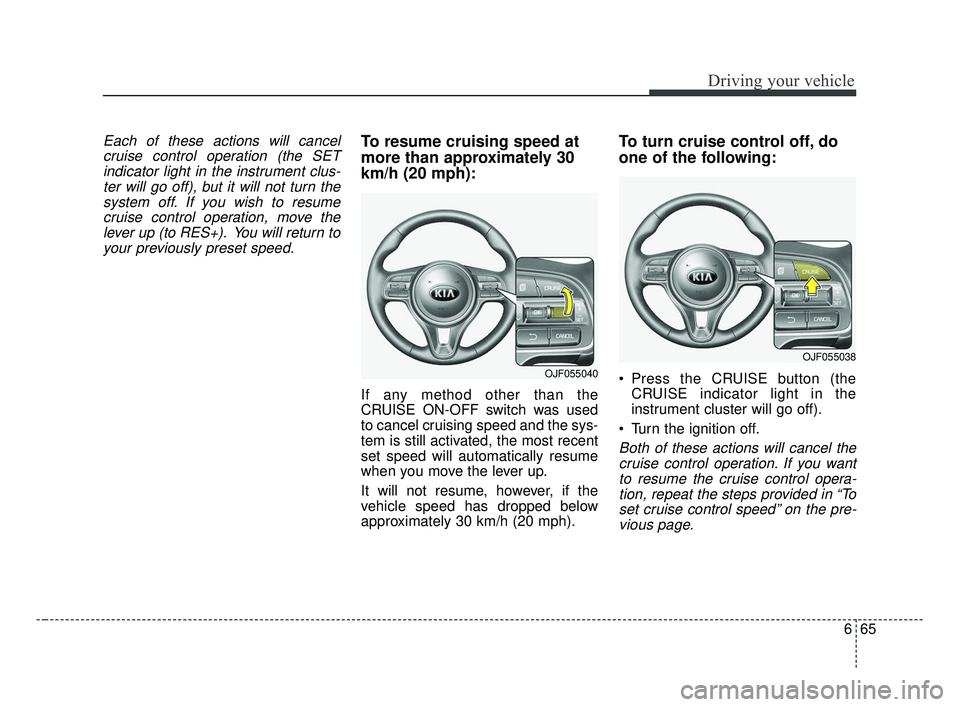
Each of these actions will cancelcruise control operation (the SETindicator light in the instrument clus-ter will go off), but it will not turn thesystem off. If you wish to resumecruise control operation, move thelever up (to RES+). You will return toyour previously preset speed.To resume cruising speed at
more than approximately 30
km/h (20 mph):
If any method other than the
CRUISE ON-OFF switch was used
to cancel cruising speed and the sys-
tem is still activated, the most recent
set speed will automatically resume
when you move the lever up.
It will not resume, however, if the
vehicle speed has dropped below
approximately 30 km/h (20 mph).
To turn cruise control off, do
one of the following:
Press the CRUISE button (the CRUISE indicator light in the
instrument cluster will go off).
Turn the ignition off.
Both of these actions will cancel the cruise control operation. If you wantto resume the cruise control opera-tion, repeat the steps provided in “Toset cruise control speed” on the pre-vious page.
OJF055040
OJF055038
JF CAN (ENG) 6.qxp 2016-09-21 11:26 Page 65
Page 423 of 629
Driving your vehicle
66
6
ADVANCED SMART CRUISE CONTROL SYSTEM (ASCC) (IF EQUIPPED)
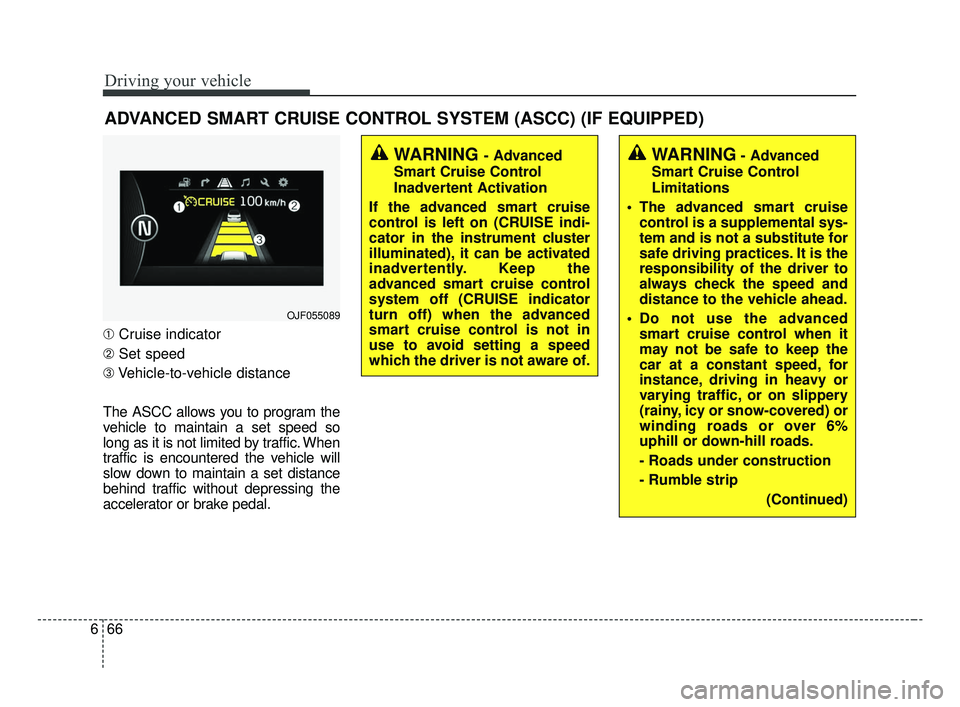
➀ Cruise indicator
➁ Set speed
➂ Vehicle-to-vehicle distance
The ASCC allows you to program the
vehicle to maintain a set speed so
long as it is not limited by traffic. When
traffic is encountered the vehicle will
slow down to maintain a set distance
behind traffic without depressing the
accelerator or brake pedal.
WARNING - Advanced
Smart Cruise Control
Inadvertent Activation
If the advanced smart cruise
control is left on (CRUISE indi-
cator in the instrument cluster
illuminated), it can be activated
inadvertently. Keep the
advanced smart cruise control
system off (CRUISE indicator
turn off) when the advanced
smart cruise control is not in
use to avoid setting a speed
which the driver is not aware of.WARNING- Advanced
Smart Cruise Control
Limitations
The advanced smart cruise control is a supplemental sys-
tem and is not a substitute for
safe driving practices. It is the
responsibility of the driver to
always check the speed and
distance to the vehicle ahead.
Do not use the advanced smart cruise control when it
may not be safe to keep the
car at a constant speed, for
instance, driving in heavy or
varying traffic, or on slippery
(rainy, icy or snow-covered) or
winding roads or over 6%
uphill or down-hill roads.
- Roads under construction
- Rumble strip
(Continued)
OJF055089
JF CAN (ENG) 6.qxp 2016-09-21 11:26 Page 66
Page 424 of 629
667
Driving your vehicle
Speed setting (ASCC)
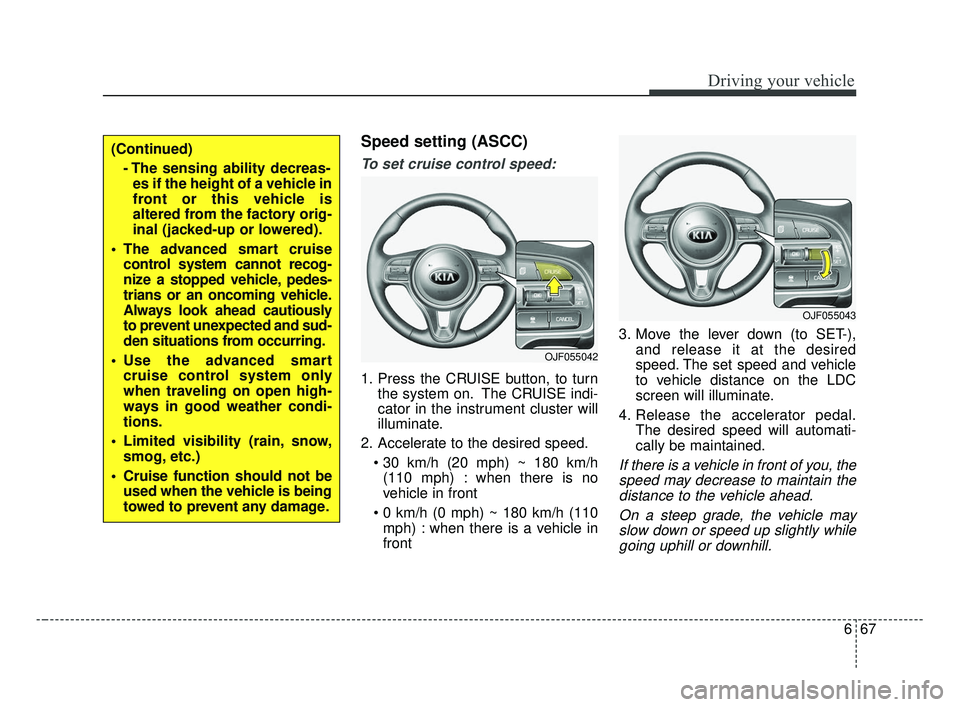
To set cruise control speed:
1. Press the CRUISE button, to turnthe system on. The CRUISE indi-
cator in the instrument cluster will
illuminate.
2. Accelerate to the desired speed. (110 mph) : when there is no
vehicle in front
mph) : when there is a vehicle in
front 3. Move the lever down (to SET-),
and release it at the desired
speed. The set speed and vehicle
to vehicle distance on the LDC
screen will illuminate.
4. Release the accelerator pedal. The desired speed will automati-
cally be maintained.
If there is a vehicle in front of you, thespeed may decrease to maintain thedistance to the vehicle ahead.
On a steep grade, the vehicle mayslow down or speed up slightly whilegoing uphill or downhill.
(Continued)
- The sensing ability decreas-es if the height of a vehicle in
front or this vehicle is
altered from the factory orig-
inal (jacked-up or lowered).
The advanced smart cruise control system cannot recog-
nize a stopped vehicle, pedes-
trians or an oncoming vehicle.
Always look ahead cautiously
to prevent unexpected and sud-
den situations from occurring.
Use the advanced smart cruise control system only
when traveling on open high-
ways in good weather condi-
tions.
Limited visibility (rain, snow, smog, etc.)
Cruise function should not be used when the vehicle is being
towed to prevent any damage.
OJF055042
OJF055043
JF CAN (ENG) 6.qxp 2016-09-21 11:26 Page 67
Page 428 of 629
671
Driving your vehicle
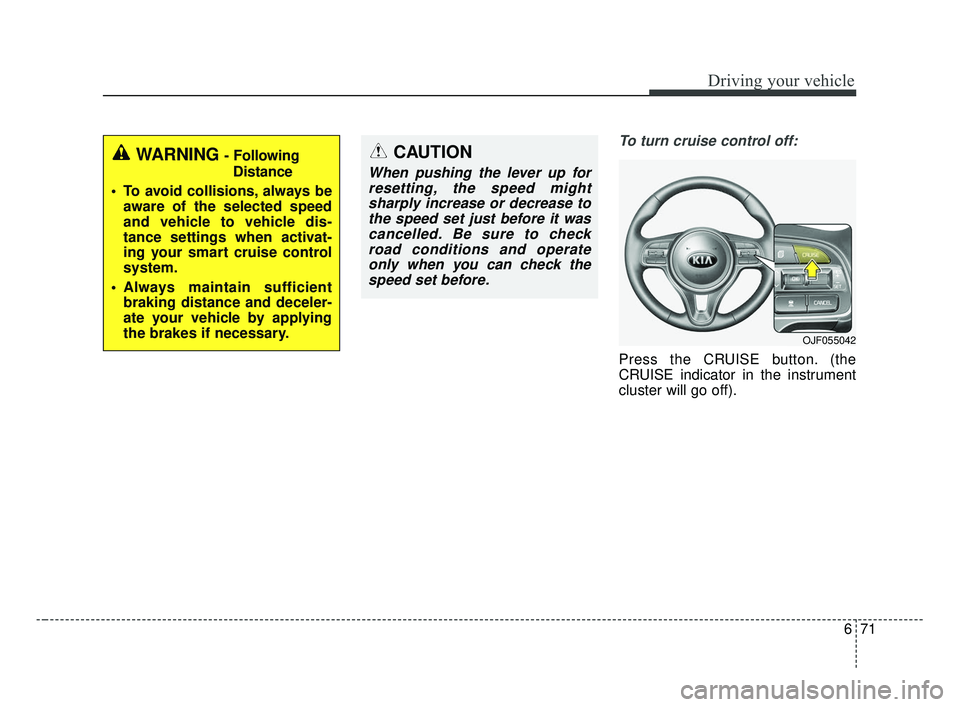
To turn cruise control off:
Press the CRUISE button. (the
CRUISE indicator in the instrument
cluster will go off).
WARNING - FollowingDistance
To avoid collisions, always be aware of the selected speed
and vehicle to vehicle dis-
tance settings when activat-
ing your smart cruise control
system.
Always maintain sufficient braking distance and deceler-
ate your vehicle by applying
the brakes if necessary.CAUTION
When pushing the lever up forresetting, the speed mightsharply increase or decrease tothe speed set just before it wascancelled. Be sure to checkroad conditions and operateonly when you can check thespeed set before.
OJF055042
JF CAN (ENG) 6.qxp 2016-09-21 11:26 Page 71
Page 447 of 629
Driving your vehicle
90
6
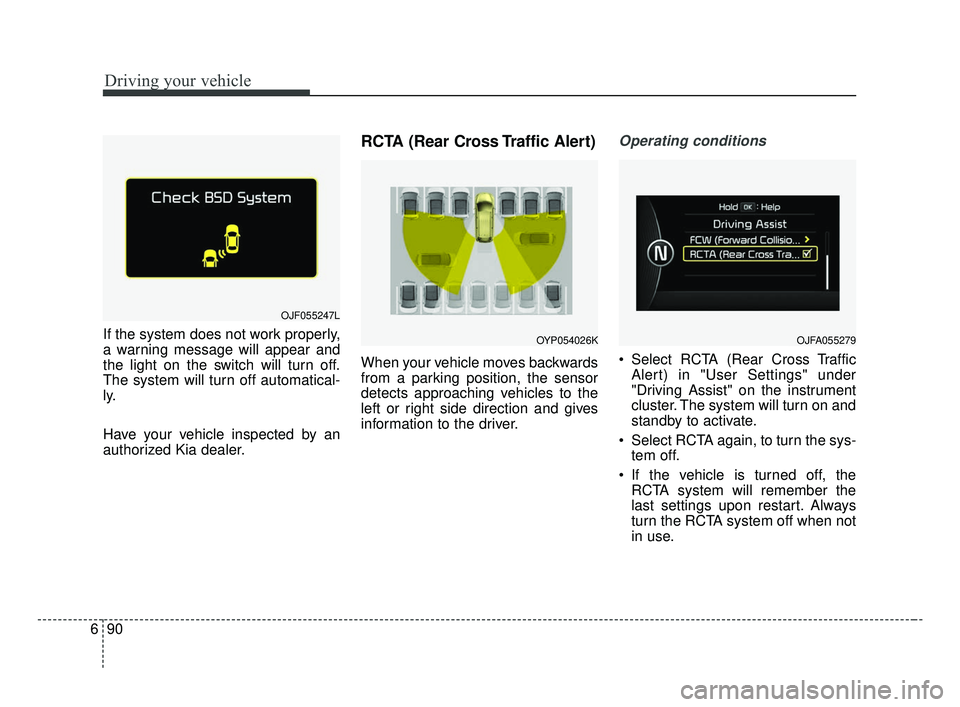
If the system does not work properly,
a warning message will appear and
the light on the switch will turn off.
The system will turn off automatical-
ly.
Have your vehicle inspected by an
authorized Kia dealer.
RCTA (Rear Cross Traffic Alert)
When your vehicle moves backwards
from a parking position, the sensor
detects approaching vehicles to the
left or right side direction and gives
information to the driver.
Operating conditions
Select RCTA (Rear Cross Traffic
Alert) in "User Settings" under
"Driving Assist" on the instrument
cluster. The system will turn on and
standby to activate.
Select RCTA again, to turn the sys- tem off.
If the vehicle is turned off, the RCTA system will remember the
last settings upon restart. Always
turn the RCTA system off when not
in use.
OJF055247L
OYP054026KOJFA055279
JF CAN (ENG) 6.qxp 2016-09-21 11:28 Page 90
Page 567 of 629
Maintenance
64
8
Fuse switch
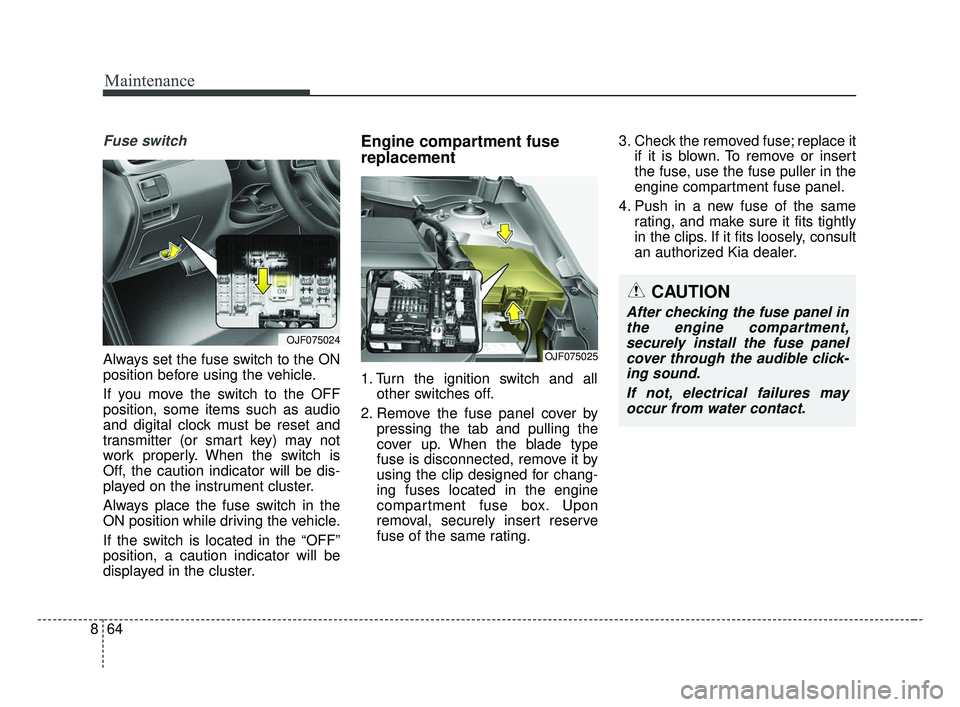
Always set the fuse switch to the ON
position before using the vehicle.
If you move the switch to the OFF
position, some items such as audio
and digital clock must be reset and
transmitter (or smart key) may not
work properly. When the switch is
Off, the caution indicator will be dis-
played on the instrument cluster.
Always place the fuse switch in the
ON position while driving the vehicle.
If the switch is located in the “OFF”
position, a caution indicator will be
displayed in the cluster.
Engine compartment fuse
replacement
1. Turn the ignition switch and all
other switches off.
2. Remove the fuse panel cover by pressing the tab and pulling the
cover up. When the blade type
fuse is disconnected, remove it by
using the clip designed for chang-
ing fuses located in the engine
compartment fuse box. Upon
removal, securely insert reserve
fuse of the same rating. 3. Check the removed fuse; replace it
if it is blown. To remove or insert
the fuse, use the fuse puller in the
engine compartment fuse panel.
4. Push in a new fuse of the same rating, and make sure it fits tightly
in the clips. If it fits loosely, consult
an authorized Kia dealer.
OJF075024
CAUTION
After checking the fuse panel inthe engine compartment,securely install the fuse panelcover through the audible click-ing sound.
If not, electrical failures mayoccur from water contact.
OJF075025
JF CAN (ENG) 8.qxp 2016-09-23 10:24 Page 64
Page 572 of 629
869
Maintenance
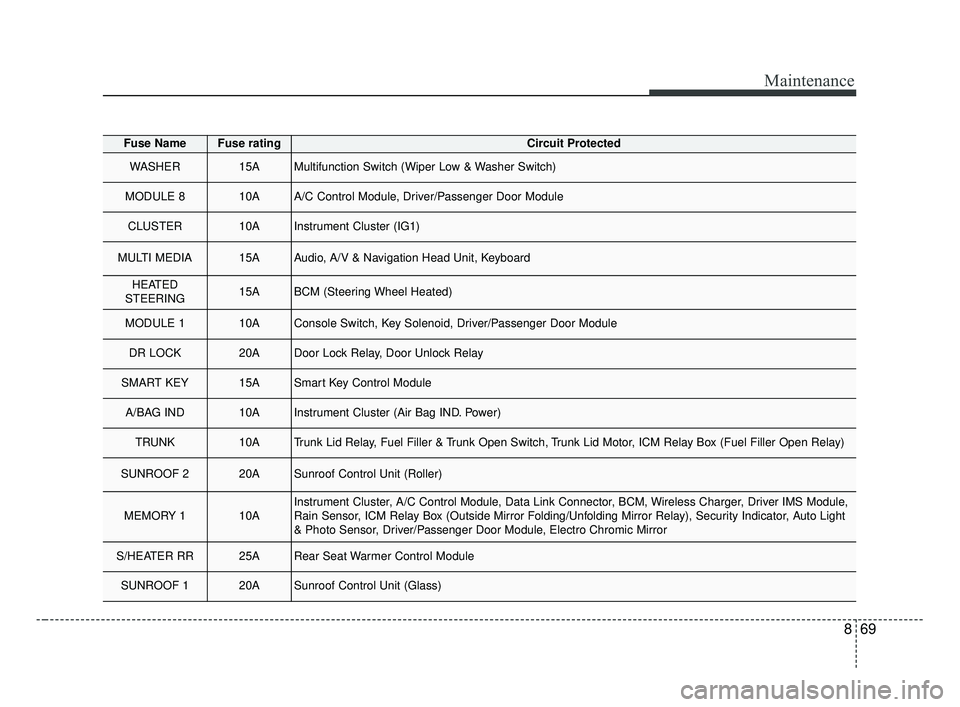
Fuse NameFuse ratingCircuit Protected
WASHER15AMultifunction Switch (Wiper Low & Washer Switch)
MODULE 810AA/C Control Module, Driver/Passenger Door Module
CLUSTER10AInstrument Cluster (IG1)
MULTI MEDIA15AAudio, A/V & Navigation Head Unit, Keyboard
HEATED
STEERING15ABCM (Steering Wheel Heated)
MODULE 110AConsole Switch, Key Solenoid, Driver/Passenger Door Module
DR LOCK20ADoor Lock Relay, Door Unlock Relay
SMART KEY15ASmart Key Control Module
A/BAG IND10AInstrument Cluster (Air Bag IND. Power)
TRUNK10ATrunk Lid Relay, Fuel Filler & Trunk Open Switch, Trunk Lid Motor, ICM Relay Box (Fuel Filler Open Relay)
SUNROOF 220ASunroof Control Unit (Roller)
MEMORY 110AInstrument Cluster, A/C Control Module, Data Link Connector, BCM, Wireless Charger, Driver IMS Module,
Rain Sensor, ICM Relay Box (Outside Mirror Folding/Unfolding Mirror Relay), Security Indicator, Auto Light
& Photo Sensor, Driver/Passenger Door Module, Electro Chromic Mirror
S/HEATER RR25ARear Seat Warmer Control Module
SUNROOF 120ASunroof Control Unit (Glass)
JF CAN (ENG) 8.qxp 2016-09-23 10:24 Page 69
Page 624 of 629
Index
6I
If you have a flat tire ....................................................7-15Changing tires ............................................................7-17
Jack and tools ..............................................................7-15
Removing and storing the spare tire ..........................7-16
If you have a flat tire (With Tire Mobility Kit) ............7-24 Checking the tire inflation pressure ............................7-29
Components of the Tire Mobility Kit ........................7-26
Distributing the sealant ..............................................7-29
Introduction ................................................................7-24
Notes on the safe use of the Tire Mobility Kit ..........7-25
Technical Data ............................................................7-30
Using the Tire Mobility Kit ........................................7-27
Important safety precautions ..........................................3-2 Air bag hazards ............................................................3-2
Always wear your seat belt ..........................................3-2
Control your speed ........................................................3-3
Driver distraction ..........................................................3-2
Keep your vehicle in safe condition ............................3-3
Restrain all children ......................................................3-2
In case of an emergency while driving............................7-3 If the engine stalls at a crossroad or crossing ..............7-3
If the engine stalls while driving ..................................7-3
If you have a flat tire while driving ..............................7-3 Instrument cluster ..........................................................4-56
Dual clutch transmission shift indicator ....................4-62
Gauges ........................................................................\
4-58
Instrument Cluster Control ........................................4-57
LCD Display Control ..................................................4-57
Transaxle Shift Indicator ............................................4-61
Instrument panel overview ..............................................2-5
Interior features............................................................4-147 Air ventilation seat ....................................................4-149
Bottle holder ............................................................4-147
Coat hook ..................................................................4-155
Cup holder ................................................................4-147
Floor mat anchor (s)..................................................\
4-155
Power outlet ..............................................................4-150
Seat warmer ..............................................................4-148
Side curtain ..............................................................4-156
Sunvisor ....................................................................4-14\
9
USB charger ..............................................................4-151
Wireless smart phone charging system ....................4-152
Interior lights................................................................4-113 Automatic turn off function ......................................4-113
Glove box lamp ........................................................4-115
Map lamp ..................................................................4-114
Room lamp ................................................................4-113
Trunk room lamp ......................................................4-115
Vanity mirror lamp ....................................................4-115
Interior overview ............................................................2-4
JF CAN (ENG) Index.qxp 8/30/2016 6:11 PM Page 6