ECO mode KIA OPTIMA 2017 Owner's Manual
[x] Cancel search | Manufacturer: KIA, Model Year: 2017, Model line: OPTIMA, Model: KIA OPTIMA 2017Pages: 629, PDF Size: 15.24 MB
Page 221 of 629
Features of your vehicle
134
4
Prolonged operation of the heater in
the recirculated air position (without
air conditioning selected) may cause
fogging of the windshield and side
windows and the air within the pas-
senger compartment may become
stale.
In addition, prolonged use of the air
conditioning with the recirculated air
position selected will result in exces-
sively dry air in the passenger com-
partment.
Sunroof inside air recirculation
(if equipped)
If the sunroof opens while the heater
or Air Conditioning system operates,
the outside (fresh) air will be select-
ed automatically for ventilating the
car. Then, if you select the recirculat-
ed air position, the outside (fresh) air
will be selected automatically after 3
minutes.
If you close the sunroof, the intake
mode will be changed to the previous
selected mode.
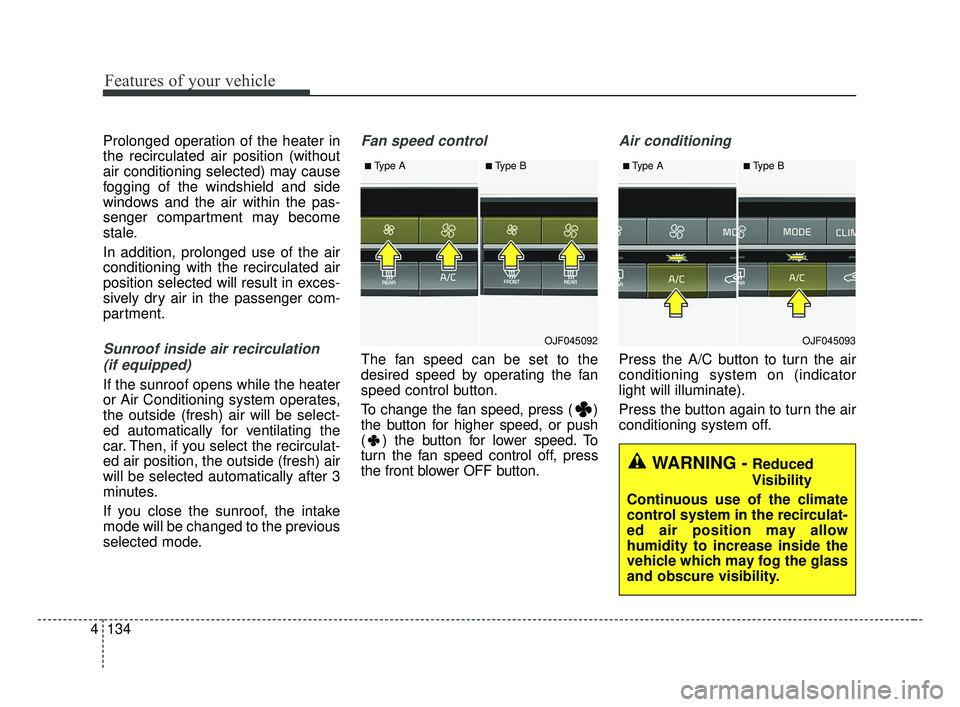
Fan speed control
The fan speed can be set to the
desired speed by operating the fan
speed control button.
To change the fan speed, press ( )
the button for higher speed, or push
( ) the button for lower speed. To
turn the fan speed control off, press
the front blower OFF button.
Air conditioning
Press the A/C button to turn the air
conditioning system on (indicator
light will illuminate).
Press the button again to turn the air
conditioning system off.
■Type A■Type B
OJF045092
■Type A■Type B
OJF045093
WARNING -Reduced
Visibility
Continuous use of the climate
control system in the recirculat-
ed air position may allow
humidity to increase inside the
vehicle which may fog the glass
and obscure visibility.
JF CAN (ENG) 4.qxp 2016-09-21 11:18 Page 134
Page 224 of 629
4137
Features of your vehicle
✽ ✽NOTICE
When opening the windows in humid
weather, air conditioning may create
water droplets inside the vehicle.
Since excessive water droplets may
cause damage to electrical equip-
ment, air conditioning should only be
used with the windows closed.
Air conditioning system operation tips
If the vehicle has been parked in
direct sunlight during hot weather,
open the windows for a short time
to let the hot air inside the vehicle
escape.
To help reduce moisture inside of the windows on rainy or humid
days, decrease the humidity inside
the vehicle by operating the air
conditioning system.
During air conditioning system operation, you may occasionally
notice a slight change in engine
speed as the air conditioning com-
pressor cycles. This is a normal
system operation characteristic.
Use the air conditioning system every month only for a few minutes
to ensure maximum system per-
formance. When using the air conditioning
system, you may notice clear water
dripping (or even puddling) on the
ground under the passenger side
of the vehicle. This is a normal sys-
tem operation characteristic.
Operating the air conditioning sys- tem in the recirculated air position
provides maximum cooling, how-
ever, continual operation in this
mode may cause the air inside the
vehicle to become stale.
During cooling operation, you may occasionally notice a misty air flow
because of rapid cooling and
humid air intake. This is a normal
system operation characteristic.CAUTION - Excessive A/C
Use
When using the air conditioningsystem, monitor the tempera-ture gauge closely while drivingup hills or in heavy traffic whenoutside temperatures are high.Air conditioning system opera-tion may cause engine over-heating. Continue to use theblower fan but turn the air con-ditioning system off if the tem-perature gauge indicates engineoverheating.
JF CAN (ENG) 4.qxp 2016-09-21 11:18 Page 137
Page 231 of 629
Features of your vehicle
144
4
To cancel or reset the Auto Defogging
System
Press the front windshield defroster
button for 3 seconds when the igni-
tion switch is in the ON position.
When the Auto Defogging System is
canceled, ADS OFF symbol will blink
3 times and the ADS OFF will be dis-
played on the climate control infor-
mation screen.
When the Auto Defogging System is
reset, ADS OFF symbol will blink 6
times without a signal.
Do not remove the sensor cover
located on the upper end of the pas-
senger side windshield glass.
Damage to the system parts could
occur and may not be covered by
your vehicle warranty.Automatic Ventilation
(if equipped)
When the ignition is ON or when the
engine is running and the outside
temperature is below 59°F (15°C),
the automatic ventilation feature will
activate if the recirculated air intake
position is selected for more than 5
minutes while A/C is off and floor
mode is selected. In this condition
the air intake position will automati-
cally switch to the outside (fresh) air
intake position.
To cancel or reset the Automatic
Ventilation
When the air conditioning system is
on, select Face Level mode and
while pressing the A/C button, press
the recirculated air position button
five times within three seconds.
JF CAN (ENG) 4.qxp 2016-09-21 11:19 Page 144
Page 244 of 629

Audio system
Audio System . . . . . . . . . . . . . . . . . . . . . . . . . . . . . . 5-2
• Antenna . . . . . . . . . . . . . . . . . . . . . . . . . . . . . . . . . . . . \
. 5-2
• Steering wheel audio controls. . . . . . . . . . . . . . . . . . . . 5-3
• AUX, USB port . . . . . . . . . . . . . . . . . . . . . . . . . . . . . . . 5-4
• How vehicle audio works . . . . . . . . . . . . . . . . . . . . . . . 5-5
Audio (Without Touch Screen) . . . . . . . . . . . . . . . . 5-8
• Features of Your Audio . . . . . . . . . . . . . . . . . . . . . . . . . 5-9
• Radio Mode . . . . . . . . . . . . . . . . . . . . . . . . . . . . . . . . . 5-22
• SiriusXM Radio Mode . . . . . . . . . . . . . . . . . . . . . . . . 5-24
• Media Mode . . . . . . . . . . . . . . . . . . . . . . . . . . . . . . . . . 5-26
• Phone Mode . . . . . . . . . . . . . . . . . . . . . . . . . . . . . . . . . 5-32
• Voice Recognition Mode . . . . . . . . . . . . . . . . . . . . . . . 5-37
• Setup Mode . . . . . . . . . . . . . . . . . . . . . . . . . . . . . . . . . 5-46
Audio (With Touch Screen) . . . . . . . . . . . . . . . . . . 5-57
• Features of Your Audio . . . . . . . . . . . . . . . . . . . . . . . . 5-58
• Radio Mode . . . . . . . . . . . . . . . . . . . . . . . . . . . . . . . . . 5-69
• SiriusXM Radio Mode . . . . . . . . . . . . . . . . . . . . . . . . 5-72
• Media Mode . . . . . . . . . . . . . . . . . . . . . . . . . . . . . . . . . 5-74
• Phone Mode . . . . . . . . . . . . . . . . . . . . . . . . . . . . . . . . . 5-89
• Bluetooth
®Wireless Technology . . . . . . . . . . . . . . . . . 5-90
• Voice Recognition Mode . . . . . . . . . . . . . . . . . . . . . . . 5-97
• Setup Mode . . . . . . . . . . . . . . . . . . . . . . . . . . . . . . . . 5-105
Declaration of Conformity. . . . . . . . . . . . . . . . . . 5-114
• IC . . . . . . . . . . . . . . . . . . . . . . . . . . . . . . . . . . . . \
. . . . . 5-114
5
JF CAN (ENG) 5 (Audio).qxp 2016-09-21 11:21 Page 1
Page 246 of 629
Audio system
53
✽ ✽NOTICE
Tinted rear window may affect the
proper functioning of the antenna.
Steering Wheel Audio Controls
(if equipped)
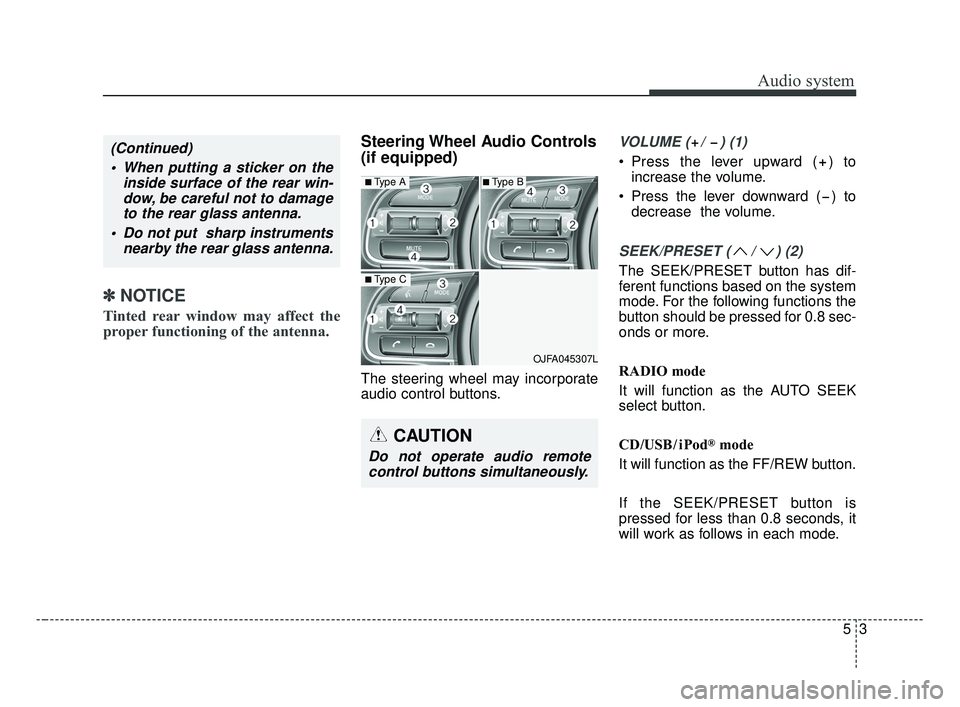
The steering wheel may incorporate
audio control buttons.
VOLUME ( / ) (1)
• Press the lever upward ( ) to
increase the volume.
Press the lever downward ( ) to decrease the volume.
SEEK/PRESET ( / ) (2)
The SEEK/PRESET button has dif-
ferent functions based on the system
mode. For the following functions the
button should be pressed for 0.8 sec-
onds or more.
RADIO mode
It will function as the AUTO SEEK
select button.
CD/USB/ iPod
®mode
It will function as the FF/REW button.
If the SEEK/PRESET button is
pressed for less than 0.8 seconds, it
will work as follows in each mode.
OJFA045307L
■Type A
■Type C
■Type B
CAUTION
Do not operate audio remote control buttons simultaneously.
(Continued)
When putting a sticker on the inside surface of the rear win-dow, be careful not to damageto the rear glass antenna.
Do not put sharp instruments nearby the rear glass antenna.
JF CAN (ENG) 5 (Audio).qxp 2016-09-21 11:21 Page 3
Page 247 of 629
Audio system
45
RADIO mode
It will function as the PRESET STA-
TION buttons.
CD/USB/ iPod
®mode
It will function as TRACK UP/DOWN
button.
MODE (3)
Press the button to change audio
source.
FM(1~2)
➟ AM ➟ SAT(1~3) ➟ CD ➟
USB (iPod®) ➟AUX ➟ MY MUSIC ➟
BT Audio ➟ FM...
In addition to mode change, Power
on/off can be made by pressing this
button when the ignition switch is on
ACC or ON.
- Power ON: Press the button when the audio is off
- Power OFF: Press the button for more than 0.8 seconds when the
audio is on.
MUTE (4, if equipped)
Press the button to mute the sound.
Press the button to turn off the microphone during a telephone
call.
Detailed information for audio control
buttons are described in the following
pages in this section.
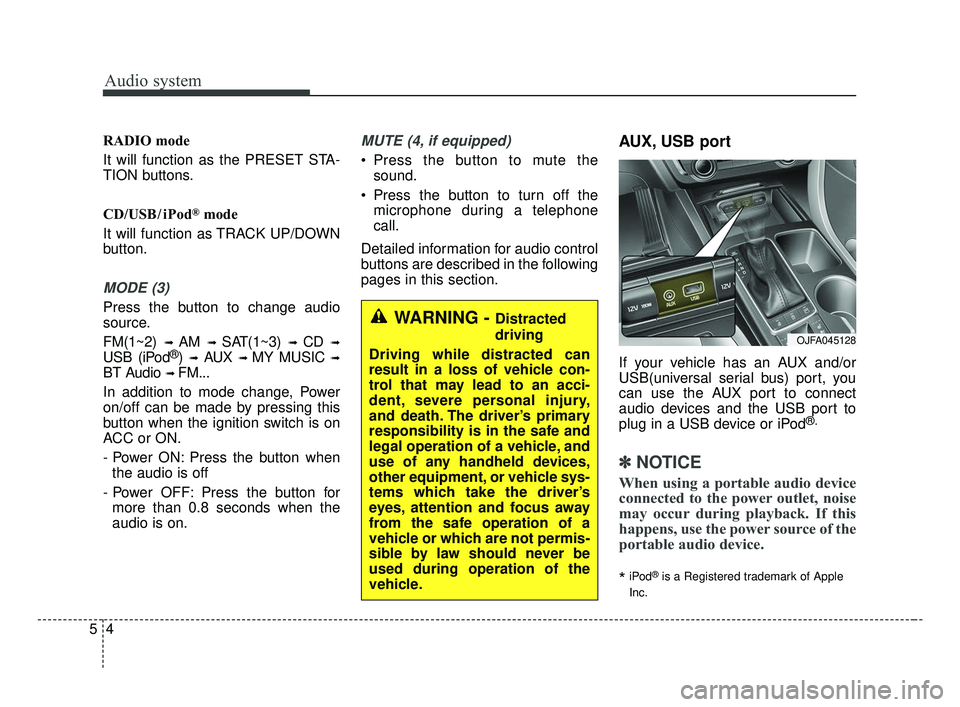
AUX, USB port
If your vehicle has an AUX and/or
USB(universal serial bus) port, you
can use the AUX port to connect
audio devices and the USB port to
plug in a USB device or iPod
®.
✽ ✽ NOTICE
When using a portable audio device
connected to the power outlet, noise
may occur during playback. If this
happens, use the power source of the
portable audio device.
*iPod®is a Registered trademark of Apple
Inc.
OJFA045128
WARNING - Distracted
driving
Driving while distracted can
result in a loss of vehicle con-
trol that may lead to an acci-
dent, severe personal injury,
and death. The driver’s primary
responsibility is in the safe and
legal operation of a vehicle, and
use of any handheld devices,
other equipment, or vehicle sys-
tems which take the driver’s
eyes, attention and focus away
from the safe operation of a
vehicle or which are not permis-
sible by law should never be
used during operation of the
vehicle.
JF CAN (ENG) 5 (Audio).qxp 2016-09-21 11:21 Page 4
Page 253 of 629
![KIA OPTIMA 2017 Owners Manual Audio system
10
5 (7)
[1] ~ [6] (Preset)
Radio mode: Saves frequencies (channels) or receives saved fre-
quencies (channels).
CD, USB, iPod
®, My Music mode
- [RPT] : Repeat
- [RDM] : Random
In th](/img/2/40406/w960_40406-252.png "KIA OPTIMA 2017 Owners Manual Audio system
10
5 (7)
[1] ~ [6] (Preset)
Radio mode: Saves frequencies (channels) or receives saved fre-
quencies (channels).
CD, USB, iPod
®, My Music mode
- [RPT] : Repeat
- [RDM] : Random
In th")
Audio system
10
5 (7)
[1] ~ [6] (Preset)
Radio mode: Saves frequencies (channels) or receives saved fre-
quencies (channels).
CD, USB, iPod
®, My Music mode
- [RPT] : Repeat
- [RDM] : Random
In the Radio, Media, Setup, and
Menu pop up screen, the number
menu is selected. (8)
DISP
Each time the button is shortly pressed, sets the Screen Off
➟
Screen On ➟Screen Off.
Audio operation is maintained and only the Screen will be turned Off.
In the Screen Off state, press any button to turn the Screen On again. (9)
SCAN
Radio mode - Shortly press the button :Previews each broadcast for 5
seconds each.
- Press and hold the button : Previews the broadcasts saved
in Preset [1] ~ [6] for 5 seconds
each.
- Press the [SCAN] button again
to continue listening to the cur-
rent frequency.
- SAT Radio does not support the Preset scan feature.
CD, USB, My Music mode - Shortly press the button :Previews each song (file) for 10
seconds each.
- Press the [SCAN] button again
to continue listening to the cur-
rent song (file).
(10) SETUP/CLOCK
Moves to the Display, Sound, Clock, Phone, System setting
modes.
JF CAN (ENG) 5 (Audio).qxp 2016-09-21 11:21 Page 10
Page 258 of 629
Audio system
515
✽ ✽NOTICE - Using USB Devices
• To use an external USB device,
make sure the device is not con-
nected when starting up the vehi-
cle. Connect the device after start-
ing up.
• If you start the engine when the USB device is connected, it may
damage the USB device. (USB
flashdrives are very sensitive to
electric shock.)
• If the engine is started up or turned off while the external USB
device is connected, the external
USB device may not work.
• The System may not play unau- thenticated MP3 or WMA files.
1) It can only play MP3 files with the compression rate between
8Kbps ~ 320Kbps.
2) It can only play WMA music files with the compression rate
between 8Kbps ~ 320Kbps.
• Take precautions for static electric- ity when connecting or disconnect-
ing the external USB device. (Continued)(Continued)
• An encrypted MP3 PLAYER is
not recognizable.
• Depending on the condition of the external USB device, the connect-
ed external USB device can be
unrecognizable.
• When the formatted byte/sector setting of External USB device is
not either 512BYTE or
2048BYTE, then the device will
not be recognized.
• Use only a USB device formatted to FAT 12/16/32.
• USB devices without USB I/F authentication may not be recog-
nizable.
• Make sure the USB connection terminal does not come in contact
with the human body or other
objects.
• If you repeatedly connect or dis- connect the USB device in a short
period of time, it may break the
device. (Continued)(Continued)
• You may hear a strange noise
when connecting or disconnecting
a USB device.
• If you disconnect the external USB device during playback in USB
mode, the external USB device can
be damaged or may malfunction.
Therefore, disconnect the external
USB device when the audio is
turned off or in another mode.
(e.g, Radio)
• Depending on the type and capac- ity of the external USB device or
the type of files stored in the
device, there is a difference in the
time for recognition the device.
• Do not use the USB device for pur- poses other than playing music
files.
• Playing videos through the USB is not supported.
• Use of USB accessories such as rechargers or heaters using USB
I/F may lower performance or
cause trouble. (Continued)
JF CAN (ENG) 5 (Audio).qxp 2016-09-21 11:22 Page 15
Page 259 of 629
Audio system
16
5
(Continued)
• If you use devices such as a USB
hub purchased separately, the
vehicle’s audio system may not
recognize the USB device. In that
case, connect the USB device
directly to the multimedia termi-
nal of the vehicle.
• If the USB device is divided by log- ical drives, only the music files on
the highest-priority drive are rec-
ognized by car audio.
• Devices such as MP3 Player/ Cellular phone/Digital camera can
be unrecognizable by standard
USB I/F.
• Charging through the USB may not be supported in some mobile
devices.
• USB HDD or USB types liable to connection failures due to vehicle
vibrations are not supported. (i-
stick type)
• Some non-standard USB devices (METAL COVER TYPE USB)
can be unrecognizable. (Continued)(Continued)
• Some USB flash memory readers
(such as CF, SD, micro SD, etc.) or
external-HDD type devices can be
unrecognizable.
• Music files protected by DRM (DIG- ITAL RIGHTS MANAGEMENT)
are not recognizable.
• The data in the USB memory may be lost while using this audio.
Always back up important data on
a personal storage device.
• Please avoid using USB memory products
which can be used as
key chains or cellular
phone accessories as
they could cause damage to the
USB jack. Please make certain
only to use plug type connector
products.✽ ✽ NOTICE - Using iPod®Device
iPod®is a registered trademark of
Apple inc.
• Some iPod
®models may not sup-
port communication protocol and
files may not play properly.
Supported iPod
®models :
- iPhone®3GS/4
- iPod®touch 1st~4th generation
- iPod®nano 1st~6th generation
- iPod®classic
• The order of search or playback of songs in the iPod
®can be different
from the order searched in the
audio system.
• If the iPod
®is disabled due to its
own malfunction, reset the iPod®.
(Reset : Refer to iPod®manual)
• An iPod®may not operate nor-
mally on low battery. (Continued)
JF CAN (ENG) 5 (Audio).qxp 2016-09-21 11:22 Page 16
Page 260 of 629
Audio system
517
(Continued)
• Some iPod®devices, such as the
iPhone®, can be connected
through the Bluetooth®Wireless
Technology interface. The device
must have audio Bluetooth
®
Wireless Technology capability
(such as for stereo headphone
Bluetooth
®Wireless Technology ).
The device can play, but it will not
be controlled by the audio system.
• To use iPod
®features within the
audio mode, use the cable provid-
ed upon purchasing an iPod
®
device.
• Skipping or improper operation may occur depending on the char-
acteristics of your iPod
®/iPhone®
device.
• If your iPhone®is connected to
both the Bluetooth®Wireless
Technology and USB, only iPod®
mode will be supported during
Bluetooth®Audio Streaming. To
use Bluetooth®Audio Streaming,
disconnect iPod®cable with
iPhone®. (Continued) (Continued)
• When connecting iPod
®with the
iPod®Power Cable, insert the con-
nector to the multimedia socket
completely. If not inserted com-
pletely, communications between
iPod
®and audio may be interrupt-
ed.
• When adjusting the sound effects of the iPod
®and the audio system,
the sound effects of both devices
will overlap and might reduce or
distort the quality of the sound.
• Deactivate (turn off) the equalizer function of an iPod
®when adjust-
ing the audio system’s volume, and
turn off the equalizer of the audio
system when using the equalizer of
an iPod
®.
• When not using iPod®with car
audio, detach the iPod®cable from
iPod®. Otherwise, iPod®may
remain in accessory mode, and
may not work properly.
• Use an iPod
®/iPhone®USB cable
shorter than 1 meter in length,
longer cables cannot be recog-
nized.
JF CAN (ENG) 5 (Audio).qxp 2016-09-21 11:22 Page 17