ECO mode KIA OPTIMA 2017 Owners Manual
[x] Cancel search | Manufacturer: KIA, Model Year: 2017, Model line: OPTIMA, Model: KIA OPTIMA 2017Pages: 629, PDF Size: 15.24 MB
Page 2 of 629
Kia, THE COMPANY
Thank you for becoming the owner of a new Kia vehicle.
As a global car manufacturer focused on building high-quality vehi-
cles with exceptional value, Kia Motors is dedicated to providing you
with a customer service experience that exceeds your expectations.
All information contained in this Owner’s Manual was accurate at the
time of publication. However, Kia reserves the right to make changes
at any time so that our policy of continual product improvement can
be carried out.
This manual applies to all models of this vehicle and includes descrip-
tions and explanations of optional as well as standard equipment. As a
result, you may encounter material in this manual that is not applica-
ble to your specific Kia vehicle.Drive safely and enjoy your Kia!
JF CAN (ENG) FOREWORD.qxp 8/25/2016 5:04 PM Page 1
Page 3 of 629
i
Thank you for choosing a Kia vehicle.
When you require service, remember that your Kia dealer
knows your vehicle best. Your dealer has factory-trained tech-
nicians, recommended special tools and genuine Kia replace-
ment parts. It is dedicated to your complete customer satisfac-
tion.
Because subsequent owners require this important information
as well, this publication should remain with the vehicle if it is
sold.
This manual will familiarize you with operational, mainte-
nance and safety information about your new vehicle. It is sup-
plemented by a Warranty and Consumer Information manual
that provides important information on all warranties regarding
your vehicle.
We urge you to read these publications carefully and follow the
recommendations to help assure enjoyable and safe operation
of your new vehicle.
Kia offers a great variety of options, components and features
for its various models. Therefore, some of the equipment
described in this manual, along with the various illustrations,
may not be applicable to your particular vehicle.
The information and specifications provided in this manual
were accurate at the time of printing. Kia reserves the right to
discontinue or change specifications or design at any time
without notice and without incurring any obligation. If you
have questions, always check with your Kia dealer.
We assure you of our continuing interest in your motoring
pleasure and satisfaction in your Kia vehicle.
© 2016 Kia Canada Inc.
All rights reserved. Reproduction by any means, electronic or
mechanical, including photocopying, recording, or by any
information storage and retrieval system or translation in
whole or part is not permitted without written authorization
from Kia Canada Inc..
Printed in U.S.A
Foreword
JF CAN (ENG) FOREWORD.qxp 8/25/2016 5:04 PM Page 2
Page 42 of 629
325
Safety features of your vehicle
Release the button to lock the
anchor into position. Try sliding the
height adjuster to make sure that it
has locked into position.Seat belts - Front passenger andrear seat 3-point system withcombination locking retractor
To fasten your seat belt:
Combination retractor type seat belts
are installed in the rear seat posi-
tions to help accommodate the
installation of child restraint systems.
Although a combination retractor is
also installed in the front passenger
seat position, it is strongly recom-
mended that children always be
seated in the rear seat. NEVER
place any infant restraint system in
the front seat of the vehicle.
This type of seat belt combines the
features of both an emergency lock-
ing retractor seat belt and an auto-
matic locking retractor seat belt. To
fasten your seat belt, pull it out of the
retractor and insert the metal tab into
the buckle. There will be an audible
"click" when the tab locks into the
buckle. When not securing a child
restraint, the seat belt operates in the
same way as the driver's seat belt
(Emergency Locking Retractor Type). It automatically adjusts to the proper
length only after the lap belt portion
of the seat belt is adjusted manually
so that it fits snugly around your hips.
When the seat belt is fully extended
from the retractor to allow the instal-
lation of a child restraint system, the
seat belt operation changes to allow
the belt to retract, but not to extend
(Automatic Locking Retractor Type).
Refer to “Using a child restraint sys-
tem” in this section.
✽ ✽
NOTICE
Although the combination retractor
provides the same level of protection
for seated passengers in either emer-
gency or automatic locking modes,
have the seated passengers use the
emergency locking feature for improv-
ed convenience. The automatic locking
function is intended to facilitate child
restraint installation. To convert from
the automatic locking feature to the
emergency locking operation mode,
allow the unbuckled seat belt to fully
retract.
WARNING- Shoulder belt
positioning
Never position the shoulder belt
across your neck or face.
WARNING- Seat belt replacement
Replace your seat belts after
being in an accident. Failure to
replace seat belts after an acci-
dent could leave you with dam-
aged seat belts that will not pro-
vide protection in the event of
another collision.
JF CAN (ENG) 3.qxp 2016-09-21 11:04 Page 25
Page 59 of 629
Safety features of your vehicle
42
3
5. Remove as much slack from the
belt as possible by pushing down
on the child restraint system while
feeding the shoulder belt back into
the retractor.
6. Push and pull on the child restraint system to confirm that the seat
belt is holding it firmly in place. If it
is not, release the seat belt and
repeat steps 2 through 6.
7. Double check that the retractor is in the "Automatic Locking" mode
by attempting to pull more of the
seat belt out of the retractor. If you
cannot, the retractor is in the
"Automatic Locking" mode.
If your CRS manufacturer instructs or
recommends you to use a tether
anchor with the lap/shoulder belt,
refer to the previous pages for more
information.✽ ✽ NOTICE
When the seat belt is allowed to
retract to its fully stowed position,
the retractor will automatically
switch from the "Automatic
Locking" mode to the emergency
lock mode for normal adult usage.
To remove the child restraint, press
the release button on the buckle and
then pull the lap/shoulder belt out of
the restraint and allow the seat belt
to retract fully.
WARNING- Auto lock
mode
Set the retractor to Automatic
Lock mode when installing any
child restraint system. If the
retractor is not in the Automatic
Locking mode, the child
restraint can move when your
vehicle turns or stops suddenly.
JF CAN (ENG) 3.qxp 2016-09-21 11:05 Page 42
Page 69 of 629
Safety features of your vehicle
52
3
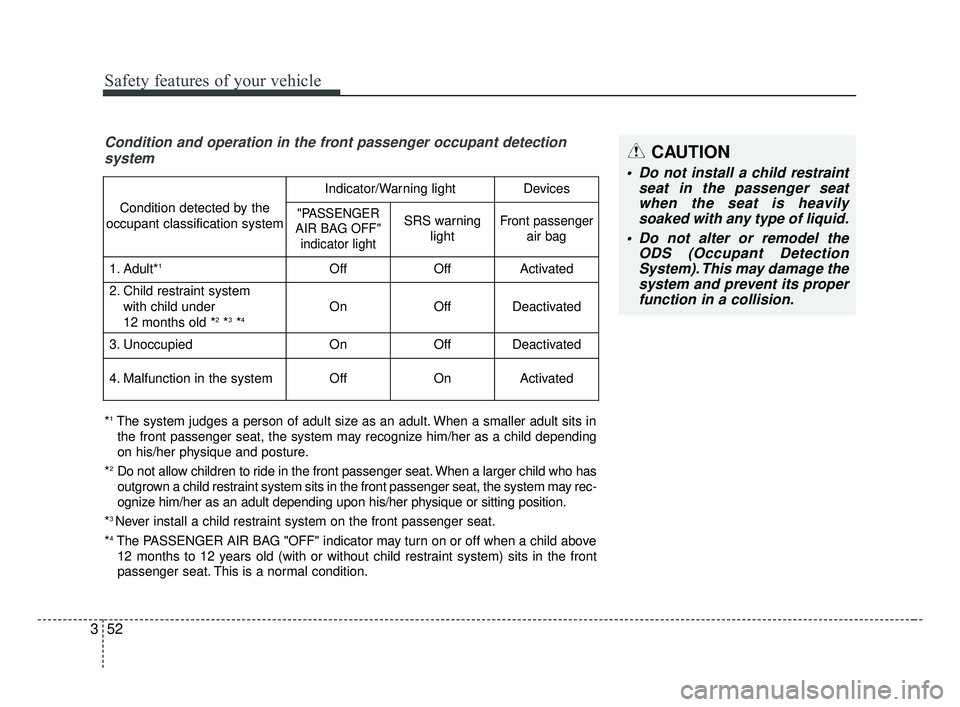
Condition and operation in the front passenger occupant detection
system
*1The system judges a person of adult size as an adult. When a smaller adult sits in
the front passenger seat, the system may recognize him/her as a child depending
on his/her physique and posture.
*
2Do not allow children to ride in the front passenger seat. When a larger child who has
outgrown a child restraint system sits in the front passenger seat, the system may rec-
ognize him/her as an adult depending upon his/her physique or sitting position.
*
3 Never install a child restraint system on the front passenger seat.
*
4The PASSENGER AIR BAG "OFF" indicator may turn on or off when a child above 12 months to 12 years old (with or without child restraint system) sits in the front
passenger seat. This is a normal condition.
Condition detected by the
occupant classification system
Indicator/Warning lightDevices
"PASSENGER
AIR BAG OFF" indicator lightSRS warning lightFront passenger air bag
1. Adult*1OffOffActivated
2. Child restraint system
with child under
12 months old *
2*3*4 OnOffDeactivated
3. Unoccupied OnOffDeactivated
4. Malfunction in the systemOffOnActivated
CAUTION
Do not install a child restraint seat in the passenger seatwhen the seat is heavilysoaked with any type of liquid.
Do not alter or remodel the ODS (Occupant DetectionSystem). This may damage thesystem and prevent its properfunction in a collision.
JF CAN (ENG) 3.qxp 2016-09-21 11:05 Page 52
Page 76 of 629
359
Safety features of your vehicle
The SRS consists of air bags
installed under the pad covers in the
center of the steering wheel and the
passenger's side front panel above
the glove box.
The purpose of the SRS is to provide
the vehicle's driver and/or the front
passenger with additional protection
than that offered by the seat belt sys-
tem alone in case of a frontal impact
of sufficient severity. The SRS uses
sensors to gather information about
the driver's and front passenger's
seat belt usage and impact severity.
The seat belt buckle sensors deter-
mine if the driver and front passen-
ger's seat belts are fastened.These sensors provide the ability to
control the SRS deployment based on
whether or not the seat belts are fas-
tened, and how severe the impact is.
The advanced SRS offers the ability
to control the air bag inflation with
two levels. A first stage level is pro-
vided for moderate-severity impacts.
A second stage level is provided for
more severe impacts.
The passenger’s front air bag is
designed to help reduce the injury of
children sitting close to the instru-
ment panel in low speed collisions.
However, children are safer if they
are restrained in the rear seat.
According to the impact severity and
seat belt usage, the SRSCM (SRS
Control Module) controls the air bag
inflation. Failure to properly wear
seat belts can increase the risk or
severity of injury in an accident.Additionally, your vehicle is equipped
with an occupant detection system in
the front passenger's seat. The occu-
pant detection system detects the
presence of a passenger in the front
passenger's seat and will turn off the
front passenger's air bag under cer-
tain conditions. For more detail, see
"Occupant detection system" in this
chapter.
Modification to the seat structure can
cause the air bag to deploy at a dif-
ferent level than should be provided.
Manufacturers are required by gov-
ernment regulations to provide a
contact point concerning modifica-
tions to the vehicle for persons with
disabilities, which modifications may
affect the vehicle’s advanced air bag
system. However, Kia does not
endorse nor will it support any
changes to any part or structure of
the vehicle that could affect the
advanced air bag system, including
the occupant detection system.
JF CAN (ENG) 3.qxp 2016-09-21 11:05 Page 59
Page 89 of 629
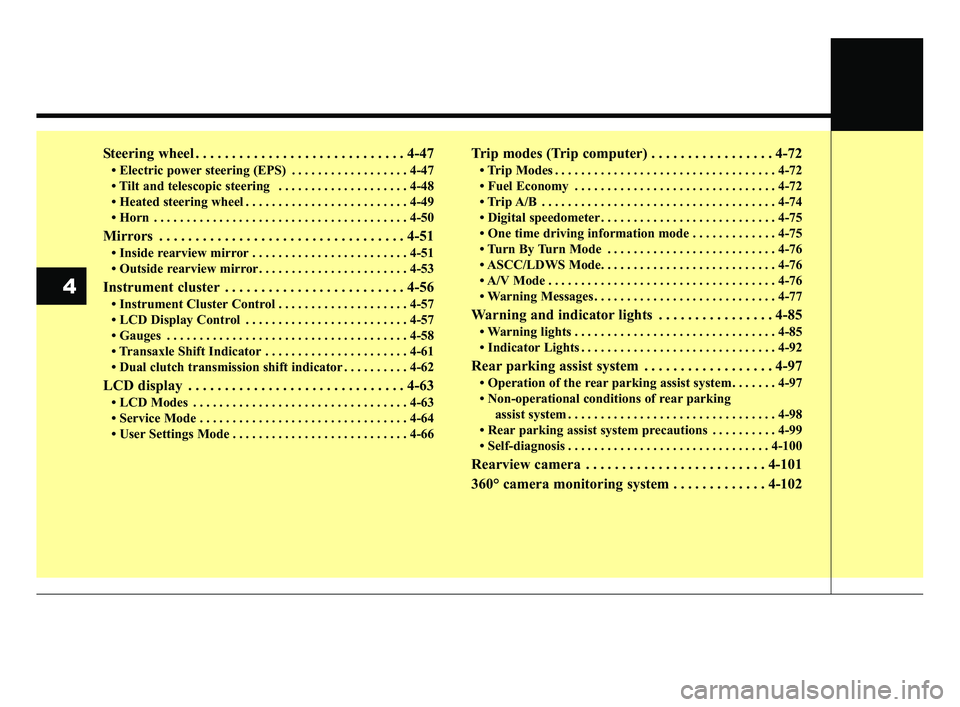
Steering wheel . . . . . . . . . . . . . . . . . . . . . . . . . . . . . 4-47
• Electric power steering (EPS) . . . . . . . . . . . . . . . . . . 4-47
• Tilt and telescopic steering . . . . . . . . . . . . . . . . . . . . 4-48
• Heated steering wheel . . . . . . . . . . . . . . . . . . . . . . . . . 4-49
• Horn . . . . . . . . . . . . . . . . . . . . . . . . . . . . . . . . . . . . \
. . . 4-50
Mirrors . . . . . . . . . . . . . . . . . . . . . . . . . . . . . . . . . . 4-51\
• Inside rearview mirror . . . . . . . . . . . . . . . . . . . . . . . . 4-51
• Outside rearview mirror. . . . . . . . . . . . . . . . . . . . . . . 4-53
Instrument cluster . . . . . . . . . . . . . . . . . . . . . . . . . 4-56
• Instrument Cluster Control . . . . . . . . . . . . . . . . . . . . 4-57
• LCD Display Control . . . . . . . . . . . . . . . . . . . . . . . . . 4-57
• Gauges . . . . . . . . . . . . . . . . . . . . . . . . . . . . . . . . . . . . \
. 4-58
• Transaxle Shift Indicator . . . . . . . . . . . . . . . . . . . . . . 4-61
• Dual clutch transmission shift indicator . . . . . . . . . . 4-62
LCD display . . . . . . . . . . . . . . . . . . . . . . . . . . . . . . 4-63
• LCD Modes . . . . . . . . . . . . . . . . . . . . . . . . . . . . . . . . . 4-63
• Service Mode . . . . . . . . . . . . . . . . . . . . . . . . . . . . . . . . 4-64
• User Settings Mode . . . . . . . . . . . . . . . . . . . . . . . . . . . 4-66
Trip modes (Trip computer) . . . . . . . . . . . . . . . . . 4-72
• Trip Modes . . . . . . . . . . . . . . . . . . . . . . . . . . . . . . . . . . 4-72\
• Fuel Economy . . . . . . . . . . . . . . . . . . . . . . . . . . . . . . . 4-72
• Trip A/B . . . . . . . . . . . . . . . . . . . . . . . . . . . . . . . . . . . . \
4-74
• Digital speedometer . . . . . . . . . . . . . . . . . . . . . . . . . . . 4-75
• One time driving information mode . . . . . . . . . . . . . 4-75
• Turn By Turn Mode . . . . . . . . . . . . . . . . . . . . . . . . . . 4-76
• ASCC/LDWS Mode. . . . . . . . . . . . . . . . . . . . . . . . . . . 4-76
• A/V Mode . . . . . . . . . . . . . . . . . . . . . . . . . . . . . . . . . . . 4-\
76
• Warning Messages . . . . . . . . . . . . . . . . . . . . . . . . . . . . 4-77
Warning and indicator lights . . . . . . . . . . . . . . . . 4-85
• Warning lights . . . . . . . . . . . . . . . . . . . . . . . . . . . . . . . 4-85
• Indicator Lights . . . . . . . . . . . . . . . . . . . . . . . . . . . . . . 4-92
Rear parking assist system . . . . . . . . . . . . . . . . . . 4-97
• Operation of the rear parking assist system . . . . . . . 4-97
• Non-operational conditions of rear parkingassist system . . . . . . . . . . . . . . . . . . . . . . . . . . . . . . . . 4-98
• Rear parking assist system precautions . . . . . . . . . . 4-99
• Self-diagnosis . . . . . . . . . . . . . . . . . . . . . . . . . . . . . . . 4-100
Rearview camera . . . . . . . . . . . . . . . . . . . . . . . . . 4-101
360° camera monitoring system . . . . . . . . . . . . . 4-102
4
JF CAN (ENG) 4.qxp 2016-09-21 11:12 Page 2
Page 115 of 629
Features of your vehicle
28
4
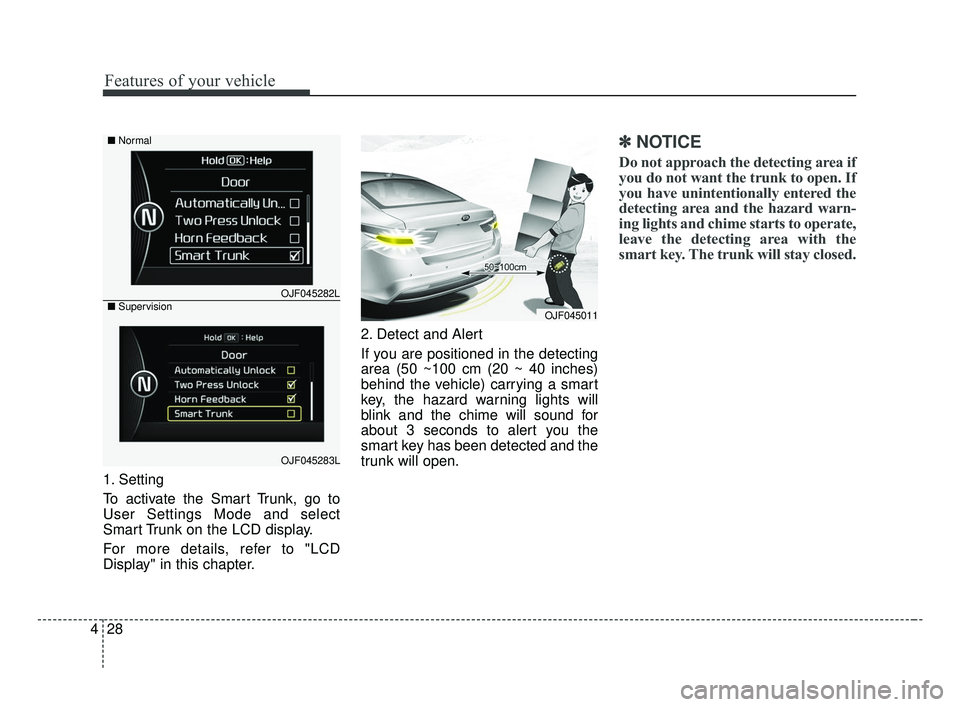
1. Setting
To activate the Smart Trunk, go to
User Settings Mode and select
Smart Trunk on the LCD display.
For more details, refer to "LCD
Display" in this chapter. 2. Detect and Alert
If you are positioned in the detecting
area (50 ~100 cm (20 ~ 40 inches)
behind the vehicle) carrying a smart
key, the hazard warning lights will
blink and the chime will sound for
about 3 seconds to alert you the
smart key has been detected and the
trunk will open.
✽ ✽
NOTICE
Do not approach the detecting area if
you do not want the trunk to open. If
you have unintentionally entered the
detecting area and the hazard warn-
ing lights and chime starts to operate,
leave the detecting area with the
smart key. The trunk will stay closed.
OJF045011
OJF045282L
OJF045283L
■
Normal
■ Supervision
JF CAN (ENG) 4.qxp 2016-09-21 11:13 Page 28
Page 150 of 629
463
Features of your vehicle
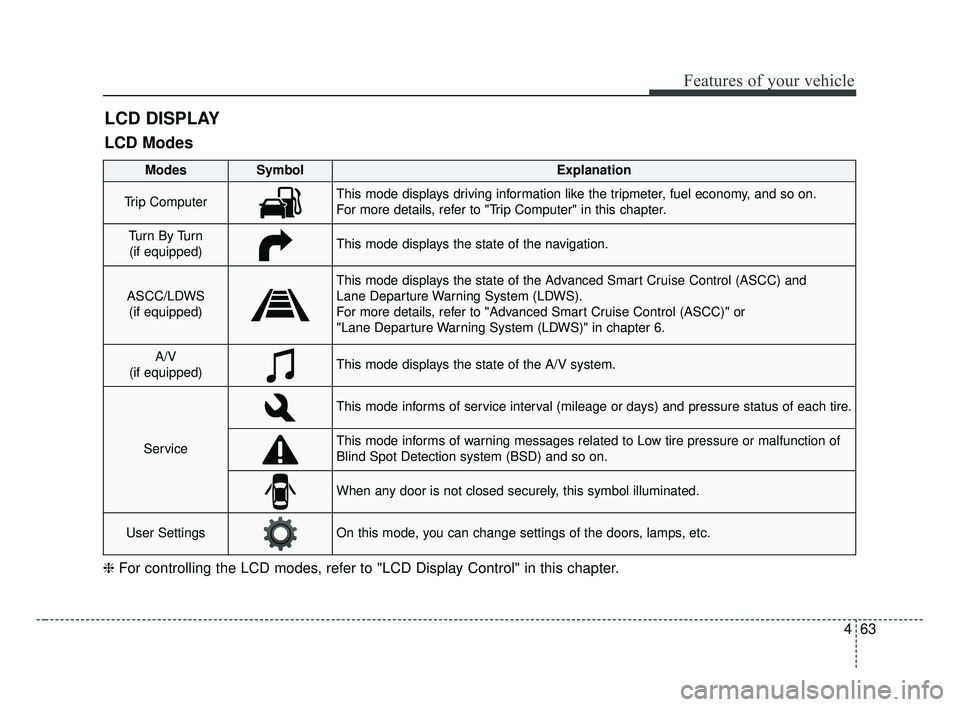
LCD DISPLAY
❈For controlling the LCD modes, refer to "LCD Display Control" in this chapter.
LCD Modes
Modes SymbolExplanation
Trip ComputerThis mode displays driving information like the tripmeter, fuel economy, and so on.
For more details, refer to "Trip Computer" in this chapter.
Tu r n B y Tu r n
(if equipped)This mode displays the state of the navigation.
ASCC/LDWS (if equipped)
This mode displays the state of the Advanced Smart Cruise Control (ASCC) and
Lane Departure Warning System (LDWS).
For more details, refer to "Advanced Smart Cruise Control (ASCC)" or
"Lane Departure Warning System (LDWS)" in chapter 6.
A/V
(if equipped)This mode displays the state of the A/V system.
Service
This mode informs of service interval (mileage or days) and pressure status of each tire.
This mode informs of warning messages related to Low tire pressure or malfunction of
Blind Spot Detection system (BSD) and so on.
When any door is not closed securely, this symbol illuminated.
User SettingsOn this mode, you can change settings of the doors, lamps, etc.
JF CAN (ENG) 4.qxp 2016-09-21 11:15 Page 63
Page 151 of 629
Features of your vehicle
64
4
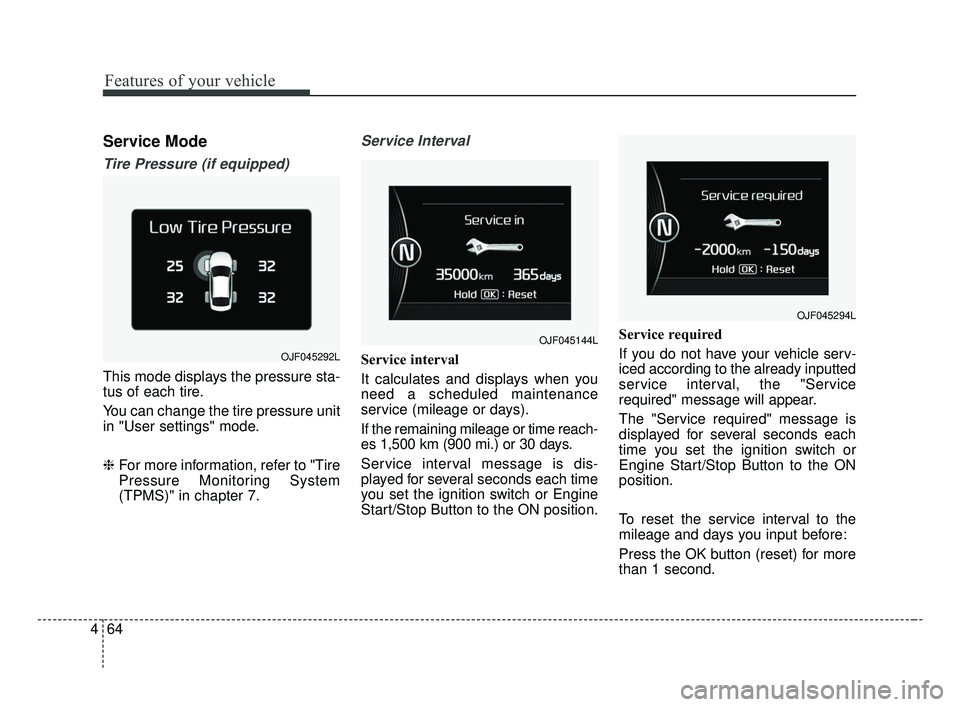
Service Mode
Tire Pressure (if equipped)
This mode displays the pressure sta-
tus of each tire.
You can change the tire pressure unit
in "User settings" mode.
❈ For more information, refer to "Tire
Pressure Monitoring System
(TPMS)" in chapter 7.
Service Interval
Service interval
It calculates and displays when you
need a scheduled maintenance
service (mileage or days).
If the remaining mileage or time reach-
es 1,500 km (900 mi.) or 30 days.
Service interval message is dis-
played for several seconds each time
you set the ignition switch or Engine
Start/Stop Button to the ON position. Service required
If you do not have your vehicle serv-
iced according to the already inputted
service interval, the "Service
required" message will appear.
The "Service required" message is
displayed for several seconds each
time you set the ignition switch or
Engine Start/Stop Button to the ON
position.
To reset the service interval to the
mileage and days you input before:
Press the OK button (reset) for more
than 1 second.
OJF045144L
OJF045294L
OJF045292L
JF CAN (ENG) 4.qxp 2016-09-21 11:15 Page 64