charging KIA OPTIMA 2017 Owners Manual
[x] Cancel search | Manufacturer: KIA, Model Year: 2017, Model line: OPTIMA, Model: KIA OPTIMA 2017Pages: 629, PDF Size: 15.24 MB
Page 91 of 629
Interior features . . . . . . . . . . . . . . . . . . . . . . . . . . 4-147
• Cup holder . . . . . . . . . . . . . . . . . . . . . . . . . . . . . . . . . 4-147
• Bottle holder. . . . . . . . . . . . . . . . . . . . . . . . . . . . . . . . 4-147
• Seat warmer . . . . . . . . . . . . . . . . . . . . . . . . . . . . . . . . 4-148
• Air ventilation seat . . . . . . . . . . . . . . . . . . . . . . . . . . 4-149
• Sunvisor . . . . . . . . . . . . . . . . . . . . . . . . . . . . . . . . . . . 4-\
149
• Power outlet . . . . . . . . . . . . . . . . . . . . . . . . . . . . . . . . 4-150
• USB charger . . . . . . . . . . . . . . . . . . . . . . . . . . . . . . . . 4-151
• Wireless smart phone charging system . . . . . . . . . . 4-152
• Coat hook . . . . . . . . . . . . . . . . . . . . . . . . . . . . . . . . . . 4-15\
5
• Floor mat anchor (s) . . . . . . . . . . . . . . . . . . . . . . . . . 4-155
• Side curtain . . . . . . . . . . . . . . . . . . . . . . . . . . . . . . . . 4-156
4
JF CAN (ENG) 4.qxp 2016-09-21 11:12 Page 4
Page 135 of 629
Features of your vehicle
48
4
(Continued)
• When the charging system warning
light comes on due to the low volt-
age (When the alternator or bat-
tery) does not operate normally or
malfunctions), the steering wheel
may require increased steering
effort.Tilt and telescopic steering
Tilt and telescopic steering allows
you to adjust the steering wheel
before you drive. You can also raise it
to give your legs more room when
you exit and enter the vehicle.
The steering wheel should be posi-
tioned so that it is comfortable for
you to drive, while permitting you to
see the instrument panel warning
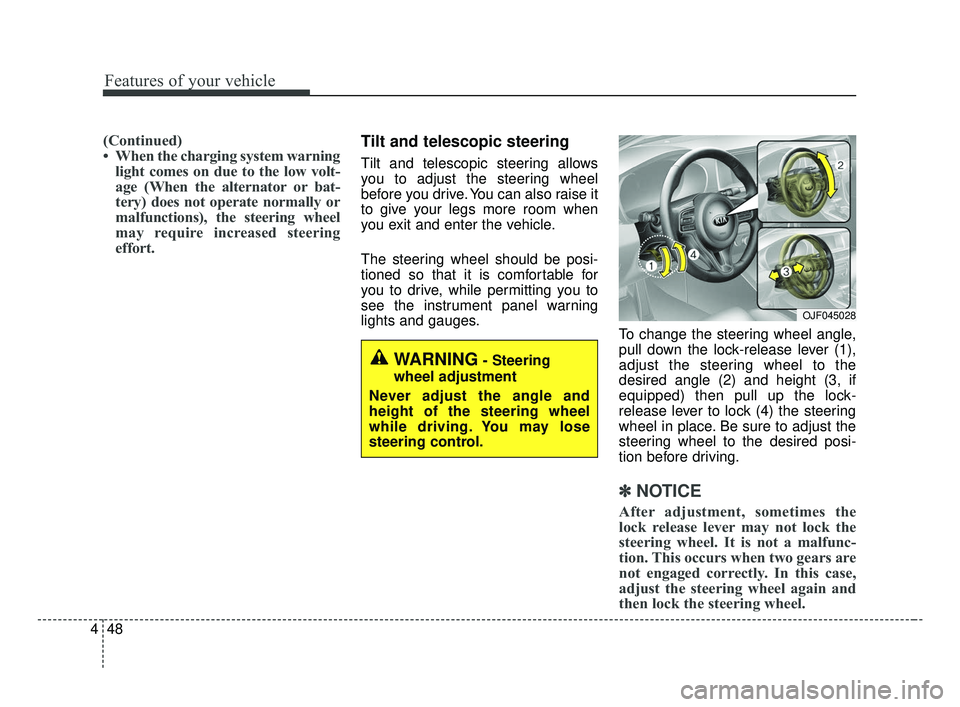
lights and gauges. To change the steering wheel angle,
pull down the lock-release lever (1),
adjust the steering wheel to the
desired angle (2) and height (3, if
equipped) then pull up the lock-
release lever to lock (4) the steering
wheel in place. Be sure to adjust the
steering wheel to the desired posi-
tion before driving.
✽ ✽NOTICE
After adjustment, sometimes the
lock release lever may not lock the
steering wheel. It is not a malfunc-
tion. This occurs when two gears are
not engaged correctly. In this case,
adjust the steering wheel again and
then lock the steering wheel.
WARNING- Steering
wheel adjustment
Never adjust the angle and
height of the steering wheel
while driving. You may lose
steering control.
OJF045028
JF CAN (ENG) 4.qxp 2016-09-21 11:14 Page 48
Page 157 of 629
Features of your vehicle
70
4
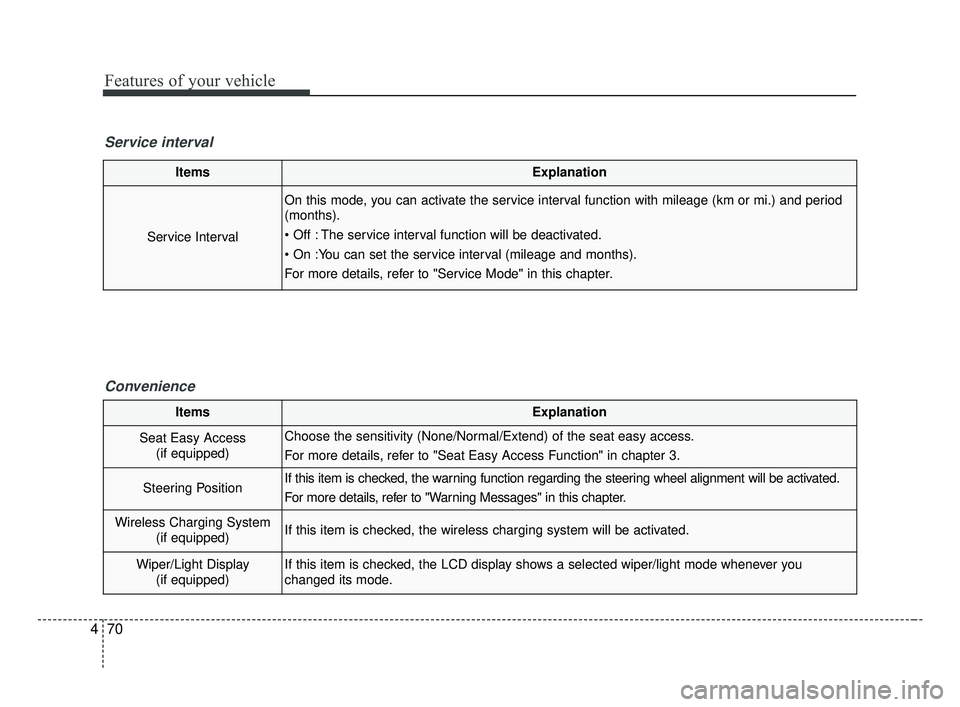
ItemsExplanation
Service Interval
On this mode, you can activate the service interval function with mileage (km or mi.) and period
(months).
The service interval function will be deactivated.
For more details, refer to "Service Mode" in this chapter.
Service interval
Convenience
ItemsExplanation
Seat Easy Access(if equipped)Choose the sensitivity (None/Normal/Extend) of the seat easy access.
For more details, refer to "Seat Easy Access Function" in chapter 3.
Steering PositionIf this item is checked, the warning function regarding the steering wheel alignment will be activated.
For more details, refer to "Warning Messages" in this chapter.
Wireless Charging System (if equipped)If this item is checked, the wireless charging system will be activated.
Wiper/Light Display(if equipped)If this item is checked, the LCD display shows a selected wiper/light mode whenever you
changed its mode.
JF CAN (ENG) 4.qxp 2016-09-21 11:15 Page 70
Page 171 of 629
Features of your vehicle
84
4
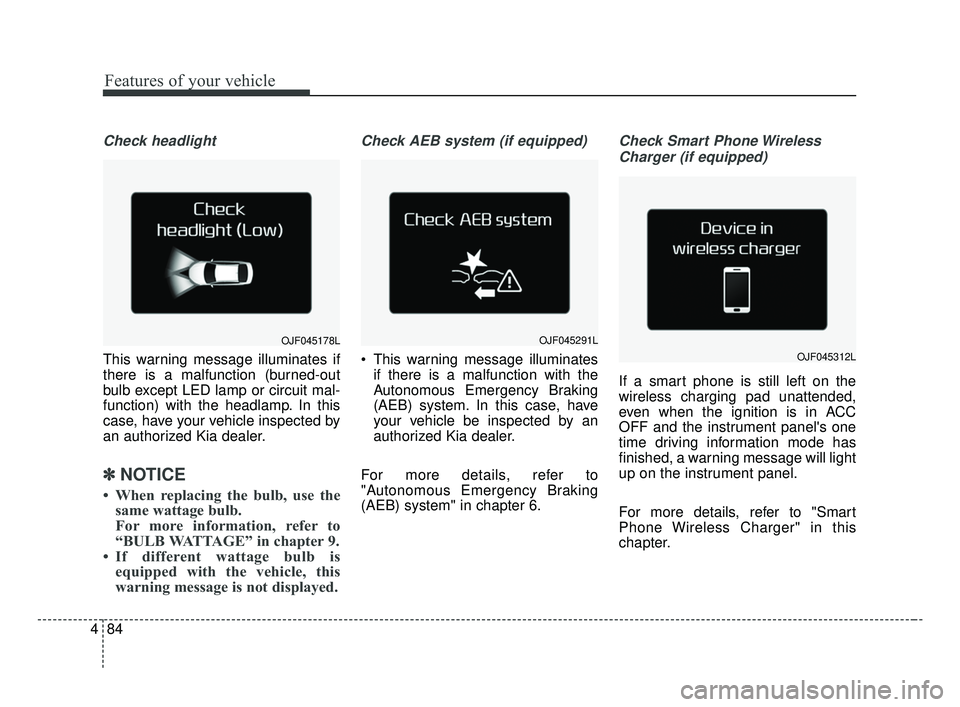
Check headlight
This warning message illuminates if
there is a malfunction (burned-out
bulb except LED lamp or circuit mal-
function) with the headlamp. In this
case, have your vehicle inspected by
an authorized Kia dealer.
✽ ✽
NOTICE
• When replacing the bulb, use the
same wattage bulb.
For more information, refer to
“BULB WATTAGE” in chapter 9.
• If different wattage bulb is equipped with the vehicle, this
warning message is not displayed.
Check AEB system (if equipped)
This warning message illuminates
if there is a malfunction with the
Autonomous Emergency Braking
(AEB) system. In this case, have
your vehicle be inspected by an
authorized Kia dealer.
For more details, refer to
"Autonomous Emergency Braking
(AEB) system" in chapter 6.
Check Smart Phone Wireless Charger (if equipped)
If a smart phone is still left on the
wireless charging pad unattended,
even when the ignition is in ACC
OFF and the instrument panel's one
time driving information mode has
finished, a warning message will light
up on the instrument panel.
For more details, refer to "Smart
Phone Wireless Charger" in this
chapter.
OJF045178LOJF045291L
OJF045312L
JF CAN (ENG) 4.qxp 2016-09-21 11:16 Page 84
Page 176 of 629
489
Features of your vehicle
Charging SystemWarning Light
This warning light illuminates:
Once you set the ignition switch or Engine Start/Stop Button to the ON
position.
- It remains on until the engine isstarted.
When there is a malfunction with either the alternator or electrical
charging system.
If there is a malfunction with either
the alternator or electrical charging
system:
1. Drive carefully to the nearest safe location and stop your vehicle.
2. Turn the engine off and check the alternator drive belt for looseness
or breakage.
If the belt is adjusted properly,
there may be a problem in the
electrical charging system.
In this case, have your vehicle
inspected by an authorized Kia
dealer as soon as possible.
Engine Oil Pressure Warning Light
This warning light illuminates:
Once you set the ignition switch or Engine Start/Stop Button to the ON
position.
- It remains on until the engine isstarted.
When the engine oil pressure is low.
If the engine oil pressure is low:
1. Drive carefully to the nearest safe location and stop your vehicle.
2. Turn the engine off and check the engine oil level (For more details,
refer to “Engine Oil” in chapter 8).
If the level is low, add oil as
required.
If the warning light remains on
after adding oil or if oil is not avail-
able, have your vehicle inspected
by an authorized Kia dealer as
soon as possible.
CAUTION - Catalytic
Converter Damage
If the Malfunction Indicator Lamp (MIL) illuminates, poten-tial catalytic converter damageis possible which could result inloss of engine power.
In this case, have your vehicleinspected by an authorized Kiadealer as soon as possible.
CAUTION - Malfunction
Indicator Lamp (MIL)
Driving with the Malfunction Indicator Lamp (MIL) on maycause damage to the emissioncontrol systems which couldaffect drivability and/or fueleconomy.
JF CAN (ENG) 4.qxp 2016-09-21 11:16 Page 89
Page 238 of 629
4151
Features of your vehicle
Plug in battery equipped electronicdevices with reverse current protec-
tion. The current from the battery
may flow into the vehicle’s electri
cal/electronic system and cause
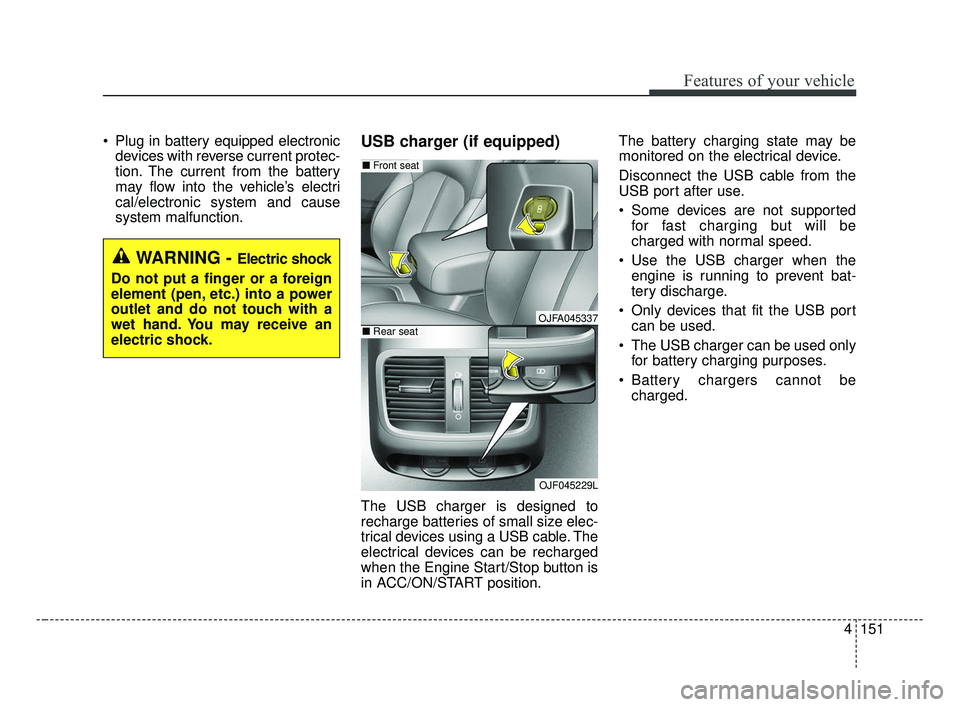
system malfunction.USB charger (if equipped)
The USB charger is designed to
recharge batteries of small size elec-
trical devices using a USB cable. The
electrical devices can be recharged
when the Engine Start/Stop button is
in ACC/ON/START position. The battery charging state may be
monitored on the electrical device.
Disconnect the USB cable from the
USB port after use.
Some devices are not supported
for fast charging but will be
charged with normal speed.
Use the USB charger when the engine is running to prevent bat-
tery discharge.
Only devices that fit the USB port can be used.
The USB charger can be used only for battery charging purposes.
Battery chargers cannot be charged.
WARNING - Electric shock
Do not put a finger or a foreign
element (pen, etc.) into a power
outlet and do not touch with a
wet hand. You may receive an
electric shock.
OJFA045337
OJF045229L
■ Front seat
■Rear seat
JF CAN (ENG) 4.qxp 2016-09-21 11:19 Page 151
Page 239 of 629
Features of your vehicle
152
4
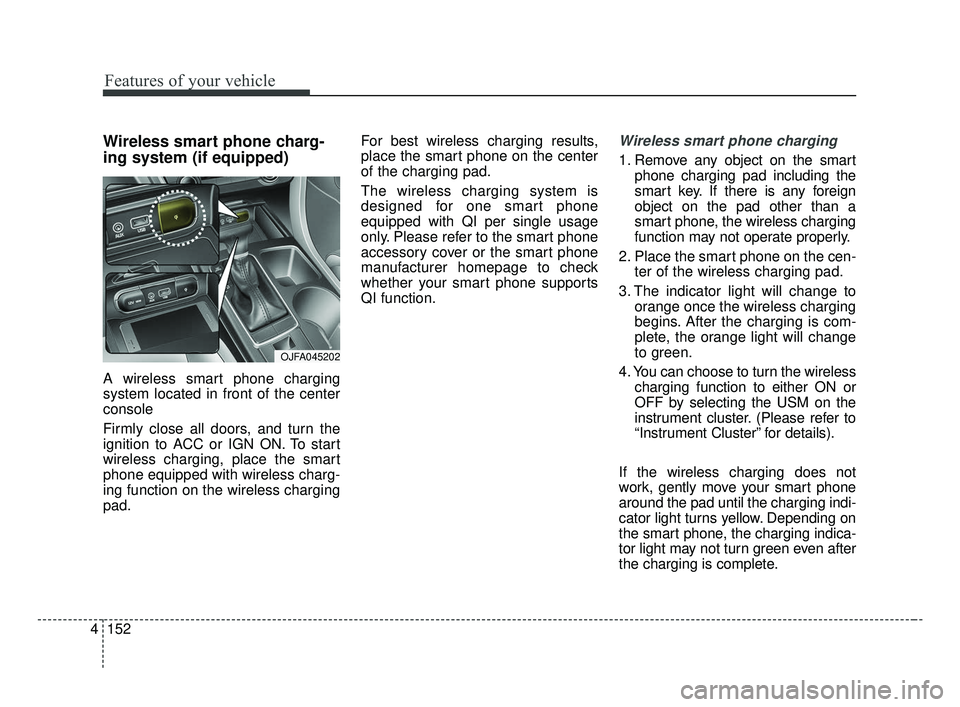
Wireless smart phone charg-
ing system (if equipped)
A wireless smart phone charging
system located in front of the center
console
Firmly close all doors, and turn the
ignition to ACC or IGN ON. To start
wireless charging, place the smart
phone equipped with wireless charg-
ing function on the wireless charging
pad. For best wireless charging results,
place the smart phone on the center
of the charging pad.
The wireless charging system is
designed for one smart phone
equipped with QI per single usage
only. Please refer to the smart phone
accessory cover or the smart phone
manufacturer homepage to check
whether your smart phone supports
QI function.
Wireless smart phone charging
1. Remove any object on the smart
phone charging pad including the
smart key. If there is any foreign
object on the pad other than a
smart phone, the wireless charging
function may not operate properly.
2. Place the smart phone on the cen- ter of the wireless charging pad.
3. The indicator light will change to orange once the wireless charging
begins. After the charging is com-
plete, the orange light will change
to green.
4. You can choose to turn the wireless charging function to either ON or
OFF by selecting the USM on the
instrument cluster. (Please refer to
“Instrument Cluster” for details).
If the wireless charging does not
work, gently move your smart phone
around the pad until the charging indi-
cator light turns yellow. Depending on
the smart phone, the charging indica-
tor light may not turn green even after
the charging is complete.
OJFA045202
JF CAN (ENG) 4.qxp 2016-09-21 11:19 Page 152
Page 240 of 629
4153
Features of your vehicle
If the wireless charging is not func-
tioning properly, the orange light will
blink and flash for ten seconds then
turn off. In such cases, remove the
smart phone from the pad and
replace it on the pad again, or double
check the charging status.
If you leave the smart phone on the
charging pad when the vehicle igni-
tion is in OFF, the vehicle will alert
you through warning messages and
sound (applicable for vehicles with
voice guidance function) after the
‘Good bye’ function on the instru-
ment cluster ends.
WARNING - Distracted
driving
Driving while distracted can
result in a loss of vehicle con-
trol that may lead to an acci-
dent, severe personal injury,
and death. The driver’s primary
responsibility is in the safe and
legal operation of a vehicle, and
use of any handheld devices,
other equipment, or vehicle sys-
tems which take the driver’s
eyes, attention and focus away
from the safe operation of a
vehicle or which are not permis-
sible by law should never be
used during operation of the
vehicle.CAUTION - Liquid in
Wireless Smart Phone
Charger
Securely close the tray cover when charging your phone to pre-vent liquid from damaging thewireless smart phone chargingsystem.
CAUTION - Metal in
Wireless Charging System
If any metallic object such as coins is located between thewireless charging system andthe smart phone, the chargingmay be disrupted. Also, themetallic object may heat up andpotentially damage the chargingsystem. If there is any metallicobject between the smart phoneand the charging pad, immedi-ately remove the smart phone.Remove the metallic object afterit has cooled down.
JF CAN (ENG) 4.qxp 2016-09-21 11:19 Page 153
Page 241 of 629
Features of your vehicle
154
4
✽ ✽
NOTICE
• If it is not possible to close the tray
cover due to the size of your smart
phone or because the tray cover
has been broken, do not use the
wireless smart phone charging
function.
• When the interior temperature of the wireless charging system rises
above a set temperature, the wire-
less charging will cease to func-
tion. After the interior tempera-
ture drops below the threshold,
the wireless charging function will
resume.
• The wireless charging may not function properly when there is a
heavy accessory cover on the
smart phone.
• The wireless charging will stop when using the wireless smart key
search function to prevent radio
wave disruption.
• The wireless charging will stop when the smart key is moved out
of the vehicle with the ignition in
ON. (Continued)(Continued)
• The wireless charging will stop
when any of the doors is opened
(applicable for vehicles equipped
with smart keys).
• The wireless charging will stop when the vehicle is turned OFF.
• The wireless charging will stop when the smart phone is not in
complete contact with the wireless
charging pad.
• Items equipped with magnetic components such as credit card,
telephone card, bankbook, any
transportation ticket and such
may become damaged during
wireless charging.
• Place the smart phone on the cen- ter of the charge pad for best
results. The smart phone may not
charge when placed near the rim
of the charging pad. When the
smart phone does get charged, it
may heat up excessively.
• For smart phones without built-in wireless charging system, an
appropriate accessory has to be
equipped. (Continued)(Continued)
• Smart phones of some manufac-
turers may display messages on
weak current. This is due to the
particular characteristic of the
smart phone and does not imply a
malfunction on wireless charging
function.
• The indicator light of some manu- facturers’ smart phones may still
be yellow after the smart phone is
fully charged. This is due to the
particular characteristic of the
smart phone and not a malfunc-
tion of the wireless charging.
• When any smart phone without a wireless charging function or a
metallic object is placed on the
charging pad, a small noise may
sound. This small sound is due to
the vehicle discerning compatibili-
ty of the object placed on the
charging pad. It does not affect
your vehicle or the smart phone in
any way.
JF CAN (ENG) 4.qxp 2016-09-21 11:19 Page 154
Page 259 of 629
Audio system
16
5
(Continued)
• If you use devices such as a USB
hub purchased separately, the
vehicle’s audio system may not
recognize the USB device. In that
case, connect the USB device
directly to the multimedia termi-
nal of the vehicle.
• If the USB device is divided by log- ical drives, only the music files on
the highest-priority drive are rec-
ognized by car audio.
• Devices such as MP3 Player/ Cellular phone/Digital camera can
be unrecognizable by standard
USB I/F.
• Charging through the USB may not be supported in some mobile
devices.
• USB HDD or USB types liable to connection failures due to vehicle
vibrations are not supported. (i-
stick type)
• Some non-standard USB devices (METAL COVER TYPE USB)
can be unrecognizable. (Continued)(Continued)
• Some USB flash memory readers
(such as CF, SD, micro SD, etc.) or
external-HDD type devices can be
unrecognizable.
• Music files protected by DRM (DIG- ITAL RIGHTS MANAGEMENT)
are not recognizable.
• The data in the USB memory may be lost while using this audio.
Always back up important data on
a personal storage device.
• Please avoid using USB memory products
which can be used as
key chains or cellular
phone accessories as
they could cause damage to the
USB jack. Please make certain
only to use plug type connector
products.✽ ✽ NOTICE - Using iPod®Device
iPod®is a registered trademark of
Apple inc.
• Some iPod
®models may not sup-
port communication protocol and
files may not play properly.
Supported iPod
®models :
- iPhone®3GS/4
- iPod®touch 1st~4th generation
- iPod®nano 1st~6th generation
- iPod®classic
• The order of search or playback of songs in the iPod
®can be different
from the order searched in the
audio system.
• If the iPod
®is disabled due to its
own malfunction, reset the iPod®.
(Reset : Refer to iPod®manual)
• An iPod®may not operate nor-
mally on low battery. (Continued)
JF CAN (ENG) 5 (Audio).qxp 2016-09-21 11:22 Page 16