brake sensor KIA OPTIMA 2019 User Guide
[x] Cancel search | Manufacturer: KIA, Model Year: 2019, Model line: OPTIMA, Model: KIA OPTIMA 2019Pages: 577, PDF Size: 13.79 MB
Page 334 of 577
Driving your vehicle
82
5
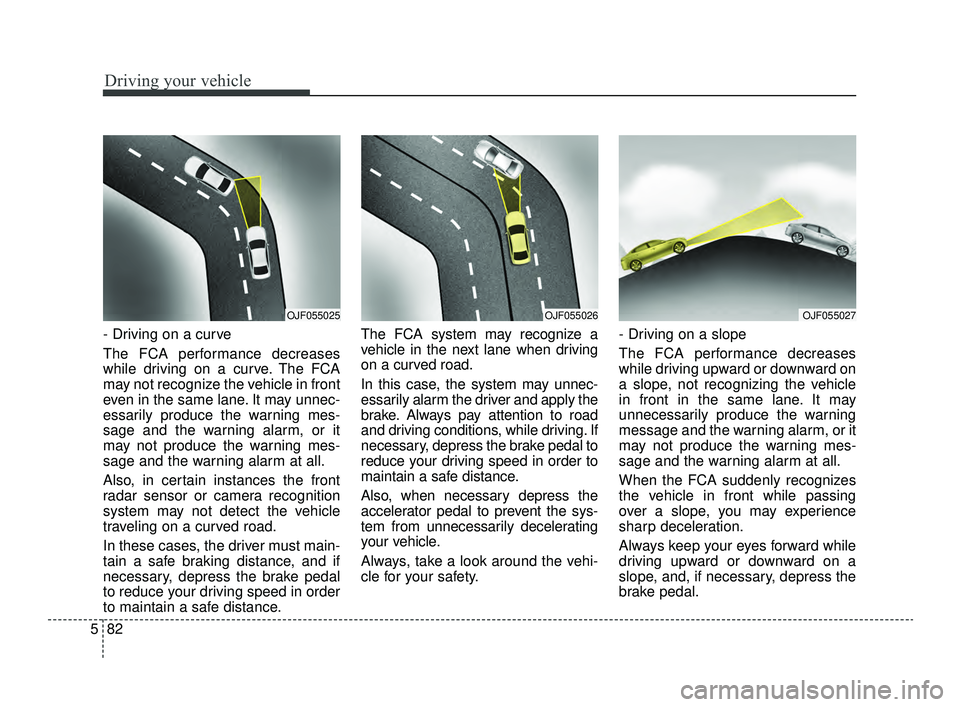
- Driving on a curve
The FCA performance decreases
while driving on a curve. The FCA
may not recognize the vehicle in front
even in the same lane. It may unnec-
essarily produce the warning mes-
sage and the warning alarm, or it
may not produce the warning mes-
sage and the warning alarm at all.
Also, in certain instances the front
radar sensor or camera recognition
system may not detect the vehicle
traveling on a curved road.
In these cases, the driver must main-
tain a safe braking distance, and if
necessary, depress the brake pedal
to reduce your driving speed in order
to maintain a safe distance. The FCA system may recognize a
vehicle in the next lane when driving
on a curved road.
In this case, the system may unnec-
essarily alarm the driver and apply the
brake. Always pay attention to road
and driving conditions, while driving. If
necessary, depress the brake pedal to
reduce your driving speed in order to
maintain a safe distance.
Also, when necessary depress the
accelerator pedal to prevent the sys-
tem from unnecessarily decelerating
your vehicle.
Always, take a look around the vehi-
cle for your safety.
- Driving on a slope
The FCA performance decreases
while driving upward or downward on
a slope, not recognizing the vehicle
in front in the same lane. It may
unnecessarily produce the warning
message and the warning alarm, or it
may not produce the warning mes-
sage and the warning alarm at all.
When the FCA suddenly recognizes
the vehicle in front while passing
over a slope, you may experience
sharp deceleration.
Always keep your eyes forward while
driving upward or downward on a
slope, and, if necessary, depress the
brake pedal.
OJF055026OJF055027OJF055025
JFa PE USA 5.QXP 5/17/2018 6:12 PM Page 82
Page 348 of 577
Driving your vehicle
96
5
Smart cruise control will be tem-
porarily canceled when:
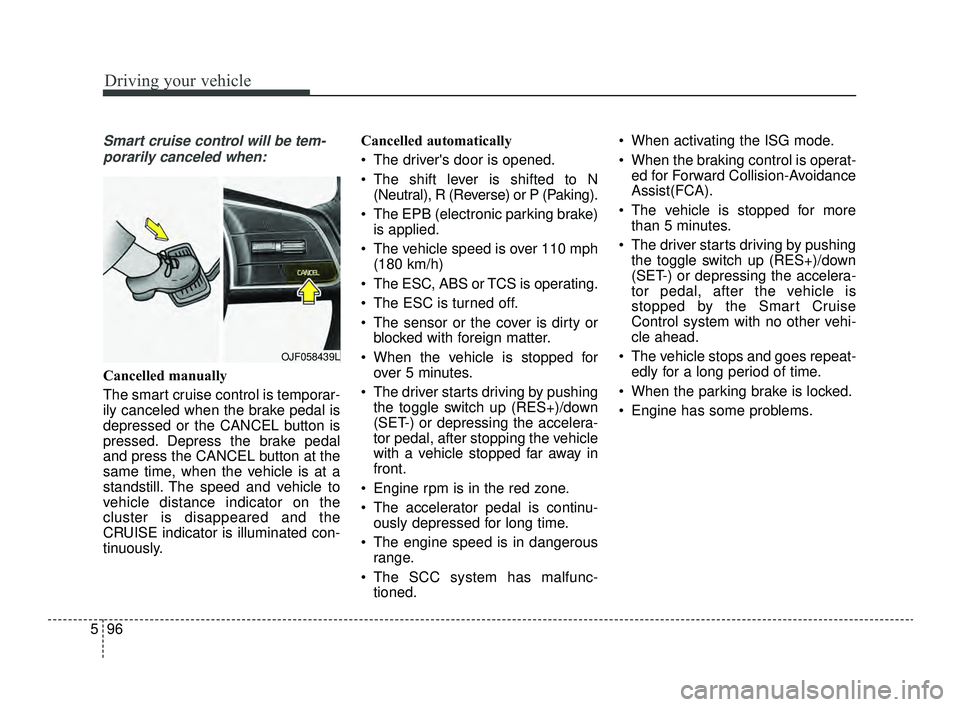
Cancelled manually
The smart cruise control is temporar-
ily canceled when the brake pedal is
depressed or the CANCEL button is
pressed. Depress the brake pedal
and press the CANCEL button at the
same time, when the vehicle is at a
standstill. The speed and vehicle to
vehicle distance indicator on the
cluster is disappeared and the
CRUISE indicator is illuminated con-
tinuously. Cancelled automatically
The driver's door is opened.
The shift lever is shifted to N
(Neutral), R (Reverse) or P (Paking).
The EPB (electronic parking brake) is applied.
The vehicle speed is over 110 mph (180 km/h)
The ESC, ABS or TCS is operating.
The ESC is turned off.
The sensor or the cover is dirty or blocked with foreign matter.
When the vehicle is stopped for over 5 minutes.
The driver starts driving by pushing the toggle switch up (RES+)/down
(SET-) or depressing the accelera-
tor pedal, after stopping the vehicle
with a vehicle stopped far away in
front.
Engine rpm is in the red zone.
The accelerator pedal is continu- ously depressed for long time.
The engine speed is in dangerous range.
The SCC system has malfunc- tioned. When activating the ISG mode.
When the braking control is operat-
ed for Forward Collision-Avoidance
Assist(FCA).
The vehicle is stopped for more than 5 minutes.
The driver starts driving by pushing the toggle switch up (RES+)/down
(SET-) or depressing the accelera-
tor pedal, after the vehicle is
stopped by the Smart Cruise
Control system with no other vehi-
cle ahead.
The vehicle stops and goes repeat- edly for a long period of time.
When the parking brake is locked.
Engine has some problems.
OJF058439L
JFa PE USA 5.QXP 5/17/2018 6:13 PM Page 96
Page 354 of 577
Driving your vehicle
102
5
If you push the smart cruise control
toggle switch (RES+ or SET-) while
Auto Hold and smart cruise control
is operating the Auto Hold will be
released regardless of accelerator
pedal operation and the vehicle will
start to move. The AUTO HOLD
indicator changes from green to
white. (if equipped with EPB
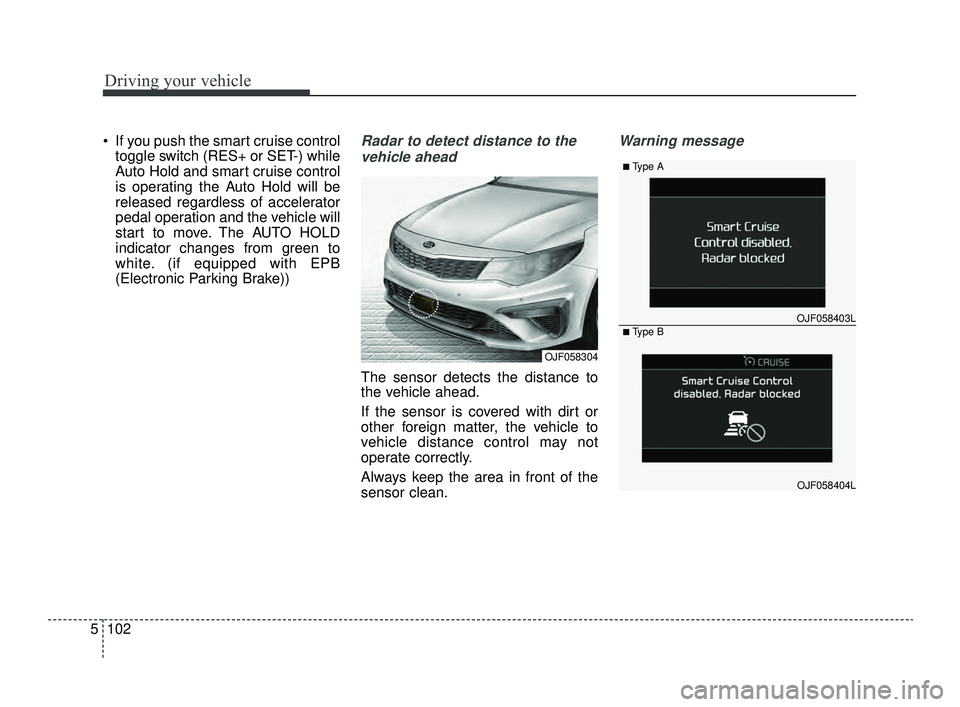
(Electronic Parking Brake))Radar to detect distance to the
vehicle ahead
The sensor detects the distance to
the vehicle ahead.
If the sensor is covered with dirt or
other foreign matter, the vehicle to
vehicle distance control may not
operate correctly.
Always keep the area in front of the
sensor clean.
Warning message
OJF058304
OJF058403L
■Type A
■Type B
OJF058404L
JFa PE USA 5.QXP 5/17/2018 6:14 PM Page 102
Page 360 of 577

Driving your vehicle
108
5
Vehicle recognition
Some vehicles ahead in your lane
cannot be recognized by the sensor
as follows:
- Narrow vehicles such as motorcy-
cles or bicycles
- Vehicles offset to one side
- Slow-moving vehicles or sudden- decelerating vehicles
- Stopped vehicles
- Vehicles with small rear profiles such as trailers with no loads A vehicle ahead cannot be recog-
nized correctly by the sensor if any of
following occurs:
- When the vehicle is pointing
upwards due to overloading in the
trunk(tailgate)
- While making turns by steering
- When driving to one side of the lane
- When driving on narrow lanes or on curves
Adjust your vehicle speed by
depressing the brake pedal accord-
ing to the road condition ahead and
driving condition. When vehicles are at a standstill
and the vehicle in front of you
changes to the next lane, be care-
ful when your vehicle starts to
move because it may not immedi-
ately recognize the stopped vehicle
in front of you.
In this case, you must maintain a
safe braking distance, and if neces-
sary, depress the brake pedal to
reduce your driving speed in order to
maintain a safe distance.
OYG056046
OYG056048
JFa PE USA 5.QXP 5/17/2018 6:14 PM Page 108
Page 419 of 577
613
What to do in an emergency
You may not be able to identify a low
tire by simply looking at it. Always
use a good quality tire pressure
gauge to measure the tire's inflation
pressure. Please note that a tire that
is hot (from being driven) will have a
higher pressure measurement than a
tire that is cold (from sitting station-
ary for at least 3 hours and driven
less than 1 mile (1.6 km) during that
3 hour period).
Allow the tire to cool before measur-
ing the inflation pressure. Always be
sure the tire is cold before inflating to
the recommended pressure.
A cold tire means the vehicle has
been sitting for 3 hours and driven for
less than 1 mile (1.6 km) in that 3
hour period.
Never use tire sealant if your vehicle
is equipped with a Tire Pressure
Monitoring System. The liquid
sealant not approved by Kia may
damage the tire pressure sensors. The TPMS cannot alert you to
severe and sudden tire damage
caused by external factors such as
nails or road debris.
If you feel any vehicle instability, immediately take your foot off the
accelerator, apply the brakes grad-
ually and with light force, and slow-
ly move to a safe position off the
road.
✽ ✽ NOTICE - Protecting TPMS
Tampering with, modifying, or dis-
abling the Tire Pressure Monitoring
System (TPMS) components may
interfere with the system's ability to
warn the driver of low tire pressure
conditions and/or TPMS malfunc-
tions. Tampering with, modifying,
or disabling the Tire Pressure
Monitoring System (TPMS) compo-
nents may void the warranty for
that portion of the vehicle.
This device complies with Part
15 of the FCC rules.
Operation is subject to the following
two conditions:
1. This device may not cause harm-
ful interference, and
2. This device must accept any inter- ference received, including inter-
ference that may cause undesired
operation.
JFa PE USA 6.qxp 5/17/2018 6:25 PM Page 13
Page 513 of 577
773
Maintenance
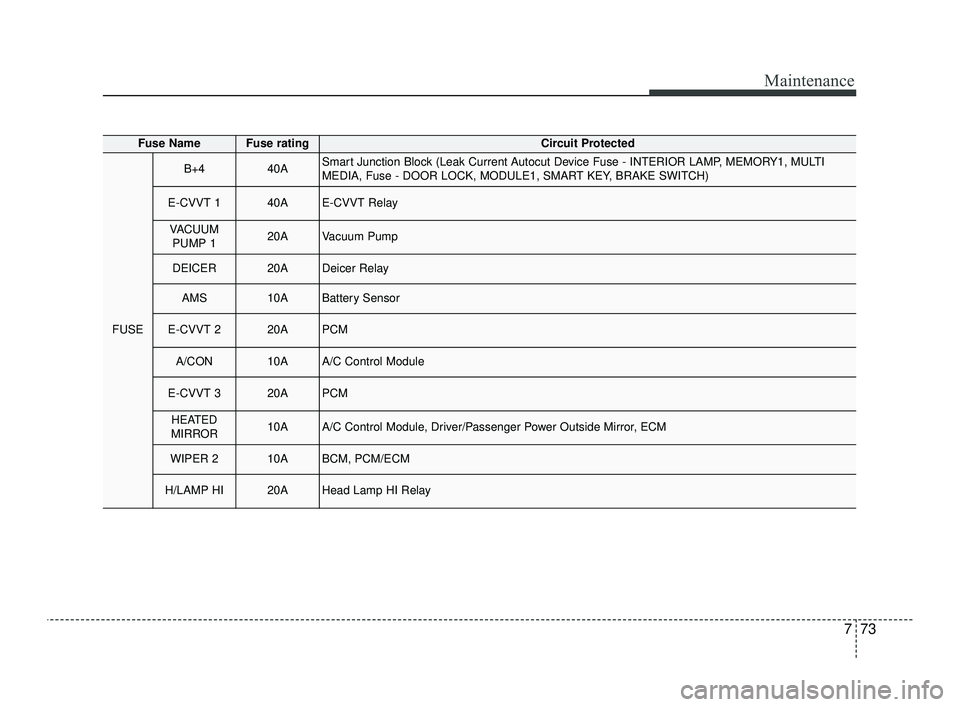
Fuse NameFuse ratingCircuit Protected
FUSE
B+440ASmart Junction Block (Leak Current Autocut Device Fuse - INTERIOR LAMP, MEMORY1, MULTI
MEDIA, Fuse - DOOR LOCK, MODULE1, SMART KEY, BRAKE SWITCH)
E-CVVT 140AE-CVVT Relay
VACUUMPUMP 120AVacuum Pump
DEICER20ADeicer Relay
AMS10ABattery Sensor
E-CVVT 220APCM
A/CON10AA/C Control Module
E-CVVT 320APCM
HEATED
MIRROR10AA/C Control Module, Driver/Passenger Power Outside Mirror, ECM
WIPER 210ABCM, PCM/ECM
H/LAMP HI20AHead Lamp HI Relay
JFa PE USA 7.qxp 5/17/2018 6:36 PM Page 73
Page 567 of 577
Index
6I
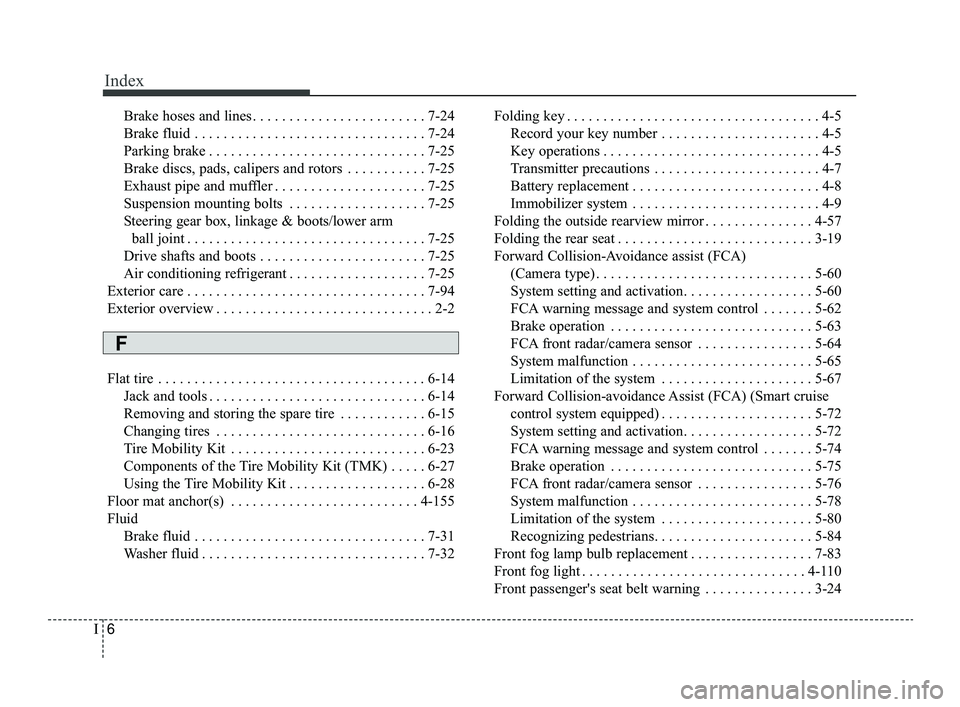
Brake hoses and lines . . . . . . . . . . . . . . . . . . . . . . . . 7-24
Brake fluid . . . . . . . . . . . . . . . . . . . . . . . . . . . . . . . . 7-24
Parking brake . . . . . . . . . . . . . . . . . . . . . . . . . . . . . . 7-25
Brake discs, pads, calipers and rotors . . . . . . . . . . . 7-25
Exhaust pipe and muffler . . . . . . . . . . . . . . . . . . . . . 7-25
Suspension mounting bolts . . . . . . . . . . . . . . . . . . . 7-25
Steering gear box, linkage & boots/lower arm ball joint . . . . . . . . . . . . . . . . . . . . . . . . . . . . . . . . . 7-25
Drive shafts and boots . . . . . . . . . . . . . . . . . . . . . . . 7-25
Air conditioning refrigerant . . . . . . . . . . . . . . . . . . . 7-25
Exterior care . . . . . . . . . . . . . . . . . . . . . . . . . . . . . . . . . 7-94
Exterior overview . . . . . . . . . . . . . . . . . . . . . . . . . . . . . . 2-2
Flat tire . . . . . . . . . . . . . . . . . . . . . . . . . . . . . . . . . . . . \
. 6-14 Jack and tools . . . . . . . . . . . . . . . . . . . . . . . . . . . . . . 6-14
Removing and storing the spare tire . . . . . . . . . . . . 6-15
Changing tires . . . . . . . . . . . . . . . . . . . . . . . . . . . . . 6-16
Tire Mobility Kit . . . . . . . . . . . . . . . . . . . . . . . . . . . 6-23
Components of the Tire Mobility Kit (TMK) . . . . . 6-27
Using the Tire Mobility Kit . . . . . . . . . . . . . . . . . . . 6-28
Floor mat anchor(s) . . . . . . . . . . . . . . . . . . . . . . . . . . 4-155
Fluid Brake fluid . . . . . . . . . . . . . . . . . . . . . . . . . . . . . . . . 7-31
Washer fluid . . . . . . . . . . . . . . . . . . . . . . . . . . . . . . . 7-32 Folding key . . . . . . . . . . . . . . . . . . . . . . . . . . . . . . . . . . . 4-\
5
Record your key number . . . . . . . . . . . . . . . . . . . . . . 4-5
Key operations . . . . . . . . . . . . . . . . . . . . . . . . . . . . . . 4-5
Transmitter precautions . . . . . . . . . . . . . . . . . . . . . . . 4-7
Battery replacement . . . . . . . . . . . . . . . . . . . . . . . . . . 4-8
Immobilizer system . . . . . . . . . . . . . . . . . . . . . . . . . . 4-9
Folding the outside rearview mirror . . . . . . . . . . . . . . . 4-57
Folding the rear seat . . . . . . . . . . . . . . . . . . . . . . . . . . . 3-19
Forward Collision-Avoidance assist (FCA) (Camera type) . . . . . . . . . . . . . . . . . . . . . . . . . . . . . . 5-60
System setting and activation. . . . . . . . . . . . . . . . . . 5-60
FCA warning message and system control . . . . . . . 5-62
Brake operation . . . . . . . . . . . . . . . . . . . . . . . . . . . . 5-63
FCA front radar/camera sensor . . . . . . . . . . . . . . . . 5-64
System malfunction . . . . . . . . . . . . . . . . . . . . . . . . . 5-65
Limitation of the system . . . . . . . . . . . . . . . . . . . . . 5-67
Forward Collision-avoidance Assist (FCA) (Smart cruise control system equipped) . . . . . . . . . . . . . . . . . . . . . 5-72
System setting and activation. . . . . . . . . . . . . . . . . . 5-72
FCA warning message and system control . . . . . . . 5-74
Brake operation . . . . . . . . . . . . . . . . . . . . . . . . . . . . 5-75
FCA front radar/camera sensor . . . . . . . . . . . . . . . . 5-76
System malfunction . . . . . . . . . . . . . . . . . . . . . . . . . 5-78
Limitation of the system . . . . . . . . . . . . . . . . . . . . . 5-80
Recognizing pedestrians. . . . . . . . . . . . . . . . . . . . . . 5-84
Front fog lamp bulb replacement . . . . . . . . . . . . . . . . . 7-83
Front fog light . . . . . . . . . . . . . . . . . . . . . . . . . . . . . . . 4-110
Front passenger's seat belt warning . . . . . . . . . . . . . . . 3-24
F
JFa PE USA Index.qxp 5/17/2018 6:44 PM Page 6