ECO mode KIA OPTIMA 2019 Owner's Manual
[x] Cancel search | Manufacturer: KIA, Model Year: 2019, Model line: OPTIMA, Model: KIA OPTIMA 2019Pages: 577, PDF Size: 13.79 MB
Page 226 of 577
Features of your vehicle
136
4
Adjusting the driver and passenger
side temperature individually
Press the “SYNC” button again to
adjust the driver and passenger
side temperature individually. The
illumination of button turns off.
Operate the driver side tempera- ture control knob to adjust the driv-
er side temperature.
Operate the passenger side tem- perature control knob to adjust the
passenger side temperature.
Temperature conversion
You can switch the temperature
mode from Centigrade to Fahrenheit
as follows:
While pressing the OFF button,
press the AUTO button for 3 seconds
or more.
The display will change from
Centigrade to Fahrenheit, or from
Fahrenheit to Centigrade.
If the battery has been discharged or
disconnected, the temperature mode
display will reset to Fahrenheit.Air intake control
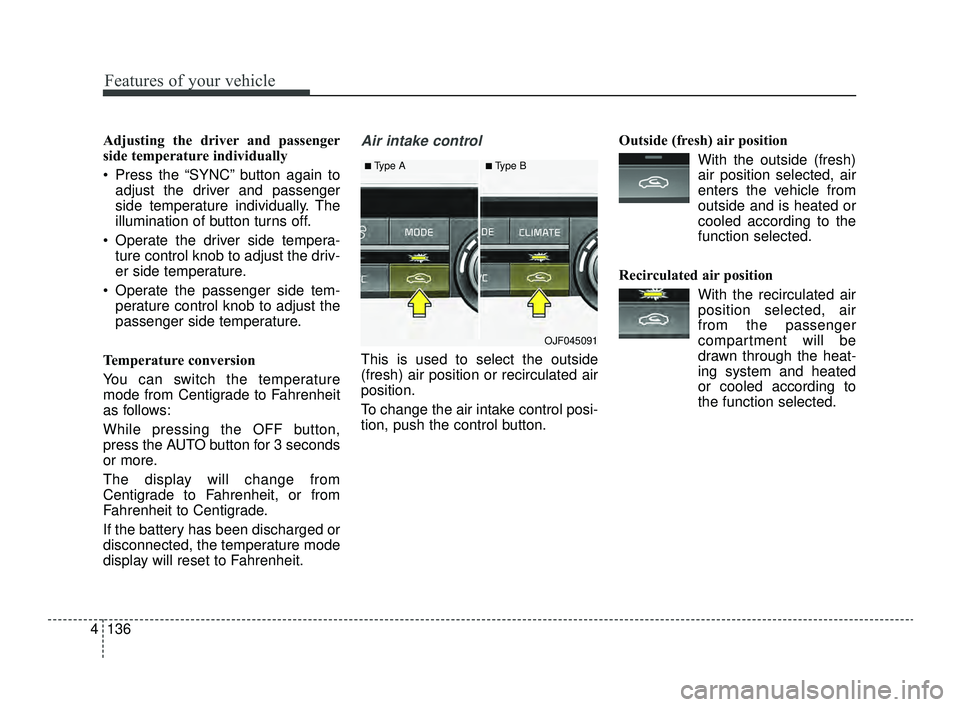
This is used to select the outside
(fresh) air position or recirculated air
position.
To change the air intake control posi-
tion, push the control button. Outside (fresh) air position
With the outside (fresh)air position selected, air
enters the vehicle from
outside and is heated or
cooled according to the
function selected.
Recirculated air position With the recirculated airposition selected, air
from the passenger
compartment will be
drawn through the heat-
ing system and heated
or cooled according to
the function selected.
■Type A■Type B
OJF045091
JFa PE USA 4.qxp 5/18/2018 7:25 PM Page 136
Page 227 of 577

4137
Features of your vehicle
Prolonged operation of the heater in
the recirculated air position (without
air conditioning selected) may cause
fogging of the windshield and side
windows and the air within the pas-
senger compartment may become
stale.
In addition, prolonged use of the air
conditioning with the recirculated air
position selected will result in exces-
sively dry air in the passenger com-
partment.
Sunroof inside air recirculation(if equipped)
If the sunroof opens while the heater
or Air Conditioning system operates,
the outside (fresh) air will be select-
ed automatically for ventilating the
car. Then, if you select the recirculat-
ed air position, the outside (fresh) air
will be selected automatically after 3
minutes.
If you close the sunroof, the intake
mode will be changed to the previous
selected mode.
Fan speed control
The fan speed can be set to the
desired speed by operating the fan
speed control button.
To change the fan speed, press ( )
the button for higher speed, or push
( ) the button for lower speed. To
turn the fan speed control off, press
the front blower OFF button.
Air conditioning
Press the A/C button to turn the air
conditioning system on (indicator
light will illuminate).
Press the button again to turn the air
conditioning system off.
■Type A■Type B
OJF045092
■Type A■Type B
OJF045093
WARNING -Reduced
Visibility
Continuous use of the climate
control system in the recirculat-
ed air position may allow
humidity to increase inside the
vehicle which may fog the glass
and obscure visibility.
JFa PE USA 4.qxp 5/18/2018 7:25 PM Page 137
Page 230 of 577
Features of your vehicle
140
4
✽ ✽
NOTICE
When opening the windows in humid
weather, air conditioning may create
water droplets inside the vehicle.
Since excessive water droplets may
cause damage to electrical equip-
ment, air conditioning should only be
used with the windows closed.
Air conditioning system operation tips
If the vehicle has been parked in
direct sunlight during hot weather,
open the windows for a short time
to let the hot air inside the vehicle
escape.
To help reduce moisture inside of the windows on rainy or humid
days, decrease the humidity inside
the vehicle by operating the air
conditioning system.
During air conditioning system operation, you may occasionally
notice a slight change in engine
speed as the air conditioning com-
pressor cycles. This is a normal
system operation characteristic.
Use the air conditioning system every month only for a few minutes
to ensure maximum system per-
formance. When using the air conditioning
system, you may notice clear water
dripping (or even puddling) on the
ground under the passenger side
of the vehicle. This is a normal sys-
tem operation characteristic.
Operating the air conditioning sys- tem in the recirculated air position
provides maximum cooling, how-
ever, continual operation in this
mode may cause the air inside the
vehicle to become stale.
During cooling operation, you may occasionally notice a misty air flow
because of rapid cooling and
humid air intake. This is a normal
system operation characteristic.CAUTION - Excessive A/C
Use
When using the air conditioningsystem, monitor the tempera-ture gauge closely while drivingup hills or in heavy traffic whenoutside temperatures are high.Air conditioning system opera-tion may cause engine over-heating. Continue to use theblower fan but turn the air con-ditioning system off if the tem-perature gauge indicates engineoverheating.
JFa PE USA 4.qxp 5/18/2018 7:25 PM Page 140
Page 237 of 577
4147
Features of your vehicle
To cancel or reset the Auto Defogging
System
Press the front windshield defroster
button for 3 seconds when the igni-
tion switch is in the ON position.
When the Auto Defogging System is
canceled, ADS OFF symbol will blink
3 times and the ADS OFF will be dis-
played on the climate control infor-
mation screen.
When the Auto Defogging System is
reset, ADS OFF symbol will blink 6
times without a signal.Automatic ventilation(if equipped)
When the ignition is ON or when the
engine is running and the outside
temperature is below 59°F (15°C),
the automatic ventilation feature will
activate if the recirculated air intake
position is selected for more than 5
minutes while A/C is off and floor
mode is selected. In this condition
the air intake position will automati-
cally switch to the outside (fresh) air
intake position.
To cancel or reset the Automatic
Ventilation
When the air conditioning system is
on, select Face Level mode and
keep pressing the air intake control
button more than 3 seconds.
When the automatic ventilation is
canceled, the indicator blinks 3
times. When the automatic ventila-
tion is activated, the indicator blinks
6 times.
CAUTION
Do not remove the sensor coverlocated on the upper end of thepassenger side windshieldglass. Damage to the systemparts could occur and may notbe covered by your vehicle war-ranty.
JFa PE USA 4.qxp 5/18/2018 7:25 PM Page 147
Page 254 of 577
Cruise control system. . . . . . . . . . . . . . . . . . . . . . . 5-87
• To set cruise control speed . . . . . . . . . . . . . . . . . . . . . 5-88
• To increase cruise control set speed. . . . . . . . . . . . . . 5-88
• To decrease the cruising speed . . . . . . . . . . . . . . . . . . 5-89
• To temporarily accelerate with the cruise control on . 5-89
• To cancel cruise control . . . . . . . . . . . . . . . . . . . . . . . 5-89
• To resume cruising speed at more than approximately 20 mph (30 km/h) . . . . . . . . . . . . . . . . . . . . . . . . . . . 5-90
• To turn cruise control off . . . . . . . . . . . . . . . . . . . . . . 5-90
Smart cruise control with Stop & Go system . . . 5-91
• Smart cruise control switch . . . . . . . . . . . . . . . . . . . . 5-93
• Smart cruise control speed . . . . . . . . . . . . . . . . . . . . . 5-93
• Vehicle to vehicle distance setting . . . . . . . . . . . . . . . 5-98
• When the lane ahead is clear . . . . . . . . . . . . . . . . . . . 5-99
• When there is a vehicle ahead of you in your lane 5-100
• To adjust the sensitivity of smart cruise control . . 5-104
• To convert to cruise control mode . . . . . . . . . . . . . . 5-105
• Limitations of the system . . . . . . . . . . . . . . . . . . . . . 5-105
Drive mode integrated control system . . . . . . . . 5-112
• Drive mode . . . . . . . . . . . . . . . . . . . . . . . . . . . . . . . . . 5-112
Blind-spot Collision Warning (BCW). . . . . . . . . 5-115
• BCW (Blind-spot Collision Warning)/ LCA (Lane Change Assist) . . . . . . . . . . . . . . . . . . . 5-116
• RCCW (Rear Cross-Traffic Collision Warning) . . 5-119
• Driver's Attention . . . . . . . . . . . . . . . . . . . . . . . . . . . 5-123
Lane Keeping Assist (LKA) system . . . . . . . . . . 5-125
• LKA operation . . . . . . . . . . . . . . . . . . . . . . . . . . . . . . 5-126
• LKA malfunction . . . . . . . . . . . . . . . . . . . . . . . . . . . . 5-132
• LKA function change . . . . . . . . . . . . . . . . . . . . . . . . 5-133
Driver Attention Warning (DAW) . . . . . . . . . . . 5-134
• System setting and activation . . . . . . . . . . . . . . . . . . 5-134
• Resetting the system . . . . . . . . . . . . . . . . . . . . . . . . . 5-136
• System disabled . . . . . . . . . . . . . . . . . . . . . . . . . . . . . 5-137
• System malfunction . . . . . . . . . . . . . . . . . . . . . . . . . . 5-137
Economical operation . . . . . . . . . . . . . . . . . . . . . 5-139
Special driving conditions . . . . . . . . . . . . . . . . . . 5-141
• Hazardous driving conditions . . . . . . . . . . . . . . . . . 5-141
• Rocking the vehicle . . . . . . . . . . . . . . . . . . . . . . . . . . 5-141
• Smooth cornering . . . . . . . . . . . . . . . . . . . . . . . . . . . 5-142
• Driving at night . . . . . . . . . . . . . . . . . . . . . . . . . . . . . 5-142
• Driving in the rain . . . . . . . . . . . . . . . . . . . . . . . . . . . 5-143
• Driving in flooded areas . . . . . . . . . . . . . . . . . . . . . . 5-144
• Driving off-road . . . . . . . . . . . . . . . . . . . . . . . . . . . . . 5-144
• Highway driving . . . . . . . . . . . . . . . . . . . . . . . . . . . . 5-144
Winter driving . . . . . . . . . . . . . . . . . . . . . . . . . . . 5-145
• Snowy or icy conditions . . . . . . . . . . . . . . . . . . . . . . 5-145
• Use high quality ethylene glycol coolant . . . . . . . . . 5-147
• Check battery and cables . . . . . . . . . . . . . . . . . . . . . 5-147
• Change to "winter weight" oil if necessary . . . . . . 5-147
• Check spark plugs and ignition system. . . . . . . . . . 5-147
5
JFa PE USA 5.QXP 5/17/2018 6:09 PM Page 2
Page 261 of 577
59
Driving your vehicle
Starting the engine
1.Make sure the parking brake isapplied.
2.Place the transaxle shift lever in P (Park). Depress the brake pedal
fully.
You can also start the engine when
the shift lever is in the N (Neutral)
position. 3.Turn the ignition switch to START
and hold it there until the engine
starts (a maximum of 10 seconds),
then release the key.
It should be started withoutdepressing the accelerator.
4.Do not wait for the engine to warm up while the vehicle remains sta-
tionary.
Start driving at moderate engine
speeds. (Steep accelerating and
decelerating should be avoided.) If the engine stalls while you are in
motion, do not attempt to move the
shift lever to the P (Park) position. If
traffic and road conditions permit,
you may put the shift lever in the N
(Neutral) position while the vehicle is
still moving and turn the ignition
switch to the START position in an
attempt to restart the engine.
CAUTION- Starter
Do not engage the starter for
more than 10 seconds. If theengine stalls or fails to start,wait 5 to 10 seconds before re-engaging the starter. Improperuse of the starter may damageit.
WARNING- Steering
wheel
Never reach for any controls
through the steering wheel
while the vehicle is in motion.
The presence of your hand or
arm in this area could cause a
loss of vehicle control.
WARNING- Proper footwear
Always wear appropriate shoes
when operating your vehicle.
Unsuitable shoes (high heels,
ski boots, sandals, etc.) may
interfere with your ability to use
the brake and accelerator pedal.
JFa PE USA 5.QXP 5/17/2018 6:09 PM Page 9
Page 264 of 577
Driving your vehicle
12
5
Starting the engine with a
smart key
1.Carry the smart key or place it
inside the vehicle.
2.Make sure the parking brake is firmly applied
3.Place the transaxle shift lever in P (Park). Depress the brake pedal
fully.
You can also start the engine whenthe shift lever is in the N (Neutral)position.
4.Press the engine start/stop button while depressing the brake pedal.
It should be started withoutdepressing the accelerator.
5.Do not wait for the engine to warm up while the vehicle remains sta-
tionary.
Start driving at moderate engine
speeds. (Steep accelerating and
decelerating should be avoided.)
Even if the smart key is in the vehi- cle, if it is far away from you, the
engine may not start. When the engine start/stop button
is in the ACC position or above, if
any door is opened, the system
checks for the smart key. If the
smart key is not in the vehicle, a
message "key is not in the vehicle"
will appear on the LCD display. And
if all doors are closed, the chime
will sound for 5 seconds. The indi-
cator or warning will turn off while
the vehicle is moving. Always have
the smart key with you.
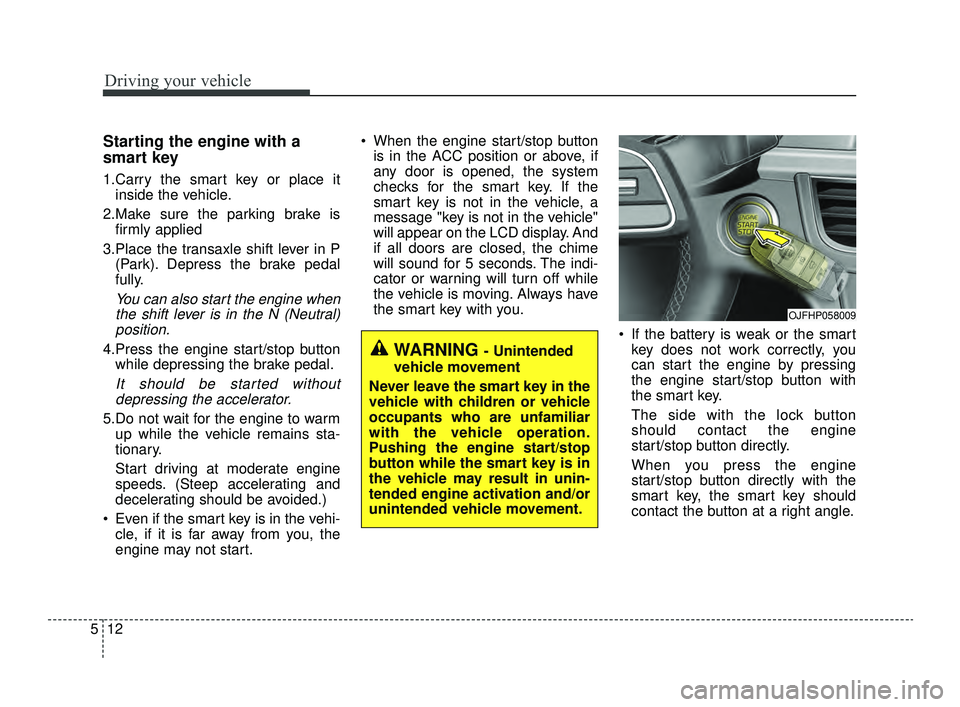
If the battery is weak or the smartkey does not work correctly, you
can start the engine by pressing
the engine start/stop button with
the smart key.
The side with the lock button
should contact the engine
start/stop button directly.
When you press the engine
start/stop button directly with the
smart key, the smart key should
contact the button at a right angle.
WARNING - Unintended
vehicle movement
Never leave the smart key in the
vehicle with children or vehicle
occupants who are unfamiliar
with the vehicle operation.
Pushing the engine start/stop
button while the smart key is in
the vehicle may result in unin-
tended engine activation and/or
unintended vehicle movement.
OJFHP058009
JFa PE USA 5.QXP 5/17/2018 6:09 PM Page 12
Page 271 of 577
519
Driving your vehicle
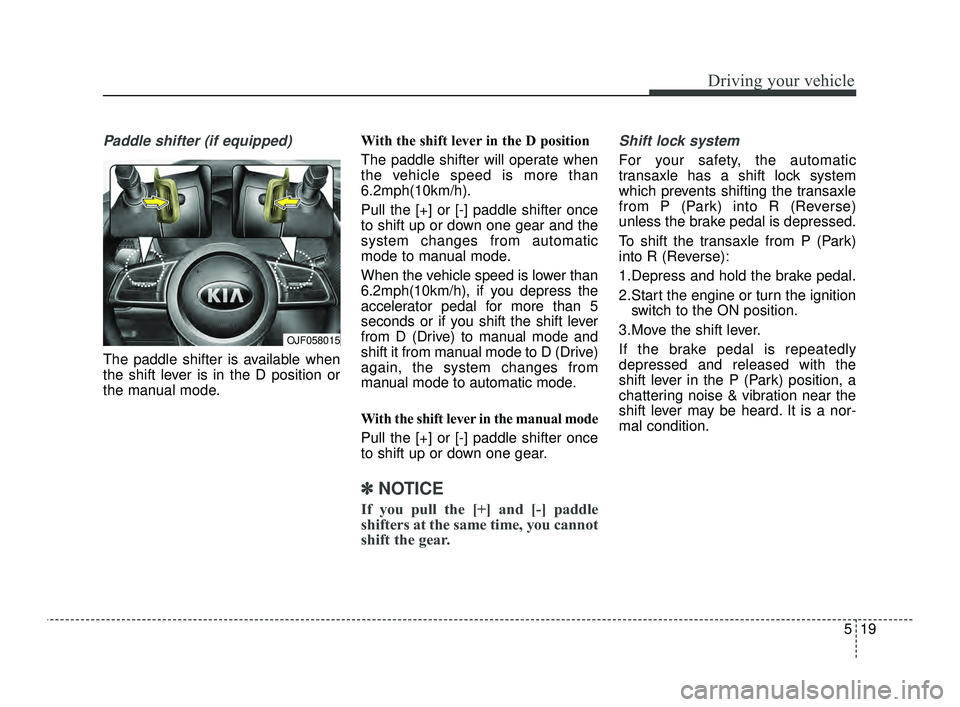
Paddle shifter (if equipped)
The paddle shifter is available when
the shift lever is in the D position or
the manual mode.With the shift lever in the D position
The paddle shifter will operate when
the vehicle speed is more than
6.2mph(10km/h).
Pull the [+] or [-] paddle shifter once
to shift up or down one gear and the
system changes from automatic
mode to manual mode.
When the vehicle speed is lower than
6.2mph(10km/h), if you depress the
accelerator pedal for more than 5
seconds or if you shift the shift lever
from D (Drive) to manual mode and
shift it from manual mode to D (Drive)
again, the system changes from
manual mode to automatic mode.
With the shift lever in the manual mode
Pull the [+] or [-] paddle shifter once
to shift up or down one gear.
✽ ✽
NOTICE
If you pull the [+] and [-] paddle
shifters at the same time, you cannot
shift the gear.
Shift lock system
For your safety, the automatic
transaxle has a shift lock system
which prevents shifting the transaxle
from P (Park) into R (Reverse)
unless the brake pedal is depressed.
To shift the transaxle from P (Park)
into R (Reverse):
1.Depress and hold the brake pedal.
2.Start the engine or turn the ignition
switch to the ON position.
3.Move the shift lever.
If the brake pedal is repeatedly
depressed and released with the
shift lever in the P (Park) position, a
chattering noise & vibration near the
shift lever may be heard. It is a nor-
mal condition.
OJF058015
JFa PE USA 5.QXP 5/17/2018 6:09 PM Page 19
Page 279 of 577
527
Driving your vehicle
Steep grade
Driving up hills or on steep grades:
To hold the vehicle on an inclineuse the foot brake or the parking
brake.
If the vehicle is held on a hill by applying the accelerator pedal or
by creeping forward with the brake
pedal dis-engaged, the clutch and
transmission may overheat which
can result in damage. At this time,
a warning message will appear on
the LCD display.
If the LCD warning is active, the foot brake must be applied.
Ignoring the warnings can lead to damage to the transmission. Transmission high temperature
Under certain conditions, such as
repeated stop-and-go launches on
steep grades, sudden take off or
acceleration, or other harsh driving
conditions, the transmission clutch
temperatures will increase exces-
sively. This could cause the clutch
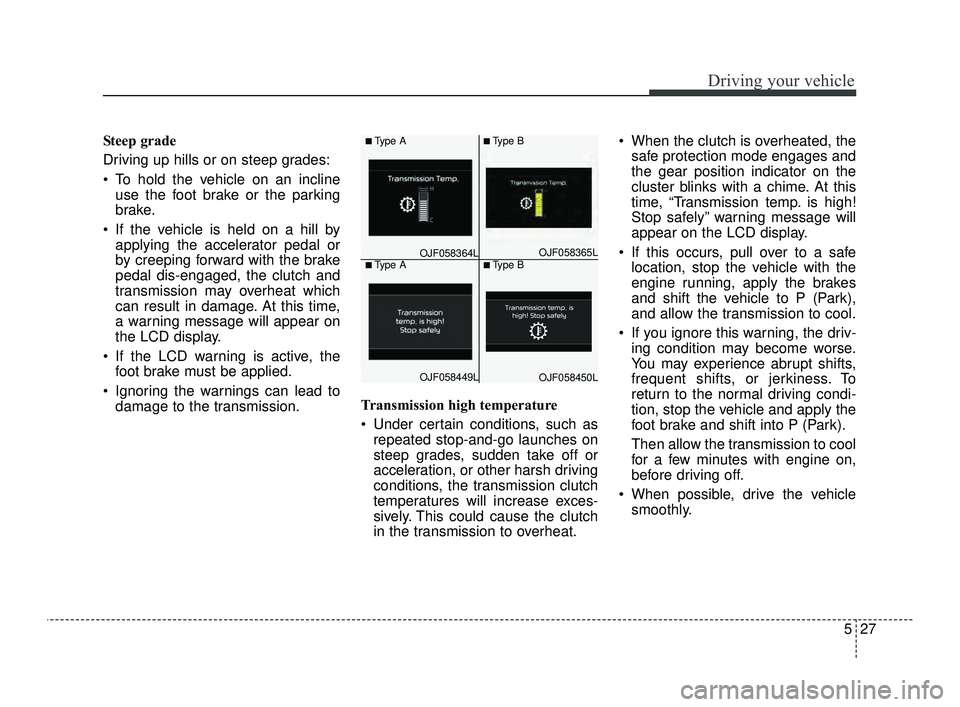
in the transmission to overheat. When the clutch is overheated, the
safe protection mode engages and
the gear position indicator on the
cluster blinks with a chime. At this
time, “Transmission temp. is high!
Stop safely” warning message will
appear on the LCD display.
If this occurs, pull over to a safe location, stop the vehicle with the
engine running, apply the brakes
and shift the vehicle to P (Park),
and allow the transmission to cool.
If you ignore this warning, the driv- ing condition may become worse.
You may experience abrupt shifts,
frequent shifts, or jerkiness. To
return to the normal driving condi-
tion, stop the vehicle and apply the
foot brake and shift into P (Park).
Then allow the transmission to cool
for a few minutes with engine on,
before driving off.
When possible, drive the vehicle smoothly.■Type A■Type B
OJF058365L■Type A■Type B
OJF058449LOJF058450L
OJF058364L
JFa PE USA 5.QXP 5/17/2018 6:10 PM Page 27
Page 283 of 577
531
Driving your vehicle
D (Drive)
This is the normal driving position.
The transmission will automatically
shift through a seven-gear
sequence, providing the best fuel
economy and power.
For extra power when passing anoth-
er vehicle or driving uphill depress
the accelerator pedal further until
you feel the transmission downshift
to a lower gear.✽ ✽NOTICE
Always make sure the vehicle is sta-
tionary, at a complete stop, before
selecting D (Drive).
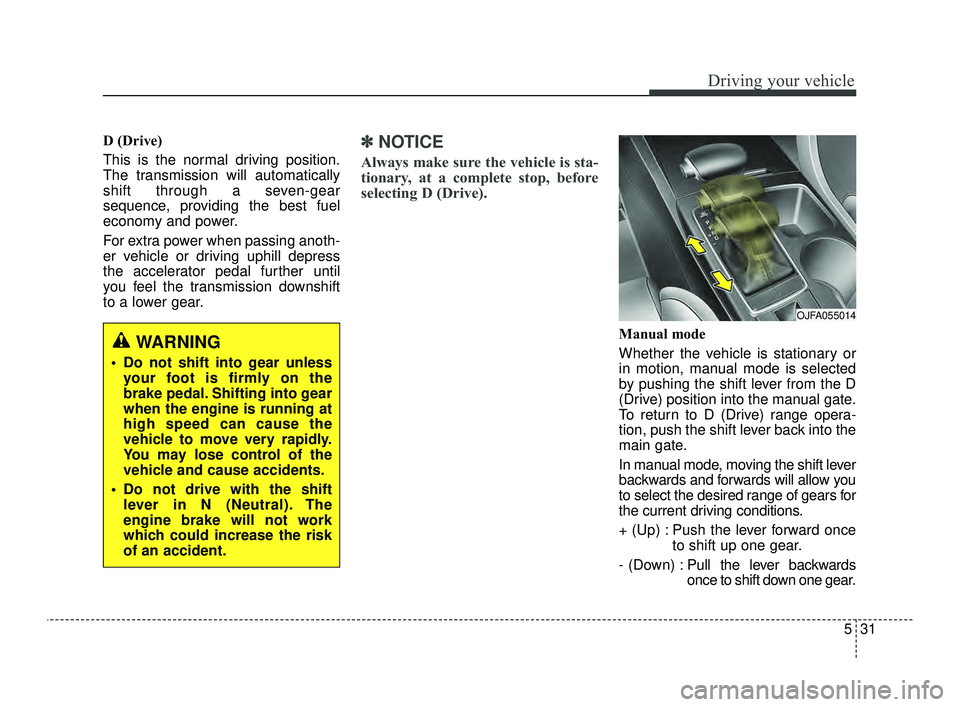
Manual mode
Whether the vehicle is stationary or
in motion, manual mode is selected
by pushing the shift lever from the D
(Drive) position into the manual gate.
To return to D (Drive) range opera-
tion, push the shift lever back into the
main gate.
In manual mode, moving the shift lever
backwards and forwards will allow you
to select the desired range of gears for
the current driving conditions.
+ (Up) : Push the lever forward once
to shift up one gear.
- (Down) : Pull the lever backwards
once to shift down one gear.
OJFA055014
WARNING
Do not shift into gear unless
your foot is firmly on the
brake pedal. Shifting into gear
when the engine is running at
high speed can cause the
vehicle to move very rapidly.
You may lose control of the
vehicle and cause accidents.
Do not drive with the shift lever in N (Neutral). The
engine brake will not work
which could increase the risk
of an accident.
JFa PE USA 5.QXP 5/17/2018 6:10 PM Page 31