fuel KIA OPTIMA 2019 Owner's Manual
[x] Cancel search | Manufacturer: KIA, Model Year: 2019, Model line: OPTIMA, Model: KIA OPTIMA 2019Pages: 577, PDF Size: 13.79 MB
Page 166 of 577
Features of your vehicle
76
4
Automatic reset
To make the average fuel economy
reset automatically whenever refuel-
ing, select the “Auto Reset” mode in
User Setting menu of the LCD display
(Refer to “LCD Display”).
OFF - You may set to default manu-
ally by using the trip switch reset but-
ton.
After ignition - The vehicle will auto- matically set to default once 4 hours
pass after the Ignition is in OFF.
After refueling - After refueling more than 6 liters and driving over 1km/h,
the vehicle will reset to default auto-
matically.
✽ ✽ NOTICE
For a more accurate calculation of
the average fuel economy, the vehi-
cle must be continuously driven
more than 10 seconds and 0.03 miles
(50 meters).
Instant Fuel Economy (2)
This mode displays the instant fuel
economy during the last few sec-
onds when the vehicle speed is
more than 5 MPH (8 km/h).
- Fuel economy range: 0 ~ 50 MPGor 0 ~ 30 L/100km
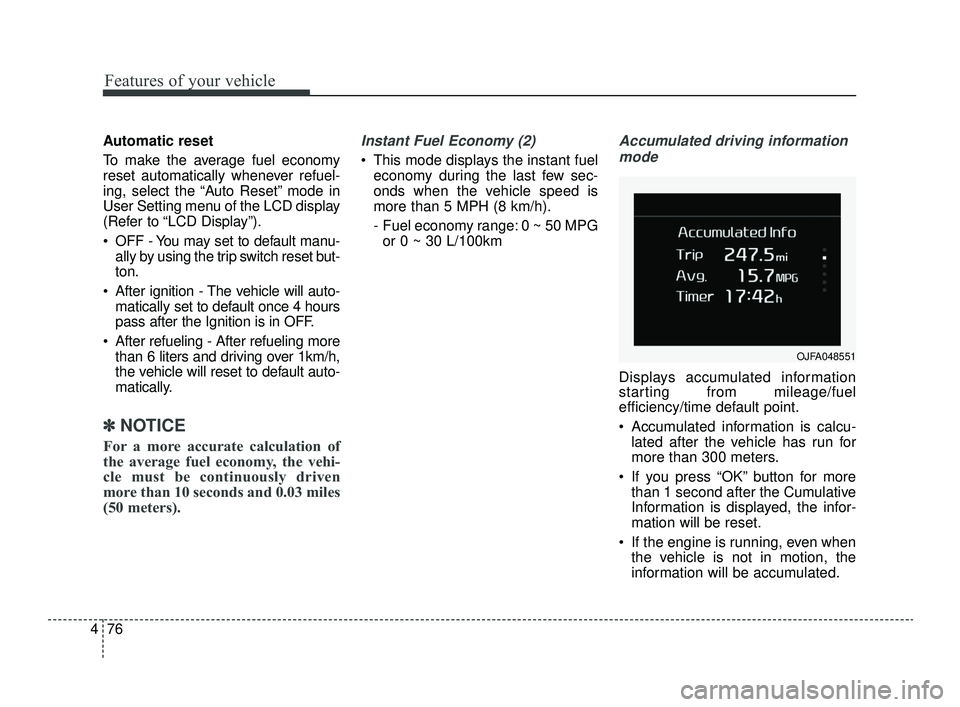
Accumulated driving information
mode
Displays accumulated information
starting from mileage/fuel
efficiency/time default point.
Accumulated information is calcu- lated after the vehicle has run for
more than 300 meters.
If you press “OK” button for more than 1 second after the Cumulative
Information is displayed, the infor-
mation will be reset.
If the engine is running, even when the vehicle is not in motion, the
information will be accumulated.
OJFA048551
JFa PE USA 4.qxp 5/18/2018 7:22 PM Page 76
Page 167 of 577
477
Features of your vehicle
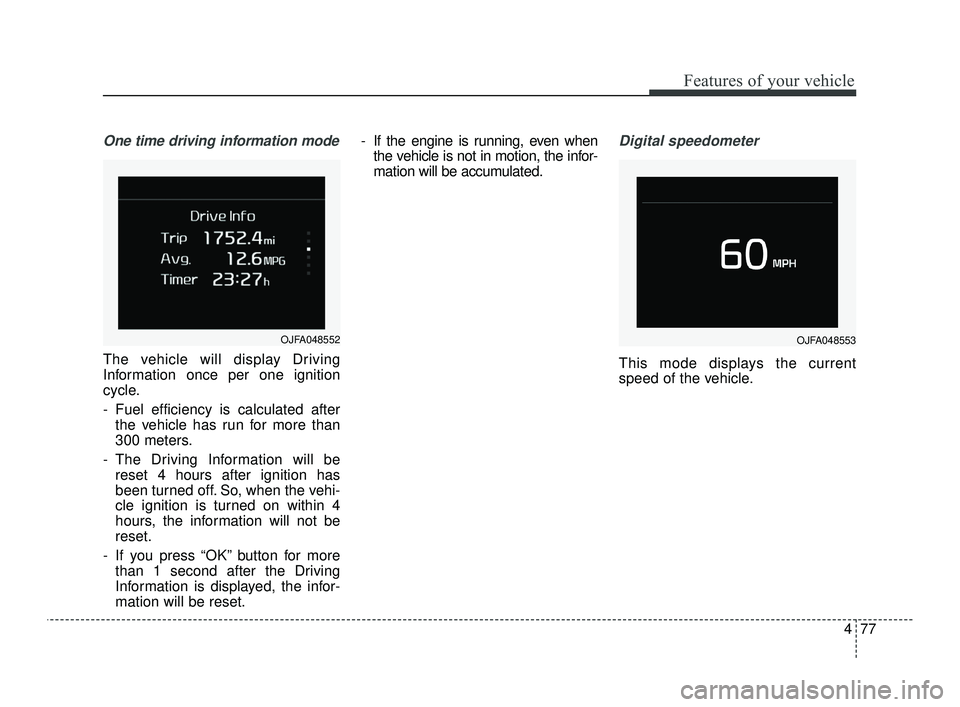
One time driving information mode
The vehicle will display Driving
Information once per one ignition
cycle.
- Fuel efficiency is calculated afterthe vehicle has run for more than
300 meters.
- The Driving Information will be reset 4 hours after ignition has
been turned off. So, when the vehi-
cle ignition is turned on within 4
hours, the information will not be
reset.
- If you press “OK” button for more than 1 second after the Driving
Information is displayed, the infor-
mation will be reset. - If the engine is running, even when
the vehicle is not in motion, the infor-
mation will be accumulated.
Digital speedometer
This mode displays the current
speed of the vehicle.
OJFA048552OJFA048553
JFa PE USA 4.qxp 5/18/2018 7:22 PM Page 77
Page 173 of 577

483
Features of your vehicle
Low Fuel
This warning message illuminatesif the fuel tank is nearly empty.
- When the low fuel level warning
light is illuminated, add fuel as
soon as possible.
- When the trip computer displays “--- mile (or km)” as range.
Check high beam assist system
(if equipped)
This warning message illuminates if the high beam assist system has
a malfunction. In this case, have
your vehicle inspected by an
authorized Kia dealer.
Check headlight
This warning message illuminatesif there is a malfunction (burned-
out bulb except LED lamp or circuit
malfunction) with the headlamp. In
this case, have your vehicle
inspected by an authorized Kia
dealer.
✽ ✽ NOTICE
• When replacing the bulb, use the
same wattage bulb.
For more information, refer to
“BULB WATTAGE” in chapter 8.
• If different wattage bulb is equipped with the vehicle, this
warning message is not displayed.
Check Forward Collision-
avoidance Assist system (if equipped)
This warning message illuminates if there is a malfunction with the
Forward Collision-avoidance Assist
(FCA) system. In this case, have
your vehicle inspected by an
authorized Kia dealer.
❈ For more details, refer to “Forward
Collision-avoidance Assist(FCA)
system” in chapter 5.
JFa PE USA 4.qxp 5/18/2018 7:22 PM Page 83
Page 179 of 577
489
Features of your vehicle
Charging SystemWarning Light
This warning light illuminates:
Once you set the ignition switch or Engine Start/Stop Button to the ON
position.
- It remains on until the engine isstarted.
When there is a malfunction with either the alternator or electrical
charging system.
If there is a malfunction with either
the alternator or electrical charging
system:
1. Drive carefully to the nearest safe location and stop your vehicle.
2. Turn the engine off and check the alternator drive belt for looseness
or breakage.
If the belt is adjusted properly,
there may be a problem in the
electrical charging system.
In this case, have your vehicle
inspected by an authorized Kia
dealer as soon as possible.
Engine Oil Pressure Warning Light
This warning light illuminates:
Once you set the ignition switch or Engine Start/Stop Button to the ON
position.
- It remains on until the engine isstarted.
When the engine oil pressure is low.
If the engine oil pressure is low:
1. Drive carefully to the nearest safe location and stop your vehicle.
2. Turn the engine off and check the engine oil level (For more details,
refer to “Engine Oil” in chapter 7).
If the level is low, add oil as
required.
If the warning light remains on
after adding oil or if oil is not avail-
able, have your vehicle inspected
by an authorized Kia dealer as
soon as possible.
CAUTION - Catalytic
Converter Damage
If the Malfunction Indicator Lamp (MIL) illuminates, poten-tial catalytic converter damageis possible which could result inloss of engine power.
In this case, have your vehicleinspected by an authorized Kiadealer as soon as possible.
CAUTION - Malfunction
Indicator Lamp (MIL)
Driving with the Malfunction Indicator Lamp (MIL) on maycause damage to the emissioncontrol systems which couldaffect drivability and/or fueleconomy.
JFa PE USA 4.qxp 5/18/2018 7:22 PM Page 89
Page 269 of 577
517
Driving your vehicle
✽ ✽NOTICE
After the ignition switch has been
turned off, the EPB (Electronic
Parking Brake) cannot be released.
For EPB (Electronic Parking Brake)
equipped vehicles with [AUTO
HOLD] function used while driving, if
the ignition button has been turned
[OFF], the EPB (Electronic Parking
Brake) will be engaged automatical-
ly. Therefore, [AUTO HOLD] function
should be turned off before the igni-
tion button is turned off. D (Drive)
This is the normal forward driving
position. The transaxle will automati-
cally shift through a 6-gear
sequence, providing the best fuel
economy and power.
For extra power when passing anoth-
er vehicle or climbing grades,
depress the accelerator fully, at
which time the transaxle will auto-
matically downshift to the next lower
gear.
CAUTION- Starter
If the engine stalls while the
vehicle is in motion, do notattempt to move the shift leverto the P (Park) position. If thetraffic and road conditions per-mit, you may put the shift leverin the N (Neutral) position whilethe vehicle is still moving andpress the engine start/stop but-ton in an attempt to restart theengine.
JFa PE USA 5.QXP 5/17/2018 6:09 PM Page 17
Page 275 of 577
523
Driving your vehicle
The dual clutch transmission canbe thought of as an automatically
shifting manual transaxle. It gives
the driving feel of a manual
transaxle, yet provides the ease of
a fully automatic transaxle.
When D (Drive) is selected, the transmission will automatically shift
through the gears similar to a con-
ventional automatic transaxle.
Unlike a traditional automatic
transaxle, the gear shifting can
sometimes be felt and heard as the
actuators engage the clutches and
the gears are selected.
The dual clutch transmission adopts a dry-type dual clutch,
which is different from the torque
converter of the automatic
transaxle. It shows better accelera-
tion performance and increased
fuel efficiency while driving but ini-
tial launch might be little bit slower
than the automatic transaxle. As a result, gear shifts are some-
times more noticeable than a con-
ventional automatic transmission
and a light vibration during launch-
ing can be felt as the transmission
speed is matched with the engine
speed. This is a normal condition of
the dual clutch transmission.
The dry-type clutch transfers torque more directly and provides a direct-
drive feeling which may feel differ-
ent from a conventional automatic
transaxle with a torque converter.
This may be more noticeable when
launching the vehicle from a stop or
when traveling at low, stop-and-go
vehicle speeds.
When rapidly accelerating at a low vehicle speed, the engine rpm may
increase depending on the vehicle’s
driving condition.
For smooth launch uphill, press down the accelerator pedal
smoothly depending on the current
conditions.(Continued)
Unexpected and sudden vehi-
cle movement can occur if
these precautions are not fol-
lowed.
Do not use engine braking (rapidly shifting from a high
gear to lower gear) on slip-
pery roads. The vehicle may
slip causing an accident.
CAUTION
To avoid damage to your transmission, do not try toaccelerate with the shift leverin R (Reverse) or any forwardgear position with the brakeengaged.
When stopped on a slope, do not hold the vehicle with accel-erator pedal. Engage the serv-ice brake or the parking brake.
JFa PE USA 5.QXP 5/17/2018 6:09 PM Page 23
Page 283 of 577
531
Driving your vehicle
D (Drive)
This is the normal driving position.
The transmission will automatically
shift through a seven-gear
sequence, providing the best fuel
economy and power.
For extra power when passing anoth-
er vehicle or driving uphill depress
the accelerator pedal further until
you feel the transmission downshift
to a lower gear.✽ ✽NOTICE
Always make sure the vehicle is sta-
tionary, at a complete stop, before
selecting D (Drive).
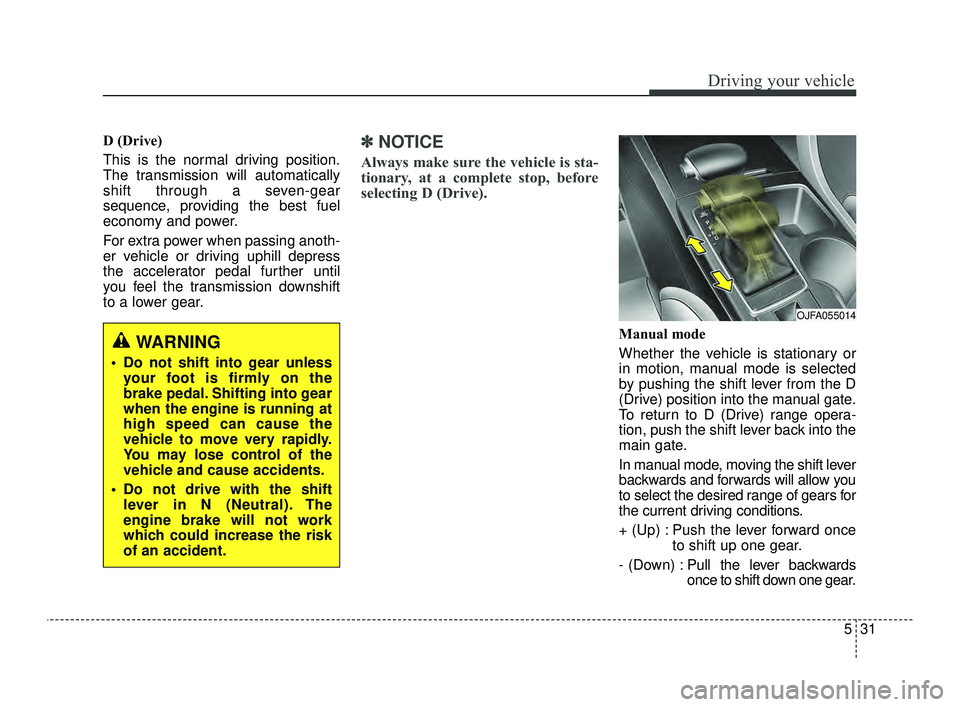
Manual mode
Whether the vehicle is stationary or
in motion, manual mode is selected
by pushing the shift lever from the D
(Drive) position into the manual gate.
To return to D (Drive) range opera-
tion, push the shift lever back into the
main gate.
In manual mode, moving the shift lever
backwards and forwards will allow you
to select the desired range of gears for
the current driving conditions.
+ (Up) : Push the lever forward once
to shift up one gear.
- (Down) : Pull the lever backwards
once to shift down one gear.
OJFA055014
WARNING
Do not shift into gear unless
your foot is firmly on the
brake pedal. Shifting into gear
when the engine is running at
high speed can cause the
vehicle to move very rapidly.
You may lose control of the
vehicle and cause accidents.
Do not drive with the shift lever in N (Neutral). The
engine brake will not work
which could increase the risk
of an accident.
JFa PE USA 5.QXP 5/17/2018 6:10 PM Page 31
Page 365 of 577
5113
Driving your vehicle
ECO mode (Active ECO)
Active ECO helps improve
fuel efficiency by control-
ling certain engine and
transaxle system operat-
ing parameters. Fuel effi-
ciency depends on the
driver's driving habit and
road condition.
button is pressed and
the ECO mode is select-
ed, the ECO indicator
(green) will illuminate to
show that the Active
ECO is operating.
activated, it does not
turn off even though the
engine is restarted
again. To turn off the
system, press the
DRIVE MODE button
again. When Active ECO is activated:
The acceleration may slightly be
reduced even though you depress
the accelerator fully.
The air conditioner performance may be limited
The shift pattern of the automatic transaxle may change.
The engine noise may get louder.
The above situations are normal
conditions when the Active Eco
System is activated to improve fuel
efficiency. Limitation of Active ECO opera-
tion:
If the following conditions occur while
Active ECO is operating, the system
operation is limited even though
there is no change in the ECO indi-
cator.
When the coolant temperature is
low:
The system will be limited until
engine performance becomes nor-
mal.
When driving up a hill: The system will be limited to gain
power when driving uphill because
the engine torque is restricted.
When using manual mode: The system will be limited accord-
ing to the shift location.
When the accelerator pedal is deeply depressed for a few sec-
onds:
The system will be limited, judging
that the driver wants to speed up.
ECO
JFa PE USA 5.QXP 5/17/2018 6:14 PM Page 113
Page 366 of 577
Driving your vehicle
114
5
SPORT mode
SPORT mode focuses on
dynamic driving by auto-
matically adjusting the
steering wheel, engine
and transaxle system.
button is pressed and
the SPORT mode is
selected, the SPORT
indicator (yellow) will illu-
minate.
is activated, and the
engine start/stop button
is turned off and on it will
change to NORMAL
mode. To turn on the
SPORT mode press
DRIVE MODE button
again.
ed:
- While holding vehicle speed, it maintains the
gear and RPM for some
time even though the
accelerator pedal is not
depressed.
- Up-shifting is delayed.
✽ ✽
NOTICE
In Sport drive mode, the fuel effi-
ciency may decrease.
SPORT
JFa PE USA 5.QXP 5/17/2018 6:14 PM Page 114
Page 391 of 577
5139
Driving your vehicle
Your vehicle's fuel economy depends
mainly on your style of driving, where
you drive and when you drive.
Each of these factors affects how
many miles (kilometers) you can get
from a gallon (liter) of fuel. To operate
your vehicle as economically as pos-
sible, use the following driving sug-
gestions to help save money in both
fuel and repairs:
Drive smoothly. Accelerate at amoderate rate. Don't make "jack-
rabbit" starts or full-throttle shifts
and maintain a steady cruising
speed. Don't race between stop-
lights. Try to adjust your speed to
the traffic so you don't have to
change speeds unnecessarily.
Avoid heavy traffic whenever pos-
sible. Always maintain a safe dis-
tance from other vehicles so you
can avoid unnecessary braking.
This also reduces brake wear.
Drive at a moderate speed. The faster you drive, the more fuel your
vehicle uses. Driving at a moderate
speed, especially on the highway,
is one of the most effective ways to
reduce fuel consumption. Don't "ride" the brake pedal. This
can increase fuel consumption and
also increase wear on these com-
ponents. In addition, driving with
your foot resting on the brake pedal
may cause the brakes to overheat,
which reduces their effectiveness
and may lead to more serious con-
sequences.
Take care of your tires. Keep them inflated to the recommended pres-
sure. Incorrect inflation, either too
much or too little, results in unnec-
essary tire wear. Check the tire
pressures at least once a month.
Be sure that the wheels are aligned correctly. Improper align-
ment can result from hitting curbs
or driving too fast over irregular
surfaces. Poor alignment causes
faster tire wear and may also result
in other problems as well as
greater fuel consumption. Keep your vehicle in good condi-
tion. For better fuel economy and
reduced maintenance costs, main-
tain your vehicle in accordance
with the maintenance schedule in
chapter 8. If you drive your vehicle
in severe conditions, more frequent
maintenance is required (see
chapter 8 for details).
Keep your vehicle clean. For maxi- mum service, your vehicle should
be kept clean and free of corrosive
materials. It is especially important
that mud, dirt, ice, etc. not be
allowed to accumulate on the
underside of the vehicle. This extra
weight can result in increased fuel
consumption and also contribute to
corrosion.
Travel lightly. Don't carry unneces- sary weight in your vehicle. Weight
reduces fuel economy.
Don't let the engine idle longer than necessary. If you are waiting
(and not in traffic), turn off your
engine and restart only when
you're ready to go.
ECONOMICAL OPERATION
JFa PE USA 5.QXP 5/17/2018 6:16 PM Page 139