ignition KIA Optima Hybrid 2011 3.G Owner's Guide
[x] Cancel search | Manufacturer: KIA, Model Year: 2011, Model line: Optima Hybrid, Model: KIA Optima Hybrid 2011 3.GPages: 394, PDF Size: 8.63 MB
Page 92 of 394
421
Features of your vehicle
In cold and wet climates, power windows
may not work properly due to freezing
conditions.
Power windows
The ignition switch must be in the ON
position for power windows to operate.
Each door has a power window switch
that controls the door’s window. The driv-
er has a power window lock switch which
can block the operation of passenger
windows.
The power windows can be operated for
approximately 30 seconds after the igni-
tion key is removed or turned to the ACC
or LOCK position. However, if the front
doors are opened, the power windows
cannot be operated even within the 30
second period.
✽ ✽NOTICE
While driving with the rear windows
down or with the sunroof (if equipped)
in an open (or partially open) position,
your vehicle may demonstrate a wind
buffeting or pulsation noise. This noise
is a normal occurrence and can be
reduced or eliminated by taking the fol-
lowing actions. If the noise occurs with
one or both of the rear windows down,
partially lower both front windows
approximately one inch. If you experi-
ence the noise with the sunroof open,
slightly reduce the size of the sunroof
opening.
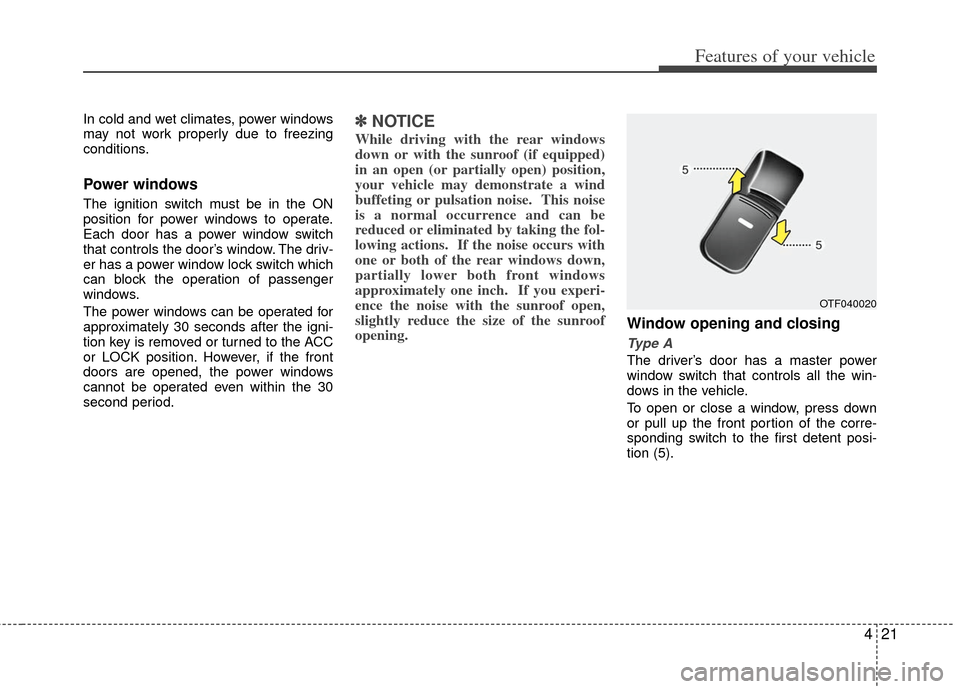
Window opening and closing
Type A
The driver’s door has a master power
window switch that controls all the win-
dows in the vehicle.
To open or close a window, press down
or pull up the front portion of the corre-
sponding switch to the first detent posi-
tion (5).
OTF040020
Page 93 of 394
Features of your vehicle
22
4
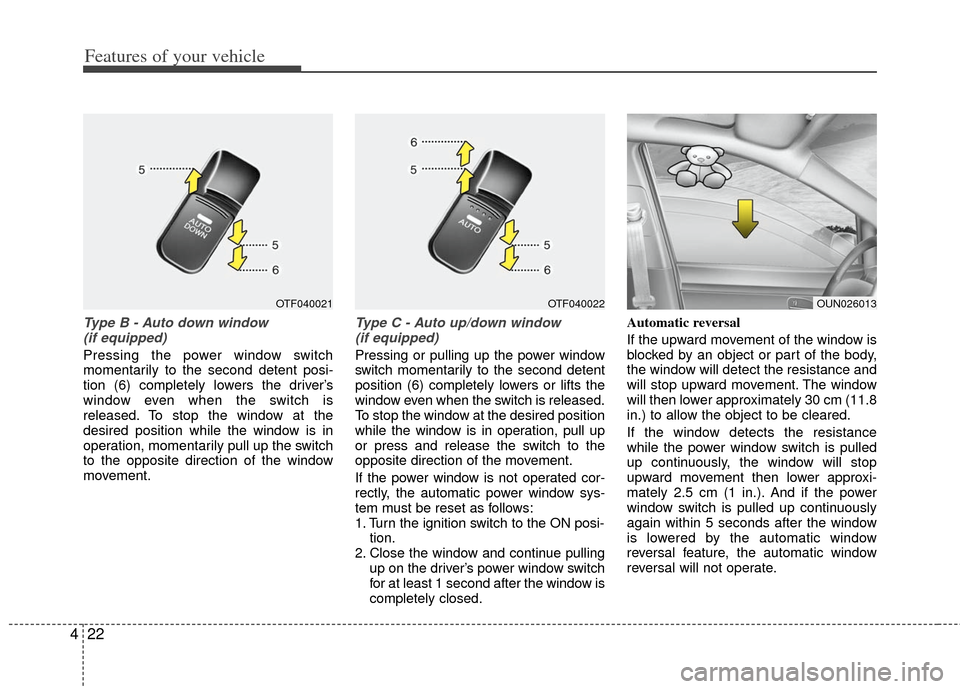
Type B - Auto down window
(if equipped)
Pressing the power window switch
momentarily to the second detent posi-
tion (6) completely lowers the driver’s
window even when the switch is
released. To stop the window at the
desired position while the window is in
operation, momentarily pull up the switch
to the opposite direction of the window
movement.
Type C - Auto up/down window (if equipped)
Pressing or pulling up the power window
switch momentarily to the second detent
position (6) completely lowers or lifts the
window even when the switch is released.
To stop the window at the desired position
while the window is in operation, pull up
or press and release the switch to the
opposite direction of the movement.
If the power window is not operated cor-
rectly, the automatic power window sys-
tem must be reset as follows:
1. Turn the ignition switch to the ON posi- tion.
2. Close the window and continue pulling up on the driver’s power window switch
for at least 1 second after the window is
completely closed. Automatic reversal
If the upward movement of the window is
blocked by an object or part of the body,
the window will detect the resistance and
will stop upward movement. The window
will then lower approximately 30 cm (11.8
in.) to allow the object to be cleared.
If the window detects the resistance
while the power window switch is pulled
up continuously, the window will stop
upward movement then lower approxi-
mately 2.5 cm (1 in.). And if the power
window switch is pulled up continuously
again within 5 seconds after the window
is lowered by the automatic window
reversal feature, the automatic window
reversal will not operate.
OUN026013OTF040021OTF040022
Page 99 of 394
Features of your vehicle
28
4
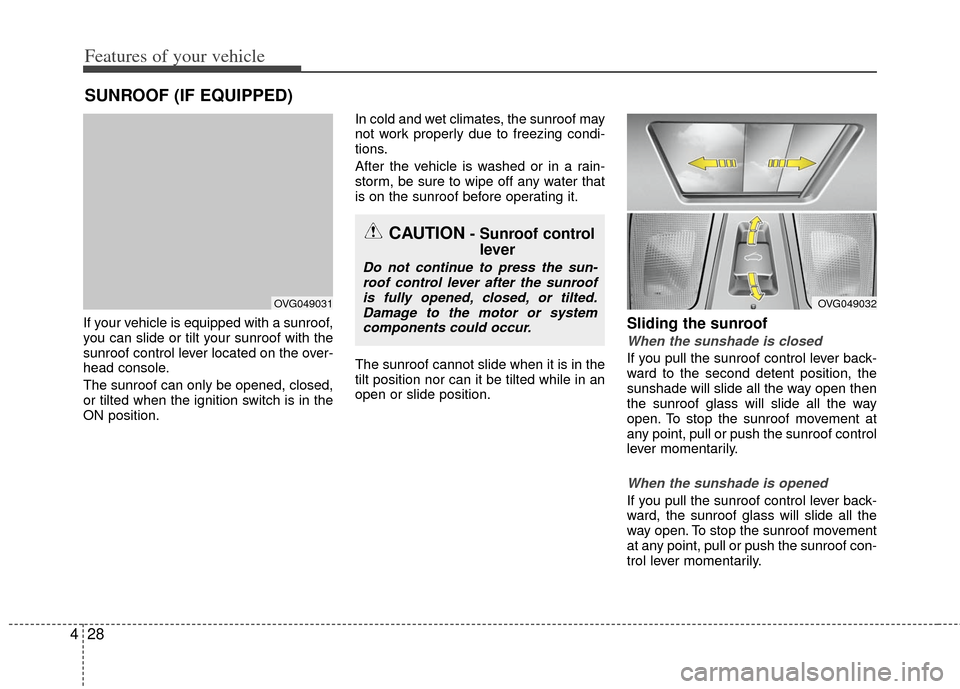
If your vehicle is equipped with a sunroof,
you can slide or tilt your sunroof with the
sunroof control lever located on the over-
head console.
The sunroof can only be opened, closed,
or tilted when the ignition switch is in the
ON position. In cold and wet climates, the sunroof may
not work properly due to freezing condi-
tions.
After the vehicle is washed or in a rain-
storm, be sure to wipe off any water that
is on the sunroof before operating it.
The sunroof cannot slide when it is in the
tilt position nor can it be tilted while in an
open or slide position.Sliding the sunroof
When the sunshade is closed
If you pull the sunroof control lever back-
ward to the second detent position, the
sunshade will slide all the way open then
the sunroof glass will slide all the way
open. To stop the sunroof movement at
any point, pull or push the sunroof control
lever momentarily.
When the sunshade is opened
If you pull the sunroof control lever back-
ward, the sunroof glass will slide all the
way open. To stop the sunroof movement
at any point, pull or push the sunroof con-
trol lever momentarily.
SUNROOF (IF EQUIPPED)
CAUTION- Sunroof control
lever
Do not continue to press the sun-
roof control lever after the sunroofis fully opened, closed, or tilted.Damage to the motor or systemcomponents could occur.
OVG049031OVG049032
Page 102 of 394
431
Features of your vehicle
Resetting the sunroof
Whenever the vehicle battery is discon-
nected or discharged, or related fuse is
blown, you must reset your sunroof sys-
tem as follows:
1. Turn the ignition switch to the ON posi-tion and close the sunroof completely.
2. Release the control lever.
3. Push and hold the control lever forward (for more than 10 seconds) until the
sunroof tilts and slightly moves. Then,
release the lever.
4. Push the sunroof control lever forward in the direction of close until the sun-
roof operates as follows;
SUNSHADE OPEN → TILT OPEN →
SLIDE OPEN → SLIDE CLOSE →
SUNSHADE CLOSE
Then, release the control lever.
When this is complete, the sunroof
system is reset. ❈
For more detailed information, contact
an authorized Kia dealer.
✽ ✽
NOTICE
If the sunroof is not reset when the vehi-
cle battery is disconnected or dis-
charged, or related fuse is blown, the
sunroof may operate improperly.
Page 103 of 394
Features of your vehicle
32
4
A driver position memory system is pro-
vided to store and recall the driver seat
position with a simple button operation.
By saving the desired position into the
system memory, different drivers can
reposition the driver seat based upon
their driving preference. If the battery is
disconnected, the position memory will
be lost and the driving position should be
restored in the system.
Storing positions into memory
using the buttons on the door
Storing driver’s seat positions
1. Shift the shift lever into P while the
ignition switch is ON.
2. Adjust the driver seat to position com- fortable for the driver.
3. Press SET button on the control panel. The system will beep once.
4. Press one of the memory buttons (1 or 2) within 5 seconds after pressing the
SET button. The system will beep
twice when memory has been suc-
cessfully stored.
DRIVER POSITION MEMORY SYSTEM (IF EQUIPPED)
OTF040035
WARNING
Never attempt to operate the driver
position memory system while the
vehicle is moving.
This could result in loss of control,
and an accident causing death,
serious injury, or property damage.
Page 104 of 394
433
Features of your vehicle
Recalling positions from memory
1. Shift the shift lever into P while theignition switch is ON.
2. To recall the position in memory, press the desired memory button (1 or 2).
The system will beep once, then the
driver seat will automatically adjust to
the stored positions.
Adjusting the control switch for the driver
seat while the system is recalling the
stored position will cause the movement
to stop and move in the direction that the
control switch is moved.
Easy access function
(if equipped)
With the shift lever in the P position, the
system will move the driver's seat auto-
matically as follows.
- It will move the driver’s seat rearward when the engine start/stop button is
turned to the OFF position or the smart
key is removed from the smart key hold-
er.
- It will move the driver’s seat forward when the engine start/stop button is
turned to the ACC or START position or
the smart key is inserted into the smart
key holder.
WARNING
Use caution when recalling adjust-
ment memory while sitting in the
vehicle. Push the seat position con-
trol knob to the desired position
immediately if the seat moves too
far in any direction.
Page 105 of 394
Features of your vehicle
34
4
Electric power steering
Power steering uses the motor to assist
you in steering the vehicle. If the engine
is off or if the power steering system
becomes inoperative, the vehicle may
still be steered, but it will require
increased steering effort.
The motor driven power steering is con-
trolled by the power steering control unit
which senses the steering wheel torque
and vehicle speed to command the
motor.
The steering wheel becomes heavier as
the vehicle’s speed increases and
becomes lighter as the vehicle’s speed
decreases for better control of the steer-
ing wheel.
Should you notice any change in the
effort required to steer during normal
vehicle operation, have the power steer-
ing checked by an authorized Kia dealer.
✽ ✽
NOTICE
The following symptoms may occur dur-
ing normal vehicle operation:
• The steering effort is high immediate-
ly after turning the ignition switch on.
This happens as the system performs
the EPS system diagnostics. When the
diagnostics is completed, the steering
wheel will return to its normal condi-
tion.
• A click noise may be heard from the EPS relay after the ignition switch is
turned to the ON or LOCK position.
• Motor noise may be heard when the vehicle is at a stop or at a low driving
speed.
• The steering effort increases if the steering wheel is rotated continuously
when the vehicle is not in motion.
However, after a few minutes, it will
return to its normal conditions.
• When you operate the steering wheel in low temperature, abnormal noise
could occur. If temperature rises, the
noise will disappear. This is a normal
condition.
If the Electric Power Steering System
does not operate normally, the warning
light will illuminate on the instrument
cluster. The steering wheel may become
difficult to control or operate abnormally.
Take your vehicle to an authorized Kia
dealer and have the vehicle checked as
soon as possible.
STEERING WHEEL
Page 107 of 394
Features of your vehicle
36
4
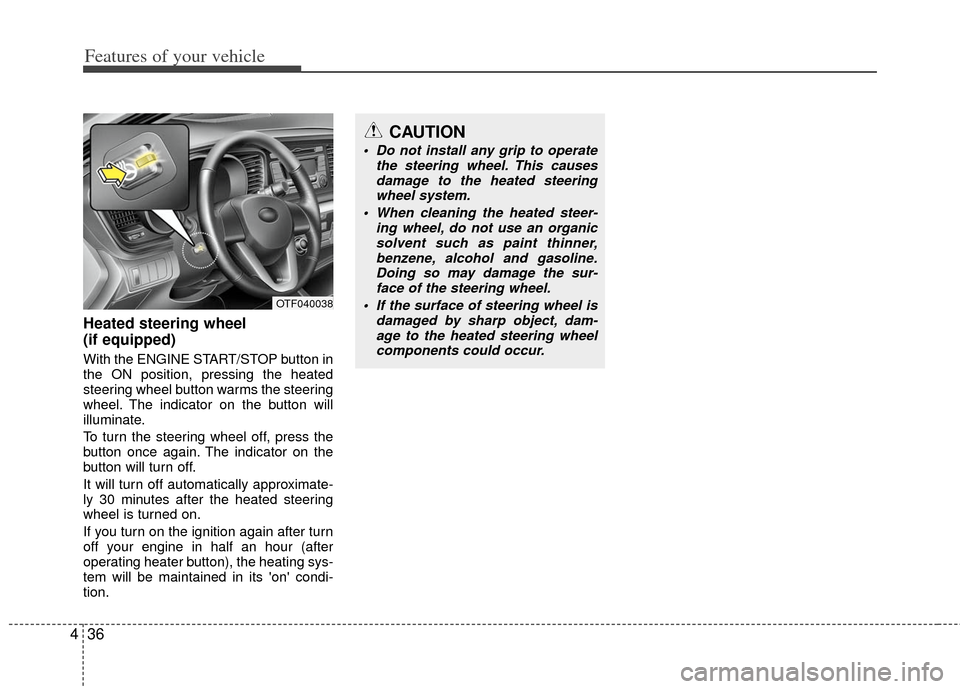
Heated steering wheel
(if equipped)
With the ENGINE START/STOP button in
the ON position, pressing the heated
steering wheel button warms the steering
wheel. The indicator on the button will
illuminate.
To turn the steering wheel off, press the
button once again. The indicator on the
button will turn off.
It will turn off automatically approximate-
ly 30 minutes after the heated steering
wheel is turned on.
If you turn on the ignition again after turn
off your engine in half an hour (after
operating heater button), the heating sys-
tem will be maintained in its 'on' condi-
tion.
CAUTION
Do not install any grip to operate
the steering wheel. This causesdamage to the heated steeringwheel system.
When cleaning the heated steer- ing wheel, do not use an organicsolvent such as paint thinner, benzene, alcohol and gasoline.Doing so may damage the sur-face of the steering wheel.
If the surface of steering wheel is damaged by sharp object, dam-age to the heated steering wheelcomponents could occur.
OTF040038
Page 110 of 394
439
Features of your vehicle
Z-Nav™ Compass Display
The NVS™ Mirror in your vehicle is also
equipped with a Z-Nav™ Compass that
shows the vehicle Compass heading in
the Display Window using the 8 basic
cardinal headings (N, NE, E, SE, etc.).
Compass function
The Compass can be turned ON and
OFF and will remember the last state
when the ignition is cycled. To turn the
display feature ON/OFF:
1. Press and release the button toturn the display feature OFF.
2. Press and release the button again to turn the display back ON.
Additional options can be set with press
and hold sequences of the button and
are detailed below.
There is a difference between magnetic
north and true north. The compass in the
mirror can compensate for this difference
when it knows the Magnetic Zone in
which it is operating. This is set either by
the dealer or by the user. The operating
Zone Numbers for North America are
shown in the figure on the following sec-
tion.
B520C05NF
Page 115 of 394
Features of your vehicle
44
4
Outside rearview mirror
Be sure to adjust the mirror angles
before driving.
Your vehicle is equipped with both left-
hand and right-hand outside rearview
mirrors. The mirrors can be adjusted
remotely with the remote switch (if
equipped). The mirror heads can be fold-
ed to prevent damage during an auto-
matic car wash or when passing through
a narrow street. The right outside rearview mirror is con-
vex. Objects seen in the mirror are closer
than they appear.
Use your interior rearview mirror or direct
observation to determine the actual dis-
tance of following vehicles when chang-
ing lanes.
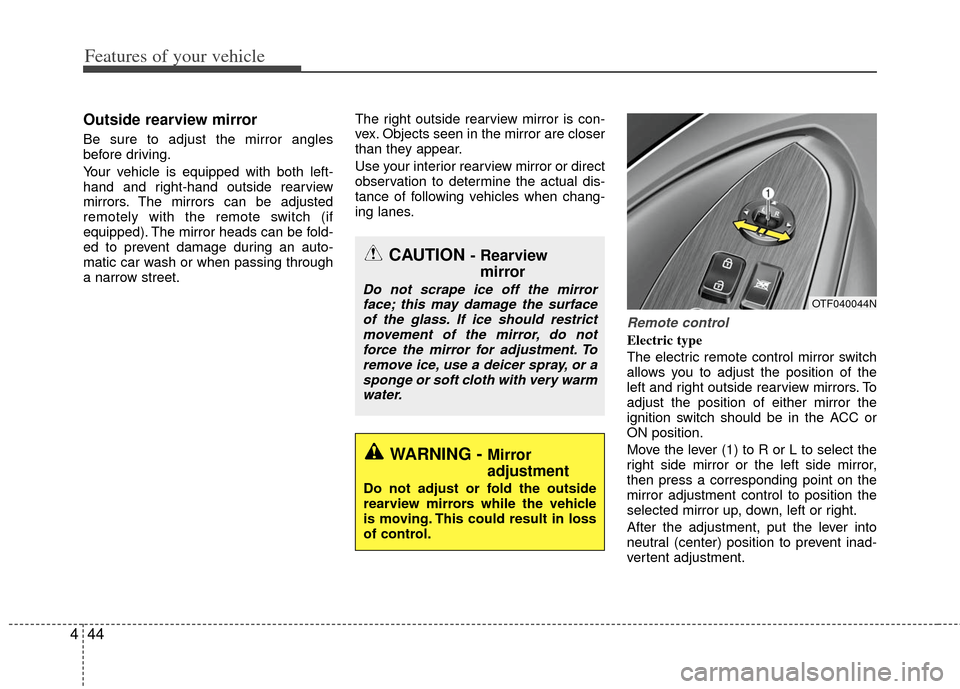
Remote control
Electric type
The electric remote control mirror switch
allows you to adjust the position of the
left and right outside rearview mirrors. To
adjust the position of either mirror the
ignition switch should be in the ACC or
ON position.
Move the lever (1) to R or L to select the
right side mirror or the left side mirror,
then press a corresponding point on the
mirror adjustment control to position the
selected mirror up, down, left or right.
After the adjustment, put the lever into
neutral (center) position to prevent inad-
vertent adjustment.
CAUTION - Rearview
mirror
Do not scrape ice off the mirror
face; this may damage the surfaceof the glass. If ice should restrictmovement of the mirror, do not force the mirror for adjustment. Toremove ice, use a deicer spray, or asponge or soft cloth with very warmwater.
WARNING - Mirror
adjustment
Do not adjust or fold the outside
rearview mirrors while the vehicle
is moving. This could result in loss
of control.
OTF040044N