key KIA Optima Hybrid 2012 3.G User Guide
[x] Cancel search | Manufacturer: KIA, Model Year: 2012, Model line: Optima Hybrid, Model: KIA Optima Hybrid 2012 3.GPages: 394, PDF Size: 8.63 MB
Page 81 of 394
Features of your vehicle
10
4
The theft-alarm system by the key can be
activated by an authorized Kia dealer.
If you want this feature, consult an
authorized Kia dealer.
Do not arm the system until all pas-
sengers have left the vehicle. If the
system is armed while a passenger(s)
remains in the vehicle, the alarm may
be activated when the remaining pas-
senger(s) leaves the vehicle. If any
door (or tailgate) or engine hood is
opened within 30 seconds after the
system enters the armed stage, the
system will be disarmed to prevent
unnecessary alarm.Theft-alarm stage
The alarm will be activated if any of the
following occurs while the system is
armed.
A front or rear door is opened without
using the transmitter (or smart key).
The trunk is opened without using the transmitter (or smart key).
The engine hood is opened.
The horn will sound and the hazard
warning lights will blink continuously for
approximately 27 seconds. To turn off the
system, unlock the doors with the trans-
mitter (or smart key).
Disarmed stage
The system will be disarmed when:
Smart key
- The door unlock button is pressed.
- The button of the front outside door is pressed while carrying the smart key.
- The engine is started. (within 3 sec- onds)
After the doors are unlocked, the hazard
warning lights will blink twice to indicate
that the system is disarmed.
After pressing the unlock button, if any
door (or trunk) is not opened within 30
seconds, the system will be rearmed.
Page 82 of 394
411
Features of your vehicle
Avoid trying to start the engine whilethe alarm is activated. The vehicle
starting motor is disabled during the
theft-alarm stage.
If the system is not disarmed with the
transmitter, insert the key into the igni-
tion switch, turn the ignition switch to
the ON position and wait for 30 sec-
onds. Then the system will be dis-
armed.
If you lose your keys, consult your authorized Kia dealer.
If the system is not disarmed with the transmitter, insert the key into the igni-
tion switch and start the engine. Then
the system will be disarmed.
If you lose your keys, consult your authorized Kia dealer.
Page 83 of 394
Features of your vehicle
12
4
DOOR LOCKS
Operating door locks from out-
side the vehicle
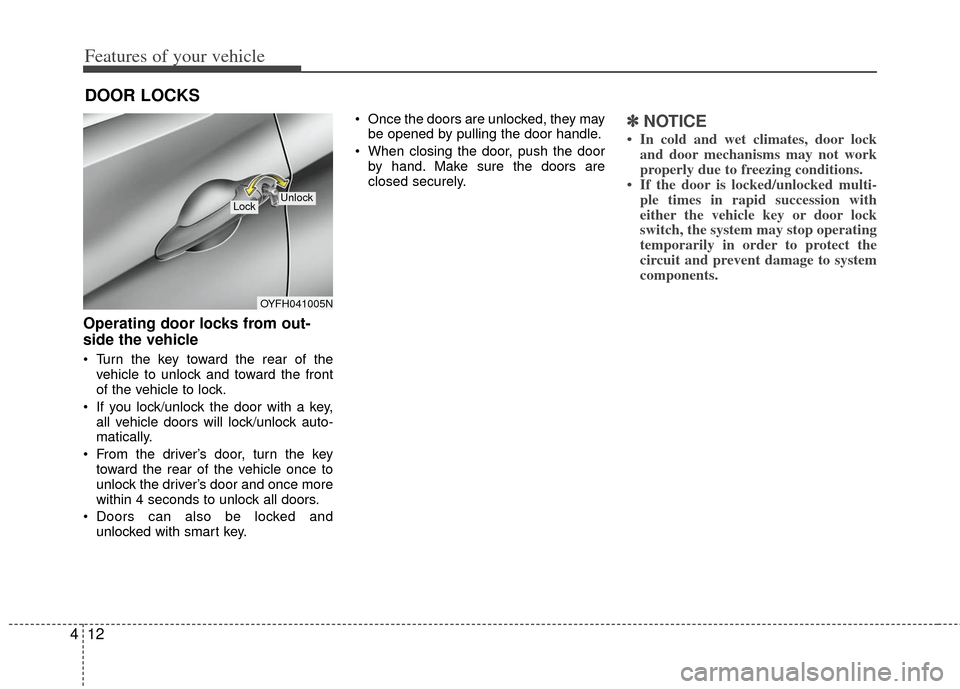
Turn the key toward the rear of the
vehicle to unlock and toward the front
of the vehicle to lock.
If you lock/unlock the door with a key, all vehicle doors will lock/unlock auto-
matically.
From the driver’s door, turn the key toward the rear of the vehicle once to
unlock the driver’s door and once more
within 4 seconds to unlock all doors.
Doors can also be locked and unlocked with smart key. Once the doors are unlocked, they may
be opened by pulling the door handle.
When closing the door, push the door by hand. Make sure the doors are
closed securely.
✽ ✽ NOTICE
• In cold and wet climates, door lock
and door mechanisms may not work
properly due to freezing conditions.
• If the door is locked/unlocked multi- ple times in rapid succession with
either the vehicle key or door lock
switch, the system may stop operating
temporarily in order to protect the
circuit and prevent damage to system
components.
OYFH041005N
LockUnlock
Page 84 of 394
413
Features of your vehicle
Operating door locks from inside
the vehicle
With the door lock button
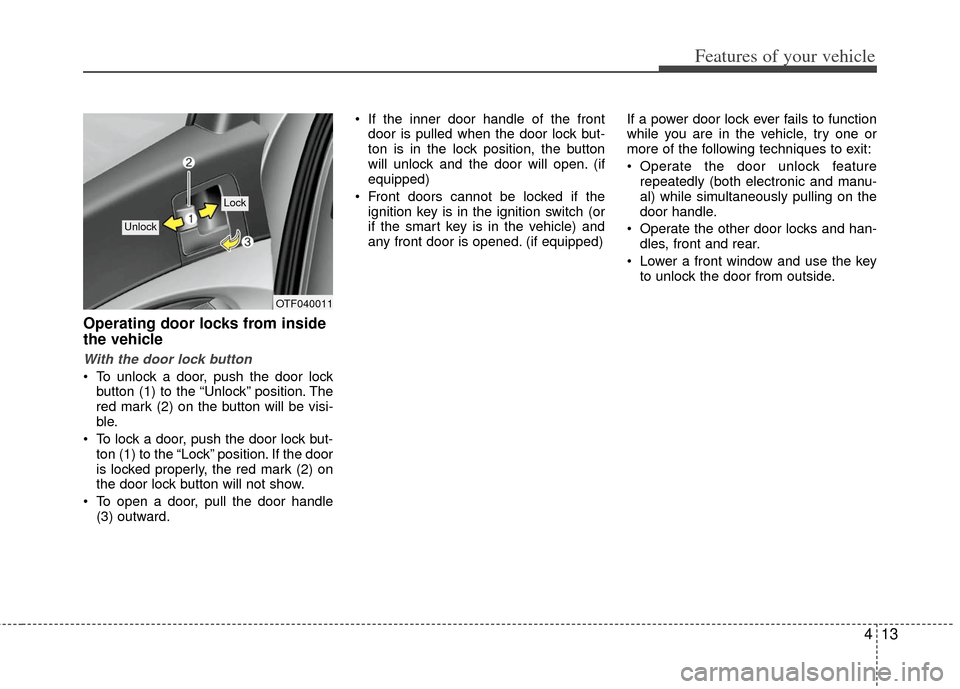
To unlock a door, push the door lockbutton (1) to the “Unlock” position. The
red mark (2) on the button will be visi-
ble.
To lock a door, push the door lock but- ton (1) to the “Lock” position. If the door
is locked properly, the red mark (2) on
the door lock button will not show.
To open a door, pull the door handle (3) outward. If the inner door handle of the front
door is pulled when the door lock but-
ton is in the lock position, the button
will unlock and the door will open. (if
equipped)
Front doors cannot be locked if the ignition key is in the ignition switch (or
if the smart key is in the vehicle) and
any front door is opened. (if equipped) If a power door lock ever fails to function
while you are in the vehicle, try one or
more of the following techniques to exit:
Operate the door unlock feature
repeatedly (both electronic and manu-
al) while simultaneously pulling on the
door handle.
Operate the other door locks and han- dles, front and rear.
Lower a front window and use the key to unlock the door from outside.
OTF040011
Lock
Unlock
Page 85 of 394
Features of your vehicle
14
4
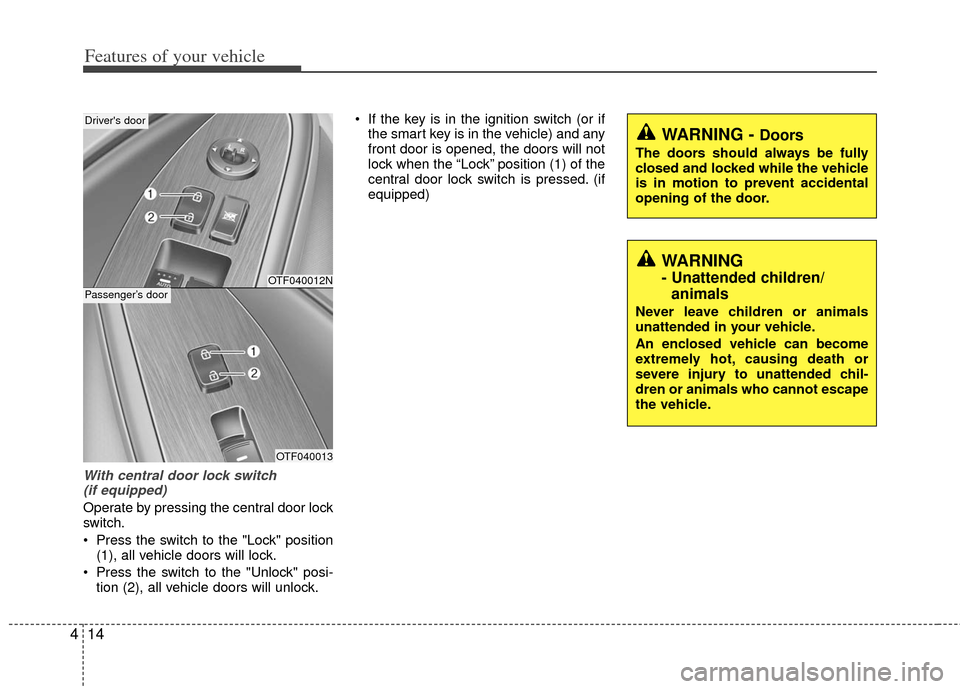
With central door lock switch
(if equipped)
Operate by pressing the central door lock
switch.
Press the switch to the "Lock" position (1), all vehicle doors will lock.
Press the switch to the "Unlock" posi- tion (2), all vehicle doors will unlock. If the key is in the ignition switch (or if
the smart key is in the vehicle) and any
front door is opened, the doors will not
lock when the “Lock” position (1) of the
central door lock switch is pressed. (if
equipped)
WARNING
- Unattended children/animals
Never leave children or animals
unattended in your vehicle.
An enclosed vehicle can become
extremely hot, causing death or
severe injury to unattended chil-
dren or animals who cannot escape
the vehicle.
WARNING - Doors
The doors should always be fully
closed and locked while the vehicle
is in motion to prevent accidental
opening of the door.
OTF040012N
OTF040013
Driver's door
Passenger’s door
Page 86 of 394
415
Features of your vehicle
Impact sensing door unlock sys-
tem (if equipped)
All doors will automatically unlock when
an impact causes the air bags to deploy.
Auto door lock/unlock feature
(if equipped)
All doors will automatically lock whenthe transaxle shift lever is shifted out of
P (Park).
All doors will automatically unlock when the transaxle shift lever is shifted
into P (Park).
Speed sensing door lock system
(if equipped)
All doors will be automatically locked
after the vehicle speed exceeds 15 km/h.
And all doors will be automatically
unlocked when you turn the engine off or
when you remove the ignition key. (if
equipped) An authorized Kia dealer can activate or
deactivate some auto door lock/ unlock
features as follows;
Auto door unlock by using the driver's
door lock button
Auto door lock/unlock by shifting the transaxle shift lever out of P (Park) or
into P (Park)
Auto door unlock when the smart key is removed from the smart key holder.
If you want to activate or deactivate a
door lock/unlock feature, refer to the
"vehicle setting" in this chapter.
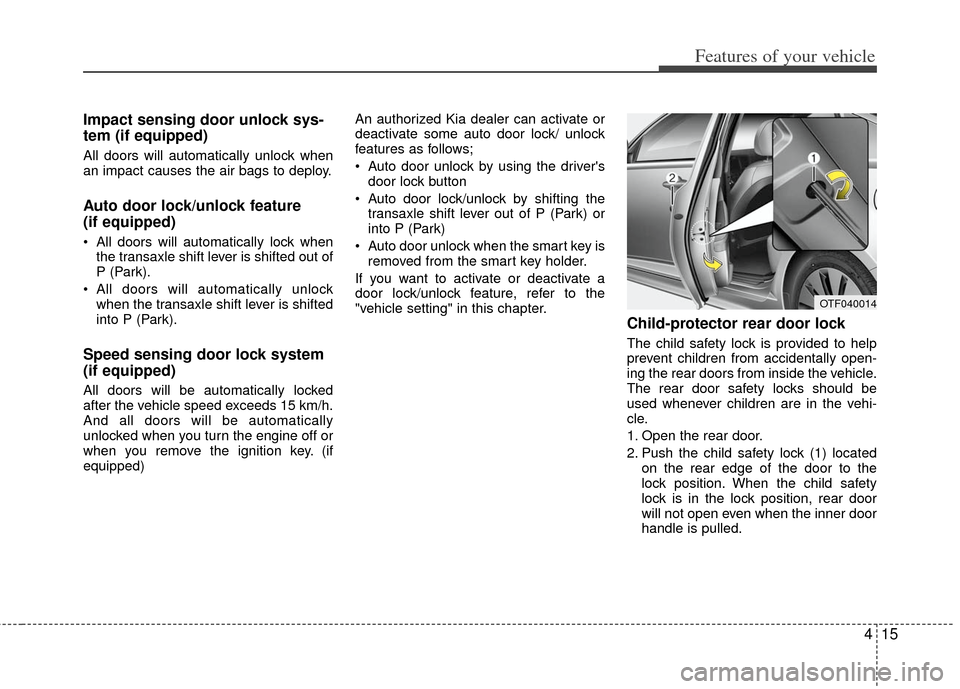
Child-protector rear door lock
The child safety lock is provided to help
prevent children from accidentally open-
ing the rear doors from inside the vehicle.
The rear door safety locks should be
used whenever children are in the vehi-
cle.
1. Open the rear door.
2. Push the child safety lock (1) located on the rear edge of the door to the
lock position. When the child safety
lock is in the lock position, rear door
will not open even when the inner door
handle is pulled.
OTF040014
Page 88 of 394
417
Features of your vehicle
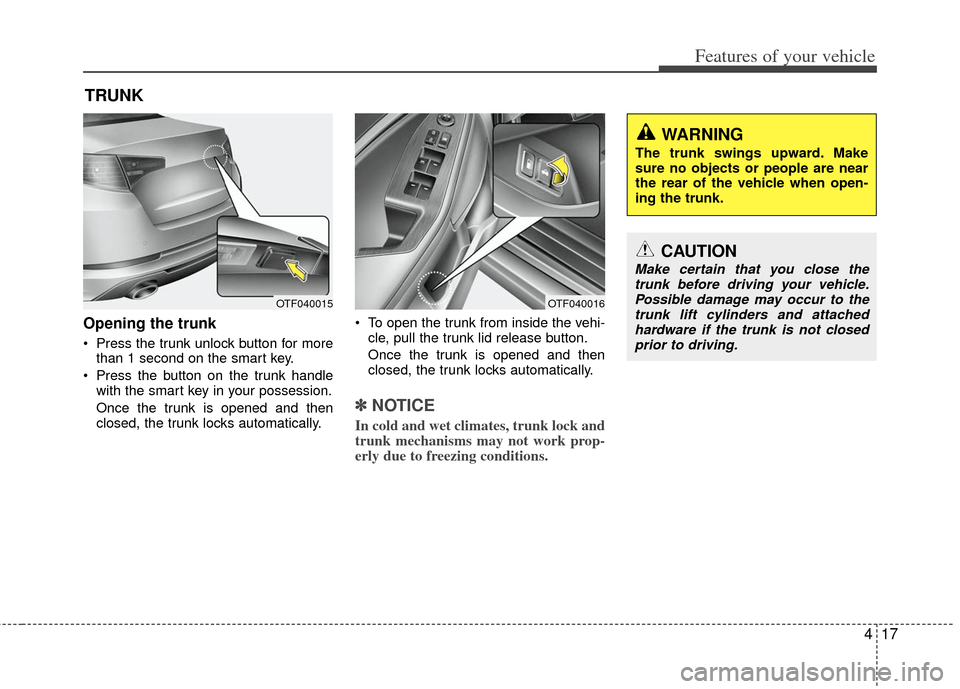
Opening the trunk
Press the trunk unlock button for morethan 1 second on the smart key.
Press the button on the trunk handle with the smart key in your possession.
Once the trunk is opened and then
closed, the trunk locks automatically. To open the trunk from inside the vehi-
cle, pull the trunk lid release button.
Once the trunk is opened and then
closed, the trunk locks automatically.
✽ ✽ NOTICE
In cold and wet climates, trunk lock and
trunk mechanisms may not work prop-
erly due to freezing conditions.
TRUNK
OTF040016OTF040015
CAUTION
Make certain that you close the
trunk before driving your vehicle.Possible damage may occur to thetrunk lift cylinders and attached hardware if the trunk is not closedprior to driving.
WARNING
The trunk swings upward. Make
sure no objects or people are near
the rear of the vehicle when open-
ing the trunk.
Page 89 of 394
Features of your vehicle
18
4
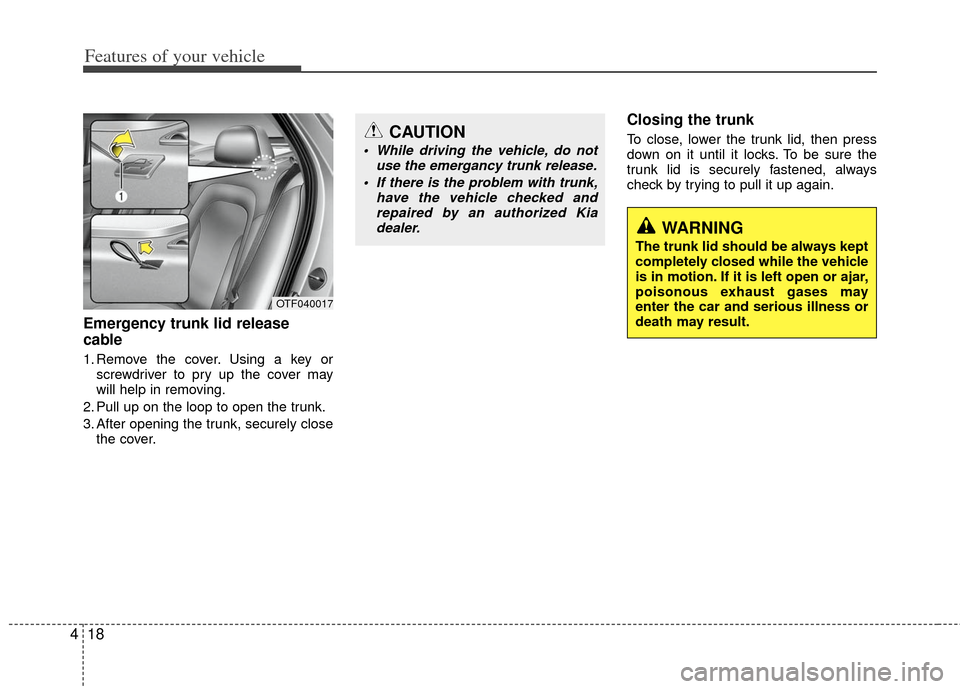
Emergency trunk lid release
cable
1. Remove the cover. Using a key or
screwdriver to pry up the cover may
will help in removing.
2. Pull up on the loop to open the trunk.
3. After opening the trunk, securely close the cover.
Closing the trunk
To close, lower the trunk lid, then press
down on it until it locks. To be sure the
trunk lid is securely fastened, always
check by trying to pull it up again.
OTF040017
CAUTION
• While driving the vehicle, do not use the emergancy trunk release.
If there is the problem with trunk, have the vehicle checked andrepaired by an authorized Kiadealer.
WARNING
The trunk lid should be always kept
completely closed while the vehicle
is in motion. If it is left open or ajar,
poisonous exhaust gases may
enter the car and serious illness or
death may result.
Page 92 of 394
421
Features of your vehicle
In cold and wet climates, power windows
may not work properly due to freezing
conditions.
Power windows
The ignition switch must be in the ON
position for power windows to operate.
Each door has a power window switch
that controls the door’s window. The driv-
er has a power window lock switch which
can block the operation of passenger
windows.
The power windows can be operated for
approximately 30 seconds after the igni-
tion key is removed or turned to the ACC
or LOCK position. However, if the front
doors are opened, the power windows
cannot be operated even within the 30
second period.
✽ ✽NOTICE
While driving with the rear windows
down or with the sunroof (if equipped)
in an open (or partially open) position,
your vehicle may demonstrate a wind
buffeting or pulsation noise. This noise
is a normal occurrence and can be
reduced or eliminated by taking the fol-
lowing actions. If the noise occurs with
one or both of the rear windows down,
partially lower both front windows
approximately one inch. If you experi-
ence the noise with the sunroof open,
slightly reduce the size of the sunroof
opening.
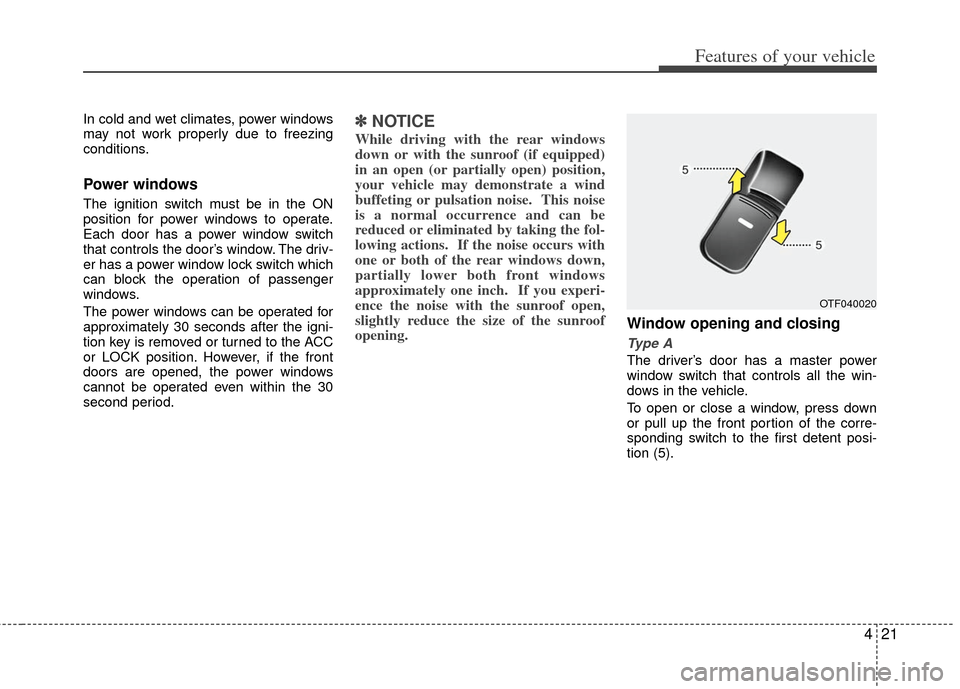
Window opening and closing
Type A
The driver’s door has a master power
window switch that controls all the win-
dows in the vehicle.
To open or close a window, press down
or pull up the front portion of the corre-
sponding switch to the first detent posi-
tion (5).
OTF040020
Page 104 of 394
433
Features of your vehicle
Recalling positions from memory
1. Shift the shift lever into P while theignition switch is ON.
2. To recall the position in memory, press the desired memory button (1 or 2).
The system will beep once, then the
driver seat will automatically adjust to
the stored positions.
Adjusting the control switch for the driver
seat while the system is recalling the
stored position will cause the movement
to stop and move in the direction that the
control switch is moved.
Easy access function
(if equipped)
With the shift lever in the P position, the
system will move the driver's seat auto-
matically as follows.
- It will move the driver’s seat rearward when the engine start/stop button is
turned to the OFF position or the smart
key is removed from the smart key hold-
er.
- It will move the driver’s seat forward when the engine start/stop button is
turned to the ACC or START position or
the smart key is inserted into the smart
key holder.
WARNING
Use caution when recalling adjust-
ment memory while sitting in the
vehicle. Push the seat position con-
trol knob to the desired position
immediately if the seat moves too
far in any direction.