reset KIA Optima Hybrid 2016 4.G Owner's Guide
[x] Cancel search | Manufacturer: KIA, Model Year: 2016, Model line: Optima Hybrid, Model: KIA Optima Hybrid 2016 4.GPages: 466, PDF Size: 14.92 MB
Page 252 of 466
4177
Features of your vehicle
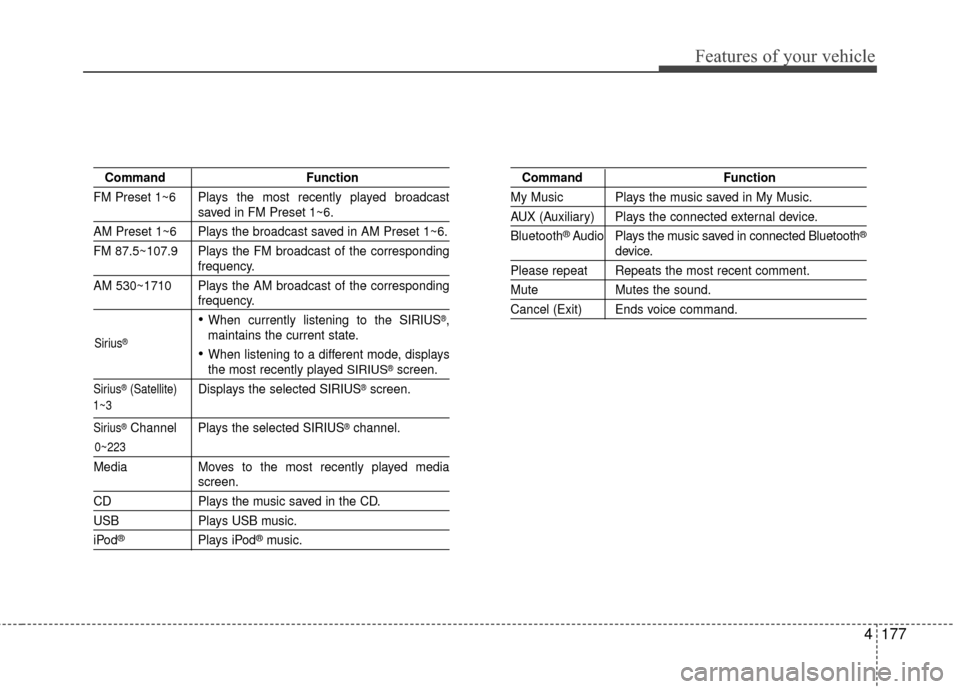
CommandFunction
FM Preset 1~6 Plays the most recently played broadcast
saved in FM Preset 1~6.
AM Preset 1~6 Plays the broadcast saved in AM Preset 1~6.
FM 87.5~107.9 Plays the FM broadcast of the corresponding
frequency.
AM 530~1710 Plays the AM broadcast of the corresponding
frequency.
When currently listening to the SIRIUS®,
maintains the current state.
When listening to a different mode, displaysthe most recently played SIRIUS®screen.
Sirius®(Satellite) Displays the selected SIRIUS®screen.
Sirius®Channel Plays the selected SIRIUS®channel.
Media Moves to the most recently played mediascreen.
CD Plays the music saved in the CD.
USBPlays USB music.
iPod®Plays iPod®music.
Command Function
My Music Plays the music saved in My Music.
AUX (Auxiliary) Plays the connected external device.
Bluetooth
®Audio Plays the music saved in connected Bluetooth®
device.
Please repeat Repeats the most recent comment.
Mute Mutes the sound.
Cancel (Exit) Ends voice command.
0~223
1~3 Sirius
®
Page 253 of 466
Features of your vehicle
178
4
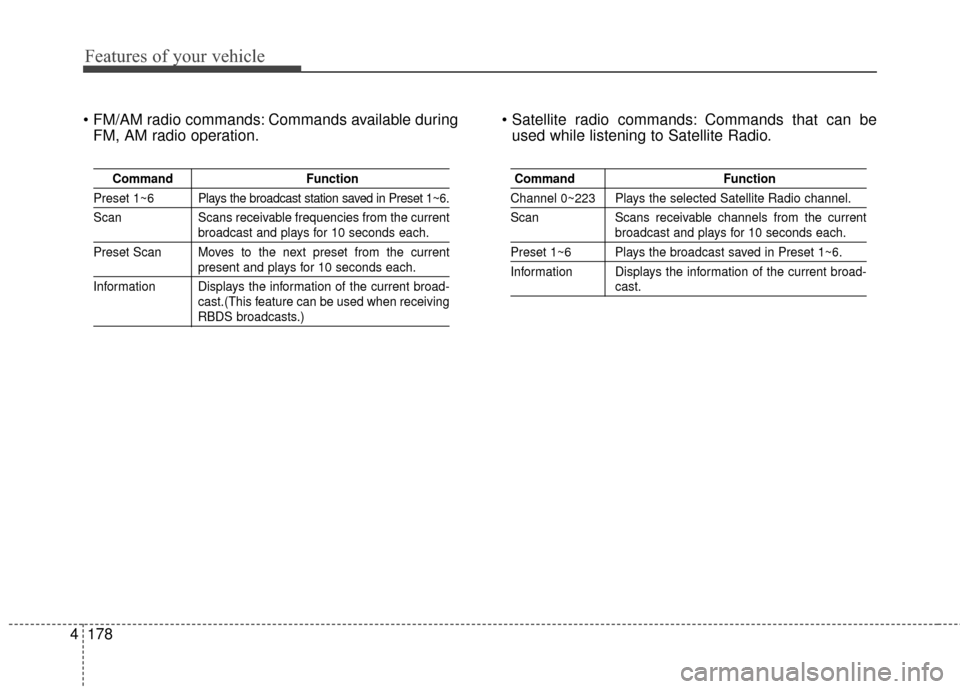
Commands available during
FM, AM radio operation. Commands that can be
used while listening to Satellite Radio.
Command Function
Preset 1~6 Plays the broadcast station saved in Preset 1~6.
Scan Scans receivable frequencies from the current
broadcast and plays for 10 seconds each.
Preset Scan Moves to the next preset from the current
present and plays for 10 seconds each.
Information Displays the information of the current broad- cast.(This feature can be used when receiving
RBDS broadcasts.)
Command Function
Channel 0~223 Plays the selected Satellite Radio channel.
Scan Scans receivable channels from the current
broadcast and plays for 10 seconds each.
Preset 1~6 Plays the broadcast saved in Preset 1~6.
Information Displays the information of the current broad-
cast.
Page 289 of 466
533
Driving your vehicle
To temporarily accelerate with
the cruise control on:
If you want to speed up temporarily
when the cruise control is on,
depress the accelerator pedal.
Increased speed will not interfere
with the cruise control operation or
change the set speed.
To return to the set speed, take your
foot off the accelerator.
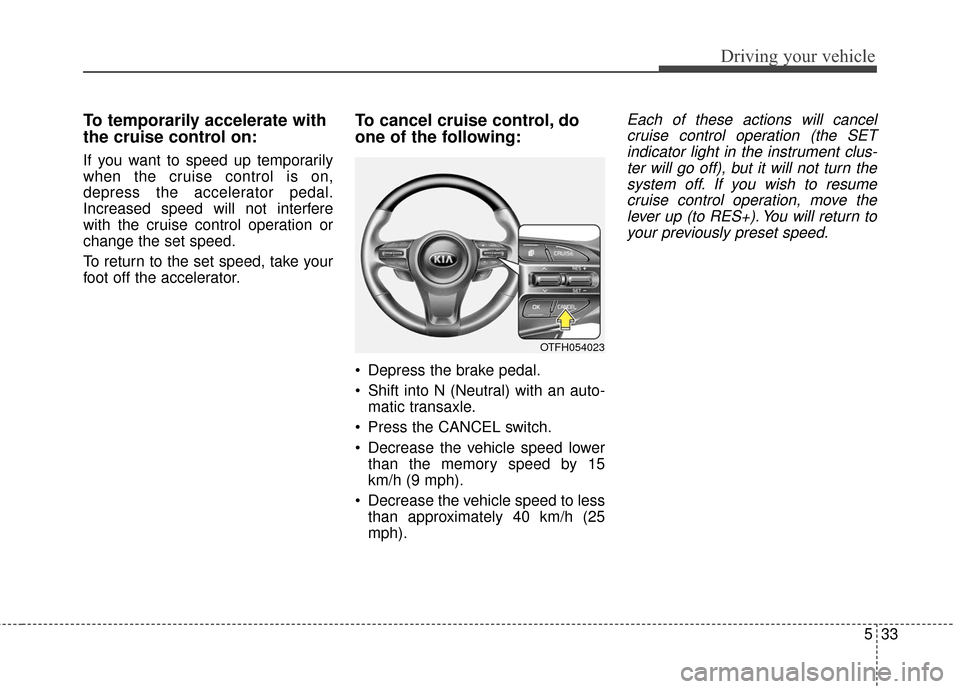
To cancel cruise control, do
one of the following:
Depress the brake pedal.
Shift into N (Neutral) with an auto-matic transaxle.
Press the CANCEL switch.
Decrease the vehicle speed lower than the memory speed by 15
km/h (9 mph).
Decrease the vehicle speed to less than approximately 40 km/h (25
mph).
Each of these actions will cancelcruise control operation (the SETindicator light in the instrument clus-ter will go off), but it will not turn thesystem off. If you wish to resumecruise control operation, move thelever up (to RES+). You will return toyour previously preset speed.
OTFH054023
Page 382 of 466
Maintenance
42
7
Battery recharging
Your vehicle has a maintenance-free,
calcium-based battery.
If the battery becomes discharged
in a short time (because, for exam-
ple, the headlights or interior lights
were left on while the vehicle was
not in use), recharge it by slow
charging (trickle) for 10 hours.
If the battery gradually discharges because of high electric load while
the vehicle is being used, recharge
it at 20-30A for two hours. When recharging the battery,
observe the following precautions:
The battery must be removed from
the vehicle and placed in an area
with good ventilation.
Watch the battery during charging, and stop or reduce the charging
rate if the battery cells begin
gassing (boiling) violently or if the
temperature of the electrolyte of
any cell exceeds 49°C (120°F).
Wear eye protection when check- ing the battery during charging.
Disconnect the battery charger in the following order.
1. Turn off the battery charger main switch.
2. Unhook the negative clamp from the negative battery terminal.
3. Unhook the positive clamp from the positive battery terminal.
Before performing maintenance or recharging the battery, turn off all
accessories and stop the engine.
The negative battery cable must be removed first and installed last
when the battery is disconnected.
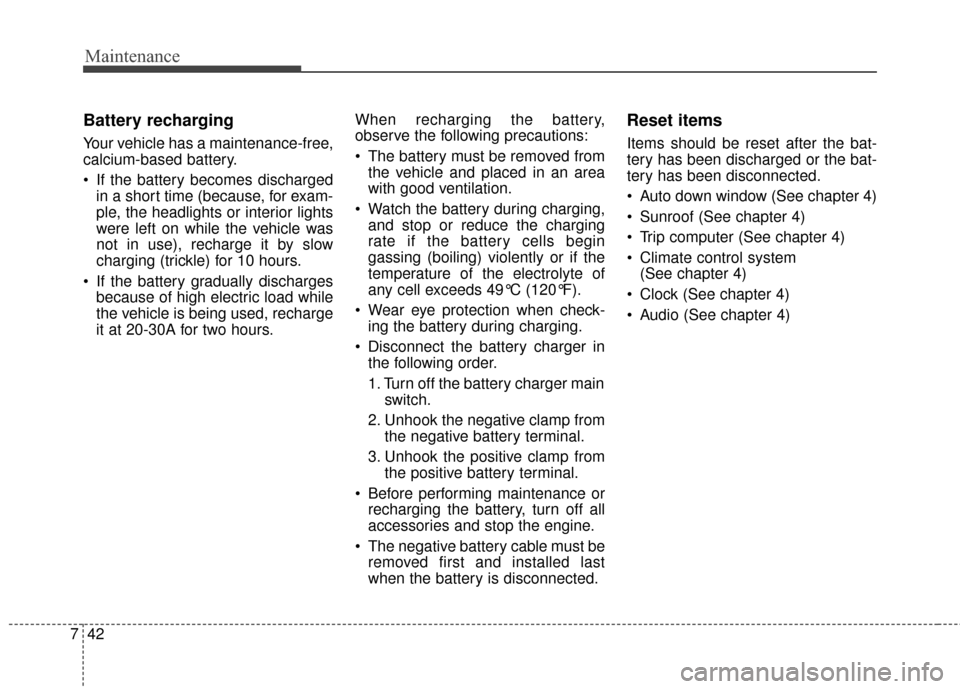
Reset items
Items should be reset after the bat-
tery has been discharged or the bat-
tery has been disconnected.
Auto down window (See chapter 4)
Sunroof (See chapter 4)
Trip computer (See chapter 4)
Climate control system (See chapter 4)
Clock (See chapter 4)
Audio (See chapter 4)
Page 386 of 466
Maintenance
46
7
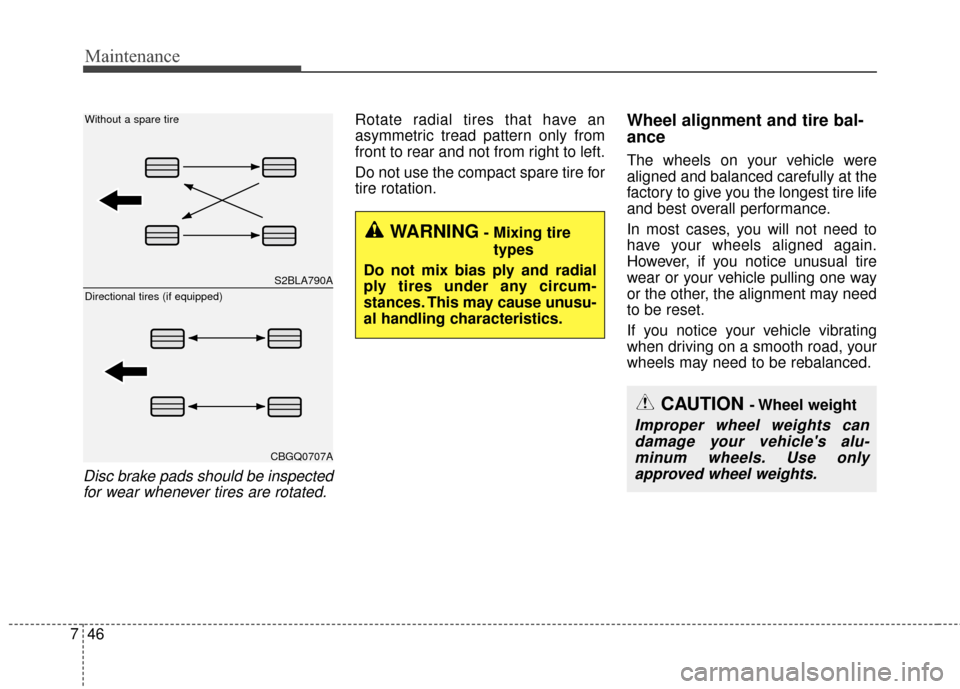
Disc brake pads should be inspected
for wear whenever tires are rotated.
Rotate radial tires that have an
asymmetric tread pattern only from
front to rear and not from right to left.
Do not use the compact spare tire for
tire rotation.Wheel alignment and tire bal-
ance
The wheels on your vehicle were
aligned and balanced carefully at the
factory to give you the longest tire life
and best overall performance.
In most cases, you will not need to
have your wheels aligned again.
However, if you notice unusual tire
wear or your vehicle pulling one way
or the other, the alignment may need
to be reset.
If you notice your vehicle vibrating
when driving on a smooth road, your
wheels may need to be rebalanced.
WARNING- Mixing tire
types
Do not mix bias ply and radial
ply tires under any circum-
stances. This may cause unusu-
al handling characteristics.
S2BLA790A
CBGQ0707A
Without a spare tire
Directional tires (if equipped)
CAUTION - Wheel weight
Improper wheel weights can damage your vehicle's alu-minum wheels. Use onlyapproved wheel weights.
Page 399 of 466
759
Maintenance
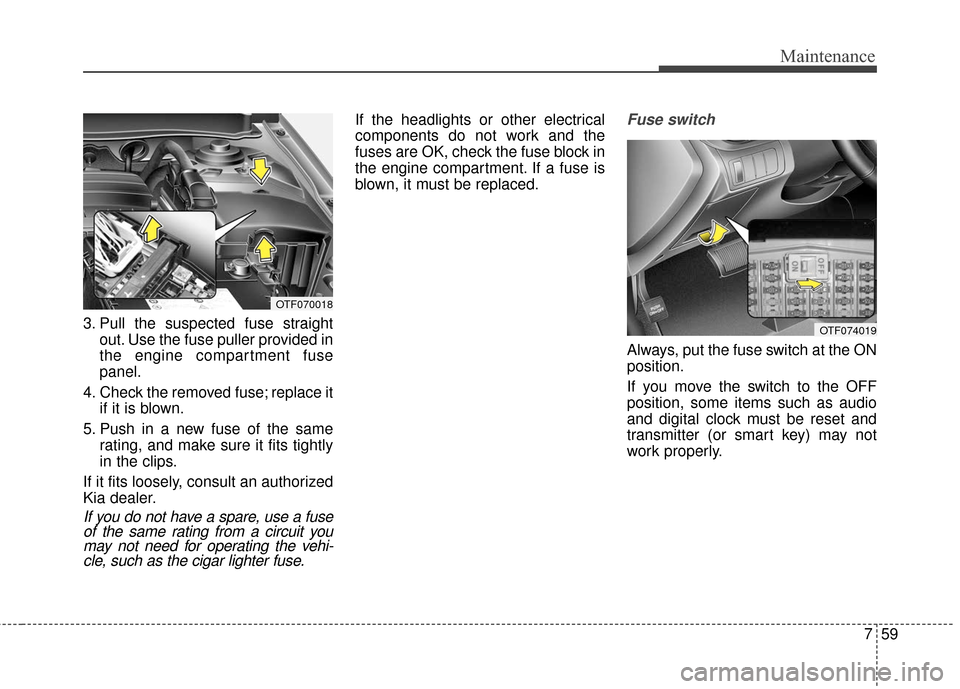
3. Pull the suspected fuse straightout. Use the fuse puller provided in
the engine compartment fuse
panel.
4. Check the removed fuse; replace it if it is blown.
5. Push in a new fuse of the same rating, and make sure it fits tightly
in the clips.
If it fits loosely, consult an authorized
Kia dealer.
If you do not have a spare, use a fuse of the same rating from a circuit youmay not need for operating the vehi-cle, such as the cigar lighter fuse.
If the headlights or other electrical
components do not work and the
fuses are OK, check the fuse block in
the engine compartment. If a fuse is
blown, it must be replaced.Fuse switch
Always, put the fuse switch at the ON
position.
If you move the switch to the OFF
position, some items such as audio
and digital clock must be reset and
transmitter (or smart key) may not
work properly.
OTF070018
OTF074019
Page 459 of 466
Index
2I
Active ECO system. . . . . . . . . . . . . . . . . . . . . . . . . . . . 5-35Active ECO operation . . . . . . . . . . . . . . . . . . . . . . . 5-35
Limitation of Active ECO operation . . . . . . . . . . . . 5-35
When Active ECO is activated . . . . . . . . . . . . . . . . . 5-35
Air bag - advanced supplemental restraint system . . . . 3-35 Air bag warning label. . . . . . . . . . . . . . . . . . . . . . . . 3-57
Air bag warning light . . . . . . . . . . . . . . . . . . . . . . . . 3-38
Curtain air bag . . . . . . . . . . . . . . . . . . . . . . . . . . . . . 3-50
Driver's and passenger's front air bag . . . . . . . . . . . 3-46
How does the air bag system operate . . . . . . . . . . . 3-36
Inflation and non-inflation conditions of the air bag . . 3-51
Occupant detection system. . . . . . . . . . . . . . . . . . . . 3-41
Side air bag. . . . . . . . . . . . . . . . . . . . . . . . . . . . . . . . 3-49
SRS Care . . . . . . . . . . . . . . . . . . . . . . . . . . . . . . . . . 3-56
SRS components and functions . . . . . . . . . . . . . . . . 3-39
Air cleaner . . . . . . . . . . . . . . . . . . . . . . . . . . . . . . . . . . 7-34\
Filter replacement. . . . . . . . . . . . . . . . . . . . . . . . . . . 7-34
Air conditioning . . . . . . . . . . . . . . . . . . . . . . . . . . . . . . . 8-3
Appearance care . . . . . . . . . . . . . . . . . . . . . . . . . . . . . . 7-82 Exterior care . . . . . . . . . . . . . . . . . . . . . . . . . . . . . . . 7-82
Interior care . . . . . . . . . . . . . . . . . . . . . . . . . . . . . . . 7-87
Audio system . . . . . . . . . . . . . . . . . . . . . . . . . . . . . . . 4-124
Aux, USB and iPod
®port . . . . . . . . . . . . . . . . . . . 4-126
Glass antenna . . . . . . . . . . . . . . . . . . . . . . . . . . . . . 4-124
Steering wheel audio controls . . . . . . . . . . . . . . . . 4-125
Automatic climate control system . . . . . . . . . . . . . . . 4-100 Automatic heating and air conditioning. . . . . . . . . 4-101
Checking the amount of air conditioner refrigerant
and compressor lubricant . . . . . . . . . . . . . . . . . . . 4-112
Climate control air filter. . . . . . . . . . . . . . . . . . . . . 4-111
Manual heating and air conditioning . . . . . . . . . . . 4-102
System operation . . . . . . . . . . . . . . . . . . . . . . . . . . 4-109
Automatic transaxle . . . . . . . . . . . . . . . . . . . . . . . . . . . 5-12 Automatic transaxle operation . . . . . . . . . . . . . . . . . 5-12
Good driving practices . . . . . . . . . . . . . . . . . . . . . . . 5-16
Back-Up Warning System . . . . . . . . . . . . . . . . . . . . . . 4-81 Back-Up Warning System precautions . . . . . . . . . . 4-82
Non-operational conditions ofBack-Up Warning System . . . . . . . . . . . . . . . . . . . 4-82
Operation of the Back-Up Warning System . . . . . . 4-81
Self-diagnosis . . . . . . . . . . . . . . . . . . . . . . . . . . . . . . 4-83
Battery. . . . . . . . . . . . . . . . . . . . . . . . . . . . . . . . . . . . \
. . 7-40 Battery recharging . . . . . . . . . . . . . . . . . . . . . . . . . . 7-42
For best battery service . . . . . . . . . . . . . . . . . . . . . . 7-40
Reset items . . . . . . . . . . . . . . . . . . . . . . . . . . . . . . . . 7-42
Before driving . . . . . . . . . . . . . . . . . . . . . . . . . . . . . . . . . 5-4 Before entering vehicle . . . . . . . . . . . . . . . . . . . . . . . 5-4
Before starting . . . . . . . . . . . . . . . . . . . . . . . . . . . . . . 5-4
Necessary inspections . . . . . . . . . . . . . . . . . . . . . . . . 5-4
Blind spot detection system (BSD) . . . . . . . . . . . . . . . 5-36
A
B
Page 464 of 466
I7
Index
Front seat adjustment - power . . . . . . . . . . . . . . . . . . 3-6
Rear seat adjustment . . . . . . . . . . . . . . . . . . . . . . . . 3-14
Seat warmer (front) . . . . . . . . . . . . . . . . . . . . . . . . . 3-11
Seat warmer (rear) . . . . . . . . . . . . . . . . . . . . . . . . . . 3-15
Seatback pocket . . . . . . . . . . . . . . . . . . . . . . . . . . . . 3-13
Seat belts . . . . . . . . . . . . . . . . . . . . . . . . . . . . . . . . . . . . \
3-18 Care of seat belts . . . . . . . . . . . . . . . . . . . . . . . . . . . 3-27
Pre-tensioner seat belt . . . . . . . . . . . . . . . . . . . . . . . 3-24
Seat belt precautions . . . . . . . . . . . . . . . . . . . . . . . . 3-26
Seat belt restraint system . . . . . . . . . . . . . . . . . . . . . 3-18
Smart key . . . . . . . . . . . . . . . . . . . . . . . . . . . . . . . . . . . . \
4-4 Battery replacement . . . . . . . . . . . . . . . . . . . . . . . . . . 4-9
Immobilizer system . . . . . . . . . . . . . . . . . . . . . . . . . 4-10
Record your key number . . . . . . . . . . . . . . . . . . . . . . 4-4
Remote keyless entry system operations . . . . . . . . . . 4-6
Smart key functions . . . . . . . . . . . . . . . . . . . . . . . . . . 4-4
Smart key precautions . . . . . . . . . . . . . . . . . . . . . . . . 4-8
Starting the hybrid system . . . . . . . . . . . . . . . . . . . . . . . 5-9
Special driving conditions . . . . . . . . . . . . . . . . . . . . . . 5-45 Driving at night . . . . . . . . . . . . . . . . . . . . . . . . . . . . 5-46
Driving in flooded areas. . . . . . . . . . . . . . . . . . . . . . 5-47
Driving in the rain . . . . . . . . . . . . . . . . . . . . . . . . . . 5-47
Driving off-road . . . . . . . . . . . . . . . . . . . . . . . . . . . . 5-48
Hazardous driving conditions . . . . . . . . . . . . . . . . . 5-45
Highway driving . . . . . . . . . . . . . . . . . . . . . . . . . . . . 5-48
Rocking the vehicle . . . . . . . . . . . . . . . . . . . . . . . . . 5-45
Smooth cornering . . . . . . . . . . . . . . . . . . . . . . . . . . . 5-46
Starting the hybrid system . . . . . . . . . . . . . . . . . . . . . . . 5-9 Starting the hybrid system with a smart key . . . . . . . 5-9
Steering wheel . . . . . . . . . . . . . . . . . . . . . . . . . . . . . . . 4-37 Electric power steering. . . . . . . . . . . . . . . . . . . . . . . 4-37
Heated steering wheel . . . . . . . . . . . . . . . . . . . . . . . 4-39
Horn . . . . . . . . . . . . . . . . . . . . . . . . . . . . . . . . . . . . \
. 4-38
Tilt and telescoping steering . . . . . . . . . . . . . . . . . . 4-38
Storage compartment . . . . . . . . . . . . . . . . . . . . . . . . . 4-117 Center console storage . . . . . . . . . . . . . . . . . . . . . . 4-117
Cool box . . . . . . . . . . . . . . . . . . . . . . . . . . . . . . . . . 4-118
Glove box . . . . . . . . . . . . . . . . . . . . . . . . . . . . . . . . 4-117
Sunglass holder . . . . . . . . . . . . . . . . . . . . . . . . . . . 4-118
Sunroof . . . . . . . . . . . . . . . . . . . . . . . . . . . . . . . . . . . . \
. 4-31 Closing the sunroof . . . . . . . . . . . . . . . . . . . . . . . . . 4-32
Resetting the sunroof . . . . . . . . . . . . . . . . . . . . . . . . 4-34
Sliding the sunroof . . . . . . . . . . . . . . . . . . . . . . . . . 4-31
Sunshade. . . . . . . . . . . . . . . . . . . . . . . . . . . . . . . . . . 4-34\
Tilting the sunroof . . . . . . . . . . . . . . . . . . . . . . . . . . 4-33
Theft-alarm system . . . . . . . . . . . . . . . . . . . . . . . . . . . . 4-12 Armed stage . . . . . . . . . . . . . . . . . . . . . . . . . . . . . . . 4-12
Disarmed stage . . . . . . . . . . . . . . . . . . . . . . . . . . . . . 4-13
Theft-alarm stage . . . . . . . . . . . . . . . . . . . . . . . . . . . 4-13
Tire specification and pressure label . . . . . . . . . . . . . . . 8-9
Tires and wheels . . . . . . . . . . . . . . . . . . . . . . . . . . 7-43, 8-5 Checking tire inflation pressure . . . . . . . . . . . . . . . . 7-44
Low aspect ratio tire. . . . . . . . . . . . . . . . . . . . . . . . . 7-55
T