light KIA OPTIMA PHEV 2017 Owner's Manual
[x] Cancel search | Manufacturer: KIA, Model Year: 2017, Model line: OPTIMA PHEV, Model: KIA OPTIMA PHEV 2017Pages: 604, PDF Size: 13.16 MB
Page 116 of 604
Safety features of your vehicle
56
3
OJFA035102
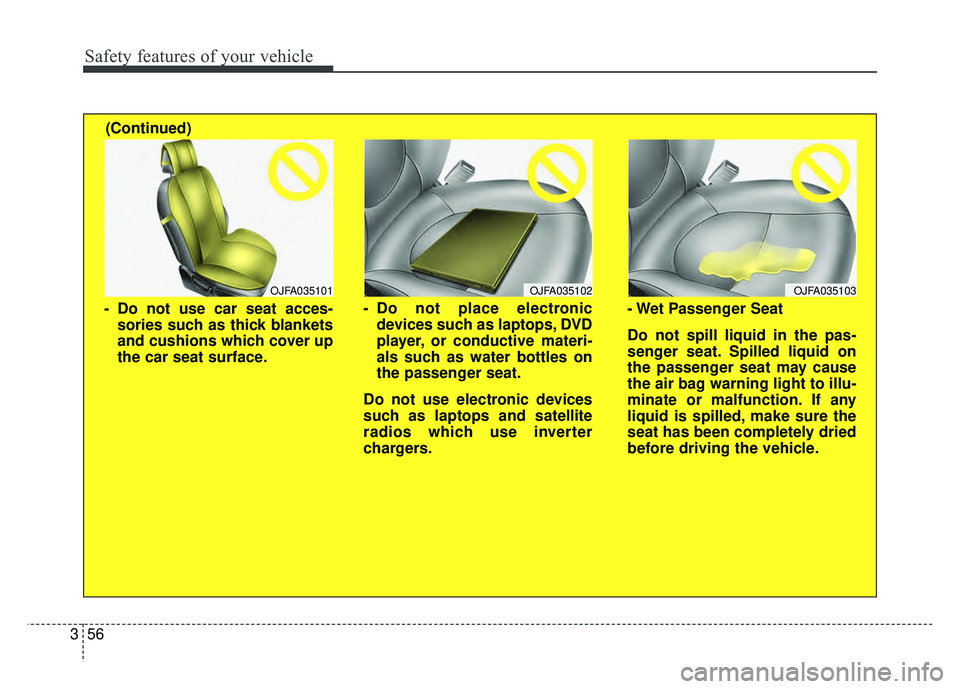
- Do not place electronic
devices such as laptops, DVD
player, or conductive materi-
als such as water bottles on
the passenger seat.
Do not use electronic devices
such as laptops and satellite
radios which use inverter
chargers.
OJFA035103
- Wet Passenger Seat
Do not spill liquid in the pas-
senger seat. Spilled liquid on
the passenger seat may cause
the air bag warning light to illu-
minate or malfunction. If any
liquid is spilled, make sure the
seat has been completely dried
before driving the vehicle.
(Continued)
OJFA035101
- Do not use car seat acces-
sories such as thick blankets
and cushions which cover up
the car seat surface.
Page 117 of 604
357
Safety features of your vehicle
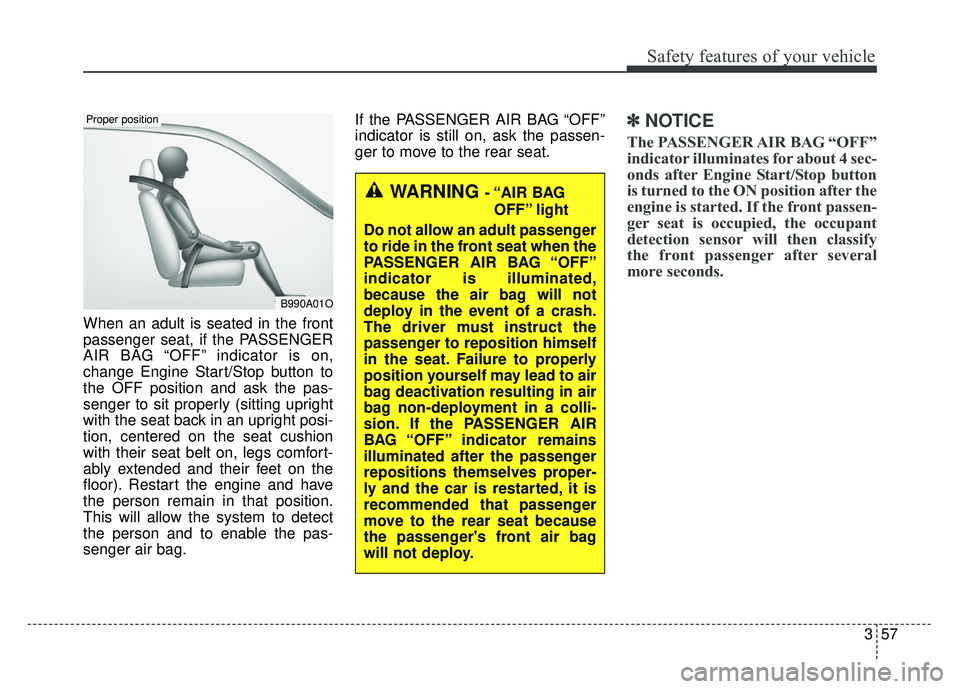
When an adult is seated in the front
passenger seat, if the PASSENGER
AIR BAG “OFF” indicator is on,
change Engine Start/Stop button to
the OFF position and ask the pas-
senger to sit properly (sitting upright
with the seat back in an upright posi-
tion, centered on the seat cushion
with their seat belt on, legs comfort-
ably extended and their feet on the
floor). Restart the engine and have
the person remain in that position.
This will allow the system to detect
the person and to enable the pas-
senger air bag.If the PASSENGER AIR BAG “OFF”
indicator is still on, ask the passen-
ger to move to the rear seat.
✽ ✽
NOTICE
The PASSENGER AIR BAG “OFF”
indicator illuminates for about 4 sec-
onds after Engine Start/Stop button
is turned to the ON position after the
engine is started. If the front passen-
ger seat is occupied, the occupant
detection sensor will then classify
the front passenger after several
more seconds.
B990A01O
Proper position
WARNING - “AIR BAG
OFF” light
Do not allow an adult passenger
to ride in the front seat when the
PASSENGER AIR BAG “OFF”
indicator is illuminated,
because the air bag will not
deploy in the event of a crash.
The driver must instruct the
passenger to reposition himself
in the seat. Failure to properly
position yourself may lead to air
bag deactivation resulting in air
bag non-deployment in a colli-
sion. If the PASSENGER AIR
BAG “OFF” indicator remains
illuminated after the passenger
repositions themselves proper-
ly and the car is restarted, it is
recommended that passenger
move to the rear seat because
the passenger's front air bag
will not deploy.
Page 118 of 604
Safety features of your vehicle
58
3
Even though your vehicle is
equipped with the occupant detec-
tion system, never install a child
restraint system in the front pas-
senger's seat. A deploying air bag
can forcefully strike a child result-
ing in serious injuries or death. Any
child age 12 and under should ride
in the rear seat. Children too large
for child restraints should use the
available lap/shoulder belts. No
matter what type of crash, children
of all ages are safer when
restrained in the rear seat.
If the PASSENGER AIR BAG “OFF” indicator is illuminated when
the front passenger's seat is occu-
pied by an adult and he/she sits
properly (sitting upright with the
seatback in an upright position,
centered on the seat cushion with
their seat belt on, legs comfortably
extended and their feet on the
floor), have that person sit in the
rear seat. Any child age 12 and under should
ride in the rear seat. Children too
large for child restraints should use
the available lap/shoulder belts. No
matter what type of crash, children of
all ages are safer when restrained in
the rear seat.
If the occupant detection system is
not working properly, the SRS air
bag warning light on the instrument
panel will illuminate because the
passenger's front air bag is connect-
ed with the occupant detection sys-
tem. If there is a malfunction of the
occupant detection system, the PAS-
SENGER AIR BAG “OFF” indicator
will not illuminate and the passen-
ger's front air bag will inflate in frontal
impact crashes even if there is no
occupant in the front passenger's
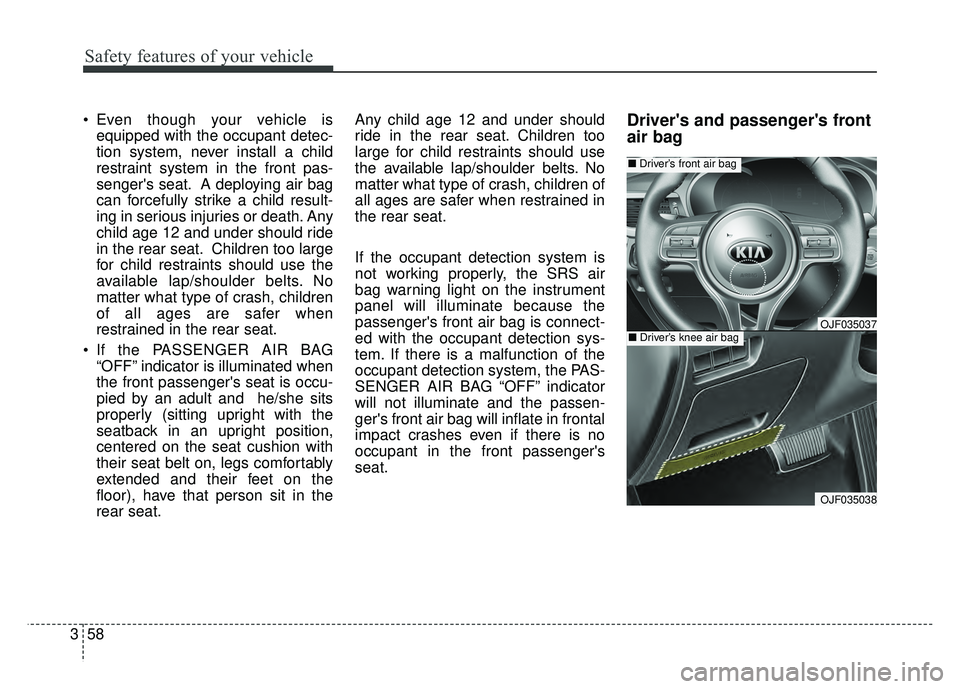
seat.Driver's and passenger's front
air bag
OJF035038
■
Driver’s front air bag
■Driver’s knee air bagOJF035037
Page 129 of 604
369
Safety features of your vehicle
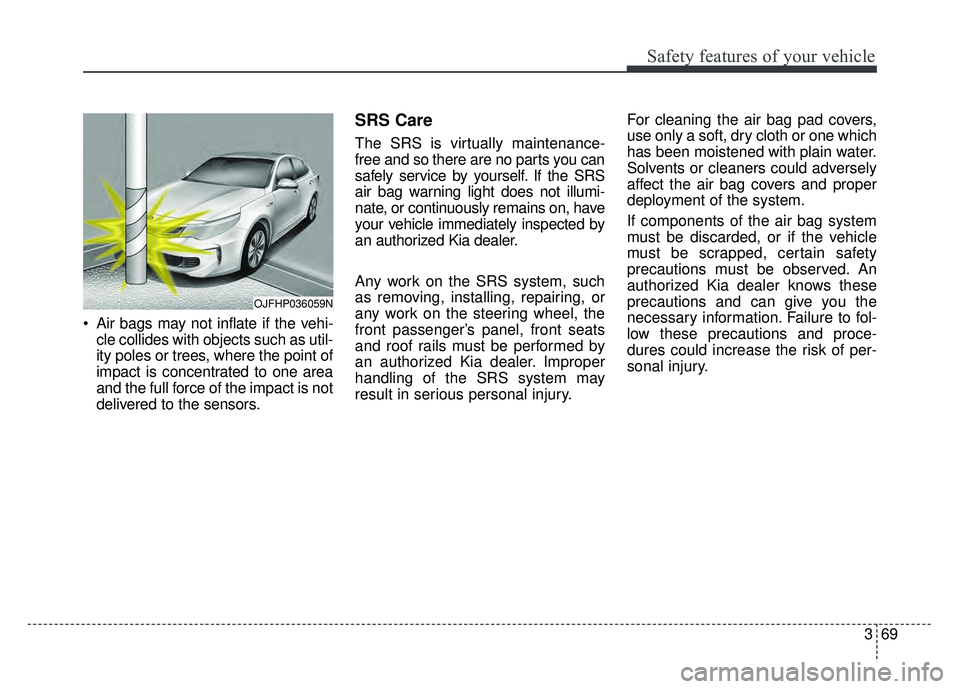
Air bags may not inflate if the vehi-cle collides with objects such as util-
ity poles or trees, where the point of
impact is concentrated to one area
and the full force of the impact is not
delivered to the sensors.
SRS Care
The SRS is virtually maintenance-
free and so there are no parts you can
safely service by yourself. If the SRS
air bag warning light does not illumi-
nate, or continuously remains on, have
your vehicle immediately inspected by
an authorized Kia dealer.
Any work on the SRS system, such
as removing, installing, repairing, or
any work on the steering wheel, the
front passenger’s panel, front seats
and roof rails must be performed by
an authorized Kia dealer. Improper
handling of the SRS system may
result in serious personal injury. For cleaning the air bag pad covers,
use only a soft, dry cloth or one which
has been moistened with plain water.
Solvents or cleaners could adversely
affect the air bag covers and proper
deployment of the system.
If components of the air bag system
must be discarded, or if the vehicle
must be scrapped, certain safety
precautions must be observed. An
authorized Kia dealer knows these
precautions and can give you the
necessary information. Failure to fol-
low these precautions and proce-
dures could increase the risk of per-
sonal injury.
OJFHP036059N
Page 132 of 604

. . . . . . . . . . . . . . . . . . . . . . . . . 4-44
. . . . . . . . . . . . . . . . . . . . . . . . . . . . . . . . . . . . \
. . . 4-45
Mirrors . . . . . . . . . . . . . . . . . . . . . . . . . . . . . . . . . . 4-46\
. . . . . . . . . . . . . . . . . . . . . . . . 4-46
. . . . . . . . . . . . . . . . . . . . . . . 4-48
Instrument cluster . . . . . . . . . . . . . . . . . . . . . . . . . 4-51
. . . . . . . . . . . . . . . . . . . . . 4-52
. . . . . . . . . . . . . . . . . . . . . . . . . . 4-52
. . . . . . . . . . . . . . . . . . . . . . . . . . . . . . . . . . . . \
. 4-53
. . . . . . . . . . . . . . . . . . . . . . . 4-57
LCD display . . . . . . . . . . . . . . . . . . . . . . . . . . . . . . 4-58
. . . . . . . . . . . . . . . . . . . . . . . . . . . . . . . . 4-59
Trip modes (Trip computer) . . . . . . . . . . . . . . . . . 4-67
. . . . . . . . . . . . . . . . . . . . . . . . . . . . . . . . . . 4-67\
. . . . . . . . . . . . . . . . . . . . . . . . . . . . . . . . 4-67
. . . . . . . . . . . . . . . . . . . . . . . . . . . . . . . . . . . . \
4-70
. . . . . . . . . . . . . . . . . . . . . . . . . . . 4-71
. . . . . . . . . . . . . 4-71
. . . . . . . . . . . . . . . . . . . . . . . . . . . 4-71
. . . . . . . . . . . . . . . . . . . . . . . . . . . 4-72
. . . . . . . . . . . . . . . . . . . . . . . . . . . . . . . . . . . 4-\
72
. . . . . . . . . . . . . . . . . . . . . . . . . . . . 4-72
Warning and indicator lights . . . . . . . . . . . . . . . . 4-82
. . . . . . . . . . . . . . . . . . . . . . . . . . . . . . . 4-82
Rear parking assist system . . . . . . . . . . . . . . . . . . 4-96
assist system . . . . . . . . . . . . . . . . . . . . . . . . . . . . . . . . 4-97
. . . . . . . . . . 4-98
. . . . . . . . . . . . . . . . . . . . . . . . . . . . . . . . 4-98
Rearview camera . . . . . . . . . . . . . . . . . . . . . . . . . . 4-99
Lighting . . . . . . . . . . . . . . . . . . . . . . . . . . . . . . . . . 4-100
. . . . . . . . . . . . . . . . . . . . . . . . 4-100
. . . . . . . . . . . . . . . . . . . . . . . . . . . . . 4-100
. . . . . . . . . . . . . . . . . . . . . . . . . . . . 4-103
. . . . . . . . . . . 4-105
. . . . . . . . . . . . . . . . . . . . . . . . . . . . . 4-106
. . . . . . . . . . . . . . . . . . . . . 4-106
. . . . . . . . 4-106
Wipers and washers . . . . . . . . . . . . . . . . . . . . . . . 4-108
. . . . . . . . . . . . . . . . . . . . . . . . . . . 4-108
. . . . . . . . . . . . . . . . . . . . . 4-108
4
Page 133 of 604
Interior lights . . . . . . . . . . . . . . . . . . . . . . . . . . . . 4-110
. . . . . . . . . . . . . . . . . . . 4-110
. . . . . . . . . . . . . . . . . . . . . . . . . . . . . . . . . 4-110
. . . . . . . . . . . . . . . . . . . . . . . . . . . . . . . . . . 4-11\
1
. . . . . . . . . . . . . . . . . . . . . . . . . . . 4-112
. . . . . . . . . . . . . . . . . . . . . . . . . . 4-112
. . . . . . . . . . . . . . . . . . . . . . . . . . . . . 4-112
Welcome system . . . . . . . . . . . . . . . . . . . . . . . . . . 4-113
. . . . . . . . . . 4-113
. . . . . . . . . . . . . . . . . . . . . . . . . . . . . . . . 4-113
Defroster . . . . . . . . . . . . . . . . . . . . . . . . . . . . . . . . 4-114
. . . . . . . . . . . . . . . . . . . . . . . 4-114
Automatic climate control system. . . . . . . . . . . . 4-115
. . . . . . . . . 4-116
. . . . . . . . . . . 4-117
. . . . . . . . . . . . . . . . . . . . . . . . . . . . 4-125
. . . . . . . . . . . . . . . . . . . . . . 4-127
refrigerant and compressor lubricant . . . . . . . . . . 4-127
Windshield defrosting and defogging . . . . . . . . . 4-129
. . . . . . . . . . . . . . 4-129
Clean air . . . . . . . . . . . . . . . . . . . . . . . . . . . . . . . . 4-132
Storage compartments . . . . . . . . . . . . . . . . . . . . . 4-133
. . . . . . . . . . . . . . . . . . . . . . . 4-133
. . . . . . . . . . . . . . . . . . . . . . . . . . . . . . . . . . 4-13\
3
. . . . . . . . . . . . . . . . . . . . . . . . . . . . . 4-134
Interior features . . . . . . . . . . . . . . . . . . . . . . . . . . 4-135
. . . . . . . . . . . . . . . . . . . . . . . . . . . . . . . . . 4-135
. . . . . . . . . . . . . . . . . . . . . . . . . . . . . . . . 4-136
. . . . . . . . . . . . . . . . . . . . . . . . . . 4-137
. . . . . . . . . . . . . . . . . . . . . . . . . . . . . . . . . . . 4-\
137
. . . . . . . . . . . . . . . . . . . . . . . . . . . . . . . . 4-138
. . . . . . . . . . . . . . . . . . . . . . . . . . . . . . . . 4-139
. . . . . . . . . . . . . . . . . . . . . . . . . . . . . . 4-140
. . . . . . . . . . . . . . . . . . . . . . . . . 4-140
. . . . . . . . . . . . . . . . . . . . . . . . . . . . . . . . 4-141
4
Page 135 of 604

45
Features of your vehicle
Locking
Pressing the button of the front out-
side door handles with all doors (and
trunk) closed and any door unlocked,
locks all the doors (and trunk).The hazard warning lights will blink
once to indicate that all doors (and
trunk) are locked. The button will only
operate when the smart key is within
28 ~ 40 in (0.7 ~ 1 m) from the out-
side door handle. If you want to make
sure that a door has locked or not,
you should check the door lock but-
ton inside the vehicle or pull the out-
side door handle.
Even though you press the button,
the doors will not lock and the chime
sounds if any of the following occurs:
• The smart key is in the vehicle.
The ENGINE START/STOP button
is in the ACC or ON position.
Any door except the trunk is opened.
Unlocking
Pressing the button of the front out-
side door handles with all doors (and
trunk) closed and locked, unlocks all
the doors (and trunk). The hazard
warning lights will blink twice to indi-
cate that all doors (and trunk) are
unlocked. The button will only oper-
ate when the smart key is within 28 ~
40 in (0.7 ~ 1 m) from the outside
door handle.
When Two press unlock function is
activated,
- If you press the Door Unlock but-ton(2) on the smart key, driver`s
door will unlock.
- If you press Door Unlock button(2) on the smart key within four sec-
onds again, then all the doors will
unlock.
- If you press the driver's outside door handle button, driver`s door
will unlock.
- If you press the driver's outside door handle button within four sec-
onds again, then all the doors will
unlock.
OYDDCO2004
OJF045003
Page 136 of 604
Features of your vehicle
64
✽
✽NOTICE
You can activate or deactivate the
Two Press Unlock function. Refer to
“User settings” in this chapter.
Trunk unlocking
If you are within 28 ~ 40 in (0.7 ~ 1 m)
from the outside trunk handle, with
your smart key in possession, the
trunk will unlock and open when you
press the trunk handle switch.
The hazard warning lights will blink
twice to indicate that the trunk is
unlocked.
Also, once the trunk is opened and
then closed, the trunk will lock auto-
matically.
Panic
1. Press the panic button (4) for more
than 1 second.
2. The horn sounds and hazard warning light flash for about 27
seconds.
✽ ✽NOTICE
To stop the horn and lights, press
any button on the smart key.
Start-up
You can start the engine without
inserting the key. For detailed infor-
mation refer to the “Engine start/stop
button” in chapter 6.
Page 138 of 604
Features of your vehicle
84
Battery replacement
A smart key battery should last for
several years, but if the smart key is
not working properly, try replacing
the battery with a new one. If you are
unsure how to use your smart key or
replace the battery, contact an
authorized Kia dealer.
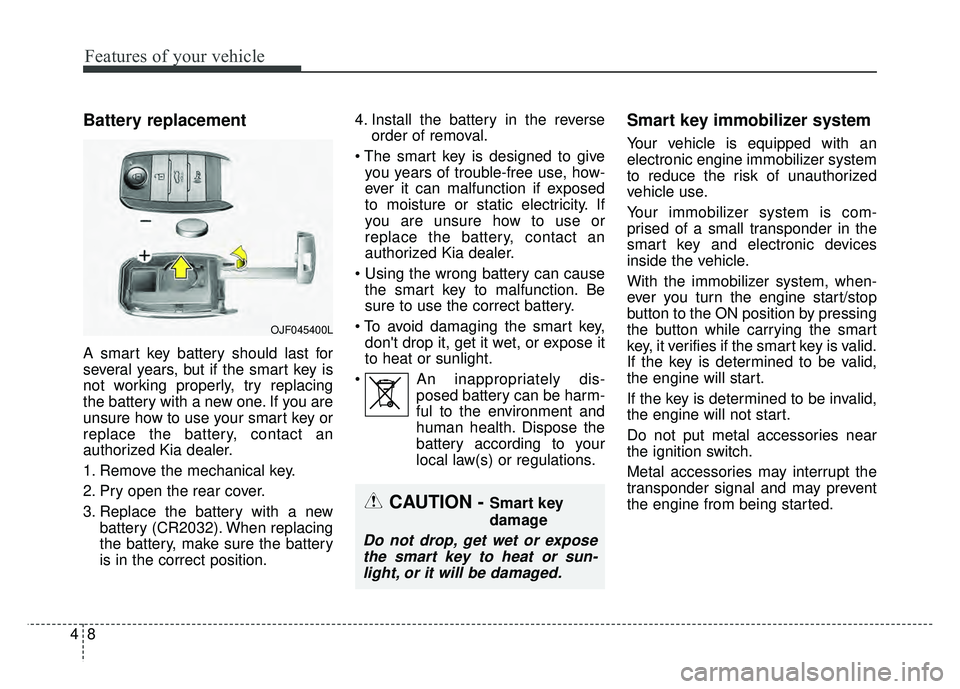
1. Remove the mechanical key.
2. Pry open the rear cover.
3. Replace the battery with a newbattery (CR2032). When replacing
the battery, make sure the battery
is in the correct position. 4. Install the battery in the reverse
order of removal.
you years of trouble-free use, how-
ever it can malfunction if exposed
to moisture or static electricity. If
you are unsure how to use or
replace the battery, contact an
authorized Kia dealer.
the smart key to malfunction. Be
sure to use the correct battery.
don't drop it, get it wet, or expose it
to heat or sunlight.
An inappropriately dis- posed battery can be harm-
ful to the environment and
human health. Dispose the
battery according to your
local law(s) or regulations.
Smart key immobilizer system
Your vehicle is equipped with an
electronic engine immobilizer system
to reduce the risk of unauthorized
vehicle use.
Your immobilizer system is com-
prised of a small transponder in the
smart key and electronic devices
inside the vehicle.
With the immobilizer system, when-
ever you turn the engine start/stop
button to the ON position by pressing
the button while carrying the smart
key, it verifies if the smart key is valid.
If the key is determined to be valid,
the engine will start.
If the key is determined to be invalid,
the engine will not start.
Do not put metal accessories near
the ignition switch.
Metal accessories may interrupt the
transponder signal and may prevent
the engine from being started.
OJF045400L
CAUTION - Smart key
damage
Do not drop, get wet or exposethe smart key to heat or sun-light, or it will be damaged.
Page 140 of 604
Features of your vehicle
10
4
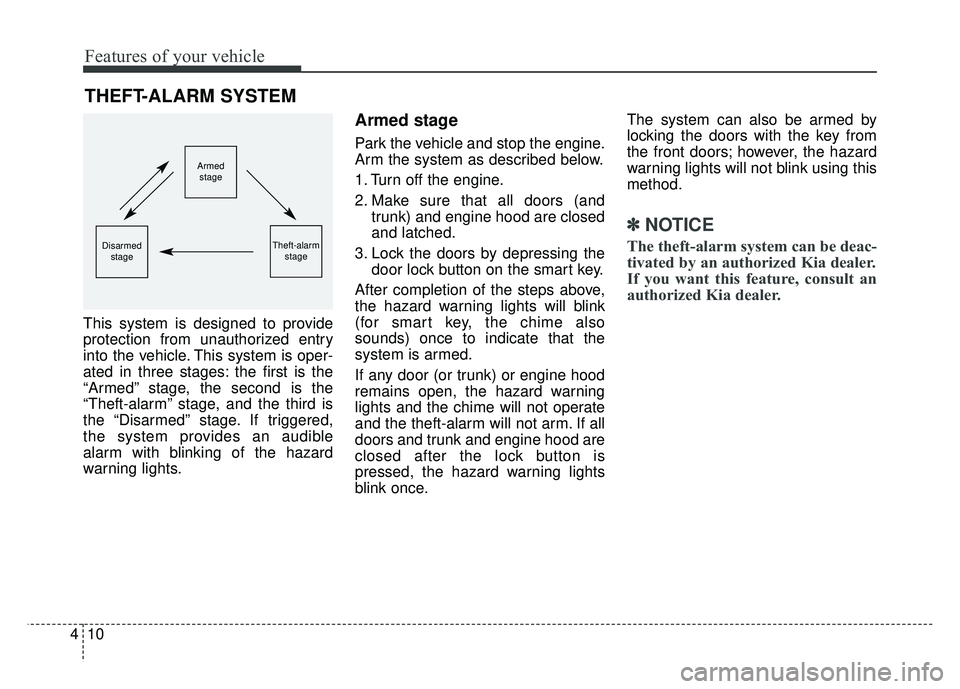
This system is designed to provide
protection from unauthorized entry
into the vehicle. This system is oper-
ated in three stages: the first is the
“Armed” stage, the second is the
“Theft-alarm” stage, and the third is
the “Disarmed” stage. If triggered,
the system provides an audible
alarm with blinking of the hazard
warning lights.
Armed stage
Park the vehicle and stop the engine.
Arm the system as described below.
1. Turn off the engine.
2. Make sure that all doors (and
trunk) and engine hood are closed
and latched.
3. Lock the doors by depressing the door lock button on the smart key.
After completion of the steps above,
the hazard warning lights will blink
(for smart key, the chime also
sounds) once to indicate that the
system is armed.
If any door (or trunk) or engine hood
remains open, the hazard warning
lights and the chime will not operate
and the theft-alarm will not arm. If all
doors and trunk and engine hood are
closed after the lock button is
pressed, the hazard warning lights
blink once. The system can also be armed by
locking the doors with the key from
the front doors; however, the hazard
warning lights will not blink using this
method.
✽ ✽
NOTICE
The theft-alarm system can be deac-
tivated by an authorized Kia dealer.
If you want this feature, consult an
authorized Kia dealer.
THEFT-ALARM SYSTEM
Armed
stage
Theft-alarm stageDisarmedstage