Blind KIA OPTIMA PHEV 2017 Owners Manual
[x] Cancel search | Manufacturer: KIA, Model Year: 2017, Model line: OPTIMA PHEV, Model: KIA OPTIMA PHEV 2017Pages: 604, PDF Size: 13.16 MB
Page 188 of 604
Features of your vehicle
58
4
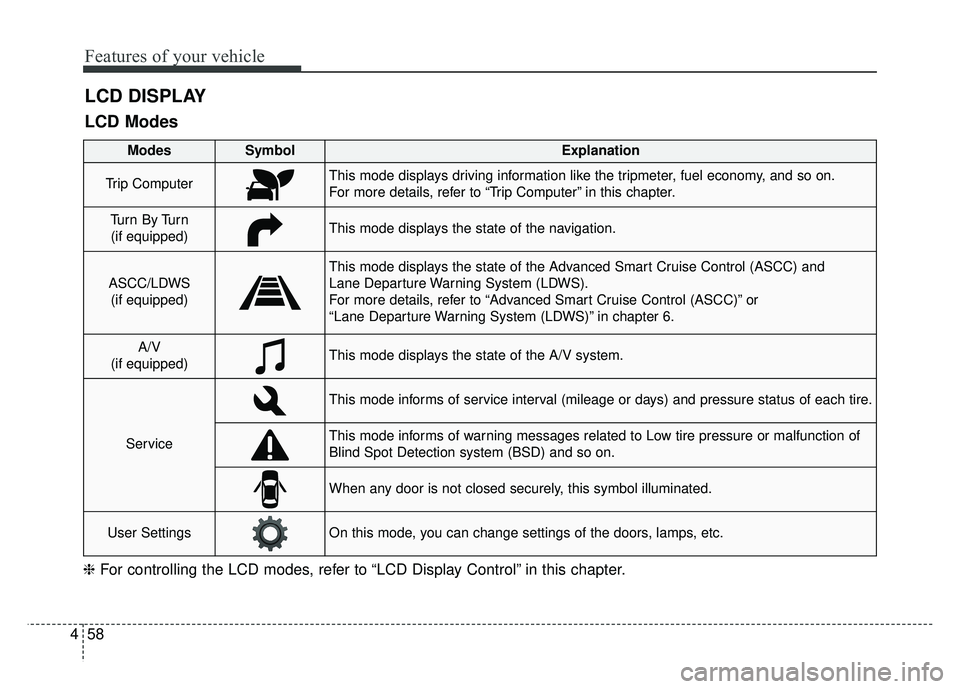
LCD DISPLAY
❈ For controlling the LCD modes, refer to “LCD Display Control” in this chapter.
LCD Modes
Modes SymbolExplanation
Trip ComputerThis mode displays driving information like the tripmeter, fuel economy, and so on.
For more details, refer to “Trip Computer” in this chapter.
Tu r n B y Tu r n
(if equipped)This mode displays the state of the navigation.
ASCC/LDWS (if equipped)
This mode displays the state of the Advanced Smart Cruise Control (ASCC) and
Lane Departure Warning System (LDWS).
For more details, refer to “Advanced Smart Cruise Control (ASCC)” or
“Lane Departure Warning System (LDWS)” in chapter 6.
A/V
(if equipped)This mode displays the state of the A/V system.
Service
This mode informs of service interval (mileage or days) and pressure status of each tire.
This mode informs of warning messages related to Low tire pressure or malfunction of
Blind Spot Detection system (BSD) and so on.
When any door is not closed securely, this symbol illuminated.
User SettingsOn this mode, you can change settings of the doors, lamps, etc.
Page 190 of 604
Features of your vehicle
60
4
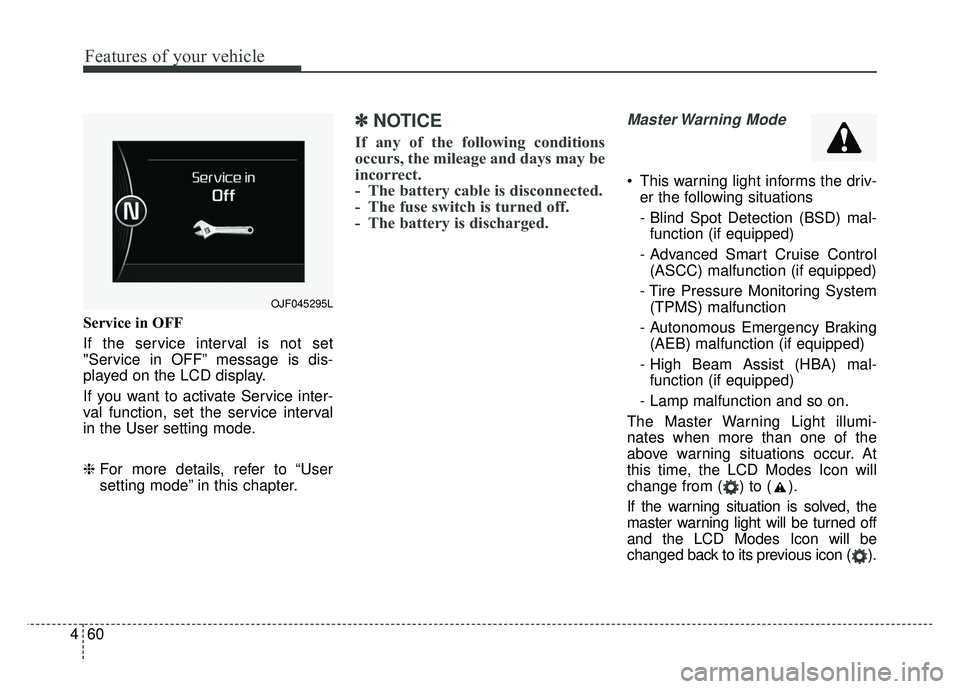
Service in OFF
If the service interval is not set
"Service in OFF” message is dis-
played on the LCD display.
If you want to activate Service inter-
val function, set the service interval
in the User setting mode.
❈ For more details, refer to “User
setting mode” in this chapter.
✽ ✽
NOTICE
If any of the following conditions
occurs, the mileage and days may be
incorrect.
- The battery cable is disconnected.
- The fuse switch is turned off.
- The battery is discharged.
Master Warning Mode
This warning light informs the driv-
er the following situations
- Blind Spot Detection (BSD) mal-function (if equipped)
- Advanced Smart Cruise Control (ASCC) malfunction (if equipped)
- Tire Pressure Monitoring System (TPMS) malfunction
- Autonomous Emergency Braking (AEB) malfunction (if equipped)
- High Beam Assist (HBA) mal- function (if equipped)
- Lamp malfunction and so on.
The Master Warning Light illumi-
nates when more than one of the
above warning situations occur. At
this time, the LCD Modes Icon will
change from ( ) to ( ).
If the warning situation is solved, the
master warning light will be turned off
and the LCD Modes Icon will be
changed back to its previous icon ( ).
OJF045295L
Page 192 of 604
Features of your vehicle
62
4
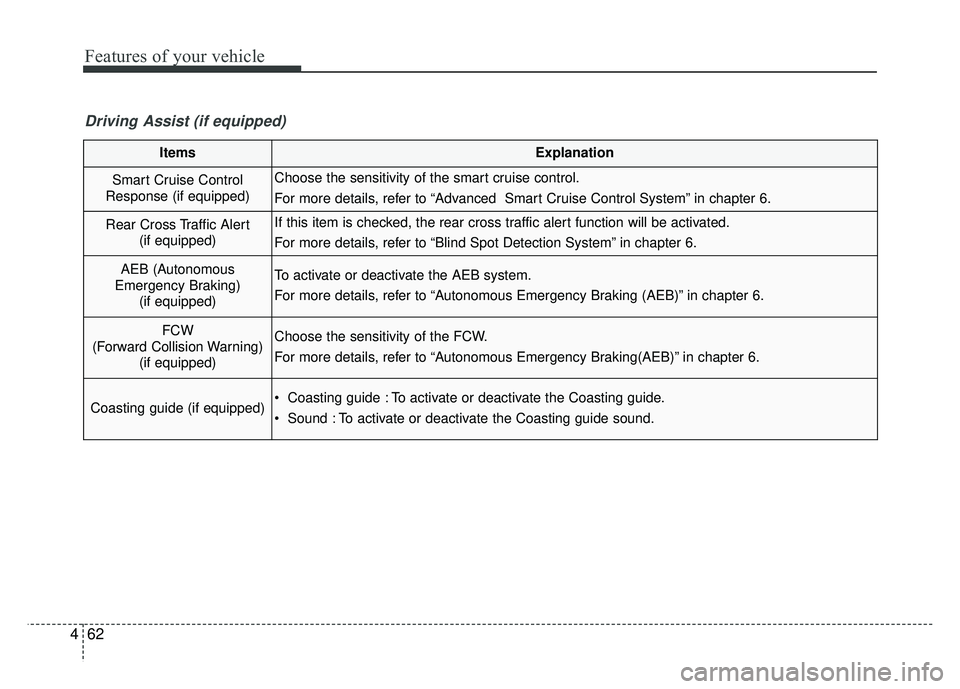
ItemsExplanation
Smart Cruise Control
Response (if equipped)Choose the sensitivity of the smart cruise control.
For more details, refer to “Advanced Smart Cruise Control System” in chapter 6.
Rear Cross Traffic Alert (if equipped)If this item is checked, the rear cross traffic alert function will be activated.
For more details, refer to “Blind Spot Detection System” in chapter 6.
AEB (Autonomous
Emergency Braking) (if equipped)To activate or deactivate the AEB system.
For more details, refer to “Autonomous Emergency Braking (AEB)” in chapter 6.
FCW
(Forward Collision Warning) (if equipped)Choose the sensitivity of the FCW.
For more details, refer to “Autonomous Emergency Braking(AEB)” in chapter 6.
Coasting guide (if equipped) Coasting guide : To activate or deactivate the Coasting guide.
Sound : To activate or deactivate the Coasting guide sound.
Driving Assist (if equipped)
Page 194 of 604
Features of your vehicle
64
4
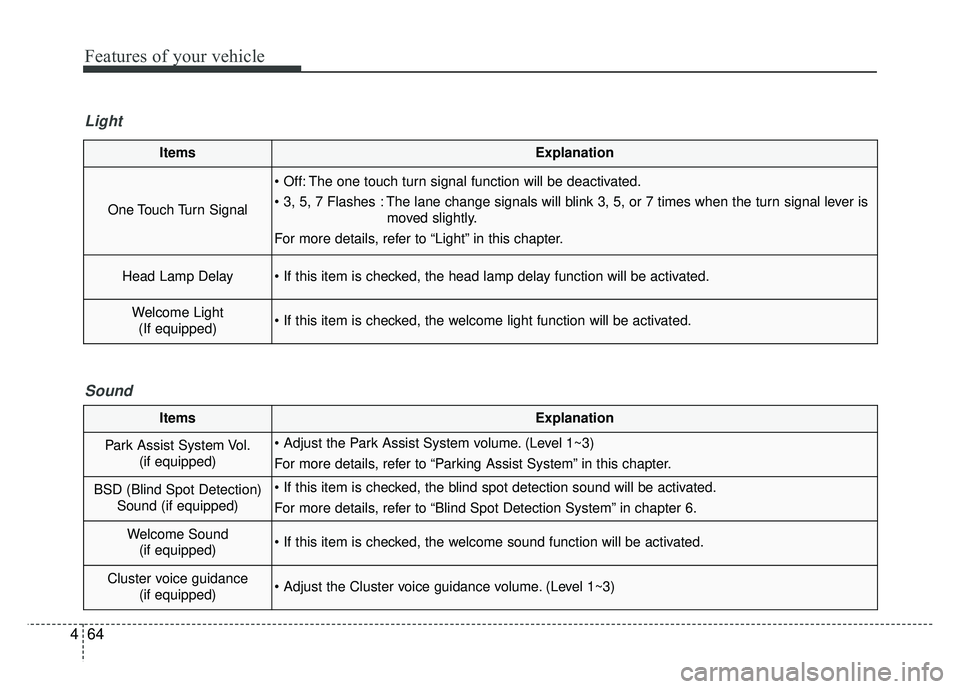
ItemsExplanation
One Touch Turn Signal
The one touch turn signal function will be deactivated.
The lane change signals will blink 3, 5, or 7 times when the turn signal lever is
moved slightly.
For more details, refer to “Light” in this chapter.
Head Lamp Delay
Welcome Light (If equipped)
Light
ItemsExplanation
Park Assist System Vol. (if equipped) (Level 1~3)
For more details, refer to “Parking Assist System” in this chapter.
BSD (Blind Spot Detection)Sound (if equipped)
For more details, refer to “Blind Spot Detection System” in chapter 6.
Welcome Sound(if equipped)
Cluster voice guidance (if equipped) (Level 1~3)
Sound
Page 219 of 604
489
Features of your vehicle
Master Warning light (if equipped)
This warning light informs the driv- er of the following situations
- Blind Spot Detection (BSD) mal-function (if equipped)
- Advanced Smart Cruise Control (ASCC) malfunction (if equipped)
- Tire Pressure Monitoring System (TPMS) malfunction
- Autonomous Emergency Braking (AEB) malfunction (if equipped)
- High Beam Assist(HBA) malfunc- tion (if equipped)
- Lamp malfunction and so on.
The Master Warning Light illumi-
nates when more than one of the
above warning situations occur. At
this time, the LCD Modes Icon will
change from ( ) to ( ).
If the warning situation is solved, the
master warning light will be turned off
and the LCD Modes Icon will be
changed back to its previous icon ( ).
Autonomous Emergency Braking (AEB) Warninglight (if equipped)
This indicator light illuminates:
When there is a malfunction with the AEB.
In this case, have the vehicle inspect-
ed by an authorized Kia dealer.
Adaptive Front Lighting System (AFLS) WarningLight (if equipped)
This warning light blinks:
When there is a malfunction with the AFLS.
If there is a malfunction with the
AFLS:
1. Drive carefully to the nearest safe location and stop your vehicle.
2. Turn the engine off and restart the engine. If the warning light
remains on, have your vehicle
inspected by an authorized Kia
dealer.
AFLS
Page 339 of 604
Active ECO system. . . . . . . . . . . . . . . . . . . . . . . . . 6-75
. . . . . . . . . . . . . . . . . . . . . . . . . 6-75
Blind spot detection system (BSD) . . . . . . . . . . . . 6-77
LCA (Lane Change Assist) . . . . . . . . . . . . . . . . . . . . 6-78
. . . . . . . . . . . . . . . . . . . . . . . . . 6-83
Lane departure warning system (LDWS) . . . . . . 6-85
. . . . . . . . . . . . . . . . . . . . . . . . . . . 6-87
. . 6-87
false warnings: . . . . . . . . . . . . . . . . . . . . . . . . . . . . . . 6-88
Economical operation . . . . . . . . . . . . . . . . . . . . . . 6-89
Special driving conditions . . . . . . . . . . . . . . . . . . . 6-91
. . . . . . . . . . . . . . . . . 6-91
. . . . . . . . . . . . . . . . . . . . . . . . . . . 6-91
. . . . . . . . . . . . . . . . . . . . . . . . . . . . 6-92
. . . . . . . . . . . . . . . . . . . . . . . . . . . . . . 6-92
. . . . . . . . . . . . . . . . . . . . . . 6-94
. . . . . . . . . . . . . . . . . . . . . . . . . . . . . 6-94
. . . . . . . . . . . . . . . . . . . . . . . . . . . . . 6-94
Winter driving . . . . . . . . . . . . . . . . . . . . . . . . . . . . 6-95
. . . . . . . . . . . . . . . . . . . . . . . 6-95
. . . . . . . . . . 6-97 . . . . . . . . . . . . . . . . . . . . . . 6-97
. . . . . . . 6-97
. . . . . . . . . . . . . . . . . . . . 6-98
. .
6-98
. . . . . . . . . . . . . 6-98
. . . . 6-98
. . . . . . . . . . . . . . . . . . . 6-98
Trailer Towing . . . . . . . . . . . . . . . . . . . . . . . . . . . . 6-98
Vehicle load limit . . . . . . . . . . . . . . . . . . . . . . . . . . 6-99
. . . . . . . . . . . . . . 6-99
. . . . . . . . . . . . . . . . . . . . . . . . . . . 6-102
Vehicle weight . . . . . . . . . . . . . . . . . . . . . . . . . . . . 6-103
. . . . . . . . . . . . . . . . . . . . . . . . . . . 6-103
. . . . . . . . . . . . . . . . . . . . . . . . . . 6-103
. . . . . . . . . . . . . . . . . . . . . . . . . . . . . . . 6-103
. . . . . . . . . . . . . . . . . . . . . 6-103
. . . . . . . . . . . . . . 6-103
. . . . . . . . . . . . . . . . . . 6-103
. . . . . . . . . . . 6-1036
Page 414 of 604
677
Driving your vehicle
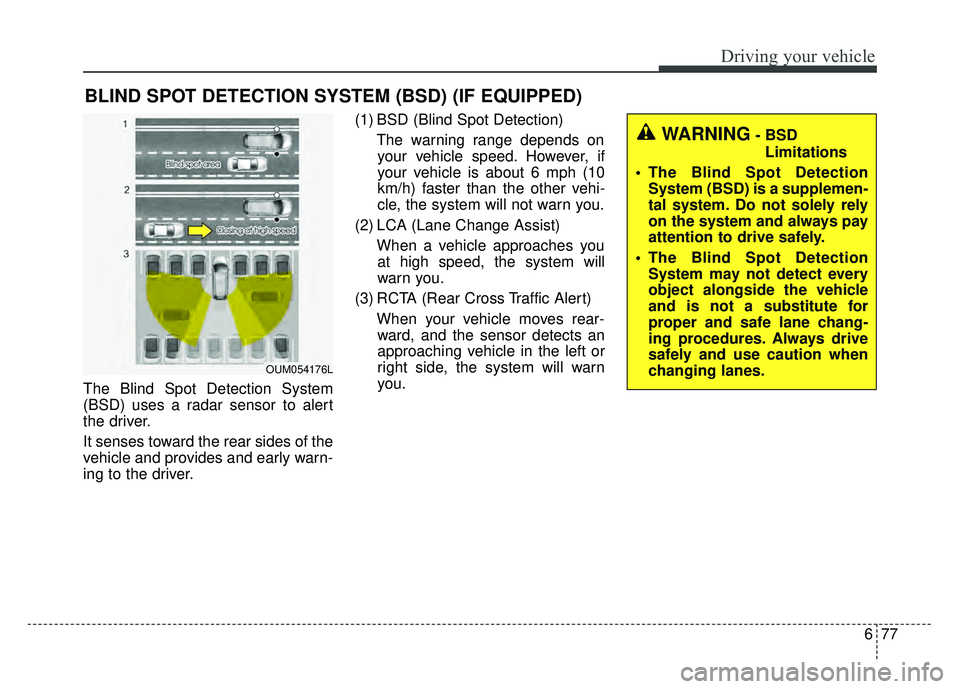
The Blind Spot Detection System
(BSD) uses a radar sensor to alert
the driver.
It senses toward the rear sides of the
vehicle and provides and early warn-
ing to the driver.(1) BSD (Blind Spot Detection)
The warning range depends onyour vehicle speed. However, if
your vehicle is about 6 mph (10
km/h) faster than the other vehi-
cle, the system will not warn you.
(2) LCA (Lane Change Assist) When a vehicle approaches youat high speed, the system will
warn you.
(3) RCTA (Rear Cross Traffic Alert) When your vehicle moves rear-ward, and the sensor detects an
approaching vehicle in the left or
right side, the system will warn
you.
BLIND SPOT DETECTION SYSTEM (BSD) (IF EQUIPPED)
WARNING- BSD
Limitations
The Blind Spot Detection System (BSD) is a supplemen-
tal system. Do not solely rely
on the system and always pay
attention to drive safely.
The Blind Spot Detection System may not detect every
object alongside the vehicle
and is not a substitute for
proper and safe lane chang-
ing procedures. Always drive
safely and use caution when
changing lanes.
OUM054176L
Page 415 of 604
Driving your vehicle
78
6
BSD (Blind Spot Detection) /
LCA (Lane Change Assist)
Operating conditions
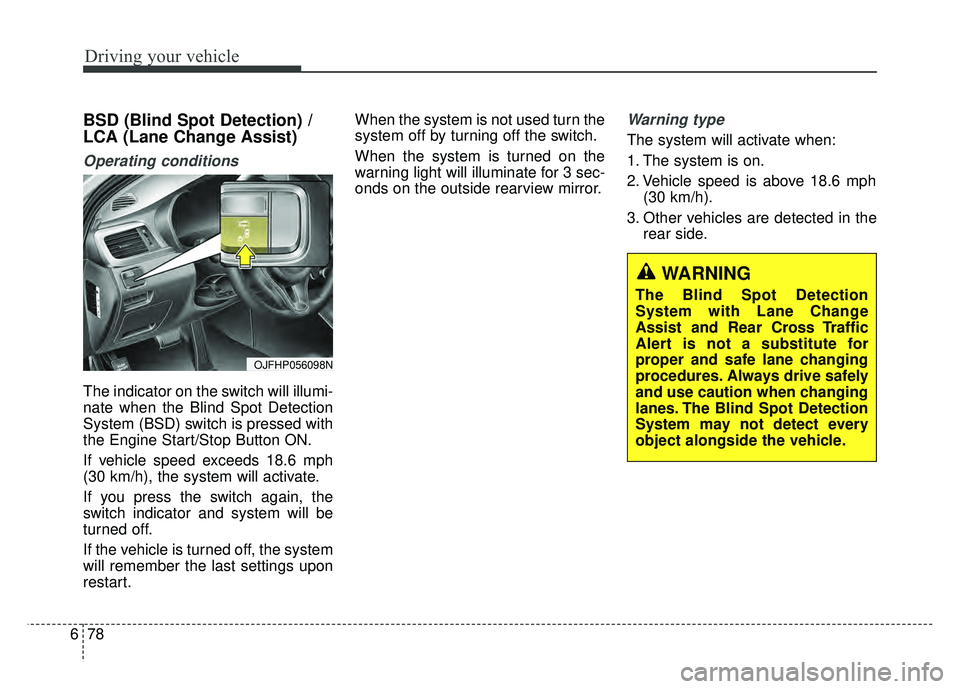
The indicator on the switch will illumi-
nate when the Blind Spot Detection
System (BSD) switch is pressed with
the Engine Start/Stop Button ON.
If vehicle speed exceeds 18.6 mph
(30 km/h), the system will activate.
If you press the switch again, the
switch indicator and system will be
turned off.
If the vehicle is turned off, the system
will remember the last settings upon
restart. When the system is not used turn the
system off by turning off the switch.
When the system is turned on the
warning light will illuminate for 3 sec-
onds on the outside rearview mirror.
Warning type
The system will activate when:
1. The system is on.
2. Vehicle speed is above 18.6 mph
(30 km/h).
3. Other vehicles are detected in the rear side.
WARNING
The Blind Spot Detection
System with Lane Change
Assist and Rear Cross Traffic
Alert is not a substitute for
proper and safe lane changing
procedures. Always drive safely
and use caution when changing
lanes. The Blind Spot Detection
System may not detect every
object alongside the vehicle.
OJFHP056098N
Page 417 of 604
Driving your vehicle
80
6
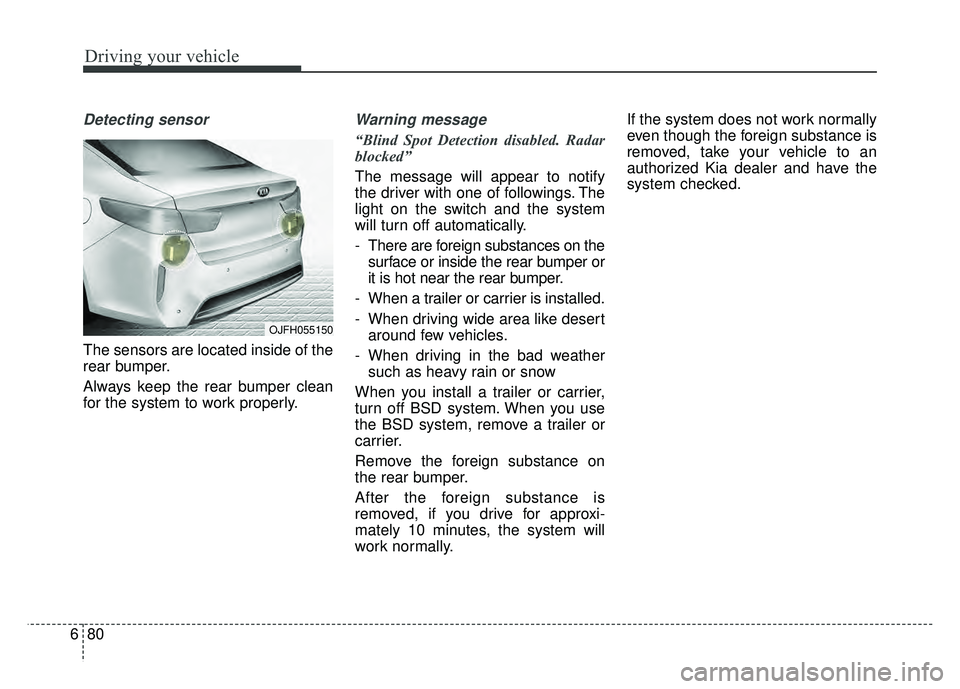
Detecting sensor
The sensors are located inside of the
rear bumper.
Always keep the rear bumper clean
for the system to work properly.
Warning message
“Blind Spot Detection disabled. Radar
blocked”
The message will appear to notify
the driver with one of followings. The
light on the switch and the system
will turn off automatically.
- There are foreign substances on the
surface or inside the rear bumper or
it is hot near the rear bumper.
- When a trailer or carrier is installed.
- When driving wide area like desert around few vehicles.
- When driving in the bad weather such as heavy rain or snow
When you install a trailer or carrier,
turn off BSD system. When you use
the BSD system, remove a trailer or
carrier.
Remove the foreign substance on
the rear bumper.
After the foreign substance is
removed, if you drive for approxi-
mately 10 minutes, the system will
work normally. If the system does not work normally
even though the foreign substance is
removed, take your vehicle to an
authorized Kia dealer and have the
system checked.
OJFH055150
Page 419 of 604
Driving your vehicle
82
6
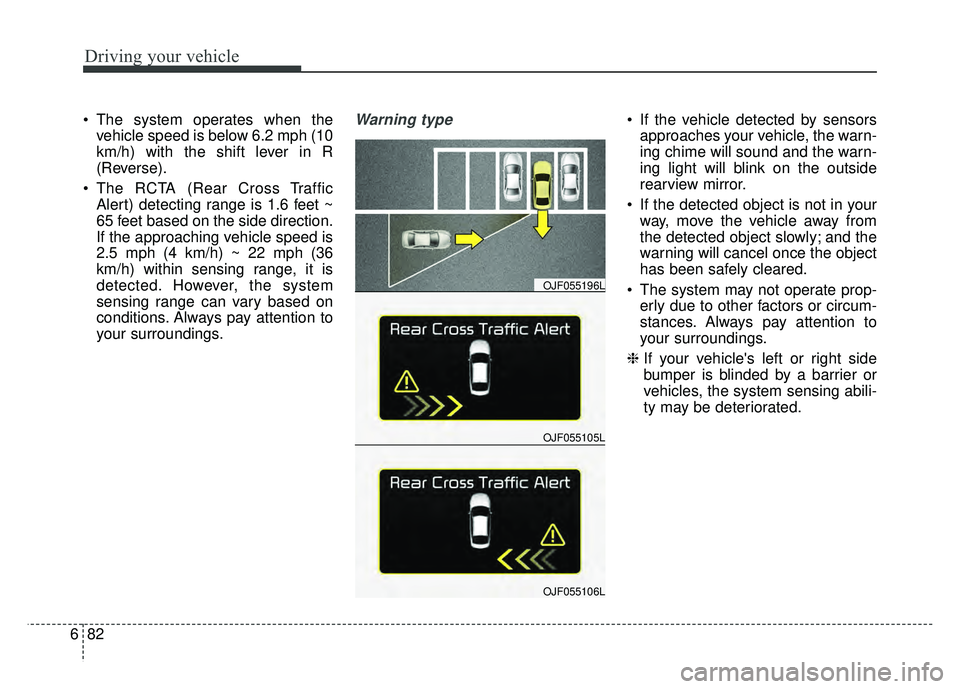
The system operates when the
vehicle speed is below 6.2 mph (10
km/h) with the shift lever in R
(Reverse).
The RCTA (Rear Cross Traffic Alert) detecting range is 1.6 feet ~
65 feet based on the side direction.
If the approaching vehicle speed is
2.5 mph (4 km/h) ~ 22 mph (36
km/h) within sensing range, it is
detected. However, the system
sensing range can vary based on
conditions. Always pay attention to
your surroundings.Warning type If the vehicle detected by sensorsapproaches your vehicle, the warn-
ing chime will sound and the warn-
ing light will blink on the outside
rearview mirror.
If the detected object is not in your way, move the vehicle away from
the detected object slowly; and the
warning will cancel once the object
has been safely cleared.
The system may not operate prop- erly due to other factors or circum-
stances. Always pay attention to
your surroundings.
\b If your vehicle's left or right side
bumper is blinded by a barrier or
vehicles, the system sensing abili-
ty may be deteriorated.
OJF055105L
OJF055196L
OJF055106L