audio KIA OPTIMA PHEV 2019 User Guide
[x] Cancel search | Manufacturer: KIA, Model Year: 2019, Model line: OPTIMA PHEV, Model: KIA OPTIMA PHEV 2019Pages: 553, PDF Size: 11.97 MB
Page 330 of 553
Driving your vehicle
48
6
✽ ✽
NOTICE
• Do not apply foreign objects such
as a bumper sticker or a bumper
guard near the radar sensor.
Doing so may adversely affect the
sensing performance of the radar.
• Always keep the radar sensor and cover clean and free of dirt and
debris.
• Use only soft cloth to wash the vehicle. Do not spray pressurized
water directly on the sensor or
sensor cover.
• Be careful not to apply unneces- sary force on the radar sensor or
sensor cover. If the sensor is
forcibly moved out of proper
alignment, the FCA system may
not operate correctly. In this case,
a warning message may not be dis-
played. Have the vehicle inspected
by an authorized Kia dealer
• If the front bumper becomes dam- aged in the area around the radar
sensor, the FCA system may not
operate properly. In this case,
have your vehicle inspected by an
authorized Kia dealer. (Continued)(Continued)
• Use only genuine parts to repair or
replace a damaged sensor or sen-
sor cover. Do not apply paint to
the sensor cover.
• Do not tint the window or install stickers or accessories around the
inside mirror where the camera is
installed.
• Make sure the frontal camera installation point does not get wet.
• Do not impact or remove any radar/camera components.
• Do not place reflective objects(white paper or mirror etc.)
on the dashboard.
The system may activate unneces-
sarily due to reflect of the sunlight.
• Excessive audio system volume may prevent occupants from hear-
ing the FCA system warning
alarm.
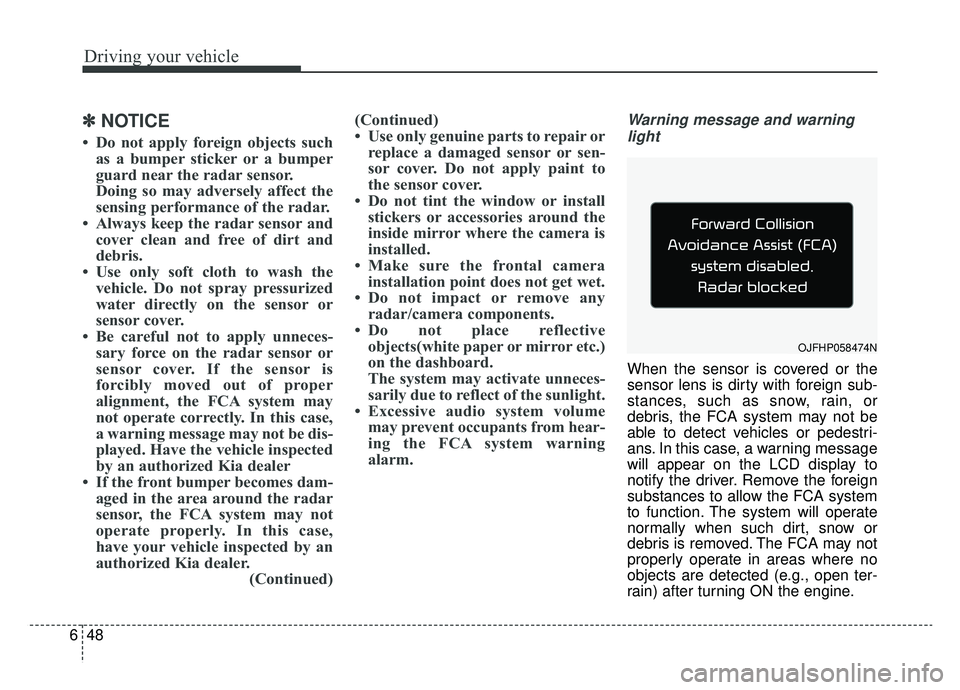
Warning message and warning
light
When the sensor is covered or the
sensor lens is dirty with foreign sub-
stances, such as snow, rain, or
debris, the FCA system may not be
able to detect vehicles or pedestri-
ans. In this case, a warning message
will appear on the LCD display to
notify the driver. Remove the foreign
substances to allow the FCA system
to function. The system will operate
normally when such dirt, snow or
debris is removed. The FCA may not
properly operate in areas where no
objects are detected (e.g., open ter-
rain) after turning ON the engine.
OJFHP058474N
Page 379 of 553
697
Driving your vehicle
LANE DEPARTURE WARNING (LDW) SYSTEM (IF EQUIPPED)
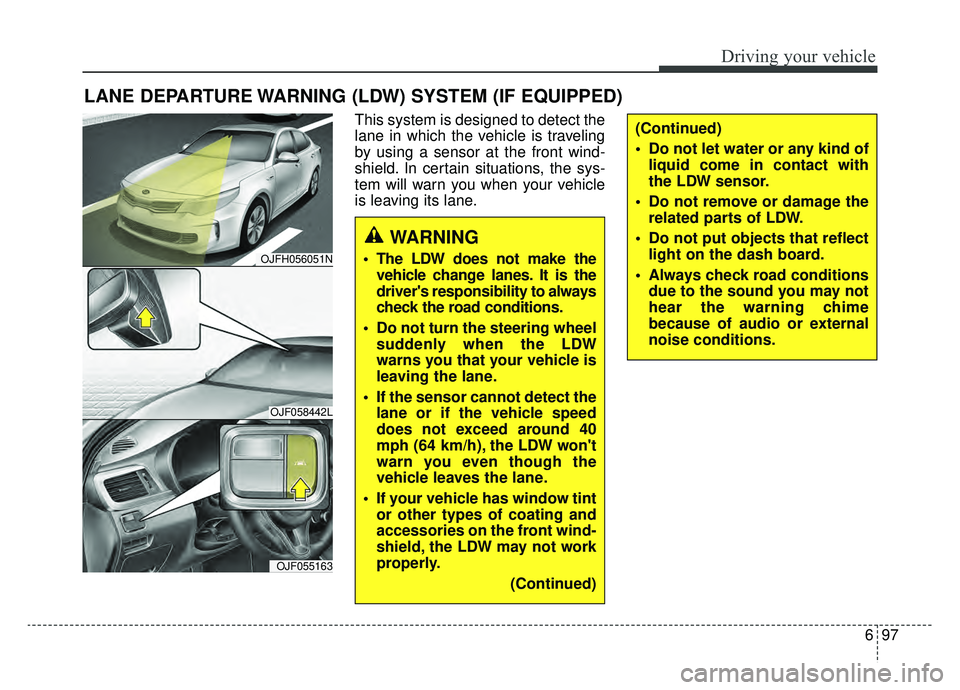
This system is designed to detect the
lane in which the vehicle is traveling
by using a sensor at the front wind-
shield. In certain situations, the sys-
tem will warn you when your vehicle
is leaving its lane.
WARNING
The LDW does not make thevehicle change lanes. It is the
driver's responsibility to always
check the road conditions.
Do not turn the steering wheel suddenly when the LDW
warns you that your vehicle is
leaving the lane.
If the sensor cannot detect the lane or if the vehicle speed
does not exceed around 40
mph (64 km/h), the LDW won't
warn you even though the
vehicle leaves the lane.
If your vehicle has window tint or other types of coating and
accessories on the front wind-
shield, the LDW may not work
properly.
(Continued)
(Continued)
Do not let water or any kind ofliquid come in contact with
the LDW sensor.
Do not remove or damage the related parts of LDW.
Do not put objects that reflect light on the dash board.
Always check road conditions due to the sound you may not
hear the warning chime
because of audio or external
noise conditions.
OJFH056051N
OJF058442L
OJF055163
Page 465 of 553
Maintenance
38
8
When recharging the battery,
observe the following precautions:
The battery must be removed from
the vehicle and placed in an area
with good ventilation.
Do not allow cigarettes, sparks, or flame near the battery.
Watch the battery during charging, and stop or reduce the charging
rate if the battery cells begin
gassing (boiling) violently or if the
temperature of the electrolyte of
any cell exceeds 120°F (49°C).
Wear eye protection when check- ing the battery during charging.
Disconnect the battery charger in the following order.
1. Turn off the battery charger main switch.
2. Unhook the negative clamp from the negative battery terminal.
3. Unhook the positive clamp from the positive battery terminal. Before performing maintenance or
recharging the battery, turn off all
accessories and stop the engine.
The negative battery cable must be removed first and installed last
when the battery is disconnected.Reset items
Items should be reset after the bat-
tery has been discharged or the bat-
tery has been disconnected.
Auto up/down window (See chapter 4)
Sunroof (See chapter 4)
Trip computer (See chapter 4)
Climate control system (See chapter 4)
Driver position memory system (See chapter 3)
Audio (See chapter 5)
Page 484 of 553
857
Maintenance
Fuse switch
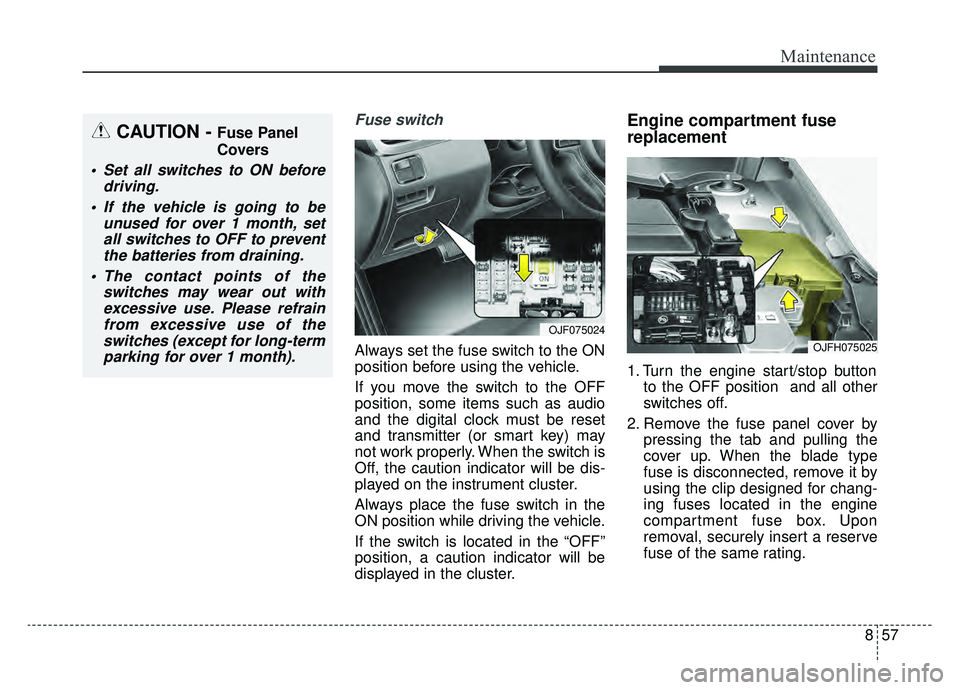
Always set the fuse switch to the ON
position before using the vehicle.
If you move the switch to the OFF
position, some items such as audio
and the digital clock must be reset
and transmitter (or smart key) may
not work properly. When the switch is
Off, the caution indicator will be dis-
played on the instrument cluster.
Always place the fuse switch in the
ON position while driving the vehicle.
If the switch is located in the “OFF”
position, a caution indicator will be
displayed in the cluster.
Engine compartment fuse
replacement
1. Turn the engine start/stop buttonto the OFF position and all other
switches off.
2. Remove the fuse panel cover by pressing the tab and pulling the
cover up. When the blade type
fuse is disconnected, remove it by
using the clip designed for chang-
ing fuses located in the engine
compartment fuse box. Upon
removal, securely insert a reserve
fuse of the same rating.
OJF075024
OJFH075025
CAUTION - Fuse Panel
Covers
Set all switches to ON beforedriving.
If the vehicle is going to be unused for over 1 month, setall switches to OFF to preventthe batteries from draining.
The contact points of the switches may wear out withexcessive use. Please refrainfrom excessive use of theswitches (except for long-termparking for over 1 month).
Page 489 of 553
Maintenance
62
8
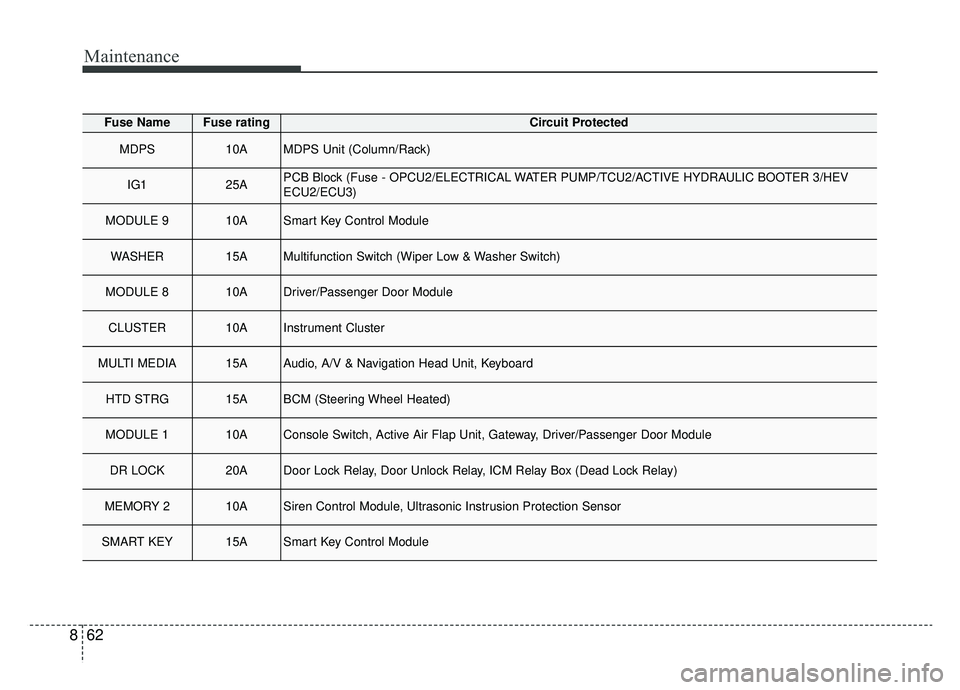
Fuse NameFuse ratingCircuit Protected
MDPS10AMDPS Unit (Column/Rack)
IG125APCB Block (Fuse - OPCU2/ELECTRICAL WATER PUMP/TCU2/ACTIVE HYDRAULIC BOOTER 3/HEV
ECU2/ECU3)
MODULE 910ASmart Key Control Module
WASHER15AMultifunction Switch (Wiper Low & Washer Switch)
MODULE 810ADriver/Passenger Door Module
CLUSTER10AInstrument Cluster
MULTI MEDIA15AAudio, A/V & Navigation Head Unit, Keyboard
HTD STRG15ABCM (Steering Wheel Heated)
MODULE 110AConsole Switch, Active Air Flap Unit, Gateway, Driver/Passenger Door Module
DR LOCK20ADoor Lock Relay, Door Unlock Relay, ICM Relay Box (Dead Lock Relay)
MEMORY 210ASiren Control Module, Ultrasonic Instrusion Protection Sensor
SMART KEY15ASmart Key Control Module
Page 490 of 553
863
Maintenance
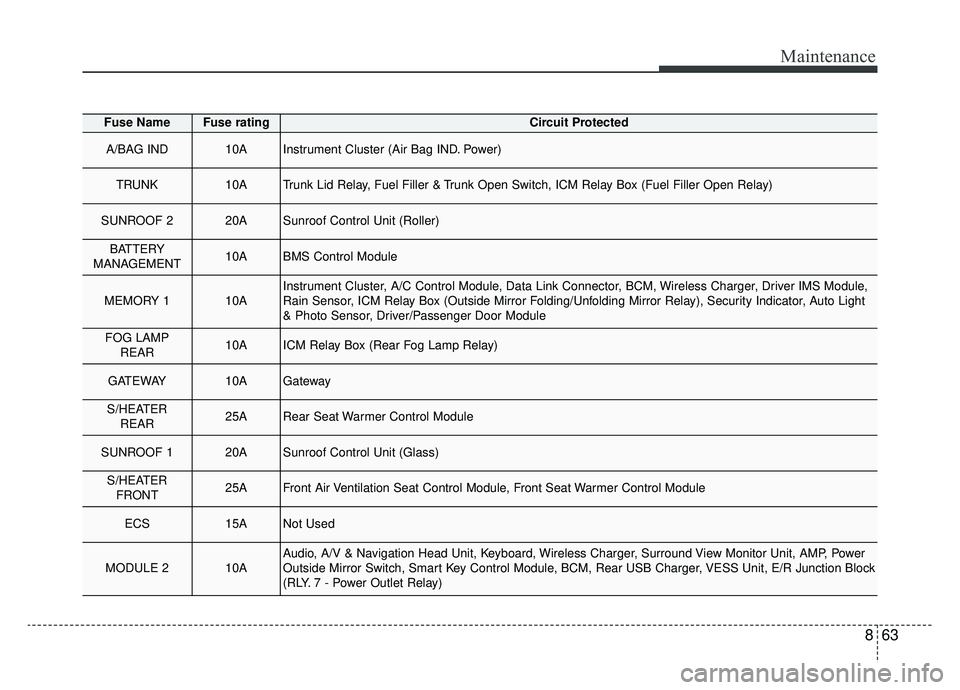
Fuse NameFuse ratingCircuit Protected
A/BAG IND10AInstrument Cluster (Air Bag IND. Power)
TRUNK10ATrunk Lid Relay, Fuel Filler & Trunk Open Switch, ICM Relay Box (Fuel Filler Open Relay)
SUNROOF 220ASunroof Control Unit (Roller)
BATTERY
MANAGEMENT10ABMS Control Module
MEMORY 110AInstrument Cluster, A/C Control Module, Data Link Connector, BCM, Wireless Charger, Driver IMS Module,
Rain Sensor, ICM Relay Box (Outside Mirror Folding/Unfolding Mirror Relay), Security Indicator, Auto Light
& Photo Sensor, Driver/Passenger Door Module
FOG LAMP REAR10AICM Relay Box (Rear Fog Lamp Relay)
GATEWAY10AGateway
S/HEATERREAR25ARear Seat Warmer Control Module
SUNROOF 120ASunroof Control Unit (Glass)
S/HEATERFRONT25AFront Air Ventilation Seat Control Module, Front Seat Warmer Control Module
ECS15ANot Used
MODULE 210AAudio, A/V & Navigation Head Unit, Keyboard, Wireless Charger, Surround View Monitor Unit, AMP, Power
Outside Mirror Switch, Smart Key Control Module, BCM, Rear USB Charger, VESS Unit, E/R Junction Block
(RLY. 7 - Power Outlet Relay)
Page 540 of 553
Specifications, Consumer information, Reporting safety defects
14
9
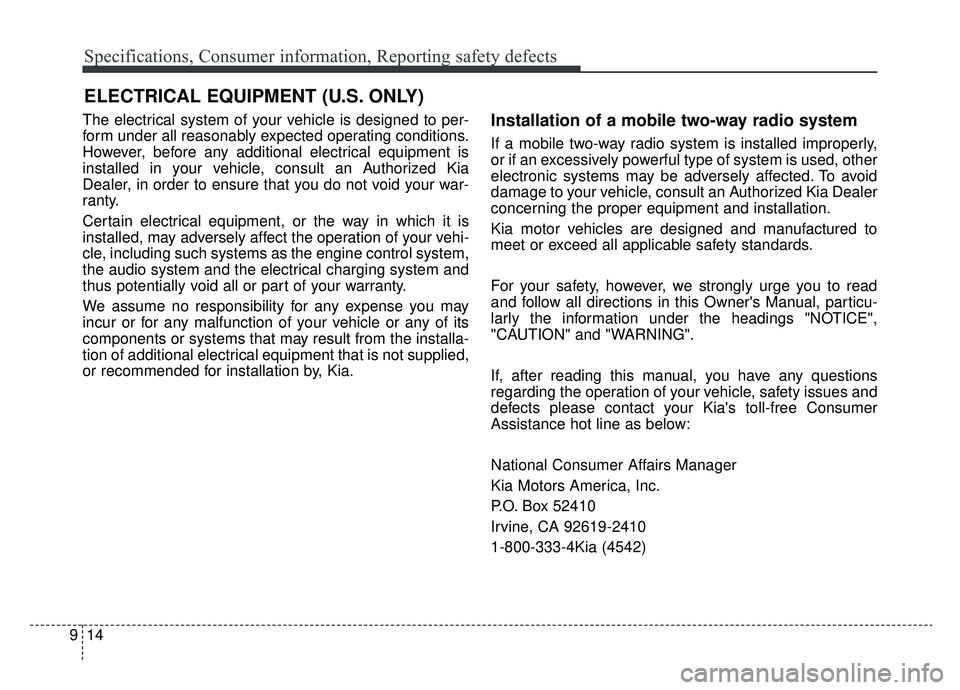
The electrical system of your vehicle is designed to per-
form under all reasonably expected operating conditions.
However, before any additional electrical equipment is
installed in your vehicle, consult an Authorized Kia
Dealer, in order to ensure that you do not void your war-
ranty.
Certain electrical equipment, or the way in which it is
installed, may adversely affect the operation of your vehi-
cle, including such systems as the engine control system,
the audio system and the electrical charging system and
thus potentially void all or part of your warranty.
We assume no responsibility for any expense you may
incur or for any malfunction of your vehicle or any of its
components or systems that may result from the installa-
tion of additional electrical equipment that is not supplied,
or recommended for installation by, Kia.Installation of a mobile two-way radio system
If a mobile two-way radio system is installed improperly,
or if an excessively powerful type of system is used, other
electronic systems may be adversely affected. To avoid
damage to your vehicle, consult an Authorized Kia Dealer
concerning the proper equipment and installation.
Kia motor vehicles are designed and manufactured to
meet or exceed all applicable safety standards.
For your safety, however, we strongly urge you to read
and follow all directions in this Owner's Manual, particu-
larly the information under the headings "NOTICE",
"CAUTION" and "WARNING".
If, after reading this manual, you have any questions
regarding the operation of your vehicle, safety issues and
defects please contact your Kia's toll-free Consumer
Assistance hot line as below:
National Consumer Affairs Manager
Kia Motors America, Inc.
P.O. Box 52410
Irvine, CA 92619-2410
1-800-333-4Kia (4542)
ELECTRICAL EQUIPMENT (U.S. ONLY)
Page 543 of 553
Index
2I
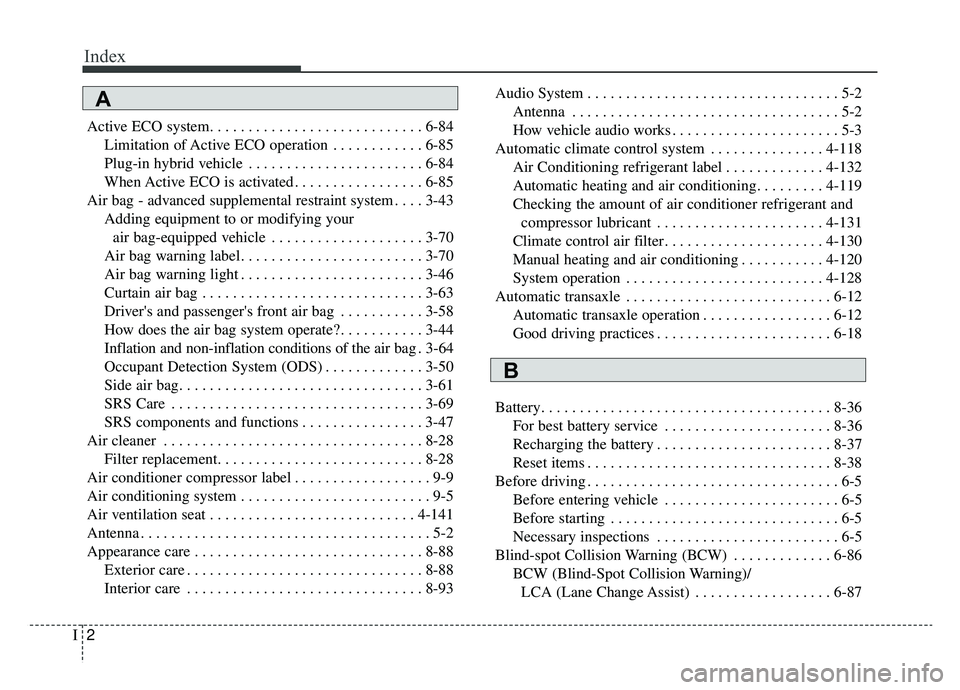
Active ECO system. . . . . . . . . . . . . . . . . . . . . . . . . . . . 6-84Limitation of Active ECO operation . . . . . . . . . . . . 6-85
Plug-in hybrid vehicle . . . . . . . . . . . . . . . . . . . . . . . 6-84
When Active ECO is activated . . . . . . . . . . . . . . . . . 6-85
Air bag - advanced supplemental restraint system . . . . 3-43 Adding equipment to or modifying your air bag-equipped vehicle . . . . . . . . . . . . . . . . . . . . 3-70
Air bag warning label. . . . . . . . . . . . . . . . . . . . . . . . 3-70
Air bag warning light . . . . . . . . . . . . . . . . . . . . . . . . 3-46
Curtain air bag . . . . . . . . . . . . . . . . . . . . . . . . . . . . . 3-63
Driver's and passenger's front air bag . . . . . . . . . . . 3-58
How does the air bag system operate? . . . . . . . . . . . 3-44
Inflation and non-inflation conditions of the air bag . 3-64
Occupant Detection System (ODS) . . . . . . . . . . . . . 3-50
Side air bag. . . . . . . . . . . . . . . . . . . . . . . . . . . . . . . . 3-61
SRS Care . . . . . . . . . . . . . . . . . . . . . . . . . . . . . . . . . 3-69
SRS components and functions . . . . . . . . . . . . . . . . 3-47
Air cleaner . . . . . . . . . . . . . . . . . . . . . . . . . . . . . . . . . . 8-28\
Filter replacement. . . . . . . . . . . . . . . . . . . . . . . . . . . 8-28
Air conditioner compressor label . . . . . . . . . . . . . . . . . . 9-9
Air conditioning system . . . . . . . . . . . . . . . . . . . . . . . . . 9-5
Air ventilation seat . . . . . . . . . . . . . . . . . . . . . . . . . . . 4-141
Antenna . . . . . . . . . . . . . . . . . . . . . . . . . . . . . . . . . . . . \
. . 5-2
Appearance care . . . . . . . . . . . . . . . . . . . . . . . . . . . . . . 8-88 Exterior care . . . . . . . . . . . . . . . . . . . . . . . . . . . . . . . 8-88
Interior care . . . . . . . . . . . . . . . . . . . . . . . . . . . . . . . 8-93 Audio System . . . . . . . . . . . . . . . . . . . . . . . . . . . . . . . . . 5-2
Antenna . . . . . . . . . . . . . . . . . . . . . . . . . . . . . . . . . . . 5-\
2
How vehicle audio works . . . . . . . . . . . . . . . . . . . . . . 5-3
Automatic climate control system . . . . . . . . . . . . . . . 4-118 Air Conditioning refrigerant label . . . . . . . . . . . . . 4-132
Automatic heating and air conditioning. . . . . . . . . 4-119
Checking the amount of air conditioner refrigerant and compressor lubricant . . . . . . . . . . . . . . . . . . . . . . 4-131
Climate control air filter. . . . . . . . . . . . . . . . . . . . . 4-130
Manual heating and air conditioning . . . . . . . . . . . 4-120
System operation . . . . . . . . . . . . . . . . . . . . . . . . . . 4-128
Automatic transaxle . . . . . . . . . . . . . . . . . . . . . . . . . . . 6-12 Automatic transaxle operation . . . . . . . . . . . . . . . . . 6-12
Good driving practices . . . . . . . . . . . . . . . . . . . . . . . 6-18
Battery. . . . . . . . . . . . . . . . . . . . . . . . . . . . . . . . . . . . \
. . 8-36 For best battery service . . . . . . . . . . . . . . . . . . . . . . 8-36
Recharging the battery . . . . . . . . . . . . . . . . . . . . . . . 8-37
Reset items . . . . . . . . . . . . . . . . . . . . . . . . . . . . . . . . 8-38
Before driving . . . . . . . . . . . . . . . . . . . . . . . . . . . . . . . . . 6-5 Before entering vehicle . . . . . . . . . . . . . . . . . . . . . . . 6-5
Before starting . . . . . . . . . . . . . . . . . . . . . . . . . . . . . . 6-5
Necessary inspections . . . . . . . . . . . . . . . . . . . . . . . . 6-5
Blind-spot Collision Warning (BCW) . . . . . . . . . . . . . 6-86 BCW (Blind-Spot Collision Warning)/LCA (Lane Change Assist) . . . . . . . . . . . . . . . . . . 6-87
A
B