instrument cluster KIA OPTIMA PHEV 2019 User Guide
[x] Cancel search | Manufacturer: KIA, Model Year: 2019, Model line: OPTIMA PHEV, Model: KIA OPTIMA PHEV 2019Pages: 553, PDF Size: 11.97 MB
Page 326 of 553
Driving your vehicle
44
6
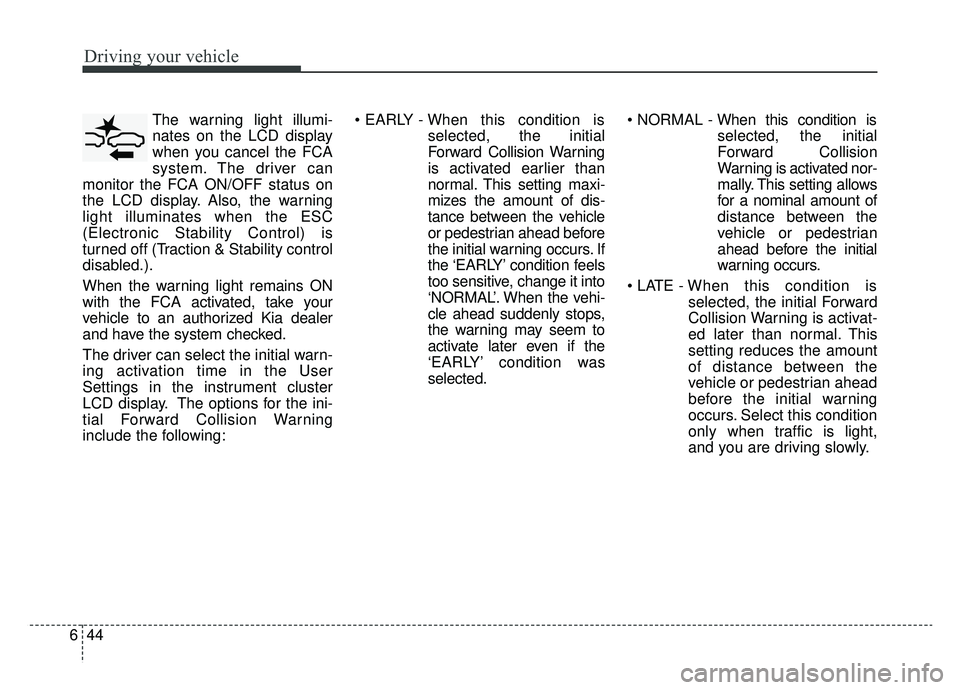
The warning light illumi-
nates on the LCD display
when you cancel the FCA
system. The driver can
monitor the FCA ON/OFF status on
the LCD display. Also, the warning
light illuminates when the ESC
(Electronic Stability Control) is
turned off (Traction & Stability control
disabled.).
When the warning light remains ON
with the FCA activated, take your
vehicle to an authorized Kia dealer
and have the system checked.
The driver can select the initial warn-
ing activation time in the User
Settings in the instrument cluster
LCD display. The options for the ini-
tial Forward Collision Warning
include the following:
selected, the initial
Forward Collision Warning
is activated earlier than
normal. This setting maxi-
mizes the amount of dis-
tance between the vehicle
or pedestrian ahead before
the initial warning occurs. If
the ‘EARLY’ condition feels
too sensitive, change it into
‘NORMAL’. When the vehi-
cle ahead suddenly stops,
the warning may seem to
activate later even if the
‘EARLY’ condition was
selected.
selected, the initial
Forward Collision
Warning is activated nor-
mally. This setting allows
for a nominal amount of
distance between the
vehicle or pedestrian
ahead before the initial
warning occurs.
selected, the initial Forward
Collision Warning is activat-
ed later than normal. This
setting reduces the amount
of distance between the
vehicle or pedestrian ahead
before the initial warning
occurs. Select this condition
only when traffic is light,
and you are driving slowly.
Page 341 of 553
659
Driving your vehicle
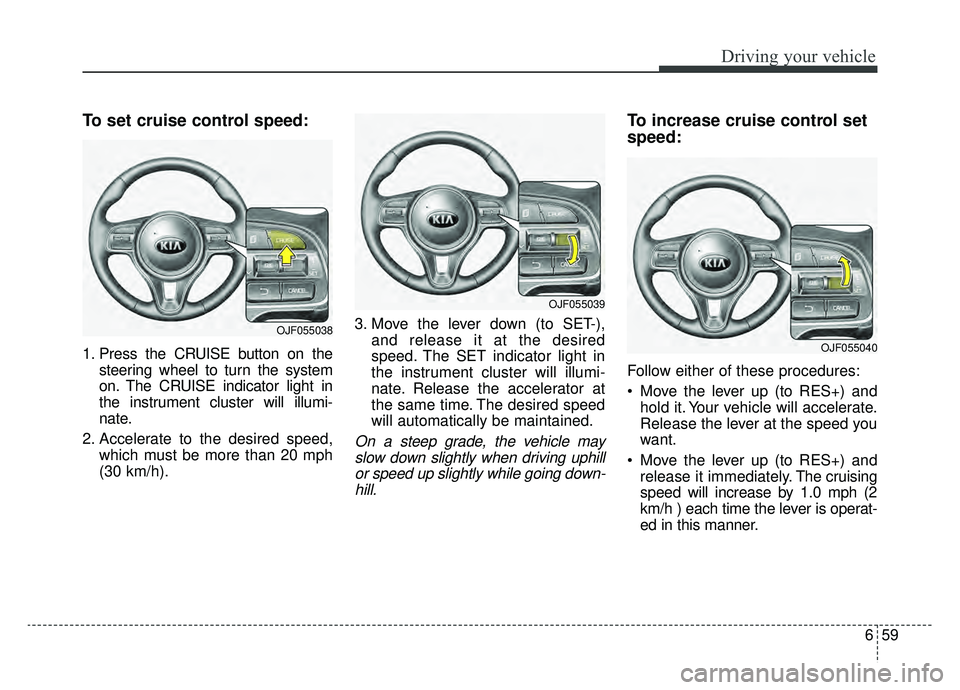
To set cruise control speed:
1. Press the CRUISE button on thesteering wheel to turn the system
on. The CRUISE indicator light in
the instrument cluster will illumi-
nate.
2. Accelerate to the desired speed, which must be more than 20 mph
(30 km/h). 3. Move the lever down (to SET-),
and release it at the desired
speed. The SET indicator light in
the instrument cluster will illumi-
nate. Release the accelerator at
the same time. The desired speed
will automatically be maintained.
On a steep grade, the vehicle mayslow down slightly when driving uphillor speed up slightly while going down-hill.
To increase cruise control set
speed:
Follow either of these procedures:
Move the lever up (to RES+) and hold it. Your vehicle will accelerate.
Release the lever at the speed you
want.
Move the lever up (to RES+) and release it immediately. The cruising
speed will increase by 1.0 mph (2
km/h ) each time the lever is operat-
ed in this manner.
OJF055038
OJF055039
OJF055040
Page 343 of 553
661
Driving your vehicle
Each of these actions will cancelcruise control operation (the SETindicator light in the instrument clus-ter will go off), but it will not turn thesystem off. If you wish to resumecruise control operation, move thelever up (to RES+). You will return toyour previously preset speed.To resume cruising speed at
more than approximately 20
mph (30 km/h):
If any method other than the
CRUISE ON-OFF switch was used
to cancel cruising speed and the sys-
tem is still activated, the most recent
set speed will automatically resume
when you move the lever up.
It will not resume, however, if the
vehicle speed has dropped below
approximately 20 mph (30 km/h).
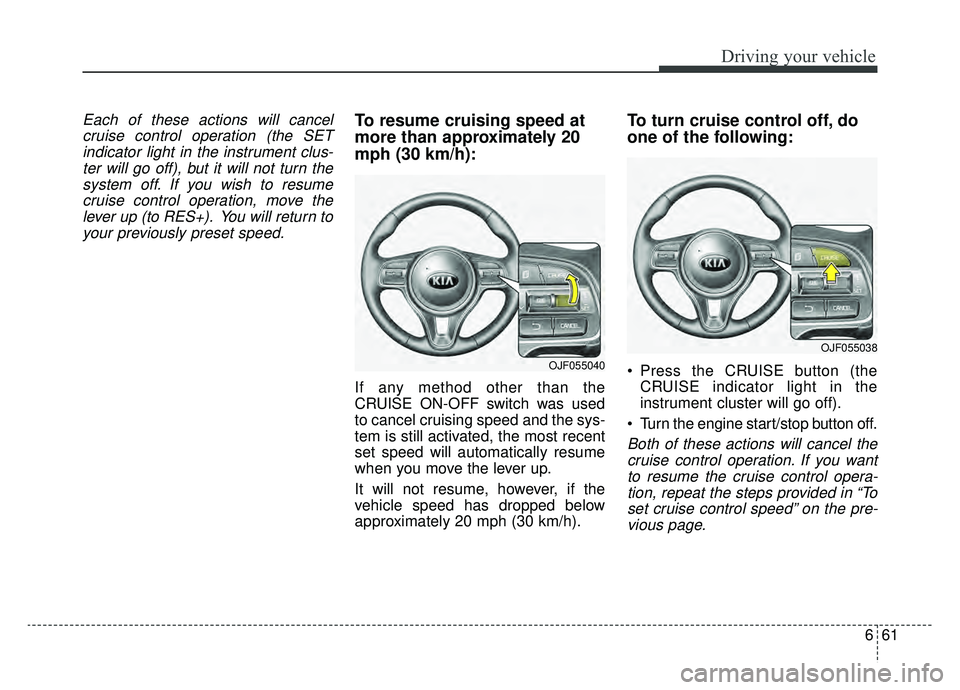
To turn cruise control off, do
one of the following:
Press the CRUISE button (the CRUISE indicator light in the
instrument cluster will go off).
Turn the engine start/stop button off.
Both of these actions will cancel the cruise control operation. If you wantto resume the cruise control opera-tion, repeat the steps provided in “Toset cruise control speed” on the pre-vious page.
OJF055040
OJF055038
Page 345 of 553
663
Driving your vehicle
(Continued)- Parking lot
- Lanes beside guard rail on aroad
- Slippery road with rain, ice, or snow
- Abrupt curved road
- Steep hills
- Windy roads
- Off roads
- Rods under construction
- Rumble strip
- When driving near crash barriers
- When driving on a sharp curve
- When the vehicle sensing ability decreases due to
vehicle modification result-
ing level difference of the
vehicle's front and rear
- When driving in heavy traffic or when traffic conditions
make it difficult to drive at a
constant speed
(Continued)(Continued)- Limited visibility (rain, snow,smog, etc.)
Pay particular attention to the driving conditions whenever
using the Smart Cruise
Control system.
Be careful when driving downhill using the SCC.
Cruise function should not be used when the vehicle is
being towed to prevent any
damage.
Always set the vehicle speed under the speed limit.
Always pay continuous atten- tion to road and driving condi-
tions even when the smart
cruise control system is being
operated.WARNING
If the Smart Cruise Control isleft on, (cruise indicator in the
instrument cluster illuminat-
ed) the Smart Cruise Control
can be activated unintention-
ally. Keep the Smart Cruise
Control system off (cruise
indicator off) when the Smart
Cruise Control is not used.
Use the Smart Cruise Control system only when traveling
on open highways in good
weather.
Do not use the Smart Cruise Control when it may not be
safe to keep the car at a con-
stant speed. For instance:
- Highway interchange andtollgate
- Road surrounded by multi- ple steel constructions (sub-
way construction, steel tun-
nel, etc)
(Continued)
Page 346 of 553
Driving your vehicle
64
6
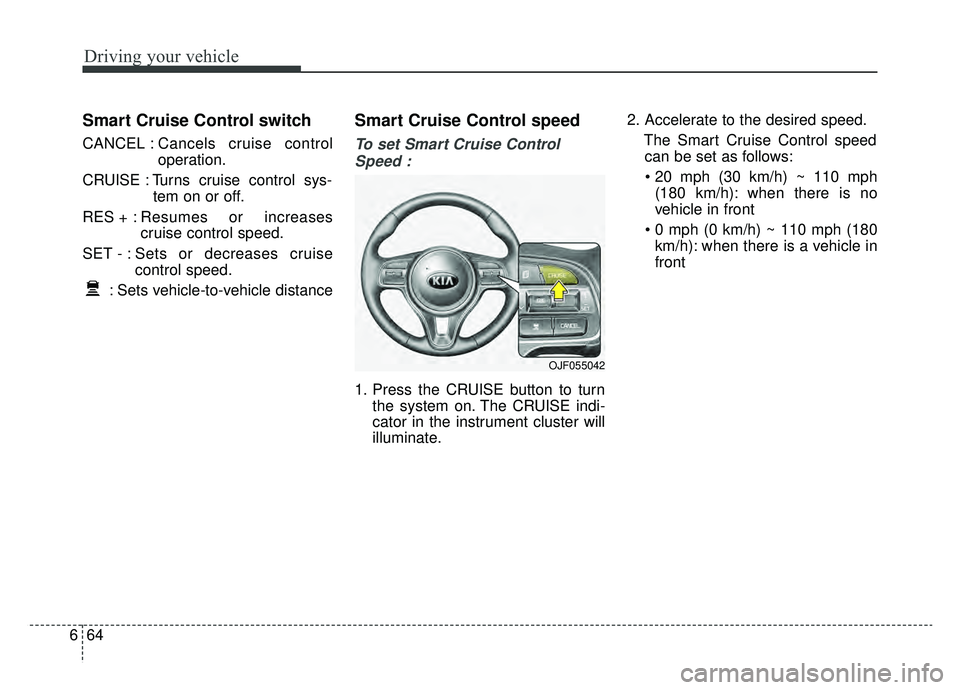
Smart Cruise Control switch
CANCEL : Cancels cruise control
operation.
CRUISE : Turns cruise control sys- tem on or off.
RES + : Resumes or increases
cruise control speed.
SET - : Sets or decreases cruise control speed.
: Sets vehicle-to-vehicle distance
Smart Cruise Control speed
To set Smart Cruise Control Speed :
1. Press the CRUISE button to turn the system on. The CRUISE indi-
cator in the instrument cluster will
illuminate. 2. Accelerate to the desired speed.
The Smart Cruise Control speedcan be set as follows:
(180 km/h): when there is no
vehicle in front
km/h): when there is a vehicle in
front
OJF055042
Page 405 of 553
77
What to do in an emergency
IF THE ENGINE OVERHEATS
If your temperature gauge indicates
overheating, you will experience a
loss of power, or hear loud pinging or
knocking, the engine is probably too
hot. If this happens, you should:
1. Turn on the emergency warningflasher and stop in a safe place.
Move the shift lever to P (Park)
and engage the parking brake.
2. If hot steam does not come out from the engine room, carefully
open the engine room and check
whether the water pump connec-
tor is properly engaged. If the con-
nector is not properly engaged,
stop the engine immediately and
properly engage the connector.
Then, turn the engine on.
3. Turn on the air conditioner. 4. If the “HEV Warning” light turns on
in the driver instrument cluster, or
engine coolant or hot steam emits
from the engine coolant filler, stop
the engine immediately. Then, call
the nearest authorized Kia dealer
for assistance. If the “Engine
Warning” light remains illuminated
or the engine coolant is not flowing
out, keep the engine running.
Open the engine hood for ventila-
tion to help cool down the engine. 5. Check the coolant temperature
gauge on the instrument cluster to
make sure the coolant tempera-
ture is sufficiently cooled down. If
the engine coolant level is low,
please check the connecting parts
between the radiator hose, heater
hose, and water pump for any
signs of leakage. When there is no
sign of leakage, please refill the
engine coolant. If causes and
signs of engine overheating such
as warning light illumination,
engine coolant leakage, or cooling
fan malfunction are found, stop the
vehicle the earliest. Then, call the
nearest authorized Kia dealer for
assistance.
WARNING
While the engine is running,
keep hair, hands and clothing
away from moving parts such
as the fan and drive belts to pre-
vent injury.
Page 484 of 553
857
Maintenance
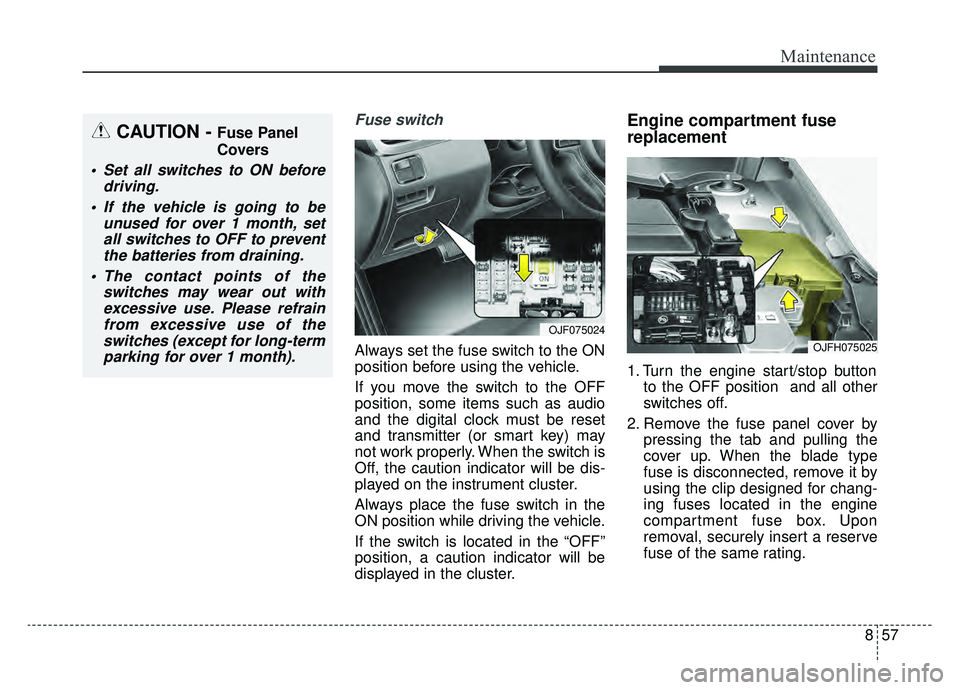
Fuse switch
Always set the fuse switch to the ON
position before using the vehicle.
If you move the switch to the OFF
position, some items such as audio
and the digital clock must be reset
and transmitter (or smart key) may
not work properly. When the switch is
Off, the caution indicator will be dis-
played on the instrument cluster.
Always place the fuse switch in the
ON position while driving the vehicle.
If the switch is located in the “OFF”
position, a caution indicator will be
displayed in the cluster.
Engine compartment fuse
replacement
1. Turn the engine start/stop buttonto the OFF position and all other
switches off.
2. Remove the fuse panel cover by pressing the tab and pulling the
cover up. When the blade type
fuse is disconnected, remove it by
using the clip designed for chang-
ing fuses located in the engine
compartment fuse box. Upon
removal, securely insert a reserve
fuse of the same rating.
OJF075024
OJFH075025
CAUTION - Fuse Panel
Covers
Set all switches to ON beforedriving.
If the vehicle is going to be unused for over 1 month, setall switches to OFF to preventthe batteries from draining.
The contact points of the switches may wear out withexcessive use. Please refrainfrom excessive use of theswitches (except for long-termparking for over 1 month).
Page 489 of 553
Maintenance
62
8
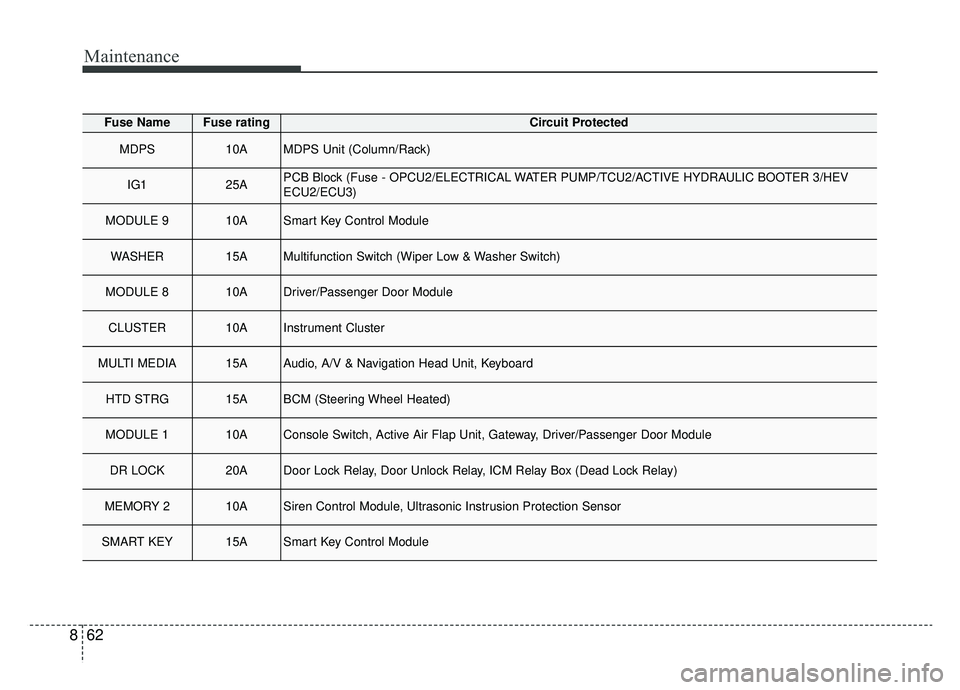
Fuse NameFuse ratingCircuit Protected
MDPS10AMDPS Unit (Column/Rack)
IG125APCB Block (Fuse - OPCU2/ELECTRICAL WATER PUMP/TCU2/ACTIVE HYDRAULIC BOOTER 3/HEV
ECU2/ECU3)
MODULE 910ASmart Key Control Module
WASHER15AMultifunction Switch (Wiper Low & Washer Switch)
MODULE 810ADriver/Passenger Door Module
CLUSTER10AInstrument Cluster
MULTI MEDIA15AAudio, A/V & Navigation Head Unit, Keyboard
HTD STRG15ABCM (Steering Wheel Heated)
MODULE 110AConsole Switch, Active Air Flap Unit, Gateway, Driver/Passenger Door Module
DR LOCK20ADoor Lock Relay, Door Unlock Relay, ICM Relay Box (Dead Lock Relay)
MEMORY 210ASiren Control Module, Ultrasonic Instrusion Protection Sensor
SMART KEY15ASmart Key Control Module
Page 490 of 553
863
Maintenance
Fuse NameFuse ratingCircuit Protected
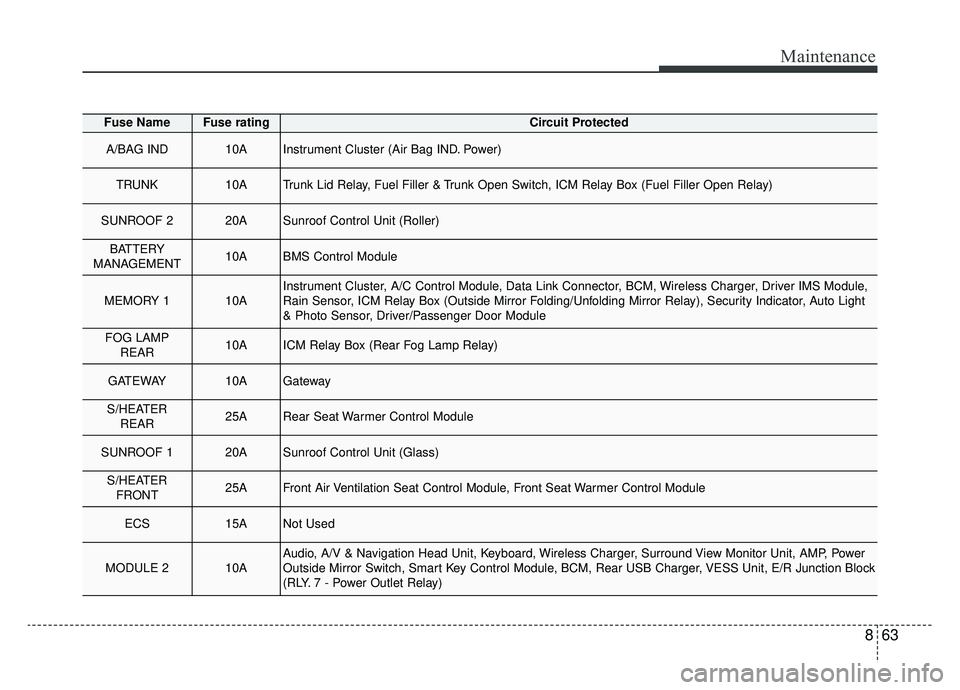
A/BAG IND10AInstrument Cluster (Air Bag IND. Power)
TRUNK10ATrunk Lid Relay, Fuel Filler & Trunk Open Switch, ICM Relay Box (Fuel Filler Open Relay)
SUNROOF 220ASunroof Control Unit (Roller)
BATTERY
MANAGEMENT10ABMS Control Module
MEMORY 110AInstrument Cluster, A/C Control Module, Data Link Connector, BCM, Wireless Charger, Driver IMS Module,
Rain Sensor, ICM Relay Box (Outside Mirror Folding/Unfolding Mirror Relay), Security Indicator, Auto Light
& Photo Sensor, Driver/Passenger Door Module
FOG LAMP REAR10AICM Relay Box (Rear Fog Lamp Relay)
GATEWAY10AGateway
S/HEATERREAR25ARear Seat Warmer Control Module
SUNROOF 120ASunroof Control Unit (Glass)
S/HEATERFRONT25AFront Air Ventilation Seat Control Module, Front Seat Warmer Control Module
ECS15ANot Used
MODULE 210AAudio, A/V & Navigation Head Unit, Keyboard, Wireless Charger, Surround View Monitor Unit, AMP, Power
Outside Mirror Switch, Smart Key Control Module, BCM, Rear USB Charger, VESS Unit, E/R Junction Block
(RLY. 7 - Power Outlet Relay)
Page 547 of 553
Index
6I
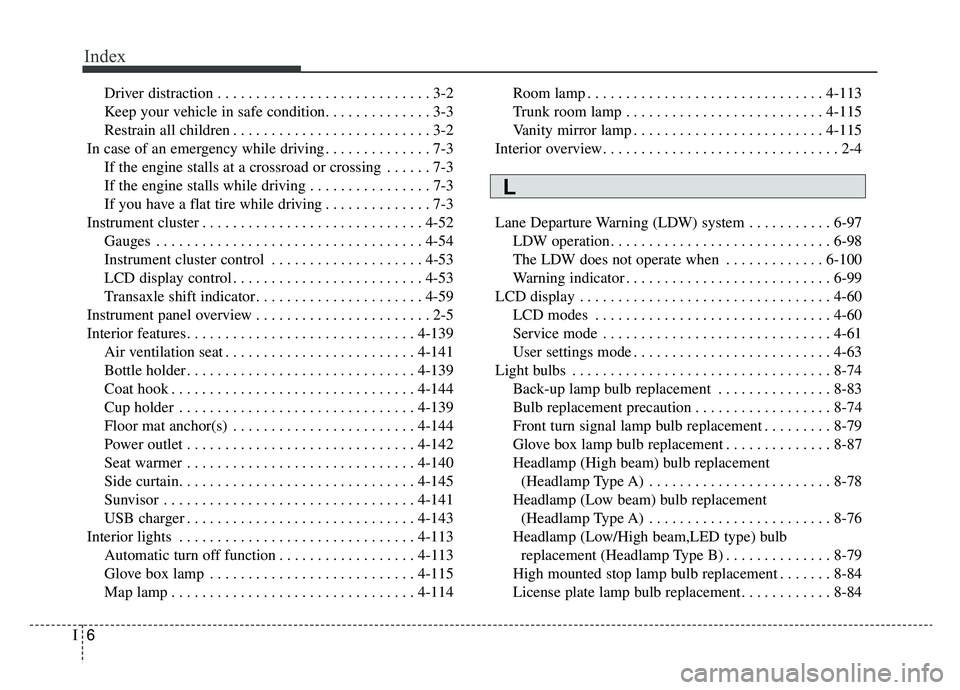
Driver distraction . . . . . . . . . . . . . . . . . . . . . . . . . . . . 3-2
Keep your vehicle in safe condition. . . . . . . . . . . . . . 3-3
Restrain all children . . . . . . . . . . . . . . . . . . . . . . . . . . 3-2
In case of an emergency while driving . . . . . . . . . . . . . . 7-3 If the engine stalls at a crossroad or crossing . . . . . . 7-3
If the engine stalls while driving . . . . . . . . . . . . . . . . 7-3
If you have a flat tire while driving . . . . . . . . . . . . . . 7-3
Instrument cluster . . . . . . . . . . . . . . . . . . . . . . . . . . . . . 4-52 Gauges . . . . . . . . . . . . . . . . . . . . . . . . . . . . . . . . . . . 4-\
54
Instrument cluster control . . . . . . . . . . . . . . . . . . . . 4-53
LCD display control . . . . . . . . . . . . . . . . . . . . . . . . . 4-53
Transaxle shift indicator . . . . . . . . . . . . . . . . . . . . . . 4-59
Instrument panel overview . . . . . . . . . . . . . . . . . . . . . . . 2-5
Interior features. . . . . . . . . . . . . . . . . . . . . . . . . . . . . . 4-139 Air ventilation seat . . . . . . . . . . . . . . . . . . . . . . . . . 4-141
Bottle holder . . . . . . . . . . . . . . . . . . . . . . . . . . . . . . 4-139
Coat hook . . . . . . . . . . . . . . . . . . . . . . . . . . . . . . . . 4-144
Cup holder . . . . . . . . . . . . . . . . . . . . . . . . . . . . . . . 4-139
Floor mat anchor(s) . . . . . . . . . . . . . . . . . . . . . . . . 4-144
Power outlet . . . . . . . . . . . . . . . . . . . . . . . . . . . . . . 4-142
Seat warmer . . . . . . . . . . . . . . . . . . . . . . . . . . . . . . 4-140
Side curtain. . . . . . . . . . . . . . . . . . . . . . . . . . . . . . . 4-145
Sunvisor . . . . . . . . . . . . . . . . . . . . . . . . . . . . . . . . . 4-141
USB charger . . . . . . . . . . . . . . . . . . . . . . . . . . . . . . 4-143
Interior lights . . . . . . . . . . . . . . . . . . . . . . . . . . . . . . . 4-113 Automatic turn off function . . . . . . . . . . . . . . . . . . 4-113
Glove box lamp . . . . . . . . . . . . . . . . . . . . . . . . . . . 4-115
Map lamp . . . . . . . . . . . . . . . . . . . . . . . . . . . . . . . . 4-114 Room lamp . . . . . . . . . . . . . . . . . . . . . . . . . . . . . . . 4-113
Trunk room lamp . . . . . . . . . . . . . . . . . . . . . . . . . . 4-115
Vanity mirror lamp . . . . . . . . . . . . . . . . . . . . . . . . . 4-115
Interior overview. . . . . . . . . . . . . . . . . . . . . . . . . . . . . . . 2-4
Lane Departure Warning (LDW) system . . . . . . . . . . . 6-97 LDW operation. . . . . . . . . . . . . . . . . . . . . . . . . . . . . 6-98
The LDW does not operate when . . . . . . . . . . . . . 6-100
Warning indicator . . . . . . . . . . . . . . . . . . . . . . . . . . . 6-99
LCD display . . . . . . . . . . . . . . . . . . . . . . . . . . . . . . . . . 4-60 LCD modes . . . . . . . . . . . . . . . . . . . . . . . . . . . . . . . 4-60
Service mode . . . . . . . . . . . . . . . . . . . . . . . . . . . . . . 4-61
User settings mode . . . . . . . . . . . . . . . . . . . . . . . . . . 4-63
Light bulbs . . . . . . . . . . . . . . . . . . . . . . . . . . . . . . . . . . 8-74\
Back-up lamp bulb replacement . . . . . . . . . . . . . . . 8-83
Bulb replacement precaution . . . . . . . . . . . . . . . . . . 8-74
Front turn signal lamp bulb replacement . . . . . . . . . 8-79
Glove box lamp bulb replacement . . . . . . . . . . . . . . 8-87
Headlamp (High beam) bulb replacement (Headlamp Type A) . . . . . . . . . . . . . . . . . . . . . . . . 8-78
Headlamp (Low beam) bulb replacement (Headlamp Type A) . . . . . . . . . . . . . . . . . . . . . . . . 8-76
Headlamp (Low/High beam,LED type) bulb replacement (Headlamp Type B) . . . . . . . . . . . . . . 8-79
High mounted stop lamp bulb replacement . . . . . . . 8-84
License plate lamp bulb replacement. . . . . . . . . . . . 8-84
L