instrument cluster KIA OPTIMA PHEV 2019 Owners Manual
[x] Cancel search | Manufacturer: KIA, Model Year: 2019, Model line: OPTIMA PHEV, Model: KIA OPTIMA PHEV 2019Pages: 553, PDF Size: 11.97 MB
Page 17 of 553
H11
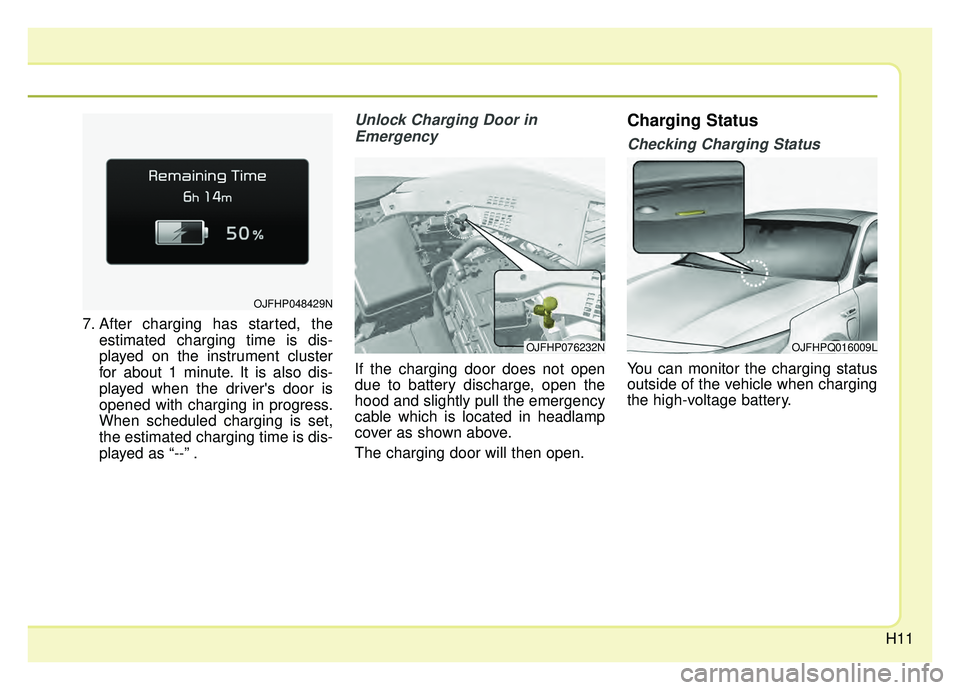
7. After charging has started, theestimated charging time is dis-
played on the instrument cluster
for about 1 minute. It is also dis-
played when the driver's door is
opened with charging in progress.
When scheduled charging is set,
the estimated charging time is dis-
played as “--” .
Unlock Charging Door in
Emergency
If the charging door does not open
due to battery discharge, open the
hood and slightly pull the emergency
cable which is located in headlamp
cover as shown above.
The charging door will then open.
Charging Status
Checking Charging Status
You can monitor the charging status
outside of the vehicle when charging
the high-voltage battery.
OJFHP048429N
OJFHP076232NOJFHPQ016009L
Page 22 of 553
H16
✽ ✽NOTICE
• The charging is in progress only
when the shift lever is in P (Park).
Charging the battery with the
Engine Start/Stop button in the
ACC position is possible. However,
it may discharge the 12-V battery.
Thus, if possible, charge the bat-
tery with the Engine Start/Stop
button in the OFF position.
• Moving the shift lever from P (Park) to R (Reverse)/N(Neutral)/D
(Drive) stops the charging process.
To restart the charging process,
move the shift lever to P (Park),
press the Engine Start/Stop button
to the OFF position, and discon-
nect the charging cable. Then,
connect the charging cable and
restart the vehicle again.
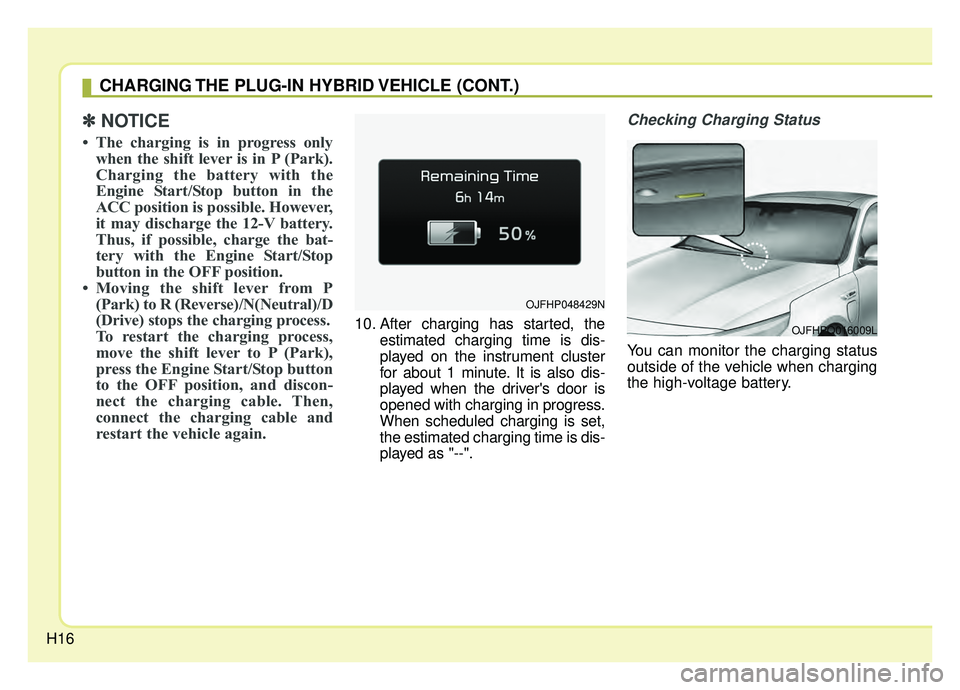
10. After charging has started, the
estimated charging time is dis-
played on the instrument cluster
for about 1 minute. It is also dis-
played when the driver's door is
opened with charging in progress.
When scheduled charging is set,
the estimated charging time is dis-
played as "--".
Checking Charging Status
You can monitor the charging status
outside of the vehicle when charging
the high-voltage battery.
CHARGING THE PLUG-IN HYBRID VEHICLE (CONT.)
OJFHPQ016009L
OJFHP048429N
Page 38 of 553
H32
Starting the Hybrid System
1.Carry the smart key into the vehicle.
2.Make sure the parking brake isfirmly applied.
3.Place the shift lever in the P(Park) position.
In N (neutral) position, you cannot
start the vehicle.
4.Depress the brake pedal.
5.Press the engine start/stop button.
6.The engine should be started with- out pressing the accelerator. In
extremely cold weather or after the
vehicle has not been operated for
several days, let the engine warm up
without depressing the accelerator.
vehicle, if it is far away from you,
the engine may not start.
ton is in the ACC or ON position
and if any door is open, the sys-
tem checks for the smart key. If
the smart key is not in the vehicle,
the warning, "Key is not in vehi-
cle" will come on, and if all doors
are closed, the chime will also
sound for about 5 seconds. Keep
the smart key in the vehicle when
using the ACC position or if the
vehicle engine is on. The indica-
tor will turn off while the vehicle is
moving. If the starting procedure is fol-
lowed, the " " symbol on the
instrument cluster will turn on.
For more details, Please check
chapter 6.
STARTING THE HYBRID/PLUG-IN HYBRID VEHICLE (SMART KEY)
Page 59 of 553
25
Your vehicle at a glance
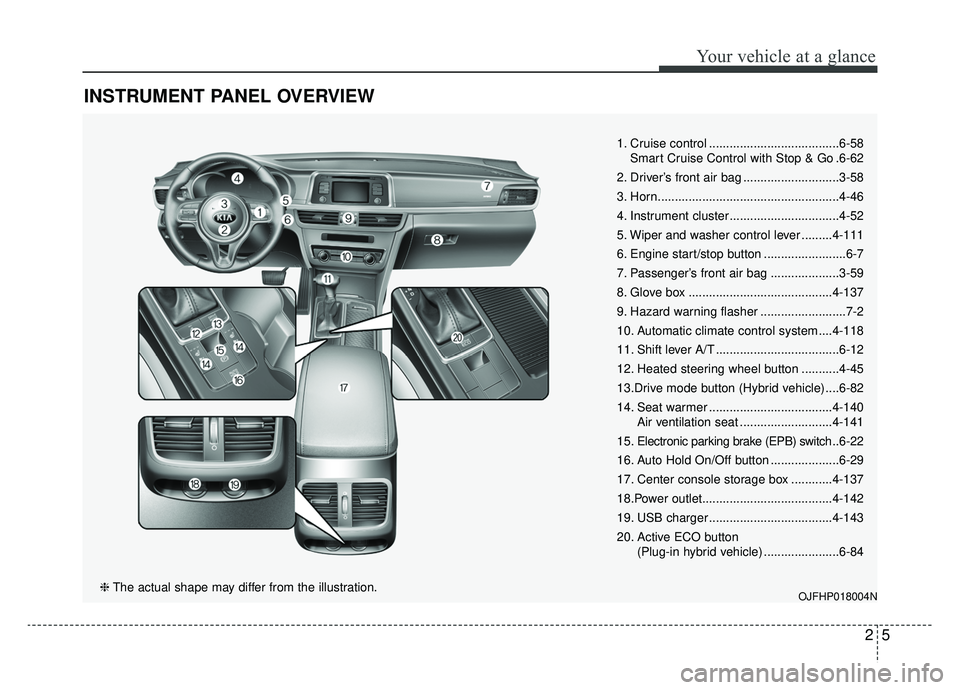
INSTRUMENT PANEL OVERVIEW
1. Cruise control ......................................6-58Smart Cruise Control with Stop & Go .6-62
2. Driver’s front air bag ............................3-58
3. Horn.....................................................4-46
4. Instrument cluster ................................4-52
5. Wiper and washer control lever .........4-111
6. Engine start/stop button ........................6-7
7. Passenger’s front air bag ....................3-59
8. Glove box ..........................................4-137
9. Hazard warning flasher .........................7-2
10. Automatic climate control system ....4-118
11. Shift lever A/T ....................................6-12
12. Heated steering wheel button ...........4-45
13.Drive mode button (Hybrid vehicle) ....6-82
14. Seat warmer ....................................4-140 Air ventilation seat ...........................4-141
15. Electronic parking brake (EPB) switch .. 6-22
16. Auto Hold On/Off button ....................6-29
17. Center console storage box ............4-137
18.Power outlet......................................4-142
19. USB charger ....................................4-143
20. Active ECO button (Plug-in hybrid vehicle) ......................6-84
OJFHP018004N❈The actual shape may differ from the illustration.
Page 132 of 553

Mirrors . . . . . . . . . . . . . . . . . . . . . . . . . . . . . . . . . . 4-47\
. . . . . . . . . . . . . . . . . . . . . . . . 4-47
. . . . . . . . . . . . . . . . . . . . . . . 4-49
Instrument cluster . . . . . . . . . . . . . . . . . . . . . . . . . 4-52
. . . . . . . . . . . . . . . . . . . . . 4-53
. . . . . . . . . . . . . . . . . . . . . . . . . . 4-53
. . . . . . . . . . . . . . . . . . . . . . . . . . . . . . . . . . . . \
. 4-54
. . . . . . . . . . . . . . . . . . . . . . . 4-59
LCD display . . . . . . . . . . . . . . . . . . . . . . . . . . . . . . 4-60
. . . . . . . . . . . . . . . . . . . . . . . . . . . . . . . . 4-61
Trip modes (Trip computer) . . . . . . . . . . . . . . . . . 4-68
. . . . . . . . . . . . . . . . . . . . . . . . . . . . . . . . . . 4-68\
. . . . . . . . . . . . . . . . . . . . . . . . . . . . . . . . 4-68
. . . . . . . . . . . . . . . . . . . . . . . . . . . . . . . . . . . . \
4-71
. . . . . . . . . . . . . . . . . . . . . . . . . . . 4-72
. . . . . . . . . . . . . 4-72
. . . . . . . . . . . . . . . . . . . . . . . . . . . 4-72
. . . . . . . . . . . . . . . . . . . . . . . . . . . . . . . . . . 4-73\
. . . . . . . . . . . . . . . . . . . . . . . . . . . . . . . . . . . 4-\
73
. . . . . . . . . . . . . . . . . . . . . . . . . . . . 4-73
Warning and indicator lights . . . . . . . . . . . . . . . . 4-84
. . . . . . . . . . . . . . . . . . . . . . . . . . . . . . . 4-84
. . . . . . . . . . . . . . . . . . . . . . . . . . . . . . 4-92
Parking distance warning-reverse . . . . . . . . . . . . 4-98
warning-reverse . 4-98
warning-reverse system . . . . . . . . . . . . . . . . . . . . . . 4-99
precautions . . . . . . . . . . . . . . . . . . . . . . . . . . . . . . . . 4-100
. . . . . . . . . . . . . . . . . . . . . . . . . . . . . . . 4-100
Rearview monitor . . . . . . . . . . . . . . . . . . . . . . . . . 4-101
Lighting . . . . . . . . . . . . . . . . . . . . . . . . . . . . . . . . . 4-102
. . . . . . . . . . . . . . . . . . . . . . . . 4-102
. . . . . . . . . . . . . . . . . . . . . . . . . . . . . 4-102
. . . . . . . . . . . . . . . . . . . . . . . . . . . . 4-105
. . . . . . . . . . . 4-108
. . . . . . . . . . . . . . . . . . . . . . . . . . . . 4-109
. . . . . . . . . . . . . . . . . . . . . 4-109
. . . . . . . . 4-110
Wipers and washers . . . . . . . . . . . . . . . . . . . . . . . 4-111
. . . . . . . . . . . . . . . . . . . . . . . . . . . 4-111
. . . . . . . . . . . . . . . . . . . . . 4-112
4
Page 173 of 553
443
Features of your vehicle
Electric power steering (EPS)
The power steering uses a motor to
assist you in steering the vehicle. If
the engine is off or if the power steer-
ing system becomes inoperative, the
vehicle may still be steered, but it will
require increased steering effort.
The motor driven power steering is
controlled by a power steering con-
trol unit which senses the steering
wheel torque and vehicle speed to
command the motor.
The steering becomes heavier as the
vehicle's speed increases and
becomes lighter as the vehicle's
speed decreases for improved steer-
ing control.
Should you notice any change in the
effort required to steer during normal
vehicle operation, have the power
steering checked by an authorized
Kia dealer. If the Electric Power Steering
System does not operate normally,
the warning light will illuminate on
the instrument cluster. The steering
wheel may require increased
steering effort. Take your vehicle to
an authorized Kia dealer and have
the vehicle checked as soon as
possible.
When you operate the steering wheel in low temperature, noise
may occur. If temperature rises, the
noise will likely disappear. This is a
normal condition.
When the vehicle is stationary, and the steering wheel is turned all the
way to the left or right continuous-
ly, the steering wheel becomes
harder to turn. The power assist is
limited to protect the motor from
overheating.
As time passes, the steering wheel
will return to its normal condition.
✽ ✽ NOTICE
The following symptoms may occur
during normal vehicle operation:
• The EPS warning light does not
illuminate.
• The steering gets heavy immedi- ately after turning the Engine
Start/Stop button is ON position.
This happens as the system per-
forms the EPS system diagnostics.
When the diagnostics are complet-
ed, the steering wheel will return
to its normal condition.
• A click noise may be heard from the EPS relay after turning the
Engine Start/Stop button is ON or
OFF position.
• A motor noise may be heard when the vehicle is at a stop or at a low
driving speed.
• If the Electric Power Steering System does not operate normally,
the warning light will illuminate on
the instrument cluster. The steer-
ing wheel may become difficult to
control or operate abnormally.
Take your vehicle to an authorized
Kia dealer and have the vehicle
checked as soon as possible. (Continued)
STEERING WHEEL
Page 182 of 553
Features of your vehicle
52
4
INSTRUMENT CLUSTER
OJFH046101N/OJFHP046101N
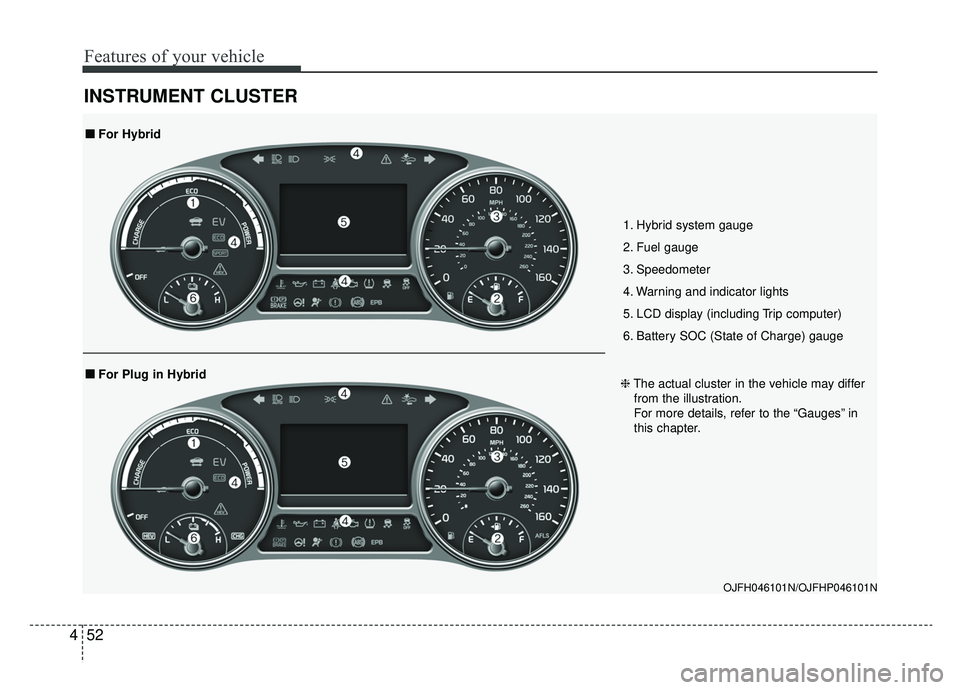
1. Hybrid system gauge
2. Fuel gauge
3. Speedometer
4. Warning and indicator lights
5. LCD display (including Trip computer)
6. Battery SOC (State of Charge) gauge
■ ■
For Plug in Hybrid
■ ■ For Hybrid
❈The actual cluster in the vehicle may differ
from the illustration.
For more details, refer to the “Gauges” in
this chapter.
Page 183 of 553
453
Features of your vehicle
Instrument Cluster Control
Adjusting Instrument ClusterIllumination
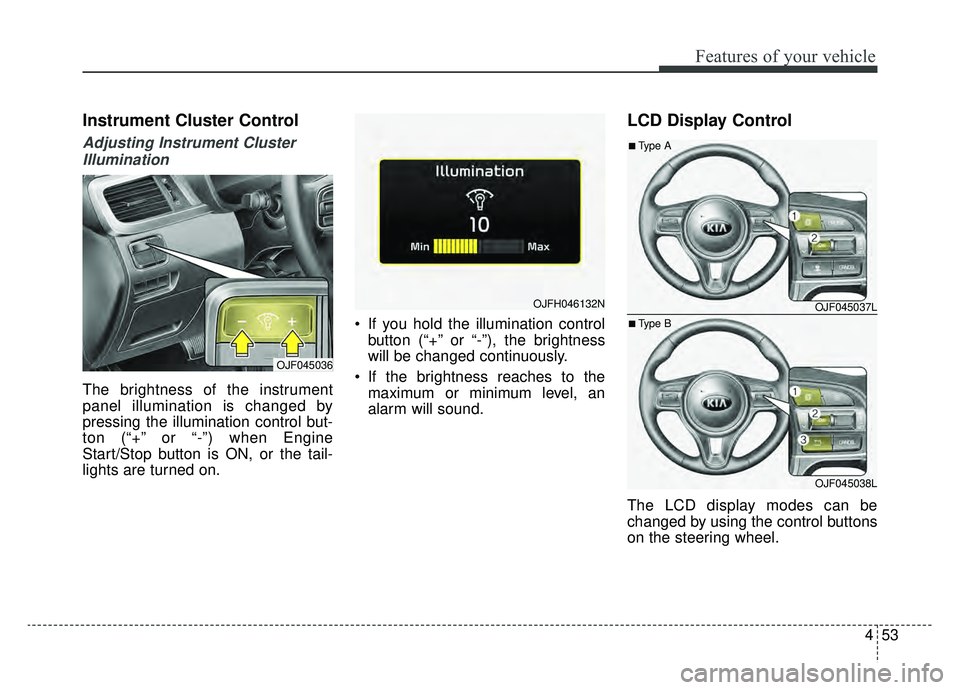
The brightness of the instrument
panel illumination is changed by
pressing the illumination control but-
ton (“+” or “-”) when Engine
Start/Stop button is ON, or the tail-
lights are turned on. If you hold the illumination control
button (“+” or “-”), the brightness
will be changed continuously.
If the brightness reaches to the maximum or minimum level, an
alarm will sound.
LCD Display Control
The LCD display modes can be
changed by using the control buttons
on the steering wheel.
OJF045036
OJFH046132NOJF045037L
OJF045038L
■Type A
■Type B
Page 210 of 553
Features of your vehicle
80
4
Coasting guide (if equipped)
A chime will sound and the coasting
guide indicator will blink four times to
inform the driver when to take the
foot off the accelerator by anticipat-
ing a decelerating event* based on
an analysis of driving routes and
road conditions based on the naviga-
tion. It encourages the driver to
remove foot from the pedal and allow
coasting down the road with EV
motor only. This helps prevent
unnecessary fuel consumption and
may increases fuel efficiency.
❈ Example of a deceleration event is
going down an extended hill, slow-
ing down approaching a toll booth,
and approaching reduced speed
zones.
Press the Engine Start/Stop button
and put the shift lever in P(Park). In
the User Settings Mode, select
Driving Assist, Coasting Guide, and
then On to turn on the system.
Cancel the selection of coasting
guide to turn off the system. For the
explanation of the system, press and
hold the [OK] button.
To activate the system, take the fol-
lowing procedures. Enter your desti-
nation information on the navigation
and select the driving route. Select
the ECO mode in the Integrated
Driving Control System. Then, satisfy
the following.
- The driving speed should be
between 37 mph (60 km/h) and 99
mph (160km/h).
❈ The operating speed may vary due
to difference between instrument
cluster and navigation effected by
tire inflation level.
Page 321 of 553
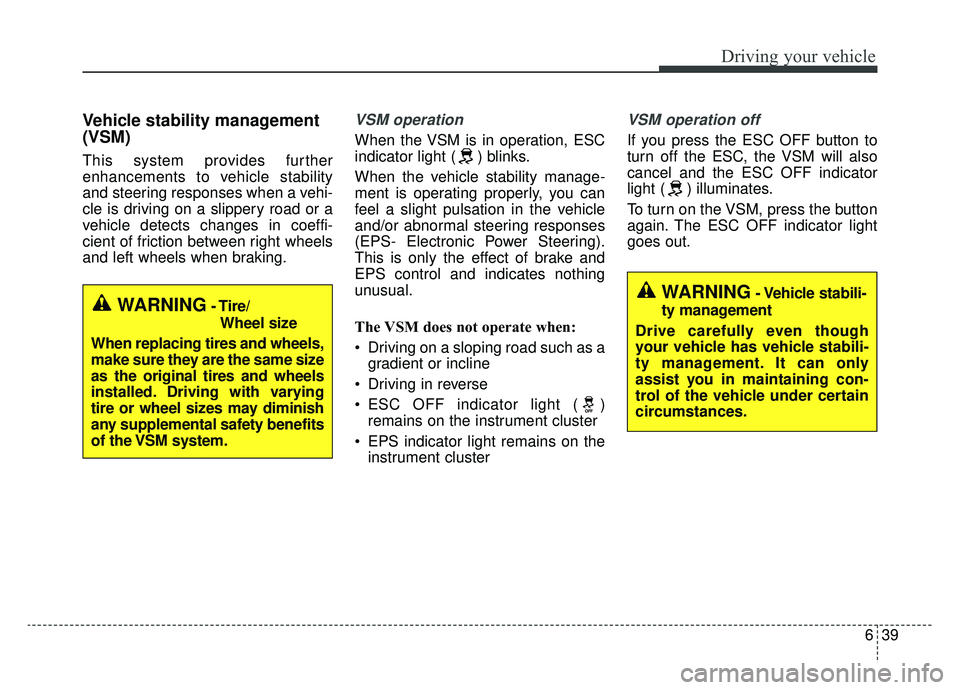
639
Driving your vehicle
Vehicle stability management
(VSM)
This system provides further
enhancements to vehicle stability
and steering responses when a vehi-
cle is driving on a slippery road or a
vehicle detects changes in coeffi-
cient of friction between right wheels
and left wheels when braking.
VSM operation
When the VSM is in operation, ESC
indicator light ( ) blinks.
When the vehicle stability manage-
ment is operating properly, you can
feel a slight pulsation in the vehicle
and/or abnormal steering responses
(EPS- Electronic Power Steering).
This is only the effect of brake and
EPS control and indicates nothing
unusual.
The VSM does not operate when:
Driving on a sloping road such as agradient or incline
Driving in reverse
ESC OFF indicator light ( ) remains on the instrument cluster
EPS indicator light remains on the instrument cluster
VSM operation off
If you press the ESC OFF button to
turn off the ESC, the VSM will also
cancel and the ESC OFF indicator
light ( ) illuminates.
To turn on the VSM, press the button
again. The ESC OFF indicator light
goes out.
WARNING- Tire/
Wheel size
When replacing tires and wheels,
make sure they are the same size
as the original tires and wheels
installed. Driving with varying
tire or wheel sizes may diminish
any supplemental safety benefits
of the VSM system.WARNING- Vehicle stabili-
ty management
Drive carefully even though
your vehicle has vehicle stabili-
ty management. It can only
assist you in maintaining con-
trol of the vehicle under certain
circumstances.