fuel KIA OPTIMA PHEV 2019 Owner's Manual
[x] Cancel search | Manufacturer: KIA, Model Year: 2019, Model line: OPTIMA PHEV, Model: KIA OPTIMA PHEV 2019Pages: 553, PDF Size: 11.97 MB
Page 185 of 553
455
Features of your vehicle
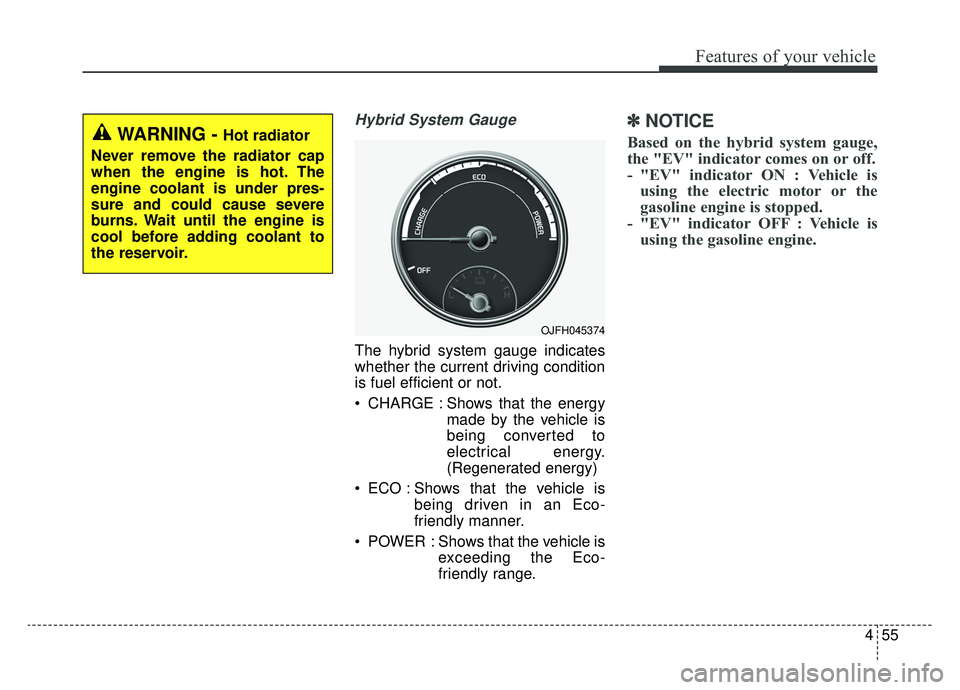
Hybrid System Gauge
The hybrid system gauge indicates
whether the current driving condition
is fuel efficient or not.
CHARGE : Shows that the energymade by the vehicle is
being converted to
electrical energy.
(Regenerated energy)
ECO : Shows that the vehicle is being driven in an Eco-
friendly manner.
POWER : Shows that the vehicle is exceeding the Eco-
friendly range.
✽ ✽NOTICE
Based on the hybrid system gauge,
the "EV" indicator comes on or off.
- "EV" indicator ON : Vehicle is
using the electric motor or the
gasoline engine is stopped.
- "EV" indicator OFF : Vehicle is using the gasoline engine.
OJFH045374
WARNING - Hot radiator
Never remove the radiator cap
when the engine is hot. The
engine coolant is under pres-
sure and could cause severe
burns. Wait until the engine is
cool before adding coolant to
the reservoir.
Page 186 of 553
Features of your vehicle
56
4
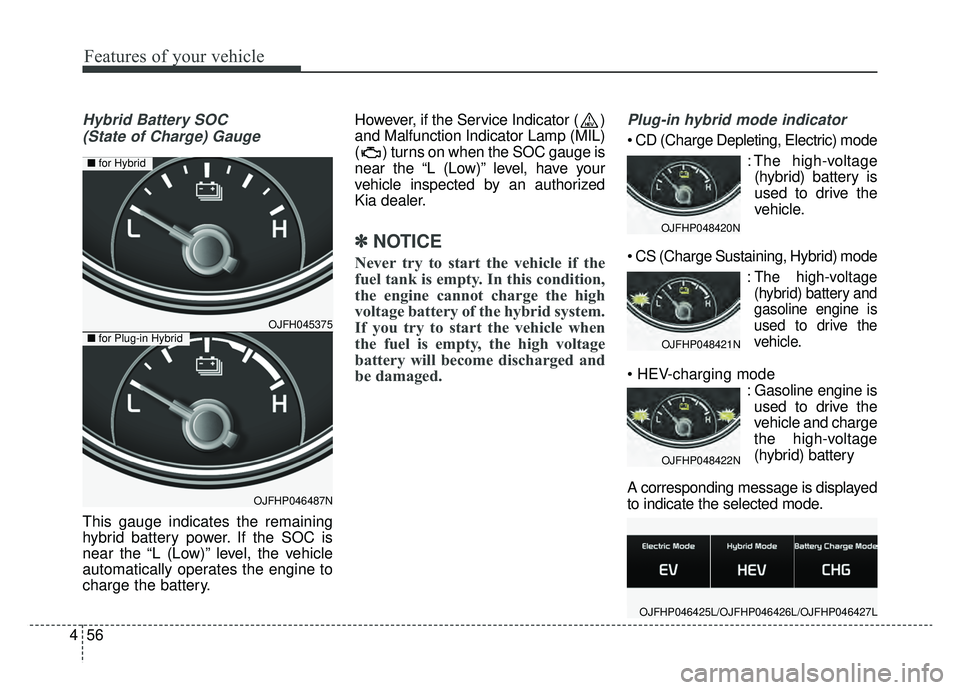
Hybrid Battery SOC
(State of Charge) Gauge
This gauge indicates the remaining
hybrid battery power. If the SOC is
near the “L (Low)” level, the vehicle
automatically operates the engine to
charge the battery. However, if the Service Indicator ( )
and Malfunction Indicator Lamp (MIL)
( ) turns on when the SOC gauge is
near the “L (Low)” level, have your
vehicle inspected by an authorized
Kia dealer.
✽ ✽
NOTICE
Never try to start the vehicle if the
fuel tank is empty. In this condition,
the engine cannot charge the high
voltage battery of the hybrid system.
If you try to start the vehicle when
the fuel is empty, the high voltage
battery will become discharged and
be damaged.
Plug-in hybrid mode indicator
: The high-voltage(hybrid) battery is
used to drive the
vehicle.
:The high-voltage
(hybrid) battery and
gasoline engine is
used to drive the
vehicle.
: Gasoline engine isused to drive the
vehicle and charge
the high-voltage
(hybrid) battery
A corresponding message is displayed
to indicate the selected mode.
OJFHP048420N
OJFHP048421N
OJFHP048422N
OJFHP046425L/OJFHP046426L/OJFHP046427L
OJFH045375
OJFHP046487N
■ for Hybrid
■for Plug-in Hybrid
Page 187 of 553
457
Features of your vehicle
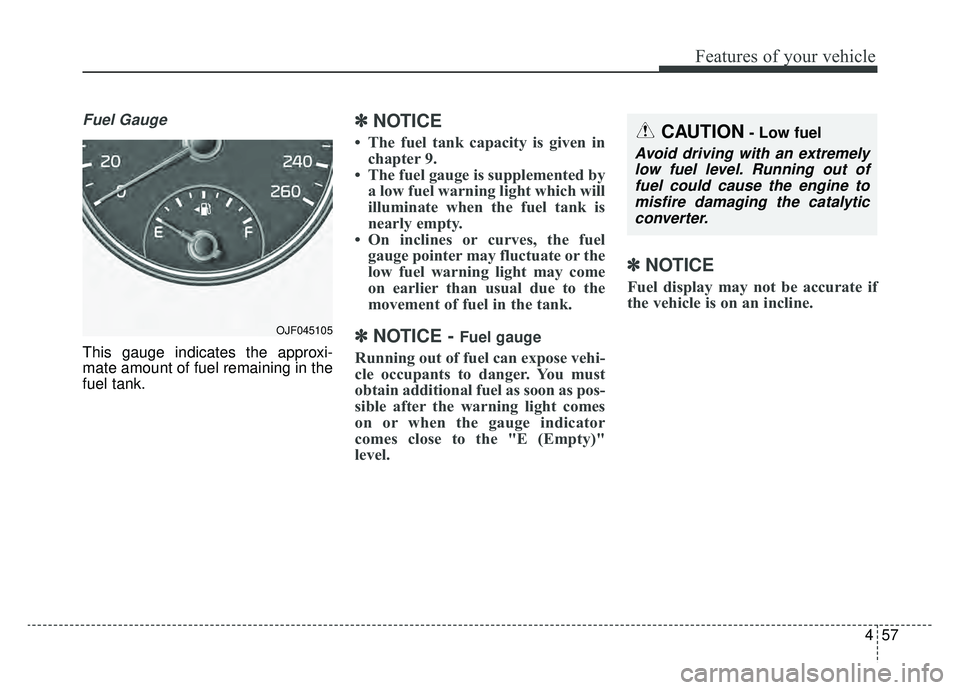
Fuel Gauge
This gauge indicates the approxi-
mate amount of fuel remaining in the
fuel tank.
✽ ✽NOTICE
• The fuel tank capacity is given in
chapter 9.
• The fuel gauge is supplemented by a low fuel warning light which will
illuminate when the fuel tank is
nearly empty.
• On inclines or curves, the fuel gauge pointer may fluctuate or the
low fuel warning light may come
on earlier than usual due to the
movement of fuel in the tank.
✽ ✽ NOTICE - Fuel gauge
Running out of fuel can expose vehi-
cle occupants to danger. You must
obtain additional fuel as soon as pos-
sible after the warning light comes
on or when the gauge indicator
comes close to the "E (Empty)"
level.
✽ ✽NOTICE
Fuel display may not be accurate if
the vehicle is on an incline.
CAUTION- Low fuel
Avoid driving with an extremely
low fuel level. Running out offuel could cause the engine tomisfire damaging the catalyticconverter.
OJF045105
Page 190 of 553
Features of your vehicle
60
4
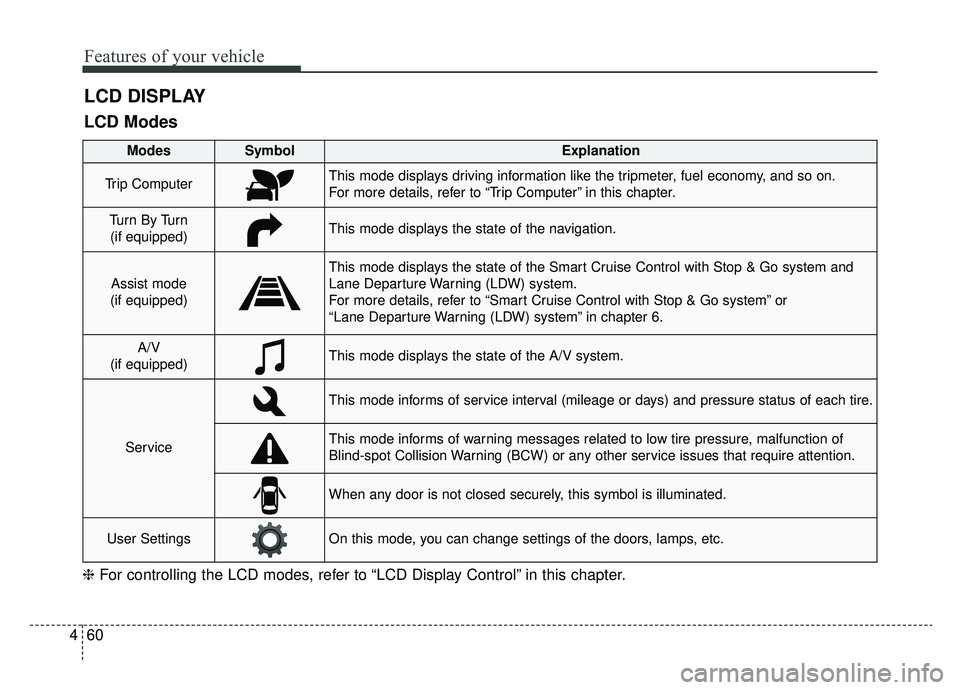
LCD DISPLAY
❈ For controlling the LCD modes, refer to “LCD Display Control” in this chapter.
LCD Modes
Modes SymbolExplanation
Trip ComputerThis mode displays driving information like the tripmeter, fuel economy, and so on.
For more details, refer to “Trip Computer” in this chapter.
Tu r n B y Tu r n
(if equipped)This mode displays the state of the navigation.
Assist mode
(if equipped)
This mode displays the state of the Smart Cruise Control with Stop & Go system and
Lane Departure Warning (LDW) system.
For more details, refer to “Smart Cruise Control with Stop & Go system” or
“Lane Departure Warning (LDW) system” in chapter 6.
A/V
(if equipped)This mode displays the state of the A/V system.
Service
This mode informs of service interval (mileage or days) and pressure status of each tire.
This mode informs of warning messages related to low tire pressure, malfunction of
Blind-spot Collision Warning (BCW) or any other service issues that require attention.
When any door is not closed securely, this symbol is illuminated.
User SettingsOn this mode, you can change settings of the doors, lamps, etc.
Page 196 of 553
Features of your vehicle
66
4
Steering Position :
- If this item is checked, the warningfunction regarding the steering
wheel alignment will be activated.
❈ For more details, refer to “Warning
Messages” in this chapter.
Wiper/Light Display (if equipped) : - If this item is checked, the LCDdisplay shows a selected
wiper/light mode whenever you
changed its mode. Service Interval
On this mode, you can activate the
service interval function with mileage
(km or mi.) and period (months).
Off : The service interval function
will be deactivated.
On : You can set the service inter- val (mileage and months).
❈ For more details, refer to “Service
Mode” in this chapter. Other
Fuel Economy Reset :
- If this item checked, the averagefuel economy will reset automati-
cally after refueling or after igni-
tion.
Fuel Economy Unit : - Choose the fuel economy unit.(US gallon, UK gallon, L/100 km)
Temperature Unit : - Choose the temperature unit.(°C,°F)
Tire Pressure Unit : - Choose the tire pressure unit.(psi, kPa, bar)
Page 198 of 553
Features of your vehicle
68
4
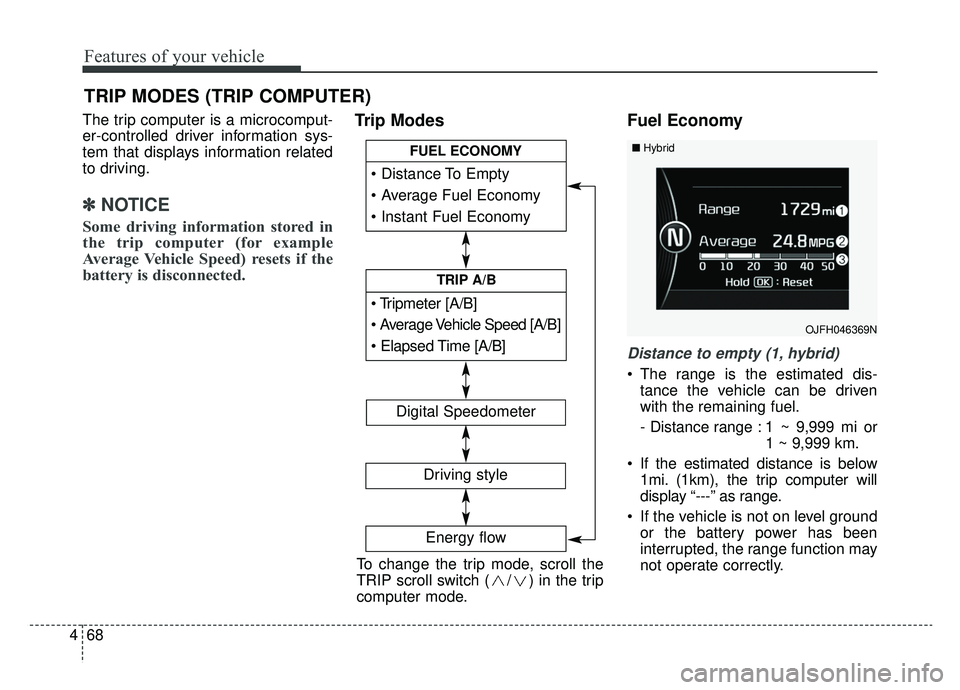
The trip computer is a microcomput-
er-controlled driver information sys-
tem that displays information related
to driving.
✽ ✽
NOTICE
Some driving information stored in
the trip computer (for example
Average Vehicle Speed) resets if the
battery is disconnected.
Trip Modes Fuel Economy
Distance to empty (1, hybrid)
The range is the estimated dis-
tance the vehicle can be driven
with the remaining fuel.
- Distance range : 1 ~ 9,999 mi or 1 ~ 9,999 km.
If the estimated distance is below 1mi. (1km), the trip computer will
display “---” as range.
If the vehicle is not on level ground or the battery power has been
interrupted, the range function may
not operate correctly.
TRIP MODES (TRIP COMPUTER)
To change the trip mode, scroll the
TRIP scroll switch ( / ) in the trip
computer mode.
[A/B]
TRIP A/B
FUEL ECONOMY
Digital Speedometer
Driving style
Energy flow
OJFH046369N
■Hybrid
Page 199 of 553
469
Features of your vehicle
The range may differ from the actu-al driving distance as it is an esti-
mate of the available driving dis-
tance.
The trip computer may not register additional fuel if less than 1.6 gal-
lons(6 liters) of fuel are added to
the vehicle.
✽ ✽ NOTICE
The fuel economy and range may
vary significantly based on driving
conditions, driving habits, and con-
dition of the vehicle.
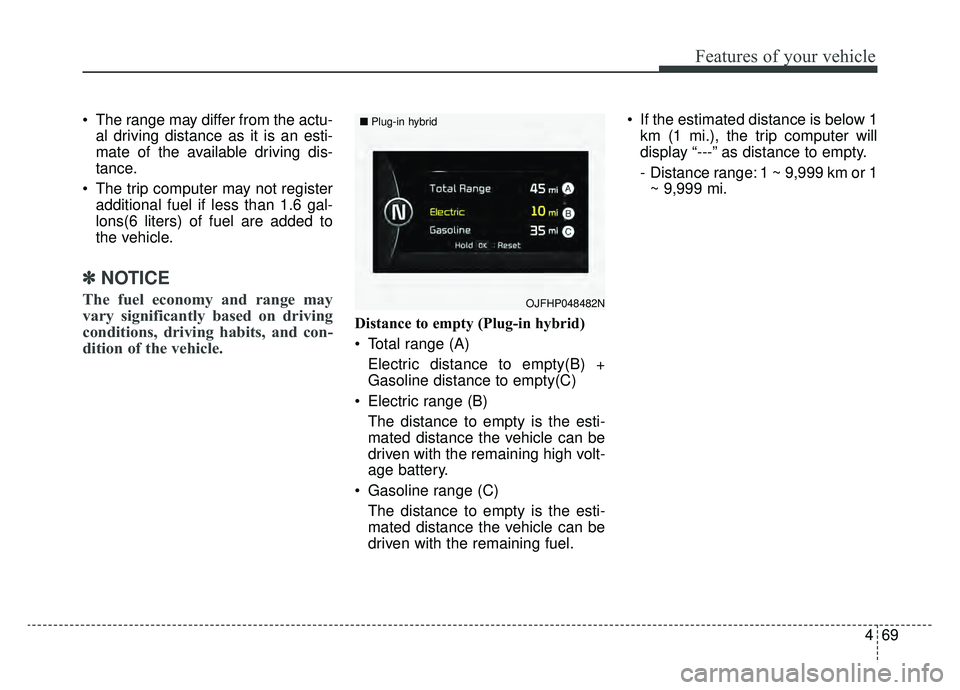
Distance to empty (Plug-in hybrid)
Total range (A)
Electric distance to empty(B) +
Gasoline distance to empty(C)
Electric range (B) The distance to empty is the esti-
mated distance the vehicle can be
driven with the remaining high volt-
age battery.
Gasoline range (C) The distance to empty is the esti-
mated distance the vehicle can be
driven with the remaining fuel. If the estimated distance is below 1
km (1 mi.), the trip computer will
display “---” as distance to empty.
- Distance range: 1 ~ 9,999 km or 1~ 9,999 mi.
OJFHP048482N
■ Plug-in hybrid
Page 200 of 553
Features of your vehicle
70
4
Average Fuel Economy (2)
The average fuel economy is cal-
culated by the total driving dis-
tance and fuel consumption since
the last average fuel economy
reset.
- Fuel economy range : 1 ~ 99.9MPG or L/100km (for Hybrid)/0 ~
99.9, 100 ~ 999 MPG or L/100km
(for Plug-in Hybrid)
The average fuel economy can be reset both manually and automati-
cally.
Manual reset
To reset average fuel economy manu-
ally, press the OK button (reset) on
the steering wheel for more than 1
second when the average fuel econ-
omy is displayed. Automatic reset
To make the average fuel economy
reset automatically whenever refuel-
ing, select the “Auto Reset” mode in
User Setting menu of the LCD dis-
play (Refer to “LCD Display”).
OFF - You may set to default man-
ually by using the trip switch reset
button.
When driving - The vehicle will automatically set to default once 4
hours pass after the the engine is
OFF.
When refueling - After refueling more than 1.6 gallons (6 liters) and
driving over 1 mph (1 km/h), the
vehicle will reset to default auto-
matically.
✽ ✽ NOTICE
For a more accurate calculation of
the average fuel economy, the vehi-
cle must be continuously driven
more than 10 seconds and 0.03 miles
(50 meters).
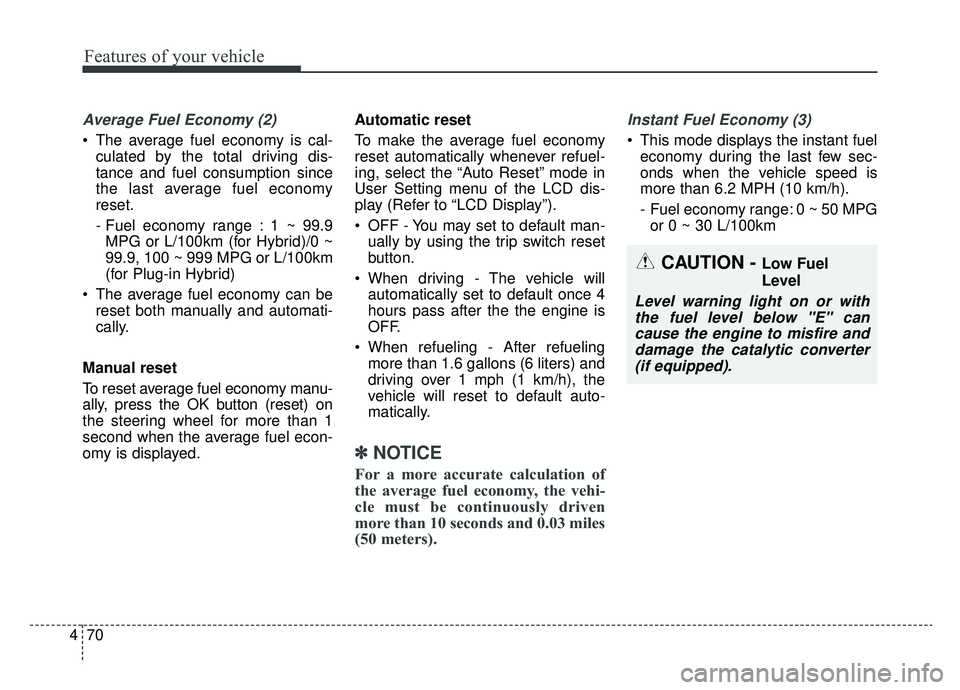
Instant Fuel Economy (3)
This mode displays the instant fuel
economy during the last few sec-
onds when the vehicle speed is
more than 6.2 MPH (10 km/h).
- Fuel economy range: 0 ~ 50 MPGor 0 ~ 30 L/100km
CAUTION - Low Fuel
Level
Level warning light on or withthe fuel level below "E" cancause the engine to misfire anddamage the catalytic converter(if equipped).
Page 202 of 553
Features of your vehicle
72
4
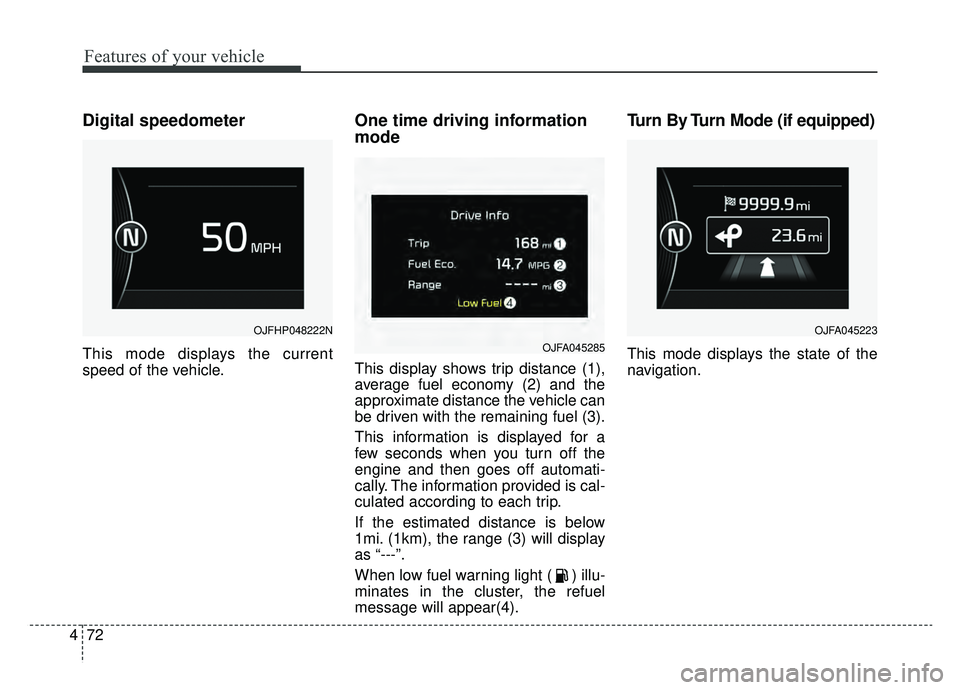
Digital speedometer
This mode displays the current
speed of the vehicle.
One time driving information
mode
This display shows trip distance (1),
average fuel economy (2) and the
approximate distance the vehicle can
be driven with the remaining fuel (3).
This information is displayed for a
few seconds when you turn off the
engine and then goes off automati-
cally. The information provided is cal-
culated according to each trip.
If the estimated distance is below
1mi. (1km), the range (3) will display
as “---”.
When low fuel warning light ( ) illu-
minates in the cluster, the refuel
message will appear(4).
Turn By Turn Mode (if equipped)
This mode displays the state of the
navigation.
OJFHP048222N
OJFA045285
OJFA045223
Page 207 of 553
477
Features of your vehicle
Align steering wheel (if equipped)
This warning message illuminatesif you start the engine when the
steering wheel is turned to more
than 90 degrees to the left or right.
It means that you should turn the steering wheel and make the angle
of the steering wheel less than 30
degrees.
Low Washer Fluid (if equipped)
This warning message illuminateson the service reminder mode if
the washer fluid level in the reser-
voir is nearly empty.
It means that you should refill the washer fluid.
Turn FUSE SWITCH on
This warning message illuminatesif the fuse switch on the fuse box is
OFF.
It means that you should turn the fuse switch on.
❈ For more details, refer to “Fuses” in
chapter 8.
Low Fuel
This warning message illuminates if
the fuel tank is nearly empty.
Add fuel as soon as possible.
Check High Beam Assist (HBA)
system (if equipped)
This warning message illuminates if
the high beam assist system has a
malfunction. In this case, have your
vehicle inspected by an authorized
Kia dealer.
Check headlight
This warning message illuminates if
there is a malfunction (burned-out
bulb except LED lamp or circuit mal-
function) with the headlamp. In this
case, have your vehicle inspected by
an authorized Kia dealer.
✽ ✽ NOTICE
• When replacing the bulb, use the
same wattage bulb.
For more information, refer to
“BULB WATTAGE” in chapter 9.
• If different wattage bulb is equipped with the vehicle, this
warning message is not displayed.