tow KIA OPTIMA PHEV 2019 Owner's Manual
[x] Cancel search | Manufacturer: KIA, Model Year: 2019, Model line: OPTIMA PHEV, Model: KIA OPTIMA PHEV 2019Pages: 553, PDF Size: 11.97 MB
Page 252 of 553
Features of your vehicle
122
4
Face-Level (B, D)
Air flow is directed toward the upper
body and face. Additionally, each
outlet can be controlled to direct the
air discharged from the outlet.
Bi-Level (B, C, D, E, F)
Air flow is directed towards the face
and the floor.
Floor-Level (A, C, D, E, F)
Most of the air flow is directed to the
floor, with a small amount of the air
being directed to the windshield and
side window defrosters. Floor/Defrost-Level
(A, C, D, E, F)
Most of the air flow is directed to the
floor and the windshield with a small
amount directed to the side window
defrosters.
✽ ✽ NOTICE - 2nd row outlet
vents (E,F)
• The air flow of the 2nd row outlet vents is controlled by the front cli-
mate control system and delivered
through the inside air duct of the
floor (E, F).
• The air flow of the 2nd row outlet vents (E, F) may be weaker than
the instrument panel vents for the
long air duct.
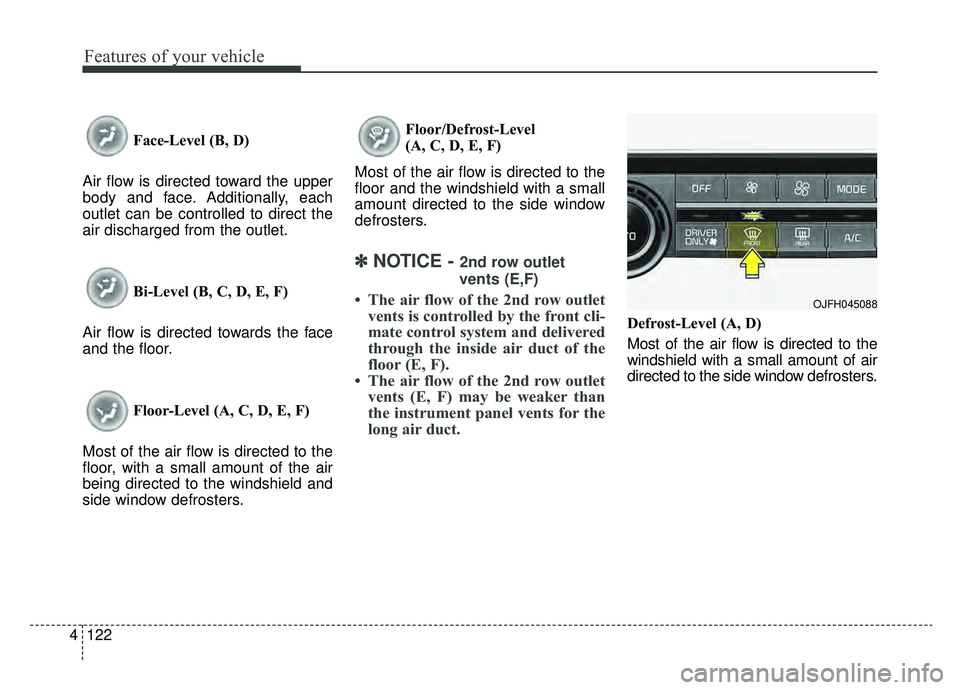
Defrost-Level (A, D)
Most of the air flow is directed to the
windshield with a small amount of air
directed to the side window defrosters.
OJFH045088
Page 265 of 553
4135
Features of your vehicle
Automatic climate control system
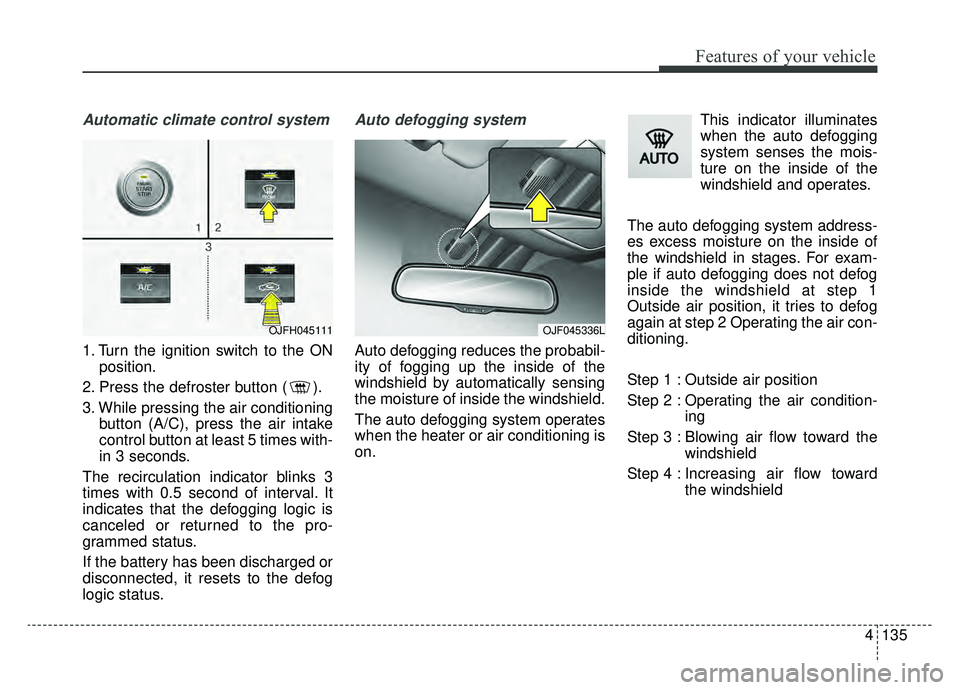
1. Turn the ignition switch to the ONposition.
2. Press the defroster button ( ).
3. While pressing the air conditioning button (A/C), press the air intake
control button at least 5 times with-
in 3 seconds.
The recirculation indicator blinks 3
times with 0.5 second of interval. It
indicates that the defogging logic is
canceled or returned to the pro-
grammed status.
If the battery has been discharged or
disconnected, it resets to the defog
logic status.
Auto defogging system
Auto defogging reduces the probabil-
ity of fogging up the inside of the
windshield by automatically sensing
the moisture of inside the windshield.
The auto defogging system operates
when the heater or air conditioning is
on. This indicator illuminates
when the auto defogging
system senses the mois-
ture on the inside of the
windshield and operates.
The auto defogging system address-
es excess moisture on the inside of
the windshield in stages. For exam-
ple if auto defogging does not defog
inside the windshield at step 1
Outside air position, it tries to defog
again at step 2 Operating the air con-
ditioning.
Step 1 : Outside air position
Step 2 : Operating the air condition- ing
Step 3 : Blowing air flow toward the windshield
Step 4 : Increasing air flow toward the windshield
OJF045336LOJFH045111
Page 271 of 553
4141
Features of your vehicle
Air ventilation seat (if equipped)
The temperature setting of the seat
changes according to the switch
position.
If you want to ventilate your seatcushion, press the switch (blue
color).
Each time you press the button, the airflow will change as follows: The seat warmer (with air ventila-
tion) defaults to the OFF position
whenever the ignition switch is
turned on.
Sunvisor
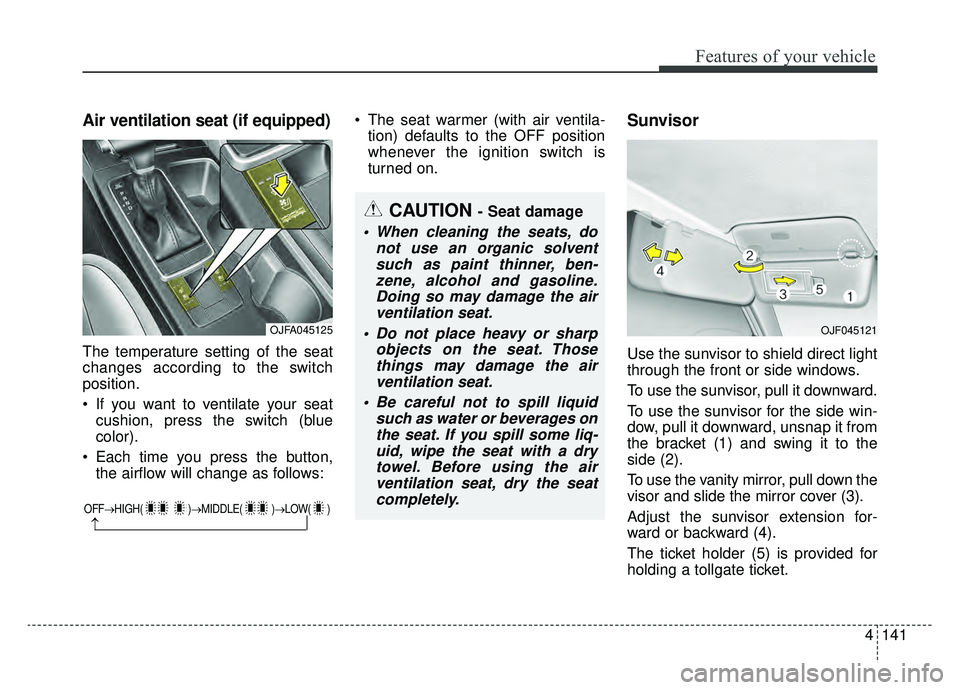
Use the sunvisor to shield direct light
through the front or side windows.
To use the sunvisor, pull it downward.
To use the sunvisor for the side win-
dow, pull it downward, unsnap it from
the bracket (1) and swing it to the
side (2).
To use the vanity mirror, pull down the
visor and slide the mirror cover (3).
Adjust the sunvisor extension for-
ward or backward (4).
The ticket holder (5) is provided for
holding a tollgate ticket.
OFF→ HIGH( )→ MIDDLE( )→LOW( )
→
CAUTION - Seat damage
When cleaning the seats, do
not use an organic solventsuch as paint thinner, ben-zene, alcohol and gasoline.Doing so may damage the airventilation seat.
Do not place heavy or sharp objects on the seat. Thosethings may damage the airventilation seat.
Be careful not to spill liquid such as water or beverages onthe seat. If you spill some liq-uid, wipe the seat with a drytowel. Before using the airventilation seat, dry the seatcompletely.
OJFA045125OJF045121
Page 275 of 553
4145
Features of your vehicle
The following must be observed
when installing ANY floor mat to the
vehicle.
Ensure that the floor mats aresecurely attached to the vehicle's
floor mat anchor(s) before driving
the vehicle.
Do not use ANY floor mat that can- not be firmly attached to the vehi-
cle's floor mat anchors.
Do not stack floor mats on top of one another (e.g. all-weather rub-
ber mat on top of a carpeted floor
mat). Only a single floor mat should
be installed in each position.✽ ✽ NOTICE
Your vehicle was manufactured with
driver's side floor mat anchors that
are designed to securely hold the
floor mat in place. To avoid any
interference with pedal operation,
Kia recommends that only the Kia
floor mat designed for use in your
vehicle be installed.
Side curtain (if equipped)
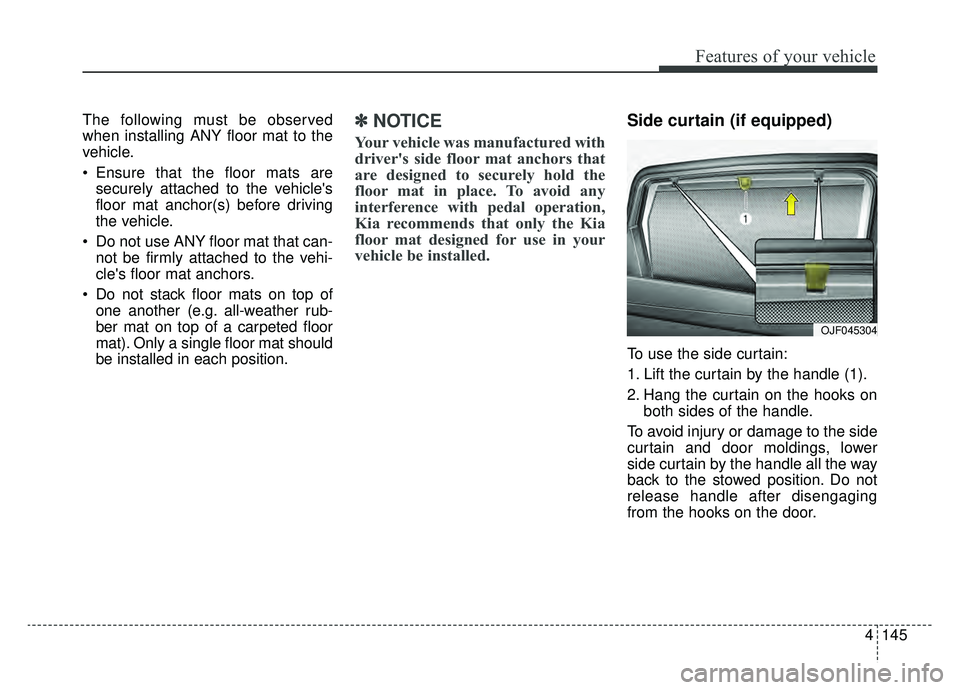
To use the side curtain:
1. Lift the curtain by the handle (1).
2. Hang the curtain on the hooks on
both sides of the handle.
To avoid injury or damage to the side
curtain and door moldings, lower
side curtain by the handle all the way
back to the stowed position. Do not
release handle after disengaging
from the hooks on the door.
OJF045304
Page 278 of 553
Audio system
53
✽ ✽NOTICE
Tinted rear window may affect the
proper functioning of the antenna.
How vehicle radio works
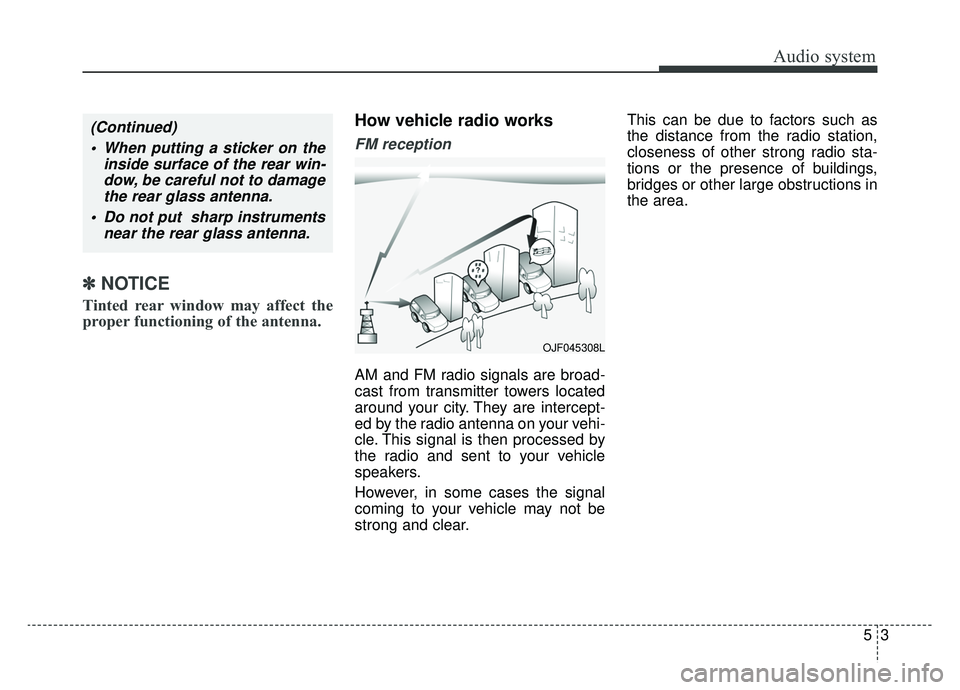
FM reception
AM and FM radio signals are broad-
cast from transmitter towers located
around your city. They are intercept-
ed by the radio antenna on your vehi-
cle. This signal is then processed by
the radio and sent to your vehicle
speakers.
However, in some cases the signal
coming to your vehicle may not be
strong and clear. This can be due to factors such as
the distance from the radio station,
closeness of other strong radio sta-
tions or the presence of buildings,
bridges or other large obstructions in
the area.
(Continued)
When putting a sticker on the inside surface of the rear win-dow, be careful not to damagethe rear glass antenna.
Do not put sharp instruments near the rear glass antenna.
OJF045308L
Page 284 of 553
. . 6-75
. . . . . . . . . . . . . . . 6-75
. . . . . . . . . . . . . . . . . . . . . . 6-76
Drive mode integrated control system . . . . . . . . . 6-82
. . . . . . . . . . . . . . . . . . . . . . . . . . . . . . . 6-82
. . . . . . . . . . . . . . . . . . 6-83
. . . . . . . . . . . . . 6-83
Active ECO system. . . . . . . . . . . . . . . . . . . . . . . . . 6-84
. . . . . . . . . . . . . . . . . . . . . . . . . 6-84
. . . . . . . . . . . . . . . . . . 6-85
. . . . . . . . . . . . . 6-85
Blind-spot Collision Warning (BCW). . . . . . . . . . 6-86
LCA (Lane Change Assist) . . . . . . . . . . . . . . . . . . . . 6-87
. . . 6-90
. . . . . . . . . . . . . . . . . . . . . . . . . . . . 6-94
Lane Departure Warning (LDW) system. . . . . . . 6-97
. . . . . . . . . . . . . . . . . . . . . . . . . . . . . . 6-98
. . . . . . . . . . . . . . . . . . . . . . . . . . . . 6-99
. . . . . . . . . . . . . . 6-100
Economical operation . . . . . . . . . . . . . . . . . . . . . 6-102
Special driving conditions . . . . . . . . . . . . . . . . . . 6-104
. . . . . . . . . . . . . . . . . 6-104
. . . . . . . . . . . . . . . . . . . . . . . . . . 6-104 . . . . . . . . . . . . . . . . . . . . . . . . . . . 6-105
. . . . . . . . . . . . . . . . . . . . . . . . . . . . . 6-105
. . . . . . . . . . . . . . . . . . . . . . . . . . . 6-106
. . . . . . . . . . . . . . . . . . . . . . 6-107
. . . . . . . . . . . . . . . . . . . . . . . . . . . . . 6-107
. . . . . . . . . . . . . . . . . . . . . . . . . . . . 6-107
Winter driving . . . . . . . . . . . . . . . . . . . . . . . . . . . 6-108
. . . . . . . . . . . . . . . . . . . . . . 6-108
. . . . . . . . . 6-110
. . . . . . . . . . . . . . . . . . . . . 6-110
. . . . . . 6-110
. . . . . . . . . . . . . . . . . . . 6-111
Use approved window washer anti-freeze in system. 6-111
. . . . . . . . . . . . 6-111
. . . 6-111
. . . . . . . . . . . . . . . . . . 6-111
Trailer Towing . . . . . . . . . . . . . . . . . . . . . . . . . . . 6-111
Vehicle load limit . . . . . . . . . . . . . . . . . . . . . . . . . 6-112
. . . . . . . . . . . . . 6-112
. . . . . . . . . . . . . . . . . . . . . . . . . . . 6-115
Vehicle weight . . . . . . . . . . . . . . . . . . . . . . . . . . . . 6-116
. . . . . . . . . . . . . . . . . . . . . . . . . . . . 6-116
. . . . . . . . . . . . . . . . . . . . . . . . . . 6-116
6
Page 292 of 553
Driving your vehicle
10
6
✽ ✽
NOTICE
• Do not wait for the engine to warm
up while the vehicle remains sta-
tionary.
Start driving at moderate engine
speeds. (Steep accelerating and
decelerating should be avoided.)
• Always start the vehicle with your foot on the brake pedal. Do not
depress the accelerator while
starting the vehicle. Do not race
the engine while warming it up.
• If ambient temperature is low, the " " indicator may remain illu-
minated longer than the normal
amount of time.
✽ ✽ NOTICE
To prevent damage to the vehicle:
• If the " " indicator turns off
while you are in motion, do not
attempt to move the shift lever to
the P (Park) position.
If traffic and road conditions per-
mit, you may put the shift lever in
the N (Neutral) position while the
vehicle is still moving and press
the Engine Start/Stop button in an
attempt to restart the hybrid sys-
tem.
• Do not push or tow your vehicle to start the hybrid system. WARNING - Unintended
vehicle movement
Never leave the smart key in the
vehicle with children or vehicle
occupants who are unfamiliar
with the vehicle operation.
Pushing the ENGINE
START/STOP button while the
smart key is in the vehicle may
result in unintended engine
activation and/or unintended
vehicle movement.
Page 310 of 553
Driving your vehicle
28
6
Emergency braking
If there is a problem with the brake
pedal while driving, emergency brak-
ing is possible by pulling up and
holding the EPB switch. Braking is
possible only while you are holding
the EPB switch.
✽ ✽
NOTICE
During emergency braking by the
EPB, the parking brake warning
light will illuminate to indicate that
the system is operating.
If you notice a continuous noise or
burning smell when the EPB is used
for emergency braking, have your
vehicle checked by an authorized Kia
dealer.
When the EPB (electronic parking
brake) is not released
If the EPB does not release normal-
ly, take your vehicle to an authorized
Kia dealer by loading the vehicle on
a flatbed tow truck and have the sys-
tem checked.
WARNING
Do not operate the electronic
parking brake while the vehicle is
moving except in an emergency
situation. Applying the electronic
parking brake while the vehicle is
moving at normal speeds can
cause a sudden loss of control of
the vehicle. If you must use the
electronic parking brake to stop
the vehicle, use great caution in
applying the brake.
Page 334 of 553
Driving your vehicle
52
6
The camera's field of view is not
well illuminated (either too dark or
too much reflection or too much
backlight that obscures the field of
view)
The vehicle in front does not have their rear lights or their rear lights
does not turned ON or their rear
lights are located unusually.
The outside brightness changes suddenly, for example when enter-
ing or exiting a tunnel
When light coming from a street light or an oncoming vehicle is
reflected on a wet road surface
such as a puddle in the road
The field of view in front is obstructed by sun glare
The windshield glass is fogged up; a clear view of the road is obstruct-
ed
The vehicle in front is driving errat- ically
The vehicle is on unpaved or uneven rough surfaces, or road
with sudden gradient changes. The vehicle is driven near areas
containing metal substances as a
construction zone, railroad, etc.
The vehicle drives inside a build- ing, such as a basement parking
lot
The camera does not recognize the entire vehicle in front.
The camera is damaged.
The brightness outside is too low such as when the headlamps are
not on at night or the vehicle is
going through a tunnel.
The shadow is on the road by a median strip, trees, etc.
The vehicle drives through a toll- gate.
The windshield glass is fogged up; a clear view of the road is obstruct-
ed.
The rear part of the vehicle in front is not normally visible. (the vehicle
turns in other direction or the vehi-
cle is overturned.)
The adverse road conditions cause excessive vehicle vibrations while
driving The sensor recognition changes
suddenly when passing over a
speed bump
The vehicle in front is moving verti- cally to the driving direction
The vehicle in front is stopped ver- tically
The vehicle in front is driving towards your vehicle or reversing
You are on a roundabout and the vehicle in front circles
Page 338 of 553
Driving your vehicle
56
6
✽ ✽
NOTICE
The system may temporarily cancel
due to the strong electric waves.
This device complies with Part 15
of the FCC rules.
Operation is subject to the following
three conditions:
1. This device may not cause harm-
ful interference, and
2. This device must accept any inter- ference received, including inter-
ference that may cause undesired
operation.
3. Changes or modifications not expressly approved by the party
responsible for compliance could
void the user’s authority to operate
the device.
WARNING
Cancel the FCA in the UserSettings on the LCD display,
before towing another vehicle.
While towing, the brake appli-
cation may adversely affect
your vehicle safety.
Pay great caution to the vehi- cle in front, when it has heavy
loading extended rearward, or
when it has higher ground
clearance.
The FCA system is designed to detect and monitor the
vehicle ahead or detect a
pedestrian in the roadway
through radar signals and
camera recognition. It is not
designed to detect bicycles,
motorcycles, or smaller
wheeled objects such as lug-
gage bags, shopping carts, or
strollers.
(Continued)
(Continued)
The FCA does not operate in acertain situation. Thus, never
test-operate the FCA against a
person or an object. It may
cause a severe injury or even
death.
When replacing or reinstalling the windshield, front bumper
or radar/camera after removal,
take your vehicle to an author-
ized Kia dealer and have the
system checked.