light KIA OPTIMA PHEV 2020 Owners Manual
[x] Cancel search | Manufacturer: KIA, Model Year: 2020, Model line: OPTIMA PHEV, Model: KIA OPTIMA PHEV 2020Pages: 597, PDF Size: 14.2 MB
Page 333 of 597
Driving your vehicle
38
5
ESC OFF usage
When driving
ESC should be turned on for daily
driving whenever possible.
To turn ESC off while driving, press the ESC OFF button while driving
on a flat road surface.
✽ ✽ NOTICE
• When operating the vehicle on a
dynamometer, ensure that the
ESC is turned off (ESC OFF light
illuminated). If the ESC is left on,
it may prevent the vehicle speed
from increasing, and result in false
diagnosis.
• Turning the ESC off does not affect ABS or brake system opera-
tion.WARNING- Electronic sta-
bility control
Drive carefully even though your
vehicle has Electronic Stability
Control. It can only assist you in
maintaining control under cer-
tain circumstances.
WARNING- Operating ESC
Never press the ESC OFF but-
ton while ESC is operating (ESC
indicator light blinks).
If ESC is turned off while ESC is
operating, the vehicle may slip
out of control.
Page 334 of 597
539
Driving your vehicle
Vehicle stability management
(VSM)
This system provides further
enhancements to vehicle stability
and steering responses when a vehi-
cle is driving on a slippery road or a
vehicle detects changes in coeffi-
cient of friction between right wheels
and left wheels when braking.
VSM operation
When the VSM is in operation, ESC
indicator light ( ) blinks.
When the vehicle stability manage-
ment is operating properly, you can
feel a slight pulsation in the vehicle
and/or abnormal steering responses
(EPS- Electronic Power Steering).
This is only the effect of brake and
EPS control and indicates nothing
unusual.
The VSM does not operate when:
Driving on a sloping road such as agradient or incline
Driving in reverse
ESC OFF indicator light ( ) remains on the instrument cluster
EPS indicator light remains on the instrument cluster
VSM operation off
If you press the ESC OFF button to
turn off the ESC, the VSM will also
cancel and the ESC OFF indicator
light ( ) illuminates.
To turn on the VSM, press the button
again. The ESC OFF indicator light
goes out.
WARNING- Tire/
Wheel size
When replacing tires and wheels,
make sure they are the same size
as the original tires and wheels
installed. Driving with varying
tire or wheel sizes may diminish
any supplemental safety benefits
of the VSM system.WARNING- Vehicle stabili-
ty management
Drive carefully even though
your vehicle has vehicle stabili-
ty management. It can only
assist you in maintaining con-
trol of the vehicle under certain
circumstances.
Page 335 of 597

Driving your vehicle
40
5
Malfunction indicator
The VSM can be deactivated even if
you don’t cancel the VSM operation
by pressing the ESC OFF button. It
indicates that a malfunction has
been detected somewhere in the
Electric Power Steering system or
VSM system. If the ESC indicator
light ( ) or EPS warning light
remains on, take your vehicle to an
authorized Kia dealer and have the
system checked.
✽ ✽
NOTICE
• The VSM is designed to function
above approximately 13 mph (22
km/h) on curves.
• The VSM is designed to function above approximately 6 mph (10
km/h) when a vehicle is braking on
a split-mu surface. A split-mu sur-
face is made of two surfaces which
have different friction forces.
The Vehicle Stability Management
system is not a substitute for safe
driving practices but a supplemen-
tary function only. It is the respon-
sibility of the driver to always check
the speed and the distance to the
vehicle ahead. Always hold the
steering wheel firmly while driving.
Your vehicle is designed to activate according to the driver’s intention,
even with installed VSM. Always fol-
low all the normal precautions for
driving at safe speeds for the condi-
tions – including driving in inclement
weather and on a slippery road.Hill-start assist control (HAC)
A vehicle has the tendency to roll
back on a steep hill when it starts to
go after stopping. The Hill-start
Assist Control (HAC) prevents the
vehicle from rolling back by applying
the brakes automatically for about 2
seconds. The brakes are released
when the accelerator pedal is
depressed or after about 2 seconds.
The HAC is activated only for about 2
seconds, so when the vehicle is
starting off always depress the accel-
erator pedal.
WARNING
For maximum protection, always
wear your seat belt. No system,
no matter how advanced, can
compensate for all driver error
and/or driving conditions.
Always drive responsibly.
Page 336 of 597
541
Driving your vehicle
Good braking practices
Check to be sure the parking brakeis not engaged and the parking
brake indicator light is out before
driving away.
Driving through water may get the brakes wet. They can also get wet
when the vehicle is washed. Wet
brakes can be dangerous! Your
vehicle will not stop as quickly if the
brakes are wet. Wet brakes may
cause the vehicle to pull to one side.
To dry the brakes, apply the brakes
lightly until the braking action
returns to normal, taking care to
keep the vehicle under control at all
times. If the braking action does not
return to normal, stop as soon as it
is safe to do so and call an author-
ized Kia dealer for assistance.
Don't coast down hills with the vehicle out of gear. This is extreme-
ly hazardous. Keep the vehicle in
gear at all times, use the brakes to
slow down, then shift to a lower
gear so that engine braking will
help you maintain a safe speed. Don't "ride" the brake pedal.
Resting your foot on the brake
pedal while driving can be danger-
ous because the brakes might
overheat and lose their effective-
ness. It also increases the wear of
the brake components.
If a tire goes flat while you are driv- ing, apply the brakes gently and
keep the vehicle pointed straight
ahead while you slow down. When
you are moving slowly enough for it
to be safe to do so, pull off the road
and stop in a safe place.
If your vehicle is equipped with an Automatic Transmission, don't let
your vehicle creep forward. To
avoid creeping forward, keep your
foot firmly on the brake pedal when
the vehicle is stopped.
Be cautious when parking on a hill. Firmly engage the parking brake
and place the shift lever in P (auto-
matic transmission). If your vehicle
is facing downhill, turn the front
wheels into the curb to help keep
the vehicle from rolling.WARNING- Maintaining
Brake Pressure on Incline
HAC does not replace the need
to apply brakes while stopped on
an incline. While stopped, make
sure you maintain brake pres-
sure sufficient to prevent your
vehicle from rolling backward
and causing an accident. Don’t
release the brake pedal until you
are ready to accelerate forward.
Page 339 of 597

Driving your vehicle
44
5
The warning light illumi-
nates on the LCD display,
when you cancel the FCA
system. The driver can
monitor the FCA ON/OFF status on
the LCD display. Also, the warning
light illuminates when the ESC
(Electronic Stability Control) is
turned off. When the warning light
remains ON with the FCA activated,
have the system checked by an
authorized Kia dealer.
warning activation time on the LCD
display. Go to the 'User Settings →
Driver Assistance → Forward
Collision Warning →
Early/Normal/Late'.
The options for the initial Forward Collision Warning includes the fol-
lowing:
selected, the initial
Forward Collision Warning
is activated earlier than
normal. This setting maxi-
mizes the amount of dis-
tance between the vehicle
or pedestrians ahead
before the initial warning
occurs. If the ‘EARLY’ con-
dition feels too sensitive,
change it into ‘NORMAL’.
selected, the initial
Forward Collision
Warning is activated nor-
mally. This setting allows
for a smaller amount of
distance between the
vehicle or pedestrians
ahead before the initial
warning occurs com-
pared to the EARLY
mode.
selected, the initial Forward
Collision Warning is activat-
ed later than normal. This
setting reduces the amount
of distance between the
vehicle or pedestrians
ahead before the initial
warning occurs. Select this
condition only when traffic
is light, and you are driving
slowly.
Page 340 of 597
545
Driving your vehicle
Prerequisite for activation
The FCA gets ready to be activated,
when the FCA is selected on the
LCD display, and when the following
prerequisites are satisfied.
- The ESC (Electronic StabilityControl) is activated.
- Vehicle speed is over 5 mph (8 km/h). (The FCA is only activated
within a certain speed range.)
- The system detects a vehicle or pedestrian in front, which may col-
lide with your vehicle. (The FCA
may not be activated or may sound
a warning alarm in accordance
with the driving situation or vehicle
condition.)
❈ The FCA may not operate properly
according to the frontal situation,
the direction and speed of pedes-
trian.
FCA warning message and
system control
The FCA system produces warning
messages, warning alarms, and
emergency braking based on the
level of risk of a frontal collision, such
as when a vehicle ahead suddenly
brakes.
The driver can select the initial warn-
ing activation time in the User
Settings in the LCD display. The
options for the initial Forward
Collision Warning include Early,
Normal or Late initial warning time.
WARNING
Completely stop the vehicle
on a safe location before
operating the switch on the
steering wheel to activate/
deactivate the FCA system.
The FCA automatically acti- vates upon placing the Engine
Start/Stop button to the ON
position. The driver can deac-
tivate the FCA by canceling
the system setting on the LCD
display. To avoid driver dis-
tractions, do not attempt to
set or cancel the FCA while
driving the vehicle.
The FCA automatically deac- tivates upon canceling the
ESC (Electronic Stability
Control). When the ESC is
canceled, the FCA cannot be
activated on the LCD display.
The FCA warning light will
illuminate, but it does not
indicate a malfunction of the
system.
Page 343 of 597
Driving your vehicle
48
5
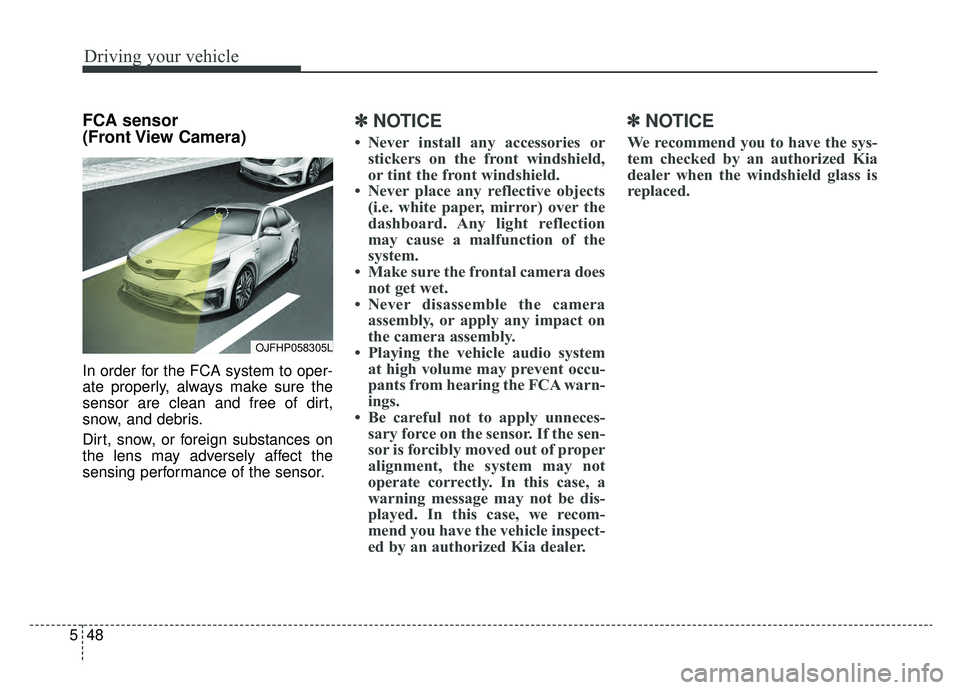
FCA sensor
(Front View Camera)
In order for the FCA system to oper-
ate properly, always make sure the
sensor are clean and free of dirt,
snow, and debris.
Dirt, snow, or foreign substances on
the lens may adversely affect the
sensing performance of the sensor.
✽ ✽
NOTICE
• Never install any accessories or
stickers on the front windshield,
or tint the front windshield.
• Never place any reflective objects (i.e. white paper, mirror) over the
dashboard. Any light reflection
may cause a malfunction of the
system.
• Make sure the frontal camera does not get wet.
• Never disassemble the camera assembly, or apply any impact on
the camera assembly.
• Playing the vehicle audio system at high volume may prevent occu-
pants from hearing the FCA warn-
ings.
• Be careful not to apply unneces- sary force on the sensor. If the sen-
sor is forcibly moved out of proper
alignment, the system may not
operate correctly. In this case, a
warning message may not be dis-
played. In this case, we recom-
mend you have the vehicle inspect-
ed by an authorized Kia dealer.
✽ ✽ NOTICE
We recommend you to have the sys-
tem checked by an authorized Kia
dealer when the windshield glass is
replaced.
OJFHP058305L
Page 344 of 597
549
Driving your vehicle
Warning message and warninglight
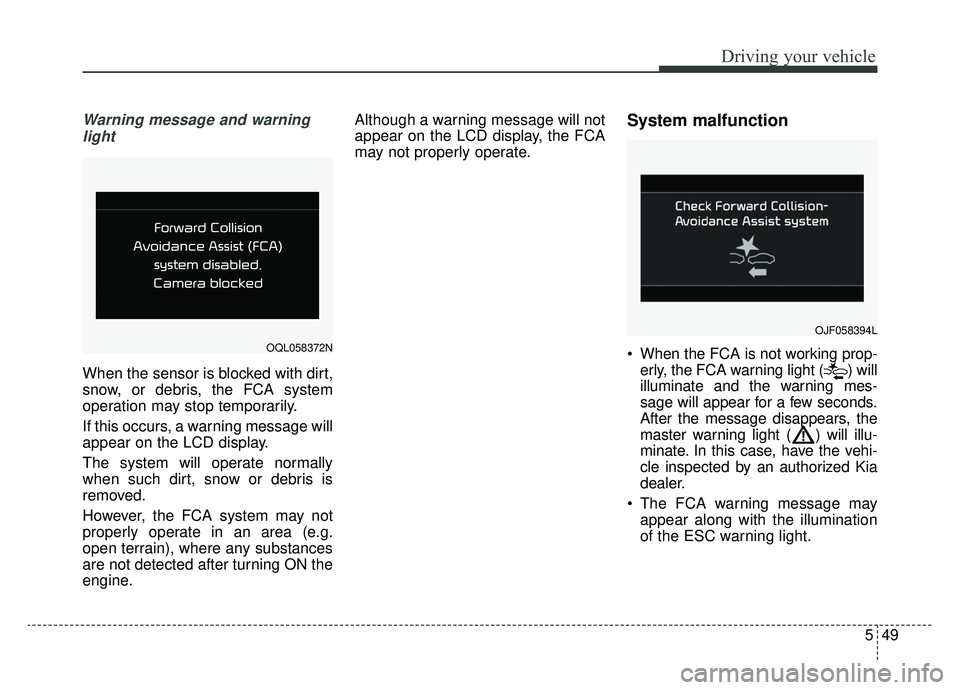
When the sensor is blocked with dirt,
snow, or debris, the FCA system
operation may stop temporarily.
If this occurs, a warning message will
appear on the LCD display.
The system will operate normally
when such dirt, snow or debris is
removed.
However, the FCA system may not
properly operate in an area (e.g.
open terrain), where any substances
are not detected after turning ON the
engine. Although a warning message will not
appear on the LCD display, the FCA
may not properly operate.
System malfunction
When the FCA is not working prop-
erly, the FCA warning light ( ) will
illuminate and the warning mes-
sage will appear for a few seconds.
After the message disappears, the
master warning light ( ) will illu-
minate. In this case, have the vehi-
cle inspected by an authorized Kia
dealer.
The FCA warning message may appear along with the illumination
of the ESC warning light.OQL058372N
OJF058394L
Page 346 of 597

551
Driving your vehicle
Limitation of the system
The Forward Collision-Avoidance
Assist (FCA) system is designed to
monitor the vehicle or pedestrians
ahead in the roadway through cam-
era recognition to warn the driver
that a collision is imminent, and if
necessary, apply emergency brak-
ing.
In certain situations, the camera may
not be able to detect the vehicle or
pedestrians ahead. In these cases,
the FCA system may not operate
normally. The driver must pay careful
attention in the following situations
where the FCA operation may be
limited.
Detecting vehicles
The sensor may be limited when:
The camera is covered object ordebris
Inclement weather such as heavy rain or snow obscures the field of
view of the camera
The camera recognition is limited
The vehicle in front is too small to be detected (for example a motor-
cycle or a bicycle, etc.)
The vehicle in front is an oversize vehicle or trailer that is too big to
be detected by the camera recog-
nition system. (for example a trac-
tor, trailer, etc.)
The camera's field of view is not well illuminated (either too dark or too
much reflection or too much back-
light that obscures the field of view)
The vehicle in front does not have their rear lights properly turned ON
or their rear lights are located
unusually.
The outside brightness changes suddenly, for example when enter-
ing or exiting a tunnel When light coming from a street
light or an oncoming vehicle is
reflected on a wet road surface
such as a puddle in the road.
The field of view in front is obstructed by sun glare or head-
light of oncoming vehicle.
The windshield glass is fogged up.
The vehicle in front is driving errat- ically.
The vehicle is on unpaved or uneven rough surfaces, or roads
with sudden gradient changes.
The vehicle is drives inside a build- ing, such as a basement parking lot
The camera does not recognize the entire vehicle in front.
The camera is damaged.
The brightness outside is too low such as when the headlamps are
not on at night or the vehicle is
going through a tunnel.
Adverse road conditions cause excessive vehicle vibrations while
driving
The sensor recognition changes suddenly when passing over a
speed bump
Page 350 of 597
555
Driving your vehicle
Detecting pedestrians
The sensor may be limited when:
The pedestrian is not fully detectedby the camera recognition system,
for example, if the pedestrian is
leaning over or is not fully walking
upright
The pedestrian is moving very quickly or appears abruptly in the
camera detection area
The pedestrian is wearing clothing that easily blends into the back-
ground, making it difficult to be
detected by the camera recogni-
tion system
The outside lighting is too bright (e.g. when driving in bright sunlight
or in sun glare) or too dark (e.g.
when driving on a dark rural road
at night)
It is difficult to detect and distin- guish the pedestrian from other
objects in the surroundings, for
example, when there is a group of
pedestrians, or a large crowd. There is an item similar to a per-
son's body structure
The pedestrian is small
The pedestrian has impaired mobility
The sensor recognition is limited
The camera is covered with a for- eign object or debris
Inclement weather such as heavy rain or snow obscures the field of
view of the radar sensor or camera
When light coming from a street light or an oncoming vehicle is
reflected on a wet road surface
such as a puddle in the road
The field of view in front is obstructed by sun glare
The windshield glass is fogged up.
The adverse road conditions cause excessive vehicle vibrations while
driving
When the pedestrian suddenly appears in front of the vehicle
When the construction area, rail or other metal object is near the
pedestrian.WARNING
Do not use the ForwardCollision -Avoidance Assist
(FCA) system when towing a
vehicle. Application of the
FCA system while towing may
adversely affect the safety of
your vehicle or the towing
vehicle.
Use extreme caution when the vehicle in front of you has
cargo that extends rearward
from the cab, or when the
vehicle in front of you has
higher ground clearance.
The FCA system is designed to detect and monitor the
vehicle ahead in the roadway
through camera recognition. It
is not designed to detect bicy-
cles, motorcycles, or smaller
wheeled objects such as lug-
gage bags, shopping carts, or
strollers.
(Continued)