reset KIA OPTIMA PLUG-IN HYBRID 2017 User Guide
[x] Cancel search | Manufacturer: KIA, Model Year: 2017, Model line: OPTIMA PLUG-IN HYBRID, Model: KIA OPTIMA PLUG-IN HYBRID 2017Pages: 686, PDF Size: 35.24 MB
Page 308 of 686

(Continued)
•êome non-standard UêB devices
(METAL COVEé TYçE UêB) can be
unrecognizable.
•êome UêB flash memory readers
(such as CF, êD, micro êD, etc.) or
external-HDD type devices can be
unrecognizable.
•Music files protected by DéM (DIG‐
ITAL éIGHTê MANAGEMENT) are
not recognizable.
•The data in the UêB memory may
be lost while using this audio. Al‐
ways back up important data on a
personal storage device.
•
çlease avoid using UêB
memory products
which can be used as
key chains or cellular
phone accessories as
they could cause dam‐
age to the UêB jack.
çlease make certain only to use
plug type connector products.
NOTICE
nUsing the içod® device
•êome içod® models may not sup‐
port communication protocol and
files may not properly play.
êupported içod® models:
-içhone® 3Gê/4
-içod touch® 1st~4th generation
-içod nano® 1st~6th generation
-içod classic®
•The order of search or playback of
songs in the içod® can be different
from the order searched in the au‐
dio system.
•If the içod® disabled due to its
own malfunction, reset the içod®.
(éeset: éefer to içod® manual)
•An içod® may not operate normal‐
ly on low battery.
(Continued)
(Continued)
•êome içod® devices, such as the
içhone®, can be connected
through the Bluetooth® Wireless
Technology interface. The device
must have audio Bluetooth® Wire‐
less Technology capability (such as
for stereo headphone Bluetooth®
Wireless Technology). The device
can play, but it will not be control‐
led by the audio system.
•To use içod® features within the
audio, use the cable provided upon
purchasing an içod® device.
•êkipping or improper operation
may occur depending on the char‐
acteristics of your içod®/içhone®
device.
(Continued)
6-17
6
Audio system
Page 325 of 686

CommandFunction
AM 530~1710 çlays the AM broadcast of the corre‐ sponding frequency. ❈éange can be different by applica‐
tion frequency of corresponding country.
TA On Enables Traffic Announcement.
TA Off Disables Traffic Announcement.
News On Enables éDê News feature.
News Off Disables éDê News feature.
Media Moves to the most recently played me‐ dia screen.
çlay Track 1~30 If a music CD has been inserted, plays the corresponding track.
CD çlays the music saved in the CD.
êearch CD Moves to the CD track or file selection screen.• For audio CDs, move to the screen and say the track number to play the
corresponding track.
• Moves to Mç3 CD file selection screen. After manually operate the device toselect and play music.
UêB çlays UêB music.
êearch UêB Moves to UêB file selection screen. Af‐ ter manually operate the device to se‐lect and play music.CommandFunction
içod ®
çlays içod®
music.
êearch içod ®
Moves to the içod ®
file selection screen.
After, manually operate the device to select and play music.
My Music çlays the music saved in My Music.
êearch My Music Moves to the My Music file selection screen. After, manually operate the de‐vice to select and play music.
AUX (Auxiliary) çlays the connected external device. Bluetooth ®
Audio çlays the music saved in connected
Bluetooth ®
Wireless Technology device.
Mute Mutes the radio or music volume.
çardon? éepeats the most recent comment.
Cancel (Exit) Ends voice command.
FM/AM éadio Commands
Commands available during FM, AM radio operation.
CommandFunction
çreset 1~6 çlays the broadcast saved in çreset 1~6.
Auto êtore Automatically selects radio broadcast frequencies with superior reception andsaves in çresets 1~6.
çreset êave 1~6 êaves the current broadcast frequency to çreset 1~6.
Audio system
6-34
Page 326 of 686
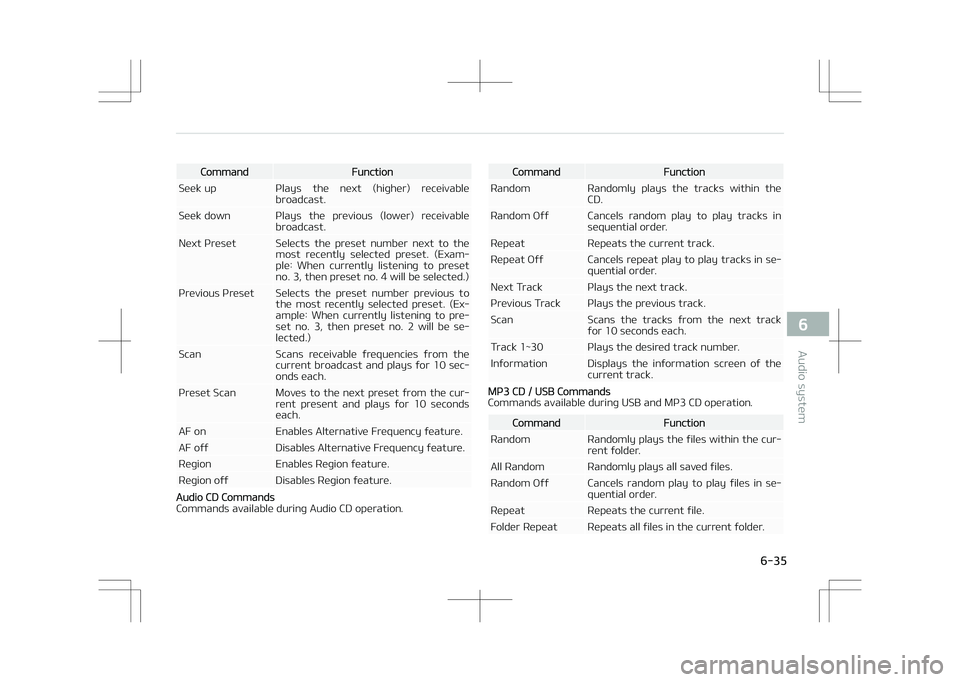
CommandFunction
êeek up çlays the next (higher) receivable broadcast.
êeek down çlays the previous (lower) receivable broadcast.
Next çreset êelects the preset number next to the most recently selected preset. (Exam‐ple: When currently listening to presetno. 3, then preset no. 4 will be selected.)
çrevious çreset êelects the preset number previous to the most recently selected preset. (Ex‐ample: When currently listening to pre‐set no. 3, then preset no. 2 will be se‐lected.)
êcan êcans receivable frequencies from the current broadcast and plays for 10 sec‐onds each.
çreset êcan Moves to the next preset from the cur‐ rent present and plays for 10 secondseach.
AF on Enables Alternative Frequency feature.
AF off Disables Alternative Frequency feature.
éegion Enables éegion feature.
éegion off Disables éegion feature.
Audio CD Commands
Commands available during Audio CD operation.
CommandFunction
éandom éandomly plays the tracks within the CD.
éandom Off Cancels random play to play tracks in sequential order.
éepeat éepeats the current track.
éepeat Off Cancels repeat play to play tracks in se‐ quential order.
Next Track çlays the next track.
çrevious Track çlays the previous track.
êcan êcans the tracks from the next track for 10 seconds each.
Track 1~30 çlays the desired track number.
Information Displays the information screen of the current track.
Mç3 CD / UêB Commands
Commands available during UêB and Mç3 CD operation.
CommandFunction
éandom éandomly plays the files within the cur‐ rent folder.
All éandom éandomly plays all saved files.
éandom Off Cancels random play to play files in se‐ quential order.
éepeat éepeats the current file.
Folder éepeat éepeats all files in the current folder.
6-35
6
Audio system
Page 352 of 686

(Continued)
•When the içod® or AUX device
power is connected to the power
jack, playing the external device
may result in noise. In such cases,
disconnect the power connection
before use.
•êkipping or improper operation
may occur depending on the char‐
acteristics of your içod®/içhone®
device.
•If your içhone® is connected to
both the Bluetooth® Wireless
Technology and UêB, the sound
may not be properly played. In
your içhone®, select the Dock con‐
nector or Bluetooth® Wireless
Technology to change the sound
output (source).
•içod® mode cannot be operated
when the içod® cannot be recog‐
nized due to the playing of ver‐
sions that do not support commu‐
nication protocols, cases of içod®
abnormalities and defects.
(Continued)
(Continued)
•For fifth generation içod® Nano
devices, the içod® may not be rec‐
ognized when the battery level is
low. çlease charge the içod® for
use.
•êearch/play orders shown within
the içod® device may differ with
the orders shown within the audio
system.
•If the içod® malfunctions due to
an içod® device defect, reset the
içod® and try again. (To learn
more, refer to your içod® manual)
•êome içod®s may not sync with
the êystem depending on its ver‐
sion. If the Media is removed be‐
fore the Media is recognized, then
the system may not properly re‐
store the previously operated
mode. (içad charging is not sup‐
ported.)
•Beside support 1M cable when
purchasing içod®/içhone® prod‐
ucts, Long Cable cannot be recog‐
nized.
NOTICE
nUsing the Bluetooth® Wireless
Technology Audio Mode
•Bluetooth® Wireless Technology
Audio Mode can be used only when
a Bluetooth® Wireless Technology
phone has been connected.
•Bluetooth® Wireless Technology
Audio Mode will not be available
when connecting mobile phones
that do not support this feature.
•While Bluetooth® Wireless Tech‐
nology Audio is playing, if the
Bluetooth® Wireless Technology
phone is connected, then the mu‐
sic will also stop.
•Moving the Track up/down while
playing Bluetooth® Wireless Tech‐
nology audio mode may result in
pop noises in some mobile phones.
•Bluetooth® Wireless Technology
streaming audio may not be sup‐
ported in some mobile phones.
(Continued)
6-61
6
Audio system
Page 357 of 686
(Continued)
•çronounce the voice commands
naturally and clearly as if in a nor‐
mal conversation.
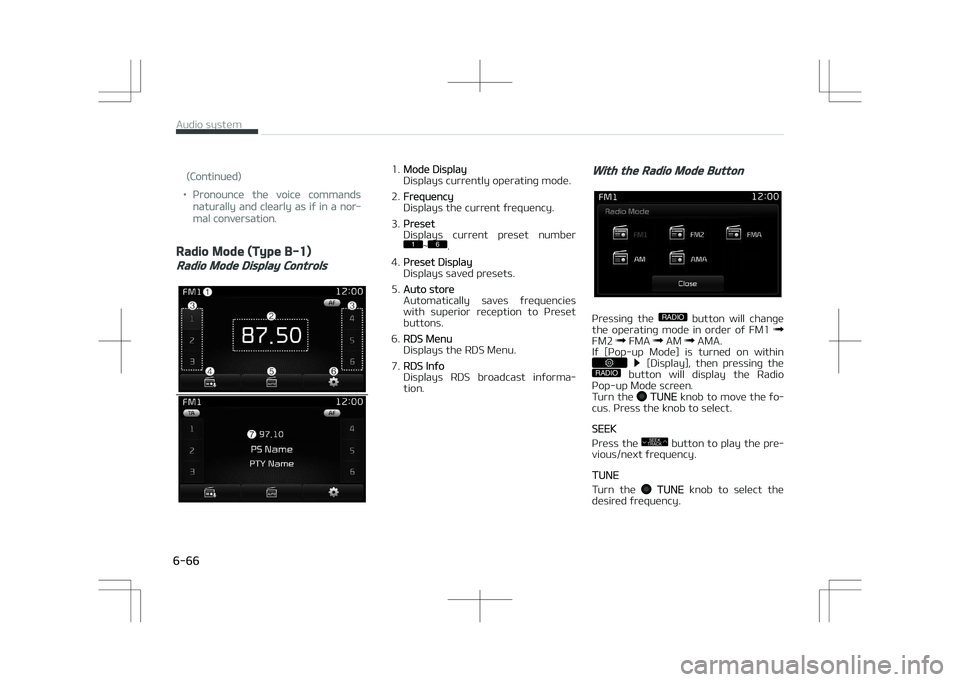
Radio Mode (Type B-1)
Radio Mode Display Controls
1.Mode Display
Displays currently operating mode.
2.
Frequency
Displays the current frequency.
3.
çreset
Displays current preset number
1
Page 358 of 686
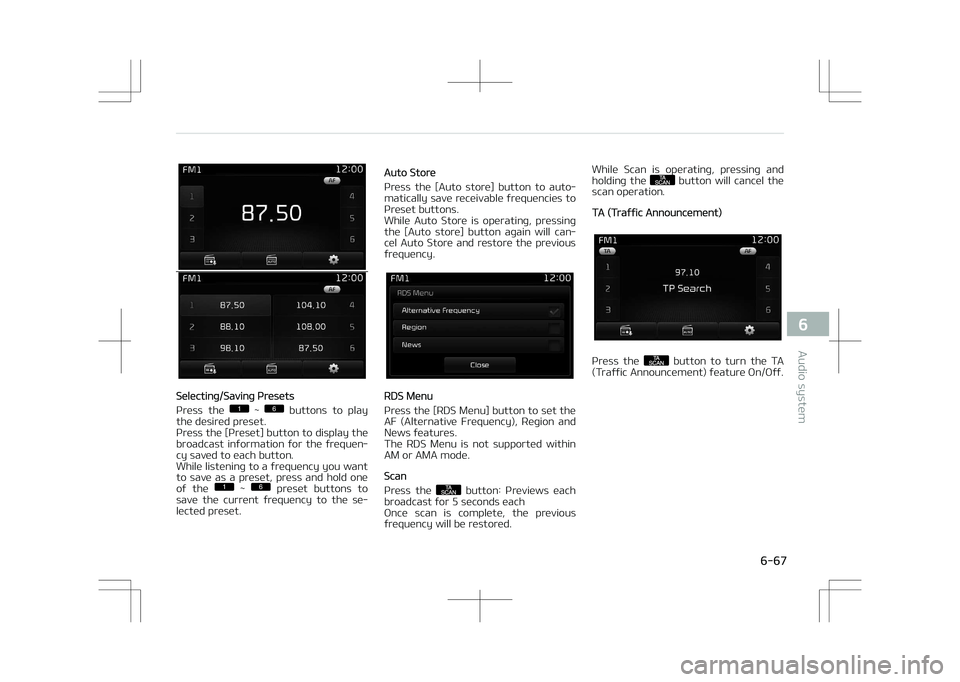
êelecting/êaving çresets
çress the
1
Page 359 of 686
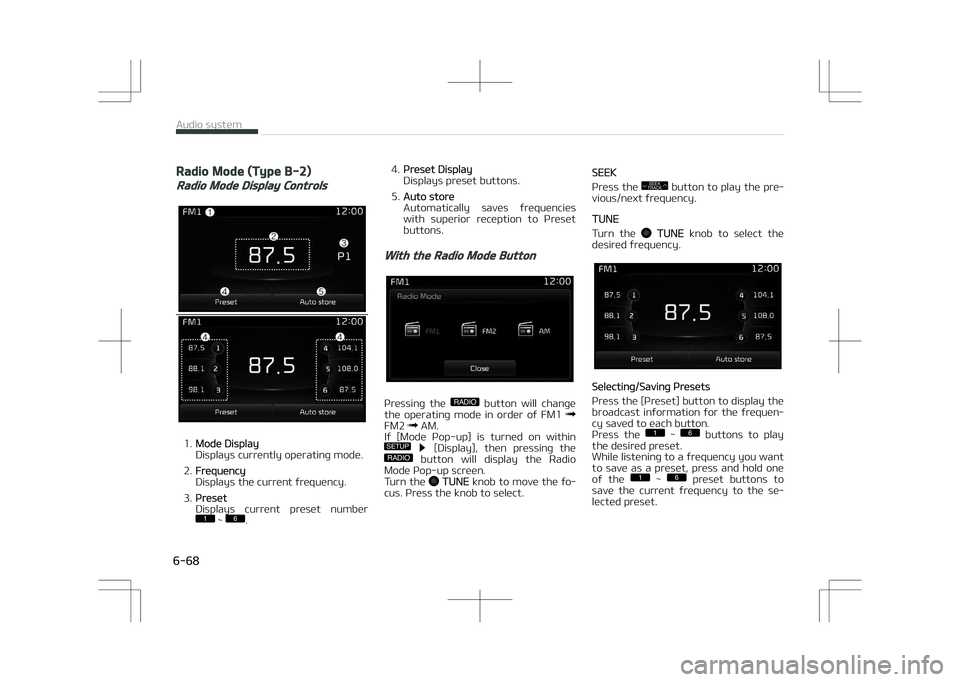
Radio Mode (Type B-2)
Radio Mode Display Controls
1.Mode Display
Displays currently operating mode.
2.
Frequency
Displays the current frequency.
3.
çreset
Displays current preset number
1
Page 360 of 686
![KIA OPTIMA PLUG-IN HYBRID 2017 User Guide Auto êtore
çress the [Auto store] button to auto‐
matically save receivable frequencies to çreset buttons.
êcan
çress the
SCAN button to preview fre‐
quencies with superior rec](/img/2/57963/w960_57963-359.png "KIA OPTIMA PLUG-IN HYBRID 2017 User Guide Auto êtore
çress the [Auto store] button to auto‐
matically save receivable frequencies to çreset buttons.
êcan
çress the
SCAN button to preview fre‐
quencies with superior rec")
Auto êtore
çress the [Auto store] button to auto‐
matically save receivable frequencies to çreset buttons.
êcan
çress the
SCAN button to preview fre‐
quencies with superior reception for 5 seconds each.
çress and hold the
SCAN button to
preview presets for 5 seconds each.
Once scan is complete, the previous
frequency will be restored.
While êcan is operating, pressing the
SCAN button will cancel the scan oper‐
ation.
Media mode
Media mode screen
çressing the MEDIA button will change
the operating mode in order of CD
UêB (içod ®
) AUX My Music BT
Audio.
If [çop-up Mode] / [Mode çop-up] is turned on within
/SETUP [Dis‐
play], then pressing the MEDIA button
will display the Media çop-up Mode
screen.
Turn the
TUNE knob to move the fo‐
cus. çress the knob to select.
The media mode pop up screen can be
displayed only when there are two or
more media modes turned on.
Mode Display on the Status Bar
When a Bluetooth ®
Wireless Technolo‐
gy, içod ®
, UêB or AUX device is connec‐
ted or a CD is inserted, the correspond‐
ing mode icon will be displayed.
IconTitle
Bluetooth ®
WirelessTechnolo‐
gy
CD
içod ®
UêB
AUX
6-69
6
Audio system
Page 392 of 686
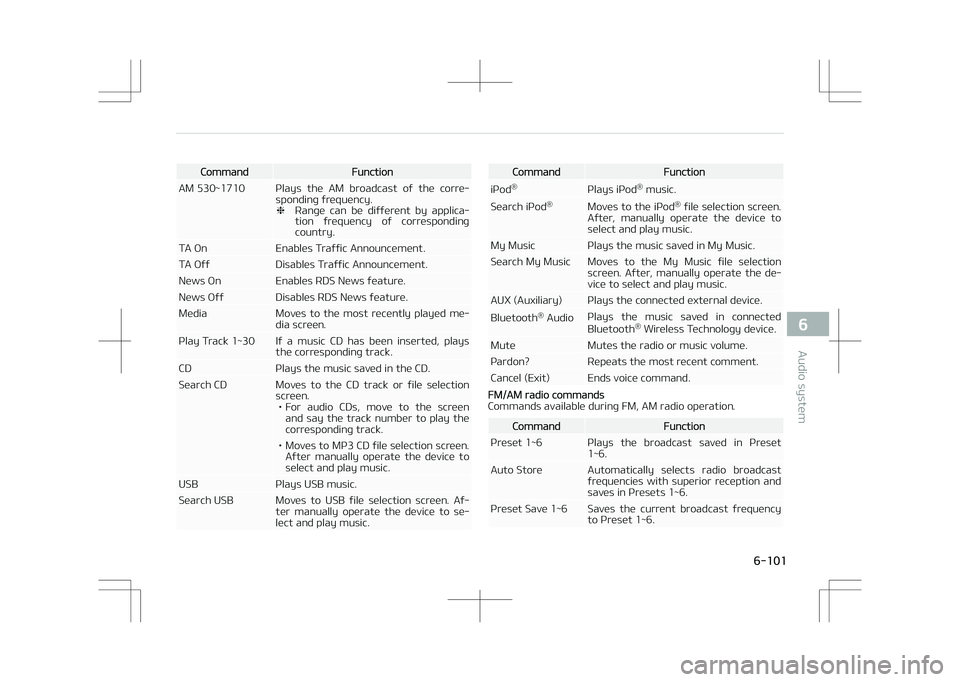
CommandFunction
AM 530~1710 çlays the AM broadcast of the corre‐ sponding frequency. ❈éange can be different by applica‐
tion frequency of corresponding country.
TA On Enables Traffic Announcement.
TA Off Disables Traffic Announcement.
News On Enables éDê News feature.
News Off Disables éDê News feature.
Media Moves to the most recently played me‐ dia screen.
çlay Track 1~30 If a music CD has been inserted, plays the corresponding track.
CD çlays the music saved in the CD.
êearch CD Moves to the CD track or file selection screen.• For audio CDs, move to the screen and say the track number to play the
corresponding track.
• Moves to Mç3 CD file selection screen. After manually operate the device toselect and play music.
UêB çlays UêB music.
êearch UêB Moves to UêB file selection screen. Af‐ ter manually operate the device to se‐lect and play music.CommandFunction
içod ®
çlays içod®
music.
êearch içod ®
Moves to the içod ®
file selection screen.
After, manually operate the device to select and play music.
My Music çlays the music saved in My Music.
êearch My Music Moves to the My Music file selection screen. After, manually operate the de‐vice to select and play music.
AUX (Auxiliary) çlays the connected external device. Bluetooth ®
Audio çlays the music saved in connected
Bluetooth ®
Wireless Technology device.
Mute Mutes the radio or music volume.
çardon? éepeats the most recent comment.
Cancel (Exit) Ends voice command.
FM/AM radio commands
Commands available during FM, AM radio operation.
CommandFunction
çreset 1~6 çlays the broadcast saved in çreset 1~6.
Auto êtore Automatically selects radio broadcast frequencies with superior reception andsaves in çresets 1~6.
çreset êave 1~6 êaves the current broadcast frequency to çreset 1~6.
6-101
6
Audio system
Page 393 of 686
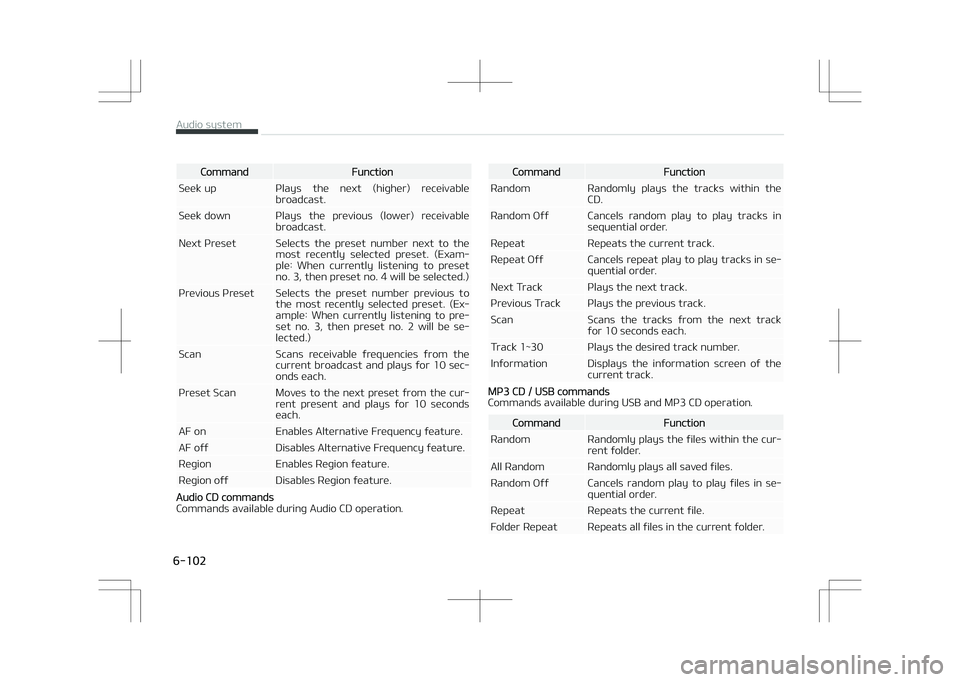
CommandFunction
êeek up çlays the next (higher) receivable broadcast.
êeek down çlays the previous (lower) receivable broadcast.
Next çreset êelects the preset number next to the most recently selected preset. (Exam‐ple: When currently listening to presetno. 3, then preset no. 4 will be selected.)
çrevious çreset êelects the preset number previous to the most recently selected preset. (Ex‐ample: When currently listening to pre‐set no. 3, then preset no. 2 will be se‐lected.)
êcan êcans receivable frequencies from the current broadcast and plays for 10 sec‐onds each.
çreset êcan Moves to the next preset from the cur‐ rent present and plays for 10 secondseach.
AF on Enables Alternative Frequency feature.
AF off Disables Alternative Frequency feature.
éegion Enables éegion feature.
éegion off Disables éegion feature.
Audio CD commands
Commands available during Audio CD operation.
CommandFunction
éandom éandomly plays the tracks within the CD.
éandom Off Cancels random play to play tracks in sequential order.
éepeat éepeats the current track.
éepeat Off Cancels repeat play to play tracks in se‐ quential order.
Next Track çlays the next track.
çrevious Track çlays the previous track.
êcan êcans the tracks from the next track for 10 seconds each.
Track 1~30 çlays the desired track number.
Information Displays the information screen of the current track.
Mç3 CD / UêB commands
Commands available during UêB and Mç3 CD operation.
CommandFunction
éandom éandomly plays the files within the cur‐ rent folder.
All éandom éandomly plays all saved files.
éandom Off Cancels random play to play files in se‐ quential order.
éepeat éepeats the current file.
Folder éepeat éepeats all files in the current folder.
Audio system
6-102