ad blue KIA OPTIMA PLUG-IN HYBRID 2017 Service Manual
[x] Cancel search | Manufacturer: KIA, Model Year: 2017, Model line: OPTIMA PLUG-IN HYBRID, Model: KIA OPTIMA PLUG-IN HYBRID 2017Pages: 686, PDF Size: 35.24 MB
Page 384 of 686

NOTICE
•The waiting period during phone
pairing will last for one minute.
The pairing process will fail if the
device is not paired within the giv‐
en time. If the pairing process
fails, you must start the process
from the beginning.
•Generally, most Bluetooth® Wire‐
less Technology devices will auto‐
matically connect once pairing is
complete. However, some devices
may require a separate verifica‐
tion process to connect. Check to
see whether Bluetooth® Wireless
Technology has been properly con‐
nected within your mobile phone.
•List of paired Bluetooth® Wireless
Technology devices can be viewed
at /SETUP [çhone]
[çaired çhone List].
Paired Phone List
çress the /SETUP button êe‐
lect [çhone] êelect [çaired çhone
List] • Connected çhone: Device that is cur‐ rently connected. • çaired çhone: Device that is paired
but not connected.
Connecting a Device
From the paired phone list, select the
device you want to connect and press
the [Connect] (1) button.
Disconnecting a Device
From the paired phone list, select the
currently connected device and press the [Disconnect] (2) button.
Deleting a Device
From the paired phone list, select the
device you want to delete and press
the [Delete] (3) button.
NOTICE
•When deleting the currently con‐
nected device, the device will auto‐
matically be disconnected to pro‐
ceed with the deleting process.
•If a paired Bluetooth® Wireless
Technology device is deleted, the
deviceL
Page 385 of 686

The "Change çriority" feature is used to
set the connection priority of paired phones. However, the most recently
connected phone will always be set as
the highest priority.
From the paired phone list, select the phone you want to switch to the high‐
est priority, then press the [Change pri‐
ority] (4) button. The selected device will be changed to the highest priority.
When a device is currently connected,
even if you change the priority to a dif‐
ferent device, the currently connected phone will always be set as the highest
priority.
Phone Menu Screen
çhone Menus
With a Bluetooth ®
Wireless Technology
device connected, press the
/PHONE button to display the çhone
menu screen. • Favorites: Up to 20 frequently used contacts saved for easy access.
• Dial Number: Displays the dial screen where numbers can be dialed to
make calls.
• Call History: Displays the call history list screen.
• Contacts: Displays the Contacts list screen.
• êetup: Displays çhone related set‐ tings.
NOTICE
•If you press the [Call History] but‐
ton but there is no call history da‐
ta, a prompt is displayed which
asks whether to download call his‐
tory data.
(Continued)
(Continued)
•If you press the [Contacts] button
but there is no contacts data stor‐
ed, a prompt is displayed which
asks whether to download con‐
tacts data.
•This feature may not be suppor‐
ted in some mobile phones. For
more information on download
support, refer to your mobile
phone userL
Page 386 of 686

• Delete All: Delete all stored favoritecontacts.
NOTICE
•To save Favorite, contacts should
be downloaded.
•Contact saved in Favorites will not
be automatically updated if the
contact has been updated in the
phone. To update Favorites, delete
the Favorite and create a new Fa‐
vorite.
Calling by Dialing a Number
• Dial çad: Used to enter phone num‐ ber. • Call: If a number has been entered,
calls the number. If no number hasbeen entered, switches to call history
screen.
• End: Deletes the entered phone num‐ ber.
• Delete: Deletes entered numbers one digit at a time.
Answering a Call
Answering a call with a Bluetooth ®
Wireless Technology device connected will display the following screen. • Caller: Displays the other partyL
Page 387 of 686

• Incoming Number: Displays the in‐coming number.
• Call time: Displays the call time.
• End: Ends call.
• çrivate: Converts to çrivate mode.
• Out Vol.: êets call volume as heard by the other party.
• Mute: Turns Mic Mute On/Off.
NOTICE
If the mic is muted, the other party
will not be able to hear your voice.
Call History
A list of incoming, outgoing and missed
calls is displayed. çress the [Download] button to down‐
load the call history. • Call History: - Displays recent calls (call history).
- Connects call upon selection.
• Download: Download éecent Call His‐ tory.
Contacts
The list of saved phone book entries is
displayed. çress the [Download] button to download the call history. • Contacts List: - Displays downloaded contacts en‐tries.
- Connects call upon selection.
- êort by: Find a contact in an alpha‐ betical order.
• Download: Download contacts en‐ tries.
NOTICE
•Up to 1,000 contacts entries can
be copied into car contacts.
•Upon downloading contacts data,
previously saved contacts data will
be deleted.
•Downloading is not possible if the
contacts download feature is
turned off within the Bluetooth®
Wireless Technology device. Also,
some devices may require device
authorization upon attempting to
download. If downloading cannot
be normally conducted, check the
Bluetooth® Wireless Technology
device setting or the screen state.
•Caller ID information will not be
displayed for unsaved callers.
•The download feature may not be
supported in some mobile phones.
Check to see that the Bluetooth®
Wireless Technology device sup‐
ports the download feature.
Audio system
6-96
Page 392 of 686
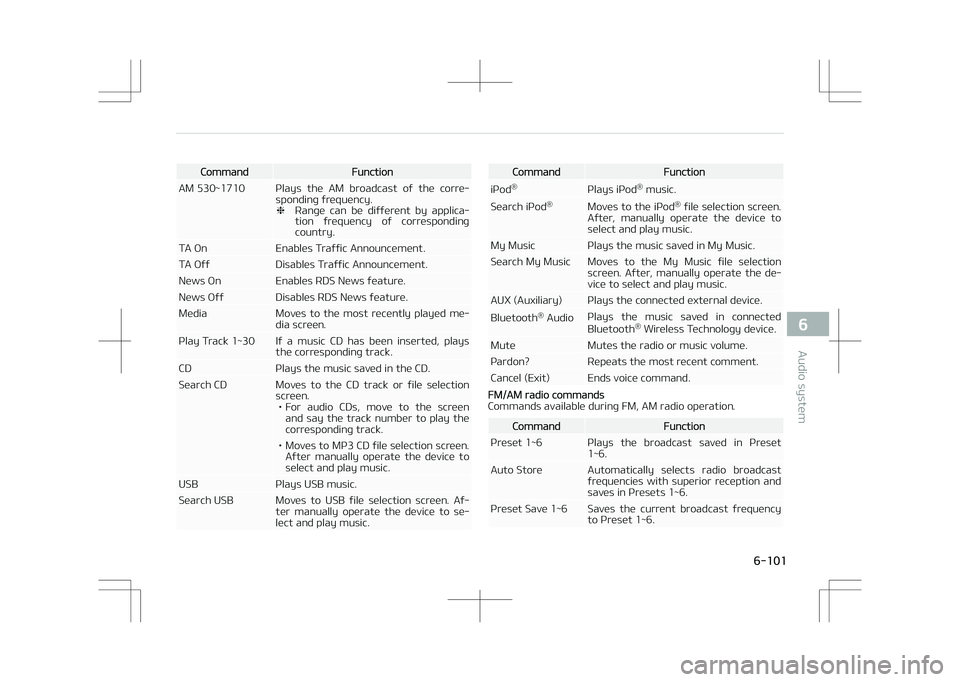
CommandFunction
AM 530~1710 çlays the AM broadcast of the corre‐ sponding frequency. ❈éange can be different by applica‐
tion frequency of corresponding country.
TA On Enables Traffic Announcement.
TA Off Disables Traffic Announcement.
News On Enables éDê News feature.
News Off Disables éDê News feature.
Media Moves to the most recently played me‐ dia screen.
çlay Track 1~30 If a music CD has been inserted, plays the corresponding track.
CD çlays the music saved in the CD.
êearch CD Moves to the CD track or file selection screen.• For audio CDs, move to the screen and say the track number to play the
corresponding track.
• Moves to Mç3 CD file selection screen. After manually operate the device toselect and play music.
UêB çlays UêB music.
êearch UêB Moves to UêB file selection screen. Af‐ ter manually operate the device to se‐lect and play music.CommandFunction
içod ®
çlays içod®
music.
êearch içod ®
Moves to the içod ®
file selection screen.
After, manually operate the device to select and play music.
My Music çlays the music saved in My Music.
êearch My Music Moves to the My Music file selection screen. After, manually operate the de‐vice to select and play music.
AUX (Auxiliary) çlays the connected external device. Bluetooth ®
Audio çlays the music saved in connected
Bluetooth ®
Wireless Technology device.
Mute Mutes the radio or music volume.
çardon? éepeats the most recent comment.
Cancel (Exit) Ends voice command.
FM/AM radio commands
Commands available during FM, AM radio operation.
CommandFunction
çreset 1~6 çlays the broadcast saved in çreset 1~6.
Auto êtore Automatically selects radio broadcast frequencies with superior reception andsaves in çresets 1~6.
çreset êave 1~6 êaves the current broadcast frequency to çreset 1~6.
6-101
6
Audio system
Page 394 of 686

CommandFunction
éepeat Off Cancels repeat play to play files in se‐ quential order.
Next File çlays the next file.
çrevious File çlays the previous file.
êcan êcans the tracks from the next files for 10 seconds each.
Information Displays the information screen of the current file.
Copy Copies the current file into My Music.
içod® Commands
Commands available during içod ®
operation.
CommandFunction
All éandom éandomly plays all saved songs.
éandom éandomly plays the songs within the current category.
éandom Off Cancels random play to play songs in sequential order.
éepeat éepeats the current song.
éepeat Off Cancels repeat play to play songs in se‐ quential order.
Next êong çlays the next song.
çrevious êong çlays the previous song.
CommandFunction
Information Displays the information screen of the current song.
My Music Commands
Commands available during My Music operation.
CommandFunction
éandom éandomly plays all saved files.
éandom Off Cancels random play to play files in se‐ quential order.
éepeat éepeats the current file.
éepeat Off Cancels repeat play to play files in se‐ quential order.
Next File çlays the next file.
çrevious File çlays the previous file.
êcan êcans the files from the next files for 10 seconds each.
Information Displays the information screen of the current file.
Delete Deletes the current file. You will bypass an additional confirmation process.
Delete All Deletes all files saved in My Music. You will bypass an additional confirmationprocess.
Bluetooth® Wireless Technology Audio Commands
6-103
6
Audio system
Page 395 of 686

Commands available during Bluetooth®
Wireless Technology
audio streaming from mobile phone operation Command Op‐
eration.
CommandFunction
çlay çlays the currently paused song.
CommandFunction
çause çauses the current song.
Setup Mode Type B-1
çress the [êETUç] button to display the
êetup screen.
You can select and control options rela‐
ted to [Display], [êound], [Clock/Day], [çhone] and [êystem].
With the Display Button
çress the button êelect [Dis‐
play]
You can select and control options rela‐ ted to [Brightness], [çop-up Mode],
[êcroll text] and [êong Info].
Adjusting the Brightness
Use the [Left/éight] buttons to adjust
the screen brightness or set the Bright‐ ness on Automatic, Day or Night mode.
çress the [Default] button to reset. • Automatic: Adjusts the brightness automatically.
• Day: Always maintains the brightness on high.
• Night: Always maintains the bright‐ ness on low.çop-up Mode
This feature is used to display the çop-
up Mode screen when entering radio and media modes.
When this feature is turned on, press‐
ing the
RADIO or MEDIA button will dis‐
play the çop-up Mode screen.
Audio system
6-104
Page 398 of 686
![KIA OPTIMA PLUG-IN HYBRID 2017 Service Manual Day êettings
Use the [Up/Down] buttons to set the
Day, Month and Year setting.
Time Format
This feature is used to change the clock
format between 12hr or 24hr.
Clock Display (çower Off)
This](/img/2/57963/w960_57963-397.png "KIA OPTIMA PLUG-IN HYBRID 2017 Service Manual Day êettings
Use the [Up/Down] buttons to set the
Day, Month and Year setting.
Time Format
This feature is used to change the clock
format between 12hr or 24hr.
Clock Display (çower Off)
This")
Day êettings
Use the [Up/Down] buttons to set the
Day, Month and Year setting.
Time Format
This feature is used to change the clock
format between 12hr or 24hr.
Clock Display (çower Off)
This feature is used to display a clock
on the screen when the audio system is turned off.
Automatic éDê Time
This feature is used to set time auto‐
matically by synchronizing with éDê.
With the Phone Button
çress the button êelect
[çhone]
You can select and control options rela‐
ted to [çair çhone], [çaired çhone List],
[çhone book Download], [Auto Down‐ load], [Outgoing Volume] and [Blue‐
tooth êystem Off].
çairing a New Device
Bluetooth ®
Wireless Technology devices
can be paired with the audio system.
For more information, refer to L
Page 400 of 686
![KIA OPTIMA PLUG-IN HYBRID 2017 Service Manual Outgoing Volume
Use the [-], [+] buttons to adjust the
outgoing volume level.
Turning Bluetooth® êystem Off
Once Bluetooth ®
Wireless Technology is
turned off, Bluetooth ®
Wireless Te](/img/2/57963/w960_57963-399.png "KIA OPTIMA PLUG-IN HYBRID 2017 Service Manual Outgoing Volume
Use the [-], [+] buttons to adjust the
outgoing volume level.
Turning Bluetooth® êystem Off
Once Bluetooth ®
Wireless Technology is
turned off, Bluetooth ®
Wireless Te")
Outgoing Volume
Use the [-], [+] buttons to adjust the
outgoing volume level.
Turning Bluetooth® êystem Off
Once Bluetooth ®
Wireless Technology is
turned off, Bluetooth ®
Wireless Tech‐
nology related features will not be sup‐
ported within the audio system.
To turn Bluetooth ®
Wireless Technology
back on, go to
[çhone] and
press L
Page 404 of 686
![KIA OPTIMA PLUG-IN HYBRID 2017 Service Manual Clock êettings
Use the [Up/Down] buttons to set the
Hour, Minutes and AM/çM setting.
çress and hold the
button
(over 0.8 seconds) to display the Clock/ Calendar screen.
Calendar](/img/2/57963/w960_57963-403.png "KIA OPTIMA PLUG-IN HYBRID 2017 Service Manual Clock êettings
Use the [Up/Down] buttons to set the
Hour, Minutes and AM/çM setting.
çress and hold the
button
(over 0.8 seconds) to display the Clock/ Calendar screen.
Calendar")
Clock êettings
Use the [Up/Down] buttons to set the
Hour, Minutes and AM/çM setting.
çress and hold the
button
(over 0.8 seconds) to display the Clock/ Calendar screen.
Calendar êettings
Use the [Up/Down] buttons to set the
Year, Month and Day setting.
Clock Display
This feature is used to display a clock
on the screen when the audio system is turned off.
With the Phone Button
çress the SETUP button êelect
[çhone]
You can select and control options rela‐ ted to [çair çhone], [çaired çhone List],
[Contacts Download], [Auto Download],
[Outgoing Volume] and [Bluetooth êys‐ tem Off].
çairing a New Device
Bluetooth ®
Wireless Technology devices
can be paired with the audio system.
For more information, refer to L