ignition KIA PICANTO 2008 Owner's Guide
[x] Cancel search | Manufacturer: KIA, Model Year: 2008, Model line: PICANTO, Model: KIA PICANTO 2008Pages: 335, PDF Size: 12.98 MB
Page 114 of 335
443
Features of your vehicle
D190600AUN
Turn signals and lane change sig- nals
The ignition switch must be on for the
turn signals to function. To turn on the
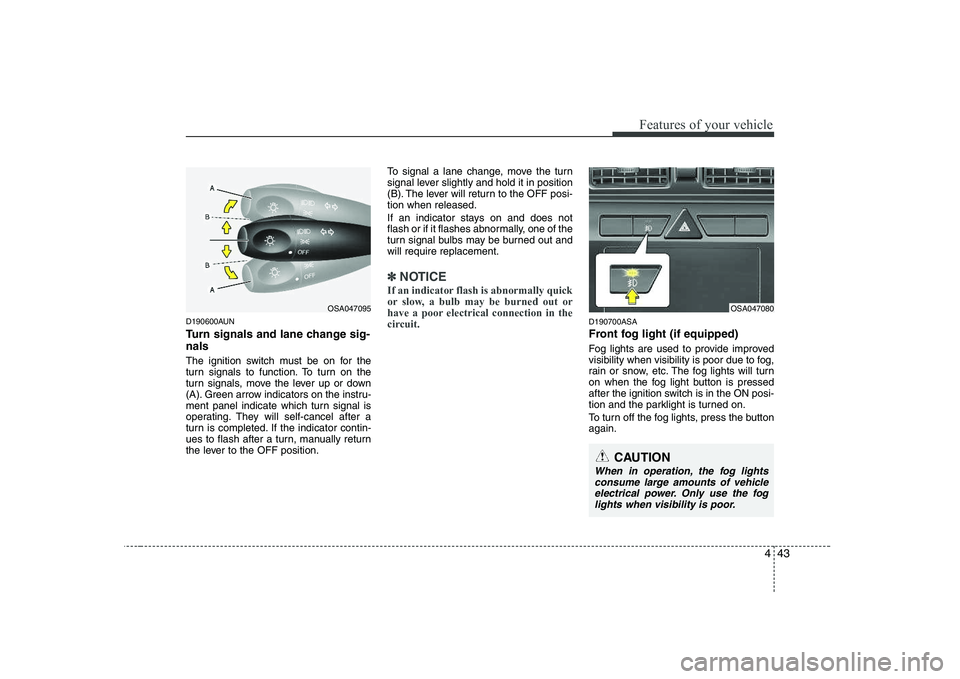
turn signals, move the lever up or down
(A). Green arrow indicators on the instru-
ment panel indicate which turn signal is
operating. They will self-cancel after a
turn is completed. If the indicator contin-
ues to flash after a turn, manually return
the lever to the OFF position.To signal a lane change, move the turn
signal lever slightly and hold it in position
(B). The lever will return to the OFF posi-tion when released.
If an indicator stays on and does not
flash or if it flashes abnormally, one of the
turn signal bulbs may be burned out andwill require replacement.
✽✽
NOTICE
If an indicator flash is abnormally quick
or slow, a bulb may be burned out or
have a poor electrical connection in the
circuit.
D190700ASA
Front fog light (if equipped)
Fog lights are used to provide improved
visibility when visibility is poor due to fog,
rain or snow, etc. The fog lights will turn
on when the fog light button is pressed
after the ignition switch is in the ON posi-
tion and the parklight is turned on.
To turn off the fog lights, press the button again.
OSA047080
CAUTION
When in operation, the fog lights consume large amounts of vehicleelectrical power. Only use the fog lights when visibility is poor.
OSA047095
Page 117 of 335
Features of your vehicle
46
4
D200100ASA
Windshield wipers
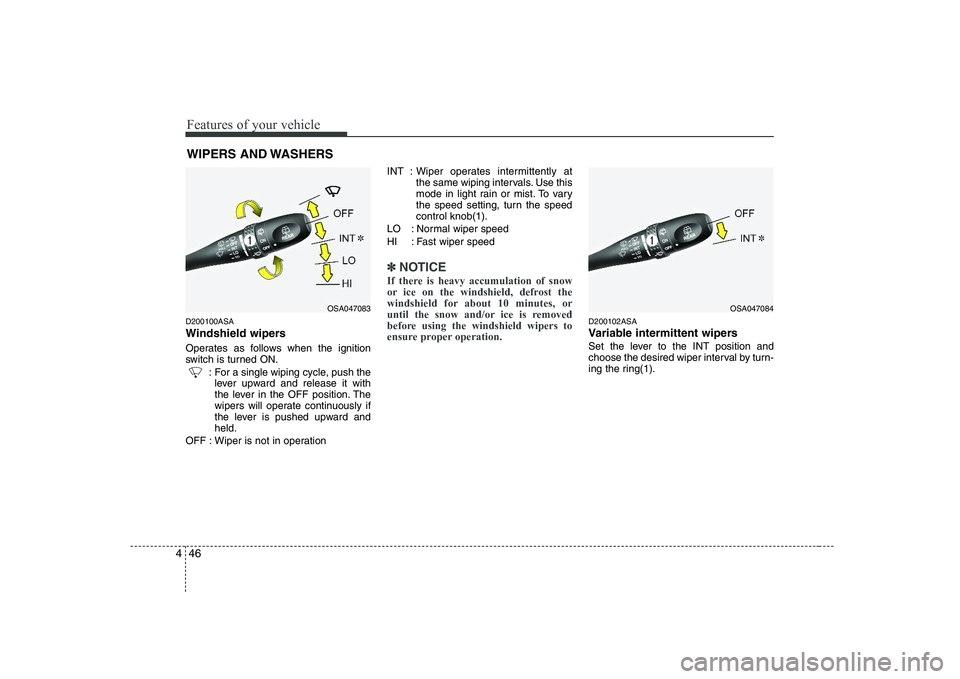
Operates as follows when the ignition
switch is turned ON.
: For a single wiping cycle, push thelever upward and release it with
the lever in the OFF position. The
wipers will operate continuously if
the lever is pushed upward andheld.
OFF : Wiper is not in operation INT : Wiper operates intermittently at
the same wiping intervals. Use this
mode in light rain or mist. To vary
the speed setting, turn the speedcontrol knob(1).
LO : Normal wiper speed
HI : Fast wiper speed
✽✽ NOTICE
If there is heavy accumulation of snow
or ice on the windshield, defrost the
windshield for about 10 minutes, or
until the snow and/or ice is removed
before using the windshield wipers to
ensure proper operation.
D200102ASA
Variable intermittent wipers
Set the lever to the INT position and
choose the desired wiper interval by turn-
ing the ring(1).
WIPERS AND WASHERS
OSA047084OSA047083
Page 127 of 335
Features of your vehicle
56
4
D230104ASA
Fan speed control
The ignition switch must be in the ON
position for fan operation.
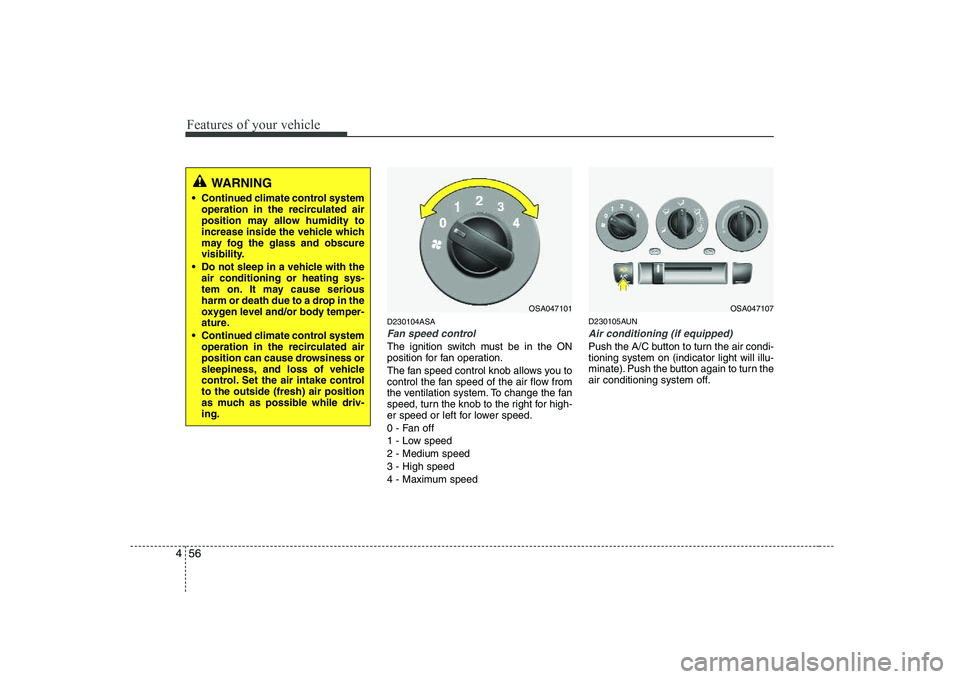
The fan speed control knob allows you to
control the fan speed of the air flow from
the ventilation system. To change the fan
speed, turn the knob to the right for high-
er speed or left for lower speed.
0 - Fan off
1 - Low speed2 - Medium speed3 - High speed
4 - Maximum speed D230105AUN
Air conditioning (if equipped)
Push the A/C button to turn the air condi- tioning system on (indicator light will illu-
minate). Push the button again to turn the
air conditioning system off.
OSA047107
WARNING
Continued climate control system operation in the recirculated air
position may allow humidity to
increase inside the vehicle which
may fog the glass and obscure
visibility.
Do not sleep in a vehicle with the air conditioning or heating sys-
tem on. It may cause serious
harm or death due to a drop in the
oxygen level and/or body temper-
ature.
Continued climate control system operation in the recirculated air
position can cause drowsiness or
sleepiness, and loss of vehicle
control. Set the air intake controlto the outside (fresh) air position
as much as possible while driv-ing.
OSA047101
Page 137 of 335
Features of your vehicle
66
4
D240205AUN
Fan speed control
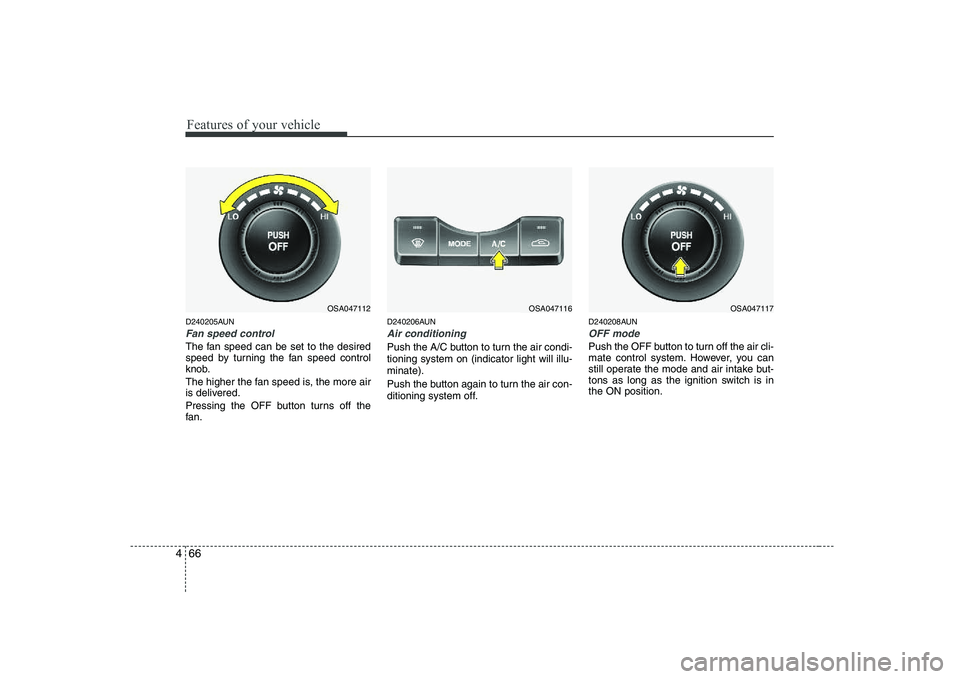
The fan speed can be set to the desired
speed by turning the fan speed control
knob.
The higher the fan speed is, the more air
is delivered.
Pressing the OFF button turns off the
fan. D240206AUN
Air conditioning
Push the A/C button to turn the air condi- tioning system on (indicator light will illu-minate).
Push the button again to turn the air con-
ditioning system off.
D240208AUN
OFF mode
Push the OFF button to turn off the air cli-
mate control system. However, you can
still operate the mode and air intake but-
tons as long as the ignition switch is inthe ON position.
OSA047116OSA047117OSA047112
Page 140 of 335
469
Features of your vehicle
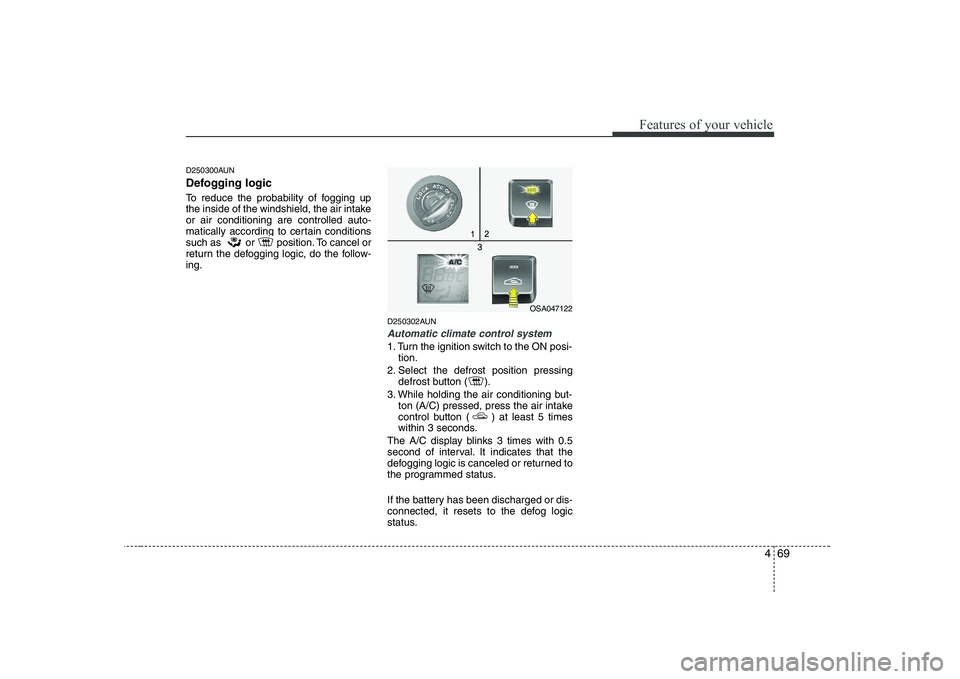
D250300AUN
Defogging logic
To reduce the probability of fogging up
the inside of the windshield, the air intakeor air conditioning are controlled auto-
matically according to certain conditions
such as or position. To cancel or
return the defogging logic, do the follow-ing.D250302AUN
Automatic climate control system
1. Turn the ignition switch to the ON posi-tion.
2. Select the defrost position pressing defrost button ( ).
3. While holding the air conditioning but- ton (A/C) pressed, press the air intake
control button ( ) at least 5 times
within 3 seconds.
The A/C display blinks 3 times with 0.5
second of interval. It indicates that the
defogging logic is canceled or returned to
the programmed status.
If the battery has been discharged or dis-
connected, it resets to the defog logic
status.
OSA047122
Page 145 of 335
Features of your vehicle
74
4
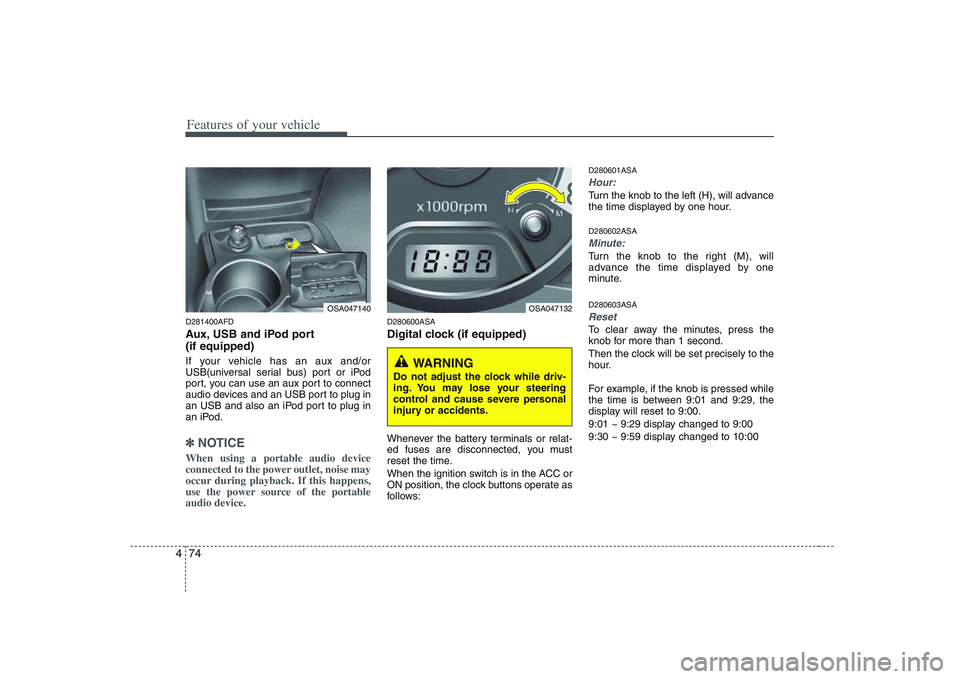
D281400AFD
Aux, USB and iPod port (if equipped)
If your vehicle has an aux and/or
USB(universal serial bus) port or iPod
port, you can use an aux port to connect
audio devices and an USB port to plug in
an USB and also an iPod port to plug in
an iPod.
✽✽
NOTICE
When using a portable audio device
connected to the power outlet, noise may
occur during playback. If this happens,
use the power source of the portableaudio device.
D280600ASA
Digital clock (if equipped)
Whenever the battery terminals or relat-
ed fuses are disconnected, you must
reset the time.
When the ignition switch is in the ACC or
ON position, the clock buttons operate as
follows: D280601ASA
Hour:
Turn the knob to the left (H), will advance
the time displayed by one hour. D280602ASA
Minute:
Turn the knob to the right (M), will
advance the time displayed by one
minute. D280603ASA
Reset
To clear away the minutes, press the
knob for more than 1 second.
Then the clock will be set precisely to the
hour.
For example, if the knob is pressed while
the time is between 9:01 and 9:29, the
display will reset to 9:00.
9:01 ~ 9:29 display changed to 9:00
9:30 ~ 9:59 display changed to 10:00
OSA047140OSA047132
WARNING
Do not adjust the clock while driv-
ing. You may lose your steering
control and cause severe personal
injury or accidents.
Page 152 of 335
481
Features of your vehicle
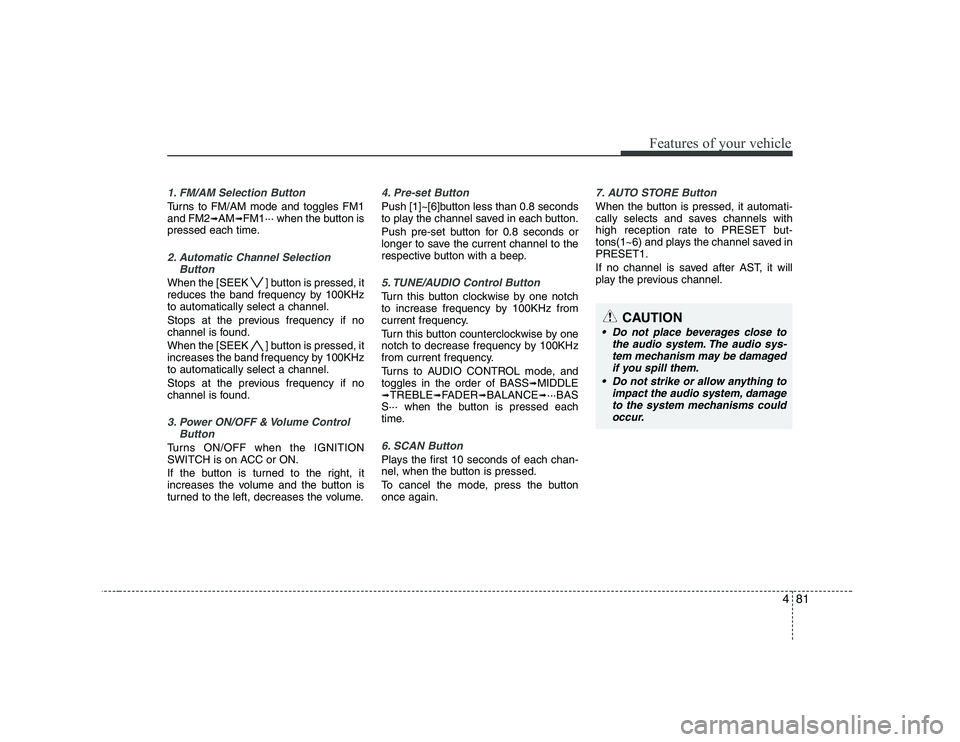
1. FM/AM Selection Button
Turns to FM/AM mode and toggles FM1 and FM2➟AM ➟FM1··· when the button is
pressed each time.
2. Automatic Channel Selection
Button
When the [SEEK ] button is pressed, it
reduces the band frequency by 100KHzto automatically select a channel.
Stops at the previous frequency if no
channel is found.
When the [SEEK ] button is pressed, it
increases the band frequency by 100KHzto automatically select a channel.
Stops at the previous frequency if no
channel is found.
3. Power ON/OFF & Volume ControlButton
Turns ON/OFF when the IGNITION
SWITCH is on ACC or ON.
If the button is turned to the right, it
increases the volume and the button is
turned to the left, decreases the volume.
4. Pre-set Button
Push [1]~[6]button less than 0.8 seconds
to play the channel saved in each button.
Push pre-set button for 0.8 seconds or
longer to save the current channel to the
respective button with a beep.
5. TUNE/AUDIO Control Button
Turn this button clockwise by one notch
to increase frequency by 100KHz from
current frequency.
Turn this button counterclockwise by one
notch to decrease frequency by 100KHz
from current frequency.
Turns to AUDIO CONTROL mode, and toggles in the order of BASS ➟
MIDDLE
➟ TREBLE ➟FADER ➟BALANCE ➟···BAS
S··· when the button is pressed each
time.
6. SCAN Button
Plays the first 10 seconds of each chan-
nel, when the button is pressed.
To cancel the mode, press the button once again.
7. AUTO STORE Button
When the button is pressed, it automati-
cally selects and saves channels with
high reception rate to PRESET but-
tons(1~6) and plays the channel saved inPRESET1.
If no channel is saved after AST, it will
play the previous channel.
CAUTION
Do not place beverages close to
the audio system. The audio sys-
tem mechanism may be damagedif you spill them.
Do not strike or allow anything to impact the audio system, damage
to the system mechanisms couldoccur.
Page 154 of 335
483
Features of your vehicle
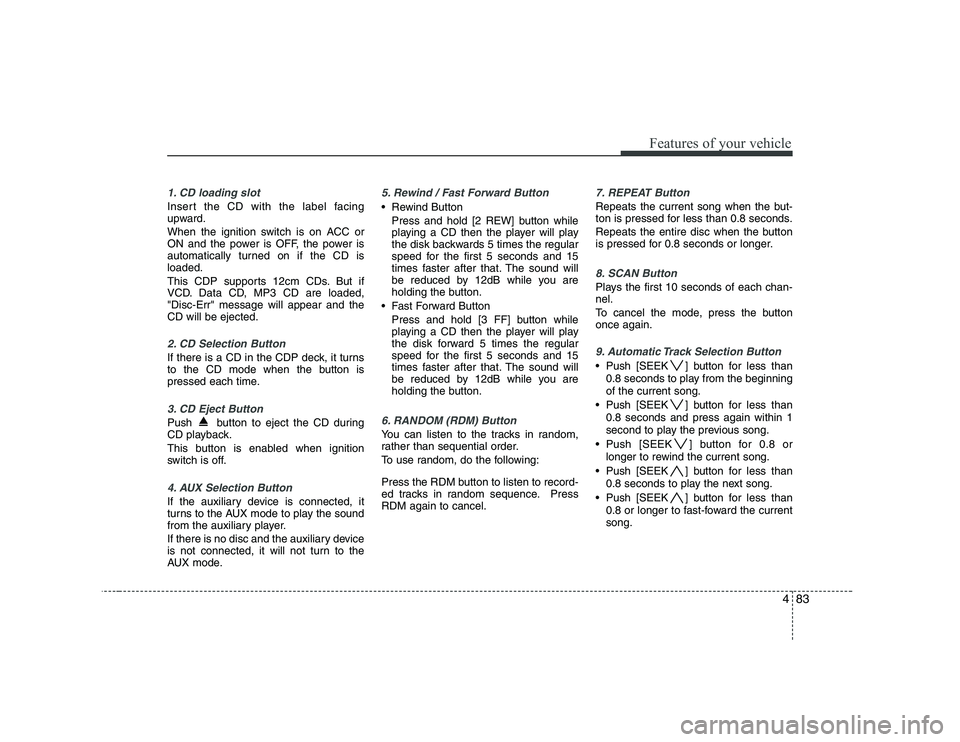
1. CD loading slot
Insert the CD with the label facing
upward.
When the ignition switch is on ACC or
ON and the power is OFF, the power is
automatically turned on if the CD isloaded.
This CDP supports 12cm CDs. But if
VCD. Data CD, MP3 CD are loaded,"Disc-Err" message will appear and theCD will be ejected.
2. CD Selection Button
If there is a CD in the CDP deck, it turns
to the CD mode when the button is
pressed each time.
3. CD Eject Button
Push button to eject the CD during
CD playback.
This button is enabled when ignition
switch is off.
4. AUX Selection Button
If the auxiliary device is connected, it
turns to the AUX mode to play the sound
from the auxiliary player.
If there is no disc and the auxiliary device
is not connected, it will not turn to the
AUX mode.
5. Rewind / Fast Forward Button
Rewind ButtonPress and hold [2 REW] button while
playing a CD then the player will play
the disk backwards 5 times the regular
speed for the first 5 seconds and 15
times faster after that. The sound will
be reduced by 12dB while you are
holding the button.
Fast Forward Button Press and hold [3 FF] button while
playing a CD then the player will play
the disk forward 5 times the regular
speed for the first 5 seconds and 15
times faster after that. The sound will
be reduced by 12dB while you are
holding the button.
6. RANDOM (RDM) Button
You can listen to the tracks in random,
rather than sequential order.
To use random, do the following:
Press the RDM button to listen to record-
ed tracks in random sequence. PressRDM again to cancel.
7. REPEAT Button
Repeats the current song when the but-
ton is pressed for less than 0.8 seconds.
Repeats the entire disc when the button
is pressed for 0.8 seconds or longer.
8. SCAN Button
Plays the first 10 seconds of each chan- nel.
To cancel the mode, press the button once again.
9. Automatic Track Selection Button
Push [SEEK ] button for less than0.8 seconds to play from the beginning of the current song.
Push [SEEK ] button for less than 0.8 seconds and press again within 1
second to play the previous song.
Push [SEEK ] button for 0.8 or longer to rewind the current song.
Push [SEEK ] button for less than 0.8 seconds to play the next song.
Push [SEEK ] button for less than 0.8 or longer to fast-foward the currentsong.
Page 157 of 335
Features of your vehicle
86
4
1. FM Selection Button
Turns to FM mode and toggles FM1 ➟
FM2 ➟FM1··· when the button is pressed
each time.
2. AM Selection Button
Turns to AM mode and toggles AM when
the button is pressed each time.
3. CD Selection Button
If there is a CD in the CDP deck it turns
to the CD mode when the button is
pressed each time.
4. Power ON/OFF & Volume Control
Button
Turns on/off when the IGNITION
SWITCH is on ACC or ON. If the button
is turned to the right, it increases the vol-
ume and left, decreases the volume.
5. Automatic Channel SelectionButton
When the [SEEK ]button is pressed,
it reduces the band frequency by 100Khz to automatically select a chan-nel.
Stops at the previous frequency if no
channel is found.
When the [SEEK ]button is pressed, it increases the band frequency by100khz to automatically select a chan-nel.
Stops at the previous frequency if no
channel is found.
6. INFO Button
Displays the information of the channel
currently played by RDS.
7. AUX Selection Button
If the auxiliary device is connected, it
turns to AUX MODE to play the sound
from the auxiliary player.
If there is no disc and the auxiliary device
is not connected, it displays "NO MEDIA"
for 5 seconds and returns to the previous
mode.
8. AUTO STORE Button
When the button is pressed, it automati-
cally selects and saves channels with
high reception rate to PRESET buttons
(1~6) and plays the channel saved inPRESET1.
If no channel is saved after the AUTO
STORE button is pressed, it will play the
previous channel.
9. SET UP Button
Press this button to turn to the SOUND,
SCROLL adjustment mode.
If no action is taken for 5 seconds after
pressing the button, it will return to the
play mode.(After entering SET UP mode,
move between items using the left, right
and PUSH functions of the TUNE button.)The SET UP item changes from SOUND
(BASS, MIDDLE, TREBLE, FADER,BALANCE, RETURN) ➟
SCROLL (ON,
OFF) ➟ RETURN.
Page 160 of 335
489
Features of your vehicle
1. CD loading slot
Insert the CD with the label facing
upward.
When the ignition switch is on ACC or
ON and the power is off, the power is
automatically turned on if the CD isloaded.
This CDP supports 12 cm CDs. But if
VCD, Data CD, MP3 CD are loaded, "Er-6" message will appear and the CD willbe ejected.
2. CD eject Button
Push button to eject the CD during
CD playback. This button is enabled
when ignition switch is off.
3. CD Selection Button
If there is a CD in the CDP deck, it turns
to the CD mode when the button is
pressed each time.
4. Automatic Track Selection Button
Push [SEEK ] button for less than0.8 seconds to play from the beginning of the current song.
Push [SEEK ] button for less than 0.8 seconds and press again within 1
seconds to play the previous song. Push [SEEK ] button for 0.8 or
longer to rewind the current song.
Push [SEEK ] button for less than 0.8 seconds to play the next song.
Push [SEEK ] button for less than 0.8 or longer to fast-foward the currentsong.
5. INFO Button
Displays the information of the current
CD TRACK in the order of DISCTITLE ➟DISC ARTIST ➟TRACK TITLE ➟
TRACK ARTIST ➟TOTAL TRACK ➟Play
Screen ➟DISC TITLE ➟···.(It is not dis-
played if the information is not availableon the disc.)
6. ENTER/TUNE Button
Turn this button clockwise to display songs after the current song.
Also, turn this button counterclockwise to
display songs before the current song.
To listen to the displayed song, press the
button to skip to the song and play.
7. REPEAT Button
Repeats current song when the button is
pressed for less than 0.8 seconds.
Repeats the entire disc when the button
is pressed for 0.8 seconds or longer.
8. RANDOM (RDM) Button
You can listen to the tracks in random,
rather than sequential order.
To use random, do the following:
Press the RDM button to listen to record-
ed tracks in random sequence. PressRDM again to cancel.
9. AST(CD SCAN) Button
Plays the first 10 seconds of each song in the disc.
To cancel the mode, press the key once again.
10. MARK Play Button
Press the button for 0.8 seconds or
longer to mark or unmark the currentsong.
Press the button for less than 0.8 to play
currently marked song.