remote control KIA PICANTO 2014 User Guide
[x] Cancel search | Manufacturer: KIA, Model Year: 2014, Model line: PICANTO, Model: KIA PICANTO 2014Pages: 1003, PDF Size: 44.67 MB
Page 600 of 1003
Features of your vehicle
108
4
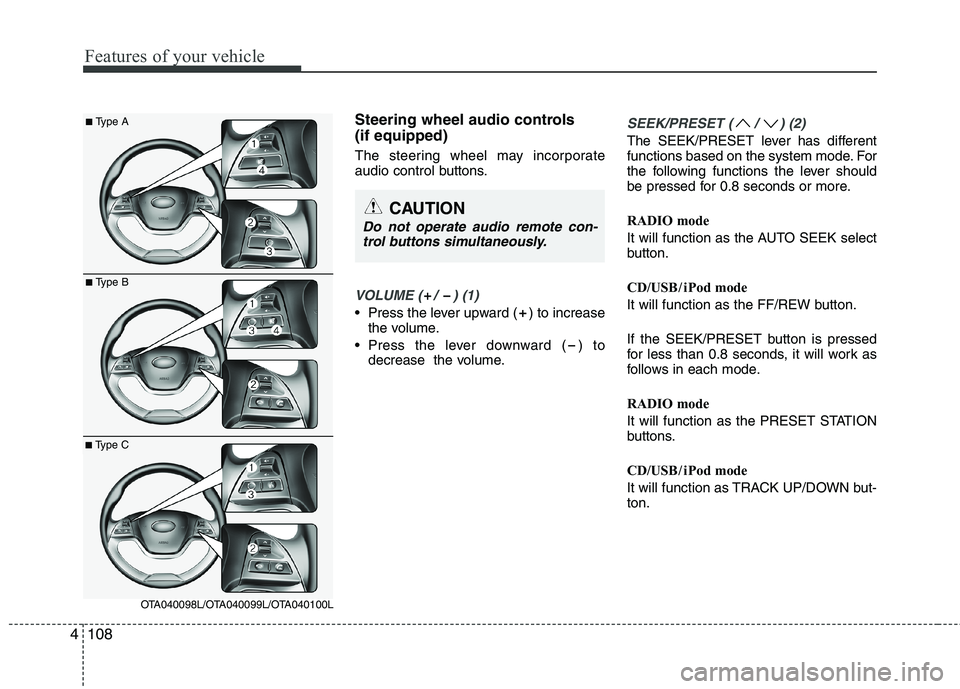
Steering wheel audio controls (if equipped)
The steering wheel may incorporate
audio control buttons.
VOLUME ( / ) (1)
• Press the lever upward ( ) to increase
the volume.
Press the lever downward ( ) to decrease the volume.
SEEK/PRESET ( / ) (2)
The SEEK/PRESET lever has different
functions based on the system mode. For
the following functions the lever should
be pressed for 0.8 seconds or more.
RADIO mode
It will function as the AUTO SEEK select
button.
CD/USB / i Pod mode
It will function as the FF/REW button.
If the SEEK/PRESET button is pressed
for less than 0.8 seconds, it will work as
follows in each mode.
RADIO mode
It will function as the PRESET STATION
buttons.
CD/USB / i Pod mode
It will function as TRACK UP/DOWN but- ton.
CAUTION
Do not operate audio remote con-
trol buttons simultaneously.
■ Type A
■Type B
■Type C
OTA040098L/OTA040099L/OTA040100L
Page 633 of 1003
4141
Features of your vehicle
■Using the head unit as Bluetooth®
Wireless Technology music
This audio system supports A2DP (Audio
Advanced Distribution Profile) and
AVRCP(Audio Video Remote ControlProfile).
Both profiles are available for listening to
the MP3 music via
Bluetooth®Wireless
Technology mobile phone supporting
above
Bluetooth®Wireless Technology
profiles.
To play MP3 music from the
Bluetooth®
Wireless Technology mobile phone, press
the button until “MP3 Play” is
displayed on the LCD.
Then try playing music by phone.
When playing music from the
Bluetooth®
Wireless Technology mobile phone, the
head unit displays MP3 MODE. NOTE:
all the sounds that the phone supports can be
heard by the audio system.
The
Bluetooth®Wireless Technology
mobile phones shall feature A2DP
and AVRCP functions.
Bluetooth®
Wireless Technology mobile phones
may not play music through the head
unit on first try. Please try the below;
i.e : Menu ➟Filemanager ➟Music ➟
Option ➟Play via Bluetooth
phone for more.
To stop music, try stop playing
music from the phone then change
the audio mode to other than “MP3
Play” mode (e.g. FM, AM, CD, etc.)
AUX
Page 651 of 1003
4159
Features of your vehicle
BLUETOOTH®WIRELESS
TECHNOLOGYPHONE OPERA-
TION (if equipped)
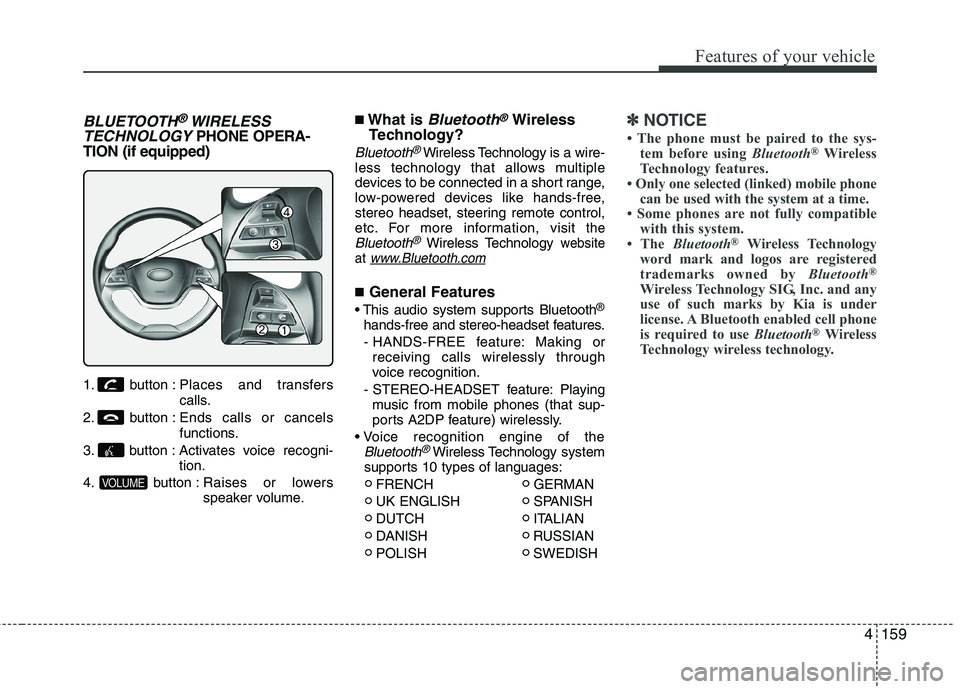
1. button : Places and transfers
calls.
2. button : Ends calls or cancels functions.
3. button : Activates voice recogni- tion.
4. button : Raises or lowers speaker volume. ■
What is
Bluetooth®Wireless
Technology?
Bluetooth®Wireless Technology is a wire-
less technology that allows multiple
devices to be connected in a short range,
low-powered devices like hands-free,
stereo headset, steering remote control,
etc. For more information, visit
theBluetooth®Wireless Technologywebsite
at www.Bluetooth.com
■ General Features
®
hands-free and stereo-headset features. - HANDS-FREE feature: Making or receiving calls wirelessly through
voice recognition.
- STEREO-HEADSET feature: Playing music from mobile phones (that sup-
ports A2DP feature) wirelessly.
Bluetooth®Wireless Technology system
supports 10 types of languages:
FRENCH GERMAN
UK ENGLISH SPANISH
DUTCH ITALIAN
DANISH RUSSIAN
POLISH SWEDISH
✽✽ NOTICE
The phone must be paired to the sys- tem before using Bluetooth®
Wireless
Technology features.
Only one selected (linked) mobile phone
can be used with the system at a time.
Some phones are not fully compatible
with this system.
The Bluetooth ®
Wireless Technology
word mark and logos are registered
trademarks owned by Bluetooth®
Wireless Technology SIG, Inc. and any
use of such marks by Kia is under
license. A Bluetooth enabled cell phone
is required to use Bluetooth®
Wireless
Technology wireless technology.
VOLUME
Page 659 of 1003
4167
Features of your vehicle
■Bluetooth®Wireless Technology
Audio Music Streaming
The audio system supports Bluetooth®
Wireless TechnologyA2DP (Audio
Advanced Distribution Profile) and
AVRCP (Audio Video Remote Control
Profile) technologies.
Both profiles provide steaming of music
via compatible “PAIRED”
Bluetooth®
Wireless Technology Mobile phone.
To stream music from the
Bluetooth®
Wireless Technology mobile phone, play
your music files on your mobile phone
according to your mobile phone user’s
manual and press the button on
the audio system until “MP3 play” is dis-
played on the LCD.
The audio system head unit displays ‘MP3 MODE’. NOTE:
all music and sound files your
mobile phone supports can be
played by the audio system.
Bluetooth®Wireless Technology
compatible mobile phones must
include A2DP and AVRCP capabili-ties.
AVRCP compatible
Bluetooth®Wireless Technology
mobile phones may not play music
through the audio system initially.
These mobile phones may need to
have the
Bluetooth®Wireless
Technology streaming enabled, for
example;
i.e : Menu ➟
Filemanager ➟Music ➟
Option ➟Play via Bluetooth
mobile phone for more information.
To cancel
Bluetooth®Wireless
Technology mobile phone music
streaming, stop music playback on
the mobile phone or change the
audio mode to AM/FM, CD, iPod,ect.
MEDIA
Page 834 of 1003
4
Keys / 4-3
Remote keyless entry / 4-6
Smart key / 4-9
Theft-alarm system / 4-12
Door locks / 4-15
Tailgate / 4-19
Windows / 4-21
Hood / 4-26
Fuel filler lid / 4-28
Sunroof / 4-31
Steering wheel / 4-35
Mirrors / 4-38
Instrument cluster / 4-42
Rear parking assist system / 4-65
Hazard warning flasher / 4-68
Lighting / 4-69
Wipers and washers / 4-76
Interior light / 4-79
Defroster / 4-82
Manual climate control system / 4-83
Automatic climate control system / 4-92
Windshield defrosting and defogging / 4-99
Features of your vehicle
Page 871 of 1003
Features of your vehicle
38
4
Inside rearview mirror
Adjust the rearview mirror to center on
the view through the rear window. Make
this adjustment before you start driving.
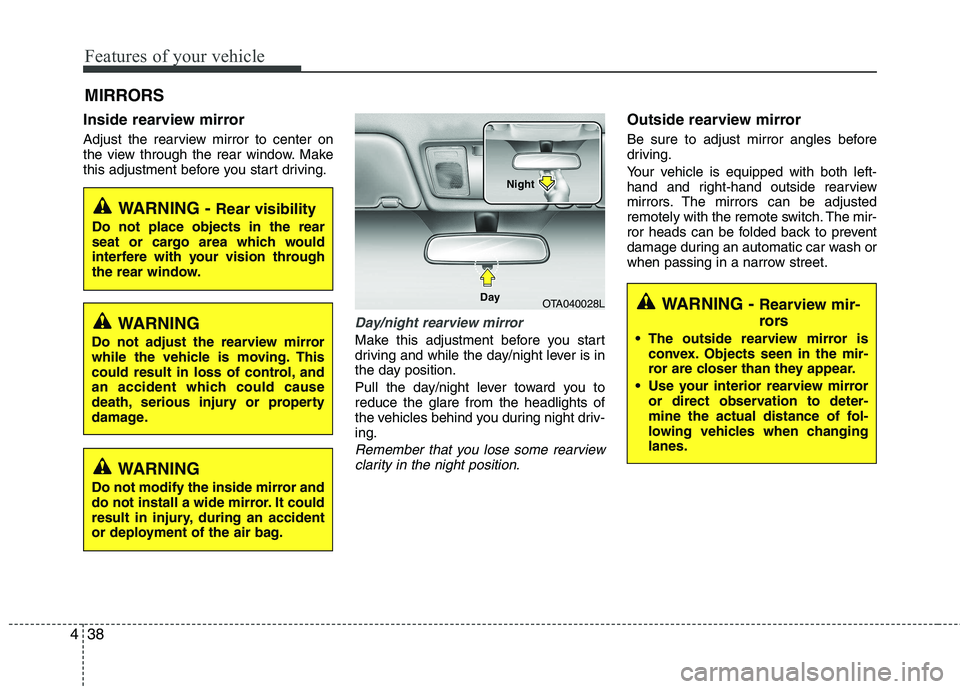
Day/night rearview mirror
Make this adjustment before you start
driving and while the day/night lever is in
the day position.
Pull the day/night lever toward you to reduce the glare from the headlights of
the vehicles behind you during night driv-ing.
Remember that you lose some rearview
clarity in the night position.
Outside rearview mirror
Be sure to adjust mirror angles before
driving.
Your vehicle is equipped with both left-
hand and right-hand outside rearview
mirrors. The mirrors can be adjusted
remotely with the remote switch. The mir-
ror heads can be folded back to prevent
damage during an automatic car wash or
when passing in a narrow street.
MIRRORS
WARNING -
Rear visibility
Do not place objects in the rear
seat or cargo area which would
interfere with your vision through
the rear window.
OTA040028L
Day Night
WARNING
Do not adjust the rearview mirror
while the vehicle is moving. This
could result in loss of control, and
an accident which could cause
death, serious injury or property
damage.
WARNING
Do not modify the inside mirror and
do not install a wide mirror. It could
result in injury, during an accident
or deployment of the air bag.
WARNING - Rearview mir-
rors
The outside rearview mirror is convex. Objects seen in the mir-
ror are closer than they appear.
Use your interior rearview mirror or direct observation to deter-
mine the actual distance of fol-
lowing vehicles when changinglanes.
Page 872 of 1003
439
Features of your vehicle
Remote control
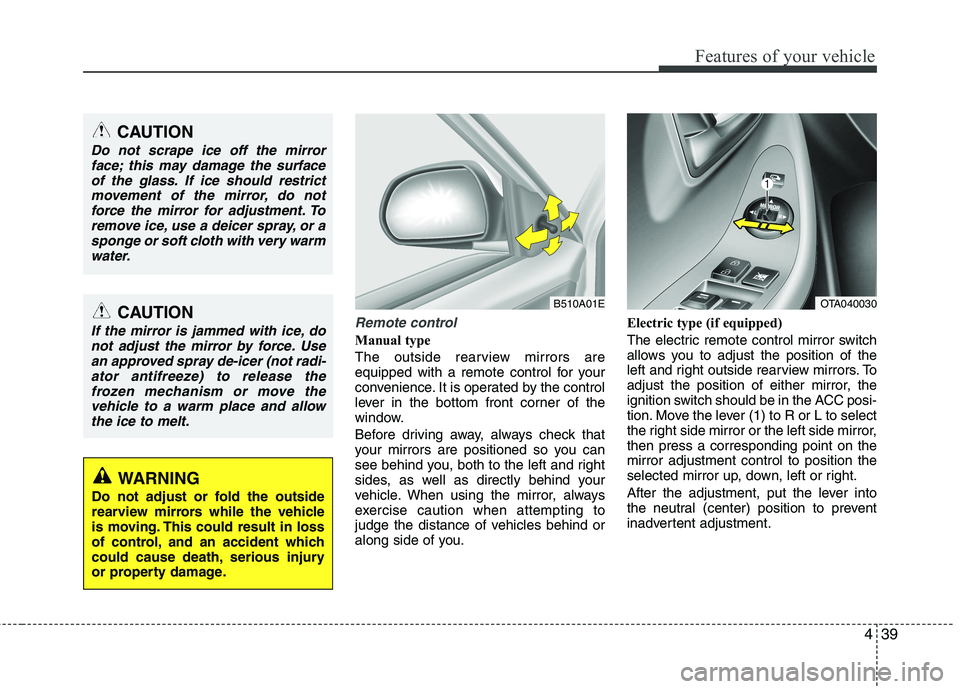
Manual type
The outside rearview mirrors are
equipped with a remote control for your
convenience. It is operated by the control
lever in the bottom front corner of the
window.
Before driving away, always check that
your mirrors are positioned so you can
see behind you, both to the left and right
sides, as well as directly behind your
vehicle. When using the mirror, always
exercise caution when attempting to
judge the distance of vehicles behind or
along side of you.Electric type (if equipped)
The electric remote control mirror switch
allows you to adjust the position of the
left and right outside rearview mirrors. To
adjust the position of either mirror, the
ignition switch should be in the ACC posi-
tion. Move the lever (1) to R or L to select
the right side mirror or the left side mirror,then press a corresponding point on themirror adjustment control to position the
selected mirror up, down, left or right.
After the adjustment, put the lever into
the neutral (center) position to prevent
inadvertent adjustment.
CAUTION
Do not scrape ice off the mirror
face; this may damage the surface
of the glass. If ice should restrictmovement of the mirror, do notforce the mirror for adjustment. To remove ice, use a deicer spray, or a
sponge or soft cloth with very warmwater.
CAUTION
If the mirror is jammed with ice, donot adjust the mirror by force. Use
an approved spray de-icer (not radi-ator antifreeze) to release thefrozen mechanism or move thevehicle to a warm place and allow
the ice to melt.
WARNING
Do not adjust or fold the outside
rearview mirrors while the vehicle
is moving. This could result in loss
of control, and an accident which
could cause death, serious injury
or property damage.
B510A01EOTA040030
Page 943 of 1003
Features of your vehicle
110
4
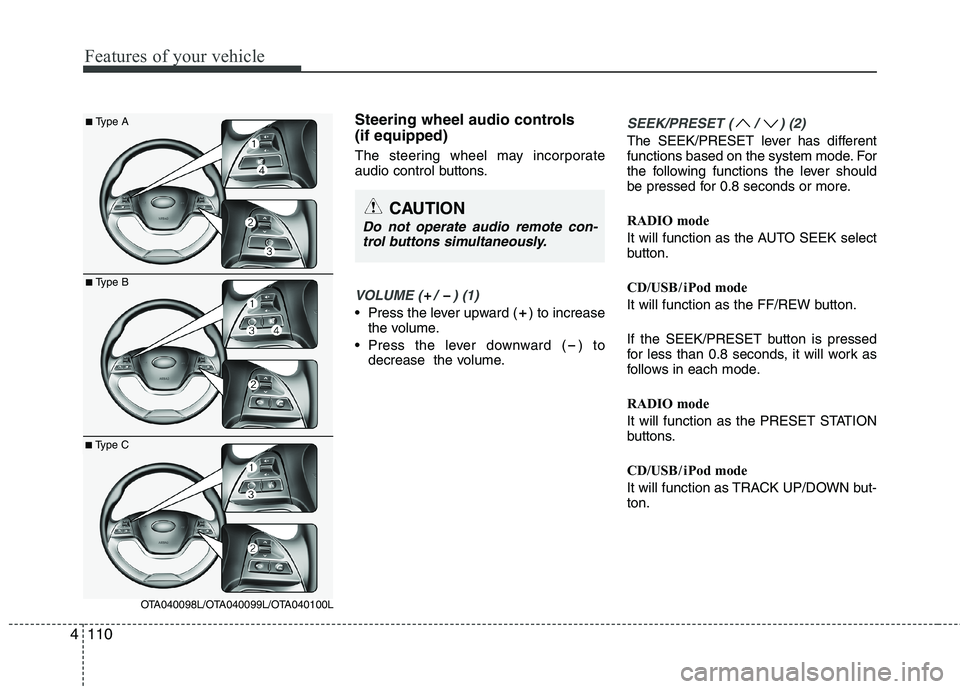
Steering wheel audio controls (if equipped)
The steering wheel may incorporate
audio control buttons.
VOLUME ( / ) (1)
• Press the lever upward ( ) to increase
the volume.
Press the lever downward ( ) to decrease the volume.
SEEK/PRESET ( / ) (2)
The SEEK/PRESET lever has different
functions based on the system mode. For
the following functions the lever should
be pressed for 0.8 seconds or more.
RADIO mode
It will function as the AUTO SEEK select
button.
CD/USB / i Pod mode
It will function as the FF/REW button.
If the SEEK/PRESET button is pressed
for less than 0.8 seconds, it will work as
follows in each mode.
RADIO mode
It will function as the PRESET STATION
buttons.
CD/USB / i Pod mode
It will function as TRACK UP/DOWN but- ton.
CAUTION
Do not operate audio remote con-
trol buttons simultaneously.
■ Type A
■Type B
■Type C
OTA040098L/OTA040099L/OTA040100L
Page 976 of 1003
4143
Features of your vehicle
■Using the head unit as Bluetooth®
Wireless Technology m usic
This audio system supports A2DP (Audio
Advanced Distribution Profile) and
AVRCP(Audio Video Remote ControlProfile).
Both profiles are available for listening to
the MP3 music via
Bluetooth®Wireless
Technology cellular phone supporting
above
Bluetooth®Wireless Technology
profiles.
To play MP3 music from the
Bluetooth®
Wireless Technology cellular phone,
press the button until “MP3
Play” is displayed on the LCD.
Then try playing music by phone.
When playing music from the
Bluetooth®
Wireless Technology cellular phone, the
head unit displays MP3 MODE. NOTE:
all the sounds that the phone supports can be
heard by the audio system.
Bluetooth®Wireless Technology
cellular phones shall feature A2DP
and AVRCP functions.
Bluetooth®
Wireless Technology cellular phones
may not play music through the head
unit on first try. Please try the below;
i.e : Menu ➟Filemanager ➟Music ➟
Option ➟Play via Bluetooth
phone for more.
To stop music, try stop playing
music from the phone then change
the audio mode to other than “MP3
Play” mode (e.g. FM, AM, CD, etc.)
AUX
Page 994 of 1003
4161
Features of your vehicle
BLUETOOTH®
PHONE OPERATION
(if equipped)
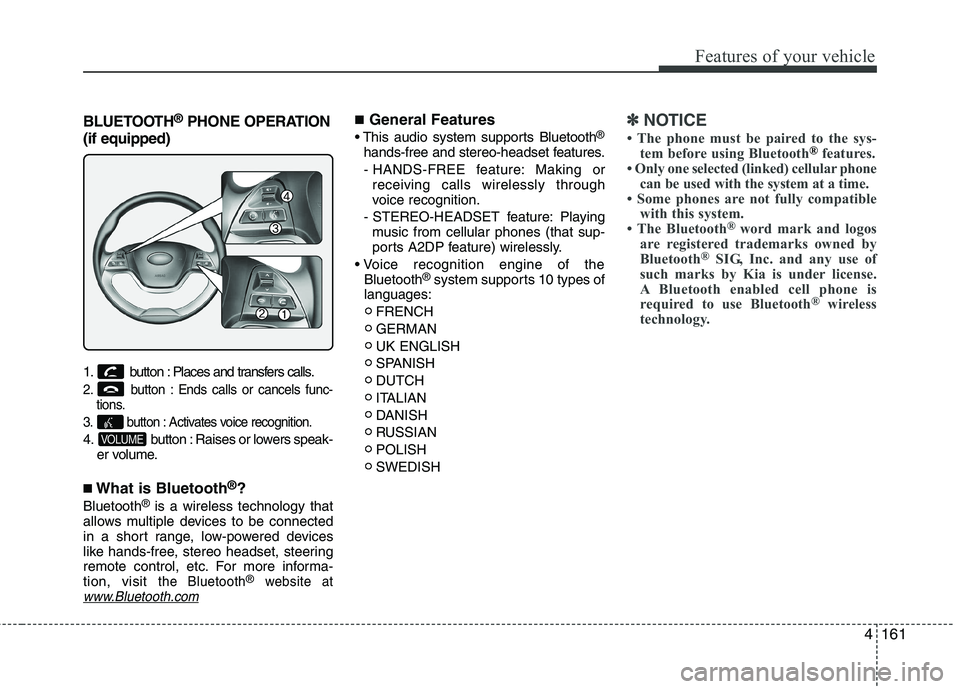
1. button : Places and transfers calls.
2. button : Ends calls or cancels func- tions.
3. button : Activates voice recognition.
4. button : Raises or lowers speak- er volume.
■ What is Bluetooth ®
?
Bluetooth ®
is a wireless technology that
allows multiple devices to be connected
in a short range, low-powered devices
like hands-free, stereo headset, steering
remote control, etc. For more informa-tion, visit
the Bluetooth®website atwww.Bluetooth.com
■ General Features
®
hands-free and stereo-headset features. - HANDS-FREE feature: Making or receiving calls wirelessly through
voice recognition.
- STEREO-HEADSET feature: Playing music from cellular phones (that sup-
ports A2DP feature) wirelessly.
Bluetooth ®
system supports 10 types of
languages:
FRENCH GERMANUK ENGLISH
SPANISHDUTCH
ITALIAN
DANISH
RUSSIANPOLISHSWEDISH✽✽ NOTICE
The phone must be paired to the sys- tem before using Bluetooth
®features.
Only one selected (linked) cellular phone can be used with the system at a time.
Some phones are not fully compatible with this system.
The Bluetooth ®
word mark and logos
are registered trademarks owned by
Bluetooth ®
SIG, Inc. and any use of
such marks by Kia is under license.
A Bluetooth enabled cell phone is
required to use Bluetooth ®
wireless
technology.
VOLUME