low KIA PICANTO 2015 Manual Online
[x] Cancel search | Manufacturer: KIA, Model Year: 2015, Model line: PICANTO, Model: KIA PICANTO 2015Pages: 846, PDF Size: 49.67 MB
Page 136 of 846
463
Features of your vehicle
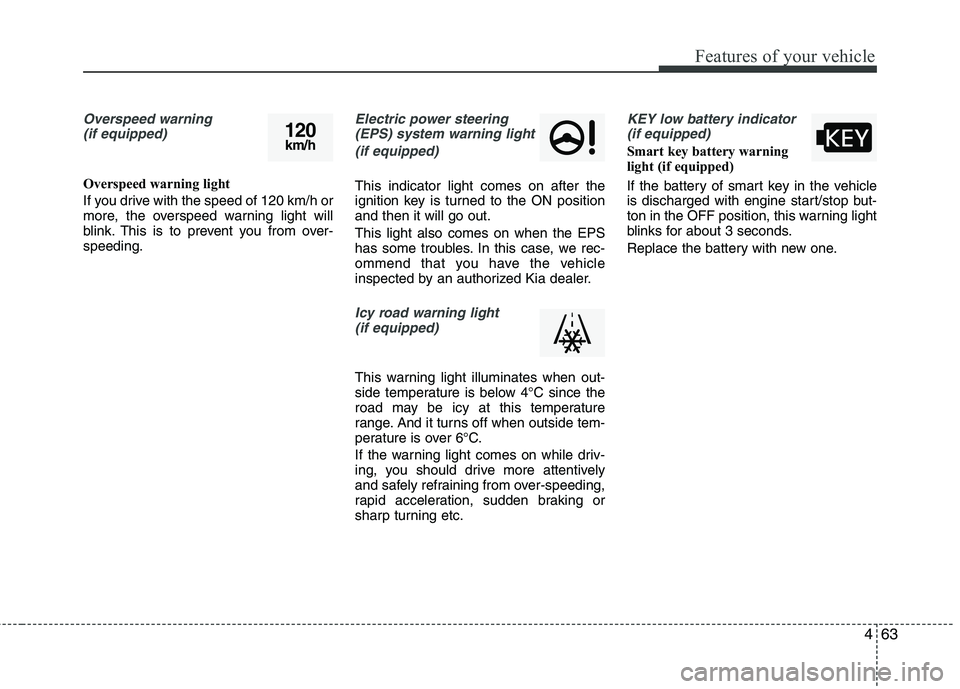
Overspeed warning (if equipped)
Overspeed warning light
If you drive with the speed of 120 km/h or
more, the overspeed warning light will
blink. This is to prevent you from over-speeding.
Electric power steering(EPS) system warning light
(if equipped)
This indicator light comes on after the
ignition key is turned to the ON positionand then it will go out. This light also comes on when the EPS
has some troubles. In this case, we rec-
ommend that you have the vehicle
inspected by an authorized Kia dealer.
Icy road warning light(if equipped)
This warning light illuminates when out-
side temperature is below 4°C since the
road may be icy at this temperature
range. And it turns off when outside tem-
perature is over 6°C.
If the warning light comes on while driv-
ing, you should drive more attentively
and safely refraining from over-speeding,
rapid acceleration, sudden braking or
sharp turning etc.
KEY low battery indicator(if equipped)
Smart key battery warning
light (if equipped)
If the battery of smart key in the vehicle
is discharged with engine start/stop but-
ton in the OFF position, this warning light
blinks for about 3 seconds.
Replace the battery with new one.
120km/h
Page 137 of 846
Features of your vehicle
64
4
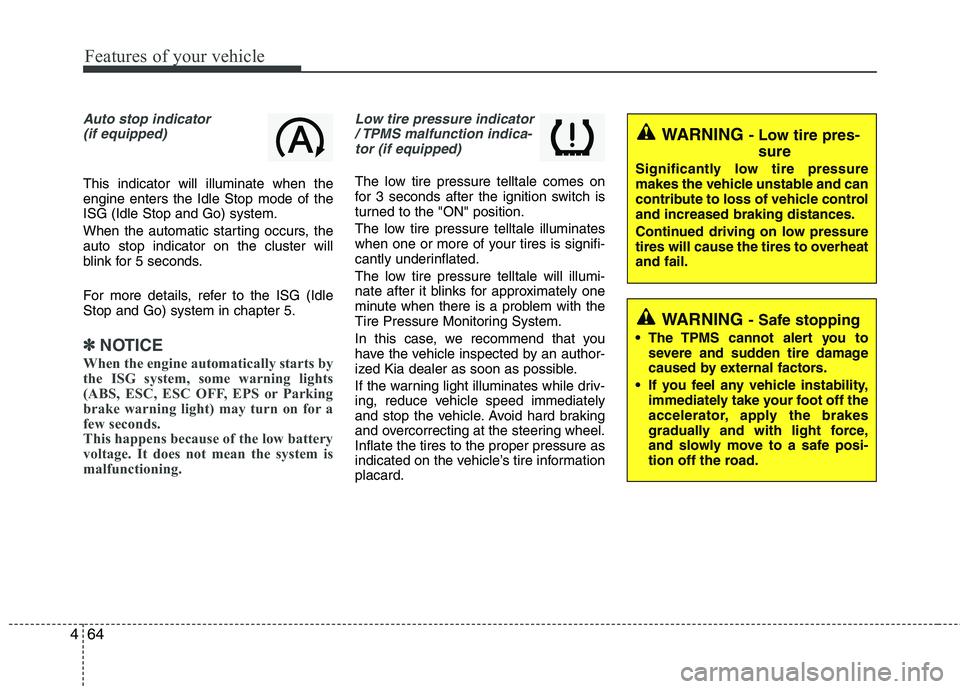
Auto stop indicator
(if equipped)
This indicator will illuminate when the engine enters the Idle Stop mode of theISG (Idle Stop and Go) system.
When the automatic starting occurs, the auto stop indicator on the cluster will
blink for 5 seconds.
For more details, refer to the ISG (Idle Stop and Go) system in chapter 5.
✽✽ NOTICE
When the engine automatically starts by
the ISG system, some warning lights
(ABS, ESC, ESC OFF, EPS or Parking
brake warning light) may turn on for a
few seconds.
This happens because of the low battery
voltage. It does not mean the system is
malfunctioning.
Low tire pressure indicator / TPMS malfunction indica-tor (if equipped)
The low tire pressure telltale comes on
for 3 seconds after the ignition switch is
turned to the "ON" position.
The low tire pressure telltale illuminates
when one or more of your tires is signifi-
cantly underinflated.
The low tire pressure telltale will illumi-
nate after it blinks for approximately one
minute when there is a problem with the
Tire Pressure Monitoring System.
In this case, we recommend that you
have the vehicle inspected by an author-
ized Kia dealer as soon as possible.
If the warning light illuminates while driv-
ing, reduce vehicle speed immediately
and stop the vehicle. Avoid hard braking
and overcorrecting at the steering wheel.Inflate the tires to the proper pressure as
indicated on the vehicle’s tire informationplacard.
WARNING - Low tire pres-
sure
Significantly low tire pressure
makes the vehicle unstable and can
contribute to loss of vehicle controland increased braking distances.
Continued driving on low pressure
tires will cause the tires to overheatand fail.
WARNING - Safe stopping
The TPMS cannot alert you to severe and sudden tire damage
caused by external factors.
If you feel any vehicle instability, immediately take your foot off the
accelerator, apply the brakes
gradually and with light force,
and slowly move to a safe posi-
tion off the road.
Page 139 of 846
Features of your vehicle
66
4
Non-operational conditions of rear parking assist system
The rear parking assist system may
not operate properly when:
1. Moisture is frozen to the sensor. (It will
operate normally when the moisture has been cleared.)
2. The sensor is covered with foreign matter, such as snow or water, or the
sensor cover is blocked. (It will operate
normally when the material is removed
or the sensor is no longer blocked.)
3. Driving on uneven road surfaces (unpaved roads, gravel, bumps, gradi-ent).
4. Objects generating excessive noise (vehicle horns, loud motorcycle
engines, or truck air brakes) are within
range of the sensor.
5. Heavy rain or water spray exists.
6. Wireless transmitters or mobile phones are within range of the sensor.
7. The sensor is covered with snow.
8. Trailer towing The detecting range may decrease when:
1. The sensor is stained with foreign mat-
ter such as snow or water. (The sens-
ing range will return to normal when
removed.)
2. Outside air temperature is extremely hot or cold.
The following objects may not be rec-
ognized by the sensor:
1. Sharp or slim objects such as ropes, chains or small poles.
2. Objects which tend to absorb the sen- sor frequency such as clothes, spongy
material or snow.
3. Undetectable objects smaller than 1 m (40 in.) in height and narrower than 14
cm (6 in.) in diameter. Rear parking assist system pre- cautions
The rear parking assist system may
not sound sequentially depending on the speed and shapes of the objectsdetected.
The rear parking assist system may malfunction if the vehicle bumperheight or sensor installation has been
modified or damaged. Any non-factory
installed equipment or accessories
may also interfere with the sensor per-
formance.
The sensor may not recognize objects less than 40 cm (15 in.) from the sen-
sor, or it may sense an incorrect dis-
tance. Use caution.
When the sensor is frozen or stained with snow, dirt, or water, the sensor
may be inoperative until the stains are
removed using a soft cloth.
Do not push, scratch or strike the sen- sor. Sensor damage could occur.
Page 142 of 846
469
Features of your vehicle
Battery saver function
The purpose of this feature is to pre-vent the battery from being dis-
charged. The system automatically
turns off the parking lights when the
driver removes the ignition key (smart
key: turns off the engine) and opens
the driver-side door.
With this feature, the parking lights will be turned off automatically if the driver
parks on the side of road at night.
If necessary, to keep the lights on
when the ignition key is removed,
(smart key: turns off the engine) per-
form the following:
1) Open the driver-side door.
2) Turn the parking lights OFF and ON again using the light switch on the
steering column. Headlight escort function (if equipped) The headlights (and/or taillights) will
remain on for approximately 20 minutes
after the ignition key is removed when
the engine is turned off. However, if the
driver’s door is opened and closed, the
headlights are turned off after 30 sec-
onds.
The headlights can be turned off by
pressing the lock button on the transmit-
ter (or smart key) twice or turning off the
light switch from the headlight or Autolight position.
Headlight welcome function (if equipped)
When the headlight switch is in the ON or
AUTO position and all doors (and tail-
gate) are closed and locked, if you press
the door unlock button on the transmitter
(or smart key), the headlights will come
on for about 15 seconds.
If the headlight switch is in the AUTO
position, the function can only operate atnight.
At this time, if you press the door unlock
button again or door lock button on the
transmitter (or smart key), the headlights
will turn off immediately.
Daytime running light (if equipped)
Daytime Running Lights (DRL) can make
it easier for others to see the front of your
vehicle during the day. DRL can be help-
ful in many different driving conditions,
and it is especially helpful after dawn and
before sunset.
The DRL system will make the head-
lights light turn OFF when:
1. The position or head light switch is ON.
2. Engine off or ACC.
LIGHTING
CAUTION
If the driver gets out of the vehicle
through other doors (except dri-
ver's door), the battery saver func- tion does not operate and the head-light escort function does not turnoff automatically. Therefore, It caus-
es the battery to be discharged. In this case, make sure to turn off thelamp before getting out of the vehi- cle.
Page 143 of 846
Features of your vehicle
70
4
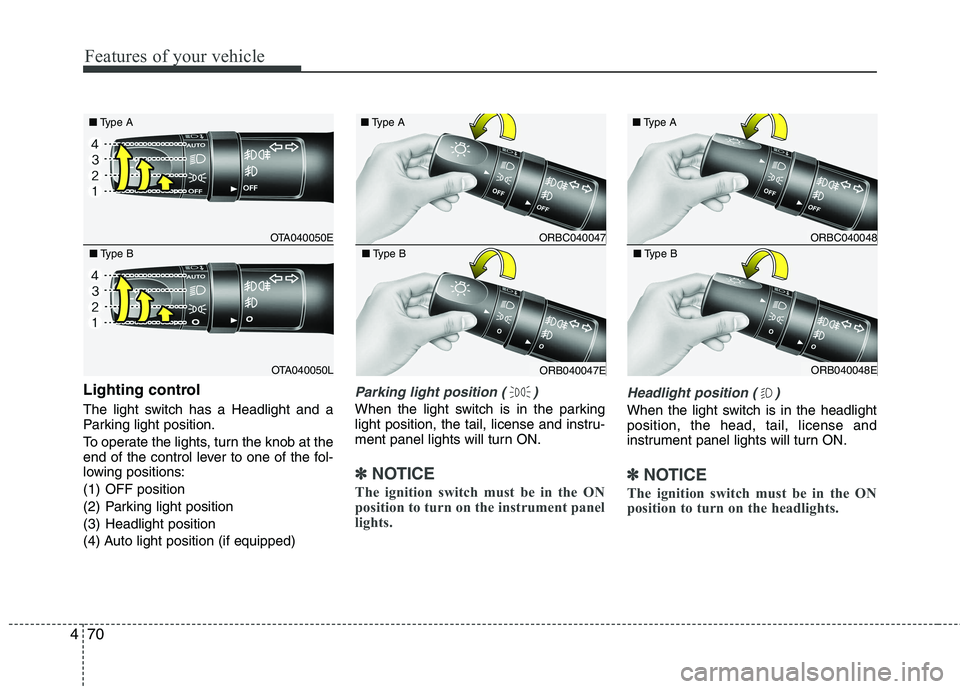
Lighting control
The light switch has a Headlight and a
Parking light position.
To operate the lights, turn the knob at the
end of the control lever to one of the fol-
lowing positions:
(1) OFF position
(2) Parking light position
(3) Headlight position
(4) Auto light position (if equipped)Parking light position ( )
When the light switch is in the parking
light position, the tail, license and instru-
ment panel lights will turn ON.
✽✽
NOTICE
The ignition switch must be in the ON
position to turn on the instrument panel
lights.
Headlight position ( )
When the light switch is in the headlight position, the head, tail, license and
instrument panel lights will turn ON.
✽✽ NOTICE
The ignition switch must be in the ON
position to turn on the headlights.
OTA040050E
■
Type A
OTA040050L
■
Type B
ORBC040047
■
Type A
ORB040047E
■
Type B
ORBC040048
■
Type A
ORB040048E
■
Type B
Page 144 of 846

471
Features of your vehicle
Auto light position (if equipped)
When the light switch is in the AUTO light position, the taillights and headlights will
turn ON or OFF automatically depending
on the amount of light outside the vehi-
cle.High beam operation
To turn on the high beam headlights, push
the lever away from you. Pull it back for
low beams. The high beam indicator will light when
the headlight high beams are switched on.
To prevent the battery from being dis-
charged, do not leave the lights on for a pro-
longed time while the engine is not running.
CAUTION
Never place anything over sensor
(1) located on the instrument
panel. This will ensure betterauto-light system control.
Don’t clean the sensor using a window cleaner. The cleaner may
leave a light film which could interfere with sensor operation.
If your vehicle has window tint or other types of metallic coating onthe front windshield, the Auto
light system may not work prop-erly.
OTA040051E
ORBC040049
■
Type A
ORB040049E
■
Type B
WARNING
Do not use high beam when there
are other vehicles. Using high beamcould obstruct the other driver'svision.
Page 145 of 846

Features of your vehicle
72
4
Flashing headlights
To flash the headlights, pull the lever
towards you. It will return to the normal
(low beam) position when released. The
headlight switch does not need to be on
to use this flashing feature.
Turn signals and lane change sig- nals
The ignition switch must be on for the
turn signals to function. To turn on the
turn signals, move the lever up or down
(A). The green arrow indicators on the
instrument panel indicate which turn sig-
nal is operating.They will self-cancel after a turn is com-
pleted. If the indicator continues to flash
after a turn, manually return the lever tothe OFF position.
To signal a lane change, move the turn
signal lever slightly and hold it in position
(B). The lever will return to the OFF posi-tion when released.
If an indicator stays on and does not
flash or if it flashes abnormally, one of the
turn signal bulbs may be burned out andwill require replacement.
One-touch triple turn signal
(if equipped)
To activate an one-touch lane change
function, move the turn signal lever
slightly and then release it. The lane
change signals will blink 3 times.
✽✽ NOTICE
If an indicator flash is abnormally quick
or slow, a bulb may be burned out or have
a poor electrical connection in the circuit.
ORB040051E
■
Type B ORBC040051
■
Type A
ORBC040050
■ Type A
ORB040050E
■Type B
Page 148 of 846
475
Features of your vehicle
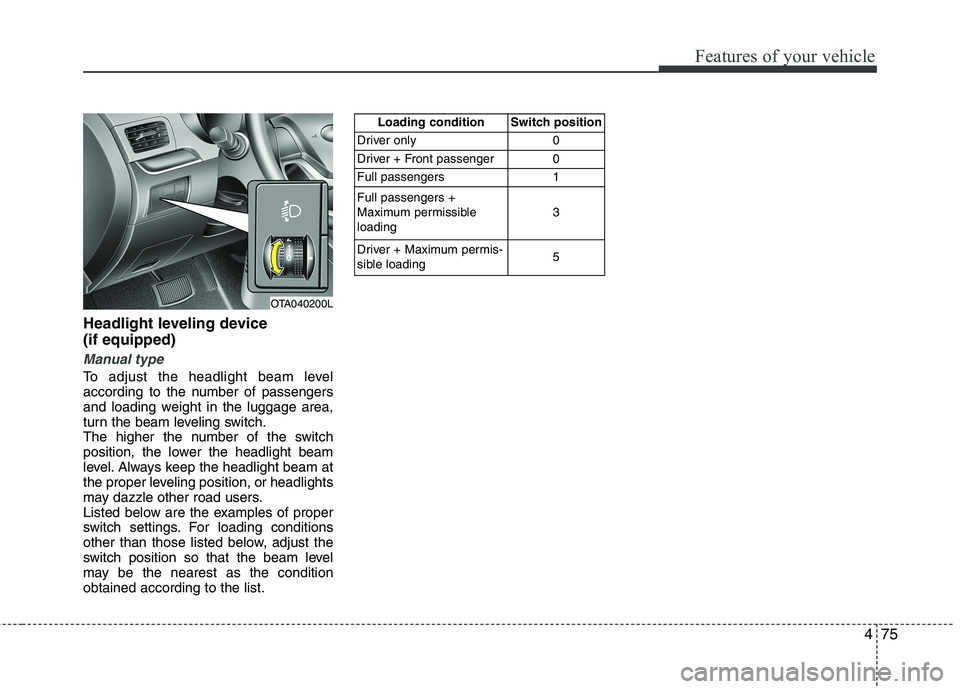
Headlight leveling device (if equipped)
Manual type
To adjust the headlight beam level
according to the number of passengers
and loading weight in the luggage area,
turn the beam leveling switch.
The higher the number of the switch
position, the lower the headlight beam
level. Always keep the headlight beam at
the proper leveling position, or headlights
may dazzle other road users.
Listed below are the examples of proper
switch settings. For loading conditions
other than those listed below, adjust the
switch position so that the beam level
may be the nearest as the conditionobtained according to the list.
OTA040200LLoading condition Switch position
Driver only 0
Driver + Front passenger 0
Full passengers 1 Full passengers +
Maximum permissibleloading 3
Driver + Maximum permis-
sible loading 5
Page 149 of 846
Features of your vehicle
76
4
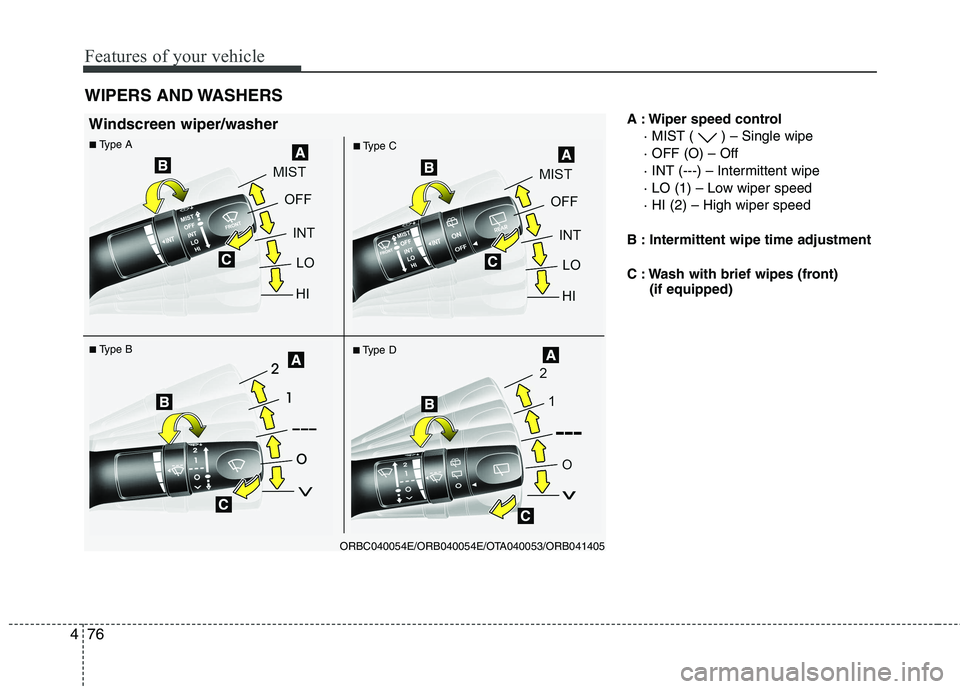
A : Wiper speed control
· MIST ( ) – Single wipe · OFF (O) – Off
· INT (---) – Intermittent wipe
· LO (1) – Low wiper speed· HI (2) – High wiper speed
B : Intermittent wipe time adjustment
C : Wash with brief wipes (front) (if equipped)
WIPERS AND WASHERS
Windscreen wiper/washer
■Type B
■
Type A■Type D
■
Type C
ORBC040054E/ORB040054E/OTA040053/ORB041405
Page 150 of 846
477
Features of your vehicle
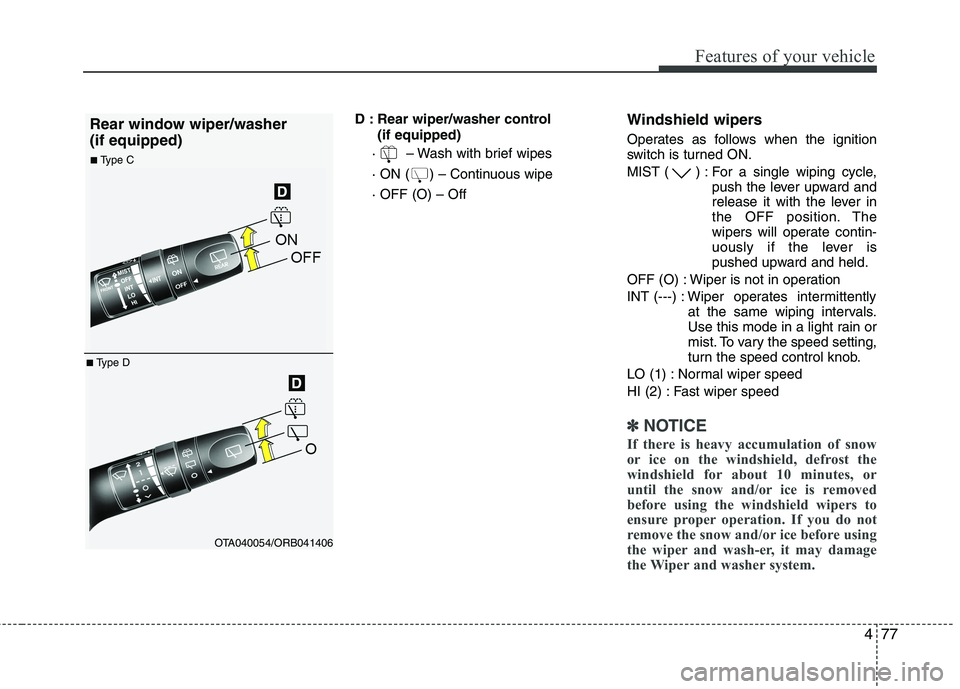
D : Rear wiper/washer control (if equipped)
· – Wash with brief wipes
· ON ( ) – Continuous wipe· OFF (O) – Off Windshield wipers
Operates as follows when the ignition
switch is turned ON.
MIST ( ) : For a single wiping cycle,
push the lever upward and
release it with the lever in
the OFF position. The
wipers will operate contin-
uously if the lever is
pushed upward and held.
OFF (O) : Wiper is not in operation
INT (---) : Wiper operates intermittently at the same wiping intervals.
Use this mode in a light rain or
mist. To vary the speed setting,
turn the speed control knob.
LO (1) : Normal wiper speed
HI (2) : Fast wiper speed
✽✽ NOTICE
If there is heavy accumulation of snow
or ice on the windshield, defrost the
windshield for about 10 minutes, or
until the snow and/or ice is removed
before using the windshield wipers to
ensure proper operation. If you do not
remove the snow and/or ice before using
the wiper and wash-er, it may damage
the Wiper and washer system.
■ Type D
■
Type C
OTA040054/ORB041406
Rear window wiper/washer (if equipped)