service KIA PICANTO 2016 User Guide
[x] Cancel search | Manufacturer: KIA, Model Year: 2016, Model line: PICANTO, Model: KIA PICANTO 2016Pages: 488, PDF Size: 31.22 MB
Page 202 of 488
127
Features of your vehicle
4
(Continued) Turn on the car ignition before using this device. Do not operatethe audio system for long periodsof time with the ignition turned off
as such operations may lead tobattery discharge.
Do not subject the device to severe shock or impact. Direct
pressure onto the front side ofthe monitor may cause damage tothe LCD or touch screen.
When cleaning the device, make sure to turn off the device and
use a dry and smooth cloth.Never use tough materials, chem- ical cloths, or solvents (alcohol,benzene, thinners, etc.) as such
materials may damage the devicepanel or cause color/quality dete-rioration
(Continued)(Continued) Do not place beverages close to the audio system. Spilling bever-ages may lead to system mal-function.
In case of product malfunction, please contact your place of pur-chase or After Service center.
Placing the audio system within an electromagnetic environment
may result in noise interference.CAUTION
Operating the device while driv- ing could lead to accidents due to
a lack of attention to external sur-roundings. First park the vehiclebefore operating the device.
Adjust the volume to levels that allow the driver to hear soundsfrom outside of the vehicle.Driving in a state where external sounds cannot be heard may lead
to accidents.
Pay attention to the volume set- ting when turning the device on.A sudden output of extreme vol-ume upon turning the device on
could lead to hearing impairment.(Adjust the volume to a suitablelevels before turning off the device.)
If you want to change the position of device installation, pleaseinquire with your place of pur-chase or service maintenancecenter. Technical expertise is
required to install or disassemblethe device.
(Continued)
Page 269 of 488
Features of your vehicle
1944
✽✽NOTICE - USING THE
Bluetooth®Wireless Technology
CELLULAR PHONE
Do not use a cellular phone or per- form Bluetooth ®
Wireless Technology
settings (e.g. pairing a phone) while
driving.
Some Bluetooth ®
Wireless Technology
-enabled phones may not be recog-
nized by the system or fully compati-
ble with the system.
Before using Bluetooth®
Wireless
Technology related features of the
audio system, refer your phone’s User’s
Manual for phone-side Bluetooth®
Wireless Technology operations.
The phone must be paired to the audio
system to use Bluetooth®
Wireless
Technology related features.
You will not be able to use the hands- free feature when your phone (in the
car) is outside of the cellular service
area (e.g. in a tunnel, in a under-
ground, in a mountainous area, etc.). (Continued)(Continued)
If the cellular phone signal is poor or
the vehicles interior noise is too loud,
it may be difficult to hear the other
person’s voice during a call.
Do not place the phone near or inside
metallic objects, otherwise communi-
cations with Bluetooth®
Wireless
Technology system or cellular service
stations can be disturbed.
While a phone is connected through
Bluetooth ®
Wireless Technology your
phone may discharge quicker than
usual for additional Bluetooth®
Wireless
Technology-related operations.
Some cellular phones or other devices
may cause interference noise or mal-
function to audio system. In this case,
store the device in a different location
may resolve the condition.
Phone contact names should be saved in English or they may not be dis-
played correctly. (Continued)(Continued)
If Priority is set upon vehicle igni-
tion(IGN/ACC ON), the Bluetooth®
Wireless Technology phone will be
automatically connected.
Even if you are outside, the Bluetooth®
Wireless Technology phone will be
automatically connected once you are
in the vicinity of the vehicle.
If you do not want automatic
Bluetooth ®
Wireless Technology con-
nection, turn the Bluetooth®
Wireless
Technology feature off.
The hands-free call volume and quali-
ty may differ depending on the mobile
phone type.
Bluetooth ®
Wireless Technology fea-
tures can be used only when the
mobile phone has been paired and
connected with the device. For more
information on pairing and connect-
ing Bluetooth ®
Wireless Technology
enabled mobile phones, refer to the
“Phone Setup” section. (Continued)
Page 298 of 488
Driving your vehicle
16
5
Fuelling systems and corresponding
adapters vary from country to country. As
not all service stations abroad will pro-
vide you with the required adapter for
your liquefied gas equipment we suggest
that you buy the necessary adapter
before travelling abroad.
Please check whether the adapters fit
your filling equipment.
✽✽
NOTICE
In Europe the most common adapter
types are ACME (1), Dish Coupling (2),
and Bayonet (3).
It is generally advisable to always carry
all three adapters on board as the pro-
liferation of filling systems varies from
country to country.
LPG safety precaution
Refill LPG only 80% of the tank.
Do not remove the valve to over refill. If you refill more than you are permitted,
the fuel tank may explode.
Turn the engine off while refilling.
Avoid heat and direct sunlight the fuel tank may pressure up.
Avoid underground parking lots or closed places when you need to park
your vehicle for a very long time.
If you smell LPG inside your vehicle open the windows. If you notice a leak,
we recommend that the system be
checked by an authorized Kia dealer.
Make sure your vehicle is parked on a level surface and nothing flammable is
near while you check your vehicle.CAUTION
When an adapter is used, the user
needs to be aware of the following:
Worn out adapters must not be used.
Due to use of an adapter the released volume of gas is muchgreater compared to a direct con-
nection with the vehicle fillingconnector.
The nozzle must be disconnected from the car before the adapter isremoved.
Some vehicles only have a very small diameter thread to fix anadaptor.
In this case, the user should takeextra care.
The added length of the adapterprovides a greater bending moment. If the fill coupling has not been properly installed, thiscan distort the panel of the car or
even cause the thread of theadapter to shear.
If the vehicle drives away stillconnected then the adapter mayshear unwontedly before the
break-away coupling parts.
Page 305 of 488
523
Driving your vehicle
R (Reverse)
Use this position to drive the vehicle
backward.N (Neutral)
The wheels and transaxle are not
engaged. The vehicle will roll freely even
on the slightest incline unless the parking
brake or service brakes are applied.
D (Drive)
This is the normal forward driving posi-
tion. The transaxle will automatically shift
through a 4-gear sequence, providing the
best fuel economy and power.
For extra power when passing another
vehicle or climbing grades, depress the
accelerator pedal fully (more than 80%)
until the kick down mechanism (if
equipped) works with a clicking noise, at
which time the transaxle will automatical-
ly downshift to the next lower gear.
✽✽
NOTICE
Always come to a complete stop before
shifting into D (Drive).
3 (Third gear)
Use for towing a trailer during hill climb-
ing or to use engine braking downhill.
"3" automatically shifts between 1st, 2nd
and 3rd gears. This means that no shift-
up to 4th gear is performed. However, theshift-up to 4th gear is done when the car
speed exceeds a certain value to prevent
the engine from over-revving. Manually
move the selector to "D" when returning
to normal driving condition.
2 (Second gear)
Use for driving on a slippery road, hill
climbing or engine braking downhill. "2"
automatically shifts between first and
second gears. This means that no shift-up to 3rd gear is
performed. However, the shift-up to thirdgear is done when the car speed
exceeds a certain value to prevent the
engine from over-revving. Manually move
the selector to "D" returning to normal
driving condition.
CAUTION
Always come to a complete stop before shifting into or out of R(Reverse); you may damage thetransaxle if you shift into R(Reverse) while the vehicle is in
motion, except as explained in“Rocking the vehicle” in this section.
WARNING
Do not drive with the shift lever in N
(Neutral). The engine brake will not
work and lead to an accident.
Page 308 of 488
Driving your vehicle
26
5
Moving up a steep grade from a stand-
ing start
To move up a steep grade from a stand-
ing start, depress the brake pedal, shift
the shift lever to D (Drive). Select the
appropriate gear depending on load
weight and steepness of the grade, and
release the parking brake. Depress the
accelerator gradually while releasing the
service brakes.
WARNING
If your vehicle becomes stuck in
snow, mud, sand, etc., then you
may attempt to rock the vehicle free
by moving it forward and backward.
Do not attempt this procedure if
people or objects are anywhere
near the vehicle. During the rocking
operation the vehicle may suddenly
move forward or backward as it
becomes unstuck, causing injury
or damage to nearby people orobjects.
Page 309 of 488
527
Driving your vehicle
Power brakes
Your vehicle has power-assisted brakes
that adjust automatically through normal
usage.
In the event that the power-assisted
brakes lose power because of a stalled
engine or some other reason, you can
still stop your vehicle by applying greater
force to the brake pedal than you nor-
mally would. The stopping distance, how-
ever, will be longer.
When the engine is not running, the
reserve brake power is partially depleted
each time the brake pedal is applied. Do
not pump the brake pedal when the
power assist has been interrupted.
Pump the brake pedal only when neces-
sary to maintain steering control on slip-
pery surfaces.In the event of brake failure
If service brakes fail to operate while the
vehicle is in motion, you can make an
emergency stop with the parking brake.
The stopping distance, however, will be
much greater than normal.
BRAKE SYSTEM (Continued)
When descending a long or steep
hill, shift to a lower gear and
avoid continuous application of
the brakes. Continuous brakeapplication will cause the brakes
to overheat and could result in a
temporary loss of braking per-
formance.
Wet brakes may impair the vehi- cle’s ability to safely slow down;
the vehicle may also pull to oneside when the brakes are applied.
Applying the brakes lightly will
indicate whether they have been
affected in this way. Always test
your brakes in this fashion after
driving through deep water. To
dry the brakes, apply them lightly
while maintaining a safe forward
speed until brake performancereturns to normal.
Always, confirm the position of the brake and accelerator pedal
before driving. If you don't checkthe position of the accelerator
and brake pedal before driving,
you may depress the accelerator
instead of the brake pedal. It maycause a serious accident.
WARNING - Brakes
Do not drive with your foot rest- ing on the brake pedal. This will create abnormal high brake tem-
peratures, excessive brake lining
and pad wear, and increasedstopping distances.
(Continued)
WARNING- Parking brake
Applying the parking brake while
the vehicle is moving at normal
speeds can cause a sudden loss of
control of the vehicle. If you mustuse the parking brake to stop the
vehicle, use great caution in apply-
ing the brake.
Page 310 of 488
Driving your vehicle
28
5
Disc brakes wear indicator
Your vehicle has disc brakes.
When your brake pads are worn and new
pads are required, you will hear a high-
pitched warning sound from your front
brakes or rear brakes. You may hear this
sound come and go or it may occur
whenever you depress the brake pedal.
Please remember that some driving con-
ditions or climates may cause a brake
squeal when you first apply (or lightly
apply) the brakes. This is normal and does
not indicate a problem with your brakes.
Rear drum brakes (if equipped)
Your rear drum brakes do not have wear
indicators. Therefore, have the rear brake
linings inspected if you hear a rear brake
rubbing noise. Also have your rear
brakes inspected each time you change
or rotate your tires and when you have
the front brakes replaced.
Parking brake
Applying the parking brake
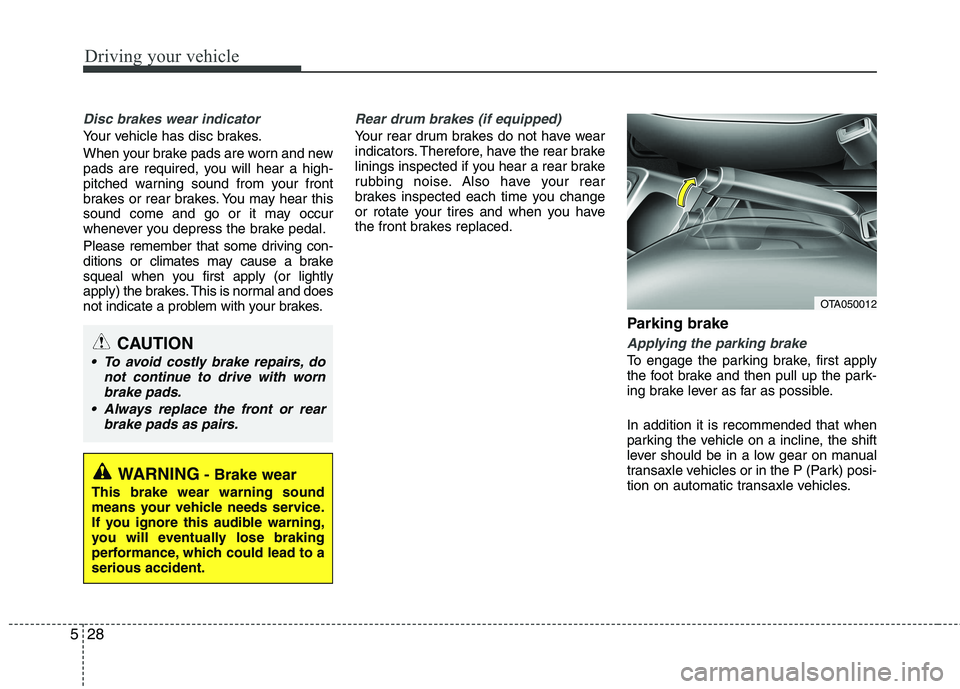
To engage the parking brake, first apply
the foot brake and then pull up the park-
ing brake lever as far as possible. In addition it is recommended that when
parking the vehicle on a incline, the shift
lever should be in a low gear on manual
transaxle vehicles or in the P (Park) posi-
tion on automatic transaxle vehicles.
WARNING- Brake wear
This brake wear warning sound
means your vehicle needs service.
If you ignore this audible warning,
you will eventually lose braking
performance, which could lead to aserious accident.
CAUTION
To avoid costly brake repairs, do not continue to drive with worn
brake pads.
Always replace the front or rear brake pads as pairs.
OTA050012
Page 335 of 488
553
Driving your vehicle
Remember, your vehicle does notrequire extended warm-up. After the
engine has started, allow the engine to
run for 10 to 20 seconds prior to plac-
ing the vehicle in gear. In very cold
weather, however, give your engine a
slightly longer warm-up period.
Don't "lug" or "over-rev" the engine. Lugging is driving too slowly in too high
a gear resulting in the engine bucking. If
this happens, shift to a lower gear. Over-
revving is racing the engine beyond its
safe limit. This can be avoided by shift-
ing at the recommended speeds. Use your air conditioning sparingly.
The air conditioning system is operat-
ed by engine power so your fuel econ-
omy is reduced when you use it.
Open windows at high speeds can reduce fuel economy.
Fuel economy is less in crosswinds and headwinds. To help offset some of
this loss, slow down when driving in
these conditions.
Keeping a vehicle in good operating con-
dition is important both for economy and
safety. Therefore, we recommend that the
system be serviced by an authorized Kia
dealer.
WARNING - Engine off
during motion
Never turn the engine off to coast
down hills or anytime the vehicle is
in motion. The power steering and
power brakes will not function prop-
erly without the engine running.
Instead, keep the engine on and
downshift to an appropriate gear for
engine braking effect. In addition,turning off the ignition while driving
could engage the steering wheel
lock resulting in loss of vehicle
steering which could cause seri-
ous injury or death.
Page 349 of 488
65
What to do in an emergency
EMERGENCY STARTING
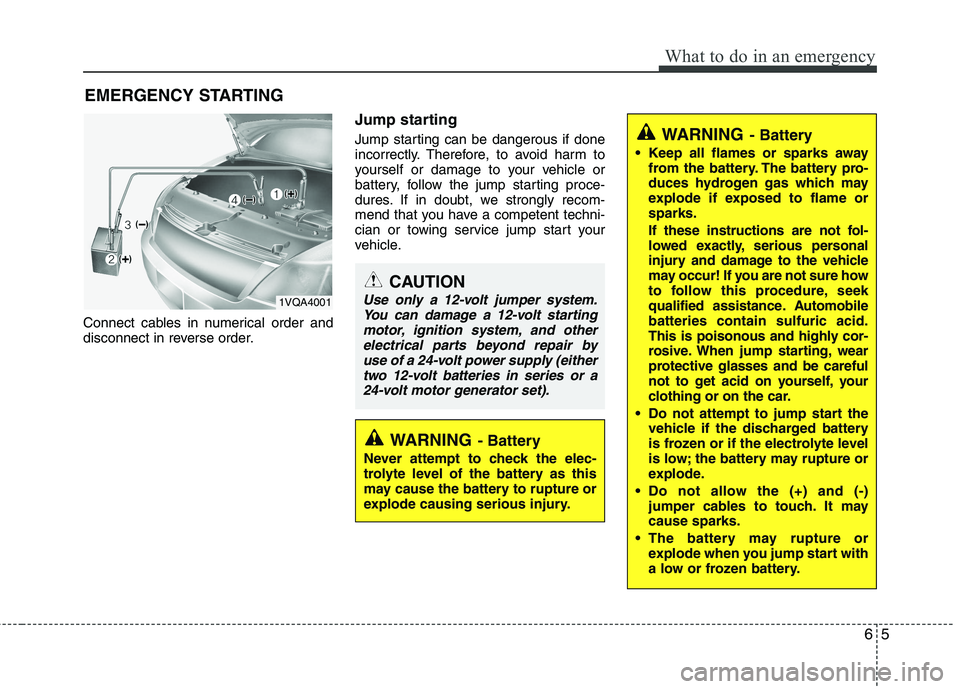
Connect cables in numerical order and
disconnect in reverse order. Jump starting
Jump starting can be dangerous if done
incorrectly. Therefore, to avoid harm to
yourself or damage to your vehicle or
battery, follow the jump starting proce-
dures. If in doubt, we strongly recom-
mend that you have a competent techni-
cian or towing service jump start your
vehicle.
CAUTION
Use only a 12-volt jumper system.
You can damage a 12-volt startingmotor, ignition system, and other
electrical parts beyond repair byuse of a 24-volt power supply (eithertwo 12-volt batteries in series or a24-volt motor generator set).
WARNING - Battery
• Keep all flames or sparks away from the battery. The battery pro-
duces hydrogen gas which may
explode if exposed to flame orsparks.
If these instructions are not fol-
lowed exactly, serious personal
injury and damage to the vehicle
may occur! If you are not sure how
to follow this procedure, seek
qualified assistance. Automobilebatteries contain sulfuric acid.
This is poisonous and highly cor-
rosive. When jump starting, wear
protective glasses and be careful
not to get acid on yourself, your
clothing or on the car.
Do not attempt to jump start the vehicle if the discharged battery
is frozen or if the electrolyte level
is low; the battery may rupture or
explode.
Do not allow the (+) and (-) jumper cables to touch. It maycause sparks.
The battery may rupture or explode when you jump start with
a low or frozen battery.
WARNING - Battery
Never attempt to check the elec-
trolyte level of the battery as this
may cause the battery to rupture or
explode causing serious injury.
1VQA4001
Page 350 of 488
What to do in an emergency
6
6
Jump starting procedure 1. Make sure the booster battery is 12-
volt and that its negative terminal is
grounded.
2. If the booster battery is in another vehi- cle, do not allow the vehicles to touch.
3. Turn off all unnecessary electrical loads.
4. Connect the jumper cables in the exact sequence shown in the illustra-
tion. First connect one end of a jumper
cable to the positive terminal of the
jump start connector (1), then connect
the other end to the positive terminal
on the booster battery (2). Proceed to connect one end of the
other jumper cable to the negative ter-
minal of the booster battery (3), then
the other end to the negative terminal
of the jump start connector (4). Do not
connect it to or near any part that
moves when the engine is cranked.
Do not allow the jumper cables to con-
tact anything except the correct bat-
tery terminals or the correct ground.
Do not lean over the battery when
making connections. 5. Start the engine of the vehicle with the
booster battery and let it run at 2,000
rpm, then start the engine of the vehi-
cle with the discharged battery.
If the cause of your battery discharging is
not apparent, we recommend that the system be checked by an authorized Kia
dealer.
CAUTION - Battery cables
Do not connect the jumper cable
from the negative terminal of the
booster battery to the negative ter- minal of the discharged battery.This can cause the discharged bat-tery to overheat and crack, releas-
ing battery acid.CAUTION -AGM battery (if equipped)
Absorbent Glass Matt (AGM) bat-
teries are maintenance-free andwe recommend that the systembe serviced by an authorized Kia
dealer. For charging your AGMbattery, use only fully automaticbattery chargers that are special-ly developed for AGM batteries.
When replacing the AGM battery, use only the Kia genuine batteryfor the ISG system.
Do not open or remove the cap on top of the battery. This may causeleaks of internal electrolyte that
could result in severe injury.
If the AGM battery is reconnected or replaced, ISG function will notoperate immediately.
If you want to use the ISG func-tion, the battery sensor needs tobe calibrated for approximately 4 hours with the ignition off.