reset KIA PICANTO 2016 Owner's Manual
[x] Cancel search | Manufacturer: KIA, Model Year: 2016, Model line: PICANTO, Model: KIA PICANTO 2016Pages: 488, PDF Size: 31.22 MB
Page 223 of 488
Features of your vehicle
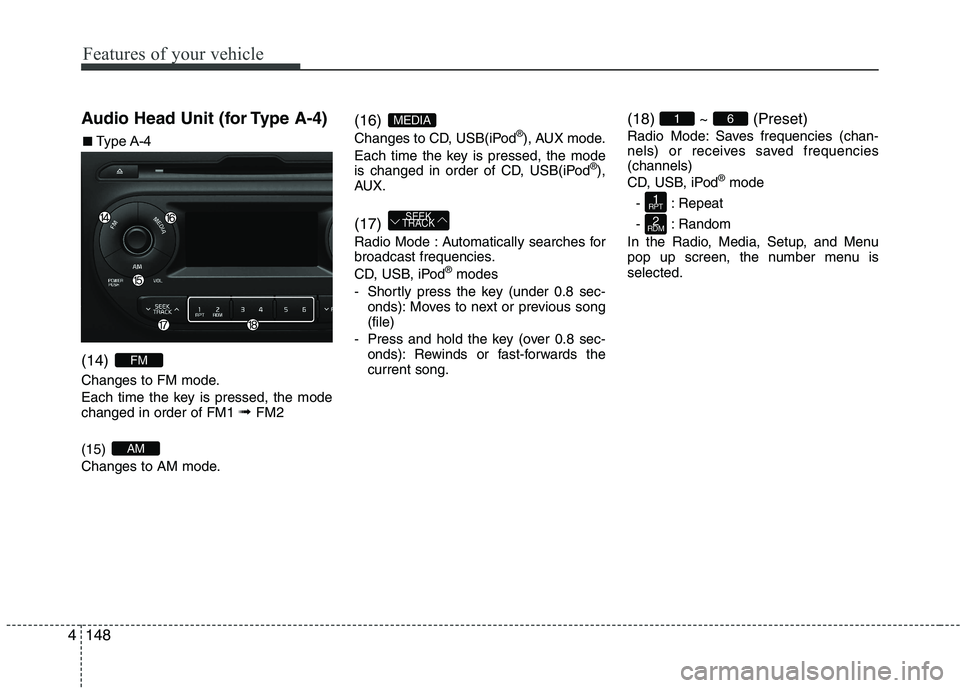
1484Audio Head Unit (for Type A-4) (14)
Changes to FM mode.
Each time the key is pressed, the mode changed in order of FM1
➟ FM2
(15)
Changes to AM mode. (16)
Changes to CD, USB(iPod
®
), AUX mode.
Each time the key is pressed, the mode
is changed in order of CD, USB(iPod ®
),
AUX. (17)
Radio Mode : Automatically searches for
broadcast frequencies.
CD, USB, iPod ®
modes
- Shortly press the key (under 0.8 sec- onds): Moves to next or previous song (file)
- Press and hold the key (over 0.8 sec- onds): Rewinds or fast-forwards thecurrent song. (18) ~ (Preset)
Radio Mode: Saves frequencies (chan-
nels) or receives saved frequencies(channels)
CD, USB, iPod
®
mode
- : Repeat
- : Random
In the Radio, Media, Setup, and Menu
pop up screen, the number menu isselected.
2
RDM
1
RPT
61
SEEK
TRACK
MEDIA
AM
FM
■■ Type A-4
Page 252 of 488
![KIA PICANTO 2016 Owners Manual 177
Features of your vehicle
4
SYSTEM SETTINGS
Press the key Select [System]
Memory Information
Displays currently used memory and
total system memory.
Select [Memory Information] OK
The curren](/img/2/40383/w960_40383-251.png "KIA PICANTO 2016 Owners Manual 177
Features of your vehicle
4
SYSTEM SETTINGS
Press the key Select [System]
Memory Information
Displays currently used memory and
total system memory.
Select [Memory Information] OK
The curren")
177
Features of your vehicle
4
SYSTEM SETTINGS
Press the key Select [System]
Memory Information
Displays currently used memory and
total system memory.
Select [Memory Information] OK
The currently used memory is displayed on the left side while the total system
memory is displayed on the right side.
RADIO (for RDS model) ❈
RADIO may differ depending on the
selected audio.
Changing RADIO mode SEEK
Press the key
Shortly pressing the key (under 0.8 seconds): Changes the frequency.
Pressing and holding the key (over 0.8 seconds): Automatically searches for
the next frequency. Preset SEEK Press
the ~ key
seconds): Plays the frequency saved in
the corresponding key.
seconds): Pressing and holding thedesired key from ~ will
save the currently playing broadcast to
the selected key and sound a BEEP.
SCAN
Press the key
seconds): The broadcast frequency
increases and previews each broadcast
for 5 seconds each. After scanning all
frequencies, returns and plays the cur-
rent broadcast frequency.
TA
SCAN
61
61
SEEK
TRACK
SETUP
CLOCK
Page 253 of 488
Features of your vehicle
1784Selecting through manual search
Turn the TUNE knob left/right to adjust
the frequency.
Traffic Announcement (TA)
Shortly pressing the key (under
0.8 seconds): Set / TA Traffic
Announcement) mode. MENU
Within key are the A.Store (Auto
Store) and Info functions.
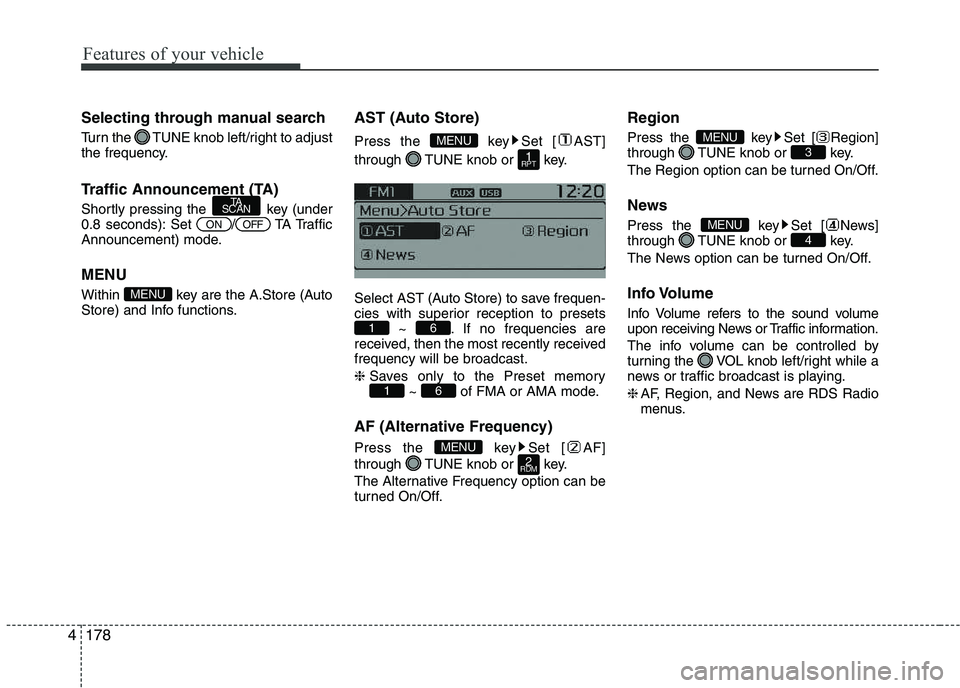
AST (Auto Store)
Press the key Set [ AST]
through TUNE knob or key.
Select AST (Auto Store) to save frequen-
cies with superior reception to presets
~ . If no frequencies are
received, then the most recently receivedfrequency will be broadcast. ❈ Saves only to the Preset memory
~ of FMA or AMA mode.
AF (Alternative Frequency)
Press the key Set [ AF]
through TUNE knob or key.
The Alternative Frequency option can be
turned On/Off. Region
Press the key Set [ Region]
through TUNE knob or key.
The Region option can be turned On/Off.
News
Press the key Set [ News]
through TUNE knob or key.
The News option can be turned On/Off.
Info Volume
Info Volume refers to the sound volume
upon receiving News or Traffic information.
The info volume can be controlled by
turning the VOL knob left/right while a
news or traffic broadcast is playing. ❈
AF, Region, and News are RDS Radio
menus.
4MENU
3MENU
2
RDMMENU
61
61
1
RPT
MENU
MENU
OFFON
TA
SCAN
Page 254 of 488
179
Features of your vehicle
4
RADIO ❈
RADIO may differ depending on the
selected audio.
Changing RADIO mode SEEK
Press the key
Shortly pressing the key (under 0.8 seconds): Changes the frequency.
Pressing and holding the key (over 0.8 seconds): Automatically searches for the
next frequency. Preset SEEK Press
the ~ key
Shortly pressing the key (under 0.8 seconds): Plays the frequency saved in
the corresponding key.
Pressing and holding the key (over 0.8 seconds): Pressing and holding thedesired key from ~ will
save the currently playing broadcast to
the selected key and sound a BEEP.
SCAN
Press the key
Shortly pressing the key (under 0.8 seconds): The broadcast frequency
increases and previews each broad-
cast for 5 seconds each. After scan-
ning all frequencies, returns and plays
the current broadcast frequency.
Pressing and holding the key (over 0.8 seconds): Previews the broadcasts
saved in Preset ~ for 5seconds each. Selecting through manual search
Turn the TUNE knob left/right to adjust
the frequency. MENU
Within key are the A.Store (Auto
Store) and Info functions.
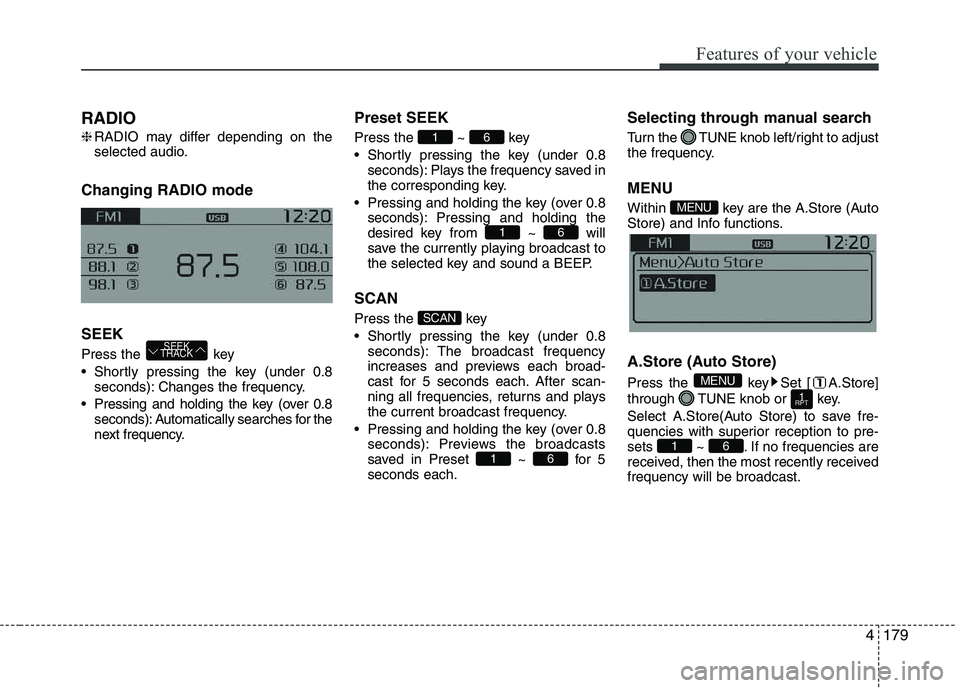
A.Store (Auto Store)
Press the key Set [ A.Store]
through TUNE knob or key.
Select A.Store(Auto Store) to save fre-
quencies with superior reception to pre-
sets ~ . If no frequencies are
received, then the most recently receivedfrequency will be broadcast.
61
1
RPT
MENU
MENU
61
SCAN
61
61
SEEK
TRACK
Page 274 of 488
199
Features of your vehicle
4
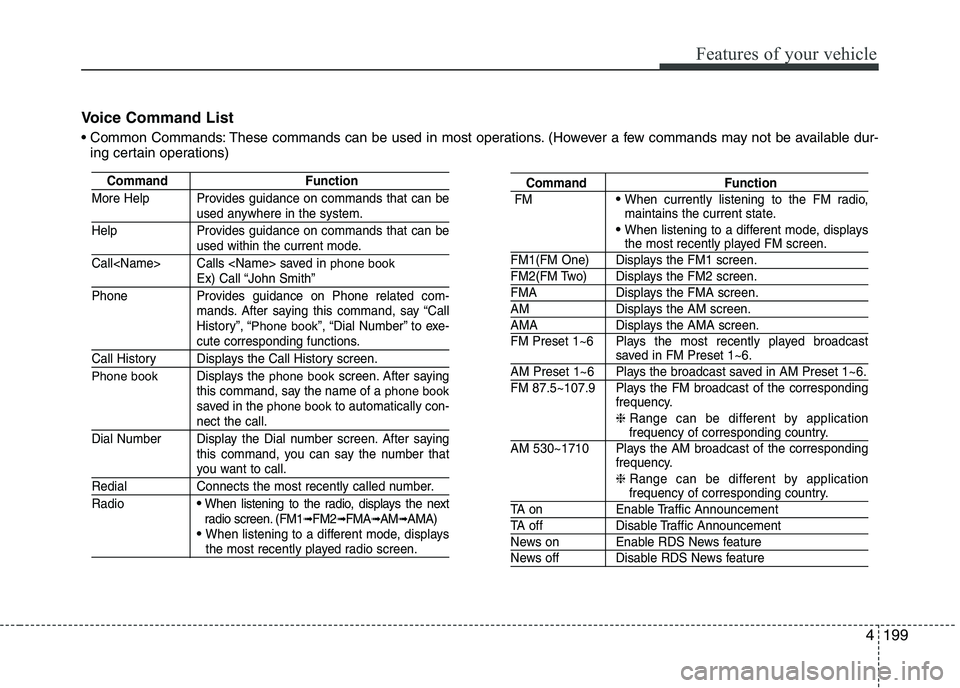
Voice Command List
These commands can be used in most operations. (However a few commands may not be available dur-
ing certain operations)
Command Function
More Help Provides guidance on commands that can be
used anywhere in the system.
Help Provides guidance on commands that can be
used within the current mode.
Call
phone bookEx) Call “John Smith”
Phone Provides guidance on Phone related com- mands. After saying this command, say “Call
History”, “
Phone book”, “Dial Number” to exe-cute corresponding functions.
Call History Displays the Call History screen.
Phone bookDisplays the phone bookscreen. After saying
this command, say the name of a phone booksaved in the phone bookto automatically con-nect the call.
Dial Number Display the Dial number screen. After saying this command, you can say the number that
you want to call.
Redial Connects the most recently called number. Radio
When listening to the radio, displays the next
radio screen. (FM1➟FM2 ➟FMA ➟AM ➟AMA)
When listening to a different mode, displaysthe most recently played radio screen.
Command Function
FM
When currently listening to the FM radio,
maintains the current state.
When listening to a different mode, displaysthe most recently played FM screen.
FM1(FM One) Displays the FM1 screen.
FM2(FM Two) Displays the FM2 screen.
FMA Displays the FMA screen.
AM Displays the AM screen.
AMA Displays the AMA screen.
FM Preset 1~6 Plays the most recently played broadcast
saved in FM Preset 1~6.
AM Preset 1~6 Plays the broadcast saved in AM Preset 1~6.
FM 87.5~107.9 Plays the FM broadcast of the corresponding frequency.
❈ Range can be different by application
frequency of corresponding country.
AM 530~1710 Plays the AM broadcast of the corresponding frequency.
❈ Range can be different by application
frequency of corresponding country.
TA on Enable Traffic Announcement
TA off Disable Traffic Announcement
News on Enable RDS News feature
News off Disable RDS News feature
Page 276 of 488
201
Features of your vehicle
4
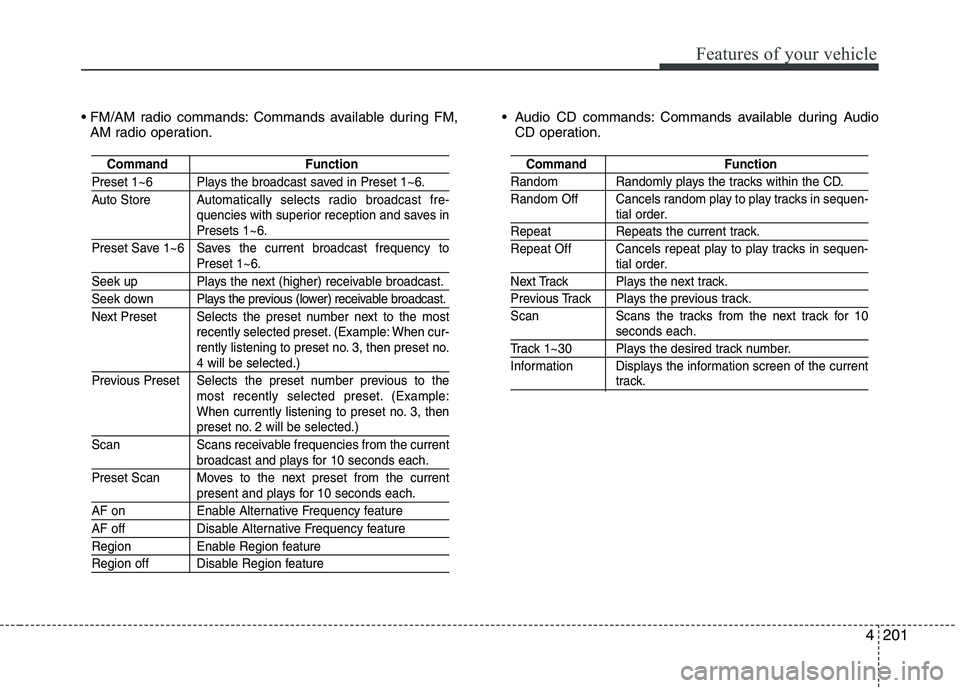
Commands available during FM,
AM radio operation. Audio CD commands: Commands available during Audio
CD operation.
Command Function
Preset 1~6 Plays the broadcast saved in Preset 1~6.
Auto Store A utomatically selects radio broadcast fre-
quencies with superior reception and saves in
Presets 1~6.
Preset Save 1~6 Saves the current broadcast frequency to
Preset 1~6.
Seek up Plays the next (higher) receivable broadcast.
Seek down Plays the previous (lower) receivable broadcast.
Next Preset Selects the preset number next to the most recently selected preset. (Example: When cur-
rently listening to preset no. 3, then preset no.
4 will be selected.)
Previous Preset Selects the preset number previous to the most recently selected preset. (Example:
When currently listening to preset no. 3, then
preset no. 2 will be selected.)
Scan Scans receivable frequencies from the current
broadcast and plays for 10 seconds each.
Preset Scan Moves to the next preset from the current
present and plays for 10 seconds each.
AF on Enable Alternative Frequency feature
AF off Disable Alternative Frequency feature
Region Enable Region feature
Region off Disable Region feature
Command Function
Random Randomly plays the tracks within the CD.
Random Off Cancels random play to play tracks in sequen-
tial order.
Repeat Repeats the current track.
Repeat Off Cancels repeat play to play tracks in sequen-
tial order.
Next Track Plays the next track.
Previous Track Plays the previous track.
Scan Scans the tracks from the next track for 10
seconds each.
Track 1~30 Plays the desired track number.
Information Displays the information screen of the current
track.
Page 329 of 488
547
Driving your vehicle
To temporarily accelerate with the
cruise control on:
If you want to speed up temporarily when
the cruise control is on, depress the
accelerator pedal. Increased speed will
not interfere with cruise control operationor change the set speed.
To return to the set speed, take your foot
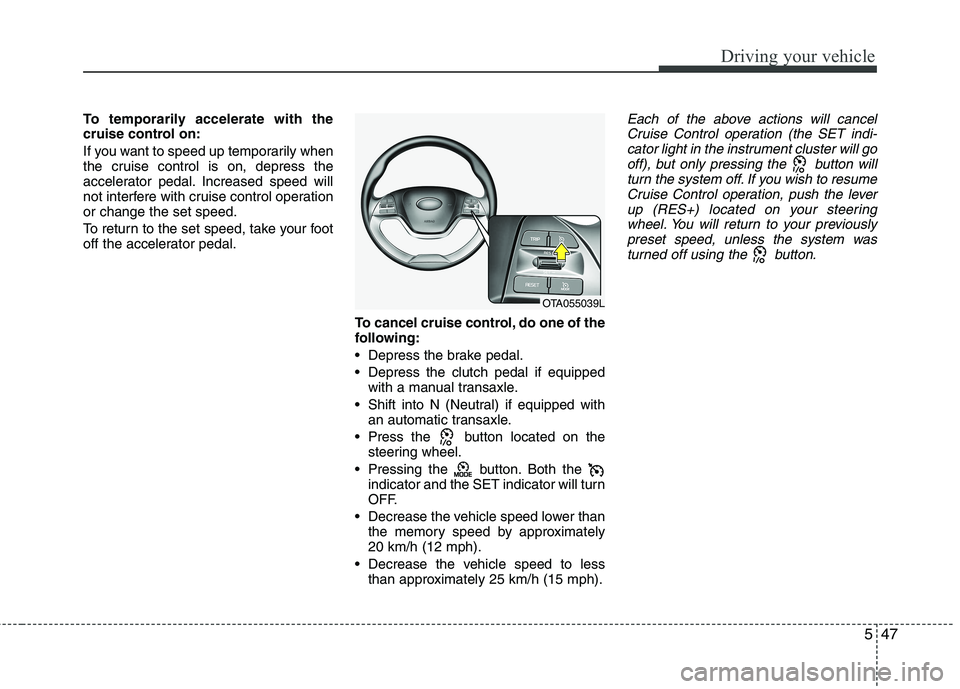
off the accelerator pedal.To cancel cruise control, do one of the
following:
Depress the brake pedal.
Depress the clutch pedal if equippedwith a manual transaxle.
Shift into N (Neutral) if equipped with an automatic transaxle.
Press the button located on the steering wheel.
Pressing the button. Both the indicator and the SET indicator will turn
OFF.
Decrease the vehicle speed lower than the memory speed by approximately20 km/h (12 mph).
Decrease the vehicle speed to less than approximately 25 km/h (15 mph).Each of the above actions will cancel
Cruise Control operation (the SET indi- cator light in the instrument cluster will gooff), but only pressing the button will
turn the system off. If you wish to resumeCruise Control operation, push the leverup (RES+) located on your steering
wheel. You will return to your previously preset speed, unless the system wasturned off using the button.
OTA055039L
Page 330 of 488
Driving your vehicle
48
5
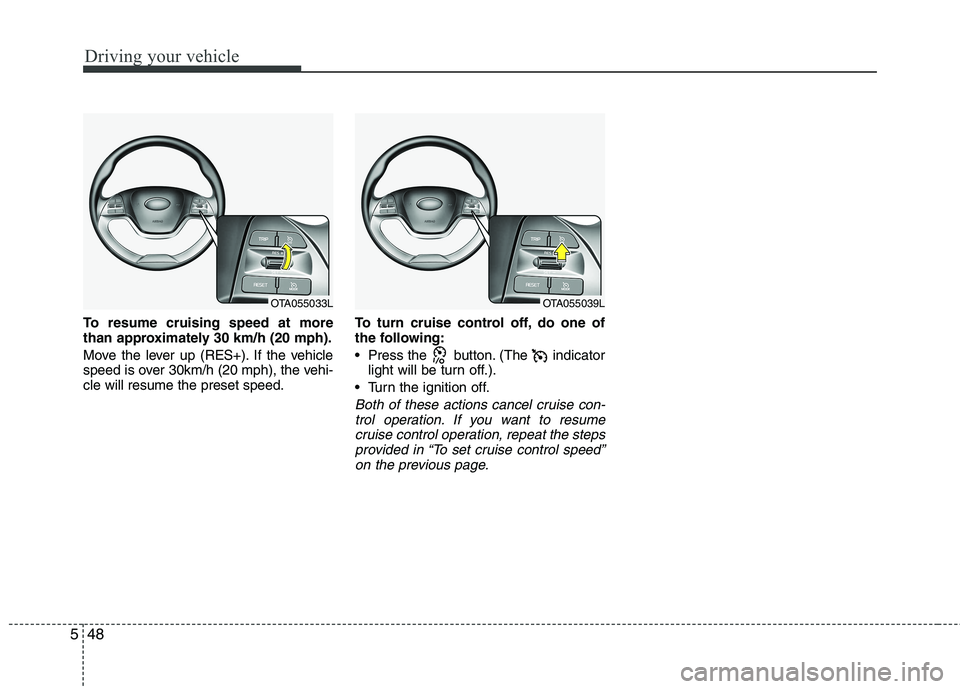
To resume cruising speed at more
than approximately 30 km/h (20 mph).
Move the lever up (RES+). If the vehicle
speed is over 30km/h (20 mph), the vehi-cle will resume the preset speed. To turn cruise control off, do one of
the following:
Press the button. (The indicator
light will be turn off.).
Turn the ignition off.
Both of these actions cancel cruise con- trol operation. If you want to resumecruise control operation, repeat the steps
provided in “To set cruise control speed”on the previous page.
OTA055033LOTA055039L
Page 331 of 488
549
Driving your vehicle
You can set the speed limit when you do
not want to drive over a specific speed.
If you drive over the preset speed limit,
the warning system operates (set speed
limit will blink and chime will sound) until
the vehicle speed returns within thespeed limit.
✽✽NOTICE
While speed limit control is in opera-
tion, the cruise control system cannot be
activated.
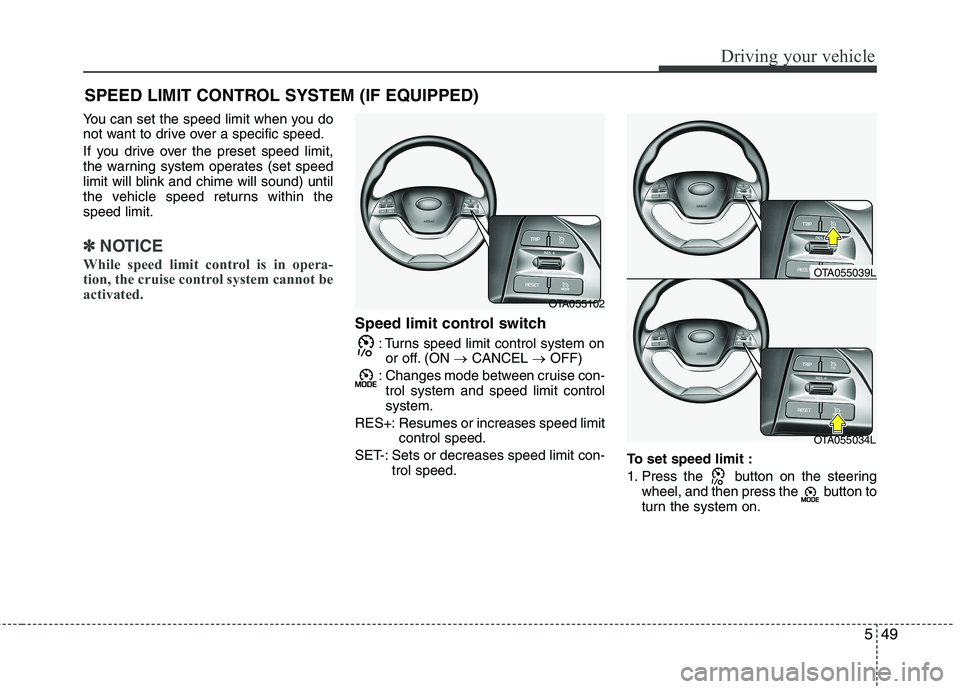
Speed limit control switch
: Turns speed limit control system onor off. (ON CANCEL OFF)
: Changes mode between cruise con- trol system and speed limit control system.
RES+: Resumes or increases speed limit control speed.
SET-: Sets or decreases speed limit con- trol speed. To set speed limit :
1. Press the button on the steering
wheel, and then press the button to
turn the system on.
SPEED LIMIT CONTROL SYSTEM (IF EQUIPPED)
OTA055102
OTA055034L
OTA055039L
Page 332 of 488
Driving your vehicle
50
5
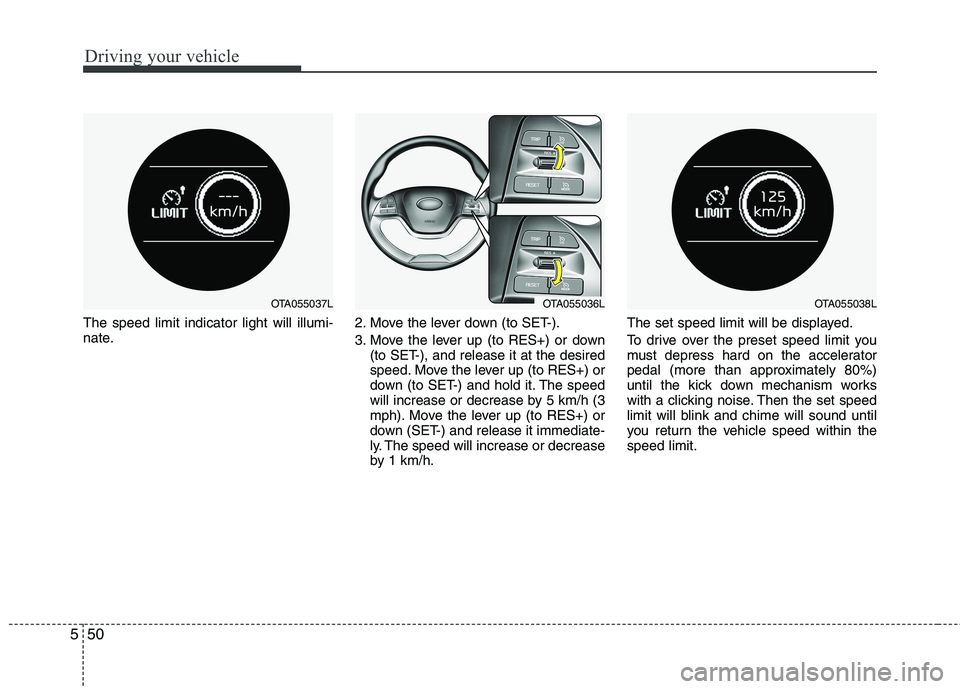
The speed limit indicator light will illumi-
nate. 2. Move the lever down (to SET-).
3. Move the lever up (to RES+) or down
(to SET-), and release it at the desired
speed. Move the lever up (to RES+) or
down (to SET-) and hold it. The speed
will increase or decrease by 5 km/h (3
mph). Move the lever up (to RES+) or
down (SET-) and release it immediate-
ly. The speed will increase or decrease
by 1 km/h. The set speed limit will be displayed.
To drive over the preset speed limit you
must depress hard on the accelerator
pedal (more than approximately 80%)
until the kick down mechanism works
with a clicking noise. Then the set speed
limit will blink and chime will sound until
you return the vehicle speed within thespeed limit.
OTA055038LOTA055037LOTA055036L