audio KIA PICANTO 2017 Owner's Manual
[x] Cancel search | Manufacturer: KIA, Model Year: 2017, Model line: PICANTO, Model: KIA PICANTO 2017Pages: 488, PDF Size: 31.26 MB
Page 210 of 488
135
Features of your vehicle
4
(Continued)
If the USB device is divided by logical drives, only the music fileson the highest-priority drive arerecognized by car audio.
Devices such as MP3 Player/ Cellular phone/Digital camera canbe unrecognizable by standard USB I/F can be unrecognizable.
Some non-standard USB devices (METAL COVER TYPE USB) canbe unrecognizable.
Some USB flash memory readers (such as CF, SD, microSD, etc.) orexternal-HDD type devices can beunrecognizable.
Music files protected by DRM (DIGITAL RIGHTS MANAGEMENT)are not recognizable.
The data in the USB memory may be lost while using this audio.
Always back up important data ona personal storage device.
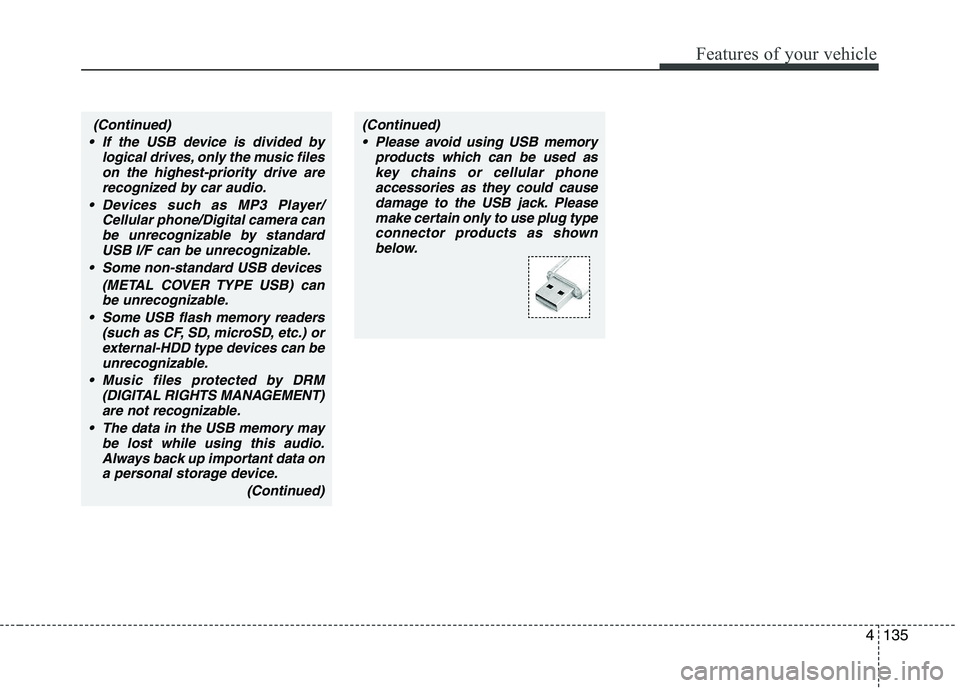
(Continued)(Continued) Please avoid using USB memory products which can be used askey chains or cellular phone
accessories as they could causedamage to the USB jack. Please make certain only to use plug type
connector products as shownbelow.
Page 213 of 488

Features of your vehicle
138
✽✽NOTICE - USING THE iPod ®
DEVICE
Some iPod ®
models may not sup-
port communication protocol and
files may not properly play.
Supported iPod ®
models:
- iPod ®
Mini
- iPod ®
4th (Photo) ~ 6th (Classic)
generation
- iPod ®
Nano 1st~4th generation
- iPod ®
Touch 1st~2nd generation
The order of search or playback of songs in the iPod ®
can be different
from the order searched in the
audio system.
If the iPod ®
disabled due to its
own malfunction, reset the iPod ®
.
(Reset: Refer to iPod ®
manual)
An iPod ®
may not operate nor-
mally on low battery.
To use iPod®
features within the
audio, use the cable provided upon
purchasing an iPod®
device.
Skipping or improper operation may occur depending on the characteris-
tics of your iPod®
/iPhone ®
device.
(Continued) (Continued)
When connecting
iPod®
with the
iPod ®
Power Cable, insert the connec-
tor to the multimedia socket complete-
ly. If not inserted completely, communi-
cations between iPod®
and audio may
be interrupted.
When adjusting the sound effects of the iPod ®
and the audio system, the
sound effects of both devices will over-
lap and might decrease or distort the
quality of the sound.
Deactivate (turn off) the equalizer
function of an iPod®
when adjusting
the audio system’s volume, and turn
off the equalizer of the audio system
when using the equalizer of an iPod®
.
When not using iPod®
with car audio,
detach the iPod®
cable from iPod®
.
Otherwise, iPod®
may remain in
accessory mode, and may not work
properly.
4
Page 216 of 488

141
Features of your vehicle
4
SYSTEM CONTROLLERS AND FUNCTIONS ❈
Display and settings may differ
depending on the selected audio.
Audio Head Unit (1) (EJECT) Ejects the disc. (2)
Changes to FM/AM mode.
Each time the key is pressed,the mode is changed in order of FM1 ➟FM2 ➟FMA
➟ AM ➟ AMA. (3)
Changes to CD, USB(iPod
®
), AUX, My
Music, BT Audio mode.
Each time the key is pressed, the mode
is changed in order of CD, USB(iPod ®
),
AUX, My Music, BT Audio. (4)
Operates Phone Screen❈ When a phone is not connected, the
connection screen is displayed.
(5)
Radio Mode : Automatically searches for
broadcast frequencies.
CD, USB, iPod ®
, My Music modes
- Shortly press the key (under 0.8 sec- onds): Moves to next or previous song (file)
- Press and hold the key (over 0.8 sec- onds): Rewinds or fast-forwards thecurrent song. (6) PWR/VOL kob
Power Knob: Turns power On/Off by
pressing the knob
Volume Knob: Sets volume by turning
the knob left/right (7) ~ (Preset)
Radio Mode: Saves frequencies (chan-
nels) or receives saved frequencies(channels)
CD, USB, iPod ®
, My Music mode
- : Repeat
- : Random
In the Radio, Media, Setup, and Menu
pop up screen, the number menu isselected.
2
RDM
1
RPT
61
SEEK
TRACK
MEDIA
RADIO
■■ Type A-1
Page 217 of 488

Features of your vehicle
1424(8)
Each time the button is shortly pressed (under 0.8 seconds), sets screen Off
➟
Screen On ➟Screen Off
❈ Audio operation is maintained and
only the screen will be turned Off. In
the screen Off state, press any key to
turn the screen On again. (9) Radio Mode
- Shortly press the key (under 0.8 sec-
onds): TA On/Off
- Press and hold the key (over 0.8 sec- onds): Previews each broadcast for 5 seconds each
Media mode
- Press and hold the key (over 0.8 sec- onds): Previews each song (file) for 10 seconds each
❈ Press and holding the key again to
continue listening to the current song(file).
(10)
- Shortly press the key (under 0.8 sec- onds) : Moves to the Display, Sound,
Clock, Phone, System setting modes
- Press and hold the key (over 0.8 sec- onds) : Move to the Time settingscreen (11)
Displays menus for the current
mode. ❈
iPod ®
List : Move to parent category
(12)
CD MP3, USB mode : Folder Search
(13) TUNE knob
Radio mode : Changes frequency by
turning the knob left/right
CD, USB, iPod ®
, My Music mode:
Searches .songs (files) by turning the
knob left/right. ❈ When the desired song is dis-
played, press the knob to play the song.
Moves focus in all selection menus and
selects menus
FOLDER
MENUTA
SCAN
Page 218 of 488

143
Features of your vehicle
4
Audio Head Unit (for Type A-2) (14)
Changes to FM mode.
Each time the key is pressed, the mode changed in order of FM1
➟ FM2 ➟FMA
(15)
Changes to AM mode. (16)
Changes to CD, USB(iPod
®
), AUX mode.
Each time the key is pressed, the mode
is changed in order of CD, USB(iPod ®
),
AUX. (17)
Radio Mode : Automatically search-
es for broadcast frequencies.
CD, USB, iPod ®
modes
- Shortly press the key (under 0.8 sec- onds): Moves to next or previous song (file)
- Press and hold the key (over 0.8 sec- onds): Rewinds or fast-forwards thecurrent song. (18) ~ (Preset)
Radio Mode: Saves frequencies (chan-
nels) or receives saved frequencies(channels)
CD, USB, iPod
®
mode
- : Repeat
- : Random
In the Radio, Media, Setup, and Menu
pop up screen, the number menu isselected.
2
RDM
1
RPT
61
SEEK
TRACK
MEDIA
AM
FM
Page 221 of 488
Features of your vehicle
1464SYSTEM CONTROLLERS AND FUNCTIONS ❈
Display and settings may differ
depending on the selected audio.
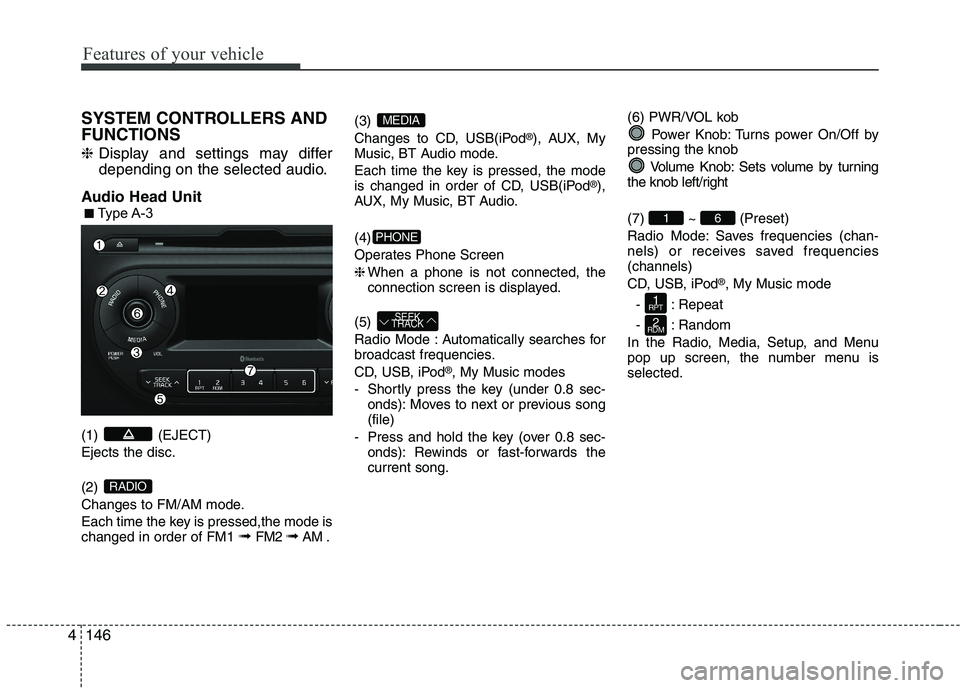
Audio Head Unit (1) (EJECT) Ejects the disc. (2)
Changes to FM/AM mode.
Each time the key is pressed,the mode is changed in order of FM1 ➟
FM2 ➟AM . (3)
Changes to CD, USB(iPod
®
), AUX, My
Music, BT Audio mode.
Each time the key is pressed, the mode
is changed in order of CD, USB(iPod ®
),
AUX, My Music, BT Audio. (4)
Operates Phone Screen❈ When a phone is not connected, the
connection screen is displayed.
(5)
Radio Mode : Automatically searches for
broadcast frequencies.
CD, USB, iPod ®
, My Music modes
- Shortly press the key (under 0.8 sec- onds): Moves to next or previous song (file)
- Press and hold the key (over 0.8 sec- onds): Rewinds or fast-forwards thecurrent song. (6) PWR/VOL kob
Power Knob: Turns power On/Off by
pressing the knob
Volume Knob: Sets volume by turning
the knob left/right (7) ~ (Preset)
Radio Mode: Saves frequencies (chan-
nels) or receives saved frequencies(channels)
CD, USB, iPod ®
, My Music mode
- : Repeat
- : Random
In the Radio, Media, Setup, and Menu
pop up screen, the number menu isselected.
2
RDM
1
RPT
61
SEEK
TRACK
PHONE
MEDIA
RADIO
■■ Type A-3
Page 222 of 488
147
Features of your vehicle
4
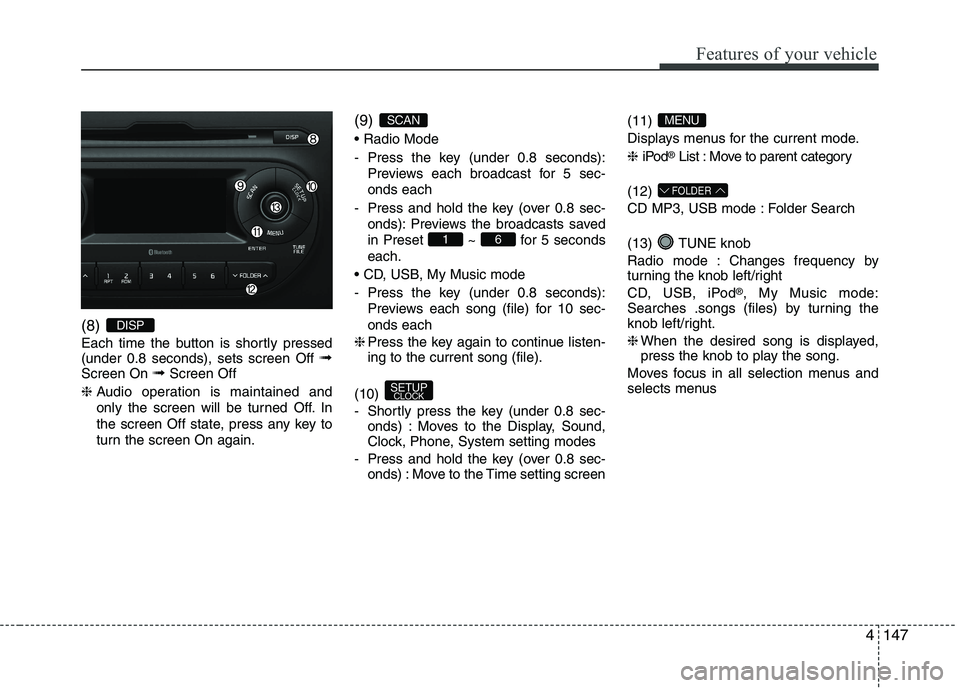
(8)
Each time the button is shortly pressed (under 0.8 seconds), sets screen Off
➟
Screen On ➟Screen Off
❈ Audio operation is maintained and
only the screen will be turned Off. In
the screen Off state, press any key to
turn the screen On again. (9)
- Press the key (under 0.8 seconds):
Previews each broadcast for 5 sec- onds each
- Press and hold the key (over 0.8 sec- onds): Previews the broadcasts saved
in Preset ~ for 5 secondseach.
- Press the key (under 0.8 seconds): Previews each song (file) for 10 sec- onds each
❈ Press the key again to continue listen- ing to the current song (file).
(10)
- Shortly press the key (under 0.8 sec- onds) : Moves to the Display, Sound,
Clock, Phone, System setting modes
- Press and hold the key (over 0.8 sec- onds) : Move to the Time setting screen (11)
Displays menus for the current mode. ❈
iPod ®
List : Move to parent category
(12)
CD MP3, USB mode : Folder Search
(13) TUNE knob
Radio mode : Changes frequency by
turning the knob left/right
CD, USB, iPod ®
, My Music mode:
Searches .songs (files) by turning the
knob left/right. ❈ When the desired song is displayed,
press the knob to play the song.
Moves focus in all selection menus and
selects menus
FOLDER
MENU
SETUP CLOCK
61
SCAN
DISP
Page 223 of 488
Features of your vehicle
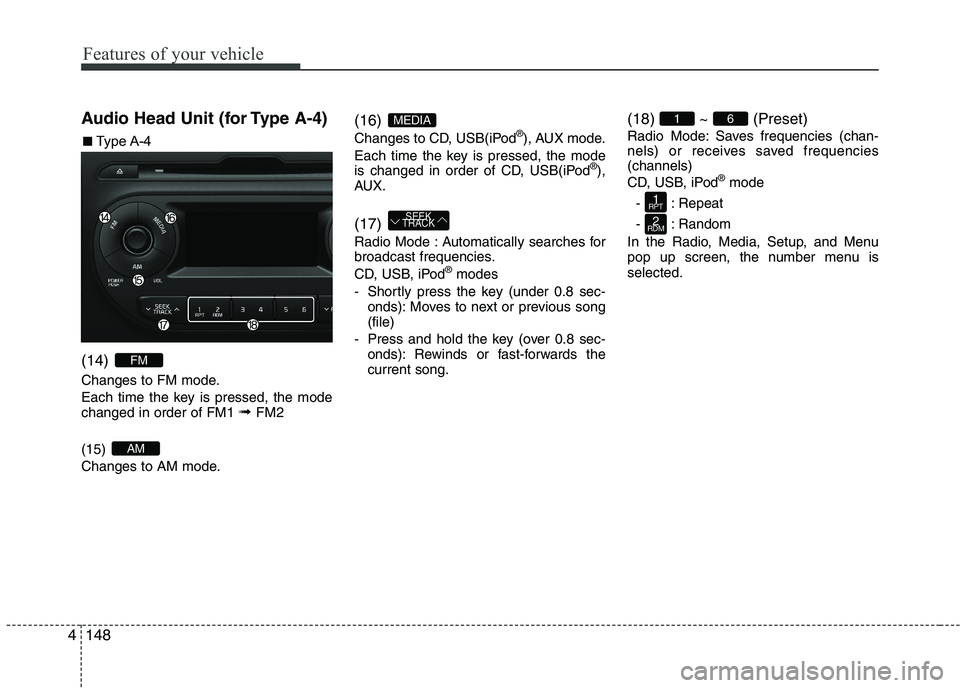
1484Audio Head Unit (for Type A-4) (14)
Changes to FM mode.
Each time the key is pressed, the mode changed in order of FM1
➟ FM2
(15)
Changes to AM mode. (16)
Changes to CD, USB(iPod
®
), AUX mode.
Each time the key is pressed, the mode
is changed in order of CD, USB(iPod ®
),
AUX. (17)
Radio Mode : Automatically searches for
broadcast frequencies.
CD, USB, iPod ®
modes
- Shortly press the key (under 0.8 sec- onds): Moves to next or previous song (file)
- Press and hold the key (over 0.8 sec- onds): Rewinds or fast-forwards thecurrent song. (18) ~ (Preset)
Radio Mode: Saves frequencies (chan-
nels) or receives saved frequencies(channels)
CD, USB, iPod
®
mode
- : Repeat
- : Random
In the Radio, Media, Setup, and Menu
pop up screen, the number menu isselected.
2
RDM
1
RPT
61
SEEK
TRACK
MEDIA
AM
FM
■■ Type A-4
Page 225 of 488
![KIA PICANTO 2017 Owners Manual Features of your vehicle
1504SETUP
Type A-1, Type A-2
Display Settings
Press the key Select [Display]
through TUNE knob or key
Select menu through TUNE knob
Mode Pop up
[Mode Pop up] Changes](/img/2/57964/w960_57964-224.png "KIA PICANTO 2017 Owners Manual Features of your vehicle
1504SETUP
Type A-1, Type A-2
Display Settings
Press the key Select [Display]
through TUNE knob or key
Select menu through TUNE knob
Mode Pop up
[Mode Pop up] Changes")
Features of your vehicle
1504SETUP
Type A-1, Type A-2
Display Settings
Press the key Select [Display]
through TUNE knob or key
Select menu through TUNE knob
Mode Pop up
[Mode Pop up] Changes . selec- tion mode
or
key to display the mode
change pop up screen.
Scroll text
[Scroll text] Set /
Maintains scroll
: Scrolls only one (1) time.
Song Info
When playing an MP3 file, select the
desired display info from ‘Folder/File’ or
‘Album/Artist/Song’. Sound Settings
Press the key Select [Sound]
through TUNE knob or key
Select
menu through TUNE knob
❈ Display and settings may differ
depending on the selected audio.2
RDM
OFF
ON
OFFON
MEDIARADIO
ON
1
RPT
Page 226 of 488
![KIA PICANTO 2017 Owners Manual 151
Features of your vehicle
4
Audio Settings
This menu allows you to set the ‘Bass,
Middle, Treble’ and the Sound Fader and
Balance.
Select [Audio Settings] Select menu
through TUNE knob Turn](/img/2/57964/w960_57964-225.png "KIA PICANTO 2017 Owners Manual 151
Features of your vehicle
4
Audio Settings
This menu allows you to set the ‘Bass,
Middle, Treble’ and the Sound Fader and
Balance.
Select [Audio Settings] Select menu
through TUNE knob Turn")
151
Features of your vehicle
4
Audio Settings
This menu allows you to set the ‘Bass,
Middle, Treble’ and the Sound Fader and
Balance.
Select [Audio Settings] Select menu
through TUNE knob Turn TUNE
knob left/right to set
Bass, Middle, Treble : Selects the
sound tone.
Fader, Balance : Moves the sound fader and balance.
Default : Restores default settings. ❈ Return : While adjusting values, re-
pressing the TUNE knob will restore
the parent menu. Speed Dependent Volume Control
This feature is used to automatically con-
trol the volume level according to the
speed of the vehicle.
Select [Speed Dependent Vol.] Set
[Off/On] of TUNE knob
Volume Dialogue (if equipped)
Adjusts voice recognition volume.
Select [Volume Dialogue] Set volume of
TUNE knob